

Treating AI as a Layered Toolkit — Not a Product to Sell
The mistake most people make with AI isn’t using the wrong tool — it’s treating any single tool as the entire strategy. Work through this framework and you’ll be able to layer LLMs, automations, and agentic systems into a coherent business toolkit, prompt any AI model with a repeatable structure, and decide exactly when each layer of the stack applies. The shift from “I offer AI” to “I solve problems using AI” is where the business model changes.

- Stop selling AI as a product — sell the outcome it delivers. A carpenter who sells hammers makes hardware-store margins. A carpenter who fixes roofs using a full toolkit makes contractor margins. Clients don’t pay for access to tools; they pay for solved problems.

- Master the LLM — your foundational tool. Claude, ChatGPT, and Gemini are the hammer in this toolkit: universally applicable, immediately accessible, and entirely dependent on the quality of input you give them. Most users treat LLMs like a search engine — vague query, mediocre output, paste and move on. The fix is structured prompting.

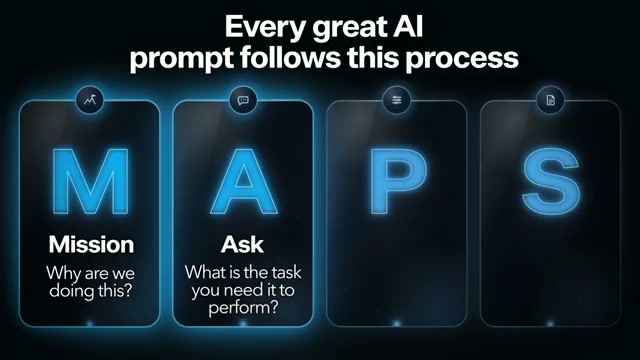
- Apply the MAPS framework to every prompt. MAPS structures every AI interaction with four components: Mission (the outcome you’re driving toward — “30 new customers a month,” not “find me leads”), Ask (one specific, unambiguous request), Parameters (all relevant context — your ICP, constraints, what’s worked before), and Shape (the exact output format — CSV, markdown, tone, length). For the Parameters component, use voice input rather than typing: speaking runs roughly three times faster than typing, which means you load richer context in less time, and richer context produces sharper output.
-
Use voice input to front-load context. Most LLM interfaces include a voice input button. Talking through your parameters instead of typing them delivers more detail per minute and removes the friction that usually causes people to underspecify.
-
Screen automation candidates with the Rule of R. Before building any workflow, confirm three things: Is the task Repetitive (happening at least weekly)? Is it Rule-based (same inputs, same outputs every time)? Does it generate a Return (saves more time than it cost to build)? If all three are yes, automate it. If any answer is no, don’t build it — some automations cost 60 hours to construct and save two minutes a week.
-
Build automations — the screwdriver layer. Tools like n8n, Zapier, and Make.com let you encode recurring, rule-based tasks into permanent workflows that run on schedule without manual input. Unlike a prompt, which requires you to show up every time, a workflow is set-and-forget leverage.

-
Graduate to agentic AI for end-to-end workflows. Agentic systems — platforms like Apex, Manus, or Perplexity Computer — handle multi-step, multi-system workflows autonomously. You define the outcome, pull the trigger, and the agent determines how to get there. Where a prompt handles a task and an automation handles a recurring process, agents handle complete workflows from idea to output.
-
Implement human-on-the-loop. “Human in the loop” means you’re pushing tasks forward throughout the process. “Human on the loop” means the agent completes the full workflow and you inspect the result afterward — the same dynamic you’d have with a capable employee. Resist intervening mid-task; let the loop close before you evaluate it.
-
Have the agent review its own output before you intervene. Once an agent finishes a task, prompt it to critique its own work. Most practitioners skip this entirely, and it frequently surfaces exactly the issues you’d have flagged yourself.
-
Deploy specialized critique agents. Build dedicated agents whose only job is reviewing the output of other agents. A coding critique agent, for instance, receives completed code, generates a list of improvements, and routes it back to the coding agent for revision — the same specialization logic that applies to human teams applies here too.
- Become the orchestrator. The goal is to be the person who deploys the right tool for each problem and sells the resulting outcome. LLM for manual reasoning tasks. Automation for recurring, rule-based processes. Agents for complete end-to-end workflows. That positioning — outcome provider, not tool vendor — is the one that compounds.
How does this compare to the official docs?
The MAPS framework and the Rule of R are proprietary mental models built on top of platforms that publish their own documentation — and where the video’s guidance aligns with or diverges from those sources is exactly where Act 2 picks up.
Here’s What the Official Docs Show
The framework Act 1 lays out is well-grounded, and official documentation confirms the core structure across every step that has a documented analogue. What follows adds platform-level context that has shifted since the tutorial was recorded, flags one SDK change that will break code if you miss it, and identifies two tools the docs surface that aren’t named in the video.
Step 1 — Sell the outcome, not the tool
No official documentation was found for this step — proceed using the video’s approach and verify independently.
Step 2 — Master the LLM
The video’s approach here matches the current docs exactly. One architectural addition worth knowing: Anthropic formally separates Messages (stateless API calls — you manage the conversation loop) from Managed Agents (stateful, persistent event history, fully managed infrastructure). That distinction matters when you reach step 7. Separately, if you’re following any Gemini Python example, the current SDK uses from google import genai and genai.Client(). As of May 2026, the older google.generativeai import pattern will fail against current SDK versions — update any sample code before running it. Perplexity also surfaces in the official docs as a real-time web-search LLM API not named in the tutorial; it’s a valid research-specific option worth adding to your step 11 toolkit.
Step 3 — Apply the MAPS framework
No official documentation was found for this step — proceed using the video’s approach and verify independently.
Step 4 — Use voice input to front-load context
The video’s approach here matches the current docs exactly. ChatGPT’s native Voice button is confirmed in the standard prompt bar. Gemini additionally exposes a Live API for real-time voice at the API level — directly relevant if you’re embedding voice input into a custom workflow rather than using a consumer interface.
Step 5 — Screen candidates with the Rule of R
No official documentation was found for this step — proceed using the video’s approach and verify independently.
Step 6 — Build automations (the screwdriver layer)
The video’s approach here matches the current docs exactly — with one scope update. n8n, Zapier, and Make.com all confirm their automation capabilities, but each platform’s current homepage leads with AI agents as a primary value proposition alongside traditional automation. As of May 2026, all three span both step 6 and step 7; treating them only as “screwdrivers” understates what each ships today.
Step 7 — Graduate to agentic AI
The video’s approach here matches the current docs exactly. Anthropic’s Managed Agents surface, n8n’s Tools Agent node with Anthropic Chat Model and Postgres memory, Zapier’s 450K+ agent ecosystem, and Make.com’s orchestration tier all confirm the agentic layer as a distinct build path. Claude Code — not named in the tutorial — is a shipped, purpose-built agentic tool that directly models this tier: it reads your codebase, edits files, runs commands, and completes end-to-end tasks autonomously.
Step 8 — Implement human-on-the-loop
No official documentation was found for this step — proceed using the video’s approach and verify independently.
Step 9 — Have the agent review its own output
No official documentation was found for this step — proceed using the video’s approach and verify independently.
Step 10 — Deploy specialized critique agents
No official documentation was found for this step — proceed using the video’s approach and verify independently.
Step 11 — Become the orchestrator
The video’s approach here matches the current docs exactly. Zapier’s multi-model selector (Claude, OpenAI, Google AI Studio, Perplexity), Make.com’s three-tier capability model, and Claude Code’s MCP integration all confirm the orchestrator pattern. Zapier adds an enterprise governance layer — centralized model access controls, full action logging, SOC 2 Type II — that practitioners deploying across teams will need to factor in.
Useful Links
- Documentation – Claude API Docs — Anthropic’s official developer documentation covering the Messages API, Managed Agents, nine-language SDK support, and the full build-to-production developer journey including evals, safety guardrails, and cost optimization.
- Gemini generateContent API | Google AI for Developers — Google’s Gemini API reference including the current
genai.Client()Python SDK, multimodal model capabilities (image, video, robotics), and built-in agentic tools including Computer Use, Google Search, and Code Execution. - ChatGPT — OpenAI’s consumer interface confirming native Voice input availability alongside Deep Research, Images, and Apps as first-class features.
- Zapier: Automate AI Workflows, Agents, and Apps — Zapier’s platform documentation covering 9,000+ integrations, 450K+ agents built, MCP protocol support for Claude and ChatGPT, and enterprise governance including SOC 2 Type II, GDPR, and CCPA compliance.
- AI Workflow Automation Platform – n8n — n8n’s platform documentation covering AI agents and workflow automation with a per-node traceable visual canvas, Anthropic Chat Model integration, and 500+ pre-built connectors.
- AI Workflow Automation Software & Tools | Make — Make.com’s platform documentation covering three capability tiers from fast automation to orchestrated autonomous AI agents, with department-specific solution pages organized by business outcome.
- Slack developer docs | Slack Developer Docs — Slack’s developer documentation including the CLI-based quickstart, official AI agent templates (Starter Agent, Support Agent/Casey), and Custom Step for Workflow Builder in Python and JavaScript.
- Overview – Perplexity — Perplexity’s API Platform documentation covering real-time web search, multi-model support, source filtering, structured results, an Agent API, and an MCP Server for tool integration.
- Overview – Claude Code Docs — Claude Code documentation for the agentic coding tool covering installation across platforms, MCP tool connections, and customization via instructions, skills, and hooks.


0 Comments