

One Canonical Tag Change That Drove 22% More Organic Traffic to Product Variation Pages
A 2024 SearchPilot A/B test on a live e-commerce site uncovered a counterintuitive canonical tag configuration that produced a 22% organic traffic uplift on product variation pages — with no negative impact on main product pages. After reading this, you’ll understand exactly how the change works, why it signals to Google the way it does, and how to replicate it across your own product catalog.

-
Confirm that your e-commerce site uses URL parameters to represent product variations. The pattern looks like
/products/metal-water-bottle?size=32ozor/products/metal-water-bottle?color=black— a single base product URL with query strings differentiating each variant. -
Audit your current canonical setup. The standard configuration before this test had the main product page carrying a self-referential canonical (pointing to itself), and each variation URL also carrying its own self-referential canonical. That setup kept variation pages technically indexable, but in practice Google was not indexing them consistently or sending meaningful organic traffic to them.
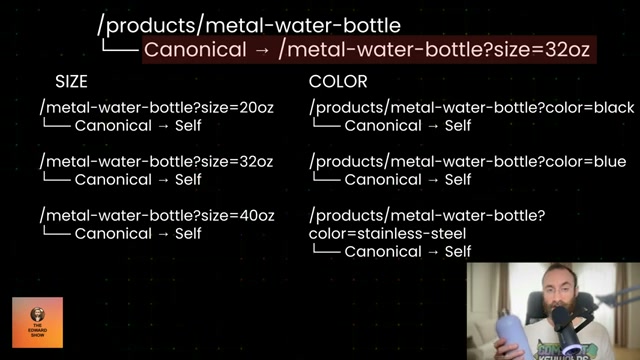
- Identify the primary variation URL for each product — typically the most popular size, color, or configuration. In the water bottle example from the test, that would be
/products/metal-water-bottle?size=32oz. This is the URL the main product page canonical will point to after the change.
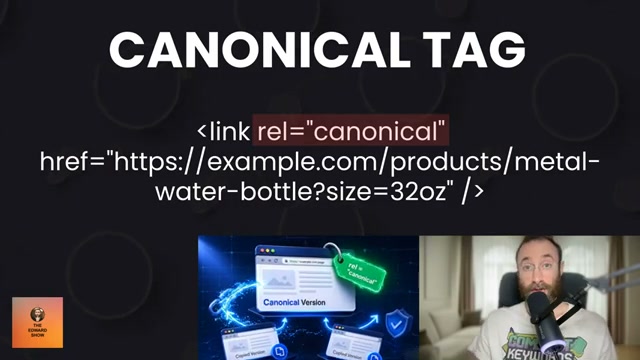
- On the main product page only, update the canonical tag from self-referential to point to that primary variation URL. The resulting tag looks like this:
<link rel="canonical" href="https://example.com/products/metal-water-bottle?size=32oz" />
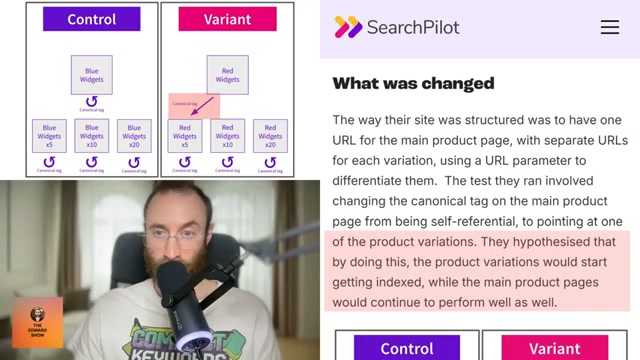
- Leave every individual variation URL’s canonical tag untouched — each continues pointing to itself. The change is surgical: only the main product page canonical redirects outward. All variation pages remain self-referential.
-
Set up split measurement before deploying broadly. Track organic traffic to main product pages and variation pages as separate segments in your analytics platform. SearchPilot’s methodology measured both groups in parallel so any cannibalization on main pages would surface alongside variation page gains — capturing the true net effect.
-
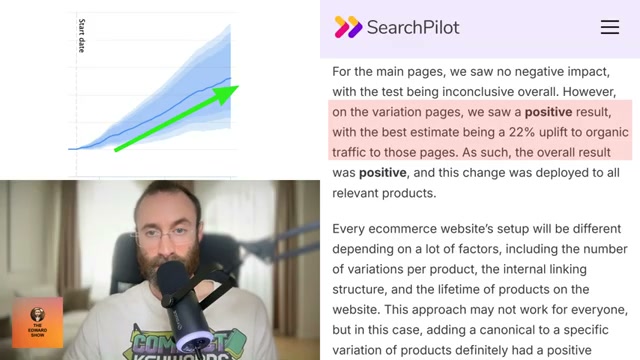
After a sufficient observation window, evaluate the net result. The SearchPilot test found no negative impact on main product pages while variation pages recorded a 22% uplift in organic traffic. The mechanism: pointing the main page canonical toward a specific variation signals to Google that the variation URL is an authoritative destination, prompting more consistent crawling, indexing, and ranking across the full variation set.
- If your test confirms positive results, deploy the canonical change across all relevant products. Every catalog differs — variation count, internal linking depth, and product age all influence outcome — so site-wide rollout should follow a validated test. At 10,000 monthly variation visits as a baseline, a 22% uplift adds 2,200 visits. At a 6% conversion rate and a $35 average order value, that translates to roughly $4,620 in additional monthly revenue per product line scaled to those numbers.

How does this compare to the official docs?
Google’s canonical tag documentation and its guidance on URL parameter handling contain important distinctions that a single A/B test result can’t fully resolve — Act 2 examines what the official sources actually say about canonicalizing parameterized URLs, and where this strategy holds up or runs into edge cases.
Here’s What the Official Docs Show
The tutorial’s core approach is technically sound and well-grounded in how Google’s canonicalization system works. What follows adds the precision the docs provide — particularly around signal strength, sitemap alignment, and CMS implementation — so you can deploy this with fewer surprises.
Step 1 — Confirm your site uses URL parameters for variations.
The video’s approach here matches the current docs exactly. Google’s canonicalization documentation treats query-parameter URLs (e.g., ?size=32oz) as a recognized URL pattern, and the docs explicitly reference these as a common scenario for canonical management.
Step 2 — Audit your current canonical setup.
The video’s approach here matches the current docs exactly. One important addition: Google states that if no canonical is specified, it will identify the best version itself. That means your self-referential variation canonicals may not be preventing Google from consolidating variation pages under the main URL — which is precisely why the targeted canonical change in step 4 matters.
Step 3 — Identify the primary variation URL for each product.
No official documentation was found for this step — proceed using the video’s approach and verify independently.
Step 4 — Update the main product page canonical to point to the primary variation URL.
The video’s approach here matches the current docs exactly, with two additions worth knowing. First, rel="canonical" is described in Google’s docs as a strong signal, not a directive — Google retains discretion to select a different canonical if it determines another URL is objectively better. The tutorial implies direct control; the docs do not promise it. Second, if you’re on WordPress, Wix, or Blogger, Google explicitly notes you may not be able to edit HTML directly and should use your CMS’s native canonical setting instead.
Step 5 — Leave variation page canonical tags untouched.
The video’s approach here matches the current docs exactly. One critical addition from the docs: XML sitemap alignment is required. Google’s best practices explicitly warn that specifying different canonical URLs across techniques — for example, rel="canonical" pointing to a variation URL while your sitemap still lists the main product page — creates conflicting signals that reduce effectiveness. Update your sitemap to reflect whichever URL you designate as canonical.
Step 6 — Set up split measurement before deploying broadly.
The video’s approach here matches the current docs exactly. One precision to carry forward: Google Search Console’s Performance report measures clicks and impressions from Search, not sessions. “Organic traffic” in the tutorial maps to clicks in GSC — filter by page URL to compare main product pages and variation pages as separate segments.
Step 7 — Evaluate the net result after an observation window.
No official documentation was found for this step — proceed using the video’s approach and verify independently.
Step 8 — Deploy site-wide after a confirmed positive test.
No official documentation was found for this step — proceed using the video’s approach and verify independently.
Note on the 22% figure: the SearchPilot homepage confirms the platform is a legitimate enterprise SEO A/B testing tool used by major e-commerce retailers. The specific case study reporting a 22% organic traffic uplift was not accessible from the captured pages — the figure could not be verified from the available screenshots.
Useful Links
- How to Specify a Canonical with rel=”canonical” and Other Methods — Google Search Central’s primary documentation on canonicalization methods, signal strength, best practices, and CMS-specific guidance
- Google Search Console — The Performance report is the correct tool for monitoring URL-level impressions and clicks after implementing a canonical change
- SearchPilot | SEO A/B Testing Done Differently — The enterprise SEO A/B testing platform used to run the canonical-tag test described in the tutorial


0 Comments