

Salesforce resolved 9,500 IT support cases automatically and saved $57,000 in the first two months after deploying Agentforce agents internally — with 40% of all IT cases now handled without any human intervention. This post walks through the exact architecture, testing methodology, and scaling strategy Salesforce used inside their own “Techforce” IT department so you can replicate it in your own org.
What This Is
Salesforce’s internal IT department, called “Techforce,” manages support for 76,000 employees who generate approximately 25,000 support tickets per month. Before Agentforce, the bulk of these tickets required human agents to triage, respond, and resolve — a resource-intensive and slow process for repetitive, predictable requests.
The Salesforce blog details how the company adopted a “Customer Zero” philosophy before releasing Agentforce to the broader market: they became their own first customer. As documented in the Agentforce research report, this means “we are our own first customer, prototyping the path so you don’t have to… ensuring that by the time a solution reaches you, it has already delivered real impact for us.” That internal pressure-test is what makes this case study worth studying closely — it’s not a controlled demo, it’s a live enterprise deployment at scale.
Agentforce is Salesforce’s agentic AI platform, integrated across the Salesforce Platform and Data Cloud via the Einstein Trust Layer. The reasoning core is the Atlas Reasoning Engine — the component that gives agents the ability to reason through complex, ambiguous instructions rather than follow rigid decision trees. This is the fundamental distinction from legacy chatbots or Flow-based automation: the agent can interpret intent and plan actions, not just pattern-match to a script.
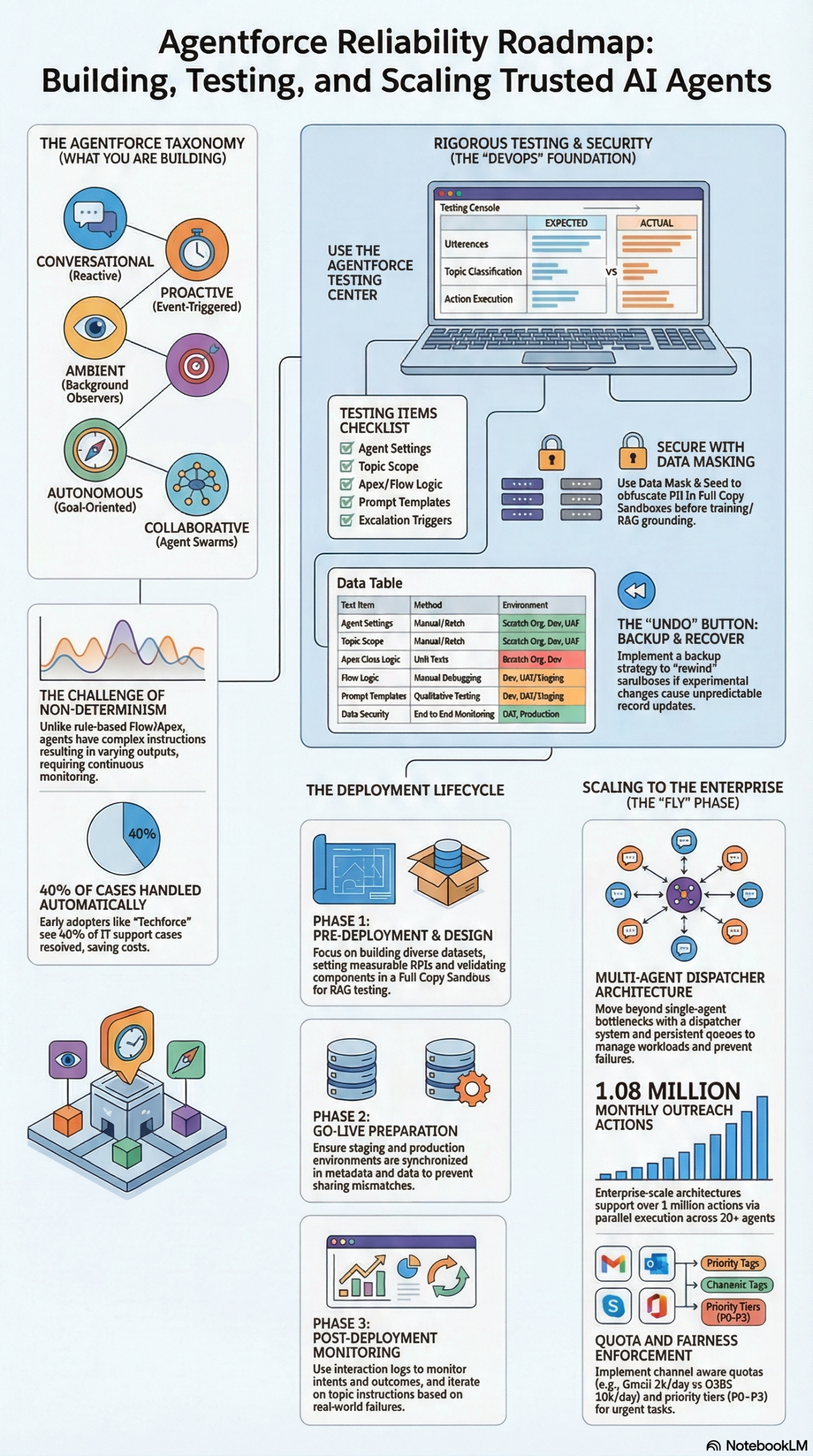
According to the research report, the platform supports five distinct agent types, each built for different operational modes:
| Agent Type | Definition | Mode of Operation |
|---|---|---|
| Conversational | Reactive, request-response via natural language (text/voice) | “Digital front door” for inbound repetitive requests |
| Proactive | Triggered by events, data changes, or defined conditions | Initiates workflows without direct user interaction |
| Ambient | Background observer of user activity and data streams | Reduces cognitive load by automating “work about work” |
| Autonomous | Goal-oriented, plans and executes multi-step sequences independently | Acts as a “digital employee” given high-level objectives |
| Collaborative | A swarm of specialist agents coordinated by an orchestrator | Delegates subtasks across domains via Agent2Agent protocol |
For IT support, Salesforce deployed primarily conversational and autonomous agent types, enabling the system to field inbound requests, classify them, attempt self-resolution, and escalate to human agents when needed — without any hard-coded scripting.
Two integration protocols form the backbone of the architecture as documented in the research report:
- Model Context Protocol (MCP): An open standard that gives Agentforce a common language for communicating with external tools and services — ERPs, legacy ticketing systems, Active Directory, knowledge bases.
- Agent2Agent (A2A): Governs internal communication between specialized agents within the Salesforce ecosystem, so a master orchestrator can route tickets to a dedicated IT sub-agent, a Billing sub-agent, or an HR sub-agent based on classification.
Together, these protocols let a single inbound ticket travel through a network of specialized agents, each contributing their domain expertise, before surfacing a resolution or a structured escalation to the right human team.
Why It Matters
The headline number — 40% of IT cases handled without human involvement — is significant, but the underlying implication is more important: Agentforce is not a chatbot layer bolted onto Salesforce; it is a fully integrated operational system that reads live data, executes actions, and escalates with context.
For Salesforce admins and architects, this changes the build paradigm entirely. The old workflow of “build a Flow, add a bot, route to a queue” is no longer sufficient for the kinds of efficiency gains Salesforce documented. Agentforce requires a different mental model: you’re not scripting responses, you’re defining agent purpose, preparing training data, configuring guardrails, and creating testing pipelines that account for non-deterministic outputs.
For IT leaders and ops teams, the ROI case is direct and well-documented. The Salesforce blog reports $57,000 in cost savings within the first two months of deployment. At 25,000 tickets per month, routing 9,500 of them through automated resolution removes a massive burden from L1 support staff — freeing humans to handle escalations, infrastructure incidents, and the complex tickets that actually require human judgment.
For developers specifically, the shift has deep architectural implications. Traditional Apex and Flow development is deterministic — the same input always yields the same output, making unit testing mechanically straightforward. The Atlas Reasoning Engine introduces non-determinism: two identical inputs may generate slightly different agent responses. This doesn’t make agents unreliable, but it does mean your testing strategy must change fundamentally. As the research report states directly: “when agents fail, they don’t just crash — they mislead, misclassify, or quietly erode trust.” AI failure is often silent and qualitative, not the kind of hard exception you can catch with an Apex try/catch block.
Marketing and operations teams outside of IT should also pay attention to this deployment. The same architecture — knowledge-grounded agents, RAG retrieval from Data Cloud, escalation logic via Omni-Channel — applies to customer service, sales support, HR self-service, and partner enablement. Salesforce’s IT deployment is the proof of concept for all of those use cases.
The Data
Agentforce IT Support Deployment: Results and Infrastructure at a Glance
| Metric | Value | Source |
|---|---|---|
| Employee base supported | 76,000 | Salesforce Blog |
| Monthly support tickets | 25,000 | Salesforce Blog |
| Cases resolved by AI agents (%) | 40% | Salesforce Blog |
| Cases auto-resolved (per month est.) | ~9,500 | Salesforce Blog |
| Cost savings in first 2 months | $57,000 | Salesforce Blog |
| Full Copy Sandboxes deployed | 3 | Salesforce Blog |
Agentforce Testing Matrix
The following table — adapted from the research report — maps what needs to be tested, how, in which environments, and with which tools:
| Test Item | Method | Environment | Tools |
|---|---|---|---|
| Agent Configuration | Manual/Batch | Scratch Org, UAT | Agentforce Builder, Testing Center |
| Topic Classification | Manual/Batch | Dev, UAT | Agentforce Testing Center |
| Apex Class Logic | Unit Tests | Scratch Org, Dev | Apex Testing Framework |
| Prompt Templates | Programmatic | Dev, UAT | Prompt Builder, VS Code |
| Escalation Logic | Manual/Batch | UAT, Staging | Omni-Channel, Agentforce Builder |
| Data Security | End-to-end | UAT, Prod | Event Monitoring, Shield, Arovy |
| User UI Behavior | End-to-end | Dev, UAT | Provar, Selenium, Jest |
| Credit Consumption | Monitoring | UAT, Prod | Digital Wallet, Usage Logs |
Step-by-Step Tutorial
How to Build, Test, and Scale an Agentforce IT Support Agent
This walkthrough follows Salesforce’s documented six-step build-and-train cycle, adapted with the specific infrastructure and sequencing decisions Salesforce made for the Techforce deployment. Follow the phases in order — skipping environment setup to get to the “fun part” of building the agent is the single most common mistake teams make.
Prerequisites
Before you begin, confirm you have:
- Salesforce org with Agentforce enabled (Agentforce for Service license)
- At least one Full Copy Sandbox provisioned from your production org
- Data Cloud enabled (required for RAG-based knowledge retrieval)
- Agentforce Builder access in your org
- Data Mask & Seed licenses if your org handles PII (HR data, employee records, financial information)
- A defined set of IT support topics you want to automate (password reset, VPN access, software request, access provisioning, etc.)
- At least 3-6 months of historical case data with subject lines or tags that indicate ticket intent
Phase 1: Define Agent Purpose and Scope
Start narrow. Salesforce’s Techforce deployment did not attempt to automate all 25,000 monthly tickets at launch. The research report emphasizes that the first step in the six-step cycle is to “identify specific tasks” — scoping the agent to a manageable set of high-volume, low-complexity tickets before expanding.
Step 1 — Catalog your top 10–15 ticket types by volume. Pull your case data from Salesforce and group records by subject or case category. These become your agent’s initial “Topics.” Sort by volume and prioritize the ones that are repetitive and clearly scoped — password resets, account unlocks, software license requests, hardware status checks.
Step 2 — Define permitted and prohibited actions for each topic. For each ticket type, write down exactly what the agent is allowed to do and explicitly what it cannot touch. Example: “Can initiate Okta password reset; cannot modify Active Directory group membership directly.” These boundaries become your guardrail configuration in the Einstein Trust Layer. The research report is explicit that guardrails define “what an agent cannot do, including handling out-of-scope situations and enforcing business rules.”
Step 3 — Map every escalation trigger. Decide what conditions require a guaranteed human handoff, not just an attempt at resolution. Common triggers include: the requesting user’s identity cannot be verified, the ticket involves executive-level access, the issue persists beyond three agent-led resolution attempts, or the user explicitly requests to speak with a human. These become your escalation instructions within each Topic.
Phase 2: Prepare Your Environments
This phase is where Salesforce’s approach departs most dramatically from a typical Salesforce build. The research report invokes a direct analogy: “a messy kitchen leads to messy dishes — if your environments are a mess, you cannot expect reliable deployments.” For Agentforce, environment quality is not an operational nicety — it is a prerequisite for accurate agent behavior.
Step 4 — Provision three Full Copy Sandboxes. Salesforce provisioned the following for the Techforce deployment: one UAT environment for Agentforce Service, one auto-deploy and debugging environment for Agentforce Service, and one Full Copy of Data 360 (Data Cloud). The reason Full Copy Sandboxes are non-negotiable is RAG accuracy: your agent’s knowledge retrieval depends on vector search running against production-scale data volumes. A Developer sandbox with 10,000 records produces search behavior that is completely different from a production org with five million records.
Step 5 — Apply Data Mask & Seed before any agent testing. Salesforce used Data Mask & Seed to obfuscate PII and sensitive records in every sandbox before agents were allowed to access them. This is legally and ethically required for any org handling employee data, healthcare records, or financial information. Masked data must still reflect realistic data distributions and field formats for your agents to classify and retrieve correctly.
Step 6 — Synchronize metadata versions across all environments. Stale permission sets, outdated sharing rules, or mismatched custom field configurations between your sandbox and production will cause your agent to behave differently in testing versus live operation. Before every test cycle, verify metadata parity. Use a version control system (Salesforce DX + Git) to track configuration drift.
Phase 3: Prepare and Label Training Data
Step 7 — Collect historical case transcripts and voice data. Pull text conversation logs from past IT support cases. If your support team uses a voice channel, transcribe those interactions. According to the research report, the six-step cycle explicitly calls for collecting “text transcripts and voice recordings” as the foundation for training.
Step 8 — Label intent at the utterance level. For each transcript excerpt or case record, tag the user intent (e.g., “password reset request,” “VPN connectivity issue,” “software license inquiry,” “new hardware request”). This labeled corpus teaches the Atlas Reasoning Engine to accurately classify intent during the topic routing phase. The quality of your labeling directly determines the quality of your topic classification accuracy.
Step 9 — Load and structure your knowledge base in Data Cloud. Upload IT knowledge articles, runbooks, standard operating procedures, and troubleshooting guides into Data Cloud. These are the documents your agent retrieves via RAG when generating responses to user queries. Critical point: vague, poorly structured knowledge articles produce vague, low-confidence agent responses. Invest time in cleaning and structuring this content before agent configuration — it has more impact on output quality than any prompt template adjustment.
Phase 4: Build the Agent in Agentforce Builder
Step 10 — Create a new Agent and define its system instructions. In Agentforce Builder, create the agent, define its persona, and write top-level system instructions. For an IT support agent, the persona should be professional and action-oriented — not warm or conversational. The goal is resolution speed, not rapport.
Step 11 — Configure Topics for each ticket category. Each Topic is an action domain. For every ticket type from your Phase 1 catalog, create a Topic with: a clear description of when the topic applies (used for intent classification), the specific Apex actions and Flow invocations the agent can call, and the escalation conditions for that domain.
Step 12 — Write Prompt Templates in Prompt Builder. Custom prompt templates give you precise control over how the agent reasons through edge cases that your system instructions don’t explicitly address. For IT support, build templates for: initial request acknowledgment, identity verification challenges, resolution summary messaging, and escalation handoff briefings. According to the research report, prompt templates should be tested programmatically in the Dev and UAT environments using Prompt Builder and VS Code before being promoted to production.
Step 13 — Configure guardrails in the Einstein Trust Layer. Define explicitly what is out of scope for the agent. For IT support this typically means: no access to financial system data, no modification of Active Directory groups beyond the requesting user’s own account, no processing of HR-related data. These rules are enforced at the Trust Layer level — they cannot be overridden by a crafty user input.
Phase 5: Test with the Agentforce Testing Center
Step 14 — Build your initial test suite with utterance/action pairs. In the Agentforce Testing Center, create batch test cases. Each case consists of an utterance (a user message, e.g., “I can’t log into my VPN”) paired with the expected agent behavior: which Topic it should classify to, and which action it should invoke. This is your baseline for topic classification accuracy.
Step 15 — Use AI-generated test cases for edge case coverage. The Testing Center includes a built-in AI that generates diverse utterances from your Topic descriptions. Use this aggressively to surface the edge cases you wouldn’t think of manually: typos, multi-intent messages (“I need to reset my password and also request Tableau access”), ambiguous phrasing, and adversarial inputs designed to confuse topic routing.
Step 16 — Run parallel test suite execution. The Testing Center supports parallel execution, enabling you to validate hundreds of utterance scenarios simultaneously rather than sequentially. Review results for two failure modes: incorrect topic classification (agent routes to the wrong Topic) and incorrect action selection (agent picks the wrong action within a correctly identified Topic).
Step 17 — Test your escalation logic as a first-class scenario, not an afterthought. Build explicit test cases for every escalation trigger you defined in Phase 1. Confirm that the agent reliably asks for human assistance when instructions are unclear or the situation falls outside its defined scope. The research report calls this out specifically: “guardrails must be tested extensively to ensure the agent asks for human help when instructions are unclear or risky.”
Step 18 — Track credit consumption from day one. The research report warns directly: “testing will cost you credits, whether done within a sandbox or production org.” Monitor your Digital Wallet and Usage Logs throughout every test cycle. Audit test suites for near-duplicate utterances that drive redundant credit consumption without improving coverage.
Phase 6: Deploy, Monitor, and Iterate
Step 19 — Go live on a scoped ticket subset, not your entire ticket volume. Start with two or three Topics at launch. Monitor resolution rates, escalation rates, and user satisfaction scores in Agentforce Analytics for the first two weeks before expanding to additional ticket categories.
Step 20 — Set up Backup & Recover snapshots before any configuration change. The research report documents the risk explicitly: a single bad prompt template update can cause an agent to erroneously update thousands of records during a test run. Implement Salesforce Backup & Recover and capture snapshots before every significant prompt or Topic configuration change. Snapshot-based rollback gives you a clean “undo” path without data loss.
Step 21 — Iterate on Topic instructions using production analytics. Your initial Topic descriptions are educated guesses about user intent — they will be wrong in places. After 30 days of live data, review your classification analytics dashboard and identify Topics with high misclassification rates. Rewrite those Topic descriptions with more specific scope boundaries and richer examples. Salesforce’s 40% automation rate was not the initial launch number — it was the result of this ongoing refinement loop.
Expected Outcome
Following this six-step cycle with a well-curated knowledge base and properly populated Full Copy Sandboxes, an enterprise org handling 10,000+ monthly IT tickets can realistically target 25–40% automation within the first quarter. This is consistent with Salesforce’s own documented results from the Techforce deployment.
Real-World Use Cases
Five Practical Applications of Agentforce IT Support Agents
Use Case 1: Password Reset and Account Unlock Automation
Scenario: An enterprise with 15,000 employees sees 400–500 password reset tickets per month — roughly 15–20% of total IT volume. These are zero-complexity tickets that nonetheless consume L1 support staff time every single day.
Implementation: Deploy a Conversational agent Topic for “Account Access.” Configure it to invoke an Apex action that calls the identity provider API (Okta, Azure AD, or Google Workspace) to trigger a self-service password reset link. The agent verifies user identity by matching the request against the Salesforce user record before executing the action.
Expected Outcome: Near-100% automation rate for this ticket category. Human agents are only engaged when the IdP API call fails, the user’s identity cannot be verified, or the user has been locked out in a way that requires admin-level remediation.
Use Case 2: Software License Request Routing and Provisioning
Scenario: A mid-market company processes 200 software access requests monthly. Each request requires an approval workflow, a procurement catalog check, and provisioning steps across multiple systems.
Implementation: Build an Autonomous agent that classifies the requested software, checks an entitlement catalog in Data Cloud, auto-provisions catalog-approved software, and escalates non-catalog requests to the procurement team via Omni-Channel — with the request details, requestor context, and justification pre-attached to the escalation case.
Expected Outcome: 60–70% of standard software requests auto-provisioned without human review. Non-standard requests escalate with structured context that cuts human triage time by 75–80%.
Use Case 3: VPN and Remote Access Troubleshooting
Scenario: A distributed workforce generates 200 VPN-related tickets monthly with a finite and repetitive set of root causes: expired certificates, client version mismatches, split-tunneling misconfigurations.
Implementation: Deploy a knowledge-grounded Conversational agent with RAG retrieval from a curated VPN troubleshooting runbook stored in Data Cloud. The agent walks users through a diagnostic flowchart and surfaces the exact runbook section corresponding to their specific error message or symptom.
Expected Outcome: 50–60% self-service resolution. The remaining cases escalate to network engineers with the full diagnostic thread already captured, so engineers skip the triage phase entirely and start at the root cause.
Use Case 4: Automated IT Onboarding for New Hires
Scenario: HR creates IT onboarding requests for 200 new hires per month. Each requires account creation, device assignment, software provisioning, and access group enrollment — a multi-step workflow that currently takes L1 agents significant manual coordination time.
Implementation: Build a Proactive agent triggered by a new employee record creation event in Data Cloud (sourced from the HR system via MCP). The agent executes an onboarding checklist: validates Active Directory group assignment, confirms device shipment status, provisions standard software stack, and sends a structured welcome message with setup instructions to the new hire’s Slack or email.
Expected Outcome: IT onboarding ticket volume drops 65–70%. New hires receive consistent, timely access setup on day one without any human-initiated steps for the standard provisioning flow.
Use Case 5: Cross-Team Incident Response with Collaborative Agents
Scenario: A major IT incident — network outage, suspected security breach, critical application failure — requires immediate coordination across IT Operations, Security, and Infrastructure teams. Currently, assembling context from multiple systems and alerting the right people takes 20–40 minutes during off-hours incidents.
Implementation: Deploy a Collaborative agent configuration using Agent2Agent (A2A) protocol. A master orchestrator classifies incident severity from the triggering alert, delegates initial infrastructure diagnosis to a specialist Infrastructure sub-agent, and simultaneously engages the Security sub-agent to run access log analysis. Results are synthesized into a structured incident brief and pushed to the on-call engineer’s Slack before any human has manually reviewed the alert.
Expected Outcome: Mean time to response (MTTR) drops 40–50% because all initial triage and cross-team context gathering occurs automatically. The on-call engineer arrives at the incident with a diagnostic brief, not a blank slate.
Common Pitfalls
What Goes Wrong When Building Agentforce IT Agents
Pitfall 1: Testing on an Under-Populated Sandbox
The most damaging mistake is running RAG validation against a Developer or Partial Copy sandbox. Vector search results on 10,000 records behave differently from production at five million records. Semantic clusters shift, retrieval accuracy drops, and you get false confidence in your agent’s knowledge-retrieval quality. Always use Full Copy Sandboxes for knowledge retrieval validation, as Salesforce’s deployment documented.
Pitfall 2: Applying Deterministic Pass/Fail Logic to Non-Deterministic Outputs
Traditional Apex unit tests fail if the output string doesn’t match exactly. Teams that apply this same logic to Agentforce testing produce floods of false failures. The research report is explicit that traditional “checkbox” testing is insufficient. Design your test cases to validate intent and action accuracy, not exact response wording.
Pitfall 3: Under-Testing Escalation and Edge Cases
Most testing effort concentrates on the happy path — does the agent resolve correctly when everything goes right? The research report specifically calls out testing guardrails and edge cases. If your agent doesn’t gracefully escalate when uncertain, it will attempt to handle out-of-scope requests anyway — and produce hallucinated responses that quietly erode user trust.
Pitfall 4: Ignoring Credit Consumption Until Production
Every Agentforce Testing Center run consumes flex credits. Teams that run unoptimized test suites with hundreds of near-duplicate utterances burn through credits before reaching UAT. Audit your test suite for redundant cases and use AI-generated utterances strategically for edge case coverage, not bulk volume.
Pitfall 5: Skipping Pre-Change Snapshots
One bad prompt template update in UAT can trigger mass record updates across thousands of cases. The research report documents this risk explicitly. Before any configuration change — prompt template, Topic instruction, guardrail update — capture a Backup & Recover snapshot. This is your rollback path when a change causes unexpected agent behavior at scale.
Expert Tips
Pro-Level Advice for Advanced Agentforce Deployments
Tip 1: Use Dispatcher-Mediated Execution for Enterprise-Scale Throughput
At enterprise scale with high action volumes, implement a dispatcher pattern that checks for high-priority tasks and distributes workload across multiple agent instances. As documented in the research report, this prevents processing bottlenecks during ticket volume spikes — quarter-end IT surges, major product launches, or infrastructure incidents that generate hundreds of simultaneous tickets.
Tip 2: Use Persistent Queues to Decouple Task Arrival from Processing
For async workflows (onboarding provisioning, software deployment, multi-step approvals), implement persistent queues so task arrival is decoupled from execution. This ensures no task is dropped during agent restarts or processing spikes, and it gives you visibility into queue depth as an early warning indicator of agent overload.
Tip 3: Configure Channel-Aware Sending Quotas
If your agents send notifications via email, align outbound sending behavior with provider capacity limits. The research report calls out aligning “agent sending behavior with provider capacity (e.g., Gmail vs. O365) to avoid rate-limit interruptions.” An agent that dispatches thousands of resolution emails during a batch processing window will hit provider rate limits and fail silently.
Tip 4: Enforce the Principle of Least Privilege — Then Audit It Quarterly
Grant your IT support agent only the specific object permissions required for each Topic’s actions. Salesforce’s Techforce deployment eliminated “birthright access” — the practice of granting all IT staff broad default permissions. Apply the same logic to agents. Run quarterly permission audits using Event Monitoring to verify agents are not accessing data outside their defined scope, especially after any permission set updates.
Tip 5: Version-Control Your Topic Instructions as Living Documentation
Your initial Topic descriptions will contain gaps and inaccuracies — they’re based on assumptions about user intent, not observed production behavior. After the first 30 days of production data, review classification analytics and systematically rewrite the Topics with the highest misclassification rates. Treat Topic instructions as versioned documentation: update them regularly, track what changed, and correlate changes to classification accuracy metrics.
FAQ
Frequently Asked Questions About Agentforce IT Support Agents
Q: How long does it take to deploy an Agentforce IT support agent from scratch?
A: A focused initial deployment targeting five to seven high-volume ticket types typically takes four to six weeks: one to two weeks for environment setup and data preparation, two to three weeks for agent configuration and testing, and one week for UAT and controlled go-live. The Salesforce Techforce deployment was an iterative process, not a single launch event. The 40% automation figure represents several months of post-deployment refinement, not the go-live state.
Q: Does Agentforce require Data Cloud, or can it run on standard Salesforce data?
A: For basic FAQ-style responses grounded in standard Salesforce knowledge articles, Data Cloud is not strictly required. However, for accurate RAG-based knowledge retrieval at scale — which is what drives the kind of context-aware troubleshooting that achieved 40% automation at Salesforce — Data Cloud is essential. The research report specifically cites Full Copy Data 360 sandboxes as a core infrastructure requirement for validating vector search accuracy.
Q: How do I handle non-determinism in Agentforce test design?
A: Shift from output-matching to intent-and-action validation. Instead of asserting that the agent produces an exact response string, validate that it: (a) classified the utterance to the correct Topic, and (b) invoked the correct action. The Agentforce Testing Center’s batch testing is built for this mode — it reports classification and action accuracy, not string similarity. This aligns with the research report’s guidance that “focused testing on edge cases” is more valuable than comprehensive happy-path coverage.
Q: What happens when an agent receives a request it cannot handle?
A: This is exactly what escalation logic is for, and it requires explicit configuration — it does not happen automatically. Agents must be instructed on what to do when a request falls outside their defined Topics: inform the user they are connecting them to a human agent, and pass the full conversation context to the Omni-Channel queue. If escalation behavior is not defined, the agent will attempt to handle out-of-scope requests using whatever reasoning the Atlas Engine can generate — which is the behavior that, as the research report notes, “quietly erodes trust.”
Q: What does Agentforce IT support actually cost to run, and how are credits consumed?
A: Agentforce runs on a flex credit model. Credits are consumed by every agent action: each conversation turn, each action execution, and each test run in the Agentforce Testing Center. The research report specifically flags that “testing will cost you credits, whether done within a sandbox or production org.” Monitor your Digital Wallet from the beginning of development, not just at go-live. Identify which Topics consume the most credits per resolution (typically multi-step autonomous Topics) and optimize their action chains to minimize unnecessary API calls.
Bottom Line
Salesforce’s Techforce deployment is the most detailed public case study for enterprise Agentforce implementation available: 40% automation rate, approximately 9,500 cases resolved per month without human intervention, and $57,000 in documented cost savings within the first two months. The architecture — three Full Copy Sandboxes, Data Cloud-backed RAG retrieval, the Agentforce Testing Center for batch validation, and a structured six-step build-and-train cycle — is directly replicable for any Salesforce org with sufficient ticket volume to justify the investment. The biggest implementation risk is not the technology; it is applying traditional deterministic development and testing practices to a non-deterministic system. Build your testing infrastructure and environment parity before your agent configuration, treat topic instructions as living documents you iterate on continuously, and measure success by resolution rate and classification accuracy — not by the sophistication of the initial build.


0 Comments