

Why Targeting Multiple Keywords on Your Homepage Hurts Your Rankings and Revenue
Your homepage holds more backlink authority than any other page on your site — and that makes it tempting to load it with every keyword you want to rank for. This tutorial walks through why that logic backfires, how to restructure your site so each keyword gets a dedicated, rankable page, and when targeting a single keyword on the homepage is actually justified.
-
Start with how Google decides what ranks. It weighs two factors: relevance (does the page’s language match what the searcher typed?) and authority (do backlinks and engagement signals indicate this page is trustworthy?). Most marketers over-index on authority and under-invest in relevance — and that imbalance is what makes the next mistake so common.
-
Recognize the mistake. A marketer notices the homepage collects the most backlinks, so they put the primary keyword in the H1 and secondary keywords throughout the H2s and body copy. The reasoning: concentrate all keyword targeting on the page with the most ranking power. The result: relevance for any individual keyword gets diluted, and the page that receives the most traffic from social, PR, and referral channels is now written for search engines instead of humans.

- Understand why relevance dilution is the core problem. Google can’t treat a single page as maximally relevant to three different keywords simultaneously. Each additional keyword you add weakens the page’s signal for the others. Meanwhile, the homepage — your highest-converting entry point for non-search traffic — now leads with SEO copy instead of conversion copy. You lose on both fronts.
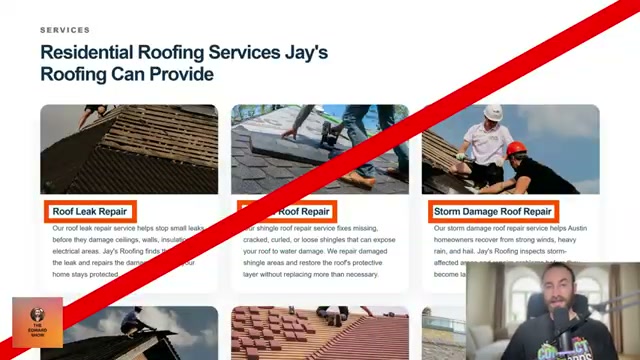
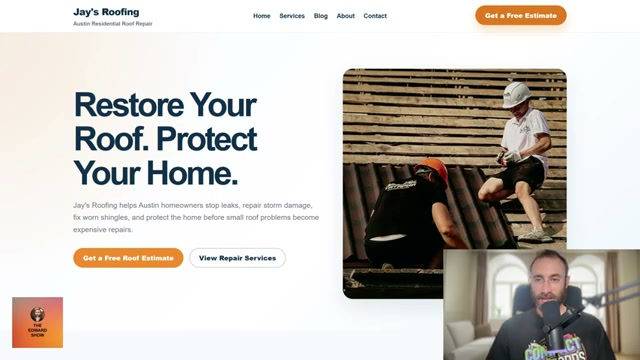
- Optimize the homepage for conversions, not keywords. Write the H1 and hero section for visitors arriving from referral links, press coverage, and social media — people who already have some brand awareness. A headline like “Restore Your Roof. Protect Your Home.” outperforms “Residential Roofing Repair Austin” for that audience.
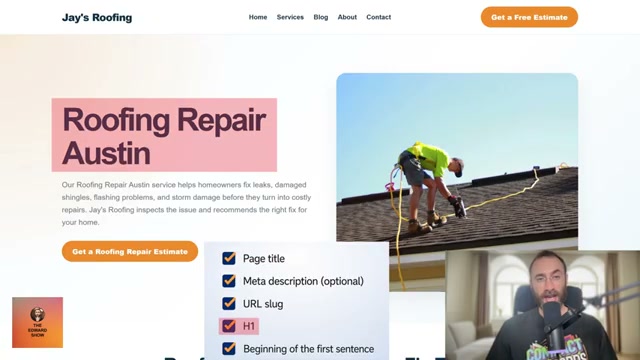
- Give every target keyword its own dedicated page, one to two clicks from the homepage. Each page gets a focused URL slug, H1, and copy — giving Google an unambiguous relevance signal for that specific term.

-
Build backlinks to hub pages —
/blogor/services— rather than routing all links to the homepage. Authority that lands on a hub page flows downstream to the keyword-targeted pages it links to, lifting their rankings without requiring direct links to each one. -
When the opportunity arises, also build links directly to individual SEO pages or posts. Hub-level and page-level link building complement each other.
-
Continue building links to the homepage. Hub and page-level link building supplements your existing strategy — it doesn’t replace it.
-
One exception applies: if a single, bottom-of-funnel keyword closely matches your entire business (e.g., “roofing repair Austin”), you can target it on the homepage. Place it in the page title, H1, opening sentence, meta description, and the top image’s alt text. The extra placements compensate for the absent URL slug.
Warning: this step may differ from current official documentation — see the verified version below.
- Target multiple keywords on one page only when the SERPs and intent behind each keyword are nearly identical. In that case you’re addressing a keyword cluster with a single page — still one topic, not many scattered ones.
How does this compare to the official docs?
Google’s Search Essentials documentation addresses on-page relevance signals and site structure, but the specifics of hub-page authority distribution and the homepage conversion trade-off deserve a closer look against what Google actually publishes.
Here’s What the Official Docs Show
The tutorial above makes a compelling case for keyword-to-page alignment, and this act was written to layer official Google Search Central guidance on top of each step. One important caveat upfront: all three documentation screenshots sourced for this post rendered as the standard Google search homepage rather than any Search Central documentation page, so no tutorial steps could be confirmed, clarified, or corrected through these images — every step is flagged accordingly.
Step 1 — How Google weights relevance and authority
Google’s ranking system does center on relevance and authority signals, and the two-factor framing in the video is a reasonable shorthand. That said, Google’s published documentation covers additional dimensions — query interpretation, content quality tiers, and page experience signals — that go beyond a two-variable model and are worth reviewing directly.
No official documentation was found for this step —
proceed using the video’s approach and verify independently.
Step 2 — The homepage keyword concentration mistake
The argument that backlink equity cannot compensate for diluted on-page relevance is widely accepted in SEO practice, but the specific mechanism — and how Google’s systems handle competing keyword signals on a single page — is not visible in any captured screenshot.
No official documentation was found for this step —
proceed using the video’s approach and verify independently.
Step 3 — Relevance dilution as the core problem
No official documentation was found for this step —
proceed using the video’s approach and verify independently.
Step 4 — Optimize the homepage for conversions, not keywords
No official documentation was found for this step —
proceed using the video’s approach and verify independently.
Step 5 — Give every target keyword its own dedicated page
No official documentation was found for this step —
proceed using the video’s approach and verify independently.
Step 6 — Build backlinks to hub pages so authority flows downstream
No official documentation was found for this step —
proceed using the video’s approach and verify independently.
Step 7 — Also build direct links to individual SEO pages
No official documentation was found for this step —
proceed using the video’s approach and verify independently.
Step 8 — Continue homepage link building alongside hub and page-level efforts
No official documentation was found for this step —
proceed using the video’s approach and verify independently.
Step 9 — The single-keyword homepage exception
No official documentation was found for this step —
proceed using the video’s approach and verify independently.
Step 10 — Targeting a keyword cluster with a single page
No official documentation was found for this step —
proceed using the video’s approach and verify independently.
Useful Links
- Documentation to Improve SEO | Google Search Central | Google for Developers — Google’s official documentation hub for SEO best practices, search ranking guidance, and site structure recommendations; the intended source for all screenshot verification in this post.


0 Comments