

Comparing GPT-5.5 and GPT-5.4: Live Tests Inside ChatGPT and Codex
OpenAI’s GPT-5.5 arrived with a price hike, a benchmark crown, and a core claim: it does more with less context than any previous model. By the end of this walkthrough, you’ll know how to access GPT-5.5 in ChatGPT, run a controlled side-by-side prompt comparison against GPT-5.4, and interpret the benchmark data that currently positions it at the top of the model leaderboard.
- Open ChatGPT and click Configure in the model selector. Set the model to latest — as of the rollout, this defaults to GPT-5.5. Access requires a Plus, Pro, Business, or Enterprise subscription; Free and Go plan users are excluded from the initial rollout. The higher-accuracy GPT-5.5-pro variant is restricted to Pro, Business, and Enterprise tiers only. At time of recording, the API is not yet available, and the model does not appear in third-party tools like Cursor.
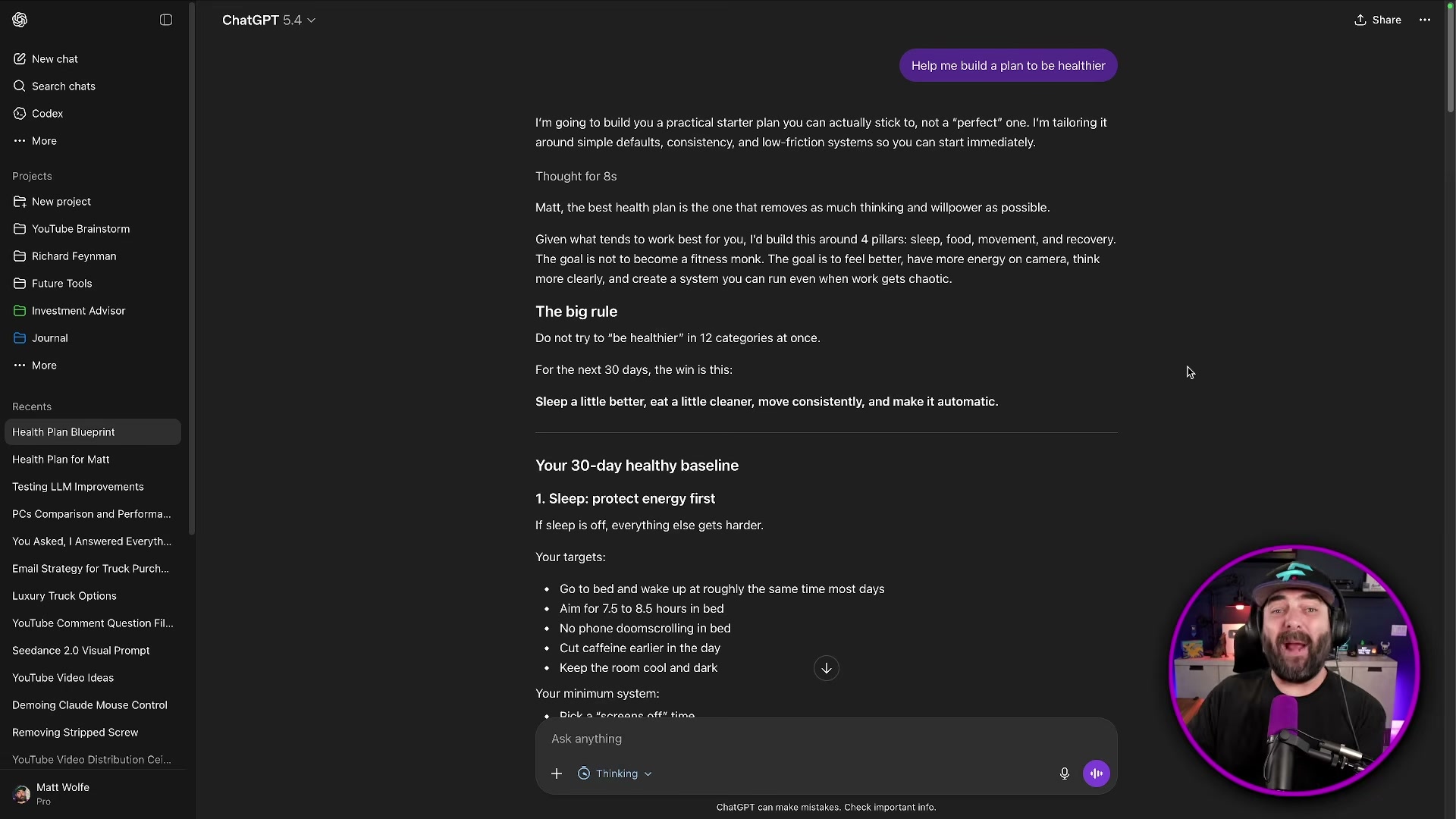
- Open separate ChatGPT sessions — one pinned to GPT-5.4, one set to GPT-5.5 via the latest default. Submit the identical prompt to both: Help me build a plan to be healthier. Provide no additional context or personal details. GPT-5.4 returns a structured but generic 30-day baseline covering sleep, food, and movement. GPT-5.5, drawing on conversation memory from previous sessions, produces a plan that references the user’s specific eating patterns, weekly recording schedule, and travel habits — from the same minimal input.
- Run a one-shot code generation comparison using this prompt in each session: Create a beautifully designed interactive website that describes and visualizes what your model [GPT-5.4 / GPT-5.5] is best at. Swap only the model name in brackets; keep everything else identical. GPT-5.4 generates an animated site with mouse-reactive backgrounds and interactive fit-score sliders — functional, though with minor layout overlap issues. GPT-5.5, without seeing the 5.4 output, independently produces a different design: clickable nodes, a dynamic capability profile graph, and the same fit-score concept arrived at from scratch.

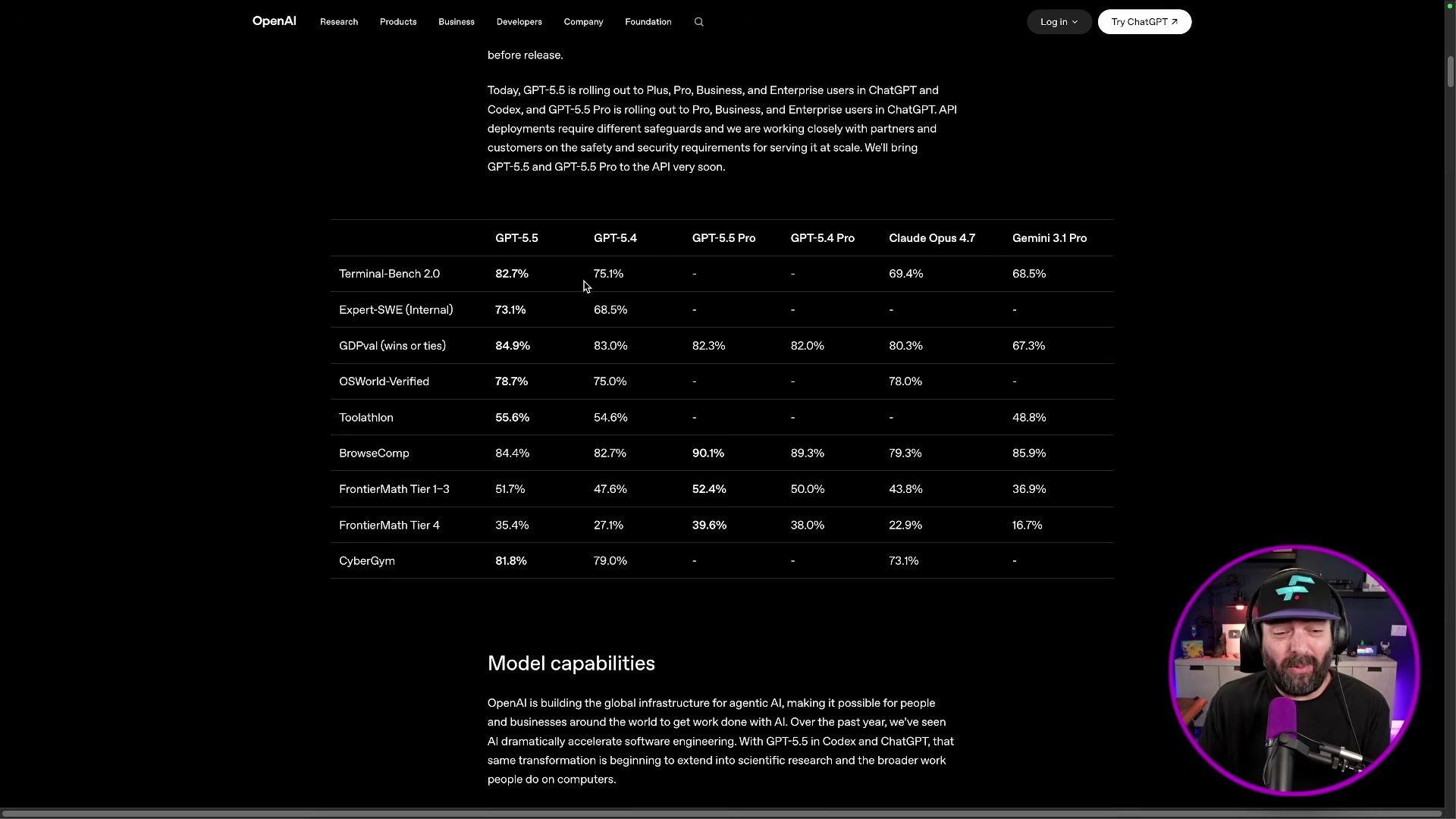
- Pull up the Terminal Bench 2.0 scores on OpenAI’s benchmark page. GPT-5.5 scores 82.7%, GPT-5.4 scores 75%, Claude Opus 4.7 scores 69.4%, and Mythos — Anthropic’s unreleased model — scores 82%. GPT-5.5 edges past the model Anthropic declined to ship publicly on this metric alone.
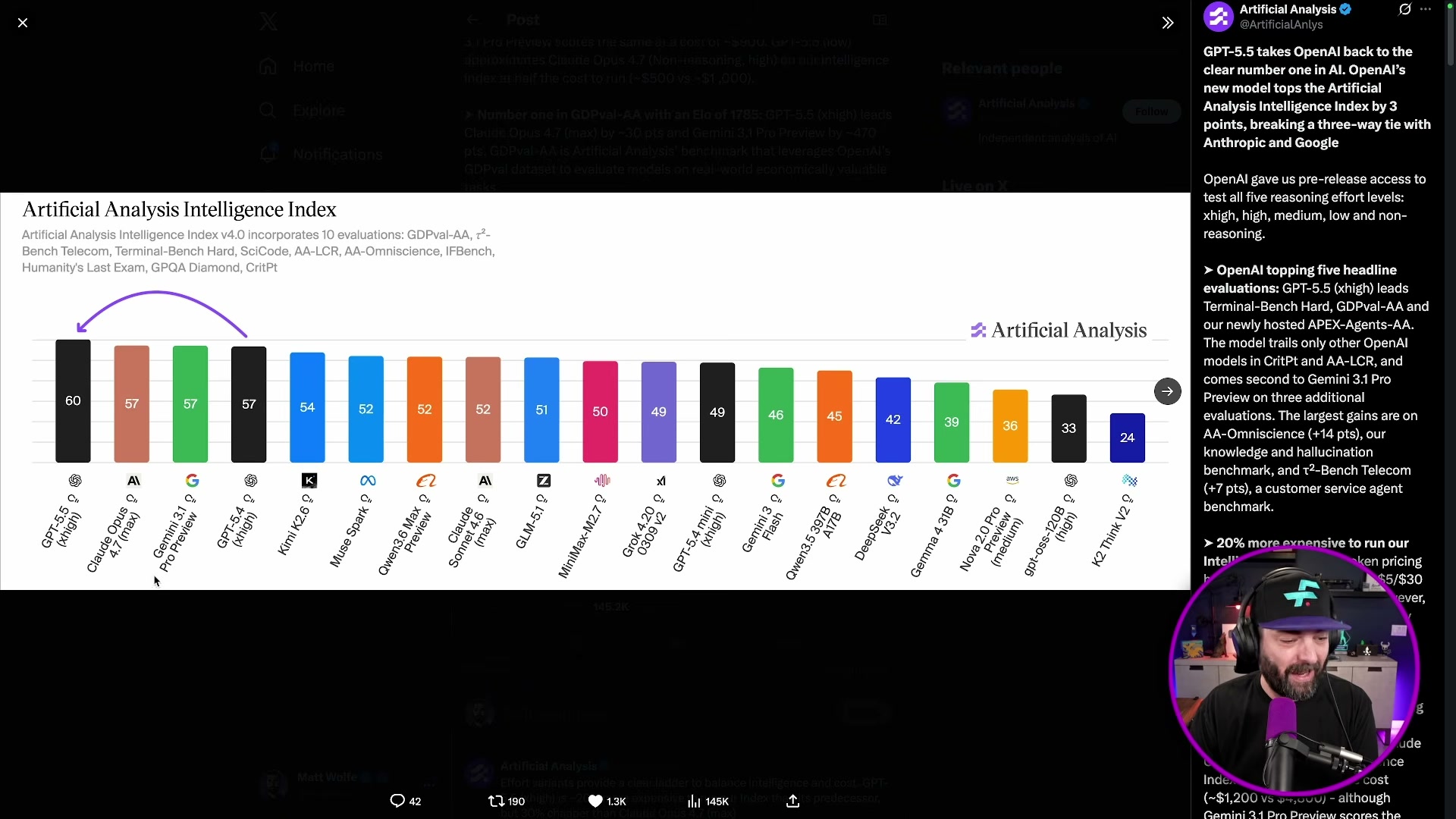
- Check the Artificial Analysis Intelligence Index, a composite score aggregating performance across 10 hard benchmarks covering reasoning, coding, knowledge, and agents. Before GPT-5.5, the leaderboard showed a three-way tie between Claude Opus 4.7, Gemini 3.1 Pro, and GPT-5.4. GPT-5.5 now holds the top position with a score of 60 — three points ahead of the previous joint leaders at 57.
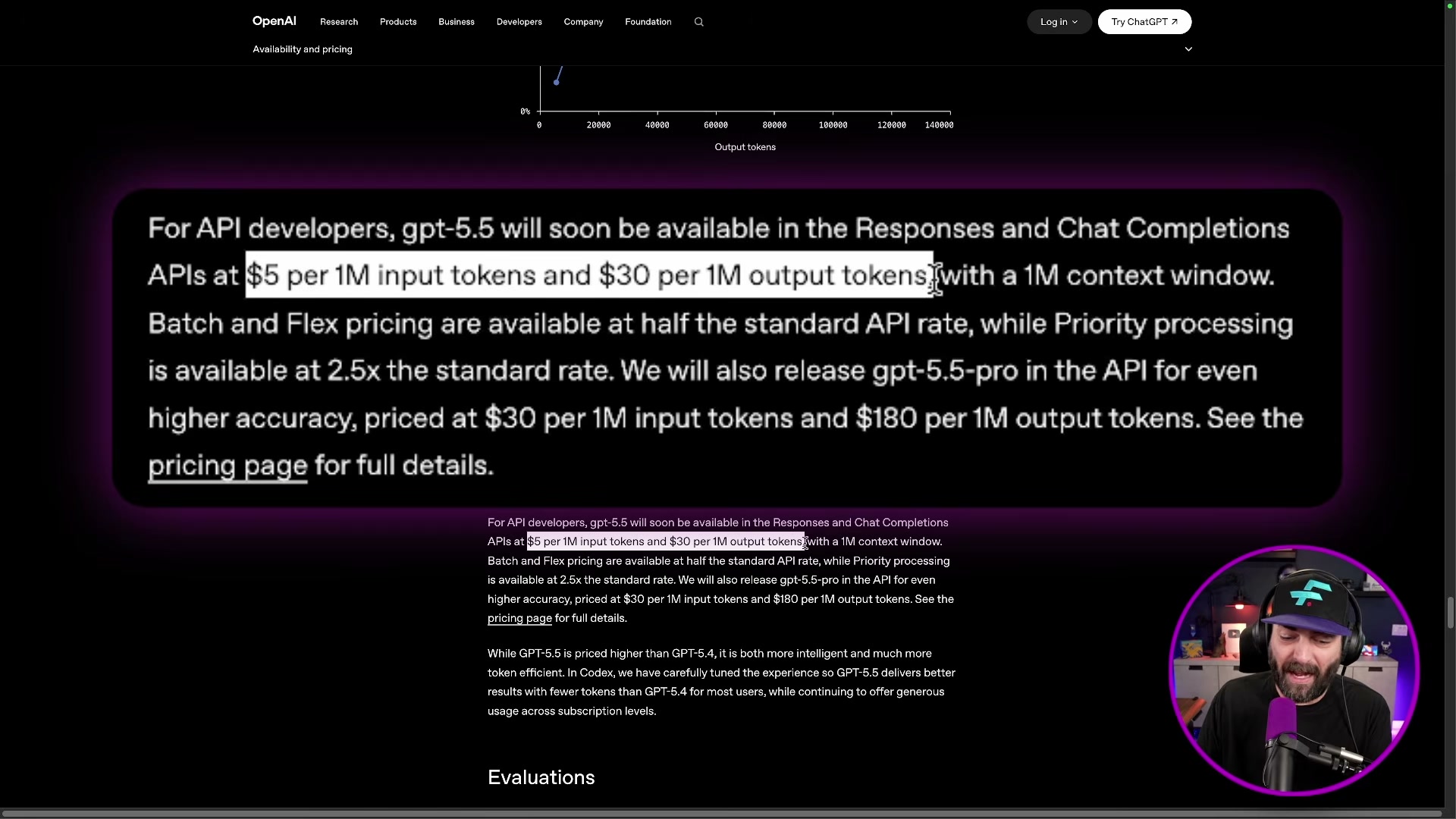
- Account for current access limitations before building any workflows. The GPT-5.5 API is not yet live at time of recording, which means cursor integrations, LangChain pipelines, and any tooling that calls OpenAI’s API directly cannot yet use this model. Monitor the OpenAI changelog for the API availability date before scoping production timelines.
How does this compare to the official docs?
OpenAI’s release notes and evaluation tables contain benchmark caveats, token-efficiency figures, and capability boundaries that a live walkthrough compresses — and those details matter when you’re making pricing or architectural decisions for real deployments.
Here’s What the Official Docs Show
The video’s live walkthrough of GPT-5.5 holds up well against the available documentation — what follows adds the detail layer that matters when you’re translating a demo into a real deployment decision. Each step below tracks the same sequence, with verified confirmations, useful additions, and honest flags where documentation couldn’t reach.
Step 1 — Accessing GPT-5.5 in ChatGPT
No official documentation was found for this step —
proceed using the video’s approach and verify independently.
The ChatGPT screenshots available were captured in a logged-out state, which means the “Configure → latest” model selector path the video describes cannot be confirmed from the docs. One useful addition on plan eligibility: the Codex web docs — governing Codex access specifically, not GPT-5.5 model availability in ChatGPT — list Edu as a qualifying tier alongside Plus, Pro, Business, and Enterprise. If your organization is on an education plan and intends to use Codex, you’re covered.
Step 2 — Health Plan Prompt Comparison
No official documentation was found for this step —
proceed using the video’s approach and verify independently.
Step 3 — Code Generation Comparison and Codex

The Codex docs confirm availability across Plus, Pro, Business, Edu, and Enterprise plans. Two setup requirements the video doesn’t surface: Codex requires connecting a GitHub account before it can access your repositories or open pull requests, and some Enterprise workspaces need admin enablement before individual users can access Codex at all. Codex also runs tasks in the cloud, including in parallel — a meaningful capability distinction from a locally-installed IDE integration like Cursor.
Step 4 — Terminal Bench Scores
No official documentation was found for this step —
proceed using the video’s approach and verify independently.
Step 5 — Artificial Analysis Intelligence Index
The video’s approach here matches the current docs exactly.

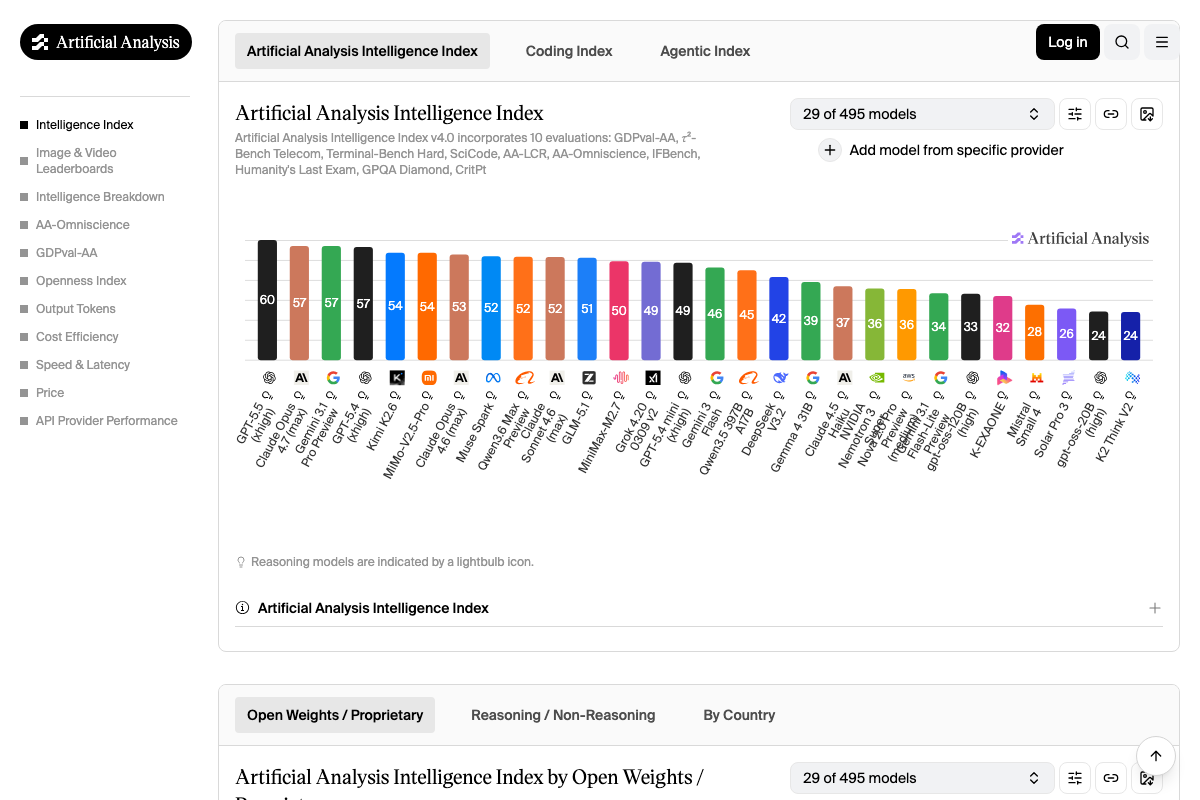
The Artificial Analysis changelog dated 23 April confirms GPT-5.5’s top ranking explicitly. The leaderboard shows GPT-5.5 at 60, with Claude Opus 4.7 (max), Gemini 3.1 Pro Preview, and GPT-5.4 all at 57 — exactly the three-way tie the video described, and the standalone breakout GPT-5.5 achieved.
Two clarifications worth adding: the video refers to “Gemini 3.1 Pro” — the leaderboard labels it Gemini 3.1 Pro Preview, reflecting its status at time of evaluation. And the composite AA Intelligence Index score is derived from 10 separate evaluations (GDPval-AA, r²-Bench Telecom, Terminal-Bench Hard, SciCode, AA-LCR, AA-Omniscience, IFBench, Humanity’s Last Exam, GPQA Diamond, and CritPt). The standalone Terminal Bench percentages from step 4 are one component of that composite — not the same metric as the index score of 60.
Step 6 — API Access Limitations
No official documentation was found for this step —
proceed using the video’s approach and verify independently.
The OpenAI Platform requires authentication to surface model listings and API availability details. The video’s claim that GPT-5.5 was unavailable via API at time of recording cannot be confirmed or denied from the available screenshots — check the OpenAI changelog directly for current API release status before scoping any dependent pipelines.
Useful Links
- ChatGPT — OpenAI’s consumer chat interface where GPT-5.5 is accessible to qualifying subscribers
- Web – Codex | OpenAI Developers — Official documentation for Codex, covering plan eligibility, GitHub account setup, and Enterprise admin requirements
- OpenAI Platform — Developer hub for API reference, model listings, and changelog updates
- AI Model & API Providers Analysis | Artificial Analysis — Independent benchmark tracker covering intelligence, speed, and price across 100+ models
- LLM Leaderboard — Comparison of over 100 AI models from OpenAI, Google, DeepSeek & others — Full Artificial Analysis Intelligence Index leaderboard with composite scores derived from 10 evaluations


0 Comments