

Meta deployed Manus—the autonomous AI agent platform it acquired for over $2 billion in December 2025—directly inside Ads Manager on February 17, 2026, giving every advertiser natural language access to campaign data, automated reporting, and proactive anomaly detection. This is not a chatbot integration. Manus operates on a “Plan → Execute → Adapt → Complete” loop that makes it categorically different from every AI assistant that came before it. This guide walks you through exactly what Manus does inside Meta’s ecosystem, how to set it up correctly, and how to avoid the mistakes that will cost you money or credibility.
What This Is
Manus AI was originally built by a Chinese startup called Butterfly Effect Technology. To facilitate global expansion and the eventual sale to Meta, the company relocated to Singapore—a move that turned the $2 billion-plus acquisition into what the NotebookLM research report describes as a “geopolitical minefield.” As of the acquisition closing in December 2025, Meta has committed to completely unwinding all Chinese ownership interests, but regulatory reviews in both the United States and China remain active.
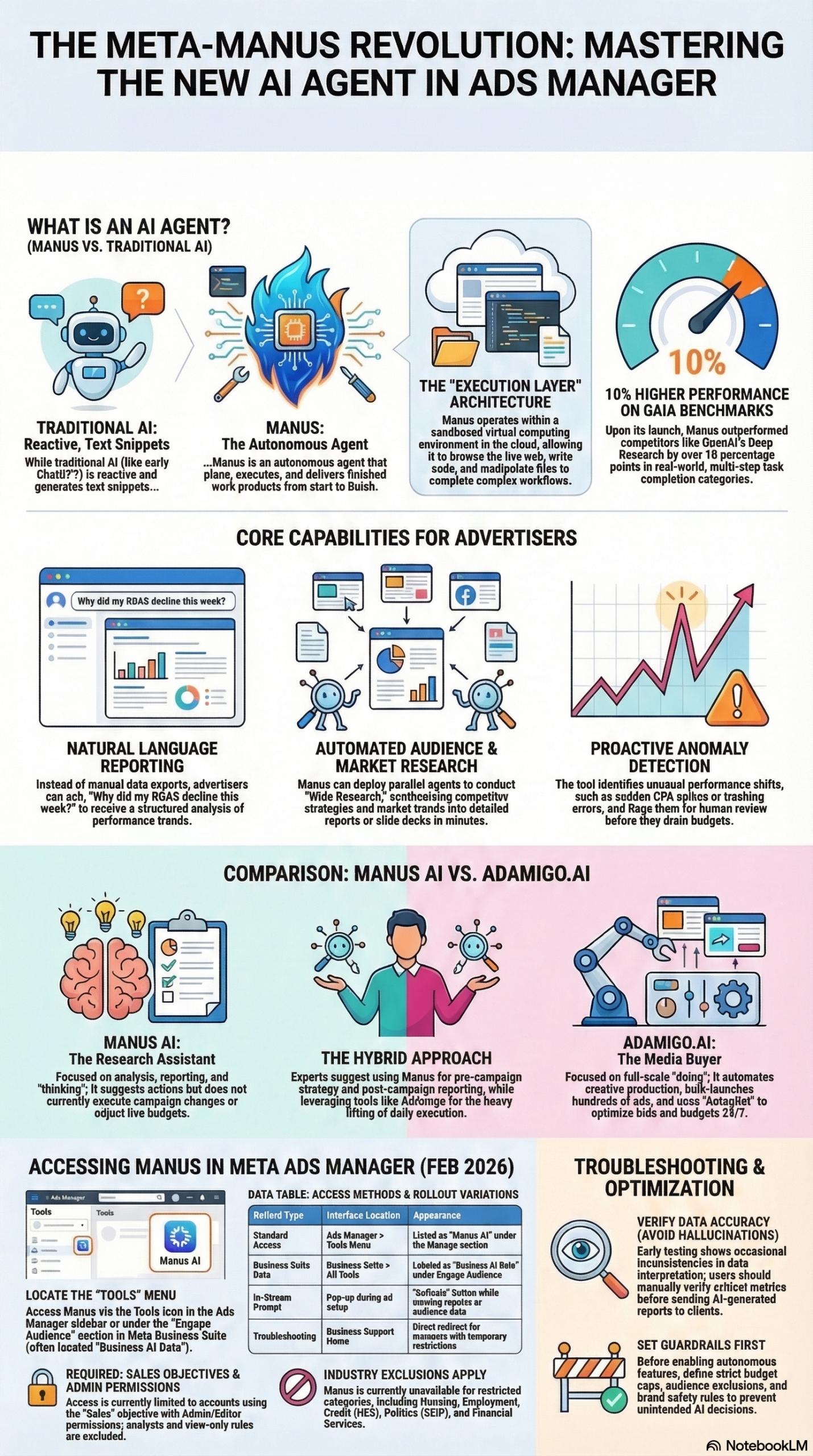
What makes Manus technically distinct from every other AI assistant integrated into an advertising platform is its architecture. Traditional large language models—including Meta AI itself—operate as reactive systems: you ask a question, they generate an answer. Manus operates as an agentic system. According to the research report, experts define Manus’s capability as emerging from how models are coupled with tools and execution environments, not just raw intelligence.
The practical difference is significant. Manus runs inside sandboxed cloud computers with persistent storage and internet access. It can write code, install software, and maintain context across long, multi-step sessions—not just answer a single query. The system uses a multi-agent architecture composed of three specialized components:
- Planner: Handles strategic thinking, breaking down a complex goal into a sequence of steps.
- Executor: Invokes tools—over 29 of them, including browser automation via Playwright, Python and JavaScript code execution, and file manipulation.
- Monitor: Manages fault isolation and coordinates between agents when something goes wrong mid-task.
The industry analogy that circulated widely at launch captures it well: “ChatGPT is like having a highly knowledgeable consultant who gives excellent advice. Manus is like having a digital employee who actually does the work.” (research report)
Inside Meta’s ecosystem, Manus has been integrated across four distinct touchpoints as of March 2026:
Meta Ads Manager: The flagship integration. Advertisers can query performance metrics in plain English, receive automated 30-day performance summaries, and run competitor research directly via the Ad Library—without exporting a single CSV.
Instagram Creator Marketplace: Automated discovery across more than 2 million verified creators in 18 markets. The key differentiator here is that Manus pulls from Meta’s first-party data rather than estimated third-party proxies, which changes the precision of influencer ROI projections significantly.
WhatsApp Business: Manus operates as what the research report calls an “autonomous digital employee” for small-to-medium enterprises (SMEs), handling customer inquiries and analyzing business performance through WhatsApp’s business API.
Desktop App (“My Computer”): A local agent for Mac and Windows that can manage files, rename folders via command-line interface, and even train machine learning models using local GPUs—all driven by natural language instructions.
For media buyers and performance marketers, the Ads Manager integration is where the immediate workflow impact is. That’s what this tutorial focuses on.
Why It Matters
The deployment of Manus rewrites the daily workflow of digital media buying at the task level, not just the speed level. This is a meaningful distinction that many early takes on the integration miss.
For performance marketers and in-house teams, the routine work of pulling reports—building pivot tables, slicing spend by creative, identifying underperforming ad sets across dozens of campaigns—is the work that consumes hours every week. Manus automates that entire layer. You ask in plain English; you get back a structured analysis. The time reclaimed is real and measurable.
For agencies managing multiple accounts, the scale multiplier is even larger. An analyst who previously managed five client reporting cycles can now manage fifteen—not because they’re working faster, but because Manus is handling the data retrieval and initial interpretation. The analyst’s job shifts to verifying the output, framing the story for the client, and making strategic recommendations. According to the research report, agencies should reallocate staff time from manual pivot tables to high-level strategic forecasting and creative storytelling.
For SMEs on WhatsApp Business, Manus lowers the operational floor. A small e-commerce operation that couldn’t previously afford a full-time social media manager now has an agent that can field customer inquiries, identify purchase patterns, and surface performance anomalies—all without a dedicated hire.
What makes this different from previous AI advertising integrations—Google’s Performance Max AI, for example, or Advantage+ campaigns inside Meta itself—is the execution layer. Manus doesn’t just recommend; it completes tasks. However, it’s critical to understand where that boundary currently sits. As of the February 2026 launch, Manus inside Ads Manager focuses on analysis and research, not direct campaign execution. It won’t autonomously launch campaigns or move budget without your approval. That capability is on the roadmap, but the current deployment is deliberately scoped to the insights layer.
Barbaros Ozturk, discussing the trajectory of agentic advertising tools, described the current Manus deployment as a “psychological bridge”—a transition that prepares marketers for the inevitable next stage: “The graphical user interface of the advertising manager is living on borrowed time… The entire media buying platform will eventually collapse into a single text prompt.” (research report)
That stage is not here yet. What is here is a powerful analysis layer that, if set up correctly, makes better-informed campaign decisions faster.
The Data: Manus AI vs. the Competitive Landscape
Understanding where Manus sits in the broader AI advertising tool market helps calibrate expectations. The research distinguishes between “analytics assistants” and “full-stack media buyers.” Manus currently occupies the first category, while third-party tools like AdAmigo.ai occupy the second.
| Feature | Manus AI (Meta Native) | AdAmigo.ai (Third-Party) | Manual / Traditional |
|---|---|---|---|
| Primary Focus | Insights, research, reporting | Full campaign execution and optimization | Human analyst-driven |
| Creative Production | Analysis of what works; no generation | Generates photorealistic ads and copy | Creative team required |
| Campaign Launch | Manual execution required | Bulk launch of hundreds of ads in seconds | Manual setup |
| Budget Management | Recommendations only; no direct spend control | Autopilot adjusts budgets and bids 24/7 | Manual adjustments |
| Optimization Signal | In-platform metrics (CPC, CTR, ROAS) | CRM-aware (qualified leads, revenue, LTV) | Analyst judgment |
| Data Source | Meta first-party data | Third-party + CRM integration | Platform exports |
| EU Availability | Restricted (many features unavailable) | Varies by tool | Unrestricted |
| Cost | Included with Ads Manager | Separate subscription | Staff cost |
Source: NotebookLM research report, March 2026.
The optimization signal row is where the platform-native vs. third-party distinction matters most for performance marketers. Kristen Pecka, Head of Stellar Marketing, framed this as the central challenge: “The gap between platform-reported ROAS and independently measured customer acquisition cost is not a minor discrepancy. It is the central challenge of modern performance marketing.” (research report)
Manus, as a Meta-native tool, is inherently optimized for Meta’s own ecosystem signals. This is a structural incentive misalignment that practitioners need to account for—more on this in the Pitfalls section.
Additionally, here’s the timeline of Manus’s integration into Meta:
| Date | Event |
|---|---|
| December 2025 | Meta acquires Manus AI (Butterfly Effect Technology) for $2B+ |
| February 17, 2026 | Manus launches globally inside Meta Ads Manager |
| March 2026 | Instagram Creator Marketplace integration active across 18 markets |
| March 2026 | WhatsApp Business SME deployment expands; desktop app in beta |
| Ongoing | EU features restricted pending regulatory review |
Source: NotebookLM research report and Social Media Today, March 2026.
Step-by-Step Tutorial: Using Manus AI in Meta Ads Manager
This is a practical walkthrough of how to connect, configure, and use Manus inside Meta Ads Manager today. This covers the analysis and reporting use cases that are available as of the February 2026 launch.
Prerequisites
Before you start, confirm you have:
- Meta Business Manager access with Admin or Advertiser-level permissions on at least one ad account
- Active ad campaigns with at least 30 days of historical data (Manus’s 30-day summary feature requires this)
- System User tokens configured (see Step 2 — this is not optional if you’re managing multiple accounts or using API-based workflows)
- No EU-based account restrictions: If your primary ad account is registered in the EU, many Manus features are currently unavailable due to the EU AI Act and data privacy regulations (research report). Verify your account region before investing setup time.
Phase 1: Enabling Manus in Your Ads Manager Account
Step 1: Access the Manus Integration Panel
Log into Meta Business Manager at business.facebook.com. Navigate to your Ads Manager account. In the left-side navigation panel, look for the AI Assistant or Manus icon—Meta has deployed this as a persistent sidebar element in the February 2026 update. If you don’t see it, check that your account has been enrolled in the rollout by going to Settings → Account Features → AI Tools.
The global rollout began February 17, 2026, but regional and account-tier rollouts may lag. Business accounts with verified payment history and consistent ad spend typically receive access first.
Step 2: Set Up System User Tokens (Do This Before Anything Else)
This step is critical and almost universally skipped by practitioners who then experience integration interruptions two months later. Standard Meta user access tokens expire every 60 days. When they expire, any Manus-connected workflow stops cold—no alerts, no fallback.
To avoid this:
- In Meta Business Settings, navigate to System Users
- Create a new System User with the role of Employee or Admin depending on required permissions
- Assign the System User to the relevant ad accounts and pages
- Generate a non-expiring System User token by clicking “Generate New Token” and selecting the appropriate permissions:
ads_management,ads_read,business_management - Store this token securely (use a secrets manager like AWS Secrets Manager or HashiCorp Vault if you’re connecting Manus to external workflows)
As noted in the research report, using non-expiring system user tokens is a documented best practice specifically for Manus integrations to avoid workflow interruption.
Step 3: Connect Ad Accounts to Manus
Once the System User is configured, navigate back to the Manus interface in Ads Manager. You’ll be prompted to authorize Manus’s access to your ad account data. Select the accounts you want Manus to analyze. Note: connecting Manus grants it access to campaign performance data and potentially audience data. Review your data processing agreements before connecting client accounts, particularly for GDPR and CCPA compliance (research report).
Phase 2: Running Your First Manus Queries
Step 4: The 30-Day Performance Summary
The fastest way to see Manus’s value immediately is to trigger a 30-day performance summary. In the Manus chat interface, type:
Summarize campaign performance for the last 30 days across all active ad accounts.
Highlight top-performing creatives by CTR and lowest-cost conversion sets by CPA.
Manus will query the Ads Manager API, aggregate the data, and return a structured summary—typically within 60–90 seconds for accounts with up to 200 active ad sets. The output includes creative-level breakdowns, trend lines, and anomaly flags (ad sets that dropped or spiked significantly versus the prior 30-day period).
Verify this output against your raw data before presenting it to stakeholders. Early testing documented in the research report indicates Manus can “hallucinate” or misinterpret nested API data. If a number looks off by more than 5%, cross-check it in the native Ads Manager reporting dashboard.
Step 5: Natural Language Campaign Queries
Beyond summaries, Manus handles ad-hoc queries. Examples of queries that return reliable results in the current deployment:
Which ad sets targeting the 25-34 age bracket have a frequency above 4.5
in the last 14 days?

What's the average CPM by placement type for video ads in Q1 2026?

Show me all campaigns with a budget utilization below 70% in the last 7 days.
For each query, Manus translates your natural language into the appropriate API calls, retrieves the data, and returns a formatted response. You can ask follow-up questions in the same thread—the persistent context window means Manus remembers what was discussed earlier in the session.
Step 6: Competitor Research via the Ad Library
One of the most underused features in the current Manus deployment is its ability to query the Meta Ad Library on your behalf. This is particularly useful for competitive creative research.
Try:
Search the Meta Ad Library for active ads from [Competitor Brand Name].
Summarize their current creative formats, call-to-action patterns,
and estimated active duration for each ad.
Manus will pull publicly available Ad Library data and structure it into a competitive intelligence brief. This replaces what was previously a manual, time-consuming process of browsing the Ad Library page by page.
Phase 3: Configuring Guardrails Before Expanding Access
Step 7: Define Budget Caps and KPI Guardrails
As Manus’s autonomous features expand in future releases, Alexander Zakharov (AI startup founder) advised: “Prepare by defining your guardrails now (budget caps, audience exclusions, brand safety rules etc.) before the AI sets its own defaults.” (research report)
Even in the current analysis-only deployment, set this up now so you’re not scrambling when execution features roll out:
- In Manus Settings (accessible from the Manus interface), navigate to Guardrails & Limits
- Define maximum daily spend thresholds per ad account
- Specify audience exclusion lists (existing customers, employees, competitor lookalikes if applicable)
- Set brand safety categories—what content contexts your ads should never appear in
- Document your primary KPI hierarchy: What does success look like in order? (e.g., Revenue > Qualified Leads > CPL)
Step 8: Set Up Anomaly Alerts
Manus’s proactive anomaly detection is one of its most valuable features for agencies managing campaigns at scale. Configure it to notify you when:
- CPA increases more than 25% week-over-week on any active campaign
- Frequency exceeds your defined threshold (typically 3.5–5 depending on campaign type)
- Budget utilization drops below 60% for a campaign that should be spending fully
- A creative asset is flagged for policy review
Navigate to Manus → Alerts → Configure and set your thresholds. Route alerts to your team’s Slack channel or email using Meta’s Webhook integration in the API settings.
Phase 4: Instagram Creator Marketplace Integration
Step 9: Using Manus for Influencer Discovery
If you’re running influencer campaigns, Manus inside the Instagram Creator Marketplace changes the sourcing workflow significantly. Access it through Creator Studio → Creator Marketplace → AI Search.
Query format:
Find creators in the US with 50,000-500,000 followers in the fitness
and wellness category, engagement rate above 3%, who have posted
branded content in the last 90 days.
Manus searches across 2 million verified creators in 18 markets using Meta’s first-party engagement data—not estimated third-party proxy metrics (research report). The result set includes audience demographic breakdowns, historical branded content performance, and direct partnership request capability.
Expected Outcome: A shortlist of 10–30 qualified creators with verifiable first-party performance data, delivered in under 2 minutes. What used to require a 3-day manual outreach and vetting process is now an afternoon task.
Real-World Use Cases
Use Case 1: E-Commerce Performance Marketing Agency
Scenario: A mid-size performance marketing agency manages 25 DTC e-commerce clients. Their analysts spend roughly 40% of their time building weekly performance reports.
Implementation: Connect all 25 client ad accounts to Manus using system user tokens. Create a standardized weekly report prompt that runs every Monday morning:
Generate a 7-day performance summary for [Account Name] including:
top 5 creatives by ROAS, ad sets where CPA exceeded target by >20%,
frequency warnings above 4.0, and budget pacing status.
Build a simple Python script that loops through each account ID, submits the query to Manus via the Ads Manager API, and compiles the outputs into a formatted PDF for each client.
Expected Outcome: Analyst time on reporting drops by 60–70%. Analysts shift to reviewing and contextualizing Manus’s output rather than producing it from scratch. Agency can scale to 40 clients without additional analyst headcount.
Use Case 2: In-House Brand Team Running Advantage+ Campaigns
Scenario: A consumer goods brand’s in-house marketing team runs Meta Advantage+ Shopping Campaigns (ASC) but struggles to understand what’s actually driving performance inside the black-box automation.
Implementation: Use Manus to interrogate the ASC results each week:
For our Advantage+ Shopping Campaign (ID: XXXXX), break down conversions
by creative asset, audience segment, and placement for the last 14 days.
Flag any creative that accounts for more than 40% of conversions
(single-point-of-failure risk).
Allocate 10–15% of spend to Advantage+ as recommended in the research report, and use Manus to interpret results—not to replace the campaign structure.
Expected Outcome: Clear visibility into which creative assets are carrying ASC performance, allowing the creative team to prioritize production of high-signal formats.
Use Case 3: SME on WhatsApp Business
Scenario: A boutique furniture retailer with no dedicated marketing staff uses WhatsApp Business as their primary customer communication channel.
Implementation: Enable Manus through the WhatsApp Business API. Configure it to handle three task types: (1) product inquiry responses using the product catalog, (2) order status lookups, (3) weekly revenue and inquiry volume summaries delivered to the owner’s WhatsApp.
Expected Outcome: The retailer handles 3–5x more concurrent customer inquiries without additional staff. Weekly performance summaries replace the need for manual sales tracking spreadsheets.
Use Case 4: Competitive Intelligence for a SaaS Marketer
Scenario: A SaaS company’s growth marketer needs to track competitor ad strategies on Meta monthly.
Implementation: Build a monthly competitor audit prompt using Manus’s Ad Library access:
Search the Meta Ad Library for active ads from [Competitor A], [Competitor B],
and [Competitor C]. For each, identify: current active ad count, primary
creative formats (video vs. static vs. carousel), primary CTAs, and
estimated minimum run duration. Compare to last month's audit.
Expected Outcome: A structured competitive creative brief delivered in 5 minutes. Previously, this took 2–3 hours of manual Ad Library browsing and spreadsheet work.
Use Case 5: Creator Campaign Manager on Instagram
Scenario: A talent management agency wants to propose creator partnerships to brand clients with data-backed pitches.
Implementation: Use Manus in Creator Marketplace to build audience-matched creator shortlists for each brand brief. When a brand asks for “Gen Z fitness audiences in the US, 18–24, female-skewed,” Manus returns verified first-party creator candidates with real engagement data—not estimated reach numbers.
Expected Outcome: Pitch decks backed by verifiable Meta first-party data rather than third-party estimates. Faster brand approval cycles because the data quality is demonstrably better.
Common Pitfalls
1. Trusting Manus Output Without Verification
The research report is explicit: early testing shows Manus can “hallucinate” or misinterpret nested API data. This isn’t a theoretical risk—it has been observed in production. The fix is straightforward: treat every Manus output as a first draft, not a final report. Build a quick-check step into your workflow where you spot-check 2–3 data points against the native Ads Manager dashboard before sending any AI-generated report to a stakeholder.
2. Using Standard User Tokens Instead of System User Tokens
Standard Meta user tokens expire every 60 days. When they expire, your Manus integration silently fails—no alert, no error message, just stale data or missing reports. Configure system user tokens from the start. This is documented in the research report as a specific known failure point for Manus integrations.
3. Ignoring the Platform Incentive Misalignment
Manus is a Meta-native tool. Its optimization signals are in-platform metrics: CPC, CTR, reported ROAS. As Kristen Pecka noted in the research report, the gap between platform-reported ROAS and independently measured customer acquisition cost is the central challenge of modern performance marketing. Manus will not flag this gap—it operates within Meta’s measurement framework. Always validate Manus’s performance assessments against your own CRM data or an independent attribution tool.
4. Skipping Guardrails Until Execution Features Launch
When Meta enables Manus to autonomously adjust bids, budgets, and targeting—which is on the roadmap—teams that haven’t pre-configured guardrails will be caught off guard. Set budget caps, audience exclusions, and brand safety rules now, before the execution layer goes live. As Alexander Zakharov warned in the research report: “Prepare by defining your guardrails now before the AI sets its own defaults.”
5. Assuming Full Feature Access in the EU
Many Manus features are currently unavailable in the EU due to data privacy regulations and the EU AI Act (research report). If you manage EU-based ad accounts, audit which features are actually available in your account before building workflows that depend on them.
Expert Tips
1. Chain Queries for Deeper Analysis
Manus maintains context within a session. Instead of asking one broad question, start narrow and build: first query for overall performance, then ask Manus to drill into the underperforming segment it identified, then ask for a hypothesis on why. The multi-turn reasoning produces significantly more useful outputs than single-shot queries.
2. Use the Ad Library Feature for Trend Spotting, Not Just Competitor Monitoring
Beyond tracking specific competitors, use Manus’s Ad Library access to identify creative format trends in your vertical. Query for all active ads in your category that have run for 30+ days (a proxy for spend efficiency) to identify which formats are sustaining ROI for the industry at large.
3. Pilot Advantage+ at 10–15% of Budget While Using Manus to Interpret Results
The research report specifically recommends this approach. Let Meta’s automation run a portion of your budget, and use Manus as your lens into what the automation is doing. This gives you the benefits of machine learning optimization without the opacity of full black-box management.
4. Build a Prompt Library for Recurring Analyses
Manus responses improve with precise, well-structured prompts. Build a team-shared prompt library for your 5–10 most common analysis types: weekly performance reviews, creative fatigue checks, frequency audits, competitor briefs. Standardized prompts produce standardized—and therefore comparable—outputs over time.
5. Separate Manus Access from Primary Account Credentials
When connecting Manus to client accounts, always use a dedicated system user with the minimum required permissions—not your personal admin credentials or the agency master account. If a Manus API session is ever compromised, minimal-permission system users limit the blast radius significantly.
FAQ
Q: Does Manus AI automatically make changes to my Meta campaigns?
As of the February 2026 launch, Manus inside Ads Manager operates in analysis and recommendation mode only—it does not autonomously execute campaign changes, adjust budgets, or launch ads. You receive insights and suggestions; all execution remains manual. Direct campaign execution is on the product roadmap, and Meta has been explicit that it will require opt-in with configurable guardrails. (research report)
Q: Is Manus available in all countries?
The global launch on February 17, 2026, covers most markets, but many features are unavailable in EU countries due to data privacy regulations (GDPR) and the EU AI Act. If your ad accounts are registered in the EU, expect a significantly reduced feature set until Meta completes its regulatory compliance process. (research report, Social Media Today)
Q: Should I be concerned about the Chinese ownership history of Manus?
This is a legitimate governance question. Meta has committed to completely unwinding all Chinese ownership interests in Manus AI following regulatory scrutiny in both the US and China (research report). For enterprise teams or agencies with data governance requirements, review your data processing agreements to confirm compliance before connecting sensitive client account data.
Q: How is Manus different from Meta’s existing AI features like Advantage+ or Meta AI?
Advantage+ is a campaign automation system—it makes bidding and targeting decisions within predefined campaign structures. Meta AI (the consumer assistant) is a reactive chatbot. Manus is an execution-layer agent that can plan and complete multi-step workflows across tools, maintain context across long sessions, and operate proactively. The architectural difference—sandboxed cloud environment, 29+ tools, multi-agent coordination—is what makes Manus categorically different from both. (research report)
Q: What data does Meta have access to when Manus is connected to my Ads Manager?
Connecting Manus grants it access to your campaign performance data and potentially audience data depending on the permissions granted. For agency accounts, this means client campaign data is accessible to Meta’s AI systems. Ensure your client contracts and data processing agreements permit this. Use the minimum required API permissions (ads_read for analysis-only workflows) and configure system user tokens with restricted scope. (research report)
Bottom Line
Meta’s Manus integration represents a genuine step-change in how advertising platforms deliver AI value—not because it replaces media buyers, but because it removes the most time-consuming and lowest-leverage work from their plates. The February 2026 launch is deliberately scoped to analysis and research, which means the risk of autonomous AI making costly campaign mistakes is still theoretical rather than live. That window won’t stay open indefinitely. The practitioners who invest time now in learning Manus’s capabilities, configuring guardrails, setting up system user tokens correctly, and building verification steps into their workflows will be significantly better positioned when execution-layer features arrive. The tools that automate your reporting are a preview of the tools that will automate your bidding—and the gap between those two milestones is closing faster than most media buying teams are prepared for.


0 Comments