

Hootsuite just claimed the top spot in G2’s 2026 Best Software Product rankings — ranked #1 overall, #1 in Best Marketing Products (up from #4 in 2025), and #1 Best Software Company in Canada. That’s not a marketing claim; G2’s methodology is built on verified customer reviews and real performance data, with no paid placements. This tutorial breaks down exactly which AI features earned Hootsuite that ranking, and how to deploy them inside your own social media operation.
What This Is
Hootsuite is an enterprise social media management platform that connects listening, strategy, publishing, analytics, and team workflow into a single system. What distinguishes the 2026 version from earlier iterations is the depth of AI integration across every layer of that stack — from content creation with OwlyWriter AI to brand intelligence via Talkwalker, to automated inbox management through AI Classifiers.
According to the G2 2026 Best Software Awards, published March 17, 2026, reviewers consistently highlighted Hootsuite’s reliability, strong reporting functionality, and the platform’s ability to handle advanced capabilities without sacrificing usability. The rankings are based purely on verified customer reviews and real performance data — no pay-to-play.
The platform’s AI layer is not a bolt-on chatbot. It is woven into the core workflow: the inbox surfaces AI-generated reply suggestions pulled from your own brand knowledge base; the analytics dashboard uses AI to translate raw performance data into ROI forecasts; the publishing calendar uses historical performance to recommend optimal post times. Every one of these features exists because social media management at enterprise scale — managing multiple channels, global teams, approval workflows, and compliance requirements — is operationally impossible to do manually at speed.
As the NotebookLM research report synthesizes from the 2026 social media landscape: “79% of social media managers now use AI daily.” That adoption rate signals a complete shift in baseline expectations. Teams that are not using AI to automate classification, draft content, or analyze sentiment are falling behind peers who have already absorbed those efficiencies into their standard operating procedures.
The platform integrates natively with the tools enterprises already use: Canva, Adobe, Slack, Microsoft Teams, Monday.com, Wrike, and Salesforce — which means Hootsuite does not require teams to abandon existing stacks to start capturing AI benefits. The architecture is designed for the reality of large organizations: multiple stakeholders, multiple platforms, multiple approval layers.
Understanding what Hootsuite is in 2026 means understanding that it is no longer primarily a scheduling tool. It is the operational command center for AI-assisted social media strategy.
Why It Matters
The G2 #1 ranking matters beyond the trophy because of what it signals about enterprise buyer priorities in 2026. According to Alex London, CMO at G2: “We’ve entered into the answer economy where AI-first software discovery is accelerating decisions, and buyers need proof they can trust.” Hootsuite earning the top spot through verified reviews — not analyst opinion — is exactly that proof.
For practitioners, the implications are direct:
For Social Media Managers: The platform’s AI handles 11 documented workflow tasks (detailed below), which means the bottleneck in your operation is no longer content volume or data analysis — it is judgment and strategy. The 79% of daily AI users cited in the research report are not replacing their jobs; they are offloading the repeatable cognitive work so they can focus on the decisions that require human context.
For Marketing Leaders: The platform’s integration of Talkwalker AI means brand intelligence is no longer a quarterly research project. You can monitor not just what is said about your brand on social platforms, but how your brand appears across AI assistants like ChatGPT, Gemini, and Perplexity — what the research report identifies as “share of voice” in the AI-first discovery economy. That is a genuinely new capability with real competitive consequences.
For Customer Service Teams: The research report documents that AI-powered chatbots built on brand-approved knowledge centers can resolve up to 80% of routine inquiries without human intervention. U-Haul cut their social media response time to under 10 minutes by centralizing DMs and comments through a single shared inbox. These are operational efficiency gains that compound over time.
For Agencies: Multi-client management becomes viable at scale when AI classifiers are automatically routing and tagging incoming messages, AI tools are generating first-draft content, and reporting is automated. The platform’s governance controls ensure that client approvals and brand voice standards can be enforced without adding headcount.
What makes Hootsuite’s approach different from alternatives is the depth of the loop: listening feeds publishing feeds analytics feeds optimization — and AI assists at every handoff. Competitors may offer individual AI features; Hootsuite’s advantage in 2026 is the coherence of the AI layer across the full workflow.
The Data
AI Use Cases Built Into Hootsuite’s Workflow
The research report identifies 11 primary ways AI enhances social media workflows within the platform:
| AI Use Case | What It Does | Workflow Stage |
|---|---|---|
| Data Summarization | Translates massive performance datasets into ROI insights and forecasts | Analytics |
| Niche Gap Analysis | Analyzes months of competitor content to surface strategic opportunities | Strategy |
| Audience Segmentation | Identifies niche buyer personas from behavioral patterns | Strategy |
| Hyper-Personalization | Generates hundreds of dynamic ad versions (e.g., Meta Advantage+) | Paid Social |
| Content Repurposing | Transforms webinars and whitepapers into social captions and video scripts | Publishing |
| Creative Brainstorming | Breaks writer’s block with trend-informed idea generation | Publishing |
| Accessibility (Alt Text) | Auto-generates accurate image descriptions for SEO and accessibility | Publishing |
| Brief Drafting | Creates proofs of concept and pitch deck outlines | Strategy |
| Custom Graphics | Iterates on visual concepts via Midjourney/DALL-E integration | Creative |
| Calendar Optimization | Suggests optimal posting times and content themes from past performance | Scheduling |
| Customer Service | Powers chatbots resolving up to 80% of routine inquiries from approved knowledge | Engagement |
Engagement Value Scoring Framework
Rather than measuring vanity metrics, the research report documents a business-impact scoring model:
| Interaction Type | Point Value |
|---|---|
| Follow-up action (Purchase or Referral) | +3 |
| Issue Resolved | +2 |
| Positive Sentiment Shift | +2 |
| Fast Response | +1 |
| Negative or Unresolved Interaction | -2 |
How to calculate: Total Points ÷ Number of Interactions = Engagement Value Score. A rising score over time indicates more meaningful interactions, not just higher volume.
Talkwalker AI Listening Capabilities
| Capability | Detail |
|---|---|
| Sentiment Detection | Identifies overall contextual attitude (positive/neutral/negative) |
| Emotion Detection | Categorizes specific emotions using Parrott’s structure |
| Sarcasm/Irony Detection | Up to 90% accuracy across 186 languages |
| LLM Insights | Monitors brand appearance in ChatGPT, Gemini, and Perplexity responses |
| Visual Listening | Detects brand mentions in images, video, and audio |
Sources: NotebookLM research report, Hootsuite blog
Step-by-Step Tutorial: Deploying Hootsuite’s AI Stack
This is a practical walkthrough for enterprise teams standing up Hootsuite’s AI features from scratch. You will move through five phases: building your knowledge foundation, configuring automated routing, deploying AI content tools, activating social listening, and instrumenting Engagement Value tracking.
Prerequisites:
– Hootsuite Enterprise plan (required for Inbox 2.0, AI Classifiers, Talkwalker integration, and Knowledge Centers)
– Connected social accounts: minimum LinkedIn, Instagram, TikTok
– Access to brand asset documents: FAQs, product one-pagers, customer service policies (PDF or TXT format, under 1MB each)
– Admin-level access to configure team permissions and workflow rules
Phase 1: Build Your Knowledge Center
The Knowledge Center is the most important thing you set up first — before enabling any AI reply features. Without it, AI-generated responses will draw from the open internet, which guarantees off-brand, inaccurate, or legally problematic answers.
Step 1: Navigate to Settings → AI Features → Knowledge Center in your Hootsuite dashboard.
Step 2: Upload your brand-approved source documents. The research report specifies: PDFs and TXT files under 1MB are the supported formats. Start with these four documents at minimum:
– Customer-facing FAQ document (product questions, pricing, returns)
– Brand voice guide or communications policy
– Current product/service one-pager
– Customer service escalation policy
Step 3: Tag each document by topic (e.g., “Billing,” “Product Features,” “Returns”) so the AI can retrieve the correct source when generating replies.
Step 4: Test the knowledge base by asking it three known questions — one easy, one nuanced, one edge case. Check whether the response accurately reflects your uploaded materials and flags appropriately when it cannot find an answer.
Step 5: Establish a quarterly review cycle for your Knowledge Center. Product changes, pricing updates, and policy shifts must be reflected in the uploaded documents or your AI responses will become stale and inaccurate.
Why this matters first: Ashwin Thapliyal, Head of Marketing at Exemplifi, documented a 12% drop in engagement when fully AI-generated captions were deployed without human review for a financial services client. The Knowledge Center plus a human approval step is the architecture that prevents that outcome.
Phase 2: Configure AI Classifiers for Inbox Routing
AI Classifiers automatically categorize incoming messages and trigger routing rules — eliminating the manual triage that slows response times. The research report recommends setting up at least five classifiers to start.
Step 1: Go to Inbox 2.0 → Settings → AI Classifiers.
Step 2: Create your five baseline classifier rules:
| Classifier Name | Trigger Signals | Action |
|---|---|---|
| Sales Opportunity | Pricing questions, comparison language, “vs.” mentions | Tag + assign to Sales team |
| Product Complaint | Negative sentiment + product name | Tag + assign to Customer Service + flag as Priority |
| Product Question | Question mark + product keyword | Tag + assign to Support queue |
| Positive Feedback | Positive sentiment + no question | Tag + auto-resolve (optional) |
| Press/Partnership | “media,” “collab,” “partner” keywords | Tag + assign to PR team |
Step 3: Set the “Response Recommended” filter so your team sees only messages that need a human reply. The AI handles first classification; your team handles final judgment.
Step 4: Connect your CRM (Salesforce is a native integration) so that messages tagged “Sales Opportunity” automatically create a lead record. This closes the loop between social engagement and pipeline.
Step 5: Monitor classifier accuracy weekly for the first month. You will find false positives — refine your trigger signals based on what the classifier gets wrong. Most teams reach reliable accuracy within 3-4 weeks of tuning.
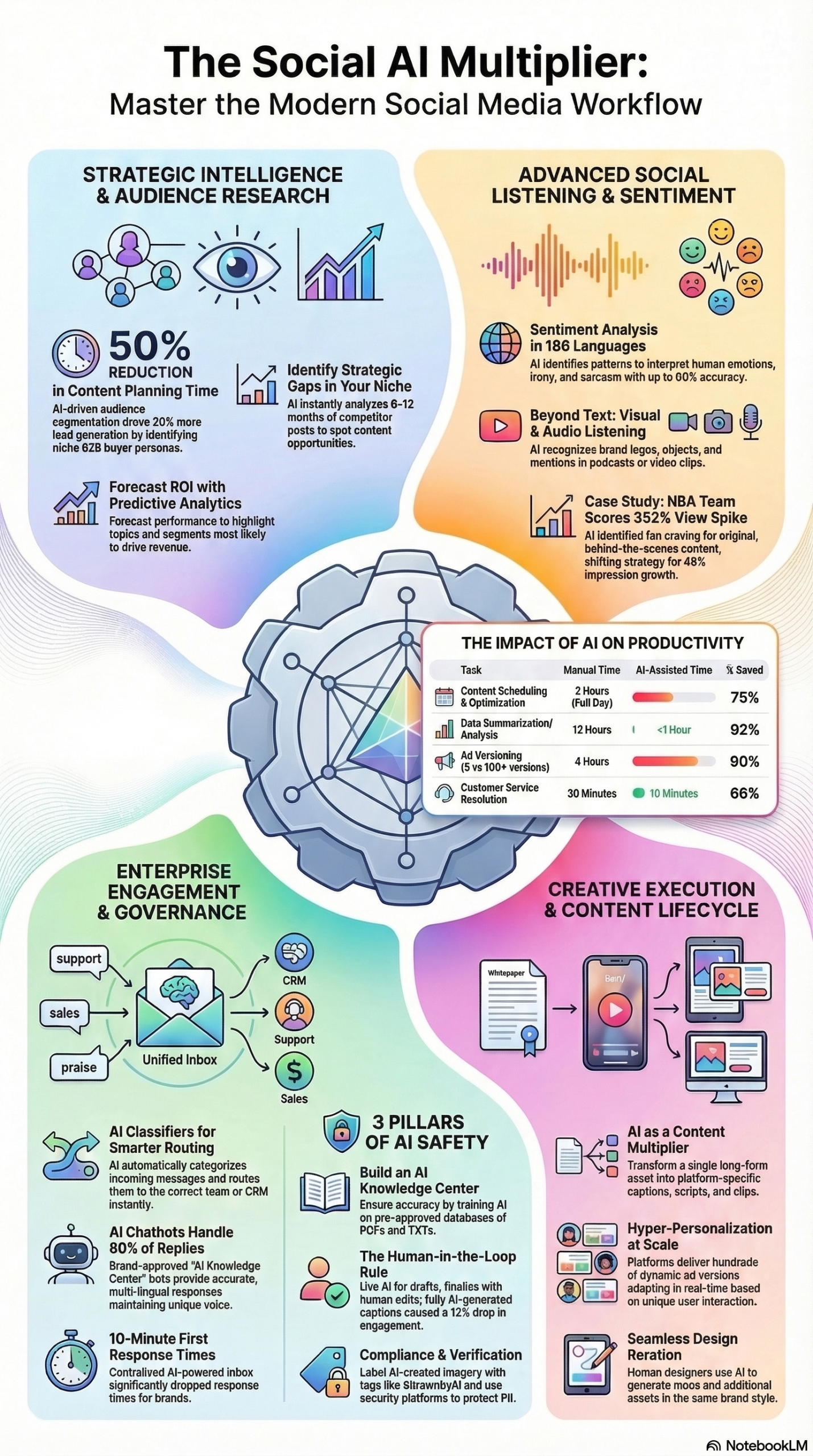
U-Haul’s documented result of under-10-minute response times cited in the research report is achievable because the triage work is eliminated — your team is not sorting; they are responding.
Phase 3: Deploy OwlyWriter AI for Content Production
OwlyWriter is Hootsuite’s native AI content tool. Use it as a first-draft engine, not a final publisher.
Step 1: Open the Publisher and click “OwlyWriter AI” from the content creation panel.
Step 2: Select your content type: Caption, Thread, Video Script, or Repurposed Content. For repurposed content — the highest-leverage use — paste in or upload a long-form asset (whitepaper excerpt, webinar transcript, blog post).
Step 3: Set your parameters:
– Platform (LinkedIn, Instagram, TikTok — each requires different tone and format)
– Target audience segment
– Content pillar (Educational, Promotional, Entertaining — follow the 80/20 rule: 80% non-promotional)
– Approximate length
Step 4: Generate 3-5 variations. The research report is explicit on this: iterate through several versions. The first output is rarely the best one.
Step 5: Apply human editing before scheduling. The 12% engagement drop documented by Exemplifi happened specifically when this step was skipped. Your human edit should focus on: brand voice consistency, specificity (AI tends toward generality), and emotional resonance.
Step 6: Use the Calendar Optimization feature to schedule based on your account’s historical performance data rather than generic best-practice timing. Your audience’s behavior patterns override industry averages.
For accessibility: Enable auto-generated alt text for every image post. This improves both social SEO (as Google increasingly indexes short-form social content) and accessibility compliance — a legal requirement for many enterprise brands.
Phase 4: Activate Talkwalker Social Listening
Talkwalker provides the intelligence layer that makes the rest of the platform strategic rather than reactive.
Step 1: Set up your core listening queries in Talkwalker:
– Your brand name + common misspellings
– Your product names
– Your top 3-5 competitors
– Your primary industry keywords
Step 2: Configure emotion detection (not just sentiment). The research report distinguishes between sentiment (overall attitude) and emotion (specific categories based on Parrott’s model). Set alerts for emotion spikes — sudden surges in anger or fear around your brand warrant immediate human review.
Step 3: Enable LLM Insights monitoring. This is the 2026 feature that tracks how your brand appears in responses from ChatGPT, Gemini, and Perplexity. Set up a weekly report to monitor your “share of voice” in the AI-first discovery economy. If a competitor is appearing in AI answers to queries where you should appear, that is a content gap to address.
Step 4: Set up Visual Listening to capture brand mentions in images, video, and audio — mentions that do not exist in text form. Product packaging appearing in a TikTok video without a caption mention is invisible to text-only listening tools.
Step 5: Create a weekly brand intelligence digest. Pull your top mentions, sentiment shifts, competitor activity, and LLM share of voice into a single document for your marketing leadership team. This replaces what used to be a quarterly research project with an always-current data feed.
Phase 5: Instrument Engagement Value Tracking
Vanity metrics (likes, follower counts) do not correlate with business outcomes. Engagement Value scoring gives you a business-impact number you can report to leadership.
Step 1: Define your interaction scoring system using the framework from the research report: +3 for purchase/referral follow-up, +2 for issue resolved, +2 for positive sentiment shift, +1 for fast response, -2 for negative or unresolved.
Step 2: Configure your analytics dashboard to tag interactions with their value score. Most of this can be automated via the AI Classifier tags you set up in Phase 2.
Step 3: Set a baseline Engagement Value Score (Total Points ÷ Number of Interactions) for your first 30 days. Every reporting period after that, compare against baseline.
Step 4: Use this score in executive reporting. A rising Engagement Value Score is a defensible business metric — it directly ties social activity to customer satisfaction, sales pipeline, and issue resolution.
Expected Outcomes After Full Deployment:
– Inbox response time reduction of 50-80% (based on U-Haul case documented in research report)
– AI chatbot resolution of up to 80% of routine inquiries without human involvement
– Content production speed increase through AI first-drafts with human finalization
– Real-time brand intelligence across text, image, video, audio, and AI assistant mentions
Real-World Use Cases
Use Case 1: Enterprise Retailer Managing Global Customer Service
Scenario: A retail brand with operations in 12 countries manages customer service across Instagram, TikTok, and Facebook in multiple languages. Response times are inconsistent across regions and teams.
Implementation: Deploy Inbox 2.0 with AI Classifiers routing by language and issue type. Build a Knowledge Center from the global FAQ document and regional policy variations. Configure Talkwalker’s 186-language sentiment detection to surface negative sentiment spikes by region.
Expected Outcome: Consistent response times under 10 minutes globally, with AI handling 80% of routine inquiries and human agents focused on escalations and high-value interactions. Based on the U-Haul benchmark documented in the research report, sub-10-minute response times are achievable once routing is centralized.
Use Case 2: B2B SaaS Company Running AI-Driven LinkedIn Campaigns
Scenario: A mid-market SaaS company wants to run hyper-personalized LinkedIn campaigns without expanding their paid social team.
Implementation: Use OwlyWriter to repurpose technical whitepapers into LinkedIn post sequences. Use Talkwalker’s niche gap analysis to identify competitor content gaps. Use Meta Advantage+ (via integration) to deploy hundreds of dynamic ad variations, as documented in the research report via Peter Lewis, CMO at Strategic Pete: “Instead of releasing five ad versions, we released hundreds, each of which changed based on the user’s history of interactions.”
Expected Outcome: Higher ad relevance scores, reduced cost-per-lead, and content production volume that would require a significantly larger team to produce manually.
Use Case 3: Marketing Agency Managing 20+ Client Accounts
Scenario: A digital agency handles social media for 20+ clients across diverse industries, each with distinct brand voices and approval workflows.
Implementation: Create separate Knowledge Centers per client. Use AI Classifiers to route client-specific inquiries to dedicated account managers. Use the content calendar and OwlyWriter to produce first drafts that are then reviewed and approved by client contacts before scheduling. Use Talkwalker to generate weekly client brand intelligence reports automatically.
Expected Outcome: Account managers can handle more clients per head without quality degradation. Automated first drafts reduce production hours. Client-specific Knowledge Centers ensure AI responses never bleed across accounts.
Use Case 4: Financial Services Brand Navigating Compliance and Engagement
Scenario: A financial services firm needs to maintain active social engagement while ensuring every response is compliant with regulatory requirements.
Implementation: Build a Knowledge Center containing only compliance-approved messaging. Require human final approval for every AI-drafted response. Use AI Classifiers to flag any incoming message that contains terms triggering compliance review (specific product names, return guarantees, investment language) before a human ever sees the draft.
Expected Outcome: Active, responsive social presence without compliance risk. The human-final-approval architecture specifically addresses the risk documented by Ashwin Thapliyal at Exemplifi — the 12% engagement drop from fully automated responses in sensitive industries. With human review as the mandatory final step, engagement quality is preserved and compliance is enforced.
Use Case 5: Consumer Brand Targeting Generational Segments
Scenario: A consumer packaged goods brand needs to run distinct content strategies for Gen Alpha, Gen Z/Millennials, and Gen X audiences simultaneously across TikTok, Instagram, and Facebook.
Implementation: Use Talkwalker’s audience segmentation and Hootsuite’s scheduling to run platform-specific strategies informed by the generational trends documented in the research report: absurdist/chaos content for Gen Alpha on TikTok; cozy/calming and “human-made” authentic content for Millennials and Gen Z; nostalgia-anchored content for Gen X (the highest-spending demographic). Schedule micro-drama series content — a format projected to generate $7.8 billion in 2026 — as the platform-native long-form play.
Expected Outcome: Higher engagement rates per platform by serving content formats that align with documented generational preferences, rather than one-size-fits-all publishing.
Common Pitfalls
Pitfall 1: Deploying AI Replies Before Building the Knowledge Center
What goes wrong: AI-generated responses pull from the open internet, producing off-brand, inaccurate, or legally dangerous replies.
Why it happens: Teams rush to deploy the visible AI features (Smart Replies, chatbots) without completing the foundational Knowledge Center setup first.
How to avoid it: Build and test the Knowledge Center completely before enabling any AI reply functionality. Three test questions minimum. Quarterly document reviews to keep it current.
Pitfall 2: Removing Humans from the Final Approval Step
What goes wrong: Engagement rates drop and brand voice erodes. Ashwin Thapliyal at Exemplifi documented a 12% engagement drop from fully AI-generated captions in financial services — precisely because nuance, emotional resonance, and brand authenticity require human judgment.
Why it happens: Teams over-optimize for speed and underestimate the quality difference between AI-first-draft and AI-final-output.
How to avoid it: Make “human final say” a policy, not a suggestion. Build it into your Hootsuite approval workflow as a required step, not an optional review.
Pitfall 3: Measuring Engagement Volume Instead of Engagement Value
What goes wrong: High-volume, low-quality interactions inflate vanity metrics while masking real customer dissatisfaction or missed sales opportunities.
Why it happens: Likes and follower counts are easy to report. Engagement Value requires configuration.
How to avoid it: Set up the Engagement Value scoring system from Phase 5 of this tutorial in your first 30 days. Use it as your primary engagement KPI in every executive report.
Pitfall 4: Ignoring LLM Share of Voice in Listening Setup
What goes wrong: Your brand remains invisible in AI-generated discovery responses while competitors appear in answers to queries where your product is the correct solution.
Why it happens: Most teams configure social listening for traditional platform mentions and neglect the AI assistant monitoring capability Talkwalker now provides.
How to avoid it: Make LLM Insights monitoring part of your standard Talkwalker setup. Review weekly. When gaps appear, treat them as SEO-style content problems to solve.
Pitfall 5: Skipping the Content Mix Discipline
What goes wrong: Audiences disengage because promotional content overwhelms educational and entertaining posts.
Why it happens: AI makes it easy to produce promotional content at scale. Without intentional ratios, teams default to what is easiest to generate — product and service posts.
How to avoid it: Enforce the 80/20 rule documented in the research report: 80% of posts educate, entertain, or inform; 20% directly promote. Configure OwlyWriter’s default settings and calendar categories to reinforce this ratio at the production stage.
Expert Tips
Tip 1: Use Prompt Engineering as a Core Team Skill
The quality of OwlyWriter output is directly proportional to prompt quality. Train your team to write specific prompts with context, target audience, desired tone, and examples. A prompt that says “write a LinkedIn post about our new feature” will produce generic output. A prompt that specifies platform, audience seniority, content pillar, competitive differentiator, and desired CTA will produce something close to publish-ready. Per the research report, iterating through several prompt versions is standard practice, not a workaround.
Tip 2: Set Up AI Classifier Tuning Sessions Weekly for the First Month
AI classifiers improve with feedback. Block 30 minutes weekly in your first month to review classifier outputs, identify misrouted messages, and refine trigger signals. Teams that do this consistently reach reliable accuracy within 3-4 weeks. Teams that skip it live with noisy inboxes for months.
Tip 3: Build Generational Content Templates by Platform
The 2026 trend data in the research report documents clear generational content preferences: chaos/absurdist for Gen Alpha; cozy/calming and human-imperfect for Millennials and Gen Z; 1970s/80s nostalgia for Gen X. Build platform-specific OwlyWriter templates for each segment. This gives your team guardrails that enforce audience alignment without requiring a creative brief on every post.
Tip 4: Treat Micro-Drama Series as Your LinkedIn and TikTok Long Game
Social-first series content is projected to generate $7.8 billion in 2026. Brands producing 3-6 episode micro-dramas on TikTok and LinkedIn are building audiences that single-post publishing cannot. Use Hootsuite’s content calendar to plan and schedule episode arcs. Use OwlyWriter to generate episodic scripts from long-form assets.
Tip 5: Optimize for Multimodal Social Search
Google is indexing short-form social video and Instagram content as of 2026, per the research report. Every post should have: accurate auto-generated alt text enabled, relevant keywords in captions (written for the platform, not just for search), and visual content that can be understood without the caption. The brands appearing in search results for social content are the ones who treated SEO discipline as a social media practice, not just a website practice.
FAQ
Q1: What makes Hootsuite’s G2 #1 ranking different from other “best software” awards?
G2’s rankings are based exclusively on verified customer reviews and real performance data — no paid placements, no analyst opinions. As Alex London, G2’s CMO, stated: buyers in the 2026 answer economy need proof they can trust, and G2’s methodology is designed to provide exactly that. The 2026 ranking reflects the actual experience of enterprise customers using the platform at scale, which is what makes it a meaningful practitioner signal rather than a marketing claim.
Q2: Do I need Hootsuite Enterprise to use the AI features covered in this tutorial?
The AI features described here — Inbox 2.0, AI Classifiers, Knowledge Centers, and Talkwalker integration — are Enterprise plan features. OwlyWriter AI and basic social listening are available on lower tiers. If you are evaluating plans, the ROI case for Enterprise is built on the customer service automation (up to 80% inquiry resolution without headcount) and the response time improvements documented for cases like U-Haul in the research report.
Q3: How do I prevent Hootsuite’s AI from producing off-brand or inaccurate replies?
Three mechanisms working together: (1) Build a comprehensive Knowledge Center with brand-approved documents before enabling any AI reply feature. (2) Enable human final approval as a required workflow step — never optional. (3) Set AI Classifiers to route sensitive message types (compliance topics, escalations, PR-relevant mentions) to human review before any reply is drafted. The Exemplifi case cited in the research report — a 12% engagement drop from fully automated captions — is the documented risk of skipping any one of these three mechanisms.
Q4: How does Talkwalker’s emotion detection differ from standard sentiment analysis?
Standard sentiment analysis returns a positive/neutral/negative classification. Talkwalker distinguishes between sentiment (overall contextual attitude) and emotion (specific categories based on Parrott’s emotional structure). This distinction matters for crisis detection: a post can be contextually negative (complaint) while carrying an emotion signal of “fear” versus “anger” — each requiring a different response strategy. The platform achieves up to 90% accuracy across 186 languages, including detection of sarcasm and irony, which standard sentiment tools consistently misclassify.
Q5: What is LLM Share of Voice and why does it matter for my brand?
LLM Share of Voice is the measure of how frequently and favorably your brand appears in responses from AI assistants — ChatGPT, Gemini, Perplexity — when users ask questions relevant to your product category. As the research report documents, AI-first software discovery is accelerating purchase decisions in 2026. If your brand does not appear in AI-generated answers to category queries, you are effectively invisible to a growing segment of buyers who no longer start their research with a search engine. Talkwalker’s LLM Insights feature monitors this and surfaces gaps you can address through targeted content production.
Bottom Line
Hootsuite earning the G2 2026 #1 Best Software Product ranking through verified customer reviews — not paid placement or analyst opinion — reflects a platform that enterprise teams have stress-tested at scale and found reliable. The AI features that drove that result are not theoretical: they resolve up to 80% of customer service inquiries automatically, cut inbox response times to under 10 minutes, and enable content production at a volume and personalization depth that manual teams cannot match. The critical operating principle, documented consistently across the research, is that AI functions as a multiplier when paired with human judgment — and breaks down when used as a replacement. Build your Knowledge Center first, enforce human final approval, instrument Engagement Value scoring from day one, and treat LLM Share of Voice monitoring as the new SEO frontier. The teams that operationalize these five practices in 2026 will have a measurable structural advantage over those still treating AI as a feature to try rather than a workflow to deploy.


0 Comments