

Eight-five percent of marketers have now integrated AI into their daily workflows, according to the AI-Powered Content Creation: Strategic Briefing 2025-2026 compiled from cross-industry research — and the primary reason isn’t hype, it’s burnout prevention. In this tutorial you’ll get a hands-on breakdown of how to select, configure, and chain the right AI content tools for your specific workflow, whether you’re a solo creator, a five-person agency, or an enterprise content team.
What This Is
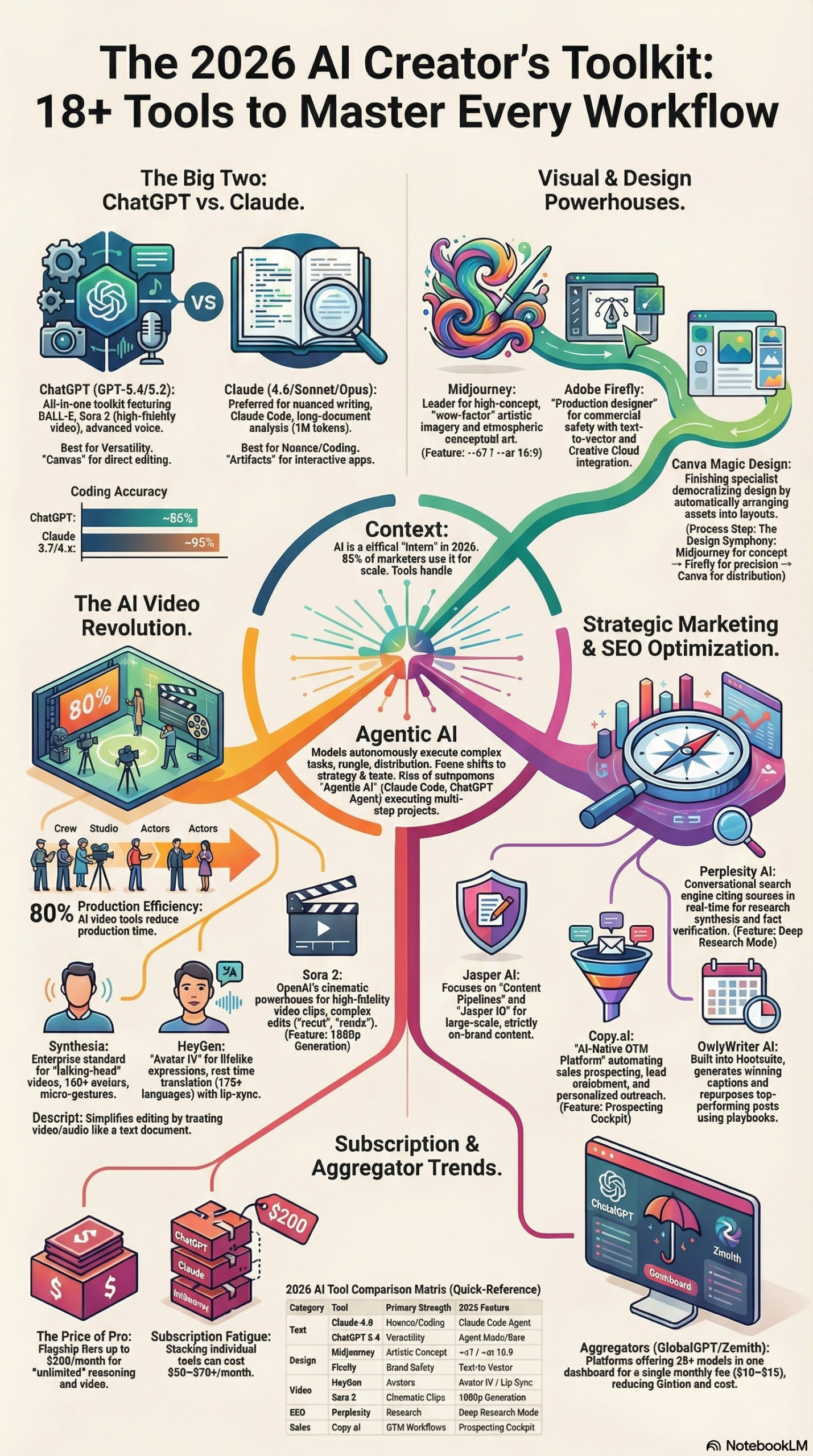
The phrase “AI content creation tools” has expanded well beyond text generators. As of 2026, the category spans at least six distinct functional layers: long-form writing, social copy, image generation, video generation, audio and video editing, and Go-To-Market (GTM) sales automation. Each layer now has purpose-built tools that outperform general-purpose models on their specific task — which means the most effective practitioners are building stacks, not relying on a single subscription.
Hootsuite’s review of 18 AI-powered content creation tools published March 24, 2026, provides a useful map of the current market. The report identifies a clear bifurcation: general-purpose flagship models like ChatGPT (now at GPT-5.4) and Claude (3.7/4.6), and specialized workflow tools like Descript for text-based video editing and Synthesia for multilingual avatar video.
Here’s how the major categories break down:
Text Generation & Long-Form Writing
ChatGPT and Claude dominate this layer. ChatGPT’s multimodal features — image, video, and voice — make it a strong all-in-one starting point. Claude differentiates on context window: the web interface handles up to 200,000 tokens, and the API supports up to 1 million tokens, making it the preferred tool for analyzing long documents like research reports, legal contracts, or entire product catalogs, according to the research briefing.
Social Media Copy
Hootsuite’s own OwlyWriter AI uses specialized formulas built specifically for social captions — not generic prompts, but templates trained on social engagement patterns. Canva Magic Design takes a different approach, suggesting full layout and copy based on uploaded brand assets.
Image Generation
Two tools dominate based on use case. Midjourney leads on artistic and conceptual generation — it’s the tool designers use for mood boarding and campaign concepts. Adobe Firefly serves enterprise teams that need commercially safe, licensed outputs. Firefly’s images are trained on licensed Adobe Stock content, which removes the copyright liability risk present with other generators, per the research briefing.
Video Generation
Sora 2 and Google Veo 3.1 are now generating cinematic 1080p and 4K footage from text prompts. Synthesia and HeyGen occupy a different niche: realistic digital avatars for training content and localized marketing in 140+ languages. These are not interchangeable — cinematic generation and avatar video serve entirely different content types.
Video & Audio Editing
Descript is the standout here. It converts your video into a text transcript, then lets you edit the video by editing the text — delete a sentence in the transcript and the corresponding footage disappears. This approach reportedly reduces production time by 80%, per the research briefing. OneStream Live handles distribution: multistreaming to multiple platforms simultaneously and 24/7 content looping.
GTM & Sales Automation
Copy.ai has moved beyond content writing into full Go-To-Market workflow automation — lead enrichment, prospecting dashboards, and personalized outreach sequencing. This is purpose-built for sales teams, not content marketers.
SEO & Long-Form
Writesonic and Neotype AI focus on SERP-optimized article generation and AI Search optimization — targeting not just Google rankings but the emerging answer-engine landscape where tools like Perplexity and ChatGPT surface content.
Understanding which layer you’re working in before picking a tool is the single most important step most practitioners skip.
Why It Matters
The research briefing puts the adoption pressure plainly: 62% of digital creators report creator burnout, and AI’s primary value proposition is offloading “tedious, time-consuming tasks” to what experts describe as an AI “intern” — so that human professionals can focus on strategy, authenticity, and what the briefing calls “texture.”
“Texture” is the operative concept here. Chelse Hensley, Social Media Strategist at Visme, described the problem precisely: “I use AI to help me batch tweets from my company’s blog articles… having AI to help draft and repurpose content is crucial.” The task she’s describing — reformatting an existing article into social copy — is pure mechanical work. It doesn’t require judgment, brand relationships, or creative vision. That’s exactly where AI earns its subscription cost.
What AI still cannot replicate, per the research briefing, is the “texture” layer: personal anecdotes, controversial takes, emotional depth, and the instinct to know when a piece of content is actually ready to publish. That remains the human’s job.
For solo creators and small teams, the math is straightforward. An AI tool that saves two hours per day at a $50 hourly rate pays for itself in the first week of a monthly subscription. The more important unlock is cognitive: creators who aren’t exhausted by formatting, reformatting, and distribution logistics produce better strategic work.
For enterprise marketing teams, the value shifts to consistency. Emily K. Schwartz, Head of Content at Haus, explained it this way in the research briefing: “By feeding an AI tool our style guide, voice, tone, and verbiage… AI makes it easy for our brand voice to come through clearly and consistently, no matter the writer, context, or medium.” When you have contractors across multiple regions producing content, AI becomes a brand consistency enforcement mechanism, not just a productivity tool.
For agencies, the ROI is in throughput. The same team that produces 10 pieces of content per month can produce 40-60 with an AI-assisted workflow — without hiring. That changes how you scope and price retainers.
The 2026 market is also dealing with a subscription fatigue problem, per the research briefing. ChatGPT alone now ranges from a free tier (limited to 10 messages every 5 hours) to a $200/month Pro tier. Stack four or five individual AI subscriptions and you’re looking at $300-$500/month before any specialized tools. This is driving adoption of aggregator platforms that bundle 100+ models into a single dashboard.
The Data
Top AI Content Creation Tools: Feature and Use Case Matrix
| Tool | Primary Strength | Best For | Key Differentiator |
|---|---|---|---|
| ChatGPT (GPT-5.4) | Versatility, multimodal (image, video, voice) | All-in-one workflows; quick copy | Broadest integration ecosystem |
| Claude (3.7/4.6) | Long-doc analysis, nuanced writing, coding | Researchers; developers; long-form | 200K–1M token context window |
| Jasper (Jasper IQ) | Enterprise brand voice automation | Marketing teams; brand consistency | Uploads style guides + forbidden terms |
| Copy.ai | GTM and sales workflow automation | Sales teams; prospecting; enrichment | Lead enrichment + outreach sequencing |
| Midjourney | Artistic/conceptual image generation | Designers; mood boards; campaigns | Highest artistic quality |
| Adobe Firefly | Commercially licensed image generation | Enterprise designers; brand assets | Copyright-safe, licensed training data |
| Descript | Text-based audio/video editing | Podcasters; video creators | Edit video by editing transcript |
| Canva | AI-integrated design + resizing | Social media content; rapid formats | Auto-resize for every platform |
| Synthesia | Digital avatars, 140+ languages | Corporate training; localized demos | Multilingual avatar video at scale |
| Writesonic | SEO article generation + SERP analysis | Content marketers; SEO specialists | SERP-brief integration |
| Neotype AI | AI Search optimization | SEO specialists; bloggers | Targets answer-engine surfaces |
| OwlyWriter AI | Social-specific caption formulas | Social media managers | Social-optimized generation formulas |
| GlobalGPT / Zemith | Multi-model aggregator | Budget-conscious power users | 100+ models, ~$10-15/month |
| OneStream Live | Multistreaming + distribution | Live streamers; video distributors | 24/7 loop + simultaneous platform push |
| HeyGen | Avatar video + localization | Sales enablement; product demos | High-realism avatar generation |
Source: AI-Powered Content Creation: Strategic Briefing 2025-2026; Hootsuite AI Content Tools Review
Pricing Overview: Selected AI Content Tools (2026)
| Tool | Free Tier | Entry Paid | Pro/Enterprise |
|---|---|---|---|
| ChatGPT | Yes (10 messages/5 hrs) | ~$20/month | $200/month (Pro) |
| Claude | Yes (limited) | ~$20/month | API usage-based |
| Canva | Yes | ~$15/month | Custom enterprise |
| Descript | Yes (limited) | ~$24/month | Custom |
| Synthesia | No | ~$29/month | Custom |
| GlobalGPT / Zemith | Limited | ~$10-15/month | ~$15-20/month |
Source: research briefing. Prices are approximate and subject to change.
Step-by-Step Tutorial: Build a Full AI Content Creation Workflow
This tutorial walks you through building a repeatable, AI-assisted content workflow from research to distribution. The workflow is designed for a content marketer producing blog posts, social content, and short-form video — but the phases apply to other content types with minor adjustments.
Prerequisites
- Access to at least one long-form writing tool (Claude or ChatGPT recommended)
- A social media scheduling tool with AI integration (Hootsuite with OwlyWriter AI, or Buffer)
- A design tool (Canva at minimum)
- Optional but high-value: Descript for video, Writesonic for SEO briefs
- Your brand’s style guide in a text-accessible format (Google Doc, Notion page, or PDF)
- A defined content brief: target keyword, audience persona, desired action
Phase 1: Lock Your Brand Voice Before You Write Anything
This is the step most practitioners skip, and it’s why their AI outputs sound generic. Before you prompt a single word of content, you need to feed the AI your brand’s voice parameters.
Step 1: Create a Brand Voice Document.
Open a text file or Google Doc. Write out the following in plain language:
– Tone descriptors (e.g., “confident but not arrogant, technical but accessible”)
– Audience description (e.g., “mid-level marketing managers at B2B SaaS companies”)
– Forbidden phrases and terms (e.g., “synergy,” “thought leader,” “game-changing”)
– 2-3 examples of content you consider “perfect” — paste the full text
– Preferred formatting conventions (bullet points vs. prose, H2 vs. H3 structure, etc.)
Step 2: Upload or Paste Into Your AI Tool.
For tools like Jasper, navigate to the Brand Voice settings and upload the document. For Claude or ChatGPT, paste the entire brand voice document at the start of your first message in any new conversation and instruct: “This is our brand voice guide. Apply it to all outputs in this conversation.”
Emily K. Schwartz at Haus confirmed this approach in the research briefing: feeding the AI your style guide, voice, tone, and verbiage ensures brand consistency “no matter the writer, context, or medium.”
Step 3: Test Before You Scale.
Ask the AI to write one short paragraph on a topic you know well. Read it critically. Does it sound like your brand? Are any forbidden phrases present? Does it match your audience’s sophistication level? Fix the brand voice document and re-test before you start producing real content.
Phase 2: Research and Outline Using the Skeleton Method
Step 4: Run Your Research Pass.
Use Claude (preferred for long-document analysis, per the research briefing) or ChatGPT to synthesize research. Paste in the source articles, research reports, or competitor content you’ve gathered and ask for a research summary with key claims, data points, and gaps.
For SEO content, run Writesonic’s SERP brief tool first. Enter your target keyword, and the tool returns the top-ranking articles’ structure, word count, headings, and key topics. This tells you the minimum content depth needed to compete.
Step 5: Generate the Skeleton Outline.
The research briefing explicitly recommends the “Skeleton Method”: use AI to generate a structured outline based on your dictated thoughts, ensuring the final output retains a unique human perspective.
Prompt example:
Here is my research summary and key points I want to make:
[paste your notes]

Generate a 10-section article outline targeting this keyword: [keyword]
For each section, include: suggested heading, 2-3 bullet points of what to cover, and estimated word count.
Apply our brand voice guide.
Review the outline before writing. Add or remove sections. Reorder for logical flow. This is your editorial judgment step — don’t skip it.
Phase 3: Draft the Content
Step 6: Write Section by Section, Not All at Once.
Generate each section individually rather than asking for a full article in one prompt. This gives you control over quality at each stage and avoids the “long output drift” problem where AI starts strong and gets generic by paragraph 15.
For each section, use the prompt structure:
Write Section 3 of our article: [section title]
The section should cover: [bullet points from skeleton]
Target word count: [X words]
Tone: [reference brand voice]
Cite this source where relevant: [paste source text]
Step 7: Inject Your “Texture.”
After each section is drafted, add what the research briefing calls “texture” — personal anecdotes, a counterintuitive claim you’ve verified, a quote from someone you’ve actually spoken to, or a real example from your own experience. This is what separates content that ranks and converts from content that reads like a template.
Tracy Rawlinson, freelance writer, noted in the research briefing: “AI is great for getting started, but knowing its limitations will help make sure your relevant content is current and well-rounded.” The AI won’t know about last week’s product update, the conference you attended, or the customer case you closed. You do.
Phase 4: Generate Social and Visual Assets
Step 8: Repurpose Into Social Copy.
Once your long-form content is drafted, use OwlyWriter AI (in Hootsuite) or paste sections into ChatGPT/Claude with a social adaptation prompt:
Convert the following section into:
- 3 LinkedIn posts (professional, data-forward, 150-200 words each)
- 5 Twitter/X posts (under 280 characters, hook-first)
- 1 Instagram caption (conversational, 100 words, 5 relevant hashtags)

Apply brand voice. Do not repeat the same hook across formats.
Step 9: Create Visual Assets.
For branded graphics, open Canva and use the AI layout suggestion feature — upload your main image or brand colors, and let Canva propose size-appropriate templates for each platform. Use Magic Resize to immediately generate all size variants (1:1, 9:16, 16:9) from the same design.
For campaign-quality imagery, use Midjourney for conceptual/artistic visuals or Adobe Firefly if your brand requires commercially licensed, copyright-safe images.
Phase 5: Video Editing and Distribution
Step 10: Edit Video With Descript.
If your content includes a recorded video or podcast, import it into Descript. The tool auto-generates a transcript, then lets you edit the video by editing the text. Delete filler words, cut rambling sections, and tighten pacing — all without touching a timeline. Use the automated silence removal feature to eliminate dead air instantly. According to the research briefing, this approach reduces production time by a reported 80%.
Step 11: Distribute Via Automation.
Don’t publish manually to one platform and call it done. Use OneStream Live or a similar multistreaming tool to push to YouTube, LinkedIn, Facebook, and TikTok simultaneously. Schedule your repurposed social copy in Hootsuite across time zones. Set evergreen content to loop.
Expected Outcomes
A practitioner following this five-phase workflow can expect:
– First draft completion time reduced from 4-6 hours to 1-2 hours for a 2,000-word article
– Social copy generation reduced from 45 minutes to 10-15 minutes per piece
– Video editing time cut by approximately 80% for transcript-editable content
– Consistent brand voice across all formats and contributors
– A repeatable, documented process that can be delegated or handed off
Real-World Use Cases
Use Case 1: The Solo B2B Content Marketer
Scenario: A single-person content team at a 50-person B2B SaaS company. Responsible for blog, LinkedIn, newsletter, and occasional video. No budget for agency support.
Implementation: Use Claude for long-form drafts (the large context window allows analyzing competitive content and company documentation in one session). Use Canva for all visual production. Schedule LinkedIn posts and monitor with Hootsuite + OwlyWriter AI. No video budget, so Descript handles any recorded webinar clips.
Expected Outcome: Output scales from 4 blog posts/month to 8-10, with social content increasing proportionally. The practitioner reports back to leadership on traffic metrics without the previous burnout-driven quality dips.
Use Case 2: The Enterprise Marketing Team Requiring Brand Compliance
Scenario: A 12-person global marketing team producing content across North America, EMEA, and APAC with multiple contractors. Brand consistency is a repeated audit failure.
Implementation: Implement Jasper with Jasper IQ. Upload the full brand style guide, regional tone guidelines, and a dictionary of forbidden terms. All contractors produce first drafts in Jasper before submitting. Regional editors review for local nuance, then publish.
Expected Outcome: Brand audit failures drop significantly. Onboarding time for new contractors is cut because the brand voice is now encoded in the tool, not dependent on a human trainer. Emily K. Schwartz’s experience at Haus, described in the research briefing, validates this approach at the organizational level.
Use Case 3: The Sales Team Using AI for GTM Automation
Scenario: A 20-person SaaS sales team with a manual prospecting process. SDRs spend 2+ hours per day on research and email personalization.
Implementation: Deploy Copy.ai’s GTM workflows. Connect to the CRM for lead data. Use Copy.ai’s prospecting “cockpit” to pull company data, recent news triggers, and job change signals, then auto-generate personalized outreach sequences. SDRs review and approve before sending.
Expected Outcome: Prospecting research time drops from 2 hours to 20 minutes per day per SDR. Email personalization at scale becomes possible without a copywriting team.
Use Case 4: The Video Creator Scaling Multilingual Content
Scenario: A product educator at a global software company needs training videos in 12 languages. Budget prohibits hiring 12 voice actors and on-camera talent.
Implementation: Record the English master version. Use Synthesia to generate AI avatar versions in each target language — Synthesia supports 140+ languages, per the research briefing. Use OneStream Live to distribute to regional YouTube channels and internal LMS platforms simultaneously.
Expected Outcome: 12-language training library produced at roughly 20% of the cost of traditional localized video production. Update cycles are faster — when the English master changes, re-generate only the affected avatar clips rather than reshooting the full video.
Use Case 5: The Budget-Constrained Creator Avoiding Subscription Fatigue
Scenario: A freelance content strategist who needs access to GPT-5.4, Claude, and Midjourney but can’t justify $60-$80/month in individual subscriptions on top of existing tools.
Implementation: Subscribe to GlobalGPT or Zemith — aggregator platforms that provide access to 100+ models for approximately $10-$15/month, per the research briefing. Use the aggregator dashboard to switch between models by task: Claude for long-form analysis, GPT for quick copy, Midjourney for image generation — all from one interface.
Expected Outcome: Full access to flagship models at roughly one-third the cost of individual subscriptions, with the added workflow efficiency of a unified dashboard.
Common Pitfalls
Pitfall 1: Skipping the Brand Voice Setup
Most practitioners dive directly into content generation and then spend time manually editing generic outputs back to their brand voice. This approach scales nothing — you’re just using AI as a faster word processor. Fix: Complete Phase 1 (brand voice locking) before generating any real content. The 30 minutes invested here saves hours across every future piece.
Pitfall 2: Relying on AI for Current Research
Freelance writer Tracy Rawlinson specifically warned in the research briefing that AI lacks access to the latest trends, demographics, and industry-specific case studies. If you’re writing about a topic where last month’s data matters (pricing, product updates, market shifts), you must verify AI-generated research claims independently. An AI hallucination in a published stat kills credibility with technical readers.
Pitfall 3: Using Digital Avatars for the Wrong Content
The research briefing flags what it calls the “authenticity gap” — AI avatars (Synthesia, HeyGen) are highly effective for high-volume informational and training content, but actively damage trust in emotional or personal content. Don’t use an avatar to announce a leadership change, apologize for a service outage, or deliver a keynote message. Use them for product tutorials, FAQ videos, and onboarding modules.
Pitfall 4: Publishing Without an EEAT Review
Google’s EEAT framework (Experience, Expertise, Authoritativeness, Trustworthiness) increasingly governs search ranking for AI-generated content. The research briefing recommends a mandatory human review checkpoint before publishing — specifically to verify that the content demonstrates real experience and includes current, verifiable sources. Don’t auto-publish AI outputs without a human reading pass.
Pitfall 5: Treating Aggregators as a Full Replacement for Direct API Access
Aggregators like GlobalGPT and Zemith are excellent for standard content workflows, but if you’re building programmatic pipelines — automated content generation at scale, custom integrations, or fine-tuned model access — you’ll need direct API access to Claude or GPT. Aggregators impose their own rate limits and don’t expose all API parameters. Budget for both if you’re running production systems.
Expert Tips
Tip 1: Use Multi-Turn Conversations as Context Accumulators.
Rather than starting a new chat for every content piece, build up context in a single long-running conversation. Paste in your brand guide, research, previous examples, and audience notes once — then treat subsequent prompts as if you’re briefing a well-informed team member who already knows your brand. Claude’s 200K token window makes this especially practical for long research-heavy projects.
Tip 2: Prompt for Disagreement.
After generating an outline or draft, add: “What are the three strongest counterarguments to this piece? What evidence would a skeptical expert cite to challenge these claims?” This surfaces gaps before your editor or audience does. The research briefing notes that the creators who win are those who build systems — and a built-in red-team step is part of that system.
Tip 3: Build a Prompt Library, Not Just Outputs.
Every time you develop a prompt that produces consistently excellent results, save it to a central prompt library (Notion, Airtable, or a simple Google Sheet). Document: the context where it works, what it doesn’t work for, and any required inputs. This library becomes a team asset that scales your methodology, not just your individual output.
Tip 4: Layer Tools for Image Quality.
For marketing visuals that need to be both creative and on-brand, run a two-step process: generate the creative concept in Midjourney, then bring the image into Adobe Firefly or Canva for brand color application, logo placement, and typography. Don’t force one tool to do everything — use each where it wins.
Tip 5: Audit Your Stack Quarterly.
The AI tool market in 2026 is moving fast. Pricing tiers change, new features arrive, and the tool you’re paying $30/month for may now be matched by a native feature in your CRM or CMS for free. Set a quarterly calendar reminder to review each subscription against current alternatives. The research briefing notes subscription fatigue is real — a quarterly audit prevents you from accumulating redundant tools without noticing.
FAQ
Q: Do I need to disclose that my content was AI-assisted?
A: Disclosure norms vary by platform and context. LinkedIn, Google, and most editorial standards don’t currently require disclosure for AI-assisted (rather than fully AI-generated) content. However, in regulated industries (financial advice, medical content, legal analysis), you should follow your industry’s specific disclosure rules. The practitioner consensus per the research briefing is that AI is a drafting tool — the same way a ghostwriter or research assistant is — and the human editor/publisher takes responsibility for the final output.
Q: Will AI-generated content hurt my SEO rankings?
A: Google’s official stance targets unhelpful content, not AI content specifically. The research briefing emphasizes the importance of EEAT (Experience, Expertise, Authoritativeness, Trustworthiness) review before publishing. Content that demonstrates genuine expertise, is factually accurate, and provides real value to the reader is treated the same regardless of its production method. Thin, undifferentiated AI content will underperform — the same as it would if written by a human.
Q: Which tool is best for someone just starting with AI content creation?
A: Start with either ChatGPT (GPT-5.4) for its breadth and integrations, or Claude for long-form and document-heavy work. Both have free tiers. Get one tool working well before adding a second. The research briefing documents a clear pattern: practitioners who try to learn five tools simultaneously adopt none of them effectively.
Q: How do I prevent AI from “hallucinating” facts in my content?
A: The most reliable approach is to provide the AI with the source material rather than asking it to recall facts from training data. Paste in your research, your data, your reports. Ask the AI to synthesize and structure what you’ve given it, not to generate new claims. Then run a human fact-check on any statistics or quotes before publishing. As Tracy Rawlinson noted in the research briefing, knowing AI’s limitations is what makes your content accurate.
Q: Is it worth paying for a multi-model aggregator vs. individual subscriptions?
A: For practitioners who use 3+ models regularly, the math typically favors aggregators. GlobalGPT and Zemith offer access to 100+ models including GPT-5.2, Claude 4.5, and Midjourney for approximately $10-$15/month, per the research briefing — significantly less than the combined cost of individual subscriptions. The tradeoff is that aggregators may lag behind direct access for cutting-edge features and don’t provide API access for programmatic workflows. Use aggregators for manual content work; use direct APIs for production systems.
Bottom Line
The AI content creation market in 2026 is not a single tool story — it’s a stack story. The practitioners getting the most value are those who have mapped their workflow to specific functional layers and assigned the right tool to each layer, from brand voice setup through to automated distribution. The research briefing makes clear that the human job hasn’t disappeared; it’s shifted upstream to strategy, brand voice definition, editorial judgment, and the “texture” that makes content genuinely useful rather than generically adequate. The subscription fatigue problem is real, but solvable through aggregators for multi-model access at a fraction of individual subscription costs. Build the workflow, lock the brand voice, and treat AI as a capable intern — one that needs clear briefs, source material, and a human final read before anything goes live.


0 Comments