

YouTube’s new Gemini-powered Creator Partnerships platform doesn’t just rename BrandConnect — it fundamentally re-architects how brands find, evaluate, and activate creators at scale. Under the hood, a Large Recommender Model (LRM) trained on billions of behavioral signals now surfaces creator recommendations the same way YouTube surfaces videos: through semantic understanding, not keyword matching. This guide breaks down exactly how the system works, how to access it, and how to get measurable results from it as either a brand or a creator.
What This Is
YouTube Creator Partnerships is the evolution of YouTube’s existing BrandConnect tool, now fully integrated into Google Ads and YouTube Studio with Gemini AI powering the core matching engine. The rebrand isn’t cosmetic. The underlying technology — documented in YouTube’s PLUM framework research — represents a genuine architectural shift in how the platform understands both content and creator audiences.
At the creator-matching layer, Gemini analyzes billions of data points to identify the strongest brand-creator fit. This isn’t a glorified search bar. The system evaluates audience composition similarity between a brand’s existing customer base and a creator’s viewer demographics, historical organic brand mentions within creator content, conversion signals from past sponsored integrations, and long-tail audience overlap that traditional demographic targeting misses entirely.
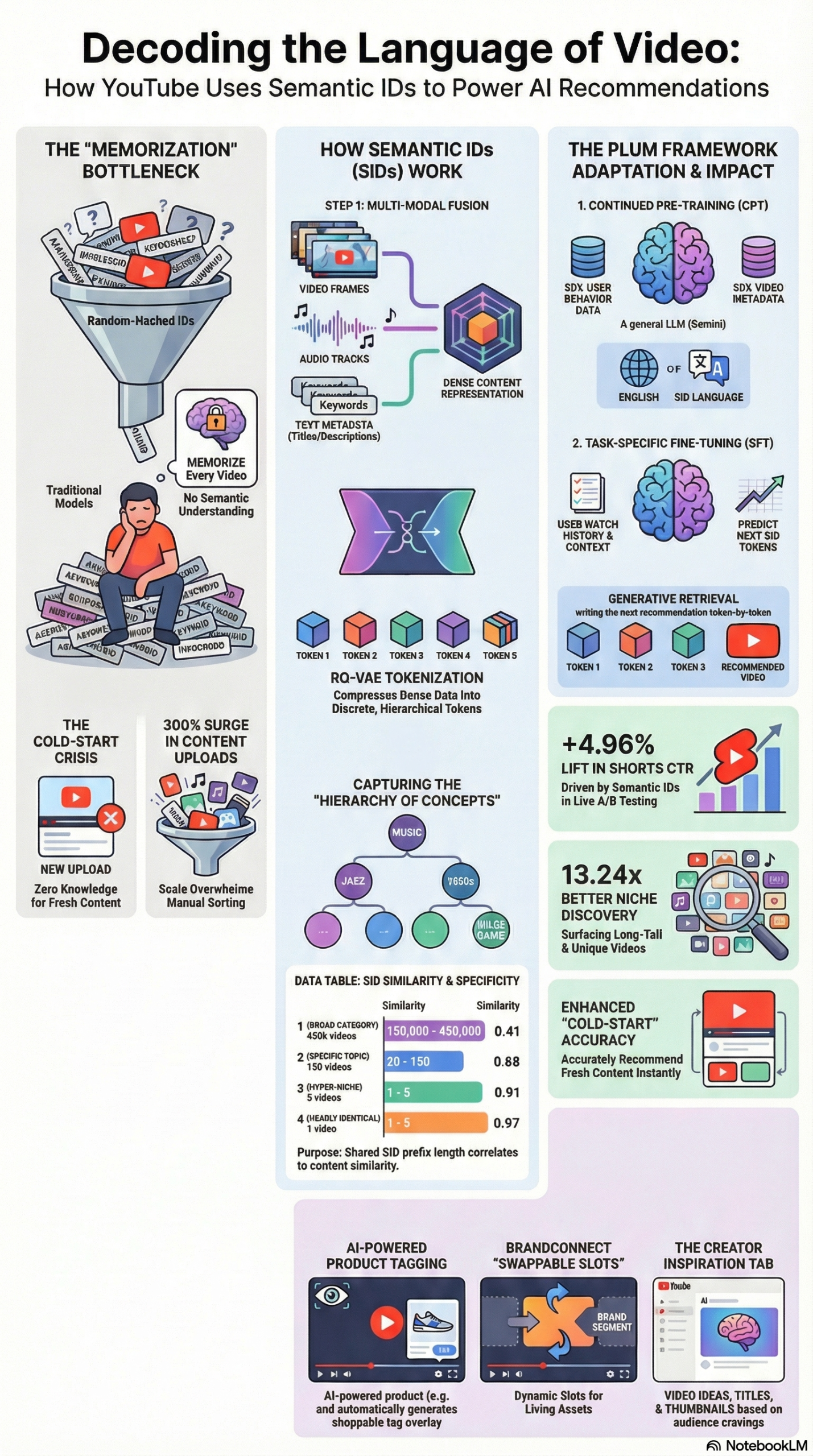
The deeper technical story — documented in the PLUM framework briefing — is that YouTube adapted Google’s Gemini LLM to power not just creator discovery but the entire video recommendation stack for Shorts. The same Semantic ID (SID) technology that now decides which videos a user sees next is being applied to decide which creators a brand should partner with. This is a convergence of recommendation science and influencer marketing infrastructure that no third-party platform can currently replicate.
How Semantic IDs work in practice: Traditional recommendation systems assign random numeric IDs to items (videos, creators) and rely on embedding tables to learn associations through repeated exposure. The problem is that a brand-new creator — or a creator in a niche vertical — has almost no training data, so the model can’t evaluate them. Semantic IDs solve this by encoding the content itself into a hierarchical token sequence using a Residual-Quantized Variational AutoEncoder (RQ-VAE). Audio, video frame data, and metadata text are fused into a single discrete token that captures meaning, not just identity. The first token might represent a broad category (Fitness), while subsequent tokens narrow to specifics (Home Workouts → No-Equipment → Beginner). A new creator in that niche receives a meaningful SID the moment their content is uploaded — no cold-start problem.
Per the PLUM research report, replacing traditional embedding tables with SID-based generative retrieval produced a 13.24x larger set of unique recommended videos for YouTube Shorts. For brands, the practical implication is that Creator Partnerships can now surface mid-tier and niche creators who would have been invisible to the old BrandConnect system, because they lacked the engagement history required for traditional models to evaluate them accurately.
The new monetization features layered into this platform include:
- Swappable Sponsorships: Creators designate “swappable slots” in long-form videos where brand segments can be dynamically inserted, removed when a deal expires, and resold to a new advertiser — without re-editing the video.
- AI Shopping Tags: Gemini automatically identifies the highest-intent moment in a video when a product is mentioned and surfaces a purchase tag at that exact timestamp.
- Shorts Brand Links: Creators add direct brand URLs to Shorts, enabling conversion tracking beyond vanity metrics like views and likes.
Why It Matters
For anyone running creator marketing programs — brand-side, agency-side, or as a creator monetizing through partnerships — this system changes three fundamental things.
First, it eliminates the spreadsheet-and-gut-feel creator scouting workflow. The manual process of exporting CSV files from third-party analytics tools, cross-referencing audience demographics, and cold-emailing creators with unknown brand-fit is being replaced by AI-generated shortlists inside the same interface where you buy media. Brands with over $1,000 in Google Ads spend can now access non-public creator data and AI-driven best-fit suggestions directly within Google Ads.
Second, it creates a direct competitive threat to third-party creator platforms. Tools that charge SaaS fees to search creator databases are now competing against a free-to-access Google-native solution that has actual first-party conversion data. YouTube knows which creator videos drove purchases because it controls the checkout flow, the ad stack, and the viewing session. No third-party tool has that signal depth.
Third, the ROAS data backs up the shift. According to the YouTube NewFronts 2026 Presentation, YouTube drives 86% higher incremental long-term ROAS than paid social. Critically, 40% of a video’s views occur more than a month after upload — meaning creator content compounds in a way that traditional paid media does not. Partnership Ads (boosting creator-led videos on Shorts) show a 30% increase in average conversion lift over standard ad units.
For content creators specifically, the calculus has also shifted. The YouTube NewFronts data shows 78% of viewers consider YouTube creators the most trustworthy content source, and 83% of Gen Z viewers prefer watching their favorite creators over traditional studio productions. That trust premium is now a quantifiable, AI-scored asset that brands can evaluate before signing a deal.
The Data
YouTube Creator Partnerships vs. Traditional Influencer Marketing Platforms
| Capability | YouTube Creator Partnerships | Third-Party Creator Platforms |
|---|---|---|
| Creator discovery engine | Gemini AI (SID-based matching) | Keyword/category search |
| First-party conversion data | Yes (YouTube checkout + GA4) | No (estimated/modeled) |
| Audience match depth | Billions of behavioral signals | Self-reported demographics |
| Cold-start creator visibility | Yes (SID encodes new creators) | No (requires engagement history) |
| Native ad amplification | Yes (Partnership Ads in Google Ads) | Requires separate paid campaign |
| Swappable sponsorship slots | Yes | No |
| AI Shopping Tags | Yes (auto-timestamp product tags) | No |
| Pricing model | Performance/CPA options | Flat SaaS fee + creator fees |
| Minimum spend for AI discovery | $1,000 Google Ads spend | Varies ($500–$2,000+/month) |
Key Performance Benchmarks (PLUM + Creator Partnerships)
| Metric | Result | Source |
|---|---|---|
| CTR lift for YouTube Shorts (LRM vs. baseline) | +4.96% | PLUM Framework Research |
| Unique video recommendation set expansion | 13.24x larger | PLUM Framework Research |
| Cost reduction via offline inference optimization | 95% | PLUM Framework Research |
| Incremental long-term ROAS vs. paid social | +86% | YouTube NewFronts 2026 |
| Conversion lift from Partnership Ads | +30% | YouTube NewFronts 2026 |
| Revenue increase for authentic creators (2025–2026) | +15–25% | NotebookLM Research Report |
| Revenue drop for mass-produced/automated channels | -40–60% | NotebookLM Research Report |
Step-by-Step Tutorial
How to Launch Your First Gemini-Matched Creator Campaign on YouTube
This walkthrough assumes you’re operating on the brand or agency side. You have a Google Ads account with at least $1,000 in historical spend, and you want to run a creator partnership campaign with AI-matched creator recommendations.
Phase 1: Set Up Your Campaign Foundation
Prerequisites:
– Google Ads account with $1,000+ lifetime spend (required for Creator Search access)
– YouTube channel linked to your Google Ads account
– Brand Safety settings configured in Google Ads
– Conversion tracking active (Google Tag Manager or GA4 integration)
Step 1: Access YouTube Creator Partnerships
Log into Google Ads. In the left navigation, go to Tools & Settings → Brand Safety & Suitability → YouTube Creator Partnerships (formerly found under the BrandConnect tab). If you don’t see this menu item, verify your account spend threshold has been met. Accounts under $1,000 can still access the basic creator directory but will not receive Gemini AI matching recommendations.
Step 2: Define Your Target Audience Profile
Before requesting AI-matched creator recommendations, you need to upload or connect your first-party audience data. The Gemini matching engine uses this to identify creators whose organic viewership most closely resembles your customer base.
Navigate to Audience Manager → Customer Match and upload a hashed CSV of your customer email list (minimum 1,000 emails for statistically significant matching). Alternatively, connect a Google Analytics 4 property with active conversion events. The system will extract audience composition signals — age bands, interest categories, viewing behavior patterns — without exposing individual-level data.
Step 3: Configure Your Campaign Brief
In the Creator Partnerships interface, create a new campaign brief with the following fields:
- Campaign objective: Select from Awareness, Consideration, or Conversion. The AI weights its creator recommendations differently based on this signal — Conversion campaigns prioritize creators with documented purchase-intent audiences; Awareness campaigns weight reach and demographic breadth.
- Product/Service category: This feeds directly into the SID matching system. Be specific — “Running Shoes for Trail Runners” will generate better matches than “Athletic Footwear.”
- Budget range: The system uses this to filter out creators whose typical integration fees fall outside your budget. Tier 1 (1M+ subscribers), Tier 2 (100K–1M), Tier 3 (10K–100K) are weighted against your stated range.
- Content format preference: Long-form dedicated video, long-form integrated mention, YouTube Shorts, or Live integration. Each format has different Swappable Sponsorship and AI Shopping Tag availability.
Phase 2: Evaluate AI-Matched Creator Recommendations
Step 4: Run the Gemini Creator Discovery Scan
Once your brief is saved, click Find Creators. The Gemini engine will return a ranked shortlist — typically 15–40 creators depending on how niche your category is. Each result includes:
- Audience Match Score (0–100): How closely the creator’s viewership matches your uploaded customer profile
- Organic Brand Mention History: Whether the creator has organically referenced brands in your category without being paid — a strong authenticity signal
- Conversion Index: A proprietary score based on how often viewers of this creator’s content have taken conversion actions after watching branded integrations
- Estimated Integration Fee Range: Based on the creator’s historical deals, not publicly disclosed rate cards
Review the full list before filtering. Gemini’s SID-based matching will surface creators you wouldn’t find through keyword search — mid-tier channels in adjacent niches whose audiences over-index heavily on your product category. Pay attention to the Audience Match Score over raw subscriber count.
Step 5: Review Non-Public Creator Data
For creators in your shortlist, click their profile card to access the expanded data view. This includes audience age/gender breakdown, top viewer geographies, average watch time percentiles, and historical campaign performance if they’ve run integrations through the Creator Partnerships system before. This data is not publicly visible and is only accessible to advertisers through the Google Ads interface.
Step 6: Shortlist and Send Collaboration Requests
Select 5–10 creators to shortlist. The system allows you to send standardized collaboration requests directly within the platform — no cold email required. Your brief summary, budget range, and campaign timeline are pre-populated. Creators receive these requests in their YouTube Studio under the Earn → Creator Partnerships tab.
Phase 3: Structure the Deal with Swappable Sponsorships
Step 7: Configure Swappable Sponsorship Slots
This is the feature that changes the economics of YouTube creator deals most significantly. Once a creator accepts your collaboration request, negotiate whether the integration will occupy a Swappable Slot in a long-form video. Here’s why this matters operationally:
Traditional YouTube sponsorships are permanent — the brand segment lives in the video forever. Swappable Slots allow the creator to replace your segment with a new advertiser’s segment after your deal term ends. For you as the brand, this means:
- Lower upfront cost: Creators charge less for time-limited slots vs. permanent integrations
- Defined exclusivity windows: You can negotiate a 90-day, 180-day, or 12-month window during which only your brand occupies that slot
- Reduced content aging risk: You’re not locking in creative assets that may feel outdated in 18 months
In the Creator Partnerships interface, mark the deal as a Swappable Sponsorship and specify the slot duration. The system tracks the active/expired status automatically.
Step 8: Enable AI Shopping Tags
If your campaign goal includes direct e-commerce conversion, enable AI Shopping Tags in the campaign settings. Gemini automatically scans the creator’s video for the timestamp where your product is mentioned or demonstrated at the highest-intent moment and surface a product card at that point. You link your Google Merchant Center product feed; the system handles timestamp detection and card display. This requires your products to be active in Google Merchant Center with up-to-date pricing and availability.
Step 9: Amplify with Partnership Ads
Once the creator publishes the sponsored content, activate Partnership Ads (formerly “Creator Partnerships Boost”) from the campaign dashboard. This promotes the creator’s video as a paid ad unit across YouTube, Google Display Network, and YouTube Shorts. The creative is the creator’s actual video — not a brand-produced asset. According to YouTube’s own data, this format delivers a 30% higher average conversion lift compared to standard video ad units.
Phase 4: Measure and Optimize
Step 10: Track Performance in Google Ads
All Creator Partnerships campaign data flows into your Google Ads reporting dashboard. For Shorts Brand Links specifically, you’ll see direct click-through and conversion data tied to each creator. For long-form integrations, use View-through Conversion windows (recommend a 30-day window given that 40% of views occur post-30-days) to capture the full attribution tail.
Expected outcomes after a 60-day campaign:
– Audience match data confirms or challenges your existing persona assumptions
– Conversion Index scores update based on actual campaign performance — building richer first-party benchmarks for future campaigns
– Swappable Slot metrics show ROI per slot duration, informing future deal structuring
Real-World Use Cases
Use Case 1: DTC E-Commerce Brand — Cold Audience Acquisition
Scenario: A direct-to-consumer supplement brand has exhausted Meta audience targeting and needs incremental reach in the 25–44 male fitness demographic.
Implementation: Upload 50,000 hashed customer emails to Google Ads Customer Match. Run Creator Discovery with a brief targeting “strength training, powerlifting, home gym” as the product category. Gemini’s matching returns a list of 23 creators, including 8 mid-tier channels (150K–500K subscribers) in adjacent niches like “garage gym builds” and “budget home fitness” whose audiences over-index 3x on the supplement buyer profile. Enable AI Shopping Tags and Partnership Ads on all integrations.
Expected Outcome: Lower CPM than paid social targeting the same demographic, with higher purchase intent because the audience is consuming content specifically about fitness outcomes. The 40% long-tail view rate means the content continues converting months past the deal term.
Use Case 2: SaaS Company — Niche B2B Creator Marketing
Scenario: A project management SaaS wants to reach small business owners who watch productivity and business operations content on YouTube.
Implementation: Link a GA4 property with 6 months of free trial signups as the conversion event. Set campaign objective to Conversion with a $50 CPA target. Creator Discovery surfaces 12 creators in the “solopreneur tools,” “freelance workflows,” and “business operations” niches — categories that would never appear in a broad “business” keyword search. Use Shorts Brand Links on creators who also post short-form content to capture mobile discovery traffic.
Expected Outcome: Creator-validated software demonstrations outperform traditional demo-reel ads because the creator is using the product in a real workflow context. Conversion Index scores from the Creator Partnerships system provide pre-campaign signal on likely CPA before committing to an integration fee.
Use Case 3: Creator Monetization — Maximizing Revenue Per Video
Scenario: A creator with 800,000 subscribers in the personal finance niche wants to maximize revenue from a long-form video on “investing for beginners.”
Implementation: In YouTube Studio, designate the mid-roll segment (around the 8-minute mark, after the core educational content) as a Swappable Slot. Accept a 6-month deal from a brokerage platform. Set up AI Shopping Tags for the investment app mentioned organically. After 6 months, remove the brokerage segment and resell the slot to a different financial services brand at a potentially higher rate, given updated view count data. Apply for the Inspiration Tab within YouTube Studio to surface AI-generated video ideas that align with the channel’s SID cluster — ensuring future videos surface to the same audience.
Expected Outcome: Revenue from a single video extends well past the initial publishing date. Swappable Slots convert a one-time sponsorship into a recurring revenue line item for that video URL.
Use Case 4: Agency Managing Multi-Brand Creator Campaigns
Scenario: A digital agency manages creator marketing for 8 brand clients across CPG, fashion, and tech categories.
Implementation: Create separate Google Ads accounts (or use Manager Account structure) for each brand. Run Creator Discovery scans for each brief simultaneously. Use the non-public Audience Match and Conversion Index data to build a proprietary creator scorecard across all 8 client categories — identifying creators whose audiences overlap multiple client verticals. Structure bundled deals where a single creator runs non-competing integrations for two agency clients in the same upload window.
Expected Outcome: The agency builds a proprietary dataset of creator performance indexed against actual client conversion data — a durable competitive advantage over agencies still relying on third-party tools without first-party signal access.
Common Pitfalls
1. Ignoring Audience Match Score in Favor of Raw Subscriber Count
The Gemini matching algorithm explicitly surfaces smaller creators with higher audience relevance scores above larger creators with weaker audience alignment. Running campaigns with Tier 1 creators who have a 45/100 Audience Match Score while ignoring Tier 3 creators scoring 89/100 wastes budget on reach that doesn’t convert. Always sort the Creator Discovery results by Audience Match Score first, then filter by subscriber floor.
2. Setting Up AI Shopping Tags Without Google Merchant Center Sync
AI Shopping Tags require an active, synced Merchant Center feed with real-time inventory status. If your product feed is stale or incomplete, the Shopping Tag either won’t display or will show incorrect pricing — a guaranteed way to damage trust with the creator’s audience. Verify your feed syncs at least once every 24 hours before enabling this feature.
3. Underestimating Policy Compliance Risk for AI-Assisted Content
YouTube’s updated monetization policies targeting mass-produced content are actively enforced on creator partners as well. If a creator is using AI-generated voiceover or automated scripts for the sponsored segment without original commentary, your integration could be caught in a demonetization review — removing the content from the recommendation system mid-campaign. Vet creators’ production methods as part of your onboarding. The litmus test per Vidpros’ analysis: “Could only you have made this video, or could anyone have created the same thing using automated tools?”
4. Not Using Conversion Tracking Before Running Partnership Ads
Partnership Ads amplify creator content as paid units. If conversion tracking isn’t live in your Google Ads account before the campaign launches, you won’t capture any of the attribution data the system is designed to generate. Set up conversion events, verify they’re firing in GA4, and test with a small media budget before scaling.
5. Short Deal Windows on New Creator Relationships
A 30-day deal window is too short to capture the full view and conversion tail for long-form content. Given that 40% of a video’s views come after the 30-day mark, short deal windows artificially cap your measurable ROAS. Structure initial deals at 90 days minimum, with Performance Clauses tied to Conversion Index rather than raw view count milestones.
Expert Tips
1. Use Co-occurrence Signals to Find Audience Clusters, Not Just Creators
The SID-v2 system that powers Creator Partnerships encodes behavioral co-occurrence — videos watched in the same session — directly into the semantic tokens. When you brief the system on your product category, it’s matching against viewing session clusters, not just single-channel audiences. Use this by running discovery scans across multiple product category variations (e.g., “trail running” vs. “ultra-marathon training” vs. “obstacle course racing”) and comparing the audience overlap in the results. You’ll identify creator clusters whose audiences share watching sessions — prime territory for bundled deals.
2. Treat the Conversion Index as a Forward-Looking Signal
The Conversion Index in Creator Partnerships is updated based on real campaign outcomes, not just historical estimates. After running 2–3 campaigns through the system, your account’s benchmark data makes future creator recommendations increasingly accurate. Resist switching to third-party platforms mid-cycle — you’re training a feedback loop.
3. Activate Freshness-Oriented Content Timing
The PLUM architecture updates its recommendation model in hours or days — not months — to surface trending content immediately. Coordinate creator publication timing around product launches, seasonal moments, or trending topics in the creator’s niche. Content published during a relevant trend window receives disproportionate recommendation surface area because the LRM weights freshness signals explicitly.
4. Build Shorts Brand Links Into Every Long-Form Deal
Creators with dual-format strategies (long-form + Shorts) should be given Shorts Brand Links as a standard deal component, not an add-on. The conversion data from Shorts is distinct from long-form attribution and runs in parallel — giving you two separate measurement channels from a single creator relationship and a lower-cost entry point for testing new creators before committing to full long-form integration fees.
5. Disclose AI Usage Explicitly in Your Brief Requirements
Require creators to disclose any AI assistance used in the sponsored segment as part of your deal agreement. YouTube’s mandatory disclosure labels for synthetic or AI-altered media apply to sponsored content, and violations can trigger demonetization reviews that remove your integrated content from recommendations. Building disclosure compliance into the contract protects your campaign and aligns with YouTube’s updated authenticity requirements.
FAQ
Q: What’s the minimum spend required to access Gemini-powered creator recommendations in Google Ads?
A: According to YouTube’s Creator Partnerships documentation, advertisers need at least $1,000 in Google Ads spend to access non-public creator data and AI-driven matching recommendations. Below this threshold, you can still access the basic Creator Partnerships directory but won’t receive the Gemini-generated best-fit shortlists or Audience Match Scores.
Q: How is this different from the old YouTube BrandConnect?
A: BrandConnect was primarily a creator directory with manual search and outreach tools. Creator Partnerships adds three substantive layers: Gemini AI matching using behavioral and audience similarity data, native Google Ads integration enabling Partnership Ads amplification and conversion tracking, and monetization features like Swappable Sponsorships and AI Shopping Tags that didn’t exist in BrandConnect. The underlying recommendation engine is also entirely new — built on the same PLUM/SID architecture that now powers YouTube Shorts recommendations, per the PLUM framework briefing.
Q: How does YouTube’s updated content policy affect brands running AI-generated campaign assets through Creator Partnerships?
A: YouTube’s 2025–2026 policy updates specifically target mass-produced, low-effort AI-generated content. Sponsored content that uses AI-generated voiceover, automated scripts, or templated production without original creator commentary is at risk of demonetization review. Brands should require that creators add original thought, personal insight, or unique storytelling to all sponsored segments — regardless of what AI tools they use in production. Channels that have maintained authenticity have seen revenue increases of 15–25% as low-quality competitors are removed from the recommendation system.
Q: Can creators outside the United States participate in Creator Partnerships?
A: The platform is integrated into Google Ads globally, and YouTube has not publicly limited Creator Partnerships to US-only markets. However, some features — particularly AI Shopping Tags tied to Google Merchant Center and Shorts Brand Links with direct conversion tracking — may have geographic availability limitations based on Google Commerce infrastructure in specific markets. Check current availability in your region’s Google Ads Help Center.
Q: How do I measure the long-term ROAS from Creator Partnerships campaigns beyond standard 30-day attribution windows?
A: Configure View-through Conversion windows in Google Ads to 90 days (the maximum available) to capture the full view tail. Complement this with GA4 Data-Driven Attribution models that distribute credit across touchpoints over time. Since 40% of a video’s views occur more than 30 days after upload, a 30-day attribution window systematically understates ROAS by roughly that proportion. Run a 90-day vs. 30-day comparison report after your first campaign to establish your category’s actual attribution curve.
Bottom Line
YouTube Creator Partnerships isn’t a feature update — it’s a structural play to become the operating system for creator marketing the way Google Ads became the operating system for search advertising. The Gemini AI matching engine, built on the same PLUM/SID architecture that drives YouTube Shorts recommendations, gives the platform a first-party signal advantage that third-party creator tools cannot structurally replicate. For brands, the 86% incremental ROAS premium over paid social — validated by YouTube’s own NewFronts 2026 data — makes the case for reallocating budget from performance social to creator-driven YouTube campaigns. The practical action is straightforward: upload your customer list, run the Gemini creator discovery scan, and compare the Audience Match Scores against the creators you’re currently paying for manually. You’ll find the gaps immediately.


0 Comments