

YouTube’s new Creator Partnerships platform — powered by Google’s Gemini AI — has collapsed what used to be a fragmented, manually-intensive influencer marketing process into a single, centralized workflow. If you’re a creator trying to attract brand deals, or a marketer trying to find and manage creator relationships at scale, this platform changes how you operate — starting today.
This tutorial walks through exactly what YouTube Creator Partnerships is, why it matters more than most people realize, and step-by-step how to configure both the creator and brand sides of the system to maximize results.
What Is YouTube Creator Partnerships?
YouTube Creator Partnerships is the consolidation of two previously separate tools — BrandConnect and the Creator Partnerships Hub — into a single unified platform. According to the NotebookLM research report compiled from YouTube’s 2026 product announcements, this unification is designed explicitly to eliminate the manual friction that has historically been the primary bottleneck in influencer marketing.
The platform sits inside YouTube Studio for creators and inside Google Ads for brands. It’s not a third-party influencer marketplace bolted onto YouTube — it’s native infrastructure built directly into the platforms creators and advertisers already use every day.
At its core, the system has four components:
1. Creator Search (Gemini-Powered)
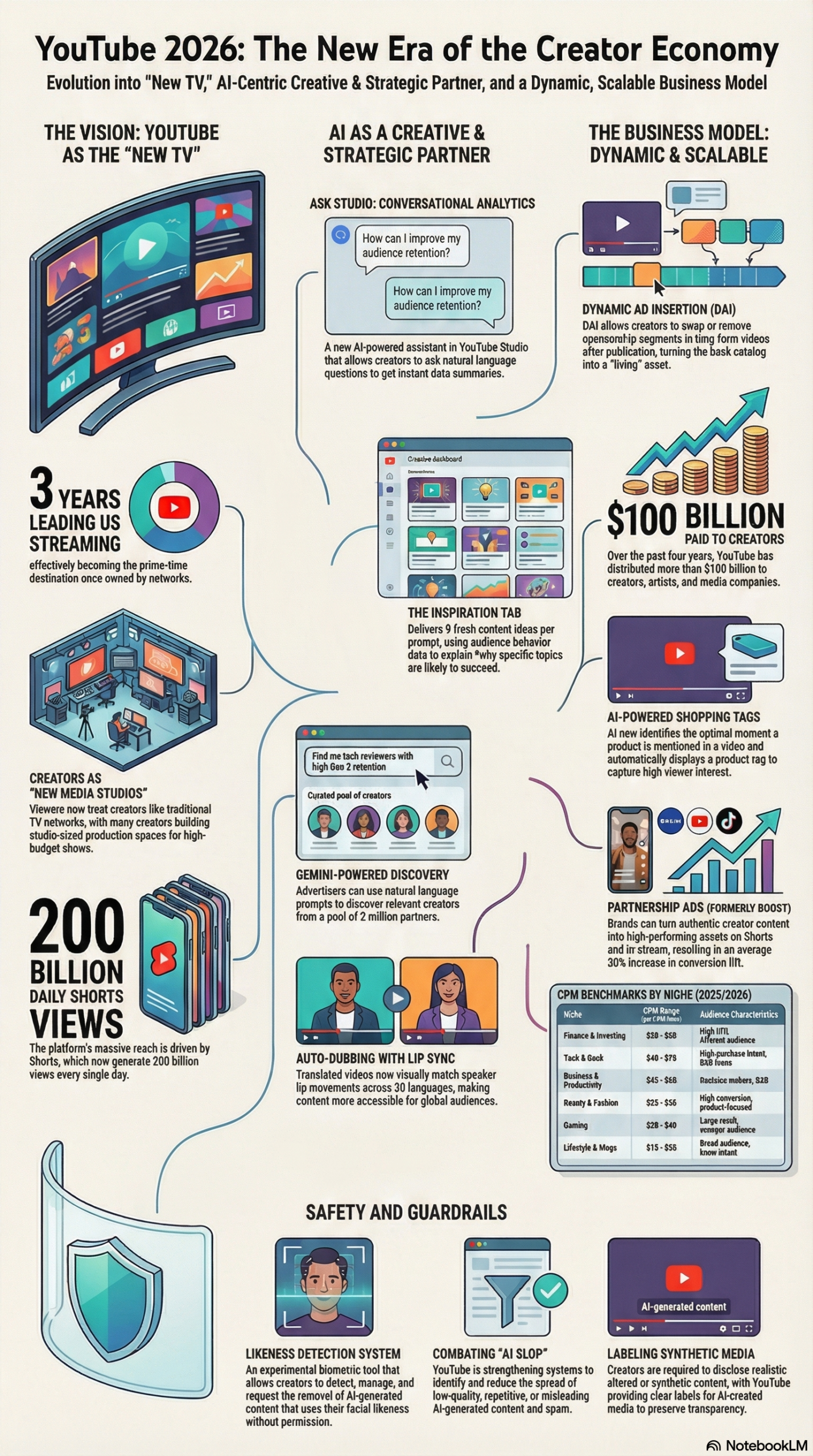
Brands can type natural language queries — something like “Find U.S. tech creators with high Gen Z retention” — and the Gemini AI engine returns a ranked list of matching creators. This moves creator discovery from spreadsheet-based guesswork to intent-based search. The AI evaluates not just subscriber counts, but audience demographics, content categories, and engagement quality, according to the NotebookLM research report.
2. Management Hub (Google Ads Dashboard)
Once a brand identifies creators it wants to work with, all deal-making — sending inquiries, negotiating terms, managing brand deal links, and tracking campaign performance — happens inside a single dashboard in Google Ads. No email chains, no disconnected tracking sheets, no missed messages buried in a creator’s DMs.
3. Media Kits
Creators can build customizable profile cards inside YouTube Studio that surface audience demographics, channel performance data, and niche positioning directly to any brand searching the platform. These aren’t static PDFs — they’re live data feeds connected to YouTube’s analytics. When a brand clicks a creator’s profile in the Gemini search results, they see the Media Kit automatically.
4. Open Calls
This is the feature that most changes the creator side of the equation. Instead of waiting for brands to discover them, creators can browse and apply directly to brand campaigns posted as “Open Calls.” YouTube is expanding this feature globally through 2026, according to the Digiday source article. Think of it as a job board for brand deals — except the eligibility criteria are evaluated automatically against your channel metrics.
The platform also includes Creator Partnerships Boost (formerly known as Partnership Ads), which lets brands take a creator’s organic branded content and convert it into a paid media buy — amplifying it across Shorts, in-stream, and other YouTube surfaces — without the creator having to produce new content.
This is not an incremental feature update. It’s a rearchitecting of how YouTube positions itself in the $21+ billion influencer marketing industry. As Anders Bill, Co-founder of Superfiliate, told Digiday: “This is the clearest signal yet that the platforms recognize the operational layer has been the bottleneck.”
Why It Matters
The influencer marketing industry has had an operations problem for years. The process of finding the right creator, vetting their audience, negotiating a deal, managing deliverables, tracking performance, and measuring ROI has required patchwork tooling across spreadsheets, third-party platforms, email, and manual data pulls. Agencies built entire practices around this overhead — and brands paid for it.
YouTube Creator Partnerships attacks every node of that problem simultaneously. Here’s what changes for each stakeholder:
For independent creators: The platform fundamentally shifts the power dynamic. Previously, a mid-tier creator with 100K subscribers who wasn’t already in a network or agency roster had nearly no mechanism for brands to find them organically. Now, if they have strong Gen Z retention on tech content, a Gemini-powered search surfaces them instantly when a brand types the right query. The NotebookLM research report documents that creators who activate “Channel Insights Sharing” — a toggle in YouTube Studio — appear approximately 60% more often in Gemini-powered brand searches. That’s not a marginal improvement; that’s structural discoverability.
For brands and in-house marketing teams: The shift from spray-and-pray creator outreach to intent-based search with real performance data reduces the cost of creator discovery dramatically. More importantly, the Management Hub centralizes relationship tracking in Google Ads — where ad buying is already happening — so creator partnerships become line items in the media plan rather than a separate workflow managed by a different team.
For agencies: This cuts both ways. Agencies that added value primarily through creator discovery and relationship management will feel margin pressure. Agencies that pivot to strategy, creative direction, and campaign optimization — the things AI can’t automate — become more valuable, not less.
What makes this different from existing platforms: Tools like AspireIQ, Grin, and Mavrck are standalone SaaS platforms that require importing data from YouTube and other networks. Creator Partnerships is native to YouTube and Google Ads, meaning the performance data flowing into brand searches and Media Kits is real-time, first-party, and unfiltered. There’s no import lag, no API sampling, and no data normalization issues.
The broader context matters here: YouTube CEO Neal Mohan stated in his 2026 annual letter — cited in the NotebookLM research report — that YouTube has paid creators, artists, and media companies over $100 billion between 2022 and 2026. That’s not a charitable gesture; that’s what’s needed to keep the content supply that makes YouTube dominant. Creator Partnerships is the infrastructure layer that makes that economic relationship more efficient and scalable in both directions.
The Data
The metrics cited in the NotebookLM research report and the Digiday article give a clear picture of the platform’s performance and scale:
| Metric | Figure | Source |
|---|---|---|
| Total creator payouts (2022–2026) | $100 billion+ | NotebookLM Research Report |
| Channels using AI creation tools daily (Dec 2025) | 1 million+ | NotebookLM Research Report |
| YouTube Shopping GMV growth (YoY, mid-2025) | 5x | NotebookLM Research Report |
| Conversion lift with Creator Partnerships Boost | 30% average increase | NotebookLM Research Report |
| Creator search appearance lift (insight sharing on vs. off) | ~60% more appearances | NotebookLM Research Report |
| Brand interaction rate lift (insight sharing enabled) | 2x higher click/interaction rate | NotebookLM Research Report |
| Video views occurring 30+ days after upload | 40% of total views | NotebookLM Research Report |
| Auto-dubbed content daily viewers (late 2025) | 6 million+ (10+ min/day) | NotebookLM Research Report |
| Podcast hours watched on TV screens (Oct 2025) | 700 million+ hours | NotebookLM Research Report |
The 40% stat on late views is critical for understanding how Dynamic Ad Insertion (DAI) — the monetization layer that works alongside Creator Partnerships — changes the economics for both sides. A brand deal on a two-year-old video can still reach a significant audience, and with DAI, that ad can be current, regionally targeted, and swappable. That’s a back-catalog monetization opportunity that didn’t exist twelve months ago.
Step-by-Step Tutorial: Setting Up YouTube Creator Partnerships
This walkthrough covers both sides of the platform — creator setup and brand setup — because understanding both gives you a tactical advantage regardless of which seat you’re in.
Phase 1: Creator Setup — Configure Your Profile for Discovery
Prerequisites:
– YouTube Studio access
– YouTube Partner Program membership (required for most monetization features)
– A populated channel with at least 3 months of performance history
Step 1: Navigate to the Creator Partnerships Tab
Log into YouTube Studio at studio.youtube.com. In the left sidebar, look for “Creator Partnerships” — this is the unified tab that replaced the separate BrandConnect interface. If you see BrandConnect, your account may still be in transition; the consolidation was rolling out through Q1 2026.
Step 2: Enable Channel Insights Sharing
Inside the Creator Partnerships tab, you’ll see a toggle labeled “Channel Insights Sharing.” Turn this on immediately. This is the highest-leverage single action you can take on this platform. According to the NotebookLM research report, enabling this option causes your channel to appear approximately 60% more frequently in Gemini-powered brand searches. What insights does this share? Audience demographic breakdowns (age, gender, location), engagement rates, watch time distribution, and content category performance — the exact data brands need to evaluate partnership fit. Without this, you’re invisible to Gemini’s discovery engine regardless of your channel quality.
Step 3: Build Your Media Kit
Select “Media Kit” within the Creator Partnerships tab. You’ll be prompted to fill in:
– Channel Description: Write this as if a brand partnership manager is reading it. Lead with your niche, your audience profile, and your format (long-form tutorials, Shorts, live streams, etc.). Be specific. “Tech content for software developers, primarily ages 25-34, 70% U.S.-based” is far more useful to a Gemini search than “I make tech videos.”
– Audience Demographics: These populate automatically from your analytics. Review them for accuracy — if they look wrong, your channel insights may need more history to stabilize.
– Performance Highlights: Manually add your top-performing videos, average view duration, and any third-party brand campaigns you’ve completed. Include results where possible.
– Contact and Rates: Add a preferred contact method and an optional rate card. You don’t have to publish rates, but having them visible filters out low-budget inquiries and signals professionalism.
Step 4: Browse Open Calls
From the Creator Partnerships dashboard, navigate to “Open Calls.” This feed shows active brand campaigns you can apply to directly. Filter by category, audience requirements, and compensation type. When applying:
– Read the brand brief fully before applying.
– In your application, reference specific channel metrics that match what the brief is asking for (don’t make them infer the fit — state it).
– Attach relevant past content examples, not just your general channel URL.
Apply to Open Calls consistently. Early adoption of this feature means less competition per application compared to what saturation will look like six months from now.
Step 5: Structure Your Content for Dynamic Ad Insertion
This step is about future-proofing your catalog. When filming new videos, build in natural transition points — a brief pause or contextual break — every 8-12 minutes. These become the insertion points for DAI. According to the NotebookLM research report, DAI allows creators to swap, replace, or remove ad segments after a video is published, turning old videos into living revenue assets. Without intentional transitions, DAI insertion can feel abrupt to viewers. Film with this in mind now, and your back-catalog will compound in value as the feature matures.
Phase 2: Brand/Advertiser Setup — Run Creator Search and Manage Deals
Prerequisites:
– Google Ads account with advertiser access
– Campaign objectives defined (awareness, conversion, Shorts amplification, etc.)
– Budget parameters established
Step 1: Access Creator Search in Google Ads
Log into Google Ads at ads.google.com. Navigate to Tools & Settings > Creator Partnerships. You’ll see the Gemini-powered Creator Search interface — a text prompt field, not a traditional search bar with filters.
Step 2: Write Effective Natural Language Queries
The quality of your results depends directly on how specific your prompts are. Weak query: “Find travel creators.” Strong query: “Find U.S.-based travel creators with audiences that skew 30-45, high female viewership, who regularly feature hotel and accommodation content, with above-average watch time on videos over 10 minutes.”
Gemini evaluates creators against real channel data, so the more precisely you describe your target audience’s behavior and demographics, the more accurate the results. Test multiple query variations. A query focused on audience retention will return different results than one focused on audience location. Use both to triangulate your shortlist.
Step 3: Review Creator Profiles and Media Kits
Click any creator in the search results to open their Media Kit. Key things to evaluate:
– Audience demographics vs. your target customer profile — look for overlap, not just size.
– Watch time on relevant content — a creator with 500K subscribers but poor watch time on the content category you care about is a weaker partner than a 100K channel with strong retention on that specific format.
– Content-brand alignment — scan recent uploads for tone and audience relationship. A creator who frequently criticizes brands in their niche is a higher-risk partner regardless of metrics.
Step 4: Send Partnership Inquiries Through the Management Hub
From the creator’s profile, click “Reach Out.” This opens the Management Hub messaging interface. Draft a brief, specific inquiry — include your campaign objective, rough timeline, deliverable expectations, and compensation range. Specificity signals professionalism and increases response rates. The Management Hub tracks all correspondence, so you maintain a full record of every negotiation thread without managing separate email chains.
Step 5: Activate Creator Partnerships Boost
Once a creator delivers content, evaluate whether it’s a candidate for Boost amplification. Creator Partnerships Boost (formerly Partnership Ads) takes the creator’s organic video and distributes it as a paid media placement across YouTube surfaces — Shorts feed, in-stream, and browse. The NotebookLM research report cites an average 30% increase in conversion lift for advertisers using this feature on Shorts placements. To activate: navigate to the campaign in Google Ads, select the creator partnership, and toggle on “Boost.” Set audience targeting to extend the creator’s organic reach into audiences that match but haven’t yet seen the content.
Expected Outcomes:
After completing both setups, creators should see increased inbound brand inquiries within 2-4 weeks of enabling insight sharing and completing their Media Kit. Brands running Gemini searches should expect a shortlisted creator pool within minutes, compared to days or weeks using traditional manual research methods. The Management Hub consolidates all active partnerships into one view, which is the operational efficiency win most mid-scale marketing teams will feel immediately.
Real-World Use Cases
Use Case 1: Independent Creator Monetizing a Niche Audience
Scenario: A creator with 85,000 subscribers produces weekly deep-dive tutorials on Python programming for data scientists. She’s been monetizing through AdSense and Patreon but struggles to land brand deals because she has no agency representation and no formal outreach process.
Implementation: She enables Channel Insights Sharing, builds a Media Kit emphasizing her audience’s professional profile (developers, ages 28-40, high U.S. and European concentration), and applies to two Open Calls per week in the developer tools and SaaS software categories.
Expected Outcome: Gemini surfaces her channel to developer tool brands running targeted searches. With a 2x higher interaction rate documented for creators with insight sharing enabled per the NotebookLM research report, her profile generates qualified brand inquiries without cold outreach. Within 60 days she’s in active negotiations with two SaaS companies.
Use Case 2: Mid-Size Brand Running Creator Campaigns at Scale
Scenario: A DTC home goods brand is running creator campaigns across 15-20 creators per quarter. The marketing team is managing everything through a mix of email, a spreadsheet, and one third-party influencer platform. Campaign tracking is manual and inconsistent.
Implementation: The brand moves creator discovery to Gemini search inside Google Ads, using queries targeted at home improvement and interior design creators with female-skewed audiences aged 28-45. All deal-making moves to the Management Hub. For top performers, they activate Creator Partnerships Boost on Shorts content.
Expected Outcome: The team cuts creator discovery time by 70% and eliminates the third-party platform subscription. Boosted Shorts placements deliver the 30% average conversion lift cited in the NotebookLM research report, improving overall campaign ROI.
Use Case 3: Agency Repositioning Post-Automation
Scenario: A boutique influencer marketing agency that built its business on creator discovery and relationship management is watching that service become commoditized by Gemini search.
Implementation: The agency reorients its value proposition toward campaign strategy, creative brief development, and performance optimization. They use Creator Partnerships as their operational layer but differentiate on the strategic and creative inputs that shape what clients search for and how they structure deals. They also begin offering DAI strategy — helping clients plan back-catalog monetization with Dynamic Ad Insertion.
Expected Outcome: The agency retains clients by demonstrating that better queries and better briefs produce better results from the same tools. Revenue per client increases because strategy retainers carry higher margins than execution-only engagements.
Use Case 4: Creator Leveraging DAI for Back-Catalog Revenue
Scenario: A tech review creator has 600 videos in his library, most of which were sponsored with baked-in integrations that are now outdated or for brands that no longer exist. Those videos still get 40% of their lifetime views after the first month, per the NotebookLM research report, but the sponsored segments deliver zero revenue.
Implementation: He structures new videos with intentional DAI insertion points and works with YouTube’s partner team to enable Dynamic Ad Insertion on his catalog. He connects his Creator Partnerships profile to signal his back-catalog’s ongoing viewership to brands.
Expected Outcome: His 600-video library becomes an active revenue surface. Brands targeting his audience can place dynamic ads in two-year-old videos, and he earns on content he hasn’t thought about in years. His monthly revenue from catalog content increases substantially without producing a single new video.
Common Pitfalls
Pitfall 1: Leaving Channel Insights Sharing Off
This is the single biggest mistake creators make. Without enabling this toggle, you’re invisible to Gemini’s discovery engine regardless of how good your content is. The platform can only surface what it can read. Check your YouTube Studio Creator Partnerships tab and enable this immediately.
Pitfall 2: Writing a Generic Media Kit
A Media Kit that says “I create content about finance for young audiences” gives a Gemini search nothing specific to match against. Brands using natural language queries are describing very specific audience characteristics. Your Media Kit needs to speak that language — specific demographics, specific engagement metrics, specific content formats. Generic descriptions produce generic results (i.e., being skipped).
Pitfall 3: Ignoring DAI-Friendly Production
Filming new videos without natural transition points means future Dynamic Ad Insertion will feel disruptive to viewers. This affects completion rates and, by extension, advertiser satisfaction. The fix is simple: build a brief natural pause or topic transition into your script every 8-12 minutes. Do it now before your catalog grows larger.
Pitfall 4: Brands Using Subscriber Count as the Primary Filter
Gemini search returns performance-based data, not just size data. Brands that mentally filter results down to the highest subscriber counts first are replicating the same mistake they made with legacy influencer platforms. A creator with 80K subscribers, strong watch time, and perfect audience alignment will outperform a 500K creator with diffuse audience demographics. Evaluate the data, not the vanity metric.
Pitfall 5: Treating Creator Partnerships Boost as a One-Size-Fits-All Amplification Tool
Boost works best when the underlying creator content is already performing organically. Boosting mediocre content produces mediocre results at scale. Identify which organic creator videos are getting strong completion rates and genuine engagement before allocating Boost spend. Let organic performance qualify the content first.
Expert Tips
1. Use Gemini Query Iteration as a Research Method
Run 5-10 query variations and compare the creator sets they return. When two different queries consistently surface the same creator, that’s a signal of genuine niche dominance — a stronger partnership indicator than appearing in only one search.
2. Sync Creator Partnerships Boost With Seasonal Ad Buying Cycles
The 30% conversion lift cited in the NotebookLM research report is an average. Boost performance spikes during high-intent consumer windows (product launches, seasonal events). Stack Boost campaigns against your highest-intent windows rather than running them continuously.
3. Monitor Your Media Kit Analytics Weekly
YouTube Studio shows you how many brands have viewed your Media Kit and what actions they took. Use this data to A/B test your Media Kit descriptions. If views are high but inquiries are low, your Media Kit isn’t converting — rewrite the channel description with more specific audience data.
4. For Brands: Convert Top Creator Content Into a Media Buy Strategy
Per the NotebookLM research report, 40% of a YouTube video’s lifetime views happen more than one month after upload. This means a creator’s back-catalog is active inventory, not dead content. Build partnership deals that include back-catalog DAI rights, not just new content delivery.
5. Creators: Apply to Open Calls Before They Go Viral
Open Calls is a new feature with growing but not yet saturated adoption. Apply aggressively now while competition per listing is lower. Build an application template that you can customize quickly — have your key metrics, audience description, and two sample video links ready to paste. Volume matters in the early adoption window.
FAQ
Q: Does YouTube Creator Partnerships replace third-party influencer marketing platforms entirely?
Not immediately, but it reduces the value proposition of platforms that focused on creator discovery and deal management. The Digiday article notes that Creator Partnerships centralizes the full lifecycle — discovery, negotiation, management, and amplification — for YouTube specifically. Third-party platforms that aggregate data across multiple networks (TikTok, Instagram, YouTube) still offer cross-platform visibility, but for YouTube-native campaigns, the native tooling is now more capable than most standalone platforms.
Q: Is YouTube Creator Partnerships available to all creators or only large channels?
The platform is accessible through YouTube Studio for YouTube Partner Program members. Open Calls filtering and Gemini discovery search include channels of varying sizes — the Gemini engine evaluates audience quality metrics rather than raw subscriber thresholds. That said, some advertiser campaigns will set their own minimum requirements, which creators will see listed in each Open Call before applying.
Q: How does Dynamic Ad Insertion interact with Creator Partnerships deals?
They’re related but separate systems. Creator Partnerships manages the relationship between brands and creators and the terms of sponsorship deals. DAI is the technical mechanism for serving ads into video content dynamically. For Boost campaigns, brands are placing paid placements through Google Ads. For DAI back-catalog monetization, YouTube’s ad serving system handles the insertion. The NotebookLM research report notes that these systems together make a creator’s video library into a “living asset” — the commercial relationship and the technical delivery are increasingly unified.
Q: What data does Channel Insights Sharing actually expose to brands?
According to the NotebookLM research report, sharing channel insights makes audience demographics (age, gender, location), engagement rates, watch time patterns, and content category performance visible within the Creator Partnerships search interface. It does not expose personal creator account data, payment information, or private channel settings. Creators retain control and can disable insight sharing at any time.
Q: How long does it typically take to start receiving brand inquiries after setting up Creator Partnerships?
There’s no guaranteed timeline, but based on the platform’s design and the 60% discoverability lift documented in the NotebookLM research report for insight-sharing creators, most active channels with a complete Media Kit should see increased brand profile views within 2-4 weeks. Actual inquiry volume depends on how competitive your niche is and whether brands in your category are actively using Gemini search. Apply to Open Calls in parallel — that’s a direct application channel that doesn’t require waiting for inbound discovery.
Bottom Line
YouTube Creator Partnerships isn’t a feature update — it’s a structural rebuild of how creator-brand relationships are formed and managed at scale on the world’s largest video platform. The Digiday article frames it accurately: the operational layer has been the bottleneck, and YouTube has now attacked it directly with Gemini AI, centralized management tooling, and Dynamic Ad Insertion. For creators, the move is clear — enable Channel Insights Sharing, build a specific Media Kit, and apply to Open Calls aggressively while adoption is still early. For brands, the Gemini-powered Creator Search plus Boost amplification creates a full-funnel creator media strategy that lives inside Google Ads alongside your existing campaigns. The platforms that reduce friction fastest capture the most commercial activity, and right now, YouTube is removing friction faster than any other player in the creator economy.


0 Comments