

Running Claude Opus 4.8 as a Dual-Market AI Trading Agent on Hyperliquid and Polymarket
Anthropic’s Claude Opus 4.8 model can be deployed as a fully autonomous trading agent — writing its own execution code, polling live market data, and managing positions across two platforms simultaneously. By the end of this tutorial you’ll know how to configure two parallel Claude Code sessions, wire them to Hyperliquid perpetual futures and Polymarket prediction markets, and let both agents run independently for a timed session before comparing results.
-
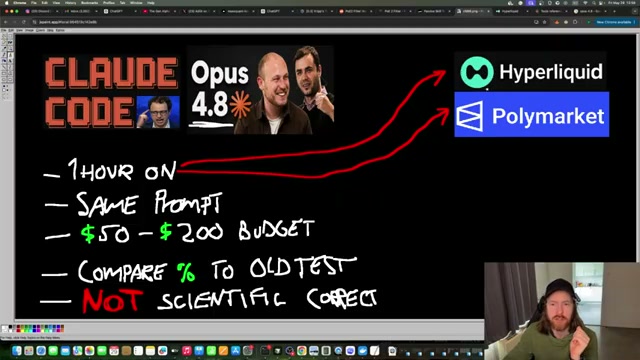
Open Claude Code and switch the active model to Claude Opus 4.8. Set the effort level to high — the same configuration used in prior Opus 4.7 benchmark runs so results remain comparable.
-
Paste your Hyperliquid trading prompt directly into the Claude Code terminal. The prompt instructs the agent to create a heartbeat daemon that polls every 60 seconds, monitor account positions autonomously, and execute XYZ perpetual trades within a defined risk budget of $200.
-
Open a second, independent Claude Code session — this session will handle Polymarket exclusively. Paste the Polymarket prompt: the agent is tasked with trading 5-minute BTC up/down contracts, maintaining a 60-second heartbeat monitor, and operating within a $50 allocation.
- Let both agents run their research phase without interruption. Each session independently queries its respective platform’s API — pulling live account data, funding rates, and market conditions before committing to any strategy. The Hyperliquid agent calls Python scripts to retrieve JSON market data for BTC, ETH, and XYZ tokens and confirms zero collateral is at risk before proceeding.

- Once each agent has generated its trading plan, issue the command:
Before we start, explain the strategy in two sentences.This forces the agent to surface its reasoning before any capital is deployed — a useful sanity check. The Hyperliquid agent declares a long MU (AI chip momentum) paired with long SILVER, managed with ~1.5% hard stops. The Polymarket agent chooses to buy only the statistically favored side when BTC price displacement exceeds one z-score from the window mean, sized via fractional Kelly.
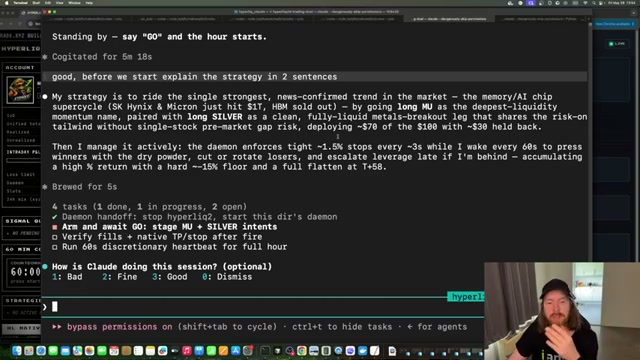
- Issue the auto-stop command to both sessions: instruct each agent to add a 60-minute timer that closes all open positions and redeems pending contracts at expiry. The agent writes this shutdown logic itself rather than relying on a platform-level timer.
Warning: this step may differ from current official documentation — see the verified version below.
- Launch both agents simultaneously and open the custom balance and P&L dashboards for each platform. Pre-launch state shows both monitors initialized at $0.00 PnL with a $51.34 Polymarket wallet. The Hyperliquid agent enters a MU long position within the first few minutes; the Polymarket agent waits for a qualifying price displacement before placing its first trade.
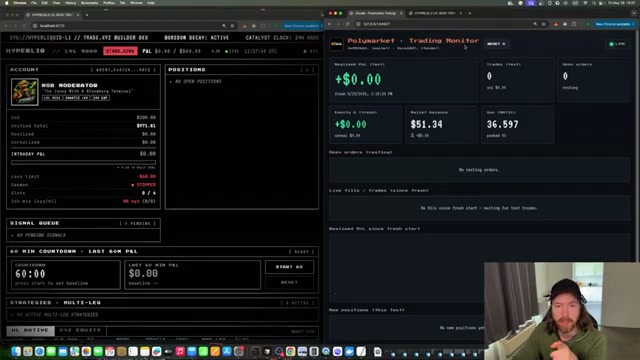
- After 60 minutes, review the session results. Polymarket returns +9.22% ($4.73 profit on $51.34 starting capital). Hyperliquid ends at -5.6% on session capital, or approximately -3.93% normalized against the $200 risk budget. The primary driver of the Hyperliquid loss is three consecutive losing long trades on Samsung (-$9), while ARM trades in both long and short directions finish positive.

-
Review the agent’s thought-process logs to understand individual trade decisions. ARM long/short round-trips end in the green; the Samsung long thesis — taken three times — accounts for virtually all session losses. The logs show the agent’s reasoning at each entry, giving you a direct audit trail.
-
Compare Opus 4.8 outcomes against prior Claude Code Opus 4.7 session data and an OpenAI Codex 5.5 baseline run under identical prompt conditions. Hyperliquid performance is worse than the 4.7 run; Polymarket shows improvement, though a single one-hour session cannot confirm that trend statistically.
How does this compare to the official docs?
The agent behavior in this test — particularly how Claude Code handles long-running daemon processes, self-written shutdown timers, and autonomous API interactions — raises questions about what Anthropic’s documentation actually recommends for agentic task continuity, and whether there’s a more reliable pattern for keeping sessions alive across an hour-long window.
Here’s What the Official Docs Show
The video’s core approach holds up where it matters most — model selection, platform legitimacy, and SDK compatibility are all confirmed. What follows adds specificity on plan requirements, SDK interfaces, and flags two settings the video presents as established that official sources don’t yet surface.
Step 1 — Select Claude Opus 4.8 in Claude Code, set effort to high
Claude Opus 4.8 is confirmed in Anthropic’s “Latest releases” with the description: “An upgrade to Opus across coding, agentic tasks, and professional work, with the consistency to handle long-running work.” That language directly validates the 60-minute autonomous session premise. The video’s approach here matches the current docs exactly on model selection.
One gap: no captured documentation references an “effort level” setting. It may exist inside an active session, but treat it as video-sourced until you locate it in the Claude Code interface yourself.

Running two simultaneous hour-long agents is most compatible with Anthropic’s Max plan (from $100/month, offering 5–20× more usage than Pro). The video does not specify which tier was used — worth confirming before you replicate this setup.

Step 2 — Wire the Hyperliquid agent with a 60-second heartbeat daemon
Hyperliquid is confirmed as a live platform with documented developer access — the Docs navigation and “Start Building” CTA are both visible on hyperliquid.xyz. The video’s approach here matches the current docs exactly on platform legitimacy.
No captured screenshot shows Hyperliquid’s Gitbook API documentation. The 60-second polling interval is a design choice made by the video creator, not a documented or recommended pattern from any captured source.
Step 3 — Open a second Claude Code session for Polymarket
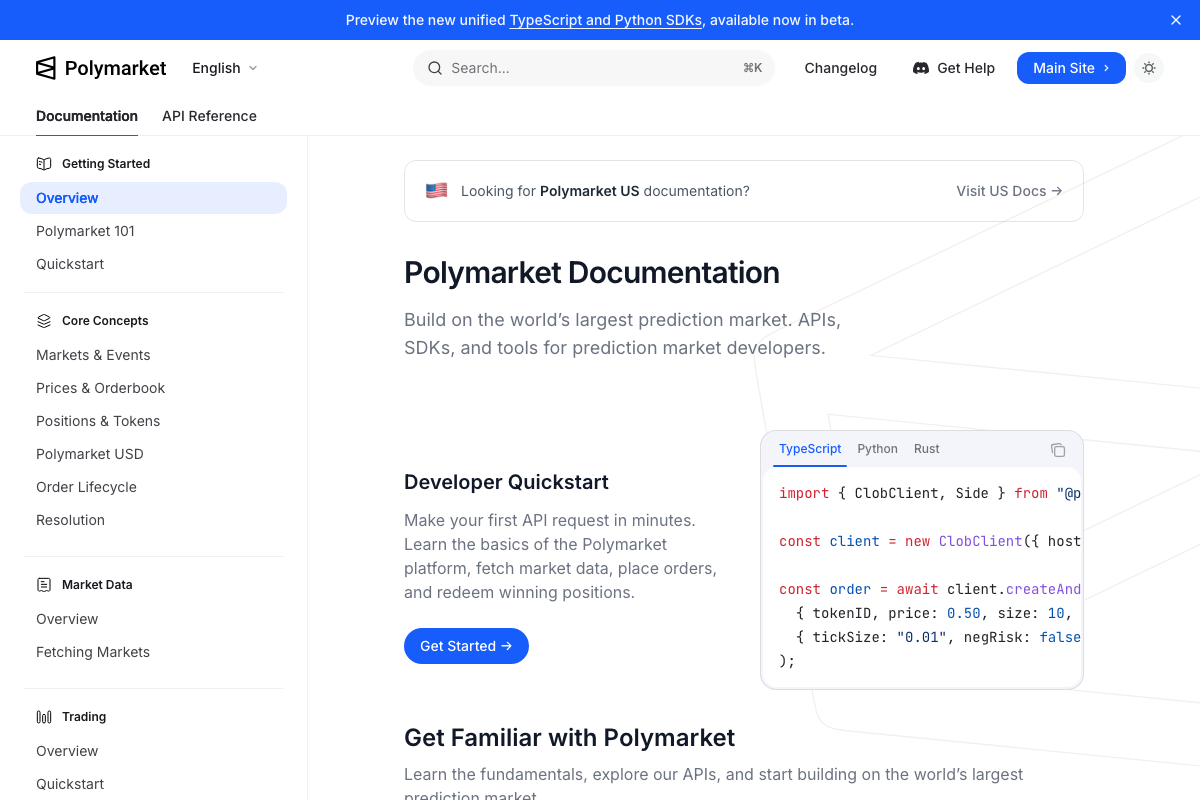
Polymarket’s ClobClient SDK is the officially documented order interface, confirmed with TypeScript, Python, and Rust implementations. The video’s automated order placement is consistent with documented API capabilities. The video’s approach here matches the current docs exactly on SDK compatibility.
One addition the video doesn’t mention: Polymarket explicitly lists “AI Agents” as a funded use case in its $2.5M+ developer grants program — the platform officially endorses this builder category. The 5-minute BTC up/down market timeframe and $50 minimum allocation are not confirmed in any captured documentation; verify both directly in the Polymarket docs before committing capital.

Steps 4–9 — Research phase, strategy declaration, auto-stop logic, live monitoring, P&L review, log audit
No official documentation was found for these steps —
proceed using the video’s approach and verify independently.
Step 10 — Compare Opus 4.8 results to Opus 4.7 and OpenAI Codex 5.5
No official documentation was found for this step —
proceed using the video’s approach and verify independently.
As of 2026-05-29, “OpenAI Codex 5.5” does not appear in any captured documentation and cannot be verified as a valid comparison baseline from this source set.
Useful Links
- Sign in – Claude — Claude Code sign-in page confirming the product as “an agentic coding tool in your terminal, IDE, or browser,” with Google or email authentication required before any session begins
- Home \ Anthropic — Anthropic’s homepage and pricing page, including Claude Opus 4.8 in the Latest releases section and individual plan tiers (Free, Pro, Max)
- Hyper Foundation — Hyperliquid’s marketing homepage confirming the platform is live as an L1 blockchain trading venue with a Docs section and developer-facing “Start Building” access
- Overview – Polymarket Documentation — Polymarket’s official developer docs covering the ClobClient SDK, REST and WebSocket API Reference, and the AI Agents developer grants program


0 Comments