

On March 24, 2026, two versions of LiteLLM—one of the most downloaded AI gateway packages in the Python ecosystem—were poisoned with credential-stealing malware and pushed to PyPI. What happened next is a masterclass in real-time incident response using AI assistance, and a stark warning for every team running production AI infrastructure. This tutorial walks you through the attack anatomy, the AI-assisted response workflow Callum McMahon used to detect and report it, and the concrete hardening steps that will protect your stack going forward.
What This Is
The LiteLLM attack is a textbook supply chain poisoning event executed by the cybercrime group TeamPCP (also known as DeadCatx3). The attack was first documented by Simon Willison on March 24, 2026 and is among the most consequential AI infrastructure security incidents on record.
LiteLLM is a Python package that acts as a universal gateway for calling hundreds of LLM APIs—OpenAI, Anthropic, Google, Cohere, and more—through a single unified interface. It’s foundational infrastructure in the modern AI stack, used as a dependency inside frameworks like MLflow, DSPy, CrewAI, and OpenHands, and downloaded roughly 95 million times per month according to Simon Willison’s reporting.
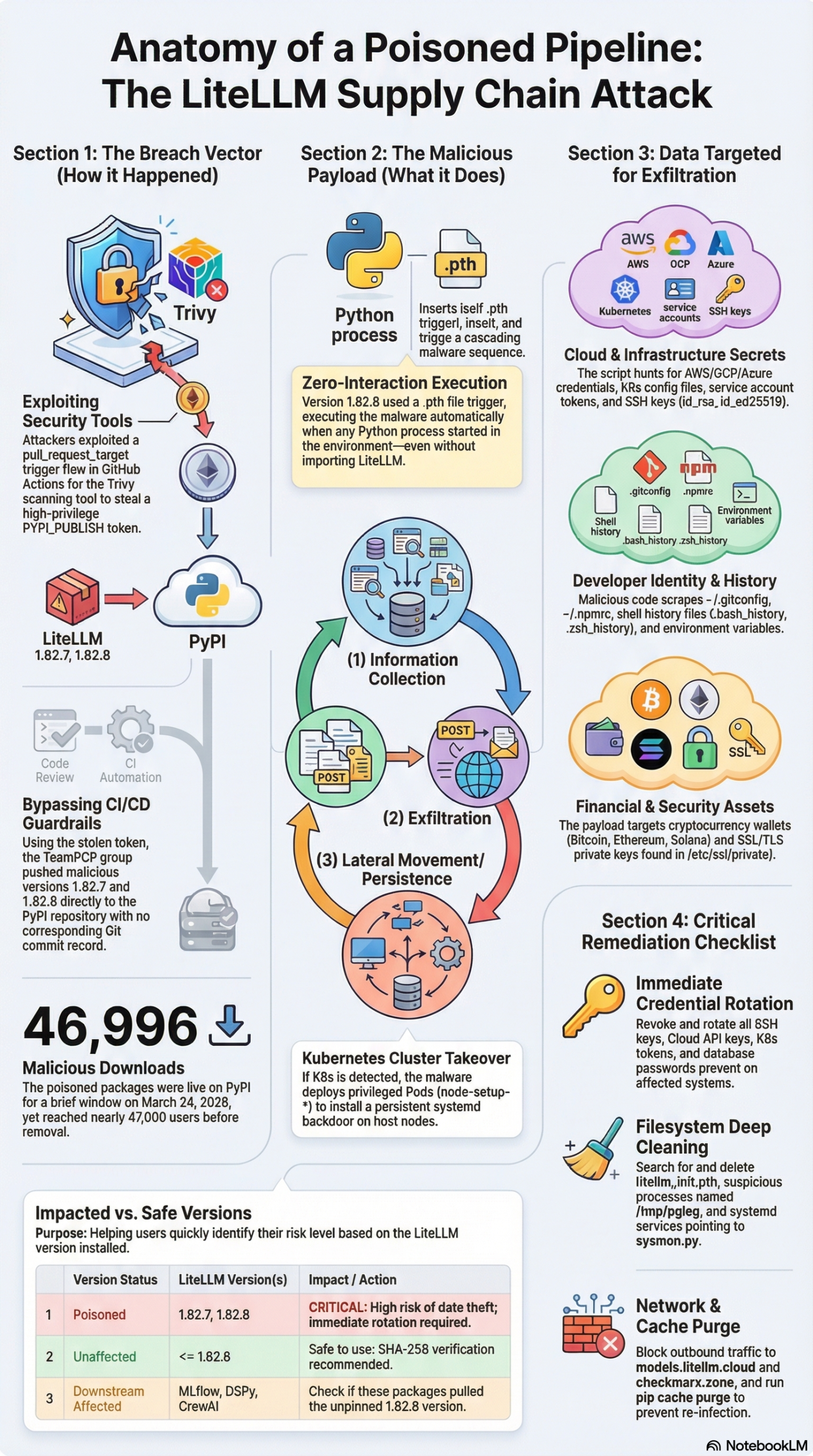
The attack was not a direct hack of LiteLLM’s own codebase or repository. Instead, TeamPCP executed a multi-stage supply chain poisoning campaign that weaponized a security tool to steal publishing credentials:
Stage 1 — Trivy Compromise (March 19, 2026): TeamPCP first targeted Trivy, a widely-used open-source security scanner. By submitting a carefully crafted malicious pull request that exploited the pull_request_target trigger in GitHub Actions, the attackers forced Trivy’s high-privileged workflow to execute their injected code. This allowed them to steal the PYPI_PUBLISH token that Trivy used for releasing packages to PyPI.
Stage 2 — Token Theft and LiteLLM Access: LiteLLM’s CI/CD pipeline used Trivy for security scanning. With the stolen token, TeamPCP gained the ability to publish packages to PyPI under the LiteLLM namespace—completely bypassing code review, CI checks, and every other gate in the normal release process.
Stage 3 — Malicious Package Publication: On March 24, 2026, the attackers published LiteLLM versions 1.82.7 and 1.82.8 to PyPI containing credential-stealing malware. These versions were live for approximately 46 minutes before being pulled—during which they were downloaded nearly 47,000 times.
The malware in each version used a different execution trigger:
- Version 1.82.7 embedded malicious code inside
litellm/proxy/proxy_server.py, requiring the user to import or run the proxy module to trigger execution. - Version 1.82.8 added a
litellm_init.pthfile to the wheel root, which caused automatic execution on any Python process start—no import required. This is a particularly insidious technique because even runningpython --versionin an infected environment could trigger the payload.
Once executed, the malware ran through four stages according to the research report: reconnaissance (hostname, IP, environment variables); credential theft (targeting .ssh directories, .aws/credentials, Kubernetes tokens, shell histories, and SSL private keys); horizontal movement in Kubernetes environments (deploying privileged pods named node-setup or host-provisioner on every node in the cluster); and persistence (installing a systemd user service called sysmon.py that checked for new payloads from checkmarx[.]zone every 50 minutes).
The attack was discovered largely because of a coding error by the attackers. The .pth file launcher in version 1.82.8 generated child Python processes via subprocess.Popen in a way that functioned as a fork bomb—causing infected machines to crash or freeze instantly. ML engineer Callum McMahon first encountered the threat when his machine froze after opening a project in his IDE, which triggered the malicious package and the unintentional fork bomb.
Why It Matters
This wasn’t just another package compromise. The LiteLLM attack has three properties that make it uniquely dangerous for teams building AI products.
Scale of exposure. LiteLLM’s ~95 million monthly downloads and integration into over 2,000 dependent packages created a blast radius unlike most supply chain attacks. Frameworks like MLflow, DSPy, CrewAI, and OpenHands all reference LiteLLM as a dependency. According to the research report, 88% of the 2,337 packages depending on LiteLLM did not pin versions, meaning they automatically pulled in the malicious update without any human decision-making involved. A single dependency update bot running in a CI/CD pipeline during that 46-minute window was enough to get infected.
Targeting AI infrastructure credentials specifically. The malware was purpose-built to harvest the exact credentials that AI/ML teams use to run inference pipelines, fine-tuning jobs, and model deployments—cloud provider credentials (AWS, Azure, GCP), Kubernetes tokens, and SSH keys. A compromised LiteLLM installation on a production AI gateway server could expose every downstream cloud service and every client API key routed through the proxy.
The attack weaponized the security toolchain itself. By compromising Trivy before attacking LiteLLM, TeamPCP demonstrated a meta-strategy: poison the tools designed to catch poisoning. As the NSFOCUS Advisory Report stated, “software supply chain risks are no longer limited to a single technology stack or platform, but have gradually evolved into a global challenge for the entire IT ecosystem.” The conventional wisdom of “use a security scanner in your CI/CD pipeline” doesn’t protect you if the scanner itself has been compromised.
The developer Mario Zechner, creator of the Pi framework, captured a systemic truth this incident exposed: as documented in the research report, the acceleration of AI-assisted development means “we have basically given up all discipline and agency for a sort of addiction, where your highest goal is to produce the largest amount of code in the shortest amount of time. Consequences be damned.” Automated dependency updates are a perfect expression of that trade-off—and they’re exactly what this attack exploited.
For practitioners: if you run any AI infrastructure that uses LiteLLM—whether directly or as a transitive dependency—this attack is a forcing function to audit your dependency management, credential storage, and CI/CD pipeline security practices right now.
The Data
LiteLLM Attack Timeline and Impact
| Date | Event | Impact |
|---|---|---|
| March 19, 2026 | TeamPCP compromises Trivy scanner, releases malicious v0.69.4 | PYPI_PUBLISH token stolen via GitHub Actions exploit |
| March 24, 2026 | Malicious LiteLLM 1.82.7 published to PyPI | Credential-theft malware, requires proxy module import |
| March 24, 2026 | Malicious LiteLLM 1.82.8 published to PyPI | Fork-bomb variant; auto-executes on any Python process start |
| March 24, 2026 (~46 min window) | Packages pulled from PyPI after Callum McMahon’s report | ~47,000 downloads already made |
| March 26, 2026 | McMahon publishes Claude AI transcript of his real-time response | Community incident analysis and response template |
Source: Simon Willison, FutureSearch transcript, research report
Malicious Version Comparison
| Version | Malware Location | Trigger | Auto-Executes | Risk Level |
|---|---|---|---|---|
| 1.82.7 | litellm/proxy/proxy_server.py |
Requires proxy module import | No | High |
| 1.82.8 | litellm_init.pth (wheel root) |
Any Python process start | Yes | Critical |
Source: research report
Dependency Pinning Status Among LiteLLM-Dependent Packages
| Category | Count | Percentage |
|---|---|---|
| Packages with unpinned LiteLLM dependency | ~2,056 | 88% |
| Packages with pinned LiteLLM dependency | ~281 | 12% |
| Total packages referencing LiteLLM | 2,337 | 100% |
Source: research report / NSFOCUS Advisory
Known Indicators of Compromise (IOCs)
| Indicator | Type | Notes |
|---|---|---|
litellm_init.pth SHA-256: 71e35aef...135238 |
Malicious file | Found in site-packages; triggers on any Python start |
litellm-1.82.8 wheel SHA-256: d2a0d5f5...800ebb |
Malicious package | Auto-executing variant |
litellm-1.82.7 wheel SHA-256: 8395c326...eac2 |
Malicious package | Proxy-module triggered variant |
models.litellm.cloud |
Exfiltration domain | Attacker-controlled; not affiliated with BerriAI |
checkmarx.zone |
Payload delivery domain | Used for persistence stage; bypasses DNS allowlists |
/tmp/pglog |
Local file | Malicious process state tracking |
Source: research report
Step-by-Step Tutorial: Responding to a Supply Chain Attack with AI Assistance
The most instructive part of this incident is how Callum McMahon handled it. Rather than trying to manually deobfuscate malicious Python code alone, he used Claude as a real-time security analyst to work through the attack in structured, verifiable steps. His published transcript is a practical template for any team facing a similar situation. Here’s the complete incident response workflow structured for practitioners, expanded with the hardening steps the incident exposed as necessary.
Phase 1: Immediate Detection and Triage
Prerequisites:
– Access to a command line on the potentially affected machine
– A second, clean machine for credential rotation and analysis
– Your CI/CD build logs accessible
Step 1: Identify the anomaly and check installed versions.
In Callum’s case, the trigger was a machine freeze when opening a project in his IDE. If you see unexpected process spawning, a frozen environment, or a sudden CPU spike after a pip install or environment update, your first move is to check recently installed packages—from a shell, without triggering further Python execution if possible.
# List installed packages and versions
pip list --format=columns | grep litellm

# Alternatively with uv:
uv pip list | grep litellm
If the output shows litellm 1.82.7 or litellm 1.82.8, assume the environment is compromised. Do not run additional Python commands on this machine.
Step 2: Check for the .pth persistence file.
The most critical artifact from the 1.82.8 version is litellm_init.pth in your site-packages directory. Because .pth files are loaded automatically by the Python interpreter at startup, this file causes malicious code to execute on every Python process start—including diagnostic commands.
# Find your site-packages directory (run from a clean machine if possible)
python -c "import site; print(site.getsitepackages())"

# Search for the malicious .pth file
find /path/to/site-packages -name "litellm_init.pth"
The SHA-256 hash of the confirmed malicious file is 71e35aef03099cd1f2d6446734273025a163597de93912df321ef118bf135238 (source: research report). If the file is present, do not run any more Python commands on this machine until the environment is fully isolated.
Step 3: Check Kubernetes for lateral movement artifacts.
If your environment has any Kubernetes access, run this check immediately:
kubectl get pods -A | grep -E "node-setup|host-provisioner"
These are the privileged pod names the malware deploys during its horizontal movement stage. Their presence means the malware successfully executed in a K8s context and attempted cluster-wide persistence. Treat the entire cluster as compromised if you find them.
Phase 2: AI-Assisted Code Analysis
This is the workflow Callum McMahon pioneered and documented in his Claude transcript. The key insight is that AI assistants can compress hours of manual malware analysis into minutes—if you use them correctly.
Step 4: Extract the malicious payload for analysis.
Python wheel files are standard zip archives. You can inspect them without executing any code:
# Unzip the wheel on a clean, air-gapped analysis machine
unzip litellm-1.82.8-py3-none-any.whl -d litellm_extracted/

# Inspect the .pth file content
cat litellm_extracted/litellm_init.pth

# Inspect the malicious proxy server file (1.82.7)
cat litellm_extracted/litellm/proxy/proxy_server.py | head -100
Step 5: Prompt Claude for behavioral analysis.
Callum’s approach was precise and effective. He did not ask “is this malware?”—he asked Claude to explain exactly what the code does, step by step. This distinction matters: behavioral analysis gives you specific IOCs, network targets, and file paths you can act on immediately.
Use this prompt structure:
I found this Python code inside a package I just installed.
Please explain exactly what this code does, step by step,
with particular attention to:
- Any network connections (destination IPs or domains)
- Any file system reads or writes (especially credential files)
- Any subprocess or shell execution
- Any persistence mechanisms (cron jobs, systemd services, .pth files)

Do not speculate about intent—only describe what the code literally executes.

[paste the extracted code here]
Claude identified the credential theft patterns, the network exfiltration target (models.litellm.cloud, an attacker-controlled domain masquerading as the legitimate LiteLLM project), and the fork-bomb subprocess behavior in Callum’s session. When Callum asked whether this should be reported to PyPI, Claude suggested the security@pypi.org contact address after confirming the malicious nature of the code—a practical example of AI assistance extending to incident response procedures, not just code analysis.
Step 6: Confirm network indicators against your logs.
Once you have the suspected IOCs from the AI analysis, cross-reference them against your network logs and DNS query history:
models.litellm.cloud— attacker-controlled exfiltration endpoint (not affiliated with the real BerriAI/LiteLLM project)checkmarx.zone— payload delivery domain for the persistence stage, chosen to bypass DNS allowlists that might block more obvious threat domains
Check your firewall outbound logs, DNS resolver logs, and CloudTrail/GCP Audit Logs for any calls originating during the March 24 exposure window.
Phase 3: Containment and Credential Rotation
Step 7: Isolate the affected environment.
If the malware executed, treat all credentials accessible from that environment as compromised. Isolation steps:
– Remove the affected machine from your network segment or disable network access.
– Do not run any more Python processes on the machine.
– Do not use any credentials stored in ~/.aws/credentials, ~/.ssh/, K8s contexts, or environment variables until they have been rotated from a clean machine.
Step 8: Rotate all credentials systematically.
Work through every credential type that may have been exposed. Use a completely separate, known-clean machine for all rotation operations:
# AWS: Create new access keys, then delete the old ones
aws iam create-access-key --user-name [your-username]
aws iam delete-access-key --access-key-id [old-key-id]

# Check CloudTrail for unauthorized API calls during the exposure window
aws cloudtrail lookup-events \
  --start-time 2026-03-24T14:00:00Z \
  --end-time 2026-03-24T16:00:00Z \
  --lookup-attributes AttributeKey=Username,AttributeValue=[your-username]

# SSH: Generate new keys on the clean machine
ssh-keygen -t ed25519 -C "your_email@example.com"
# Then update authorized_keys on all servers
For cloud platforms: rotate IAM access keys (AWS), service account keys (GCP), and client secrets (Azure AD). For Kubernetes: rotate service account tokens, audit RBAC bindings for any new unauthorized roles, and delete any node-setup or host-provisioner pods immediately.
Step 9: Purge the package cache.
The malicious wheel may be cached locally in pip or uv’s cache directories. A future pip install litellm without explicit version and hash constraints could reinstall from the poisoned local cache.
# Clear pip cache
pip cache purge

# Clear uv cache
rm -rf ~/.cache/uv

# Verify clean re-install with safe version
pip install litellm==1.82.9  # or the current latest safe version

# Verify installed version
pip show litellm
Phase 4: Reporting and Documentation
Step 10: Report to PyPI security.
If you confirm a malicious package on PyPI, report it immediately to security@pypi.org. Include:
– Package name and version number(s)
– SHA-256 hash of the malicious wheel (from the IOC table above)
– Summary of malicious behavior (credential theft, K8s lateral movement, persistence mechanism)
– IOCs: malicious domain names, file paths, process names
PyPI’s security team can remove packages within minutes of a confirmed report. In the LiteLLM case, the packages were live for approximately 46 minutes before Callum McMahon’s report led to removal. The speed of your report directly limits the number of additional downloads.
Step 11: Issue a downstream security advisory.
If your product exposes LiteLLM as a dependency, your users may be affected. Publish a security advisory documenting:
– Affected versions (1.82.7 and 1.82.8)
– The exact 46-minute exposure window on March 24, 2026
– Remediation steps (credential rotation, cache purge, K8s pod audit)
– Full IOC list for their threat intelligence systems
– The SHA-256 hashes for the malicious wheel files
Phase 5: Long-Term Hardening
Step 12: Implement hash-pinned dependencies.
Loose version specifiers like litellm>=1.80.0 or even litellm==1.82.6 automatically pull the latest matching version (or can be bypassed if an attacker replaces an artifact at the same version). Cryptographic hash pinning ensures the installed package is byte-for-byte identical to what you audited:
# Generate a requirements file with hashes using pip-compile
pip-compile --generate-hashes requirements.in

# Or with uv
uv pip compile --generate-hashes requirements.in
The resulting requirements.txt will contain entries like:
litellm==1.82.9 \
    --hash=sha256:abc123def456...
This makes any tampered package—regardless of version number—fail to install. It’s the single most effective technical control against this class of attack.
Expected Outcome: After completing this full workflow, you should have: confirmed whether the malware executed in your environment, rotated all potentially exposed credentials, removed all malicious artifacts from disk and cache, verified no unauthorized K8s pods exist, reported the incident to PyPI, notified your downstream users if applicable, and implemented hash-pinned dependencies to prevent recurrence.
Real-World Use Cases
Use Case 1: AI Agency Running Client LLM Proxies
Scenario: A marketing AI agency runs a shared LiteLLM proxy server for multiple clients, routing requests to OpenAI, Anthropic, and Google APIs. The server has AWS credentials for logging to S3 and runs in a Kubernetes deployment for horizontal scaling.
Implementation: Since version 1.82.8 auto-executes on any Python process start via the .pth file, the malware would have fired the moment the server’s Python runtime initialized—no user action required. Within minutes, the attackers would have harvested AWS credentials and the K8s service account token. The agency discovers the compromise via the fork-bomb crash that freezes the proxy server.
They immediately: check for node-setup and host-provisioner pods across all cluster namespaces, rotate AWS keys for every client account linked to the server, audit CloudTrail for the 46-minute window on March 24 to identify any unauthorized API calls, and notify all clients of the potential credential exposure with specific remediation instructions.
Expected Outcome: By acting within hours, the agency limits the blast radius to credential theft with no confirmed data exfiltration. All clients rotate their keys. The agency implements hash-pinned dependencies and a 48-hour dependency cooldown policy. They migrate from static PYPI_PUBLISH tokens to PyPI Trusted Publishing on their own packages.
Use Case 2: ML Engineer Discovering the Attack in Real Time (The McMahon Model)
Scenario: This is the Callum McMahon scenario exactly. An ML engineer opens a project in their IDE, the environment installs or updates packages, and the machine freezes due to the fork-bomb behavior in version 1.82.8.
Implementation: Following Callum’s approach as documented in the Claude transcript at FutureSearch, the engineer uses Claude to analyze the malicious code by pasting the contents of the extracted wheel directly into the AI assistant and asking for step-by-step behavioral analysis. Claude identifies the credential theft vectors (.aws/credentials, .ssh/ directories, shell history), the attacker-controlled exfiltration domain (models.litellm.cloud), and the persistence mechanism (sysmon.py systemd service). Claude then suggests security@pypi.org as the appropriate reporting address.
Expected Outcome: The incident is reported to PyPI within minutes of discovery, directly contributing to the rapid takedown. The engineer’s documented transcript becomes a community resource that demonstrates how non-security specialists can use AI assistants to perform structured, accurate malware analysis in real time—lowering the barrier for the entire ecosystem to respond faster.
Use Case 3: DevOps Team Auditing CI/CD Pipeline Exposure
Scenario: A DevOps team runs LiteLLM as part of a RAG pipeline for an internal knowledge base. After seeing news of the attack, they need to determine if their automated dependency update bot pulled in the malicious versions during the 46-minute window.
Implementation: They search CI/CD build logs for all jobs that ran pip install litellm or pip install -r requirements.txt on March 24, 2026, and check timestamps against the known exposure window. For any builds that ran during that window, they pull the build artifacts and check the installed wheel SHA-256 hashes against the known-malicious hashes from the IOC table.
# Check build artifact hashes against known-malicious values
sha256sum litellm-*.whl
# Compare against: d2a0d5f564628773b6af7b9c11f6b86531a875bd2d186d7081ab62748a800ebb (1.82.8)
#                  8395c3268d5c5dbae1c7c6d4bb3c318c752ba4608cfcd90eb97ffb94a910eac2 (1.82.7)
Expected Outcome: If affected, they roll back all deployments from March 24, rotate cloud credentials used in those environments, and implement hash pinning across all requirements files. If not affected (builds ran outside the window), they implement the same hardening as a preventive measure—and document the near-miss in a post-mortem to drive organizational policy change.
Use Case 4: Open Source Maintainer Checking Transitive Exposure
Scenario: The maintainer of a Python library that uses DSPy (which depends on LiteLLM) wants to determine if their users were exposed via the transitive dependency chain.
Implementation: Since 88% of LiteLLM-dependent packages had unpinned versions, the risk propagated several levels deep. The maintainer audits their dependency tree:
# Check if LiteLLM is a transitive dependency
pip show dspy | grep Requires
pipdeptree | grep litellm
They confirm LiteLLM is a transitive dependency and publish a security advisory noting the transitive risk. They update their own package’s dependency specification to pin LiteLLM to a safe version with a cryptographic hash, preventing their users from accidentally pulling the malicious versions via their package.
Expected Outcome: Users who had affected versions in their environments take the remediation steps. The maintainer’s proactive communication protects their downstream user base and establishes them as a trusted steward of their users’ security posture.
Common Pitfalls
Pitfall 1: Running Python on the Compromised Machine to Investigate
The 1.82.8 .pth file executed on any Python process start—including python --version, pip list, and python -c "import site". If you suspect litellm_init.pth is installed in your environment, running even a trivial Python command re-triggers the malware. Investigate from a separate, clean machine, and use shell tools (find, cat, sha256sum) rather than Python-based diagnostics wherever possible.
Pitfall 2: Forgetting Cached Wheels
After removing the malicious package, many teams forget that pip and uv maintain local caches of downloaded wheels. A subsequent pip install litellm without explicit hash constraints can reinstall from the poisoned cache, re-infecting the environment silently. Always run pip cache purge and rm -rf ~/.cache/uv as part of remediation before doing any reinstall.
Pitfall 3: Only Rotating the Most Obvious Credentials
Teams typically rotate AWS access keys but miss less-obvious credentials: SSL private keys, Kubernetes service account tokens, shell history contents (which frequently contain hardcoded credentials passed as CLI arguments), and CI/CD environment variables. The malware specifically targeted shell history files—any credentials you have ever pasted into a terminal on that machine should be treated as compromised and rotated.
Pitfall 4: Assuming Version Pinning Alone Is Sufficient
Pinning litellm==1.82.6 prevents pulling new versions, but does not protect against a replaced artifact at the same version number (a technique used in other attacks). Cryptographic hash pinning (--hash=sha256:...) ensures the installed package is byte-for-byte identical to what you audited, regardless of what PyPI serves for that version number. Version pinning is table stakes; hash pinning is the actual protection.
Pitfall 5: Stopping Remediation After Surface-Level Cleanup
Teams that don’t run Kubernetes directly often do a surface-level remediation—delete the package, rotate AWS keys, call it done. But if the compromised machine had any Kubernetes API access (even read-only), the malware’s K8s scanning stage may have attempted to deploy privileged pods that persist independently of the original infected machine. Always run the kubectl get pods -A | grep -E "node-setup|host-provisioner" check across your entire cluster, even if you’re not a “Kubernetes shop” in the traditional sense.
Expert Tips
Tip 1: Implement a Dependency Cooldown Policy
Use tools like uv or configure your dependency update bots to enforce a minimum release age for new packages—typically 24-48 hours. This gives the security community time to identify subverted updates before they reach your production environment. As documented in the research report, the malicious LiteLLM packages were live for only 46 minutes. A 24-hour cooldown would have prevented every automated install that occurred during that window.
Tip 2: Migrate to PyPI Trusted Publishing
The LiteLLM attack succeeded because a long-lived, static PYPI_PUBLISH API token was stored in Trivy’s CI/CD system and subsequently stolen. PyPI’s Trusted Publisher (OIDC) model eliminates long-lived tokens entirely—it issues short-lived credentials via OpenID Connect that expire immediately after a publish operation completes. Any package you maintain, or any package your organization depends on critically, should push its maintainers toward this model. There is no persistent credential to steal.
Tip 3: Build IOC Hash Checks Into CI/CD
Maintain a version-controlled file of known-malicious package hashes and run a hash check as part of your CI/CD post-install validation step. If any installed wheel matches a known-bad SHA-256 hash, fail the build immediately and alert the team. This takes under 30 minutes to implement in a GitHub Actions workflow and provides a deterministic safety net independent of PyPI’s own security processes.
Tip 4: Sandbox Your Agentic Coding Workflows
As the research report notes, coding agents should be restricted to deterministic sandboxes that limit network and filesystem access, rather than relying on non-deterministic AI classifiers to judge intent. If an AI coding agent runs in your environment and has access to your credential files, it operates under the same risk model as any other process. Restrict agent filesystem access to the project directory and block outbound network connections from agent sandboxes except to explicitly allowlisted endpoints.
Tip 5: Use Behavioral Prompts for AI-Assisted Security Analysis
When using Claude or another AI assistant for malware triage (as Callum McMahon did), structure your prompts around behavioral description, not classification. “What does this code do, step by step—specifically any network calls, file reads, or subprocess executions?” produces more actionable output than “Is this malicious?” The behavioral prompt gives you specific IOCs—domain names, file paths, process names—you can immediately act on. The classification prompt gives you a yes/no answer that still requires further analysis before you can take any concrete remediation step.
FAQ
Q1: Which versions of LiteLLM were malicious, and how do I check what I have installed?
Versions 1.82.7 and 1.82.8 were the only confirmed malicious versions, published to PyPI on March 24, 2026. They were live for approximately 46 minutes. All versions before 1.82.7 and from 1.82.9 onward are clean. To check your installed version, run pip show litellm and look at the Version field. If you see 1.82.7 or 1.82.8, treat the environment as compromised. (Source: Simon Willison)
Q2: Does the malware only affect teams that use LiteLLM directly?
No—the malware propagated transitively. Because 88% of the 2,337 packages that depend on LiteLLM used unpinned version specifiers, any environment running a dependency update on March 24 could have pulled in the malicious version indirectly through frameworks like MLflow, DSPy, CrewAI, or OpenHands. If you use any LiteLLM-dependent framework and ran pip install -r requirements.txt or an auto-update bot during the exposure window, check your environment for litellm_init.pth.
Q3: How did TeamPCP actually get access to LiteLLM’s PyPI credentials without hacking LiteLLM directly?
They attacked Trivy first. TeamPCP exploited the pull_request_target trigger in Trivy’s GitHub Actions workflow on March 19, 2026—five days before the LiteLLM attack. This trigger, when misconfigured, allows code from an external pull request to run within the context of a high-privilege workflow that has access to repository secrets. The stolen secret was Trivy’s PYPI_PUBLISH token. Since LiteLLM used Trivy in its own CI/CD pipeline, the attackers inherited publishing rights to LiteLLM’s PyPI namespace. They never needed to compromise LiteLLM’s repository at all. (Source: research report)
Q4: Is it safe to use Claude to analyze the malicious code?
Yes—this is exactly what Callum McMahon did, and it was effective. Claude can perform behavioral analysis of Python code, describing what it does without executing it. The key constraint (both ethical and practical) is to ask Claude to describe the code’s behavior, not to improve, modify, or help deploy it. In Callum’s session, Claude correctly identified the credential theft patterns, the attacker-controlled exfiltration domain, and suggested security@pypi.org as the reporting contact—all without any security background required from the user. (Source: FutureSearch transcript)
Q5: What’s the single highest-impact prevention measure for this class of attack?
Cryptographic hash pinning on all production dependencies. Version pins (litellm==1.82.6) protect against version drift but not against a replaced artifact at a matching version number. Hash pinning (--hash=sha256:...) ensures that the package on disk is byte-for-byte identical to the version you audited—any modification, however small, causes the install to fail. Combined with a 24-48 hour dependency cooldown for new releases, these two controls together would have protected any team running automated dependency updates during the 46-minute exposure window. Implementation takes under an hour using pip-compile --generate-hashes or uv pip compile --generate-hashes. (Source: research report)
Bottom Line
The LiteLLM supply chain attack is a high-watermark event for AI infrastructure security—not because of its technical novelty, but because of its strategic targeting. By first compromising Trivy, a security scanner, to steal publishing credentials, TeamPCP demonstrated that the attack surface for AI systems extends well beyond models and APIs to include every tool in your build and deployment pipeline. The 46-minute exposure window and ~47,000 downloads show exactly how fast damage propagates in a high-velocity, auto-updating ecosystem where 88% of dependent packages pin nothing. Callum McMahon’s AI-assisted response—using Claude to analyze the malicious code behaviorally, identify IOCs, and find the PyPI reporting address in real time—is a replicable framework that lowers the expertise barrier for incident response across the entire ecosystem. Going forward, hash-pinned dependencies, dependency cooldowns, and PyPI Trusted Publishing are no longer optional hardening steps for AI infrastructure teams—they are the minimum viable security baseline.


0 Comments