

Hootsuite’s February 2026 update delivers three headline capabilities that directly address the most time-consuming parts of modern social media management: influencer campaign coordination, automated stakeholder reporting, and cross-platform post-level analytics. If you are still toggling between five different platforms to track influencer content, schedule recurring reports, and compare per-post metrics side-by-side, this release closes several of those gaps inside a single dashboard.
This tutorial walks you through every new February 2026 feature — what each one does, how to configure it step-by-step, and how to deploy it in real production workflows backed by the broader AI-driven context reshaping social media management in 2026.
What This Is
The Hootsuite February 2026 Feature Release
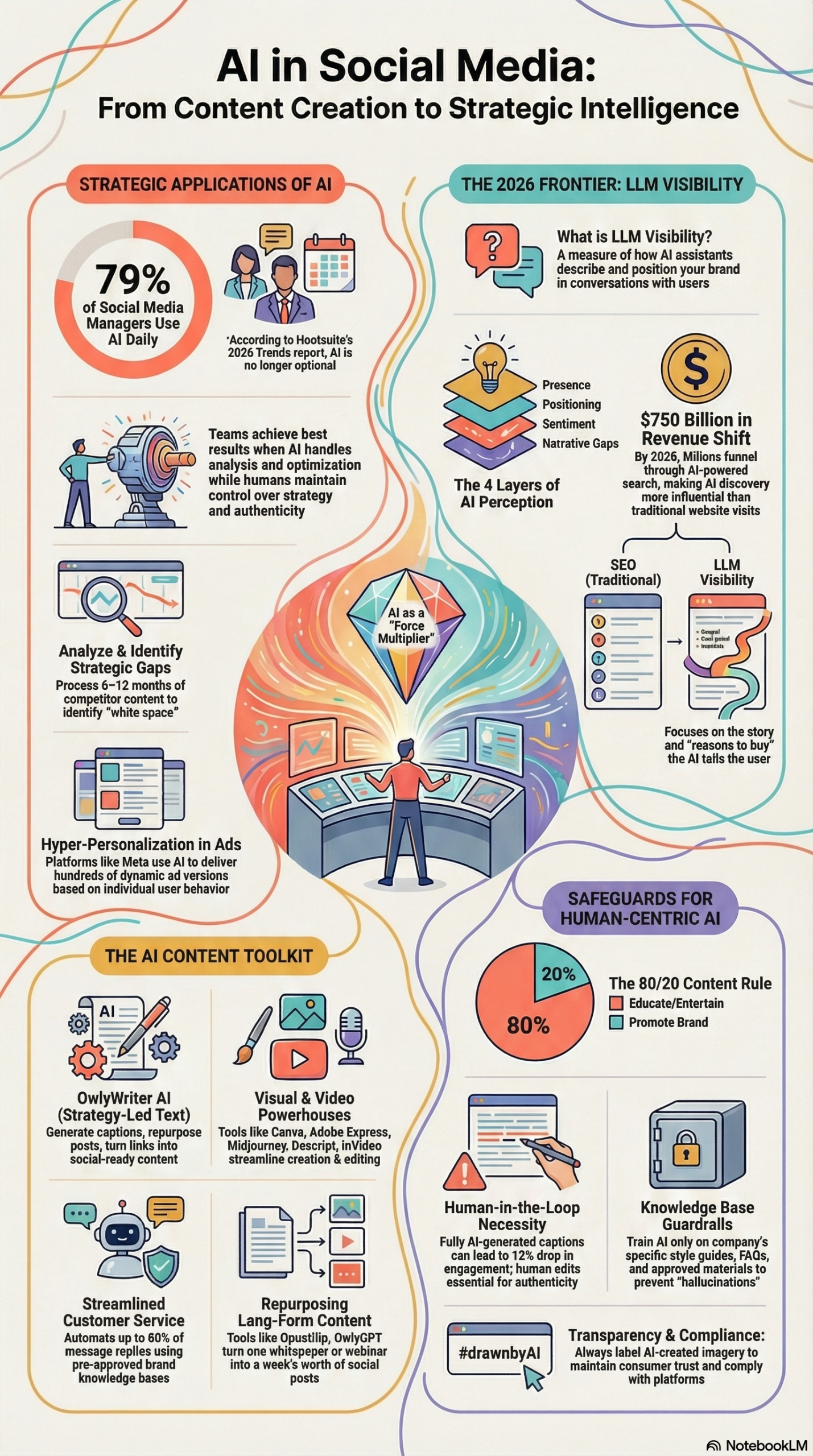
The February 2026 product update from Hootsuite introduces five distinct improvements spanning influencer marketing, social listening, mobile content creation, inbox management, and analytics. These are not cosmetic refreshes — each addresses a specific friction point that social media managers have escalated as team workloads have increased. According to Hootsuite’s research report on AI in social media management, 79% of social media managers now use artificial intelligence daily, and the operational pressure to do more with the same headcount has made platform consolidation a strategic priority.
Here is a concise breakdown of what shipped in February 2026:
1. Upfluence Integration
The most significant addition in this release is the full embedding of Upfluence, an enterprise influencer marketing platform, directly inside the Hootsuite dashboard. This integration enables teams to discover influencers, manage campaigns, and publish influencer-generated content (IGC) without leaving Hootsuite. Once an influencer’s content is approved inside Upfluence, it flows directly into the Hootsuite content scheduler for distribution across TikTok, Facebook, LinkedIn, Instagram, and other supported networks.
2. Scheduled Talkwalker Reports
Hootsuite has expanded its Talkwalker social listening integration to allow users to schedule listening reports at set dates and times with configurable repeat frequency. Previously, generating a listening report required a manual pull every time a stakeholder needed an update. Now those reports can be automated to land in inboxes on a recurring schedule — weekly competitive digests, monthly sentiment summaries, or quarterly trend reviews.
3. Mobile Per-Network Editing
Content teams using Hootsuite’s mobile app can now customize copy, media, and formatting on a per-platform basis before publishing. A post destined for LinkedIn no longer has to carry the same caption as the Instagram version — both can be edited independently from mobile without switching to desktop.
4. Custom Resolve Reasons in Inbox
The Inbox module now supports custom resolve reason labels. When a customer service conversation is closed, agents can tag it with a specific resolution category that the team defines. This transforms raw conversation data into structured workflow intelligence.
5. Expanded Posts Tables in Analytics Reports
The Analytics Reports module now includes expanded Posts Tables with additional column options, enabling aligned metric comparisons across social networks at the individual post level. Teams can now view engagement rate, reach, impressions, clicks, and other network-specific metrics in a single sortable table.
All five updates are available to Hootsuite customers on plans that include the corresponding modules (Listening, Inbox, Analytics).
Why It Matters
Consolidation Is the Operational Imperative of 2026
The dominant pressure on social media teams right now is volume. Demand for high-frequency content — estimated at 16 to 24 posts per week across platforms — cannot be met by teams that spend 30% of their time context-switching between tools. Every platform switch is a cognitive tax, and when you multiply that across influencer management, listening dashboards, reporting exports, and inbox queues, you understand why platform consolidation is no longer a “nice to have.”
The Upfluence integration specifically collapses what was previously a three-tool workflow — influencer discovery in Upfluence, approval in a project management tool, and then manual scheduling in Hootsuite — into a single interface. For agencies running campaigns across multiple brands, this is a material reduction in handoff errors and duplicated effort.
The scheduled Talkwalker reports speak to a different but equally real pain: the time cost of manual reporting. Social listening data is only valuable if stakeholders see it consistently. When reports require a human to generate and send them, they get deprioritized during busy weeks — exactly when competitive intelligence would be most useful. Automation removes that dependency entirely.
The expanded analytics Posts Table addresses a gap that has frustrated data-driven teams for years: the inability to compare post-level performance across networks in one view. Marketers who run identical campaigns on Instagram and LinkedIn have had to export platform-native analytics separately and reconcile them in spreadsheets. That work is now done inside Hootsuite.
According to Hootsuite’s 2026 research data, AI-driven audience segmentation can reduce content planning time by as much as 50%, and automated scheduling can trim administrative time by 60%. The February 2026 features extend those gains into influencer marketing and reporting workflows that were still largely manual.
For agencies, enterprise brand teams, and solo practitioners managing multiple accounts, this release means fewer tools, fewer logins, and fewer places where data gets siloed. The value is operational: more hours redirected from coordination overhead toward strategy and creative work.
The Data
February 2026 Feature Impact: Before vs. After
| Workflow | Before Feb 2026 | After Feb 2026 | Key Benefit |
|---|---|---|---|
| Influencer content publishing | Switch between Upfluence + Hootsuite | Native scheduling from Hootsuite | Eliminates dual-platform workflow |
| Stakeholder listening reports | Manual export and send each cycle | Automated scheduled delivery | Consistent intelligence delivery |
| Mobile posting | Same copy published to all networks | Per-network copy/media customization | Platform-native content from mobile |
| Inbox resolution tracking | Generic close actions | Custom resolve reason labels | Structured resolution data for reporting |
| Cross-network post analytics | Separate platform exports + spreadsheet | Single Posts Table in Hootsuite | Centralized performance comparison |
AI Adoption Context (2026)
| Metric | Data Point | Source |
|---|---|---|
| Social managers using AI daily | 79% | Hootsuite Research |
| Content planning time reduction via AI segmentation | Up to 50% | Hootsuite Research |
| Admin time reduction via automated scheduling | Up to 60% | Hootsuite Research |
| Routine customer inquiries handled by AI chatbots | Up to 80% | Hootsuite Research |
| Marketers who believe AI creates new job opportunities | 69% | Hootsuite Research |
| U.S. revenue projected through AI-powered search by 2028 | $750 billion | Hootsuite Research |
Step-by-Step Tutorial
How to Deploy Every February 2026 Hootsuite Feature
Prerequisites:
– Active Hootsuite account with relevant modules enabled (Listening requires Talkwalker integration; Inbox requires Hootsuite Inbox; Analytics requires Analytics Reports)
– Upfluence account (for the influencer integration)
– Admin or Editor-level permissions in your Hootsuite organization
Phase 1: Connect Upfluence to Hootsuite
The Upfluence integration is the highest-leverage addition in this release. Here is how to connect it and run your first influencer campaign through the unified workflow.
Step 1: Access the Integration Hub
From your Hootsuite dashboard, navigate to Settings → Integrations → App Directory. Search for “Upfluence” in the search bar. If your plan includes the integration, you will see an “Install” button. Click it and follow the OAuth authorization flow to connect your Upfluence account.
Step 2: Verify Connected Profiles
Once authorized, Hootsuite will display your connected Upfluence workspace. Confirm that your influencer lists and active campaigns are visible in the Upfluence panel — this confirms bidirectional data sync is active.
Step 3: Discover and Vet Influencers
Inside Hootsuite, open the Upfluence panel (accessible from the left sidebar). Use Upfluence’s search filters — follower range, engagement rate, audience demographics, niche keywords — to build a shortlist of potential influencers. You no longer need to open a separate browser tab for this step.
Step 4: Manage Campaign Briefs
Within the Upfluence panel inside Hootsuite, create a campaign brief: define deliverables, deadlines, usage rights, and posting guidelines. Assign influencers from your shortlist directly to the campaign.
Step 5: Review and Approve Influencer-Generated Content
When influencers submit their content for review, it surfaces directly inside the Hootsuite content queue. Your social media manager reviews it without leaving the platform. Approved content moves to the Hootsuite content calendar with a single click, ready for scheduled publishing.
Step 6: Schedule IGC Across Networks
From the content calendar, set the publish time and select which networks the influencer content should post to: TikTok, Facebook, LinkedIn, Instagram, and other supported channels. Apply any final caption edits, UTM parameters for tracking, or post labels before scheduling.
Step 7: Track Performance
After the influencer post publishes, its performance data flows into the Hootsuite Analytics module alongside your owned content. You can now compare influencer-generated content performance against brand-owned posts in the same Posts Table — something that previously required a manual export.
Phase 2: Automate Talkwalker Listening Reports
Step 1: Open the Listening Module
Navigate to Listening in the Hootsuite sidebar. Select the Talkwalker topic or search stream you want to report on — this could be a branded keyword, a competitor name, or an industry topic you’re monitoring.
Step 2: Configure Report Parameters
Click Create Report and select the metrics you want included: mention volume, sentiment breakdown, top sources, top authors, geographic distribution, and share of voice. Set your date range (trailing 7 days, 30 days, or custom).
Step 3: Enable Scheduled Delivery
In the report configuration panel, toggle Schedule Report. Set:
– Delivery date: The first send date
– Time: The specific hour/minute for delivery (match your stakeholder’s meeting schedule — e.g., Monday 8:00 AM before a weekly review)
– Repeat frequency: Weekly, bi-weekly, monthly, or a custom interval
Step 4: Configure Recipients
Add the email addresses of stakeholders who should receive the report. You can add internal team members or external clients. Hootsuite will send the report as a formatted PDF or link on the configured schedule without any further manual action.
Step 5: Verify the First Delivery
After setting up, trigger a test send to confirm formatting and data accuracy before the first automated delivery. Check that all sections render correctly and that the data is pulling from the correct listening stream.
Pro tip: Set up separate report schedules for different audiences — a weekly operational report for your social team and a monthly executive summary for leadership with higher-level trend data.
Phase 3: Use Mobile Per-Network Editing
Step 1: Open the Hootsuite Mobile App
Open the Hootsuite mobile app (iOS or Android) and tap the Compose button to create a new post.
Step 2: Select Multiple Networks
In the network selector, choose all the platforms you want to publish to — for example, LinkedIn, Instagram, and TikTok simultaneously.
Step 3: Enable Per-Network Customization
Tap the Customize per network toggle (February 2026 addition). The interface will split your draft into separate editing panels for each selected platform.
Step 4: Edit Each Network Version Independently
– LinkedIn: Use a professional tone, include relevant hashtags in the body, and consider a longer caption with a clear CTA.
– Instagram: Shorten the caption, front-load the hook in the first line, move hashtags to a comment or the end of caption.
– TikTok: Write a punchy one-liner with trending hashtags and an action-oriented CTA.
Each version can also carry a different image or video if your media library supports it — you’re not locked into the same creative across platforms.
Step 5: Schedule or Publish
Set your publish times (Hootsuite will suggest optimal times based on your audience data) and schedule. All network-specific versions will publish independently with their custom content.
Phase 4: Set Up Custom Resolve Reasons in Inbox
Step 1: Access Inbox Settings
In Hootsuite Inbox, navigate to Settings → Resolve Reasons. By default, you may see generic options like “Resolved” or “No action needed.”
Step 2: Create Custom Reason Labels
Click Add Reason and define labels that reflect your actual resolution patterns. Examples:
– “Answered — Product Question”
– “Escalated — Billing Issue”
– “Spam / Irrelevant”
– “Completed — Influencer Inquiry”
– “Resolved — Technical Support”
Step 3: Train Your Team
Require agents to select a resolve reason when closing every conversation. This discipline is what transforms the feature from a tagging exercise into a reporting asset.
Step 4: Build Resolution Reports
Once you have 2-4 weeks of tagged data, pull the Inbox reporting view filtered by resolve reason. You will immediately see patterns: which issue types drive the most volume, which agents handle which categories, and where resolution time is longest. Use this data to update your AI knowledge base or customer FAQ.
Phase 5: Use the Expanded Posts Table in Analytics
Step 1: Open Analytics Reports
Navigate to Analytics → Reports and open an existing report or create a new one.
Step 2: Add the Posts Table Widget
Click Add Widget → Posts Table. Select the networks you want to include and the date range for the analysis.
Step 3: Configure Columns
With the February 2026 expansion, you now have additional column options available. Click Customize Columns and add the metrics most relevant to your reporting goal:
– Impressions
– Reach
– Engagement Rate
– Link Clicks
– Video Views
– Saves/Repins (network-specific)
Step 4: Sort and Filter
Sort the Posts Table by any column — for example, sort by Engagement Rate descending to identify your top performers across all networks in a single view. Filter by content type (video, image, link) to compare format performance.
Step 5: Export or Share
Export the Posts Table as a CSV for further analysis in a spreadsheet, or include it directly in a Hootsuite custom report PDF for client delivery.
Expected Outcome: After completing all five phases, your team will have a consolidated workflow where influencer campaigns, listening intelligence, mobile content production, inbox management, and cross-network analytics all operate from a single platform — reducing the tool overhead that has historically fragmented social media operations.
Real-World Use Cases
Use Case 1: Agency Running a Multi-Brand Influencer Campaign
Scenario: A mid-size digital marketing agency manages influencer programs for three CPG brands simultaneously. Each campaign involves 10-20 micro-influencers posting across Instagram and TikTok over a 30-day window.
Implementation: The agency connects each brand’s Upfluence account to the corresponding Hootsuite organization. Influencer vetting, brief creation, and content approval all happen inside Hootsuite. Once approved, influencer posts are scheduled directly from the Hootsuite content calendar with UTM-tagged links for each brand.
Expected Outcome: The agency eliminates the three-platform handoff between Upfluence, Asana (for approvals), and Hootsuite (for scheduling). Campaign setup time drops, and post-campaign reporting can pull influencer content performance alongside paid social data in the same Analytics dashboard.
Use Case 2: Enterprise Brand Team Automating Competitive Intelligence
Scenario: A retail brand’s social team monitors three competitor brands and two industry keywords using Talkwalker inside Hootsuite. Every Monday morning, the VP of Marketing wants a sentiment summary before the weekly planning meeting.
Implementation: The social manager creates a Talkwalker report covering share of voice, sentiment trends, and top-performing competitor content. She configures it to deliver every Monday at 7:45 AM via email to the VP and the brand director. No manual pull required.
Expected Outcome: Stakeholders receive consistent competitive intelligence regardless of whether the social manager is traveling, on PTO, or in a production crunch. The automated scheduling capability described in this release directly addresses the “busy week deprioritization” problem that causes listening data to go unseen.
Use Case 3: Global Content Team Using Mobile Per-Network Editing
Scenario: A SaaS company’s content team publishes 18-20 posts per week across LinkedIn, Instagram, and Twitter/X. Historically, they draft on desktop, but team members in different time zones need to make last-minute copy adjustments while mobile.
Implementation: Using mobile per-network editing, team members can now adjust LinkedIn copy to add a professional framing, trim the Instagram version to 125 characters, and rewrite the X version as a punchy single-sentence hook — all from their phones, without losing formatting consistency.
Expected Outcome: The content team meets the 16-24 post-per-week publishing demand documented in Hootsuite’s research without requiring every edit to be escalated to a desktop session. Response time to trending news moments improves because the mobile editing experience now matches the quality of desktop.
Use Case 4: Customer Support Team Building Resolution Intelligence
Scenario: An e-commerce brand’s social support team handles 400+ inbox messages per week across Facebook, Instagram, and Twitter/X. Leadership wants to know what percentage of volume is product questions vs. shipping issues vs. complaints.
Implementation: The support manager creates 6 custom resolve reason labels that map to their most common issue types. Over four weeks, agents tag every resolved conversation. The resulting Inbox report shows that 38% of volume is shipping inquiries — data that triggers a proactive FAQ post series to deflect future volume.
Expected Outcome: The resolve reason data directly informs content strategy and customer FAQ improvements. This is how AI knowledge base development begins — with structured resolution data, not guesswork.
Use Case 5: Performance Marketer Optimizing Cross-Network Content Strategy
Scenario: A performance marketer runs the same campaign creative on LinkedIn, Instagram, and Facebook simultaneously and needs to know which platform and which content format (video vs. image) is generating the best engagement rate.
Implementation: Using the expanded Posts Table in Hootsuite Analytics, she builds a side-by-side view with Engagement Rate, Reach, and Link Clicks columns for all three networks. She sorts by Engagement Rate to immediately identify that LinkedIn video is outperforming LinkedIn images by 2.3x, and that Facebook image carousels are leading all formats on that platform.
Expected Outcome: Budget and creative production resources are reallocated in the following sprint based on actual cross-network post data — not assumptions. The expanded Posts Table provides the evidence that previously required a manual spreadsheet reconciliation.
Common Pitfalls
1. Skipping the Upfluence OAuth Verification Step
When connecting Upfluence to Hootsuite, users often complete the authorization flow but fail to confirm that their active campaigns and influencer lists have synced correctly. If permissions in Upfluence are role-restricted (e.g., only campaign managers can view certain influencer lists), the sync may appear complete but show incomplete data. Always verify the Upfluence panel inside Hootsuite against your actual Upfluence account before running a live campaign through it.
2. Scheduling Talkwalker Reports Without Validating the Data Stream
Automated reports are only valuable if the underlying listening stream is well-configured. Teams that set up recurring reports before properly tuning their Talkwalker search query — refining Boolean logic, excluding irrelevant sources, filtering noise — end up automating low-quality data delivery. Configure and validate your listening stream for at least one manual reporting cycle before enabling scheduled automation.
3. Treating Mobile Per-Network Editing as Optional
Per-network customization from mobile is only valuable if the team actually uses it. The pitfall is defaulting to a single universal caption to save time — which defeats the purpose of the feature entirely. As Hootsuite’s research notes, AI-driven content tools handle drafting efficiently; the human value-add is in platform-specific voice and formatting. Establish a team standard that mobile edits require at least a caption tweak per platform.
4. Inconsistent Resolve Reason Tagging in Inbox
Custom resolve reasons generate useful data only when applied consistently. If some agents tag conversations and others skip the step, the resulting report data is skewed and unreliable. According to the documented best practices in the Hootsuite research report, implementing a “human-in-the-loop” process for any AI or automated workflow requires structured inputs — and resolve reason tagging is exactly that kind of structured input. Make it mandatory via team SOP, not optional.
5. Over-Engineering the Posts Table Without a Clear Question
The expanded Posts Table is powerful, but adding every available column creates visual noise that makes the report harder to interpret. Start with 3-5 core metrics tied to a specific business question (“Which content format drives the most engagement on LinkedIn?”) before adding secondary metrics. A cluttered Posts Table takes longer to read than the spreadsheet it was supposed to replace.
Expert Tips
Tip 1: Chain Upfluence Data Into Your LLM Visibility Monitoring
Hootsuite’s Senior Director of Marketing Strategy Ryan Smith has described LLMs as “a new stakeholder of the brand.” Influencer-generated content is one of the highest-signal inputs that LLMs synthesize when building brand narratives. When you publish IGC through Hootsuite’s Upfluence integration, ensure that influencer posts include consistent brand language — product names, category descriptors, brand differentiators — so those signals reinforce how AI assistants like ChatGPT and Perplexity describe your brand in responses.
Tip 2: Use Resolve Reason Data to Build Your AI Customer Service Knowledge Base
The 80% of routine customer inquiries that AI chatbots can handle are identifiable from your inbox resolve reason data. After 30 days of consistent tagging, export your resolve reason breakdown and use the top 5 categories to build or update your AI chatbot’s knowledge base. You are essentially letting actual customer conversation patterns define your automation roadmap.
Tip 3: Stack Talkwalker Report Schedules for Different Audiences
Create separate scheduled reports for different stakeholder levels. Your social team needs a weekly operational digest with granular mention volume and sentiment spikes. Your VP needs a monthly executive summary with share of voice and trend trajectory. Your client (if agency-side) may need a quarterly competitive landscape report. Hootsuite’s scheduling feature supports all of these simultaneously — configure each as a separate report instance with its own recipient list and frequency.
Tip 4: Benchmark Influencer Content Performance Against Owned Content Baselines
Now that influencer posts are tracked in the same Hootsuite Posts Table as your owned content, establish a clear internal benchmark: your average organic engagement rate on Instagram for brand-owned posts. Compare this against your influencer post engagement rate monthly. If IGC consistently outperforms owned content (as it frequently does for authentic micro-influencer posts), use that data to justify budget reallocation from production-heavy brand content toward influencer partnerships.
Tip 5: Use Per-Network Mobile Editing to Respond to Breaking News Moments
The highest-leverage application of mobile per-network editing is reactive content — responding to breaking industry news, trending memes, or viral moments. Speed matters, but platform-native formatting matters equally. With per-network editing now available on mobile, your social manager can draft a LinkedIn thought leadership response, an Instagram Story-ready caption, and a punchy X post simultaneously within minutes of a news event, without waiting to get to a desktop.
FAQ
Q1: Does the Upfluence integration require a paid Upfluence subscription?
Yes. The Upfluence integration connects your existing Upfluence account to Hootsuite — it does not provide Upfluence functionality for free. You need both an active Upfluence subscription and a Hootsuite plan that includes the integration tier. Check with your Hootsuite account manager for current plan requirements, as these vary by region and contract type.
Q2: Can Talkwalker report scheduling be paused without deleting the configuration?
The February 2026 feature set, as documented by Hootsuite, supports scheduled reports with repeat frequency options. For specific pause/resume functionality details, check your Hootsuite Listening module settings or contact Hootsuite support — feature-level controls may vary based on plan tier.
Q3: Is per-network editing on mobile available for all supported Hootsuite networks?
Based on the February 2026 release notes, mobile per-network editing supports the core networks available in Hootsuite’s mobile app, including TikTok, Facebook, LinkedIn, Instagram, and X/Twitter. Network availability may vary by device OS version and app update status — ensure you are running the latest version of the Hootsuite mobile app.
Q4: How does the expanded Posts Table handle networks with different native metrics?
The expanded Posts Table in Hootsuite Analytics normalizes available metrics per network. Network-specific metrics (such as TikTok’s “plays” vs. Instagram’s “reach”) will appear in network-specific columns, while cross-network metrics (impressions, engagement rate, link clicks) appear as shared columns for direct comparison. Columns with no data for a given network will display as blank or “N/A” in that row.
Q5: Can fully AI-generated content be published through the Upfluence-Hootsuite integration without human review?
You can technically schedule any content, but this is not recommended. Ashwin Thapliyal of Exemplifi documented a 12% drop in engagement when fully AI-generated captions were published without human editing for a financial services client. The established best practice is AI-assisted drafting with mandatory human review before any post — including influencer-coordinated content — goes live. Hootsuite’s own workflow design supports a “human-in-the-loop” approval step before publication for exactly this reason.
Bottom Line
Hootsuite’s February 2026 update is not a feature sprint for feature sprint’s sake — the Upfluence integration, scheduled Talkwalker reports, mobile per-network editing, custom inbox resolve reasons, and expanded Posts Table each address a documented operational cost that social media teams are paying today. The thread connecting all five is consolidation: fewer platforms, fewer handoffs, and more structured data flowing into a single source of truth. As Hootsuite’s research shows, AI-driven workflow gains of 50-60% in planning and scheduling time are already being realized by teams that have centralized their operations — these features extend that centralization into influencer marketing and reporting workflows that were still largely manual. The teams that deploy these features systematically, with clear SOPs and consistent data discipline, will free meaningful capacity for the strategic and creative work that still requires human judgment.


0 Comments