

Google just removed the last excuse for skipping YouTube ads. As of March 27, 2026, Google has rolled out Veo globally inside Google Ads, letting any advertiser turn up to three static product images into polished, 10-second YouTube-ready videos — no production team, no camera crew, no editing software required. If your team has been sitting on a library of clean product photography while your competitors dominate YouTube placements, this tutorial will show you exactly how to put Veo to work today.
What This Is
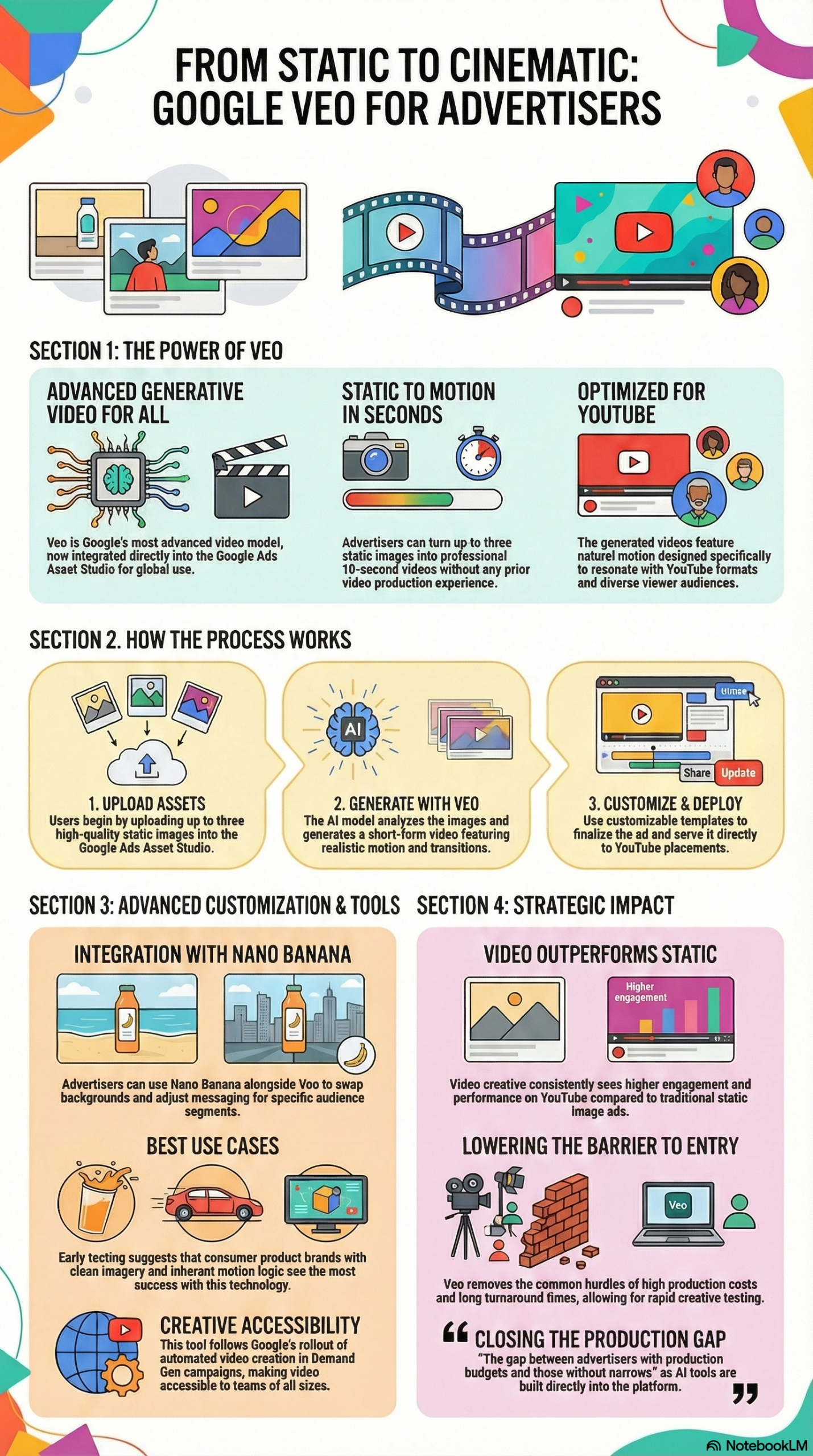
Veo is Google’s most advanced generative video model, now embedded directly into the Google Ads platform through a tool called Asset Studio. According to the Search Engine Land report on the global launch, the workflow is straightforward: you upload up to three static images into Asset Studio, and Veo generates a 10-second video featuring natural motion, optimized specifically for YouTube formats and audiences.
This is not an animated GIF maker or a slideshow builder. Veo applies genuine generative motion — meaning it understands the physics and visual logic of what’s in your images and animates them accordingly. A bottle of shampoo might show liquid motion; a running shoe might show dynamic foot movement; a piece of jewelry might catch light and rotate. The model infers the most natural motion for the subject matter rather than just panning or zooming across a static frame.
The technical pipeline runs entirely inside Google Ads. There’s no third-party software to install, no API key to configure, and no file exports or imports needed. The generated videos are output as ready-to-serve ad units, formatted for YouTube’s ad inventory, and can be plugged directly into your campaigns.
Once a video is generated, Nano Banana — Google’s creative adaptation layer within the platform — gives advertisers the ability to go further. According to the NotebookLM research report, Nano Banana allows you to swap backgrounds, adjust messaging copy, and tailor the generated video to specific audience segments. This means a single source image set can yield multiple video variants for different demographics, interests, or funnel stages without any additional production work.
The global launch on March 27, 2026, marks the culmination of a multi-phase AI creative rollout from Google. Earlier milestones included automated video templates and automatic video creation inside Demand Gen campaigns. The research report frames the Veo integration as a “next step” in Google’s long-term strategy to automate creative processes — a shift from template-based animation toward genuine AI-generated motion. The implication is clear: Google intends for creative production to happen inside its ad platform, not outside it.
For practitioners, the most important technical constraint to understand is the 10-second limit. Veo-generated videos are designed for YouTube’s short ad formats — specifically pre-roll and in-feed video. This makes them ideal for awareness and consideration objectives, where short, high-impact visual content is most effective. They are not designed to replace 30-second brand films or long-form product demos.
The model performs best, according to early tester Ameet Khabra, Founder of Hop Skip Media, when the source images represent “consumer product brands with clean imagery and inherent motion logic.” This is a meaningful qualifier we’ll return to throughout this guide — your source assets matter enormously to the quality of the output.
Why It Matters
The core problem Veo solves is deceptively simple: video ads on YouTube consistently outperform static creative, but the cost and complexity of producing video has historically locked out a large segment of advertisers. As Anu Adegbola, Paid Media Editor at Search Engine Land, put it: “The gap between advertisers with production budgets and those without narrows.”
That narrowing has compounding effects for different practitioner types:
For in-house marketing teams at mid-size brands: The typical path to YouTube ads required budget approval for video production, vendor sourcing, shoot logistics, editing rounds, and brand review cycles. The total cost for a single 10-second ad could easily run $5,000–$25,000+ when agency and production fees were included, and the timeline from brief to live often stretched four to six weeks. Veo collapses that to minutes, inside a platform you’re already paying for.
For performance marketing teams: The ability to generate video variants from static assets means you can now run proper A/B tests between your static creative and video creative within the same campaign structure. This was previously a budget-intensive undertaking. Now it’s a workflow step.
For agencies running image-heavy client campaigns: Many agencies have clients with deep product photography libraries but no video budget. The research report specifically calls this out as a primary beneficiary: “For teams running image-heavy campaigns who have been unable to compete in video placements, this changes the equation significantly.” Agencies can now offer YouTube video creative as a deliverable without expanding their production capabilities.
For Google itself: This is a competitive moat play. Every creative asset generated inside Google Ads keeps advertisers deeper inside the Google ecosystem. It also increases the supply of YouTube-eligible ad inventory, which benefits YouTube’s revenue per advertiser.
What makes this different from third-party AI video tools like Runway, Kling, or Pika is the native integration and the output format. Those tools require export, upload, transcoding, and manual campaign setup. Veo outputs are campaign-ready inside Google Ads — the entire loop closes inside the platform. That workflow efficiency is the real differentiator, not the raw generative capability.
The Data
The following comparison, derived from the NotebookLM research report, illustrates the workflow difference between traditional video production and Veo-powered production inside Google Ads:
| Dimension | Traditional Video Production | Veo in Google Ads |
|---|---|---|
| Input Requirements | Filming, editing, motion graphics design | Up to 3 static images |
| Time to Market | Days to weeks | Minutes |
| Tools Required | External software, agencies, hardware | Google Ads Asset Studio + Nano Banana |
| Primary Format | Various (broadcast, digital, social) | YouTube-specific (up to 10 seconds) |
| Budget Barrier | High — production costs range from hundreds to tens of thousands | Low — included in Google Ads platform access |
| Creative Variants | Costly and time-consuming to produce | Multiple variants via Nano Banana at no additional production cost |
| Team Requirement | Videographer, editor, creative director | Marketing manager or media buyer |
| Campaign Integration | Manual upload, format conversion, setup | Native — outputs are ready-to-serve ad units |
The data tells one story clearly: the production bottleneck that kept small and mid-size advertisers out of YouTube video placements is gone. The remaining differentiator is creative strategy, not production capacity.
Step-by-Step Tutorial: Using Google Veo in Google Ads
Prerequisites
Before you start, confirm you have the following:
- An active Google Ads account with campaigns running or ready to build
- Access to Asset Studio inside your Google Ads interface (available globally as of March 27, 2026, per the Search Engine Land announcement)
- At least one — ideally three — high-resolution static product images (JPEG or PNG, minimum 1080p recommended)
- Clear understanding of the campaign objective you’re building toward (awareness, consideration, or conversion)
Phase 1: Audit and Select Your Source Images
This phase is where most advertisers make their first mistake — they grab whatever product shots are easiest to find rather than selecting images with the highest generative potential.
Veo produces the best output from images that have what Ameet Khabra of Hop Skip Media calls inherent motion logic. Before you open Asset Studio, review your image library with this filter in mind:
Images that work well:
– Liquids (beverages, skincare, cleaning products) — the AI can generate pouring, splashing, or flowing motion
– Apparel worn by models — natural fabric movement, walking, or turning
– Food on a surface — steam rising, ingredients falling, garnish settling
– Vehicles in motion contexts — wheels turning, environment blurring
– Technology products with lights or screens — glowing, activating, displaying
Images that tend to perform poorly:
– Flat lay photography with no clear motion axis
– Heavily text-overlaid product shots where text competes with motion
– Extremely busy backgrounds that confuse the AI’s spatial understanding
– Products that have no natural movement state (a plain cardboard box, for example)
– Low-resolution images or images with heavy JPEG compression artifacts
Select up to three images that pass the motion logic test. You don’t need to use all three slots — a single hero image with strong inherent motion can produce excellent results. However, feeding the model two or three complementary angles (front, detail, lifestyle) tends to produce richer, more visually varied output.
Phase 2: Access Asset Studio Inside Google Ads
Log into your Google Ads account and navigate to the Asset Studio section of the platform. As of the March 2026 global rollout, Asset Studio is the hub for all AI-powered creative tools including Veo.
To locate it:
- From the main Google Ads dashboard, click Campaigns in the left navigation
- Select or create the campaign you want to generate video assets for
- Navigate to the Assets tab within the campaign view
- Look for the Asset Studio entry point — this will be labeled within the creative assets section of your campaign
Alternatively, some accounts surface Asset Studio as a top-level tool in the left navigation sidebar under the Tools menu. The placement may vary slightly by account type and interface version.
Once inside Asset Studio, you’ll see the Veo video generation interface alongside other creative tools in the platform.
Phase 3: Upload Your Images and Generate Video
With Asset Studio open and your pre-screened images ready:
-
Click the Veo video generation option within Asset Studio. This will open the image upload and generation panel.
-
Upload your images — you can upload one, two, or three static images. Drag and drop or use the file browser. Supported formats are JPEG and PNG. Larger, higher-resolution files will give the model more visual information to work with.
-
Select a template — Veo provides customizable templates that shape how the generated video is structured and paced. Templates are optimized for different YouTube ad formats (pre-roll, in-feed, etc.). Choose the template that matches your campaign objective:
- Awareness templates tend to prioritize visual dynamism and brand recall
-
Consideration templates often structure the video to showcase product features in sequence
-
Add any copy direction — Asset Studio allows you to provide headline or messaging inputs that Veo and the template system will incorporate into the video output. Keep this brief and aligned with your primary campaign message.
-
Click Generate — Veo will process your inputs and return a 10-second video with natural motion applied. Generation time is reported to be on the order of minutes, not hours.
-
Review the output — Play the generated video and evaluate it against these criteria:
- Is the motion natural and physically plausible?
- Does the product remain clearly identifiable throughout?
- Is the overall tone aligned with your brand?
- Is the video visually clean enough for YouTube placements?
If the output doesn’t meet your standards, you can regenerate. The model’s outputs are stochastic — re-running the same inputs will produce a different but related video. It is worth generating two to three variations before moving forward.
Phase 4: Refine and Adapt with Nano Banana
Nano Banana is the creative adaptation tool built into the same workflow. According to the NotebookLM research report, it allows you to:
- Swap backgrounds — replace the background environment of the generated video with something more contextually relevant to a specific audience segment (e.g., a home environment for a household products audience versus a gym setting for a fitness audience)
- Adjust messaging — update the copy or call-to-action overlay on the video to match different offers, audience segments, or campaign flights
- Tailor content to audience interests — align the visual context and messaging to specific audience definitions in your campaign targeting
To use Nano Banana effectively:
- Take your initial Veo-generated video and open it in the Nano Banana editing panel within Asset Studio
- Identify the audience segments your campaign is targeting — you should have at least two or three distinct audience definitions
- For each segment, create a variant: swap the background to match that audience’s likely context, and adjust the messaging to speak to their specific interest or intent signal
- Save each variant as a separate asset
- Assign specific video variants to the corresponding audience targeting in your campaign
This step is where Veo goes from a single video to a multi-variant creative strategy. The production overhead of creating audience-specific video variants used to be prohibitive. Nano Banana makes it a workflow step that takes 15–30 minutes rather than an additional production cycle.
Phase 5: Set Up the Campaign and Launch
With your video assets generated and refined:
-
Assign the video asset to your campaign — in the Assets section of your campaign, upload or link the Veo-generated video. Since Asset Studio outputs are native to the platform, this step should be seamless.
-
Set your targeting parameters — make sure audience segments align with the Nano Banana variants you created. Match the right video to the right audience from the start.
-
Configure your bidding and budget — for first-run video campaigns using Veo-generated assets, start with a discovery budget to gather impression and view data before scaling. A reasonable starting test budget is 20–30% of your equivalent static campaign spend.
-
Enable A/B testing — as the research report explicitly recommends, you should run a direct comparison between your highest-performing static image and its Veo-generated video equivalent. This will give you concrete ROI data for the video format and establish a benchmark for future AI-generated creative.
-
Launch and set monitoring checkpoints — set a calendar reminder to review campaign performance at 7 days and 14 days post-launch. Key metrics to track: view-through rate (VTR), click-through rate (CTR), cost-per-view (CPV), and any downstream conversion metrics tied to your campaign objective.
Expected Outcomes
After completing this workflow, you should have:
– One to three 10-second YouTube ad videos generated from your static image assets
– Multiple audience-specific variants created via Nano Banana
– An active A/B test comparing video versus static creative performance
– A repeatable process for generating new video creative from future image assets in under an hour
Real-World Use Cases
Use Case 1: E-Commerce Brand With Deep Product Photography
Scenario: A mid-size skincare brand has 200+ professional product shots across their catalog but has never run YouTube ads because video production was cost-prohibitive. Their Google Shopping and Display campaigns are strong, but they’re locked out of YouTube pre-roll inventory.
Implementation: The paid media manager identifies the top five product lines by revenue and selects two to three hero images per line — each featuring the product in a lifestyle context with clear motion logic (liquid textures, glass packaging that catches light). Using Asset Studio, they generate one Veo video per product line, then use Nano Banana to create two variants per video: one targeting skincare-interested audiences, one targeting beauty deal-seekers. The entire process takes one afternoon.
Expected Outcome: Ten YouTube video ad assets deployed across five product lines in under eight hours of total work. The brand enters YouTube pre-roll inventory for the first time and can benchmark video CTR and view-through rates against existing static Display campaign data.
Use Case 2: Performance Agency Converting Client Image Campaigns
Scenario: A digital agency manages Google Ads for 12 e-commerce clients. Three clients have specifically requested YouTube expansion but don’t have video production budgets. The agency has never offered video creative production as a service.
Implementation: The agency designates Asset Studio as a standard workflow step in campaign setup for all image-heavy clients. For each client, they audit the existing image asset library, select candidates with motion logic, generate Veo videos, and include video creative in the campaign deliverables without billing a separate production line item.
Expected Outcome: The agency expands its service offering to include YouTube video creative without adding production overhead or headcount. Clients gain access to higher-performing YouTube placements, and the agency strengthens its retention argument by demonstrating measurable performance improvement.
Use Case 3: Retail Brand Running Seasonal Promotions
Scenario: A national retail brand runs heavy promotional campaigns during Q4, Black Friday, and seasonal sales events. Historically, creative refresh cycles can’t keep pace with the promotion calendar — video assets are produced months in advance and may not reflect current offers or inventory.
Implementation: The in-house performance team uses Veo to generate fresh video creative tied to each promotional event using product images updated to reflect current offers. Nano Banana handles the copy swap between events (e.g., “Up to 40% off” vs. “Final Sale” vs. “New Arrivals”). New video creative can be generated and live within hours of a promotion going active.
Expected Outcome: Creative refresh cycle shrinks from weeks to hours. The brand can respond to real-time inventory signals, competitor promotions, or trending moments with updated video creative on YouTube without engaging an external production team.
Use Case 4: B2C App or SaaS Brand Using UI Screenshots
Scenario: A consumer app company wants to run YouTube awareness campaigns but their visual assets are primarily UI screenshots and device mockups rather than physical product photography.
Implementation: The team selects high-quality device mockup images that show the app interface in a clearly readable state. They use Veo to generate motion sequences that animate the device — screen lighting up, interface transitioning — and pair the output with messaging focused on the primary value proposition. This use case requires careful image selection (clean device mockups, no cluttered backgrounds) to get quality output.
Expected Outcome: Mixed results, and this use case illustrates the model’s limits. Apps and software products don’t always have the same inherent motion logic as physical consumer goods. The team should generate multiple variations and expect to discard some outputs. The best results will come from mockups that suggest device interaction rather than static interface screenshots.
Use Case 5: DTC Brand A/B Testing Video vs. Static ROI
Scenario: A direct-to-consumer fitness brand wants concrete data on whether YouTube video ads are worth the incremental investment over their existing Display static campaigns.
Implementation: Following the research report’s recommendation to “benchmark against static performance,” the team identifies their top three performing static image ads and generates Veo video equivalents from the same source images. They run a controlled A/B test: same audiences, same budget split, same campaign period — static versus video.
Expected Outcome: The team gets empirical data on the video uplift for their specific category, audience, and product type. This data drives a budget reallocation decision grounded in actual performance rather than assumption, and establishes a baseline CPV and VTR benchmark for all future video campaigns.
Common Pitfalls
Pitfall 1: Using Low-Quality or Compositionally Complex Images
The single most common mistake is uploading whatever product images are convenient rather than selecting for motion logic and image quality. Veo is a generative model — it works from what you give it. Compressed, small, or compositionally noisy images produce noticeably lower quality video output. Always start with your best available imagery. Clean subjects, clear backgrounds, and high resolution are non-negotiable inputs.
Pitfall 2: Skipping the Nano Banana Step
Generating a video and immediately pushing it to all audiences is leaving capability on the table. Nano Banana’s ability to swap backgrounds and adjust messaging is specifically designed to create audience-relevant variants from a single generation. Skipping this step means running a generic video against every audience segment, which is no different from a static one-size-fits-all approach. Budget 30 minutes per video asset for Nano Banana refinement.
Pitfall 3: No A/B Test Against Static Baseline
If you don’t test video against static, you have no data to support budget reallocation. The research report explicitly calls out A/B testing as a critical step. Launch every Veo campaign with a parallel static asset test and give it at least two weeks of runtime before drawing conclusions.
Pitfall 4: Misaligning Format with Objective
Veo outputs are 10-second videos designed for awareness and consideration objectives on YouTube. Using them in conversion-focused campaigns where longer, more explanatory creative is typically needed will produce disappointing results — not because Veo failed, but because the format is wrong for the objective. Match the format to the funnel stage.
Pitfall 5: Treating AI Generation as a One-Shot Process
Regenerating is not failure — it’s part of the workflow. Because Veo’s outputs vary between generation runs, the first output should be treated as a draft. Generate two to three variations, evaluate all of them, and choose the best. Factor this into your time estimates when planning creative sprints.
Expert Tips
Tip 1: Pre-Score Your Image Library for Motion Potential
Before your first session in Asset Studio, systematically review your image library and tag images by motion potential: high (liquids, fabric, vehicles, food), medium (tech products, apparel flat lays), low (packaging closeups, text-heavy shots). This makes future Veo sessions faster and produces consistently better outputs.
Tip 2: Build Nano Banana Variants Before Launch, Not After
Don’t wait for initial performance data to create audience variants. Build at minimum two Nano Banana variants per video asset at launch — one for your primary audience, one for a secondary. This gives you audience-specific learning from day one rather than adding a production cycle post-launch.
Tip 3: Use the 10-Second Format as a Brand Recall Vehicle
The research report notes that video consistently outperforms static on YouTube. But 10 seconds isn’t enough time for product education or conversion argument — it’s ideal for brand recall and visual impact. Frame your creative brief accordingly: the goal is to make the audience remember the brand and product, not to close a sale in 10 seconds.
Tip 4: Align Generated Video Assets to Your Highest-Performing Static
Don’t start Veo testing with your weakest or most average static assets. Start with your top-performing static images — the ones already proven to resonate with your audience. If those images have motion logic, Veo will produce better-quality video from them, and you’re more likely to see a meaningful performance lift in your A/B test.
Tip 5: Track VTR as Your Primary Quality Signal
View-through rate (VTR) is your most immediate signal of whether a Veo-generated video is working on YouTube. A strong VTR means viewers are choosing to continue watching beyond the skip point — a direct measure of creative quality and audience relevance. Use VTR to rank your Veo variants and kill underperformers fast, reallocating budget to the highest-VTR assets.
FAQ
Q1: Is Veo in Google Ads free to use, or is there an additional cost?
Based on the Search Engine Land announcement, Veo is integrated into Google Ads through Asset Studio as part of the platform’s native tools. The research report lists “low budget barrier — included in platform tools” as a key differentiator versus traditional production. However, Google’s exact pricing terms for access are not specified in the available sources — confirm your account’s current access directly in Asset Studio or through your Google Ads representative, as enterprise and standard account tiers may differ.
Q2: What image specifications produce the best Veo output?
The research report and early tester feedback from Ameet Khabra of Hop Skip Media consistently point to clean imagery with inherent motion logic as the key quality driver. In practical terms: use images at 1080p or higher resolution, with clear subjects against uncluttered backgrounds, and ensure the product depicted has a natural motion state the AI can extrapolate. JPEG and PNG formats are both supported.
Q3: Can Veo-generated videos be used in placements other than YouTube?
According to the research report, Veo’s outputs are specifically designed for “YouTube formats and audiences” and the pipeline is optimized for YouTube-specific ad inventory. Using them outside YouTube placements (Display network video, Performance Max video, etc.) may be technically possible but falls outside the model’s primary design intent and may affect quality. Test any cross-placement use carefully and verify format requirements match.
Q4: How many video variants can you generate from a single set of images?
The platform allows you to generate multiple video outputs from the same image set by re-running generation and by using Nano Banana to create additional variants. There is no explicitly stated cap on the number of generations per session, but each Veo run produces a new, distinct 10-second video. In practice, two to three generation runs plus Nano Banana background and messaging swaps can yield six to nine distinct video variants from a single image set — a meaningful creative expansion from minimal source material.
Q5: Does Veo work for B2B advertisers and service businesses, or only for product brands?
Early tester Ameet Khabra specifically called out “consumer product brands with clean imagery and inherent motion logic” as the strongest use case. B2B advertisers and service businesses typically lack the physical product imagery that Veo animates most effectively. That said, B2B brands with strong visual assets — data center hardware, industrial equipment, professional photography of services in action — may get usable results. The key test is whether your images pass the motion logic screen. If they do, Veo can work regardless of industry category.
Bottom Line
Google Veo’s integration into Google Ads as a globally available tool inside Asset Studio represents a genuine workflow shift, not just a feature update. The combination of image-to-video generation through Veo and creative adaptation through Nano Banana eliminates the two biggest barriers to YouTube advertising — production cost and production time — for brands that already have quality static image assets. As Anu Adegbola observed, the gap between well-funded advertisers and everyone else on YouTube just got significantly narrower. The practitioners who will capture the most value from this are those who approach it systematically: auditing image libraries for motion potential, generating multiple variants, using Nano Banana to create audience-specific creative, and running rigorous A/B tests against existing static campaigns. Veo doesn’t replace creative strategy — it removes the production bottleneck that was preventing many teams from executing that strategy on YouTube at all.


0 Comments