

A bug in Google Ads Editor is silently corrupting localization settings for advertisers who manage multi-language or multi-account campaigns — and most affected accounts don’t know it’s happening. When you copy structured snippet extensions in the Editor desktop application, those snippets can remain invisibly linked, meaning a language change in one account automatically overwrites the language setting in another. This tutorial covers exactly how the bug behaves, how to audit your accounts for existing damage, and how to build a workflow that prevents it from happening again.
What This Is
PPC News Feed, founded by Hana Kobzová, first documented the structured snippet language linking bug after it was discovered in the field by digital marketer Marcin Wsół. Wsół encountered the issue while managing Czech and Slovak e-commerce accounts — a common multi-market setup across Central Europe. When he edited the language setting for a structured snippet in the Slovak account, the Czech account’s corresponding snippet changed too. The extensions appeared to be separate entities in the Editor interface, but they were silently sharing a state.
Kobzová’s follow-up investigation confirmed the problem extends beyond cross-account scenarios. The same bug occurs within a single account when copying structured snippets between campaigns or ad groups. Copied snippets retain a hidden linkage to their source, meaning that editing one after the copy operation can overwrite the other’s language setting without any warning.
To understand why this is dangerous, you need to understand how Google Ads Editor handles shared library assets. Structured snippets, like other extensions, can be stored in the shared library and then associated with multiple campaigns. When you copy a snippet using the Editor, what should happen is a new, independent copy is created. What is actually happening with this bug is that the Editor is creating a reference to the original object rather than a true duplicate. The result is that both the original and the copy point to the same underlying language attribute — so changing one changes both.
This is not a minor cosmetic issue. For any advertiser running campaigns in multiple languages or markets, a language mismatch in a structured snippet means your extensions either fail to serve (because the snippet language doesn’t match the user’s language targeting) or serve the wrong-language copy to the wrong audience. In a Slovak/Czech scenario, for instance, a Slovak-language snippet accidentally set to Czech will either be suppressed by Google’s relevance filters or — worse — displayed to users who expect Slovak-language messaging.
The bug was reported to Google through community forums and via PPC News Feed. As of March 2026, no official patch has been released. Google’s recommended temporary workaround is to make language edits via the Google Ads web interface rather than the Editor desktop application — but even that comes with a caveat: subsequent edits in the Editor can re-trigger the language toggle, reverting the fix.
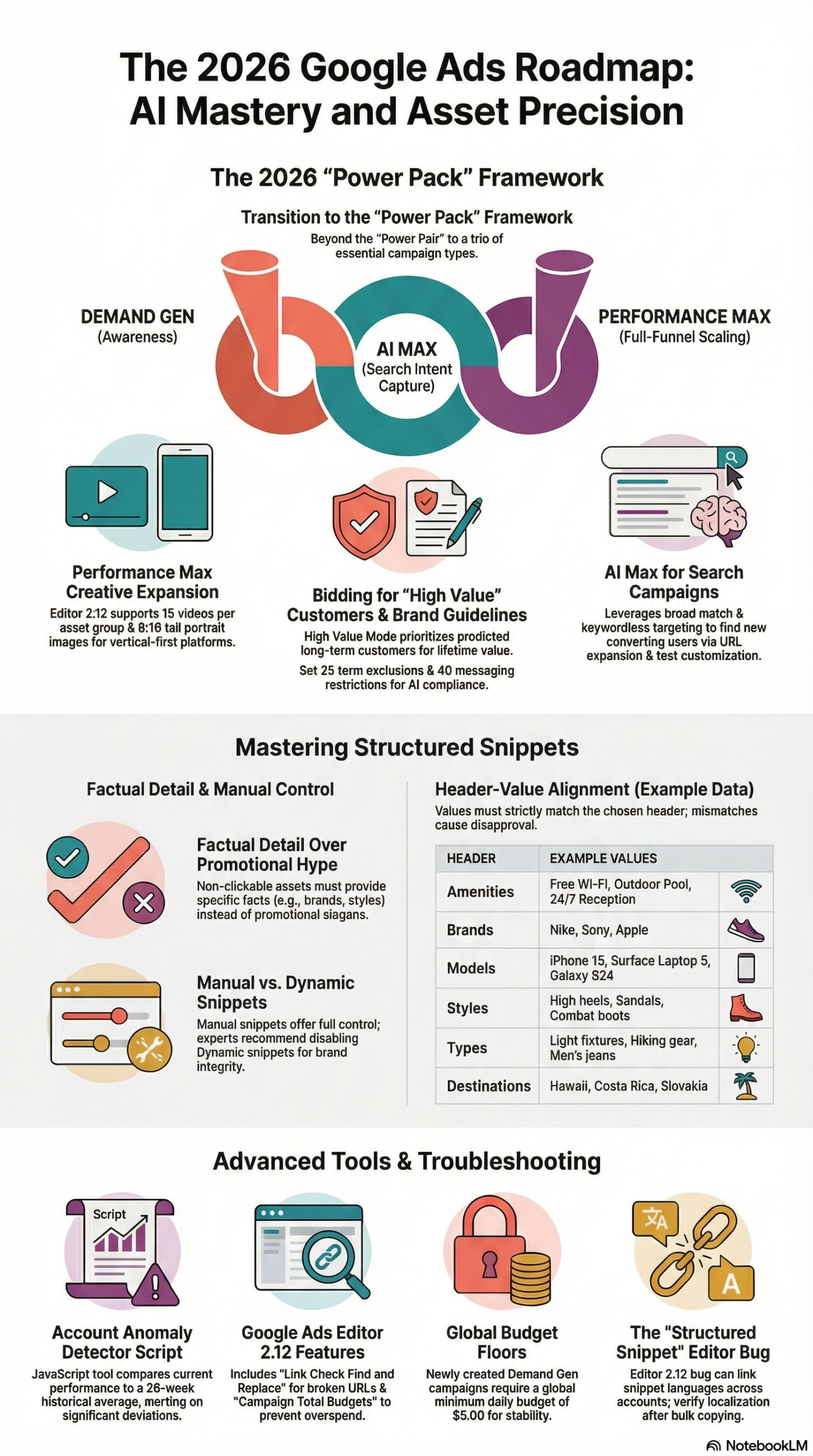
The issue sits within a broader context of Google Ads Editor version 2.12, released in March 2026. That release brought 15 major updates across creative capacity, budgeting, URL management, and reporting — per the research report for this post — making it one of the most significant Editor releases in recent memory. The bug with structured snippets is a notable regression that arrived alongside these improvements.
Why It Matters
For individual advertisers managing a single account in one language, this bug has zero practical impact. But the moment you introduce multi-language targeting, multi-regional accounts, or client-account management at any scale, the risk becomes material.
Multi-market e-commerce is the highest-risk category. Advertisers running separate accounts for different countries — a common structure for e-commerce brands operating across the EU, DACH, or Southeast Asia — use structured snippets to call out product categories, service features, or unique selling propositions tailored to each market. If a bulk-copy workflow in the Editor silently links those snippets, a language audit that should have caught inconsistencies never fires because both snippets appear to have the correct language setting in the UI — until one is touched.
Agencies managing multiple client accounts face amplified exposure. A typical agency workflow involves building a template account or campaign structure and then copying it into client accounts. If that workflow runs through Google Ads Editor — which it almost always does for efficiency — every structured snippet copied from a template is now a potential time bomb waiting for someone to edit the language setting anywhere in the chain.
The scope of the bug is still being mapped. Kobzová’s reporting confirms it affects both cross-account copies and within-account copies. That means even single-account advertisers with campaigns segmented by language (e.g., a Canadian account running English and French campaigns) are at risk if they ever duplicate structured snippet sets between campaigns.
What separates this from a standard platform bug is the silent failure mode. There’s no error message, no warning flag in the Editor, and no obvious indicator in reporting that a structured snippet is serving the wrong language. You’d need to manually spot-check the language setting of every structured snippet after each bulk copy operation to catch it — and that’s a workflow almost no practitioner has built in, because until this bug appeared, there was no reason to.
The stakes scale with the number of languages and accounts you manage. An agency with 50 client accounts, each running two or three languages, and a standard copy-from-template onboarding workflow could have hundreds of incorrectly linked snippets right now, accumulating silently every time anyone edits a language setting anywhere in the network.
The Data
Google Ads Editor 2.12: Feature Summary and Known Bugs (March 2026)
| Category | Update / Issue | Status |
|---|---|---|
| Creative Capacity | PMax video limit raised to 15 per asset group | ✅ Shipped |
| Creative Capacity | Support for 9:16 tall portrait images | ✅ Shipped |
| Demand Gen | New Customer Acquisition (NCA) goals | ✅ Shipped |
| Demand Gen | Hotel Center feed integration | ✅ Shipped |
| Demand Gen | Global daily budget floor of $5 | ✅ Shipped |
| Budgeting | Total Campaign Budgets (3–90 day window) for Search, Shopping, PMax | ✅ Shipped |
| URL Management | Link Check Find and Replace for broken URLs | ✅ Shipped |
| URL Management | Account-level tracking templates and Final URL suffixes | ✅ Shipped |
| Reporting | Final URL Expansion assets dedicated tab | ✅ Shipped |
| Reporting | Filters for Pending, Ended, and Draft statuses | ✅ Shipped |
| Bid Guidance | Real-time bid suggestions in copy/paste workflows for video brand campaigns | ✅ Shipped |
| Bug | Structured snippet language settings link across accounts on copy | ❌ Unpatched |
| Bug | Language targeting “Item Not Found” error for some supported languages | ❌ Unpatched |
| Bug | Bulk Excel uploads create duplicate shared library instances | ❌ Unpatched |
Sources: Search Engine Land, research report
Structured Snippet Bug: Cross-Account vs. Within-Account Scope
| Scenario | Bug Present? | Risk Level | Recommended Mitigation |
|---|---|---|---|
| Copy snippet cross-account (Editor) | ✅ Yes | High | Edit language only via web UI; verify after |
| Copy snippet within same account (Editor) | ✅ Yes | High | Edit language only via web UI; verify after |
| Edit existing snippet language (web UI) | ✅ Possible re-trigger | Medium | Do not re-open in Editor after web UI fix |
| Create new snippet from scratch (Editor) | ❌ No | Low | Standard workflow |
| Create new snippet from scratch (web UI) | ❌ No | Low | Safest path for new multilingual snippets |
| Bulk upload via Excel/CSV (no prior copy) | ❌ No | Low | Watch for trailing blank line duplication bug |
Source: PPC News Feed via Search Engine Land
Step-by-Step Tutorial: Audit, Fix, and Prevent the Language Linking Bug
This tutorial walks you through three phases: auditing your existing accounts for corrupted snippets, fixing affected settings safely, and restructuring your workflow to prevent recurrence. Follow these phases in order.
Phase 1: Prerequisites
Before you start, make sure you have:
- Google Ads Editor 2.12 installed (the latest version as of March 2026)
- Access to all affected accounts via the Editor’s multi-account manager view
- A spreadsheet (Google Sheets or Excel) for logging snippet statuses during the audit
- Access to the Google Ads web interface for all affected accounts — you’ll need this for safe language edits
Estimated time: 30–90 minutes depending on account count and number of structured snippets per account.
Phase 2: Audit Your Structured Snippets
Step 1: Open all relevant accounts in Google Ads Editor.
If you manage multiple accounts, use the Manager Account (MCC) view to open them simultaneously. In the Editor left panel, you’ll see your account hierarchy.
Step 2: Navigate to the Structured Snippets shared library for each account.
In the Editor, go to Extensions > Structured Snippets for each account. This view shows all structured snippets in the shared library, including their assigned language, header type (e.g., “Services,” “Brands,” “Styles”), and association count.
Step 3: Export a report of all structured snippets.
Use File > Export > Export data to CSV (or Excel) and filter for the Structured Snippets extension type. Your export should include at minimum: snippet text, header, language, campaign/ad group association, and last modified date.
Step 4: Cross-reference language settings against expected values.
In your spreadsheet, create a column for “Expected Language” based on the account or campaign the snippet is associated with. Then compare the “Actual Language” from the export against the expected value. Flag any mismatches.
Pay special attention to:
– Snippets that were recently copied from a template account
– Snippets associated with campaigns that changed language targeting recently
– Accounts onboarded via a copy-from-template workflow in the last 12 months
Step 5: Identify linked snippets using the modification timestamp.
Because the bug links snippets by reference rather than copying them cleanly, you can sometimes detect affected pairs by looking at modification timestamps. Two snippets in different accounts that both show a modification timestamp from the same day — especially if that timestamp corresponds to a bulk copy operation — are strong candidates for the linking bug.
Document every flagged snippet: account name, snippet ID (if visible), current language setting, expected language, and whether the snippet was created via copy or from scratch.
Phase 3: Fix Affected Snippets
Step 6: Log into the Google Ads web interface for the first affected account.
Do NOT attempt to fix language settings inside the Editor — this is the critical rule. Per the workaround documented by Search Engine Land and confirmed by Kobzová, web interface edits are the only currently reliable way to update a linked snippet’s language without triggering the cross-account cascade.
Step 7: Navigate to Extensions > Structured Snippets in the web UI.
Find the specific snippet you identified as having the wrong language setting. Click the pencil (edit) icon.
Step 8: Update the language setting to the correct value.
Change the language from the incorrect setting to the expected one. Save the change.
Step 9: Verify the change did NOT cascade to the linked account.
Immediately after saving, open the Google Ads web interface for the other account (the one linked via the bug). Navigate to its structured snippets and confirm the language setting there did NOT change. This verification step is non-negotiable — the bug’s behavior is not fully consistent, and in some cases the cascade can occur even from web UI edits.
Step 10: Repeat for each flagged snippet pair.
Work through your audit spreadsheet systematically. Fix one snippet, verify, then move to the next. Do not batch-edit multiple snippets simultaneously via the web interface if they share any copy-origin — keep fixes sequential so you can detect any unexpected cascades between corrections.
Step 11: Do NOT re-open the fixed snippets in the Editor.
Per the workaround guidance in the research report, reopening and editing a web-UI-fixed snippet inside Google Ads Editor can re-trigger the language toggle, undoing the fix. Until Google patches the bug, treat any snippet you’ve fixed via the web UI as Editor-off-limits for language setting changes.
Phase 4: Rebuild Your Snippet Creation Workflow
Step 12: Create a “Do Not Copy” tagging system for multilingual snippets.
Add a naming convention to all structured snippets that are language-specific. For example: [SK] Services: Delivery, Returns, Support and [CS] Services: Delivery, Returns, Support. The language prefix makes it visually obvious in the Editor which snippets should never be copied cross-account.
Step 13: Build new multilingual snippets from scratch in the web interface.
Going forward, create new structured snippets for each language/account combination directly in the Google Ads web UI, not via copy in the Editor. This is slower but eliminates the linking risk entirely for new assets.
Step 14: Use the Editor only for non-language-sensitive bulk operations.
The Editor remains the fastest tool for bulk headline updates, bid adjustments, URL fixes, and budget changes. Reserve it for those operations. For any extension work that involves language settings — structured snippets, callouts with language targeting — use the web UI.
Step 15: Schedule a monthly language audit.
Add a recurring calendar task to export structured snippet data from all accounts and cross-reference language settings. Until Google publishes an official patch, this monthly check is your primary defense against the bug quietly corrupting new snippets.
Expected Outcomes
After completing this tutorial you should have:
– A clean audit log of all structured snippets across affected accounts
– Correct language settings applied via the web UI for all previously linked snippets
– A verified checklist confirming no cross-account cascades occurred during fixes
– A naming convention and workflow protocol that prevents new linked snippets from being created
– A scheduled monthly audit to catch any future occurrences
Real-World Use Cases
Use Case 1: Central European E-Commerce Brand Managing Czech and Slovak Accounts
Scenario: A Prague-based e-commerce brand runs separate Google Ads accounts for its Czech and Slovak storefronts. Both accounts use structured snippets to call out product categories and shipping benefits. A growth manager copies the Czech account’s snippet set into the Slovak account using the Editor to save setup time during a new campaign launch.
Implementation: Following this tutorial, the growth manager audits both accounts immediately after the copy operation. The audit reveals that four snippets in the Slovak account were copied and linked — all showing “Czech” as their language despite being associated with Slovak campaigns. The manager logs into the Slovak account’s web UI, updates each of the four snippets to “Slovak,” and then verifies that the Czech account’s snippets remain unchanged. She adds the [SK] prefix naming convention to all Slovak snippets going forward and adds a “no Editor copy” note to the team’s account management playbook.
Expected Outcome: Structured snippets now serve correctly in the Slovak market, extension eligibility improves (snippets no longer suppressed due to language mismatch), and the team has a documented protocol for future campaigns.
Use Case 2: PPC Agency Onboarding New Clients From a Template Account
Scenario: A mid-size PPC agency maintains a “template account” with pre-built campaign structures, ad copy frameworks, and extension libraries. Every new client onboarding involves copying the template into the client’s account via the Editor. The agency manages 60 client accounts, roughly half of which require non-English structured snippets.
Implementation: The agency audit team runs the Phase 2 audit across all 30 multilingual client accounts and identifies linked snippets in 22 of them — all created during the template-copy onboarding process. They fix the language settings via the web UI for each affected account, then rebuild their onboarding workflow: the template account’s extension library is flagged as “language-neutral stubs,” and a new step is added to the onboarding checklist requiring that structured snippets for non-English accounts be created from scratch in the web UI.
Expected Outcome: All existing client accounts are remediated. The new onboarding checklist prevents future instances. The agency documents the bug in their internal knowledge base and adds it to the quarterly platform issues briefing shared with clients.
Use Case 3: In-House Marketing Team Running French and English Canadian Campaigns
Scenario: A Canadian SaaS company runs a single Google Ads account with English (Canada) and French (Canada) campaigns. During a campaign refresh, a team member duplicates the English structured snippets into the French campaign using the Editor’s copy-paste function and then sets the language to “French” for the duplicates.
Implementation: After the copy, the team member notices the English snippets in the original campaign now show “French” as their language — the classic cross-campaign linking symptom. Following Phase 3 of this tutorial, they log into the web UI, reset the English snippets back to “English (Canada),” verify no further cascades occurred, and then create fresh French snippets from scratch via the web UI.
Expected Outcome: Both language variants are now independent and correctly set. The English campaign’s extensions are no longer at risk of being accidentally toggled to French during future French campaign maintenance.
Use Case 4: International Retailer Using the Excel Bulk Upload Workflow
Scenario: A large retailer manages structured snippets via Excel bulk uploads to handle the volume of SKU-level callouts across 12 markets. After a recent upload, they notice multiple shared library instances of the same snippets, each with only one campaign association.
Implementation: Per the research report, this is a separate but related bug caused by trailing blank lines in Excel cells — the Editor interprets the line break as a fifth empty snippet, creating a duplicate library entry. The team audits their Excel template, strips all trailing blank lines from snippet cells, and tests a fresh upload in a staging account before pushing to production.
Expected Outcome: Bulk uploads now create single, properly structured shared library instances. The team documents the “no trailing blank lines” rule in their Excel template as an in-cell comment.
Common Pitfalls
Pitfall 1: Fixing the language in the Editor instead of the web UI.
This is the most common mistake when practitioners first encounter the bug. The instinct is to fix things where you found them — in the Editor. But the Editor is what caused the linking in the first place, and editing the language setting there can trigger the cascade again. Always use the web UI for language corrections on affected snippets. Source: Search Engine Land
Pitfall 2: Not verifying the other account after fixing.
Even web UI fixes can occasionally cascade if the snippet linking is particularly deeply embedded. Always open the linked account immediately after each fix to confirm the language setting there is unchanged. Don’t assume the fix worked — verify it.
Pitfall 3: Assuming only cross-account copies are affected.
Kobzová’s investigation confirmed the bug occurs within a single account too, when copying snippets between campaigns or ad groups. If you’ve ever duplicated campaigns within a single account and moved the structured snippets via the Editor, you need to audit intra-account copies too, not just cross-account ones. Source: PPC News Feed via Search Engine Land
Pitfall 4: Ignoring trailing blank lines in Excel uploads.
The Excel bulk upload duplication bug is a separate issue but has a similar silent failure mode: snippets appear to upload correctly but create fractured shared library entries with limited associations. Check Excel templates for trailing blank lines in all snippet cells, especially in files that have been used and modified multiple times. Source: research report
Pitfall 5: Not scheduling recurring audits.
Fixing the current state of affected accounts is necessary but not sufficient. Because the bug is unpatched, any future Editor copy operation on structured snippets can re-create the problem. A monthly export-and-compare audit is the only reliable ongoing defense until Google ships a fix.
Expert Tips
Tip 1: Use the “Pending Changes” panel before syncing.
Before you push any Editor changes to Google’s servers, review the Pending Changes panel carefully. If you see language-setting changes appearing for accounts you didn’t intentionally modify, abort the sync immediately. This panel is your last line of defense before corrupted settings go live.
Tip 2: Leverage the Editor’s Link Check Find and Replace for URL audits in parallel.
Google Ads Editor 2.12 introduced the Link Check Find and Replace tool for bulk-resolving broken URLs. Run this as part of your same monthly audit session — it catches broken destination URLs in the same Editor session where you’re auditing snippet languages, doubling the efficiency of your maintenance workflow.
Tip 3: Maintain a separate “golden master” document for multilingual snippets.
Keep a version-controlled spreadsheet (or a Notion/Confluence page) that is the authoritative record of which language should be set for each structured snippet in each account. When an audit finds a mismatch, you compare against this document — not against your memory of what it should be. This is especially valuable in agency environments where multiple people manage the same accounts.
Tip 4: Test the fix in a lower-spend account or campaign first.
If you’re managing a high-spend account and need to fix multiple linked snippets, run through Phase 3 of this tutorial on a lower-spend account first to confirm the web UI fix workflow works as expected in your specific account configuration. The bug’s behavior is not perfectly consistent across all account types and configurations.
Tip 5: Set up a language-setting change audit alert.
Until Google patches this bug, consider using a third-party script or Google Ads API query to monitor for unexpected changes to the language field of structured snippet assets. Tools like Optmyzr, Google Ads Scripts, or the Ads API’s change history endpoint can flag language-field modifications you didn’t authorize — giving you an automated early warning system rather than relying solely on monthly manual audits.
FAQ
Q1: Does this bug affect all structured snippets, or only ones created via copy in the Editor?
Based on the current reporting from PPC News Feed and Search Engine Land, the linking behavior is triggered specifically by the copy operation in Google Ads Editor. Structured snippets created from scratch — whether in the Editor or the web UI — do not appear to exhibit the linked behavior. Your existing snippets that were never copied via the Editor should be safe. Your risk is concentrated in snippets created via the Editor’s copy-paste functionality.
Q2: Will fixing the language in the web UI permanently resolve the issue?
The web UI fix corrects the live language setting and stops the incorrect extension from serving the wrong language. However, per the research report, subsequent edits to that snippet inside the Editor can re-trigger the language toggle. The fix is durable as long as you follow the protocol of not editing that snippet’s language setting in the Editor again. For a permanent fix, you’d need Google to patch the underlying object-reference bug in the Editor’s copy implementation.
Q3: How do I know if Google has patched the bug?
Monitor the official Google Ads Editor release notes for mention of a fix to structured snippet extension language linking. Third-party sources like PPC News Feed and Search Engine Land will also cover the patch when it ships. Until then, treat the manual audit workflow described in this tutorial as your standard operating procedure.
Q4: Is the “Item Not Found” language targeting error related to this bug?
They are separate issues, but both involve the Editor’s handling of language settings. The “Item Not Found” error occurs during campaign setup when selecting supported languages like Slovak — it’s a UI/cache mismatch in the Editor, not a data corruption issue like the snippet linking bug. The research report documents workarounds for the “Item Not Found” error: clear language selections, switch the Editor interface to English, or use a different browser or Incognito mode in the web UI. Neither bug is patched as of March 2026.
Q5: Can I use Google Ads Scripts to fix linked snippets at scale?
The Google Ads API and Scripts can read and write asset-level attributes including language settings for structured snippets. In theory, you could write a script that iterates through all structured snippet assets in an MCC, compares language settings against a reference map, and corrects any mismatches. This is a viable solution for large agencies managing many accounts. However, scripted writes will interact with the same underlying object-reference bug as the Editor — test thoroughly in a sandbox account before deploying at scale, and verify that API-side language changes do not cascade to linked accounts before running production.
Bottom Line
The Google Ads Editor structured snippet language linking bug is a silent, unpatched issue that can corrupt localization settings across multi-language and multi-account campaigns without any warning. It was first identified in the context of Czech and Slovak e-commerce accounts by digital marketer Marcin Wsół and independently confirmed by Hana Kobzová of PPC News Feed. The only reliable fix as of March 2026 is to perform language corrections exclusively in the Google Ads web interface and to rebuild snippet creation workflows so that multilingual assets are never created via copy in the Editor. Any agency or advertiser running campaigns across multiple languages or markets should treat an immediate structured snippet audit as a mandatory action item — not an optional one. Google Ads Editor 2.12 is otherwise a substantial upgrade with 15 meaningful improvements; this bug is a targeted, fixable regression that should not stop you from using the Editor for everything else it does well.


0 Comments