• Docs
  • Free Website
Marketing Agent Blog Marketing Agent Blog

Marketing Agent Blog Marketing Agent Blog

  • How to Master Agentic Engineering: The 2026 Practitioner's Guide

    by marketingagent.io
  • How to Build a Marketing Ark: AI, Empathy, and Design...

    by marketingagent.io

Fix These 6 Google Ads Mistakes Killing Your Ecommerce ROI

Post Pagination

  • Next PostNext
  • Agency Home
  • Hot
  • Trending
  • Popular
  • Docs
  1. Home
  2. AI Marketing
  3. Fix These 6 Google Ads Mistakes Killing Your Ecommerce ROI
3 months ago 2 months ago

AI Marketing

Fix These 6 Google Ads Mistakes Killing Your Ecommerce ROI

Ecommerce customer acquisition costs have risen [222% over the last decade](https://searchengineland.com/google-ads-mistakes-ecommerce-campaigns-473310), and approximately [90% of new ecommerce marketing campaigns fail](https://searchengineland.com/google-ads-mistakes-ecommerce-campaigns-473310)—not


marketingagent.io
by marketingagent.io 3 months ago2 months ago
21views
0

Ecommerce customer acquisition costs have risen 222% over the last decade, and approximately 90% of new ecommerce marketing campaigns fail—not because Google Ads doesn’t work, but because most advertisers bring a Meta playbook to a platform that operates on entirely different mechanics. This tutorial breaks down the six structural mistakes that silently drain ecommerce Google Ads budgets, using data from 600+ account analyses and the platform’s own AI-driven changes in 2025–2026. By the end, you’ll know exactly how to audit your account, fix each mistake, and structure campaigns that the algorithm can actually optimize.


What This Is

Google Ads in 2026 is not the manual bidding platform it was five years ago. According to the NotebookLM strategic briefing on Google Ads (2026), the platform has transitioned into a “sophisticated machine learning ecosystem” where AI evaluates millions of signals per auction to determine conversion likelihood. This shift has a direct implication: the old levers—micro-managing bids, keyword sculpting, day-parting everything—are largely irrelevant. What matters now is feeding the algorithm clean data, structuring campaigns so the machine has enough signal to learn, and making sure the full funnel (ad → landing page → checkout) is coherent.

The biggest recent change is AI Max for Search, which functions as an expansion layer added on top of existing Search campaigns. Mike Ryan, Head of Ecommerce Insights at Smarter Ecommerce, analyzed 600+ accounts and describes AI Max plainly: “AI Max is, in many ways, a repackaging of existing Google features. Broad match is in there. DSA is in there, and a lot of PMax features are in there.” What this means operationally is that AI Max applies broad-match logic to your existing exact and phrase match keywords—data shows 80% of AI Max expansion occurs on exact match keywords.

At the same time, Smart Bidding has become the default optimization engine. It uses auction-time bidding to optimize for conversions or conversion value, evaluating contextual signals including device type, physical location, time of day, remarketing list membership, browser type, and which creative version is most likely to convert. The catch: Smart Bidding requires a minimum of 30–50 conversions per month per campaign to optimize effectively. Below that threshold, it’s essentially guessing.

The six mistakes documented in Search Engine Land’s April 2026 analysis by Menachem Ani are all variations of the same root problem: advertisers set up campaigns based on intuition or habits from other platforms, then let Google’s automation run on broken inputs. The result is what Vrushti Oza of Factors.AI describes as a platform that “doesn’t punish you loudly—it punishes you quietly. The wrong settings will slowly drain your budget.”


Why It Matters

These mistakes don’t just affect ROAS metrics. They compound.

For direct-to-consumer brands, treating Google Ads purely as a retention and retargeting channel—capturing branded search and existing customers—means you’re paying a premium for demand you already created through other channels. As Menachem Ani notes: “When Google has enormous reach into new audiences, treating it purely as a closing channel leaves most of that opportunity untouched.”

For agencies managing multiple accounts, the operational disruptions (payment lapses, broken tracking, feed errors) are particularly damaging because they reset algorithm learning phases. A campaign that goes dark for even a few days due to a billing issue doesn’t just stop running—it loses its learned bidding data and must restart from scratch.

For growth-stage ecommerce brands scaling past the $50K/month ad spend threshold, campaign structure fragmentation becomes a ceiling. Too many campaigns with thin budgets prevent Smart Bidding from accumulating enough conversion volume per campaign to optimize. The algorithm can’t learn if it only sees 8 conversions a month per campaign.

For any advertiser using Max Conversion Value without a ROAS target, the campaign is optimizing for volume at any efficiency level. This is the equivalent of asking Google to spend your budget as fast as possible without caring what you get back.

The broader market context matters here: up to 26% of marketing budgets are wasted on ineffective strategies due to inaccurate tracking and poor account structure. Getting these six mistakes fixed isn’t marginal optimization—it’s recovering budget that’s currently being burned.


The Data

The following table maps each mistake to its documented impact and the corrective action required, based on the NotebookLM research report and Menachem Ani’s Search Engine Land analysis:

Mistake Documented Impact Corrective Action
Using Google only as retention Misses net-new customer acquisition; pays a “tax on existing demand” Launch non-branded Shopping and Search campaigns targeting acquisition intent
Lacking knowledge of core levers Poor feed quality, keyword/intent mismatch, wrong landing pages Audit feed, keyword intent mapping, and landing page message match
Operational disruptions Resets algorithm learning; eliminates conversion data Set automated payment alerts; weekly pixel and feed audits
Overly granular campaign structure Smart Bidding can’t reach 30–50 conversion threshold per campaign Consolidate campaigns; merge similar ad groups with shared budgets
Max Conv. Value without ROAS target Optimizes for volume only; ignores profitability Set target ROAS once sufficient conversion data exists; adjust by ≤20% increments
Underfunding new campaigns Campaigns stay stuck in “Learning” mode indefinitely Fund campaigns to reach 30–50 conversions/month; use Manual CPC initially if needed

Additional benchmark data from 600+ account analysis by Mike Ryan:

Metric AI Max Impact (Median)
Conversion value increase +13%
CPA increase (efficiency degradation) +16%
Exact match keyword expansion rate 80% of expansion traffic
Competitor brand impression share (after enabling AI Max without brand exclusions) Up to 69% of impressions

Step-by-Step Tutorial: Auditing and Fixing All 6 Mistakes

This walkthrough assumes you have an active Google Ads account with at least 30 days of campaign history. Work through each phase sequentially—some fixes affect others downstream.

Phase 1: Diagnose Your Channel Role (Mistake #1)

Step 1: Pull your Search Terms Report and filter by branded vs. non-branded.
In Google Ads, go to Keywords → Search Terms. Export to CSV and split queries into two buckets: branded (includes your company name, product names, or URLs) and non-branded. Calculate what percentage of your current conversion volume and spend falls into each bucket.

Step 2: Benchmark against acquisition intent.
If branded terms account for more than 60% of your Google Ads conversions, you’re primarily running a retention channel. Menachem Ani’s framework calls this “a tax on demand you already generated elsewhere.”

Step 3: Create a dedicated acquisition campaign.
Build a new Shopping or Search campaign targeting non-branded, category-level terms. Set budget independently from your branded campaigns so branded performance doesn’t cannibalize acquisition spend. Use Maximize Conversions bidding initially with a daily budget sufficient to generate at least 30 conversions per month.

Phase 2: Fix Your Data Foundation (Mistake #2)

Step 4: Audit your product data feed.
In Google Merchant Center, go to Products → Diagnostics. Any feed error that removes products from serving is costing you impression share directly. Common issues: missing GTINs, incorrect category mappings, price mismatches between feed and landing page. Fix all “disapproved” and “limited” status items before touching bids.

Step 5: Audit keyword intent mapping.
Export all active keywords. For each one, manually check: is this upper-funnel (research intent) or lower-funnel (purchase intent)? Upper-funnel terms like “best running shoes for flat feet” need landing pages with educational content. Lower-funnel terms like “buy Brooks Ghost 16 size 11” should go directly to a product or category page. According to the research briefing, collapsing upper and lower-funnel terms into the same ad groups wastes budget and drives Quality Score down.

Step 6: Implement message match on landing pages.
Generic landing pages produce a 47% reduction in conversion rates compared to campaign-specific pages. The promise in your ad must be immediately visible above the fold on the landing page. If your ad says “20% off running shoes this week,” the landing page headline needs to reinforce that specific offer—not a generic “Shop Our Collection.”

Phase 3: Lock Down Operational Hygiene (Mistake #3)

Step 7: Set up automated account alerts.
In Google Ads, go to Tools → Bulk Actions → Rules. Create rules that email you immediately when: (a) any campaign has zero impressions for 24 hours, (b) conversion tracking status changes, (c) a payment failure occurs. Operational disruptions reset learning phases—a campaign that goes dark even briefly loses its bidding history and must relearn from scratch.
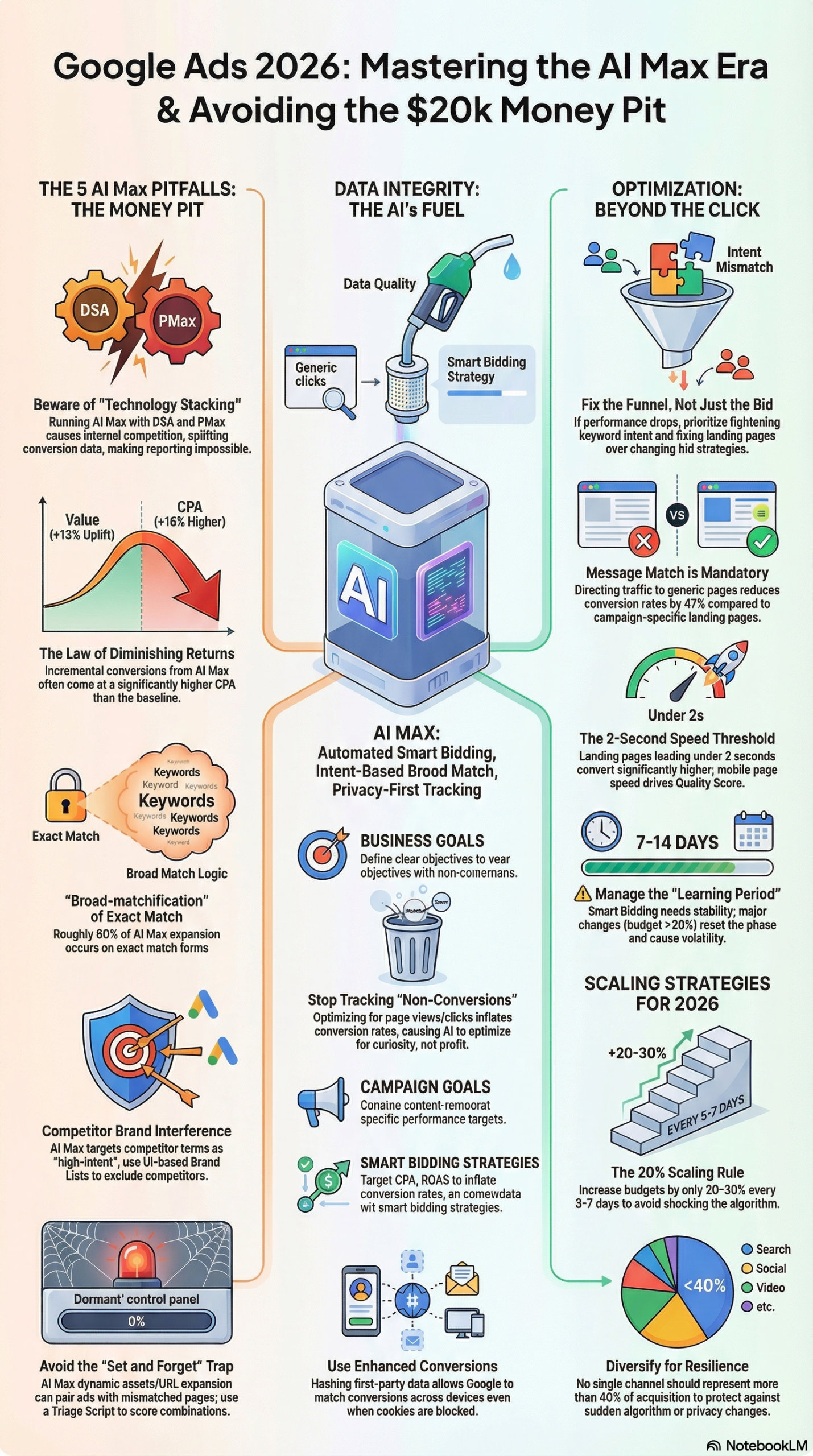
Infographic: Fix These 6 Google Ads Mistakes Killing Your Ecommerce ROI

Step 8: Implement Enhanced Conversions.
Go to Tools → Conversions → Settings for each conversion action. Enable Enhanced Conversions, which uses hashed first-party data (email addresses, phone numbers) to match conversions when cookies are blocked. Up to 26% of budgets are wasted due to inaccurate tracking—particularly from duplicate conversions and tracking non-conversion events like page views. Audit every conversion action: only keep actions with direct business value (completed purchases, qualified lead forms).

Step 9: Conduct a weekly Search Terms Review.
Set a recurring calendar block for 20 minutes every Monday. In the Search Terms Report, filter the past 7 days. Add irrelevant queries as negative keywords. Build foundational negative lists blocking “free,” “jobs,” “DIY,” and competitor brand variants you don’t want to appear for. This is not optional—it’s a budget-protection mechanism.

Phase 4: Consolidate Campaign Structure (Mistake #4)

Step 10: Audit campaign conversion volume.
Pull a 90-day report showing conversions per campaign per month. Any campaign averaging fewer than 30 conversions per month is below the Smart Bidding minimum threshold for effective optimization.

Step 11: Merge thin campaigns.
Identify campaigns targeting similar products, audiences, or intent levels. Consolidate them. Yes, this feels counterintuitive if you’ve been trained on granular campaign structures—but Smart Bidding needs volume, not segmentation, to function. The research briefing recommends consolidating into fewer, better-funded campaigns rather than spreading budget thin across many.

Step 12: Apply the 60–90 day learning rule.
After consolidating, do not make major changes for at least 14 days. Budget shifts greater than 20% or bidding strategy swaps reset the algorithm’s learning phase. Treat the first two weeks after any structural change as a data-collection window, not an optimization window.

Phase 5: Add ROAS Guardrails (Mistake #5)

Step 13: Calculate your break-even ROAS.
Break-even ROAS = 1 / gross margin. If your average order margin is 40%, your break-even ROAS is 2.5x. This is the floor—anything below means you’re losing money on each conversion.

Step 14: Set target ROAS in Smart Bidding.
Once a campaign has at least 30–50 conversions, switch from Maximize Conversion Value to Maximize Conversion Value with a Target ROAS. Set the initial target at or slightly above your break-even ROAS. Adjust in increments no larger than 20% every 5–7 days—aggressive jumps trigger Learning Mode.

Step 15: Monitor Search Partner Network separately.
In your campaign settings, check whether Search Partners is enabled. Case data shows the Search Partner Network can produce conversion rates as low as 0.07% in some accounts. Segment its performance in your reports; disable it at the campaign level if efficiency is materially below your Google Search average.

Phase 6: Fund Campaigns to Learn (Mistake #6)

Step 16: Calculate required daily budget.
If your target CPA is $40 and you need 30 conversions per month, you need to spend at least $1,200/month ($40/day) per campaign just to exit Learning Mode. If your budget can’t support this, use Manual CPC bidding as a bridge—the research briefing recommends Manual CPC for low-volume accounts until conversion volume is sufficient to support automation.

Step 17: Use a phased launch approach.
Week 1–2: Run with Manual CPC and broad match modified to gather search term data. Week 3–4: Switch to Enhanced CPC. Month 2+: Move to Target CPA or Target ROAS once you have 30+ conversions. This phased approach lets the algorithm build its learning model on actual conversion data before being asked to optimize fully autonomously.

Expected Outcome: After working through all six phases, you should see: campaigns generating 30+ monthly conversions per campaign, conversion tracking accuracy above 95%, no branded/non-branded budget cannibalization, and ROAS that reflects actual margin requirements rather than arbitrary volume targets.


Real-World Use Cases

Use Case 1: DTC Apparel Brand Moving Off Meta

Scenario: A direct-to-consumer clothing brand spending $80K/month on Meta wants to diversify into Google Ads. Their entire Google presence is branded search retargeting—$5K/month capturing people who already know them.

Implementation: Launch a dedicated non-branded Shopping campaign targeting category terms (“women’s linen pants,” “sustainable summer dresses”). Optimize the product feed first—add lifestyle images, fix missing size attributes, and ensure prices match the site. Fund the new campaign at $6,000/month to generate the 30+ monthly conversions needed for Smart Bidding to engage. Keep branded campaigns separate with their own budgets.

Expected Outcome: Within 60–90 days, the non-branded Shopping campaign should be generating net-new customers at a predictable CAC. Per Mike Ryan’s analysis, expect a 13% median conversion volume increase from properly structured campaigns, though CPA on new acquisition traffic will be higher than branded retargeting.

Use Case 2: Agency Cleaning Up an Inherited Account

Scenario: A PPC agency takes over an account with 23 active campaigns, most averaging 8–12 conversions per month. Smart Bidding is enabled but the campaigns are perpetually stuck in Learning.

Implementation: Run a 90-day conversion volume audit. Identify which product categories drive actual sales. Consolidate 23 campaigns into 6–8 theme-based campaigns organized by product category and funnel stage. Pause everything with under $500/month in trackable contribution margin. Implement Enhanced Conversions immediately—the previous agency was tracking “add to cart” as a primary conversion action.

Expected Outcome: After consolidation and a 30-day learning window, Smart Bidding starts optimizing with meaningful data. Conversion volume per campaign crosses the 30/month threshold. Account-level ROAS improves not because bids are better, but because the algorithm finally has enough signal to use.

Use Case 3: Scaling a High-AOV Product Profitably

Scenario: An ecommerce brand selling $800 average order value furniture runs campaigns on Max Conversion Value with no ROAS target. Google is spending the full budget every day, but profitability is inconsistent—some weeks are at 4x ROAS, others at 1.8x.

Implementation: Calculate break-even ROAS (1 / 0.45 gross margin = 2.2x). Set Target ROAS at 2.5x. Monitor for 14 days without changes. If volume drops more than 20%, walk the tRoAS target down by 15% increments. Simultaneously, create campaign-specific landing pages for top product categories with clear pricing, delivery timelines, and social proof—message match directly impacts Quality Score and therefore CPC.

Expected Outcome: Conversion volume may dip 10–15% initially as Google filters out low-value conversions. Profitability stabilizes above break-even ROAS consistently within 30–45 days.

Use Case 4: Protecting Brand Budget from AI Max Expansion

Scenario: A brand enables AI Max on their Search campaigns to capture more volume. Within two weeks, their impression share on competitor brand terms jumps from 4% to 69%—and their brand’s own exact match keywords are being served by AI Max expansion rather than exact match.

Implementation: Immediately go to Campaign Settings → Brand Lists and add exclusions for all competitor brand names. Build a Google Brand List that includes your own brand as an “inclusion only” specification for branded campaigns, and an “exclusion” for non-branded campaigns. Mike Ryan’s account data shows AI Max aggressively targets competitor brand terms when brand restrictions are absent—this is not a bug, it’s a feature working as designed without guardrails.

Expected Outcome: Competitor brand impression bleed drops to near zero. Brand budget goes back to serving legitimate branded queries. AI Max expansion focuses on genuinely incremental non-branded queries.

Use Case 5: New Product Launch with Zero Conversion History

Scenario: An ecommerce brand is launching a new product category. No historical conversion data exists. Smart Bidding is not an option yet.

Implementation: Start with Manual CPC bidding. Use phrase and exact match keywords to control which queries trigger ads. Set geographic targeting to “Presence: People in or regularly in your targeted locations” (not “interested in”)—using default geo-targeting settings can expose ads to people researching a location rather than physically present there. After accumulating 30 conversions, switch to Enhanced CPC. After 50+, evaluate Target CPA.

Expected Outcome: A clean conversion history built on relevant, intent-matched traffic gives Smart Bidding a reliable model to start from when it’s eventually activated. Avoids the trap of Smart Bidding learning on irrelevant traffic and encoding bad patterns.


Common Pitfalls

Pitfall 1: Changing Bids During Learning Phase
Any budget change exceeding 20% or a bidding strategy swap resets the algorithm’s learning period, which takes 14 days minimum to complete. Advertisers who tweak campaigns weekly based on daily performance are perpetually in learning mode and never reaching optimized performance. Fix: make structural decisions before launch, then hold for at least 14 days before evaluating.

Pitfall 2: Tracking Non-Conversion Events as Primary Conversions
Counting “Add to Cart,” “Page View,” or “Newsletter Signup” as primary conversion actions inflates reported conversion numbers while giving Smart Bidding the wrong optimization signal. The research briefing documents this as a primary driver of the 26% budget waste figure. Fix: audit every conversion action, set only purchase completions or qualified lead forms as primary; demote everything else to secondary.

Pitfall 3: Enabling AI Max Without Brand Exclusion Lists
AI Max will expand aggressively into competitor brand terms if not restricted. One case study from Mike Ryan’s 600+ account analysis found competitor terms accounting for 69% of impressions after AI Max activation. This burns budget on low-quality clicks that rarely convert. Fix: always configure Brand Lists before enabling AI Max.

Pitfall 4: Running AI Max, DSA, and Performance Max Simultaneously
Stacking overlapping technologies splits conversion data and creates internal auction competition. Your own campaigns bid against each other, inflating CPCs. Fix: choose one keywordless matching layer. With AI Max in place and DSA confirmed for deprecation, disable DSA campaigns and consolidate PMax and AI Max strategically rather than running all three simultaneously.

Pitfall 5: Using Default Location Targeting Settings
Google’s default geo-targeting setting includes people who are “interested in” a location, not just physically present. For local ecommerce or regional delivery businesses, this can result in significant impression and click waste from users outside your actual service area. Fix: change location targeting to “Presence: People in or regularly in your targeted locations” in every campaign’s settings.


Expert Tips

Tip 1: Build RSAs With Independent Headlines
Responsive Search Ads allow up to 15 headlines and 4 descriptions. Google’s AI selects combinations for each auction. The mistake most advertisers make is writing headlines that only make sense in sequence. Each of your 15 headlines should work as a standalone statement—benefit, social proof, urgency, or feature. The research briefing recommends targeting different “persuasion angles” across headlines so the algorithm can serve the most contextually relevant variant.

Tip 2: Implement Server-Side Tracking for High-Stakes Campaigns
Enhanced Conversions handle most cookie-blocking scenarios, but for campaigns above $20K/month, server-side tracking eliminates attribution gaps entirely. By sending conversion data from your server directly to Google’s API via Google Tag Manager’s server container, you bypass browser-level ad blockers and iOS privacy restrictions. This is table-stakes for 2026 measurement accuracy.

Tip 3: Use Multi-Touch Attribution Before Scaling Upper-Funnel
Last-click attribution systematically undervalues YouTube and Display campaigns because they assist conversions rather than close them. Before cutting awareness campaigns that “aren’t converting,” switch to Data-Driven Attribution in Google Ads settings. You’ll see how many Search conversions were preceded by a Display or YouTube interaction—often 30–50% in accounts running full-funnel strategies.

Tip 4: Scale Budgets Gradually, Not in Jumps
Increase successful campaign budgets by 20–30% every 5–7 days. Doubling a budget overnight triggers Learning Mode and often causes a 2–3 week performance dip while the algorithm recalibrates to the new volume and auction dynamics. Slow, consistent scaling preserves performance stability.

Tip 5: Don’t Exceed 40% Dependency on Any Single Channel
The research briefing’s channel diversification guideline recommends keeping no single channel above 40% of total customer acquisition. For Google Ads specifically, this means maintaining a mix of Search, Shopping, and Performance Max rather than over-indexing on any one campaign type. Algorithm changes, policy updates, and market shifts affect campaign types differently—diversified account structure builds resilience.


FAQ

Q: How long does it take Smart Bidding to exit Learning Mode?
Smart Bidding’s learning phase typically takes 7–14 days and requires a minimum of 30–50 conversions per campaign per month to optimize effectively. If you make any significant changes—budget adjustments over 20%, bidding strategy swaps, or major creative changes—the learning phase resets. For new campaigns, the fastest path out of learning mode is funding adequately to hit the conversion threshold quickly, even if that means accepting a higher CPA temporarily.

Q: Should I use AI Max or Performance Max for ecommerce?
They serve different purposes. AI Max is an expansion layer on top of Search campaigns—it adds broad-match-style coverage to your existing keywords. Performance Max is a full-inventory campaign type running across Search, Shopping, Display, YouTube, and Discover simultaneously. Mike Ryan’s analysis recommends against running both simultaneously because they create internal auction competition and split conversion signals. For most ecommerce advertisers, a combination of standard Shopping campaigns plus Performance Max (with asset groups optimized by product category) outperforms AI Max layered on top of everything else.

Q: What’s the right ROAS target to set?
Start with your break-even ROAS (1 divided by your gross margin percentage). If margins are 35%, break-even is 2.86x. Set your initial target ROAS at 10–15% above break-even to give Smart Bidding room to find profitable conversions. Adjust in increments no larger than 20% every 5–7 days. Aggressive ROAS targets (3x or 4x on a brand with 35% margins) will cause Smart Bidding to throttle spend severely while chasing only the highest-intent, lowest-cost conversions—often resulting in missed volume.

Q: How do I prevent AI Max from spending on competitor brand terms?
Use Google Brand Lists in your campaign settings to explicitly exclude competitor brand names. This feature lets you set brand inclusion (only serve for these brands) or exclusion (never serve for these brands) at the ad group level. One case study found competitor terms making up 69% of AI Max impressions without brand exclusions active. Build your brand exclusion list before enabling AI Max—not after.

Q: Is last-click attribution still acceptable for ecommerce Google Ads?
No. Last-click attribution systematically undervalues upper-funnel campaigns like YouTube and Display, which assist conversions rather than close them. In 2026, Data-Driven Attribution (DDA) is the minimum viable model for any account spending over $5K/month. DDA uses machine learning to assign partial credit across all touchpoints that contributed to a conversion, giving you an accurate picture of where your budget is generating real lift versus where it’s just capturing existing demand.


Bottom Line

The six mistakes covered here—using Google only for retention, neglecting data foundations, tolerating operational disruptions, over-fragmenting campaign structure, running without ROAS targets, and underfunding new campaigns—are all fixable with one to three weeks of focused audit work. The research briefing’s core insight applies directly: Smart Bidding and AI Max are not magic; they are optimization machines that perform proportionally to the quality of their inputs. Fix your data, structure campaigns so the algorithm can reach its learning thresholds, add profitability guardrails, and stop treating Google like a retargeting-only channel. The 222% CAC increase over the last decade is partly a market reality, but it’s also partly self-inflicted by advertisers running accounts on autopilot. The practitioners who are growing profitably on Google in 2026 are the ones who treat campaign management as systems design, not settings management.


Post Pagination

  • Previous PostPrevious
  • Next PostNext

ai max for search campaigns explained, ecommerce customer acquisition cost google ads, ecommerce google ads campaign structure best practices 2026, ecommerce google ads vs meta ads differences, EcommerceMarketing, enhanced conversions google ads setup tutorial, google ads 60 day learning period rule, google ads brand exclusion lists ai max, google ads campaign consolidation smart bidding, google ads data driven attribution ecommerce, google ads geo targeting presence vs interest, google ads learning mode how to exit faster, google ads mistakes ecommerce campaigns 2026, google ads negative keyword list ecommerce strategy, google ads overly granular campaign structure fix, google ads search partner network should i disable, google ads underfunding new campaign learning phase, GoogleAds, GoogleAdsOptimization, how to audit google ads account ecommerce, how to fix google ads campaign structure ecommerce, how to prevent ai max competitor brand targeting, how to scale google ads budget without losing performance, how to set target roas google ads ecommerce, how to track only real conversions google ads, max conversion value without roas target problems, message match landing page google ads conversions, non branded search campaigns ecommerce google ads, performance max vs ai max for ecommerce, PPCStrategy, product feed optimization google merchant center, responsive search ads headline best practices 2026, server side tracking google ads ecommerce, smart bidding minimum conversions per month, SmartBidding

Like it? Share with your friends!

0

What's Your Reaction?

hate hate
0
hate
confused confused
0
confused
fail fail
0
fail
fun fun
0
fun
geeky geeky
0
geeky
love love
0
love
lol lol
0
lol
omg omg
0
omg
win win
0
win
marketingagent.io

Posted by marketingagent.io

0 Comments

Cancel reply

Your email address will not be published. Required fields are marked *

  • Previous Post
    How to Master Agentic Engineering: The 2026 Practitioner's Guide
    by marketingagent.io
  • Next Post
    How to Build a Marketing Ark: AI, Empathy, and Design...
    by marketingagent.io

You may also like

  • 230
    Article backdrop: Why Microsoft’s AI Ad Strategy Deserves More Attention From
    AI Marketingagentic browser traffic growth Microsoft Copilot advertising 2026, AI Max for Search open pilot how to apply 2026, AIAds, AIMarketing, how to activate Microsoft Copilot shopping for e-commerce brands, how to connect Shopify catalog to Microsoft Merchant Center Copilot, how to measure Copilot-touched conversions PPC attribution, how to use Microsoft Clarity AI visibility for content strategy, Microsoft Advertising AI Max for Search 2026 guide, Microsoft Advertising audience generation natural language targeting, Microsoft Advertising LinkedIn targeting job seniority B2B campaigns, Microsoft Advertising performance max new customer acquisition goals, Microsoft Advertising performance shift root cause analysis Copilot, Microsoft Advertising vs Google Ads AI features comparison, Microsoft Brand Agents conversion lift setup guide, MicrosoftAdvertising, PPC manager role in agentic web AI advertising strategy, PPCStrategy, SearchMarketing, Universal Commerce Protocol Microsoft Advertising product feed setup

    Microsoft’s AI Ad Strategy: What PPC Managers Are Missing in 2026

    marketingagent.io
    by marketingagent.io
  • 330
    Article backdrop: Winning Google Ads Campaign Structures For DTC Ecommerce via
    AI Marketingavoid Google Ads self-competition ecommerce campaigns, best Google Ads account structure ecommerce, DSA to AI Max migration ecommerce, DTC ecommerce paid search campaign structure, DTC retargeting campaign structure Google Ads, DTCMarketing, EcommerceAdvertising, Google Ads automation signal architect ecommerce, Google Ads budget allocation DTC bestsellers, Google Ads campaign structure DTC ecommerce, Google Ads learning phase DTC brand, Google Ads product segmentation DTC ecommerce, GoogleAds, PaidSearch, Performance Max asset group best practices, Performance Max product theme asset groups, Performance Max vs Shopping campaigns DTC, PerformanceMax, seasonal DTC Google Ads campaign structure, structure Google Ads for DTC brands

    Winning Google Ads Campaign Structures for DTC Ecommerce in 2026

    marketingagent.io
    by marketingagent.io
  • 191
    Article backdrop: How To Measure PPC Performance When AI Controls The Auction
    AI MarketingAIMarketing, ChatGPT ads attribution challenge performance marketers, GoogleAds, how to measure incrementality in Google Ads campaigns, Performance Max audience exclusion new customer acquisition, PerformanceMax, PPC reporting framework AI era agency clients, PPCMarketing, profit based PPC metrics contribution margin vs ROAS
    1

    How Marketers Should Measure PPC When AI Controls the Auction

    marketingagent.io
    by marketingagent.io
  • 120
    Article backdrop: Why Agentic AI Shopping Feels Unnatural And May Not Threaten
    AI Marketingagentic AI commerce adoption challenges, AgenticAI, AI shopping agents and ecommerce brand visibility, AIMarketing, best content types for AI agent product research, ContentMarketing, discovery content strategy for AI-driven commerce, EcommerceMarketing, how agentic AI affects product page SEO, how to optimize content for agentic AI search, how to protect SEO from agentic AI disruption, SEO strategy for AI-assisted shopping 2026, SEOStrategy, why consumers wont delegate shopping to AI agents, will agentic AI shopping kill SEO

    Agentic AI Shopping Feels Unnatural — And That May Be Why SEO Survives It

    marketingagent.io
    by marketingagent.io
  • 521
    AI MarketingAIAdvertising, answer engine marketing strategy for brands, answer engine optimization for paid media, AnswerEngineMarketing, best practices for ChatGPT advertising 2026, ChatGPT ads attribution model for PPC managers, ChatGPT ads CPM pricing for marketers, ChatGPT ads for B2B software lead generation, ChatGPT ads for high consideration purchases, ChatGPT ads minimum spend requirements 2026, ChatGPT ads self serve access April 2026, ChatGPT ads vs Google search ads comparison, ChatGPT advertising conversion rate vs Google, ChatGPT advertising for travel brands, ChatGPT conversational commerce instant checkout, ChatGPT dark funnel attribution strategy, ChatGPT sponsored recommendations setup guide, ChatGPTAds, conversational ads vs display advertising performance, ConversationalCommerce, GA4 tracking ChatGPT referral traffic tutorial, how ChatGPT ads work for performance marketers, how to advertise on ChatGPT 2026, how to measure ROI from ChatGPT advertising, how to set up ChatGPT ads for B2B, how to write context native ChatGPT ad copy, OpenAI ad targeting conversation context explained, OpenAI advertising 100 million revenue milestone analysis, OpenAI advertising self serve platform guide, OpenAI answer independence advertising principle, OpenAI sponsored recommendations for e-commerce, PPC manager guide to ChatGPT sponsored ads, PPCStrategy, should I advertise on ChatGPT 2026 guide, three layer attribution model AI advertising

    ChatGPT Ads 2026: Complete Guide to OpenAI’s Sponsored Recommendations

    marketingagent.io
    by marketingagent.io
  • 170
    AI Marketingcreative led targeting Google Ads sensitive categories, demand gen vs display Google Ads restricted niches, DigitalMarketing, fair housing act Google Ads zip code targeting restriction, Google Ads content targeting placement sensitive category, Google Ads credit category demographic restrictions US, Google Ads eligible limited fix healthcare advertisers, Google Ads eligible limited status explained, Google Ads enhanced conversions sensitive category setup, Google Ads for financial services without customer match, Google Ads housing category targeting restrictions, Google Ads in market audiences sensitive category campaigns, Google Ads life event targeting healthcare campaigns, Google Ads manual CPC vs smart bidding restricted verticals, Google Ads negative keyword strategy sensitive verticals, Google Ads offline conversion tracking healthcare HIPAA, Google Ads restricted targeting workarounds legal services, Google Ads without remarketing sensitive industries, GoogleAds, HCP targeting Google Ads medical device manufacturers, how to advertise healthcare services on Google Ads, how to qualify leads with Google Ads ad copy no remarketing, how to run Google Ads in sensitive categories, how to set up Google Ads for addiction treatment centers, how to structure Google Ads campaigns for law firms 2026, how to use offline conversion tracking Google Ads legal, LegitScript certification Google Ads health products, non remarketing audience strategy Google Ads 2026, PaidSearch, PPCStrategy, running Google Ads for rehab centers without remarketing, sensitive category Google Ads targeting strategies 2026, SensitiveCategories, separate domain strategy Google Ads sensitive services, smart bidding learning period management Google Ads

    How to Run Google Ads in Sensitive Categories Without Remarketing

    marketingagent.io
    by marketingagent.io

More From: AI Marketing

  • 110
    Article backdrop: Why 62% of AI citations don’t lead to brand mentions [Study]
    AI MarketingAI citations vs brand mentions difference marketers, AI overview brand mention rate by country, AI search brand visibility measurement framework, AIMarketing, AISearch, best content types for brand mentions in AI search, BrandVisibility, ChatGPT vs Gemini brand mention rate comparison, comparative content strategy for AI brand mentions, ContentMarketing, generative engine optimization brand mention strategy 2026, GEO strategy for increasing brand name in AI responses, ghost citation problem SEO generative engine optimization, ghost citations AI search brand visibility study, how to convert AI citations into brand mentions, how to improve brand mentions in ChatGPT responses, how to track brand mentions in AI search results, Semrush ghost citations study AI brand awareness, why AI cites your content but not your brand name

    62% of AI Citations Don’t Mention Your Brand: The Ghost Citation Problem

    marketingagent.io
    by marketingagent.io
  • 120
    Article backdrop: Researchers trained an open source AI search agent, Harness-
    AI MarketingABM prospect research automation open source AI agent 2026, AIMarketing, AISearch, best open source search agent for marketing research 2026, Chroma vector database marketing intelligence pipeline setup, content gap analysis AI retrieval agent B2B marketing, curated recall benchmark open source retrieval agent marketing, Harness-1 reinforcement learning search agent use cases marketing, Harness-1 state externalizing architecture marketing intelligence, Harness-1 vs GPT-5.4 information recall benchmark comparison, how to build AI-powered competitive monitoring with Harness-1, how to deploy open source retrieval agent for marketing research, how to replace frontier AI API with open source search agent, MarketingAutomation, MarketingIntelligence, open source AI competitive intelligence automation marketing teams, open source AI marketing research tool data privacy local inference, open source AI search agent better than GPT-5.4 recall, open source AI search agent local deployment cost savings, OpenSourceAI

    Harness-1: The Open Source AI Search Agent That Beats GPT-5.4

    marketingagent.io
    by marketingagent.io
  • 120
    Article backdrop: AI Visibility Used To Mean Citation. Late June 2026, It Star
    AI Marketingagentic web SEO technical audit checklist, AgenticWeb, AI agent transaction failures analytics blind spots, AI visibility citation vs transaction era marketers, AI visibility tracker ouroboros effect inflated metrics, AIMarketing, Gemini Intelligence Android agentic web marketing strategy, Google AppFunctions API marketing use cases 2026, Google Chrome auto-browse impact on e-commerce conversion, Google Universal Commerce Protocol UCP how to apply, GoogleGemini, headless browser audit for Gemini agent readiness, how failed AI agent bookings destroy revenue silently, how to make your website agent-friendly for Google Gemini 2026, how to remove CAPTCHA for AI agent compatibility, how to separate AI agent traffic from human traffic analytics, MarketingAutomation, Universal Commerce Protocol vs Shopify Etsy integration Gemini, WCAG accessibility agent-friendly website connection 2026

    AI Visibility Is No Longer About Citations — It’s About Transactions

    marketingagent.io
    by marketingagent.io
  • 110
    Article backdrop: Your Next AI Visitor Will Know Who Sent It via @sejournal, @
    AI MarketingAI agent SEO structured data best practices 2026, AI agent traffic attribution in Google Analytics, AI search agent referral tracking analytics setup, AIAgents, AIMarketing, blended retrieval content strategy for marketers, BlendedRetrieval, content marketing strategy for blended retrieval AI, e-commerce product schema for AI agent discovery, Gemini Deep Research Max SEO implications 2026, how AI agents use private context for search, how to optimize for AI agent blended retrieval, how to rank in AI agent synthesized recommendations, Model Context Protocol marketing strategy 2026, optimizing product pages for AI agent crawlers, protecting content strategy from AI blended retrieval, schema markup for AI-powered search results, SEOStrategy, structured data for AI agent search optimization, StructuredData

    AI Visitors Now Carry Private Context: What Marketers Must Know

    marketingagent.io
    by marketingagent.io
  • 100
    Article backdrop: Google Gives Sites AI Search Opt-Out, But Not The Data To Us
    AI MarketingAI Overviews SEO strategy for content marketers 2026, AISearch, CMA Google AI search publisher requirements UK 2026, ContentMarketing, Google AI Mode impact on publisher website traffic, Google AI Overviews click data missing publishers, Google AI Overviews traffic reduction 34 percent publishers, Google AI search exclusion domain level vs page level, Google AI search opt-out Search Console toggle, Google AI search opt-out SEO ranking penalty risk, Google Search Console AI impressions report no click data, GoogleAIOverviews, how AI Overviews affect organic click-through rates, how to measure Google AI Overview impact on organic traffic, how to opt out of Google AI Overviews 2026, how to protect organic traffic from Google AI answers, publisher content licensing Google AI search strategy, SearchMarketing, SEOStrategy, should I opt out of Google AI Overviews my website

    Google’s AI Search Opt-Out: Why Missing Click Data Changes Everything

    marketingagent.io
    by marketingagent.io
  • 120
    Article backdrop: Google’s New Guidance Claims Authority Over SEO, Tools, And
    AI MarketingAEO, AEO optimization strategy using Google official documentation, AIMarketing, answer engine optimization Google official guidance, generative engine optimization best practices Google, GEO vs SEO differences Google 2026 marketers guide, Google AEO GEO guidance official documentation 2026, Google authority over SEO advice third-party tools 2026, Google generative AI search optimization official guidance, Google new SEO guidance AEO GEO authority claims, Google Search Console vs third-party SEO tools comparison, how Google views third-party SEO tool data accuracy, how to build SEO reporting stack using Google Search Console, how to evaluate SEO vendor claims against Google documentation, how to optimize content for Google AI Overviews 2026, SearchMarketing, third-party SEO tool data accuracy limitations, why Google says third-party SEO tools don't guarantee rankings

    Google Claims Authority Over SEO, AEO/GEO Tools and Third-Party Data

    marketingagent.io
    by marketingagent.io

DON'T MISS

  • 110
    Article backdrop: Why 62% of AI citations don’t lead to brand mentions [Study]
    AI MarketingAI citations vs brand mentions difference marketers, AI overview brand mention rate by country, AI search brand visibility measurement framework, AIMarketing, AISearch, best content types for brand mentions in AI search, BrandVisibility, ChatGPT vs Gemini brand mention rate comparison, comparative content strategy for AI brand mentions, ContentMarketing, generative engine optimization brand mention strategy 2026, GEO strategy for increasing brand name in AI responses, ghost citation problem SEO generative engine optimization, ghost citations AI search brand visibility study, how to convert AI citations into brand mentions, how to improve brand mentions in ChatGPT responses, how to track brand mentions in AI search results, Semrush ghost citations study AI brand awareness, why AI cites your content but not your brand name

    62% of AI Citations Don’t Mention Your Brand: The Ghost Citation Problem

    marketingagent.io
    by marketingagent.io
  • 210
    Daily Marketing Roundup: Google adds new Performance Max asset testing tools
    Digital Marketingagentic ai workflow governance marketing teams, ai email marketing tools comparison 2026, ai ethics brand positioning consumer trust 2026, ai search impressions no click data attribution, AIMarketing, AINews, answer engine optimization brand visibility tactics, apple private cloud compute marketer implications, cmo cio friction ai agent governance strategy, crm email marketing ai personalization integration, DigitalMarketing, fix kpi blind spots ai search performance, generative engine optimization zero click measurement, google aeo geo guidance official 2026, google ai search opt out site owners guide, google hyphenated domain names seo penalty myth, how to build topical authority ai search era, how to detect ai content creators influencers, hybrid human ai enterprise leadership skills, MarketingAutomation, open source ai search agent vs gpt 2026, openai super app agentic marketing workflows, seo tactician to search visibility leader career, which ai search prompts to track scoring framework

    Top 20 AI Marketing Stories: Jun 06 – Jun 09, 2026

    marketingagent.io
    by marketingagent.io
  • 340
    Daily Marketing Roundup: Google adds new Performance Max asset testing tools
    Digital MarketingAdweek Agency of the Year 2026 submissions, Adweek Commerce All-Stars 2026 retail media, AI adoption challenges for marketing agencies 2026, AI automation programmatic upfront marketplace 2026, AI share of voice measurement problems 2026, Best Buy Meta Lab shop-in-shop retail experience, ChatGPT ads competitive intelligence Adthena analysis, ContentMarketing, daily marketing news roundup June 2026, DigitalMarketing, employee advocacy B2B growth marketing strategy, experiential marketing best practices 2026, eye tracking international digital marketing strategy, Facebook Shops social commerce strategy 2026, Forrester Total Experience Score brand growth 2026, Google AI Brief vs keyword strategy SEO, Google Local Services Ads policy update July 2026, Google Performance Max asset testing tools 2026, how to build growth marketing team startup budget, how to stop siloing PPC budget across channels, how to unify search and video marketing teams, hyphenated domain names SEO Google guidance, Instagram Reels post view ads all advertisers, Knix CMO hire Cyntia Leo ex-Nike marketer, LinkedIn marketing reach analytics metric 2026, marketing industry news today June 2026, MarketingNews, MarketingToday, OpenAI ChatGPT ads UK market expansion 2026, OpenAI Codex business automation setup guide, Priyanka Chopra Jonas luxury brand advertising partnerships, top daily marketing stories June 9 2026, Tropicana CMO brand creative strategy refresh, what makes an enduring brand marketing discipline

    Top Daily Marketing Stories Today — June 9, 2026

    marketingagent.io
    by marketingagent.io
  • 130
    Viral 50: Influencer marketing platformRun your own campaigns
    ViralApple Intelligence Siri delays leadership shakeup June 2026, BuzzFeed first person essay viral intimacy content engagement, Cannes Lions 2026 creator economy celebrity community scale, daily viral marketing roundup June 8 2026 trending stories, employee advocacy organic social reach amplification tools 2026, EU open source strategy European tech sovereignty 2026, Exploding Topics trending products ecommerce early signal data, Google Gemma 4 12B Apache license any-to-any model, Have I Been Pwned data breach notification disclosure delay, how is Linear app so fast technical breakdown, Later Cannes Lions 2026 creator marketing La Croisette, Linear local-first architecture IndexedDB performance explained, NVIDIA Nemotron 3 Ultra benchmark open weights review, open weight AI models launched June 2026 roundup, OpenAI Codex 100-day developer usage limits program, self-serve influencer marketing platform brands without agency, Sprout Social premium analytics social ROI custom reporting, Teenage Engineering APC-2 professional vinyl record cutter, TikTok early trend detection tools for content marketers, Tim Cook Apple AI strategy WWDC 2026 Siri, tokenmaxxing AI multi-agent writing workflow productivity 2026, Troy Hunt data breach disclosure lag worse 2026, unified audio AI model streaming offline tasks GitHub, viral video expectation subversion short-form marketing strategy, YouTube AI generated content automatic labels detection policy

    Today’s 47 Biggest Stories Going Viral Right Now — Tuesday, June 9, 2026

    marketingagent.io
    by marketingagent.io
  • 120
    Article backdrop: Researchers trained an open source AI search agent, Harness-
    AI MarketingABM prospect research automation open source AI agent 2026, AIMarketing, AISearch, best open source search agent for marketing research 2026, Chroma vector database marketing intelligence pipeline setup, content gap analysis AI retrieval agent B2B marketing, curated recall benchmark open source retrieval agent marketing, Harness-1 reinforcement learning search agent use cases marketing, Harness-1 state externalizing architecture marketing intelligence, Harness-1 vs GPT-5.4 information recall benchmark comparison, how to build AI-powered competitive monitoring with Harness-1, how to deploy open source retrieval agent for marketing research, how to replace frontier AI API with open source search agent, MarketingAutomation, MarketingIntelligence, open source AI competitive intelligence automation marketing teams, open source AI marketing research tool data privacy local inference, open source AI search agent better than GPT-5.4 recall, open source AI search agent local deployment cost savings, OpenSourceAI

    Harness-1: The Open Source AI Search Agent That Beats GPT-5.4

    marketingagent.io
    by marketingagent.io
  • 120
    Article backdrop: AI Visibility Used To Mean Citation. Late June 2026, It Star
    AI Marketingagentic web SEO technical audit checklist, AgenticWeb, AI agent transaction failures analytics blind spots, AI visibility citation vs transaction era marketers, AI visibility tracker ouroboros effect inflated metrics, AIMarketing, Gemini Intelligence Android agentic web marketing strategy, Google AppFunctions API marketing use cases 2026, Google Chrome auto-browse impact on e-commerce conversion, Google Universal Commerce Protocol UCP how to apply, GoogleGemini, headless browser audit for Gemini agent readiness, how failed AI agent bookings destroy revenue silently, how to make your website agent-friendly for Google Gemini 2026, how to remove CAPTCHA for AI agent compatibility, how to separate AI agent traffic from human traffic analytics, MarketingAutomation, Universal Commerce Protocol vs Shopify Etsy integration Gemini, WCAG accessibility agent-friendly website connection 2026

    AI Visibility Is No Longer About Citations — It’s About Transactions

    marketingagent.io
    by marketingagent.io

Find Us On

Recent

  • Article backdrop: Why 62% of AI citations don’t lead to brand mentions [Study]

    62% of AI Citations Don’t Mention Your Brand: The Ghost Citation Problem

  • Daily Marketing Roundup: Google adds new Performance Max asset testing tools

    Top 20 AI Marketing Stories: Jun 06 – Jun 09, 2026

  • Daily Marketing Roundup: Google adds new Performance Max asset testing tools

    Top Daily Marketing Stories Today — June 9, 2026

  • Viral 50: Influencer marketing platformRun your own campaigns

    Today’s 47 Biggest Stories Going Viral Right Now — Tuesday, June 9, 2026

  • Article backdrop: Researchers trained an open source AI search agent, Harness-

    Harness-1: The Open Source AI Search Agent That Beats GPT-5.4

  • Article backdrop: AI Visibility Used To Mean Citation. Late June 2026, It Star

    AI Visibility Is No Longer About Citations — It’s About Transactions

  • Daily Marketing Roundup: Edits adds new audio and font features

    Top Daily Marketing Stories Today — June 8, 2026

  • Viral 50: The EU Open Source Strategy

    Today’s 46 Biggest Stories Going Viral Right Now — Monday, June 8, 2026

  • Article backdrop: Your Next AI Visitor Will Know Who Sent It via @sejournal, @

    AI Visitors Now Carry Private Context: What Marketers Must Know

  • Article backdrop: Google Gives Sites AI Search Opt-Out, But Not The Data To Us

    Google’s AI Search Opt-Out: Why Missing Click Data Changes Everything

  • Article backdrop: Google’s New Guidance Claims Authority Over SEO, Tools, And

    Google Claims Authority Over SEO, AEO/GEO Tools and Third-Party Data

  • Daily Marketing Roundup: Microsoft expands Audience Ads eligibility for cryptocurrenc

    Top Daily Marketing Stories Today — June 7, 2026

  • Viral 50: Clive Chan, the second hardware hire for OpenAI's custom chi

    Today’s 47 Biggest Stories Going Viral Right Now — Sunday, June 7, 2026

  • Article backdrop: Google Tests AI Search Data, UK Requires Opt Out – SEO Pulse

    Google’s AI Search Data Gap: What the New GSC Reports Mean for Marketers

  • Article backdrop: Google’s Updated Guidance Urges FTC Complaints Against Shady

    Google Tells Businesses to File FTC Complaints Against Shady SEOs

  • Daily Marketing Roundup: Google Analytics Is Adding Google Business Profile Data via

    Top 20 AI Marketing Stories: Jun 03 – Jun 06, 2026

  • Daily Marketing Roundup: Google Analytics Is Adding Google Business Profile Data via

    Top Daily Marketing Stories Today — June 6, 2026

  • Viral 50: Sakana AI launches its Recursive Self-Improvement Lab to bui

    Today’s 47 Biggest Stories Going Viral Right Now — Saturday, June 6, 2026

  • Article backdrop: Microsoft AI chief says company was “set free” from OpenAI t

    Microsoft Set Free: How the OpenAI Split Reshapes Enterprise Marketing

  • Article backdrop: The Download: AI hacking beyond Mythos, and chatbots’ impact

    AI Agent Security for Marketers: What the Meta Hack Reveals

  • Daily Marketing Roundup: Your #1 competitive advantage in Google Ads: Customer Match

    Top Daily Marketing Stories Today — June 5, 2026

  • Article backdrop: Microsoft and OpenAI broke up — now they’re ready to fight

    Microsoft Build 2026: AI Agents and In-House Models Reshape Enterprise Marketing

  • Viral 50: Social listeningTrack mentions, sentiment, + trends

    Today’s 50 Biggest Stories Going Viral Right Now — Friday, June 5, 2026

  • Article backdrop: AI agents can’t help if they can’t see your marketing data b

    AI Marketing Agents Need Live Data Access: The MCP Solution

  • Article backdrop: Why ‘it’s just SEO’ could cost the industry billions

    Google Gemini Spark Exposes AI Personalization’s Empty Promise

  • Daily Marketing Roundup: Uber Advertising, the NFL, WPP Media and Mazda are among the

    Top Daily Marketing Stories Today — June 4, 2026

  • Viral 50: Ashok Elluswamy, Tesla's VP of AI Software, announces the la

    Today’s 44 Biggest Stories Going Viral Right Now — Thursday, June 4, 2026

  • Article backdrop: Why ‘it’s just SEO’ could cost the industry billions

    GEO vs. SEO: Why “It’s Just SEO” Could Cost the Industry Billions

  • Article backdrop: Salesforce pushes agentic marketing from planning to pipelin

    How Salesforce Agentforce Is Moving Marketing from Plan to Pipeline

  • Daily Marketing Roundup: Uber Advertising, the NFL, WPP Media and Mazda are among the

    Top 20 AI Marketing Stories: May 31 – Jun 03, 2026

Trending

  • 1

    Guide to Inbound Marketing: Frameworks, Strategies, and Case Studies

  • 2

    Guide to Engagement Rate: Metrics, Benchmarks, and Case Studies

  • 3

    Are Psychographics Dead in the AI Age? The Surprising Truth About Marketing’s Most Powerful Tool

  • 4

    Marketing Agent Alert 2025: 10 Must-Know Agentive Marketing Stories From Last Week — Last Week’s Agentive Marketing News

  • 5

    Meta’s roadmap toward fully automated advertising by 2026 (and beyond): What it means for Digital Marketers

  • 6

    Chapter Four: Social Media Marketing

  • 7

    LinkedIn Accelerate – AI-Powered Ads Campaigns: Deep Dive, Use Cases & Best Practices

  • 8

    Best AI Tools for Social Media Content Generation (2026)

  • 9

    The Complete Telegram Marketing Strategy for 2026: Direct, Encrypted, and Highly Profitable

  • 10

    How to Balance YouTube Shorts and Long-Form Content for Maximum ROI in 2026 — Optimizing Both Formats

  • 11
    Daily Marketing Roundup: Microsoft expands Audience Ads eligibility for cryptocurrenc

    Top Daily Marketing Stories Today — June 7, 2026

  • 12

    The Complete Threads Marketing Strategy for 2026: From X Alternative to Meta’s Conversational Powerhouse

  • 13
    Article backdrop: OpenAI introduces ChatGPT Pro $100 tier with 5X usage limits

    ChatGPT Pro $100/Month: What Codex Limits Mean for Marketers

  • 14

    The Complete Twitch Marketing Strategy for 2026: From Gaming Platform to Creator Economy Powerhouse

  • 15

    The Complete Roadmap to Using Meta Advantage+ in 2026

  • 16

    Innovative YouTube Ad Formats for 2026: Beyond Skippable Ads — New Business Opportunities

  • 17

    Building a Search-First YouTube Content Strategy: SEO Tips for 2026

  • 18

    The Complete Guide to Using Notebook LM for Marketing in 2026

  • 19

    Mastering Instagram Carousel Strategy in 2026: The Algorithm Demands Swipes, Not Just Scrolls

  • 20

    What Is Clipping — and Why It’s Exploding in 2026

© 2026 Marketing Agent All Rights Reserved

log in

Captcha!
Forgot password?

forgot password

Back to
log in