

On February 8, 2026, a 30-second Super Bowl commercial triggered a $1 million puzzle hunt—built, secured, and deployed in 27 days. What Salesforce and Beast Industries pulled off during Super Bowl 60 wasn’t a marketing stunt. It was the most public stress test of agentic enterprise architecture ever run, and if you’re building AI-powered systems at scale, the technical blueprint they used is worth studying in detail.
This tutorial breaks down the four-system agentic enterprise architecture Salesforce used, how you can replicate it for your own production environment, and what the MrBeast activation reveals about what it actually takes to move AI from pilot to production in weeks, not months.
What This Is
The term “agentic enterprise” describes an operating model where AI agents don’t just generate text or surface recommendations—they take action autonomously within unified business systems, with humans overseeing strategy and accountability rather than manually executing every step. According to the Salesforce blog post on the MrBeast activation, the architecture has four distinct, interdependent systems.
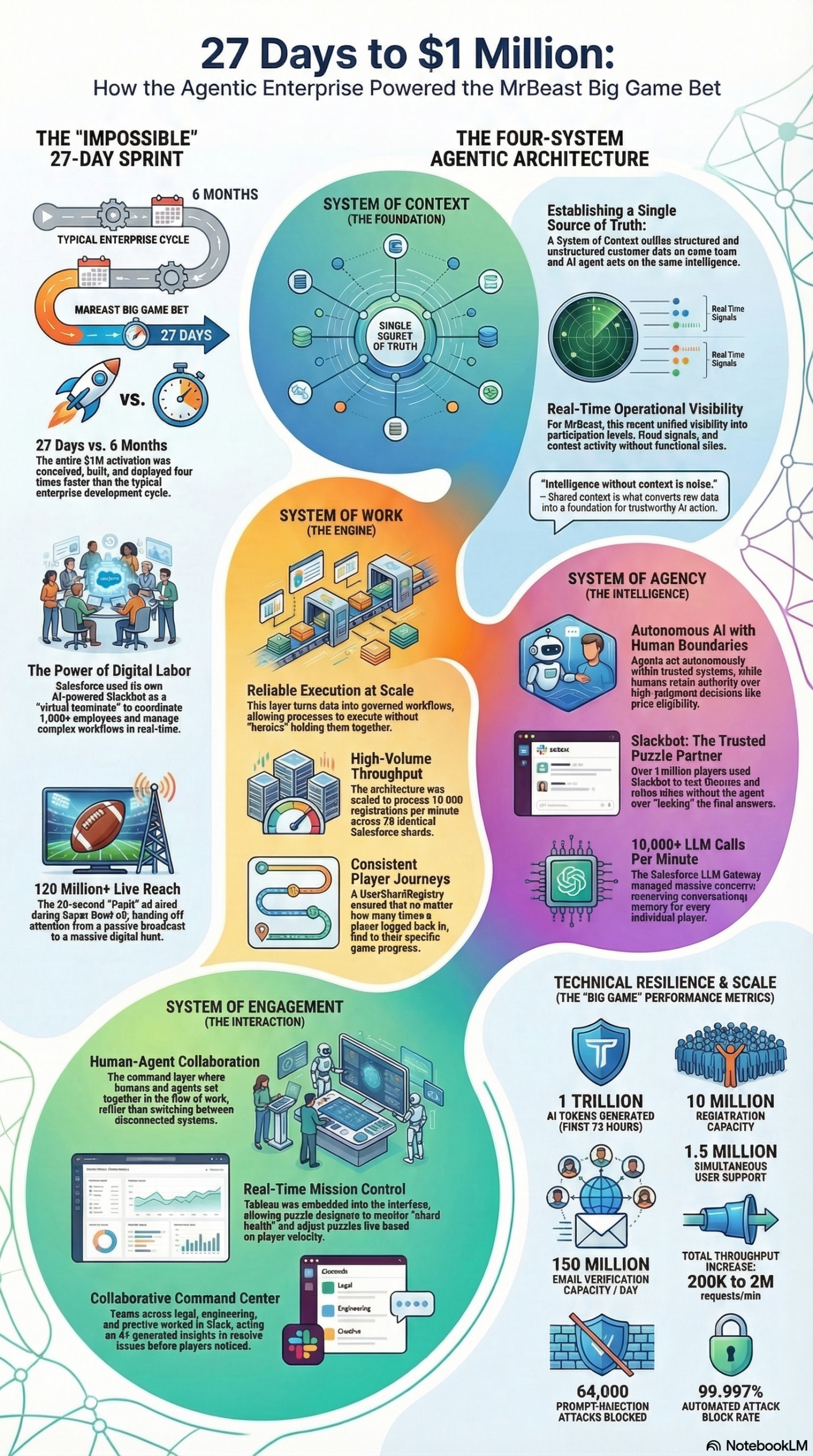
The backstory matters here. In December 2025, MrBeast—whose media operation, Beast Industries, generates over $400 million annually and carries a valuation of approximately $5 billion—posted a tweet that sparked a collaboration with Salesforce. By February 8, 2026, they had launched a national Super Bowl campaign with a $1 million prize, live interactive game mechanics for millions of concurrent users, real-time fraud detection, and a conversational AI that could help players without leaking answers. The entire build took 27 days—a process that, as Salesforce CEO Marc Benioff noted, typically takes six months.
That compression was possible because of the agentic enterprise architecture—not just faster tools, but a fundamentally different operating model. Here’s what each system does:
System of Context is the unified data layer. It brings together all structured and unstructured data—customer records, eligibility data, fraud signals, participation metrics—into a single source of truth. Without this, every AI agent and human operator works from a different slice of reality. In the MrBeast activation, this meant real-time visibility into registration data, fraud patterns, and participation rates without any siloed delays slowing down decisions.
System of Work is the process and business logic layer. It’s where workflows live—in Salesforce’s case, the Customer 360 platform. For the puzzle contest, this layer handled engineered contest logic, eligibility rules, and prize validation at a scale that would have required an army of manual operators under the old model. The system ran reliably under extreme load without human intervention.
System of Agency is where AI earns its role as an actual team member. Salesforce’s Agentforce operated autonomously within the unified data and process layers, monitoring participation patterns, coordinating responses, and serving users at a scale no human team could match. The key distinction from traditional automation: the agents weren’t just executing scripts. They were making contextual decisions grounded in live data.
System of Engagement is the human-AI collaboration layer. Salesforce used Slack as this command surface. Cross-functional teams—legal, engineering, risk, marketing—all received AI-generated insights in shared channels and acted on them in real time. Slackbot wasn’t a chatbot answering FAQs; as Benioff described it, it became “a coworker with agentic superpowers to instantly find any information needed and turn it into action.”
Together, these four systems form a closed loop: data feeds decisions, decisions trigger workflows, AI executes autonomously at scale, and humans stay in the loop through a shared engagement layer. That’s what “agentic enterprise” means in practice.
Why It Matters
Most enterprise AI deployments fail in one of two places: they can’t scale past the pilot, or they can’t integrate across the organization’s data silos. The MrBeast activation is significant precisely because it failed at neither.
For practitioners and engineers: The scale numbers here are worth sitting with. The system was engineered to handle 10 million registrations and 1.5 million simultaneous users. A static landing page absorbed 400,000 visitors per second during peak traffic. An Akamai waiting room throttled inflow to a sustainable 85,000 users per minute. The team spun up 78 identical Salesforce shards and built a custom UserShardRegistry to persist player state across logins. And in the first 72 hours alone, the system processed 1 trillion tokens—equivalent, as documented in the research report, to reading every word on the English-language internet. Total request throughput scaled from 200,000 per minute to 2 million per minute. These are B2C-scale numbers running on B2B infrastructure. That matters because it proves enterprise platforms can handle consumer-grade traffic when architected correctly.
For marketers and brand teams: The strategic shift here is as important as the technical one. Salesforce moved away from its traditional celebrity-driven advertising approach—previously featuring Matthew McConaughey—toward a creator-led model designed explicitly to reach Gen Z and younger Millennials. MrBeast’s audience doesn’t respond to passive TV commercials. They respond to interactive experiences that make them participants. The activation converted Super Bowl viewers from passive spectators into treasure hunters. That’s a workflow change for your brand strategy team, not just your ad agency.
For AI and architecture teams: As Salesforce’s Shawn Myers, Senior Director of Portfolio Product Marketing, stated: “Speed without the right operating model isn’t a competitive advantage. It’s a faster way to fail publicly.” Raw AI capability—even state-of-the-art models—collapses under real production conditions when the data is fragmented, the workflows aren’t engineered, and the human-AI coordination layer is missing. The agentic enterprise architecture solves for all three.
What makes this different from existing alternatives is the integration depth. Most AI deployments layer a model on top of existing fragmented infrastructure. The agentic enterprise model requires rebuilding the operating stack so that context, work, agency, and engagement are unified from the start. It’s more upfront work, but it’s the difference between a demo and a production system.
The Data
Four-System Agentic Architecture: Capabilities vs. Traditional Enterprise Stack
| Dimension | Traditional Enterprise Stack | Agentic Enterprise Architecture |
|---|---|---|
| Data Access | Siloed by department/system | Unified System of Context (single source of truth) |
| Workflow Execution | Manual intervention required at decision points | Engineered processes run autonomously (System of Work) |
| AI Role | Recommendation engine, no autonomous action | Autonomous agent acting on live unified data (System of Agency) |
| Human Coordination | Email chains, dashboards, separate war rooms | Shared Slack channels with AI-generated insights (System of Engagement) |
| Scale Ceiling | Limited by human operator bandwidth | Scales with infrastructure (78 shards, 2M req/min) |
| Time-to-Production | 6+ months for major campaigns | 27 days (MrBeast activation) |
| Security Posture | Perimeter-based, post-incident | Trust Layer: real-time toxicity scanning, zero-leakage AI |
| Fraud Defense | Rule-based, reviewed after the fact | ML model scanning every input/response in real time |
Source: Salesforce Blog — MrBeast Agentic Enterprise Architecture and NotebookLM Research Report
Activation Performance Benchmarks
| Metric | Specification |
|---|---|
| Peak inbound traffic | 400,000 visitors/second |
| Throttled inflow (Akamai waiting room) | 85,000 users/minute |
| Database shards deployed | 78 identical Salesforce shards |
| Token processing (first 72 hours) | 1 trillion tokens |
| Request throughput (pre-activation) | 200,000 requests/minute |
| Request throughput (post-scaling) | 2,000,000 requests/minute |
| Prompt injection attacks defended | 64,000 sophisticated attacks |
| Attack auto-block rate | 99.997% |
| Max simultaneous users supported | 1,500,000 |
| Registration capacity engineered | 10,000,000 |
Source: Salesforce Blog — MrBeast Agentic Enterprise Architecture
Step-by-Step Tutorial: Building Your Own Agentic Enterprise Architecture
This walkthrough adapts the Salesforce four-system model for a team building a production AI-powered activation, campaign, or operational system. You don’t need Super Bowl scale on day one—but the architecture pattern scales whether you’re handling 10,000 concurrent users or 1.5 million.
Prerequisites
- A CRM or customer data platform capable of serving as a unified data layer (Salesforce, HubSpot Enterprise, or equivalent)
- An AI agent framework (Agentforce, LangGraph, AutoGen, or a custom orchestrator)
- A team communication platform with API access (Slack preferred)
- A defined use case with a clear data flow: what data does the AI need, what decisions will it make, and what actions will it take?
- Security review process and defined trust boundaries before you start building
Phase 1: Build Your System of Context
The most common reason AI activations fail at scale is fragmented data. The first step is brutal: audit every data source your use case touches and determine whether your AI agents will have consistent, real-time access to a unified view.
Step 1: Map your data sources. List every data source your workflow depends on. In the MrBeast activation, this included registration data, fraud signals, participation patterns, eligibility rules, and prize status. For your use case, this might be CRM records, purchase history, support tickets, inventory data, or campaign analytics. Document each source, its freshness (real-time vs. batched), and who owns it.
Step 2: Identify your unification layer. According to the Salesforce architecture brief, the System of Context serves as the “single source of truth for all teams and AI agents.” In practice, this means selecting a platform or data warehouse that aggregates your sources and exposes them through a queryable API. Options include Salesforce Data 360, Snowflake with a semantic layer, or a purpose-built data mesh. The key requirement: AI agents and human operators must query the same data store in real time.
Step 3: Define your data contracts. Before you connect AI agents to live data, document what each field means, who can access it, and what freshness guarantees it carries. In the MrBeast case, the Slackbot was scoped to access only data the logged-in user was authorized to see—a critical security constraint that prevented data leakage. Define your access controls at this stage, not after you’ve built the agent layer.
Step 4: Test data consistency under load. Run simulated traffic against your unified data layer before you build anything on top of it. The MrBeast team discovered early that database sharding was necessary—78 shards with a custom UserShardRegistry to persist player state. You may not need 78 shards, but you need to know your ceiling before your users do.
Phase 2: Engineer Your System of Work
This phase is about replacing heroics with engineered processes. Every workflow that currently depends on a human to check a box, approve a record, or trigger a next step is a scaling bottleneck.
Step 5: Document your existing workflows as process maps. Take the business logic you want your system to execute and map it as a flowchart: inputs, decision points, outputs, exceptions. For a contest, this means eligibility validation, duplicate detection, prize tier logic, and winner notification. For a customer service activation, this might mean case routing, escalation triggers, and resolution workflows. Get specific—every ambiguous step will surface as an incident at 3 AM during peak traffic.
Step 6: Encode your workflows into your platform. In Salesforce’s case, the Customer 360 platform housed the contest’s business logic as engineered workflows that ran without manual intervention under load. Whatever platform you use, translate your process maps into automated workflows, not documentation. Every manual checkpoint is a failure point at scale.
Step 7: Build exception handling into the design. The system isn’t done when it works under normal conditions—it’s done when it fails gracefully under abnormal ones. Define what happens when a workflow step fails, when data is missing, when a user hits an edge case. The MrBeast activation used a tiered traffic management approach (static landing page → Akamai waiting room → sharded database) specifically to handle traffic spikes that would have overwhelmed a less-engineered system.
Step 8: Run a pre-launch failure drill. Before going live, intentionally break things. Simulate a database shard failing. Send malformed inputs. Spike traffic to 10x your expected peak. Document what breaks and fix it. The teams that skip this step discover their failure modes in production, under national scrutiny.
Phase 3: Deploy Your System of Agency
This is where your AI agents come online—but only after Phases 1 and 2 are solid. AI deployed on top of fragmented data and unengineered workflows will fail faster and more publicly than no AI at all.
Step 9: Define your agent’s scope and permissions. Before writing a single line of agent code, document what your agent is allowed to do autonomously versus what requires human approval. In the MrBeast activation, Agentforce monitored participation patterns and coordinated responses autonomously—but humans retained accountability for consequential decisions. Your trust boundary document should answer: what can the agent read? What can it write? What can it trigger? What requires a human sign-off?
Step 10: Connect your agent to the unified data layer. Your agent should query the System of Context exclusively—not individual source systems directly. This ensures it works from the same data as every human operator and prevents state divergence between agent actions and business reality.
Step 11: Implement your Trust Layer. The MrBeast activation defended against 64,000 sophisticated prompt injection attacks—attempts to trick the AI into revealing puzzle answers or leaking sensitive data. The system used a machine learning-based model to scan every user input and AI response in real time, auto-blocking 99.997% of attacks. For your deployment, this means at minimum: input sanitization, output filtering, prompt injection defense, and a zero-data-retention policy with any external LLM providers. The activation used a “zero-leakage” AI architecture where no user data was retained by external LLM providers or used to train third-party models. Implement this before you go live—retrofitting security into a running system under load is extremely difficult.
Step 12: Run your agents in shadow mode first. Before your agents take autonomous actions, run them in observation-only mode alongside your current human workflows. Compare agent decisions to human decisions for two to four weeks. Document discrepancies. Tune agent behavior before you give it write access to production systems.
Phase 4: Activate Your System of Engagement
The System of Engagement is the layer that keeps humans in the loop without turning every decision into a meeting. The goal is shared situational awareness—humans and agents acting on the same real-time information, in the same workflow environment.
Step 13: Choose your engagement layer. Salesforce used Slack. The specific tool matters less than the principle: your engagement layer should surface AI-generated insights where humans already work, not in a separate dashboard that someone has to remember to check. Slack, Teams, or a purpose-built operations console all work—if they’re integrated into your daily workflow.
Step 14: Build role-based alert channels. In the MrBeast activation, cross-functional teams—legal, engineering, risk—each had dedicated Slack channels where AI agents surfaced relevant insights in real time. Engineering saw infrastructure alerts. Legal saw eligibility edge cases. Risk saw fraud pattern summaries. Segment your alerts by function so each team gets the context they need without drowning in noise.
Step 15: Define escalation protocols. Document, in advance, what conditions trigger a human decision versus autonomous agent action. When fraud detection confidence drops below a threshold, escalate to risk. When an infrastructure alert fires, route to engineering. The agents should know when to flag for human review, and humans should know how to act on those flags quickly.
Step 16: Run a tabletop exercise before launch. Simulate a live incident in your engagement layer before you go live. Have each team respond to a synthetic AI alert as if it were real. Time the response. Identify bottlenecks in decision-making. The 27-day MrBeast timeline was only possible because the teams had clear protocols—there was no time to figure out escalation paths mid-Super Bowl.
Expected Outcomes
After implementing all four phases, you should expect:
– Faster time-to-decision: humans act on AI-surfaced insights rather than waiting for manual reports
– Higher throughput: engineered workflows eliminate human bottlenecks at scale
– Reduced incident rate: proactive Trust Layer stops attacks before they reach users
– Shorter campaign timelines: unified data and pre-built workflows compress production time significantly
– Auditable AI behavior: every agent action traces to a data source and a process definition
Real-World Use Cases
Use Case 1: B2B SaaS Product Launch at Scale
Scenario: A SaaS company is launching a new product tier with a waitlist activation, a tiered pricing puzzle, and a referral mechanic—targeting 500,000 signups in the first 48 hours.
Implementation: Build a System of Context that unifies CRM data, referral tracking, and eligibility rules. Engineer a System of Work with automated waitlist position logic, referral attribution, and upgrade triggers. Deploy an Agentforce-style agent to handle eligibility questions at scale without a human support queue. Route anomalies—duplicate accounts, referral fraud—to a risk Slack channel with AI-generated summaries.
Expected Outcome: The support queue stays empty during peak traffic because the agent handles the top 90% of questions autonomously. Fraud signals surface to risk ops in real time instead of being discovered in post-event audits. The activation runs without a war room crisis because the engineering is done in advance, not during the launch.
Use Case 2: Enterprise Customer Service Activation
Scenario: An enterprise retail brand needs to handle a major product recall affecting 2 million customers—communicating status updates, processing replacement requests, and detecting fraudulent claims—all simultaneously.
Implementation: The System of Context unifies purchase history, warranty records, and replacement inventory. The System of Work encodes eligibility logic, replacement shipping workflows, and escalation rules. AI agents handle tier-one inquiries autonomously—”Is my product affected? When will my replacement ship?”—while routing complex cases to human agents via Slack with full customer context already loaded. The Trust Layer prevents prompt injection attempts that might try to extract other customers’ data.
Expected Outcome: Customer resolution time drops from days to hours. Fraudulent claims are flagged before processing, not after. Human agents spend their time on genuinely complex cases, not answering the same question two million times.
Use Case 3: Agentic Marketing Campaign Orchestration
Scenario: A marketing agency needs to run a cross-channel activation across email, SMS, paid social, and in-app—with personalization at the individual level, triggered by real-time behavior signals.
Implementation: Build a System of Context that unifies behavioral data, channel engagement history, and CRM attributes. Deploy AI agents to make next-best-action decisions for each user in real time—selecting channel, message variant, and send timing based on live context. The System of Work handles campaign suppression rules, frequency caps, and compliance checks automatically. The engagement layer surfaces campaign performance anomalies (unexpected unsubscribes, deliverability drops) to the marketing ops team in Slack.
Expected Outcome: Personalization scales to the full customer base without a larger team. Anomalies get caught in minutes, not days. Campaign performance improves because decisions are made on real-time data, not yesterday’s batch report.
Use Case 4: Creator Economy Partnership Activation
Scenario: A B2B brand wants to replicate the Salesforce-MrBeast playbook: partner with a creator, build an interactive experience for their audience, and use the activation to drive product awareness among Gen Z and Millennial decision-makers.
Implementation: Following the Salesforce model, structure the activation as a participatory experience—a challenge, a puzzle, or a competitive mechanic—rather than passive content. Embed your product’s functionality into the experience authentically (Slackbot as the “teammate,” not as a banner ad). Build the four-system architecture to handle creator-scale traffic, which spikes unpredictably. Design the engagement layer so the creator’s team and your team operate from the same information in real time.
Expected Outcome: Brand awareness that reaches audiences traditional B2B advertising never touches. A documented product demonstration embedded in an experience the audience actually participated in—far more memorable than a commercial.
Common Pitfalls
Pitfall 1: Deploying AI Before the Data Layer Is Unified
The most expensive mistake in agentic architecture is skipping Phase 1 and going straight to agents. AI operating on fragmented, inconsistent data will make confident-sounding decisions based on incorrect context—at the speed of automation. Before you build agents, your System of Context must be complete and tested. This is not optional.
Pitfall 2: Relying on Individual Heroics Instead of Engineered Systems
As Shawn Myers of Salesforce stated: “Speed without the right operating model isn’t a competitive advantage. It’s a faster way to fail publicly.” Every manual step in your workflow is a failure point at scale. If your production plan depends on a specific person being available and alert at 2 AM during peak traffic, you don’t have an architecture—you have a staffing dependency. Engineer the process, then staff for oversight, not execution.
Pitfall 3: Skipping the Trust Layer
The MrBeast activation absorbed 64,000 sophisticated prompt injection attacks in its first hours, auto-blocking 99.997% of them. If you deploy a user-facing AI agent without input scanning and output filtering, you’re relying on your users to not attempt abuse—which is not a security model. Build the Trust Layer before launch, not after your first incident.
Pitfall 4: Underestimating Token Throughput Requirements
The activation processed 1 trillion tokens in its first 72 hours. If your capacity planning is based on average usage rather than peak demand, you will underestimate. Plan for 10x your expected peak, especially for any activation tied to a scheduled event. The cost of over-provisioning is manageable. The cost of a public outage during a Super Bowl broadcast is not.
Pitfall 5: Treating the System of Engagement as Optional
Teams that skip the engagement layer and route alerts to individual dashboards will be slower to respond to incidents. The coordination overhead—”did you see the alert? what does it mean? who owns this?”—kills response time. Build the shared Slack or Teams integration before launch so humans and agents are working from the same surface from day one.
Expert Tips
Tip 1: Shard Early, Shard Aggressively
The MrBeast team used 78 identical Salesforce shards with a UserShardRegistry for persistent player assignment. If your use case involves any form of persistent user state—game progress, eligibility, preferences—design your sharding strategy before you build the application layer. Retrofitting sharding into a running system is significantly harder than designing for it upfront. As William Dressler, Regional VP of AI and Data Architecture at Salesforce, noted, the activation’s technical demands forced throughput improvements that set a new performance standard for the platform.
Tip 2: Use a Static Entry Point as Your First Line of Defense
A static landing page that absorbs 400,000 visitors per second before routing them to dynamic infrastructure is a simple and highly effective pattern. Keep your entry point as lightweight as possible—no database calls, no authentication, minimal JavaScript. Its only job is to absorb traffic and hand users off to a managed queue. The Akamai waiting room pattern used in the MrBeast activation is widely available and should be standard practice for any high-traffic activation.
Tip 3: Define Agent Accountability Before Agent Capability
Build your human accountability model before you build your agent capabilities. Know who is responsible for each category of agent decision, what the escalation path is, and how you’ll audit agent actions after the fact. AI that operates without clear human accountability creates legal, brand, and operational risk regardless of how well it performs technically.
Tip 4: Implement Zero-Data-Retention with External LLM Providers
The MrBeast activation used a zero-leakage AI architecture: no user data was retained by external LLM providers or used to train third-party models. This is a contractual requirement in many enterprise and regulated environments, but it should be your default regardless. When negotiating with LLM providers, make data retention terms explicit and get them in writing before you connect user data to any model API.
Tip 5: Test Your Engagement Layer Like You Test Your Infrastructure
Most teams test their technical infrastructure extensively but treat their Slack or Teams configuration as an afterthought. Run tabletop exercises where your team responds to synthetic incidents via the engagement layer under realistic time pressure. Identify which alerts are actionable, which are noise, and what information each team needs to make fast decisions. The quality of your engagement layer determines how quickly your team can respond when the architecture surface an anomaly at scale.
FAQ
Q: Do you need Salesforce specifically to implement the agentic enterprise architecture?
No. The four-system model—Context, Work, Agency, Engagement—is an architectural pattern, not a product requirement. The Salesforce implementation used Data 360, Customer 360, Agentforce, and Slack, but comparable stacks exist using Snowflake, Databricks, LangGraph, AutoGen, and Slack or Teams. The pattern requires unified data, engineered workflows, autonomous AI with a defined trust boundary, and a shared human-AI collaboration surface. The specific tools are less important than the integration depth between them.
Q: How realistic is the 27-day timeline for a team that doesn’t have Salesforce’s resources?
The 27-day timeline reflected both Salesforce’s pre-built platform capabilities and the fact that both teams—Salesforce and Beast Industries—were operating with extreme urgency and focus. For a team building on top of existing unified infrastructure, a major activation can be built significantly faster than traditional timelines. For a team building the architecture from scratch, expect the first activation to take longer—but subsequent activations on the same architecture to accelerate dramatically because the foundational systems are already in place.
Q: What’s the minimum viable version of this architecture for a smaller team?
Start with the System of Context—a single unified data source that all your AI tools and human operators query. Even if you can’t build all four systems immediately, eliminating data silos will have the highest immediate impact on AI output quality. Then engineer your most critical workflow (System of Work), add a basic AI agent for your highest-volume repetitive task (System of Agency), and route AI-generated alerts to your existing team communication tool (System of Engagement). You can layer in sophistication over time.
Q: How do you handle the trust and security layer in practice?
The activation used a machine learning-based model that scanned every user input and AI response in real time, blocking 99.997% of 64,000 sophisticated prompt injection attacks. In practice, this means deploying an input/output filtering layer between users and your AI agents—distinct from the AI model itself—that evaluates content against toxicity, injection, and data leakage rules before passing it through. Most major cloud AI providers offer content safety APIs. For high-stakes activations, augment these with a custom ML classifier trained on your specific threat patterns.
Q: Is this architecture only applicable to large-scale B2C activations, or does it apply to internal enterprise use cases?
The architecture applies equally to internal use cases. The same four systems that powered a 10-million-user registration capacity can be applied to an internal HR process, a financial reporting workflow, or an operations dashboard. The scale is different—instead of 1.5 million simultaneous users, you might have 5,000 employees. But the failure modes are identical: fragmented data produces bad AI decisions, unengineered workflows create bottlenecks, agents without a trust layer create security risks, and humans without a shared engagement surface respond slowly to anomalies. The pattern is architecture-invariant to scale.
Bottom Line
The MrBeast-Salesforce Super Bowl activation isn’t just a marketing case study—it’s the most comprehensively documented proof point that AI can move from pilot to production in weeks when the operating architecture is right. The four-system model—Context, Work, Agency, Engagement—gives practitioners a replicable blueprint for deploying AI that works at real scale, with real security, under real scrutiny. The 27-day timeline, 1 trillion tokens processed, and 99.997% attack block rate are not marketing claims; they are performance benchmarks for what an engineered agentic enterprise looks like in production. If your AI deployments are stalling in pilot, the architecture described here—not a better model or a faster GPU—is almost certainly what’s missing. Build the foundation first, and the speed follows.


0 Comments