

Instagram’s content creation ecosystem shifted structurally in 2026: the brands producing at scale are not bigger teams—they are teams running a four-layer AI production architecture that covers scripting, video synthesis, scheduling, and conversion automation. The Hootsuite roundup of 22 Instagram apps for 2026 maps the full tool landscape, and this tutorial shows you exactly how to select, combine, and deploy those tools into a working pipeline—not just evaluate them on a list.
What This Is
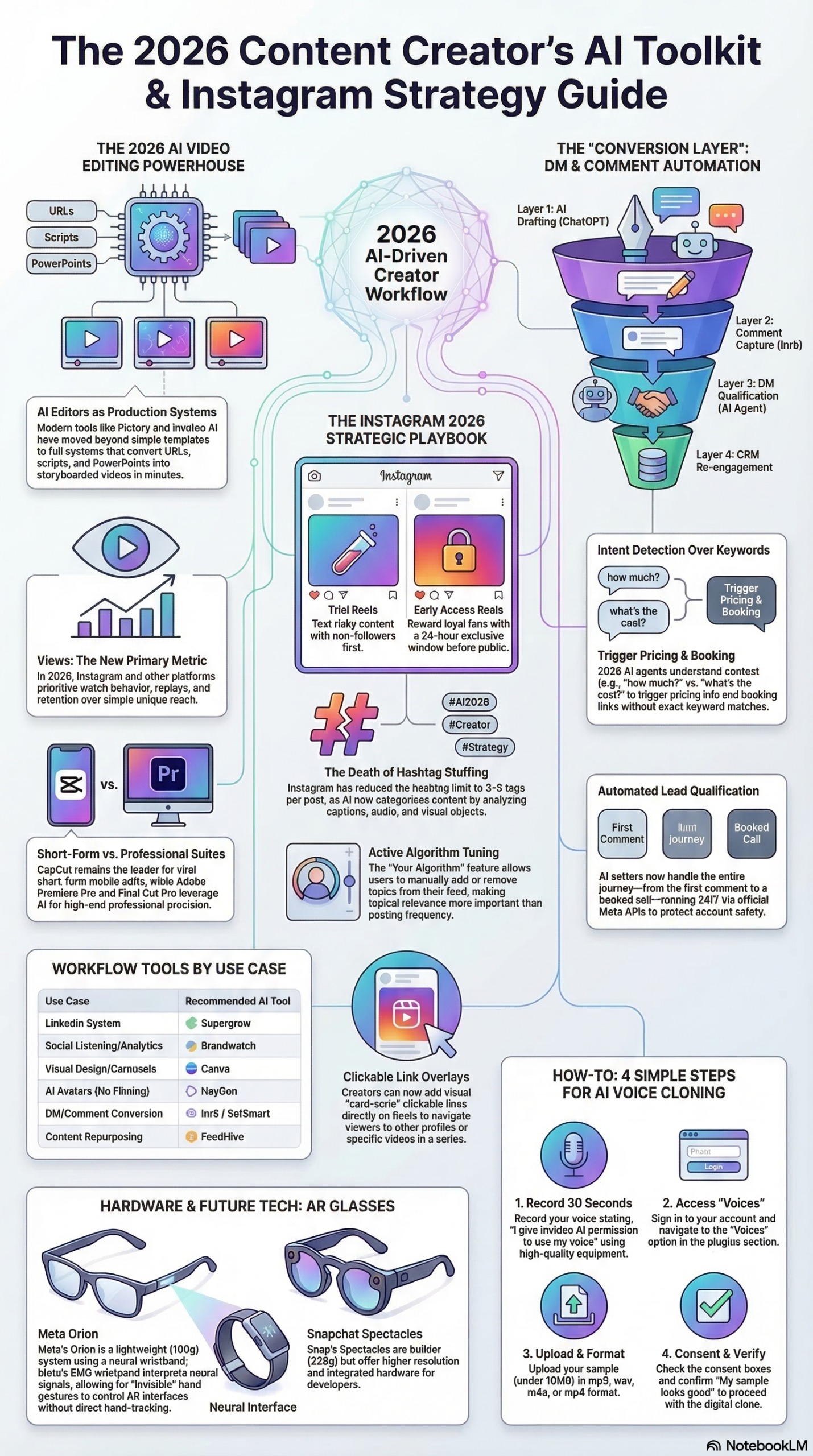
The “Instagram apps” ecosystem in 2026 is best understood not as a menu of disconnected tools, but as a four-layer production architecture. Every successful brand workflow documented in the NotebookLM strategic briefing on AI-driven content creation follows the same organizational model:
Layer 1 — Creation: Writing captions, scripts, and content briefs. Tools: ChatGPT, Claude, or Supergrow (the latter purpose-built for social media with LinkedIn and Instagram scheduling integrated).
Layer 2 — Production/Editing: Converting scripts and raw assets into finished video or graphics. Tools: CapCut for social-native short-form video, Canva for static and branded graphics, Pictory for blog-to-video and long-form synthesis, HeyGen for presenter-style AI avatar video, invideo AI for voice-cloned narration, and Runway for generative visual experiments.
Layer 3 — Distribution: Scheduling and posting at algorithmically optimal times. Tools: Metricool (deeper analytics and timing intelligence) and Buffer (simpler, ideal for solo creators).
Layer 4 — Conversion/Engagement: Handling inbound DMs, qualifying leads, and booking calls automatically. Tools: Inrō and SetSmart, both operating through Meta-approved APIs.
What makes 2026 categorically different from prior years is how far AI has penetrated Layers 1 and 2. In 2024, AI copywriting tools were assistants at best. Today, text-to-video technology has matured to the point where Pictory—currently ranked as the top tool for its comprehensive workflow—can accept a URL or blog post and generate a fully storyboarded, narrated video in minutes, according to the NotebookLM strategic briefing. The Hootsuite analysis documents this across 22 distinct tools covering every production stage.
What changed on the platform side is equally significant. Instagram itself shipped a set of features in 2025-2026 that fundamentally change how content is distributed, tested, and discovered:
- Trial Reels: Available to public accounts with 1,000+ followers. Content is distributed to non-followers first for a 24-hour test window. Creators evaluate performance before committing a video to their main feed—giving every Reel a data-driven editorial gate.
- Early Access Reels: The inverse of Trial Reels. Reward existing followers with a 24-hour exclusive preview before broader distribution, deepening loyalty with core audiences.
- “Your Algorithm” Controls: Users can now manually add or remove interest categories from their feed. As Mentionlytics documented in their February 2026 monthly overview: “The algorithm is no longer entirely passive: users can actively reshape what appears in their feed.” For marketers, this means niche specificity is no longer optional—it is a prerequisite for discovery.
- Hashtag Reduction: Instagram has dropped the effective hashtag count from 30 to 3–5 per post. The platform’s AI now categorizes content by analyzing video frames, audio, and captions directly, according to the research briefing. Over-hashtagging actively signals low-quality content.
The Hootsuite 2026 roundup maps 22 tools directly onto this four-layer model. Understanding the model before selecting tools is what separates a strategic stack from an expensive collection of overlapping subscriptions.
Why It Matters
The practical stakes are immediate: according to the NotebookLM research report, Instagram’s primary engagement metric has shifted from reach (unique accounts) to views (watch behavior and retention). This is a fundamental measurement change that invalidates most pre-2025 content strategies built around maximizing unique eyeballs.
For solo creators and small businesses, the four-layer stack levels the production playing field. A two-person marketing team running Pictory, CapCut, Inrō, and Metricool can produce and distribute at a volume that previously required four to five headcount. The research briefing specifically identifies the efficiency gains from automating repetitive tasks—trimming, captioning, formatting—as the primary competitive advantage AI tools deliver to small operators.
For agencies managing multiple client accounts, AI integration is now a client expectation, not a differentiator. Clients expect A/B testing cadences, platform-native video production volumes, and automated DM lead capture that are only achievable with AI-assisted workflows. Teams that have not adopted DM automation are actively losing leads on behalf of clients—as the Inrō guide documents: “Managing Instagram manually at scale is not a strategy, it is a bottleneck.” The DM automation tools covered in the research achieve open rates of 85–95%, compared to email marketing’s typical 20–30%.
For video-first brands, AI voice cloning through tools like invideo AI removes the studio recording bottleneck. The technology analyzes pitch, tone, and accent from a 30-second audio sample and generates voiceovers indistinguishable from the creator’s natural delivery, per the research briefing. For brands producing high volumes of educational or promotional video, this eliminates hours of re-recording per week.
The critical tension in 2026 is the authenticity paradox: Instagram rewards AI-assisted production efficiency while simultaneously penalizing content that reads as generic or clearly non-creator-originated. The research briefing is explicit that platforms are “rewarding original, creator-led content while decreasing the impact of individual, one-off posts.” The tools that win in this environment are those that amplify a creator’s voice—not replace it.
The Data
The following comparison matrix is drawn directly from the NotebookLM strategic briefing and the Hootsuite 2026 Instagram apps analysis, mapping the core tools in the ecosystem by layer, best use case, and standout feature.
Tool Comparison: 2026 AI Instagram Content Stack
| Tool | Layer | Best For | Key Feature | Pricing Tier |
|---|---|---|---|---|
| Pictory | Production | Blog-to-video, long-form synthesis | Automated storyboard + scene matching | Mid-range |
| CapCut | Production | Viral short-form Reels | AI auto-captions + background noise reduction | Free/Freemium |
| HeyGen | Production | Presenter-style videos without filming | AI avatars trained on your likeness | Mid-range |
| invideo AI | Production | Voiceover-heavy educational content | Voice cloning from 30-second audio sample | Mid-range |
| Runway | Production | Generative and experimental visuals | Generative video output | Premium |
| Canva | Production | Static graphics, carousels, covers | Brand kit + team collaboration | Freemium |
| Instagram Edits | Production/Creation | All-in-one native production | Teleprompter + editing + analytics | Free (Meta) |
| Inrō | Conversion | Lead gen + DM sales funnels | Intent detection + CRM tagging | Mid-range |
| SetSmart | Conversion | Coaches and consultants | GPT-powered DMs that book discovery calls | Mid-range |
| Metricool | Distribution | Multi-platform scheduling + analytics | Audience activity timing optimizer | Mid-range |
| Buffer | Distribution | Simple multi-platform scheduling | Visual content calendar | Freemium |
| Supergrow | Creation | B2B LinkedIn + Instagram crossover | Carousel generator + LinkedIn-first scheduling | Mid-range |
Source: NotebookLM Strategic Briefing — AI-Driven Content Creation 2026, Hootsuite Instagram Apps 2026
Instagram Platform Metric Shift: 2024 vs. 2026
| Signal | 2024 Standard | 2026 Standard |
|---|---|---|
| Primary KPI | Reach (unique accounts) | Views (watch time + retention) |
| Hashtag strategy | 20–30 per post | 3–5 per post |
| Content categorization | Hashtag-driven | AI frame / audio / caption analysis |
| Algorithm control | Fully passive | User-adjustable via “Your Algorithm” |
| DM automation permission | Restricted | Meta-approved API ecosystem (Inrō, SetSmart) |
| Testing mechanism | Post and observe | Trial Reels (24-hr non-follower test) |
| Follower engagement reward | Simultaneous with broad reach | Early Access Reels (24-hr follower exclusives) |
| Manual DM open rate | ~40–60% | ~40–60% |
| AI-automated DM open rate | N/A | 85–95% |
Source: NotebookLM Strategic Briefing, Mentionlytics February 2026 Monthly Overview
Step-by-Step Tutorial: Build Your Four-Layer Instagram Content Stack
This walkthrough covers how to build a working AI-powered Instagram content pipeline from scratch using the four-layer architecture documented in the NotebookLM research briefing. Follow in order—each layer feeds the next.
Prerequisites
Before you begin:
- Active Instagram Business or Creator account (1,000+ followers recommended to unlock Trial Reels)
- Budget estimate: $150–$300/month for a full mid-tier four-layer stack
- A clearly defined content niche (essential in the “Your Algorithm” era—non-niche content loses algorithmic placement to user-pruned feeds)
- A brand style guide: hex color codes, logo files, font names, and a one-paragraph voice and tone description
- A simple content brief template (you’ll build this in Step 2)
Phase 1: Set Up the Creation Layer
The creation layer generates all text assets: captions, Reel scripts, carousel copy, and content briefs. This is the foundation everything else builds on.
Step 1: Choose your AI writing tool. The research briefing identifies three main options for Instagram-specific creation work:
- ChatGPT: The most widely adopted, general-purpose. Strong for rapid caption drafts and script outlines.
- Claude: Better suited for longer-form scripts where nuanced tone and editorial voice matter. Stronger performance on maintaining brand voice across a full 60-second Reel script versus a short caption.
- Supergrow: Purpose-built for social content. If you’re cross-posting between Instagram and LinkedIn, Supergrow’s carousel generator and integrated scheduling make it worth the subscription over a general AI tool.
Step 2: Build a reusable script prompt template. Do not prompt AI writing tools freeform—it produces inconsistent output that requires heavy editing. Build a structured template:
Write a 60-second Instagram Reel script for [YOUR NICHE] targeting [AUDIENCE PERSONA].

Hook (first 3 seconds): [SPECIFIC HOOK ANGLE — question, bold claim, or visual directive]
Main content: 3 key points about [TOPIC]
CTA: "Comment [KEYWORD] below and I'll send you [RESOURCE] straight to your DMs"
Tone: [YOUR BRAND VOICE — e.g., "direct, educational, no corporate language"]
Do not use filler phrases. Every sentence must deliver a specific insight.
Save this as your master template. Every script iteration starts here.
Step 3: Build a content brief library. Create a shared Notion database or Google Sheet with columns for: content topic, hook angle tested, performance score (from Trial Reels data), and notes on what worked. This library becomes your institutional memory—as you accumulate testing data in Phase 3, you’ll identify winning hook patterns and systematically replicate them. The research briefing highlights this feedback loop as a key differentiator for high-performing content teams.
Phase 2: Set Up the Production Layer
The production layer converts your scripts into finished, platform-ready video and graphics. Tool selection depends on content format.
Step 4: Select your primary video tool. Based on the Hootsuite 2026 analysis and the research briefing:
- Short-form Reels (under 90 seconds): Use CapCut. It’s free, its AI auto-caption feature is best-in-class for social content, and the background noise reduction algorithm is specifically optimized for smartphone-captured audio. The research briefing ranks CapCut as the go-to tool for viral short-form content production.
- Blog-to-video or long-form synthesis: Use Pictory. Feed it a URL or paste a script, and it auto-generates a storyboard with matched stock footage and narration. Pictory is ranked #1 in the research briefing specifically for its ability to “summarize long-form content and convert blog posts into storyboards.”
- Presenter-style video without filming: Use HeyGen to create AI avatars trained on your likeness. The research briefing notes HeyGen as the tool of choice for “presenter-style videos where the AI avatar replaces the need for filming.”
- Voiceover-heavy educational content: Use invideo AI for voice cloning. Provide a 30-second audio sample—recorded in a quiet environment—and the tool generates voiceovers that match your pitch, tone, and accent. Per the research briefing, this is particularly effective for high-volume educational content where re-recording every variation is impractical.
Step 5: Configure CapCut for Instagram-native output. This setup takes 10 minutes and applies to every short-form Reel you produce:
- Open CapCut → New Project → select 9:16 aspect ratio (1080×1920px — the native Instagram Reel format)
- Import your raw footage or B-roll clips
- Navigate to Text → Auto Captions → select your language → run the transcription
- Style captions: white text, black stroke, positioned in the lower third of the frame — high contrast on any background
- Navigate to Audio → Enhance → Background Noise Reduction → enable and apply
- Before export: review for caption errors (AI transcription has ~5% error rate on technical vocabulary — fix manually)
- Export at 1080p, 30fps — Instagram’s compression algorithm handles this resolution cleanly; higher resolutions are processed down and lose quality predictably
Step 6: Switch all image content to the 3:4 aspect ratio. The research briefing explicitly recommends adopting the 3:4 ratio (the natural smartphone photo ratio now supported natively by Instagram) to maximize vertical screen real estate in mobile feeds. Open Canva, navigate to your Instagram post template, resize from 1:1 (1080×1080px) to 3:4 (1080×1350px). Update all existing templates.
Step 7: Configure your Canva brand kit. In Canva Pro:
- Brand Kit → Colors: Add all brand hex codes
- Brand Kit → Fonts: Upload brand fonts or select from Canva’s library — set a hierarchy (heading, body, accent)
- Brand Kit → Logos: Upload all logo variations (primary, white, dark backgrounds)
- Create a master Reel cover template at 1080×1920px using your brand kit
- Create a carousel template at 1080×1350px (3:4 ratio) for educational swipe posts
- Lock brand kit elements so team members cannot deviate — toggle “Lock” on brand fonts and colors in team settings
Phase 3: Set Up the Distribution Layer
The distribution layer handles when and where your content publishes. This is where human intuition is most reliably replaced by data.
Step 8: Connect Metricool or Buffer to your Instagram account. For most practitioners, Metricool is the stronger choice: its audience activity timing optimizer analyzes when your specific followers are most active and auto-schedules content during those windows. Buffer is simpler and better for solo creators who don’t need deep analytics.
For Metricool setup:
1. Sign in at metricool.com → Connect Accounts → Instagram Business
2. Navigate to Planning → Best Times to Post — note this requires 30+ days of account data to produce accurate recommendations. Connect immediately even if you won’t use the auto-scheduling feature right away.
3. Set up a content queue for each format type: Reels (daily), carousels (2–3x per week), Stories (daily), static posts (as needed)
4. Enable the Autolists feature to recycle evergreen content automatically
Step 9: Implement Trial Reels systematic testing. This is the highest-leverage distribution tactic available in 2026, according to the research briefing. Here is the exact protocol:
- Produce two versions of a Reel — change one variable only. The Metricool strategic testing guide states directly: “A Trial Reel is only useful if you change one variable at a time.” Test options: hook text, opening visual, background music track, caption CTA phrasing
- In Instagram, when posting Reel Version A → Advanced Settings → Trial → confirm
- Trial Reels are distributed to non-followers for up to 24 hours before any action is required
- Monitor: watch time, replay rate, likes-to-views ratio, and skip rate within first 3 seconds (the “lowest skip rate” insight identifies hook effectiveness)
- At the 24-hour mark, publish the winning variant to your main feed. Archive or rework the losing variant
- Document the winning variable in your content brief library (from Step 3)
After 8–10 trials, you will have a tested hook library. Content created from tested hooks consistently outperforms non-tested content—the data is produced by your actual non-follower audience, not modeled.
Step 10: Reduce hashtags to 3–5 immediately. The research briefing documents that Instagram’s AI categorizes content by analyzing video frames, audio, and captions—not hashtag strings. Use 3–5 niche-specific hashtags maximum. Choose tags that reflect your exact content niche, not broad reach tags. Drop volume-based hashtag strategies entirely.
Phase 4: Set Up the Conversion Layer
The conversion layer handles inbound engagement after content lands. This is where Instagram’s commercial potential is actually captured.
Step 11: Choose your DM automation tool. Both platforms in the research briefing operate through Meta-approved APIs:
- Inrō: Best for lead generation, product sales, and brands with high inbound DM volumes. Its intent detection identifies when a user is evaluating a purchase versus casually browsing, then CRM-tags them accordingly for follow-up segmentation.
- SetSmart: Best for service businesses—coaches, consultants, and agencies—where booking a discovery call is the primary conversion goal. Uses GPT-powered conversation agents to qualify leads and insert calendar links directly in the DM thread.
Step 12: Build your first “Comment-to-DM” automation trigger. The research briefing identifies this as the highest-priority automation implementation. Setup in Inrō:
- New Automation → Comment Trigger
- Trigger keyword: set the primary trigger (e.g., “GUIDE”) plus common variations and capitalizations (“guide”, “Guide”) — Inrō supports fuzzy matching to recover keyword variations
- Action → Send DM: Draft the opening DM message. Deliver the promised resource (PDF link, video link, or landing page URL) in the first message
- Follow-up sequence: Add 2–3 qualifying questions delivered automatically over the next 24–48 hours:
- Message 2 (sent 30 minutes after resource delivery): “What’s the biggest challenge you’re working on right now with [TOPIC]?”
- Message 3 (sent 24 hours later, if no booking): “Would a quick 15-minute call help? Here’s my calendar: [LINK]”
-
Exit condition: Once a lead books or self-disqualifies, remove from the sequence
-
In your Instagram caption, embed the CTA: “Comment ‘GUIDE’ below and I’ll send it straight to your DMs”
Step 13: Run weekly AI comment summaries. Inrō and Metricool both offer AI-powered comment summarization. Schedule this as a weekly workflow: run the summary, identify recurring audience pain points and requests, and route the top three findings back to your creation layer (Step 2) as new content topics. The research briefing recommends this specifically for identifying “audience sentiment and recurring pain points for new content ideas.” It also surfaces pricing signals—recurring “expensive” or “can’t afford” comments are audience feedback that most creators miss.
Expected Outcomes at 30–60 Days
After a properly configured four-layer stack runs for 30–60 days:
- Production volume: Realistic 3–5x increase in weekly content output without additional headcount
- DM engagement: 85–95% open rates on automated sequences per the research briefing, versus ~40–60% on manually sent DMs
- Content optimization: A tested hook library built from real non-follower audience data—eliminating guesswork in content planning
- Lead quality: Automated pre-qualification means sales conversations begin with better-informed, self-selected prospects
Real-World Use Cases
Use Case 1: DTC E-Commerce Brand Scaling Reel Output
Scenario: A direct-to-consumer skincare brand with 15,000 followers and a two-person marketing team. Current output: 1–2 Reels per week. Target: 5 per week to compete for Reels algorithm distribution.
Implementation: Use Pictory to convert product description pages into 60-second Reels by feeding it the product URL. Pictory auto-generates a storyboard, matches stock footage to script sections, and adds AI narration. CapCut handles final editing passes—captions, brand color overlays, CTA text card. Metricool schedules at peak audience activity windows. Inrō handles all “Comment SHOP” triggers and automatically delivers the product link with a 10% discount code.
Expected Outcome: The research briefing documents that automating repetitive production tasks—trimming, captioning, formatting—enables small teams to compete with large brand production volumes. A two-person team can realistically sustain 5 Reels per week with this stack. Trial Reels testing on product hook variations (product close-up vs. transformation result) produces statistically actionable data within 4–6 trials.
Use Case 2: Business Coach Automating DM Lead Qualification
Scenario: A business coach with 50,000 followers receives 200+ DMs per week but can manually respond to only 30–40. High-value leads are being lost in the volume.
Implementation: SetSmart deploys GPT-powered conversation agents in the DM inbox. Agents detect inquiry intent, ask pre-set qualifying questions (current business revenue stage, specific challenge, timeline for making a decision), and insert a calendar booking link for qualified leads. The coach’s inbox shows only conversations from prospects who have already answered qualifying questions and requested a call.
Expected Outcome: Based on Inrō guide data in the research briefing, DM automation achieves 85–95% open rates. The coach recovers 10–15 hours per week previously spent on manual DM triage while increasing total qualified discovery calls booked—because every qualifying question is answered before the call, shortening close cycles.
Use Case 3: Agency A/B Testing Content Hooks for a Client
Scenario: A social media agency manages Instagram for a regional restaurant chain. The client wants to know whether food-focused close-up Reels or chef behind-the-scenes content performs better with non-followers—potential new customers.
Implementation: Two Reels are produced with identical 60-second content structures but different opening three-second hooks. Trial Reels distributes Version A (dish close-up) and Version B (chef plating the dish) to separate non-follower audiences simultaneously. After 24 hours, the agency compares skip rate within the first three seconds, total watch time, and replay rate. The winning variant is published to the main feed. The losing variant is either archived or reworked with a new hook angle for a second trial.
Expected Outcome: The Metricool strategic testing guide establishes the one-variable rule as the foundation of actionable testing. After 8–10 trials, the agency has a tested hook library for the client—a documented competitive asset that justifies the retainer and eliminates opinion-based content decisions.
Use Case 4: Creator Scaling Content with AI Voice Cloning
Scenario: A fitness influencer with 100,000 English-speaking followers wants to publish Spanish-language content to reach a growing Latin American audience without re-recording every video in Spanish.
Implementation: invideo AI clones the creator’s voice from a 30-second English audio sample recorded in a quiet environment. Scripts are translated into Spanish by a bilingual team member. The AI voiceover tool generates the Spanish narration in the creator’s vocal characteristics—maintaining tonal warmth and pacing. CapCut adds Spanish captions styled to match the English video brand. Trial Reels tests the Spanish content with non-follower audiences before committing to the main feed.
Expected Outcome: Per the research briefing, AI voice cloning enables creators to produce voiceovers “in their own voice” across languages, maintaining audience relatability while expanding geographic reach. The accessibility benefits extend to hearing-impaired audiences via automated captions, broadening the content’s reach further.
Use Case 5: B2B SaaS Using Instagram for Inbound Trial Signups
Scenario: A B2B SaaS company targeting startup founders wants to generate inbound free trial signups from Instagram without running paid ads. Current Instagram presence is underutilized.
Implementation: Supergrow generates educational carousel posts with Instagram-native formatting, cross-posted to LinkedIn. Each carousel covers a specific pain point the product solves, ending with: “Comment TRIAL below for a direct link to start your free 14-day trial.” Inrō’s comment-to-DM automation delivers a personalized DM with the trial signup URL plus three qualifying questions (use case, company size, current solution). Qualified responses—specific use case identified, company over 10 employees, currently using a competitor—are CRM-tagged and routed to the sales team for a follow-up call.
Expected Outcome: The conversion layer handles first-pass qualification entirely. The sales team engages only with self-identified prospects who have already described their use case and company context. Per the research briefing, this “conversion layer” approach is what separates Instagram from being a brand awareness channel to a direct lead generation channel.
Common Pitfalls
1. Using unofficial automation bots. The most expensive mistake in Instagram automation. Non-Meta-approved tools that automate follows, unfollows, or DMs violate Instagram’s Terms of Service and result in account suspension—often permanent at scale. The research briefing is explicit: use only certified providers like Inrō or SetSmart. Short-term follower growth from bot activity is never recoverable value against a banned account.
2. Testing multiple variables in Trial Reels. If you change the hook, the background music, and the opening visual simultaneously, you collect data you cannot act on. The Metricool strategic testing guide is unambiguous on this point: change one variable per trial. If you changed three things and performance improved, you have no information about which change caused the improvement—and cannot replicate it reliably.
3. Maintaining a 20–30 hashtag strategy. This is a 2023 behavior pattern that actively hurts content performance in 2026. Instagram’s AI categorizes content through frame analysis, audio recognition, and caption semantics, per the research briefing. Over-hashtagging now signals low-quality, engagement-baiting content to both the algorithm and sophisticated users. Reduce to 3–5 niche-specific tags immediately—hashtags that describe your exact topic, not broad reach grabs.
4. Publishing AI-generated video without an editorial pass. Pictory and HeyGen produce drafts, not final products. Every AI-generated video requires a human review cycle: verify that the stock footage matches the script context (auto-matching is approximately 80% accurate), confirm the AI voice tone matches the emotional register of the content, and ensure the closing CTA is correctly positioned and clearly audible. The research briefing is direct that platforms reward “original, creator-led content”—AI tools that visibly replace a creator’s presence rather than enhance it do not perform at the same level.
5. Building a tool stack without mapping it to the four-layer architecture first. Subscribing to Canva, CapCut, Pictory, Inrō, and Buffer simultaneously without a clear workflow model creates subscription overlap and underutilized tools. Map your content workflow to the four layers first. Identify the single best tool for each layer given your content format and budget. Start with Layers 1 and 2, validate your production workflow, then invest in conversion automation once you have consistent engagement worth capturing.
Expert Tips
1. Start Trial Reels tests on Tuesday through Thursday mornings. Mid-week morning slots consistently generate higher initial distribution velocity for non-follower content. Higher early velocity in Trial Reels gives you a larger test audience within the 24-hour window, producing more statistically reliable data before you make the publish decision.
2. Train AI writing tools on your top-performing captions before drafting new content. Before generating new scripts with ChatGPT or Claude, paste your 10 highest-performing captions as style examples in the prompt. Include the instruction: “Match the phrasing patterns, sentence length, and tone of these examples.” This aligns AI output with your proven voice faster than iterative prompt engineering alone—and produces first drafts that require less editing.
3. Configure Inrō’s keyword triggers to match fuzzy variations. Users do not always type your exact trigger keyword. Configure your automation to recognize all capitalizations, common misspellings, and adjacent phrases: “GUIDE,” “guide,” “Guide,” “the guide,” and “send guide.” Each missed variation is a lead that falls through a narrow trigger. Inrō’s meta-approved platform supports fuzzy matching—enable it.
4. Use AI comment summaries for pricing intelligence, not just content ideas. Recurring comments about “too expensive” or “can’t justify the cost” are real-time pricing signal data that most creators ignore. The research briefing recommends AI comment summaries for identifying audience pain points and content ideas—but the same data surfaces pricing objections, competitive comparisons, and urgency signals that directly inform offer positioning. Run the summary weekly and route pricing feedback to your offer development process.
5. Record your voice cloning sample before you have an active project. invideo AI’s voice models improve with additional training data and benefit from high-quality initial samples. Record your 30-second training sample now—in a quiet room, with a condenser microphone if available—before you have an active deadline. The model quality ceiling is determined by the input sample quality, and a rushed recording in a noisy environment locks in a lower-quality voice clone permanently. Start building the model early.
FAQ
Q: Do I need 1,000 followers to use Trial Reels?
Yes. Trial Reels is currently available to public Instagram accounts with 1,000+ followers, according to the NotebookLM research report. If you are below that threshold, prioritize consistent posting using the production and distribution layers to grow to 1,000 followers first. Use Buffer or Metricool to maintain a regular posting cadence even before Trial Reels access, building the audience data history that will make Metricool’s timing optimizer useful when you reach that milestone.
Q: How much does a full four-layer stack cost per month?
The research briefing documents the tools without specific pricing tiers. Based on publicly available plans as of early 2026: CapCut (free), Buffer or Metricool freemium tiers ($0–$25/month), Canva Pro ($15/month), an AI writing tool ($20–$30/month), Pictory or invideo AI ($25–$50/month), and Inrō or SetSmart ($50–$100/month) puts a complete stack at $150–$300/month. Instagram Edits—Meta’s native production app—is free and handles scripting via teleprompter, video editing, and analytics in one environment, which can reduce production layer costs. Start with free tiers in each layer to validate your workflow before committing to paid plans.
Q: Is AI voice cloning legal and ethically acceptable for marketing content?
Voice cloning tools like invideo AI are designed specifically for cloning your own voice—not other people’s. Using your own cloned voice in your own content is legal in most jurisdictions and broadly accepted by platform content policies. The ethical concern arises only when cloning another person’s voice without explicit consent. From Instagram’s content categorization standpoint, AI-generated voiceover is treated identically to recorded human voiceover by the platform’s analysis system, per the research briefing—there is no algorithmic penalty for AI voice content.
Q: How many hashtags should I use in 2026?
Three to five, maximum. The research briefing documents that Instagram has reduced the effective hashtag count from 30 to 3–5 per post, and that the platform’s AI now categorizes content by analyzing video frames, audio, and captions—not hashtag strings. Select hashtags that precisely describe your content niche and topic. Avoid broad hashtags with hundreds of millions of posts—your content is a drop in a sea at that scale. Use specific, medium-volume hashtags where your content can surface meaningfully.
Q: Can Inrō or SetSmart get my account suspended for automation?
No—both platforms operate through Meta-approved APIs, meaning they are officially permitted automation tools under Instagram’s Terms of Service. The research briefing explicitly distinguishes certified providers from unofficial bots and follow/unfollow scripts. Never use tools that access Instagram data through non-official APIs, automate follow/unfollow actions, or send bulk direct messages outside of comment-triggered sequences. The risk of account suspension comes exclusively from non-certified tools—certified API providers like Inrō and SetSmart are explicitly approved by Meta for business use.
Bottom Line
The 22 Instagram apps in the Hootsuite 2026 roundup are individually useful—but only strategically valuable when organized into the four-layer architecture documented in the NotebookLM research briefing: Creation, Production, Distribution, and Conversion. Instagram’s 2026 platform changes—Trial Reels for systematic testing, “Your Algorithm” controls that reward niche specificity, hashtag reduction, and the shift from reach to views as the primary KPI—reward creators who operate with precision rather than volume alone. The minimum viable stack for a creator or small brand operating at scale is Pictory or CapCut for production, Inrō or SetSmart for DM conversion, and Metricool for distribution intelligence. Build the production workflow first, validate your content with Trial Reels data, then invest in conversion automation once you have consistent engagement worth capturing. The brands winning on Instagram in 2026 are not spending more on content—they are spending more intelligently, with AI doing the repeatable work and humans doing the creative direction.


0 Comments