

AI coding agents don’t make judgment calls—they grind. Matt Webb put it precisely in March 2026: “Give an agent a problem and a while loop and — long term — it’ll solve that problem even if it means burning a trillion tokens and re-writing down to the silicon.” This tutorial teaches you how to design libraries, APIs, and codebases that work with that brute-force persistence instead of against it — so your software stays maintainable, composable, and correct even when an AI agent is doing the writing.
What This Is
In early 2026, a shift in how developers talk about their own work quietly became mainstream. Matt Webb, founder of Interconnected and a longtime product and technology practitioner, published an essay called An appreciation for (technical) architecture that crystallized something many developers had felt but not yet named: when an AI agent is writing your code, the most important thing you can control is no longer the code itself — it’s the architecture that shapes what the agent can even reach for.
Webb’s framing is direct: agents are persistent and amoral about efficiency. They will solve a problem by any means available. They don’t prefer elegant solutions over ugly ones. They don’t mind generating 3,000 lines of nested callbacks if that’s what the interface in front of them invites. The constraint on their output isn’t intelligence — it’s the quality of the interfaces, libraries, and architectural patterns they’re building against.
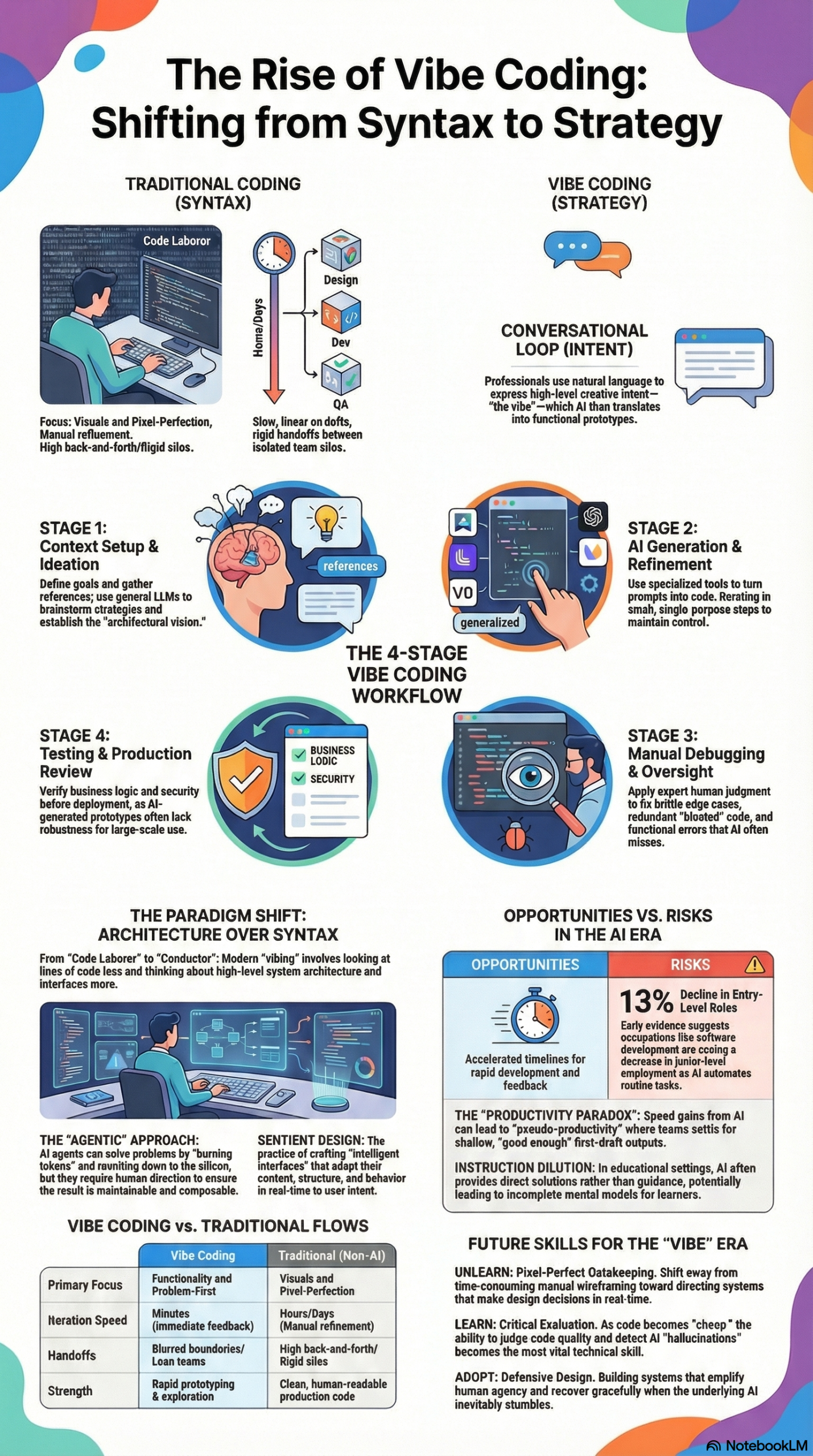
This connects to a broader paradigm that researchers and practitioners have been documenting throughout 2025 and 2026. As noted in our NotebookLM research report on Vibe Coding and Sentient Design, the term “vibe coding” — coined by Andrej Karpathy in 2025 — describes a workflow where developers “fully give in to the vibes, embrace exponentials, and forget that the code even exists.” Webb updated that language further: he now calls his practice simply “vibing” — not coding, not vibe coding, just vibing. The distinction matters. Coding implies hands on the keyboard. Vibing implies directing a system through dialogue while thinking at a higher level of abstraction.
Simon Willison surfaced Webb’s essay as one of the key pieces of practitioner writing in March 2026, tagging it under ai-assisted-programming, vibe-coding, and agentic-engineering — recognizing that it bridges the gap between the philosophical shift and the concrete engineering question: How do we make libraries that agents love?
This is not an abstract question. It has a direct, practical answer: you design architecture where the right way is also the easy way. You create interfaces with strong affordances — borrowing a term from cognitive psychology via design theorist Don Norman, whom Webb also references — so that an agent reaching for a solution is guided toward the correct pattern rather than the shortest path to compilation. Webb draws on architect Kate Macintosh’s design of Dawson’s Heights housing estate in London, where she made balconies fire escapes so they couldn’t be cut from the budget. The lesson: if you want agents (or developers under time pressure) to do the right thing, make the right thing structurally inescapable.
The scope here is wide. “Agent-ready architecture” includes:
– Library design: APIs that constrain bad patterns at the interface level
– Codebase structure: Layering and modularity that enables composability
– Documentation: Comments and docstrings that give agents the context to make good decisions
– Guardrails: Type systems, linters, and test suites that catch agent-generated errors before they propagate
Why It Matters
The practitioners who have been most burned by AI coding assistants are not the ones who gave agents too much autonomy — they’re the ones who gave agents autonomy in poorly-architected codebases. As the NotebookLM research report documents, AI-generated codebases have a specific failure mode: they “balloon” into redundant or unmanageable structures when not strictly managed. Minor UI adjustments can trigger hallucinations or break existing responsiveness. The root cause is almost always architectural, not model-level.
This matters enormously for three groups:
Independent developers and small teams are the primary adopters of vibe coding workflows right now. Research in our report shows that these practitioners are using tools like Cursor, Bolt, and Lovable to produce interactive prototypes at speeds that previously required full engineering teams. But the speed advantage disappears fast if the resulting codebase can’t be extended without agent-assisted rewrites every time. Agent-ready architecture turns a 10x speed gain into a durable 10x speed gain.
Platform and library authors face a new design obligation. Webb is explicit about this: “I am sweating developer experience even though human developers are unlikely to ever be my audience.” If your library’s primary consumers in 2026 are AI agents operating on behalf of human developers, your documentation, error messages, and API surface area need to be optimized for that consumption pattern. This is a fundamental shift in how SDK and library design should be approached.
Engineering managers and tech leads at larger organizations need to recognize what our research report calls the shift from “maker” to “conductor.” Senior developers are increasingly in oversight roles, reviewing agent outputs rather than writing code directly. Their leverage multiplies dramatically when the codebase is architected for composability and testability — because agent-generated code in a well-structured codebase fails loudly and obviously, rather than silently and expensively.
The alternative — ignoring architecture and letting agents “grind” through problems — is technically workable but economically wasteful and operationally fragile. Webb’s framing is blunt: agents could theoretically take a plain English spec and grind it out in pure assembly every time, and it would run faster. The reason we don’t do that is architecture. And the reason architecture still matters is that we want code that is maintainable, adaptive, and composable.
The Data: Traditional Development vs. Agent-Assisted Development Workflows
The NotebookLM research report documents a four-stage workflow observed across UX professionals using AI-assisted development. Below is a comparison of how each stage functions in traditional development versus agent-assisted development — and what architectural decisions govern the outcome.
| Stage | Traditional Development | Agent-Assisted (Vibe Coding) | Architectural Leverage Point |
|---|---|---|---|
| 1. Context & Ideation | Solo or team brainstorm; wireframes in Figma/Sketch | LLMs used for design strategies; rich context provided via prompt | Quality of system-level documentation; codebase README depth |
| 2. Generation | Manual line-by-line implementation | AI generates UI layouts/components via Cursor, Bolt, Lovable | API surface area; interface affordances; opinionated defaults |
| 3. Manual Debugging | Developer fixes logic, performance, edge cases | Human expert reviews for “ghost code,” redundancy, and brittleness | Type safety; test coverage; error message quality in libraries |
| 4. Testing & Review | QA cycle; staging environment | Real-time testing; loop back to generation stage if needed | Composability; modularity; isolated functions that can be tested independently |
Source: NotebookLM Research Report — Vibe Coding and Sentient Design; Matt Webb, An appreciation for (technical) architecture
The table reveals something important: the architectural leverage point in every stage is a design decision you make before an agent touches your codebase. Agents amplify what’s already there — good architecture or bad.
Step-by-Step Tutorial: Designing Agent-Ready Architecture
This is the practical core. Follow these phases in order when designing a new library, API, or codebase that AI agents will work with — or when auditing an existing one.
Prerequisites
- Basic familiarity with your language’s type system and module structure
- Access to at least one AI coding assistant (Cursor, GitHub Copilot, Claude in editor mode, etc.) for testing
- A codebase or library design you’re actively working on, or a representative sample of an existing one
Phase 1: Map Your Interface Surface Area
Before you change anything, you need to know what you’re working with. Generate a complete list of every public function, class, method, and configuration option in your library or module. In Python:
python -c "import your_module; help(your_module)" > interface_map.txt
In JavaScript/TypeScript, use your IDE’s symbol tree or:
npx ts-morph --print-symbols src/index.ts > interface_map.txt
Now ask yourself: if an AI agent had only this list — no README, no examples — what would it do? Which functions would it reach for first? Which names are ambiguous? Which parameter orders invite mistakes?
Webb’s core insight applies here directly: the right way must be the easy way. Every ambiguous interface is an invitation for the agent to guess — and agents that guess wrong can propagate the mistake across hundreds of call sites before anyone notices.
Action: Mark every function or method where the “wrong” usage pattern is as easy as the “right” one. These are your highest-priority redesign targets.
Phase 2: Apply Strong Affordances at the Interface Level
Affordances, as defined by cognitive psychologist J.J. Gibson and applied to design by Don Norman, are properties of an object that suggest how it should be used. Norman doors fail because they don’t signal “push” or “pull” — they’re ambiguous. Matt Webb applies this concept directly to software: bad interfaces create “Norman door” moments for agents, where the agent does the opposite of what you intended because the interface didn’t constrain it.
Practical affordance design for agent-ready code:
Use typed parameters over untyped dictionaries. Compare:
# Agent-hostile: anything can go here
def process_document(config: dict) -> str:
    ...

# Agent-friendly: the type system narrows the solution space
def process_document(config: DocumentConfig) -> str:
    ...
A typed DocumentConfig tells the agent exactly what fields exist, what their types are, and (if you add docstrings to the dataclass) what valid values look like. An untyped dict sends the agent to your documentation — which it may or may not read correctly.
Use named parameters over positional parameters. Positional parameters are a leading cause of agent-generated bugs:
# Agent-hostile: easy to swap arguments
def create_user(name, email, role, active):
    ...

# Agent-friendly: position doesn't matter
def create_user(*, name: str, email: str, role: UserRole, active: bool = True):
    ...
The * in Python forces all arguments to be keyword-only. The equivalent in TypeScript is an options object with a defined interface.
Make defaults opinionated and safe. Agents will use your defaults. If your default behavior is permissive, agents will generate permissive code. If your default behavior is safe and correct, agents will generate safe and correct code — because they’re guided by your interface, not their own judgment.
Phase 3: Write Agent-Optimized Documentation
This is the step most developers skip, and it’s the one that pays back the most. Agent-ready documentation is different from human-readable documentation in one key way: it’s denser and more explicit about what not to do.
For each public function or class, your docstring should include:
- One-line summary (agents use this for function selection)
- Parameter descriptions with valid value ranges (agents use this for argument generation)
- Return value description (agents use this for chaining)
- At least one usage example (agents often copy-paste the example rather than constructing a call from scratch — make sure the example demonstrates correct usage)
- Common mistakes or anti-patterns (agents will sometimes attempt known-wrong patterns; naming them explicitly in the docstring causes the agent to avoid them)
Example:
def send_notification(
    *,
    user_id: str,
    message: str,
    channel: NotificationChannel = NotificationChannel.EMAIL,
    priority: int = 5
) -> NotificationResult:
    """
    Send a notification to a user via the specified channel.

    Args:
        user_id: The unique identifier of the target user. Must be a valid UUID.
        message: The notification body. Max 500 characters. Do not include HTML.
        channel: Delivery channel. EMAIL is default; use SMS only for urgent alerts.
        priority: Integer 1-10. Default 5 (normal). Use 10 only for system alerts.

    Returns:
        NotificationResult with status, timestamp, and delivery_id.

    Example:
        result = send_notification(
            user_id="3f2d1a...",
            message="Your report is ready.",
        )

    Anti-patterns:
        - Do NOT pass raw user input as message without sanitization.
        - Do NOT use priority=10 for marketing messages.
    """
This level of documentation feels over-specified for human readers — but it’s exactly right for agent consumption.
Phase 4: Layer Your Architecture for Composability
Matt Webb’s essay describes the ideal architecture as one where “every addition makes the whole stack better.” That’s composability: the property that adding a new module or feature improves the system rather than just extending it.
The practical implementation is familiar to any engineer who’s worked with layered architectures:
- Core layer: Pure functions with no side effects and no external dependencies. These are trivially testable and trivially composable.
- Service layer: Functions that coordinate core functions and manage state. These interact with databases, APIs, and file systems.
- Interface layer: The public API surface that agents and developers call directly.
The rule for agents: keep the interface layer thin and the core layer rich. Agents should be able to accomplish most tasks by composing core functions through the interface layer, without needing to reach into the service layer. When an agent reaches into your service layer directly, it’s a sign that your interface layer is missing an abstraction.
Phase 5: Build Agent-Aware Testing Infrastructure
The research report documents that manual debugging is the stage where human expertise is most critical in vibe coding workflows — experts catch “ghost code” and redundancy that agents generate. But the goal of good architecture is to make that debugging stage mechanical rather than expert-dependent.
Build your test suite so that agent-generated code that violates your architectural constraints fails loudly and immediately:
# Test that enforces layer separation
def test_interface_layer_does_not_import_database():
    import ast
    import pathlib
    interface_files = pathlib.Path("src/interface").glob("*.py")
    for f in interface_files:
        tree = ast.parse(f.read_text())
        for node in ast.walk(tree):
            if isinstance(node, ast.Import):
                assert "database" not in [alias.name for alias in node.names], \
                    f"{f.name} imports database directly — use service layer"
This test will catch an agent that bypasses your layer separation, before the code reaches code review. That’s architectural enforcement at the tool level — the software equivalent of Kate Macintosh’s structural balconies.
Expected Outcomes
After completing these five phases, you should see:
- Agent-generated code that aligns with your architectural patterns on the first attempt, not after multiple iterations
- Debugging sessions that are shorter and more mechanical (the agent broke a clearly-defined contract, not a vague convention)
- A codebase where adding new features doesn’t require architectural re-explanation to the agent in each new session
Real-World Use Cases
Use Case 1: Internal Tooling at a SaaS Company
Scenario: A 15-person startup has adopted Cursor for all internal tooling development. Their senior engineers spend most of their time in architecture and review, with AI agents writing the implementation. But agents keep generating inconsistent error handling across services.
Implementation: The team creates a shared errors module with typed exception classes and a decorator-based error boundary pattern. Every public function in every service must use the decorator. The pattern is documented with anti-patterns explicitly called out. Agents generating new services are automatically guided to the correct error handling because the type signatures require it.
Expected Outcome: Error handling consistency improves without code review catching individual violations — the architecture catches them at test time.
Use Case 2: Open-Source Library Author
Scenario: A developer maintains a popular Python data processing library. Since vibe coding went mainstream, their GitHub issues are dominated by reports of agent-generated code that misuses their API — especially around memory management for large datasets.
Implementation: Following Webb’s insight that human developers are unlikely to be the primary audience, the author redesigns the API to use context managers for resource management. The old, resource-leaking pattern is deprecated with a clear error message that names the correct pattern. Documentation is rewritten with explicit anti-pattern callouts.
Expected Outcome: Agent-generated code using the library defaults to safe resource management. Issue volume drops. The library becomes known as “agent-friendly” and adoption increases.
Use Case 3: Enterprise Platform Team
Scenario: A large enterprise runs an internal platform that hundreds of product teams build on. The platform team has noticed that agent-assisted development across the organization is generating increasingly inconsistent implementations of authentication, logging, and observability.
Implementation: The platform team audits their SDK’s interface surface using Phase 1 of this tutorial. They identify that authentication is implemented differently in 23% of agent-generated services because the SDK offers three equivalent authentication methods with no guidance on which to prefer. They deprecate two of the three, make the preferred method the obvious default, and add docstring anti-patterns for the deprecated approaches.
Expected Outcome: New services generated with agent assistance use the correct authentication pattern by default. The platform team’s review burden drops significantly on authentication-related issues.
Use Case 4: UX Engineer Using Sentient Design Principles
Scenario: A UX Engineer — one of the hybrid “design intent plus code literacy” roles described in the research report — is building a dashboard component library that AI agents will use to generate custom dashboards on demand, in line with Josh Clark and Veronika Kindred’s vision of Sentient Design: “dashboards that design themselves, apps that manifest on demand.”
Implementation: The component library is designed with strong default styles, opinionated layout constraints, and a configuration schema that makes accessible, mobile-responsive layouts the default output. Components accept a JSON configuration object with a strict schema — agents can generate configurations without needing to know CSS.
Expected Outcome: Agents generating dashboards produce accessible, consistent interfaces without requiring design review on every output. The “right” design is the structurally easy design.
Common Pitfalls
Pitfall 1: Over-permissive interfaces that invite creative interpretation
The most common mistake is designing interfaces that accept too many valid configurations. Agents will use that flexibility — often in ways that produce correct but unmaintainable code. The research report documents that AI-generated codebases “balloon” into redundant structures when interfaces don’t constrain the solution space. Fix: add validation, use enums instead of strings, add explicit deprecation warnings for patterns you don’t want agents to use.
Pitfall 2: Underdocumented anti-patterns
Agents often attempt known-wrong patterns because those patterns appear in their training data. If your library has a common misuse pattern — even one that “works” but causes performance or security issues — and your documentation doesn’t name it explicitly, agents will generate it. Fix: add an “Anti-patterns” or “Common Mistakes” section to every public function’s docstring.
Pitfall 3: Assuming agents read READMEs
Human developers read READMEs. Agents read the code they’re given in context. If your architectural constraints live only in a README or a CONTRIBUTING guide, agents won’t see them. Fix: encode constraints in the type system, in linter rules, in test failures, and in docstrings — anywhere that’s in the agent’s active context window.
Pitfall 4: Neglecting error messages
When an agent violates a constraint, the error message it sees shapes its next attempt. Vague error messages (“invalid input”) cause agents to guess randomly. Specific error messages (“priority must be an integer between 1 and 10; received ‘high'”) guide agents directly to the fix. As the research report notes, the debugging stage is where human expertise is currently most critical — good error messages reduce that dependency.
Pitfall 5: Testing for outputs instead of patterns
Agent-generated code can pass functional tests while violating architectural patterns — calling the database layer directly from the interface layer, for example. Test for architectural conformance explicitly, as shown in Phase 5 of the tutorial, not just for correct outputs.
Expert Tips
1. Design for the agent’s context window, not the developer’s session. A human developer has your entire codebase loaded in their brain from weeks of work. An agent has whatever’s in its context window at the moment. Design your interfaces so that a function is fully understandable — correct usage, anti-patterns, return type — from its signature and docstring alone.
2. Use the “lazy developer” test. Before finalizing an interface, ask: what’s the laziest way to use this function? If the lazy usage produces bad behavior, your interface needs work. Matt Webb’s framing: “Half of software architecture is making sure that somebody can fix a bug in a hurry, add features without breaking it, and be lazy without doing the wrong thing.”
3. Invest in machine-readable schemas for configuration. JSON Schema, Pydantic models, Zod schemas — anything that gives agents a machine-readable specification of valid inputs. Agents that can validate their own output before submitting it generate dramatically better first drafts.
4. Monitor agent usage patterns across your codebase. If you’re in an organization where agents are actively writing code, periodically audit what patterns agents are generating most frequently. These patterns reveal your interface’s affordances in action — both the ones you intended and the ones you didn’t. Tools like ast-grep or semgrep can scan for specific patterns across a large codebase.
5. Treat prompt engineering as architectural documentation. As the research report notes, expert practitioners are creating “design logs” or attribution frameworks to surface the “hidden labor” of prompt engineering. The prompts your team has developed for working with your codebase are architectural knowledge — store them in version control alongside the code.
FAQ
Q: Does this mean I need to refactor my entire existing codebase before using AI coding agents?
No. Start with Phase 1 (auditing your interface surface area) to identify the highest-leverage points. Typically, 20% of your interfaces account for 80% of the agent-generated problems. Fix those first. Full architectural alignment is a gradual process, not a prerequisite for starting.
Q: How is “agent-ready architecture” different from just writing clean code?
There’s significant overlap, but agent-ready architecture has specific emphases that differ from classic clean code principles. In particular: denser, more explicit documentation; machine-readable schemas over human-readable conventions; and architectural constraints enforced by the type system and tests rather than by code review. Clean code assumes a competent human reader. Agent-ready architecture assumes a pattern-matching system with no judgment and unlimited persistence.
Q: Won’t AI models get better and make this kind of architectural work unnecessary?
Matt Webb’s insight addresses this directly: agents will always grind toward whatever their interface allows. Better models don’t change the fundamental dynamic — they just grind faster. Architecture determines what the grinding produces. The better question is: as models improve, does the cost of bad architecture go up or down? The answer is up — better agents are better at exploiting architectural weaknesses at scale.
Q: What tools should I use to test my architecture’s agent-readiness?
Start simple: give an agent a representative task in your codebase and review the generated code for architectural violations before reviewing it for functional correctness. For systematic analysis, semgrep (for pattern matching), pyright or mypy (for type system enforcement), and pytest-architecture (for import graph constraints in Python) are useful. The key is catching violations at tool-time, not review-time.
Q: How do I write documentation that agents actually use?
Keep it in the docstring, not the README. Use concrete examples with realistic values. Name anti-patterns explicitly. Keep the summary line short and precise — agents use this for function selection. As documented in the research report, expert practitioners craft prompts that are “specific, step-by-step, with concrete examples” — your documentation should meet that standard, because agents treat your docstrings as implicit prompts.
Bottom Line
Matt Webb’s observation that agents grind problems into dust reframes what software architecture is for in 2026. Architecture was always about making the right way the easy way — enabling developers under time pressure to do the correct thing without heroic effort. Now it’s about making the right way the easy way for systems that have no judgment, unlimited persistence, and the ability to propagate patterns across an entire codebase in minutes. The five-phase framework in this tutorial — mapping your interface surface, applying strong affordances, writing agent-optimized documentation, layering for composability, and building agent-aware tests — gives you a concrete path from “my codebase produces inconsistent agent output” to “my architecture guides agents toward correct patterns by default.” The developers who invest in this work now will maintain the compounding speed advantage of AI-assisted coding rather than spending that advantage on debugging.


0 Comments