

LinkedIn just told its own advertisers to stop wasting money — and the campaign is worth taking seriously. The platform’s newest creative rollout, which tells marketers to “cut the bullspend,” directly calls out the habit of chasing vanity metrics over actual revenue outcomes, according to Social Media Today. This tutorial breaks down what the campaign signals about the direction of B2B marketing on LinkedIn and, more importantly, gives you a step-by-step playbook for shifting your own LinkedIn advertising from feel-good numbers to pipeline-driving results using the platform’s latest attribution tools.
What This Is
LinkedIn’s “cut the bullspend” campaign is a self-aware piece of brand advertising aimed squarely at marketing professionals — the exact people buying LinkedIn ad inventory. Rather than promising aspirational reach or brand lift, the creative acknowledges a pattern that every B2B marketer recognizes: spending budget on impressions, clicks, and engagement that never touches revenue. The message is blunt by design. LinkedIn is effectively telling buyers that they can do better, and that the platform now has the tools to help them prove it.
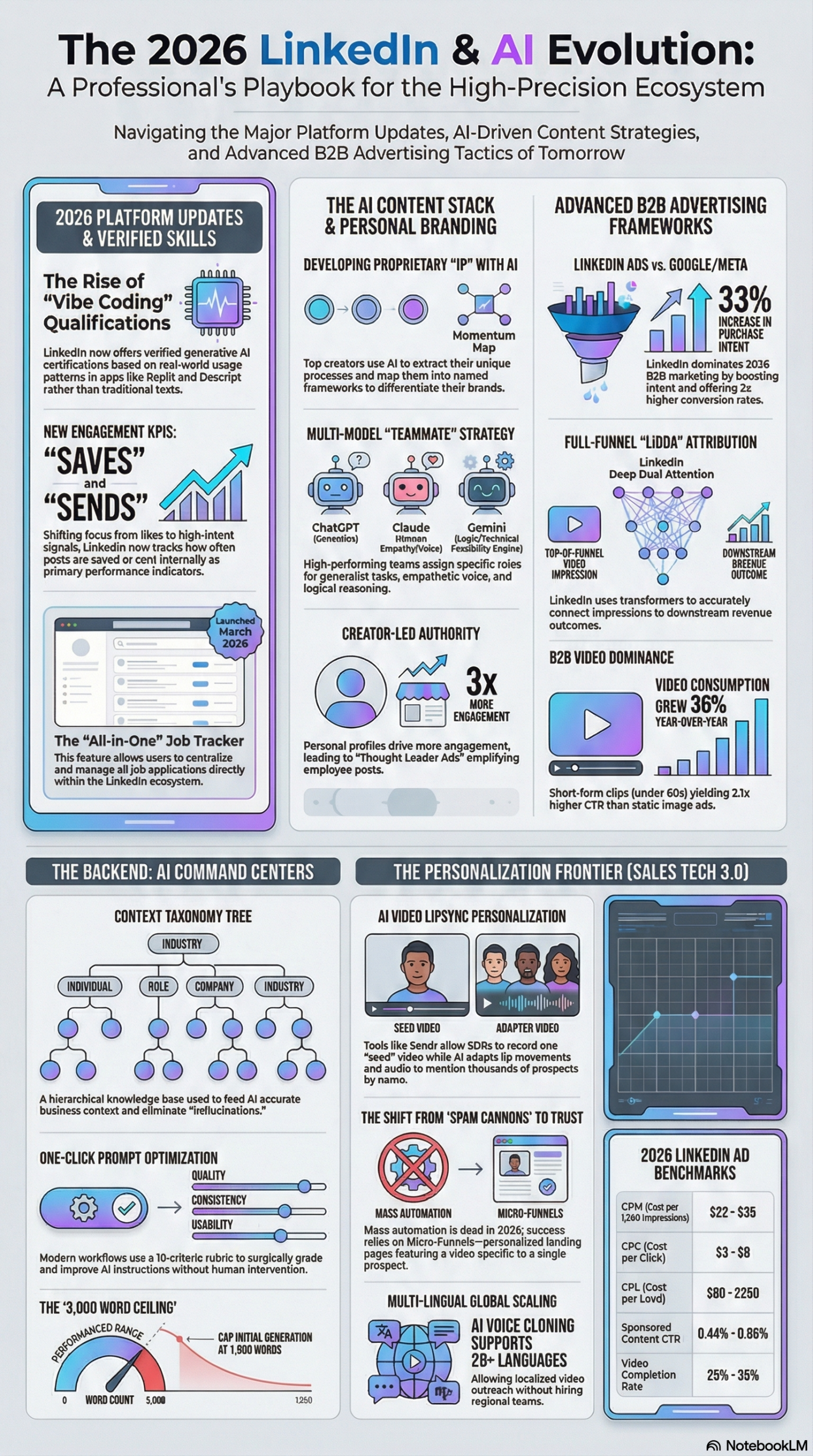
This campaign lands in a specific context. LinkedIn in 2026 is a fundamentally different advertising environment than it was three years ago. According to the NotebookLM research report, the platform now hosts over 1 billion members, including 67 million decision-makers — the precise audience B2B advertisers have always wanted to reach. What’s changed is the infrastructure for proving that you’re reaching them effectively and that the exposure is translating to revenue.
The centerpiece of that infrastructure is the LinkedIn Deep Dual Attention (LiDDA) attribution model. LiDDA is a transformer-based attribution system that connects ad impressions to downstream conversions. Unlike last-click or even multi-touch attribution models that live inside a single analytics tool, LiDDA is designed to trace multi-touch journeys across LinkedIn’s first-party data and connect them to real business outcomes — allowing marketers to reallocate budgets in real-time toward high-converting creative, potentially eliminating millions of dollars in wasted spend, as documented in the research report.
The campaign also coincides with a wave of new ad formats that LinkedIn has shipped in the past 18 months:
- Thought Leader Ads: Amplify posts from individual executives or employees rather than company pages. According to the research report, creator-led posts generate 3x more engagement than brand-page posts — and Thought Leader Ads put budget behind that signal.
- Document Ads: Let users browse PDFs and whitepapers directly inside the feed, with optional gating via Lead Gen forms. This replaces the friction of driving users off-platform just to capture intent.
- Connected TV (CTV) Ads: Reach professionals on streaming platforms using LinkedIn’s first-party targeting data — closing the loop between content consumption and professional identity.
- Accelerate Campaigns: AI-driven campaign type that handles targeting, bidding, and placement automatically, optimized for fast deployment.
- Classic Campaigns: Manual-control campaigns built for precise Account-Based Marketing (ABM) where you need to specify exact companies, job titles, and seniority levels.
The “cut the bullspend” message is LinkedIn’s way of saying: the old excuses for poor attribution are gone. The infrastructure exists to measure what actually matters.
Why It Matters
The campaign resonates because vanity metrics are not a trivial problem — they’re a budget allocation problem that affects every B2B company running LinkedIn ads.
When marketers optimize for cost-per-click or impressions, they are optimizing for the wrong objective function. A campaign that drives 10,000 clicks from the wrong audience costs more than a campaign that drives 200 qualified leads who convert to pipeline. But for years, LinkedIn campaigns were evaluated on the former because the latter was hard to prove. Without closed-loop attribution, finance teams saw a number — “we spent $40,000 on LinkedIn” — and marketers defended it with engagement metrics that finance teams couldn’t evaluate.
LiDDA attribution changes that dynamic by connecting LinkedIn ad exposure to CRM data. LinkedIn’s real-time CRM integration, which launched in June 2025, allows Campaign Manager to pull revenue data directly from CRM systems — meaning a campaign manager can now see not just that a lead converted, but how much pipeline or closed revenue that conversion represents. The KPI shifts from click-through rate to pipeline contribution.
This matters differently depending on your role:
Marketing leaders can now defend or reallocate budget with revenue data rather than vanity metrics. You can walk into a budget review and show that LinkedIn generated $2.1M in pipeline influence last quarter from $180K in spend — that’s a story finance understands.
Demand generation practitioners can use LiDDA to identify which specific ad formats, creatives, and audiences are contributing to pipeline, then double down on what works at the creative level rather than the campaign level.
Agencies can finally produce attribution reports that clients find credible. Moving from “here’s your CTR and impression share” to “here’s the revenue pipeline these campaigns influenced” is a fundamental shift in how agencies demonstrate value.
SMBs and solopreneurs benefit from Accelerate Campaigns, which democratize advanced targeting by letting AI handle the complexity — so smaller teams can compete for decision-maker attention without a dedicated paid media specialist.
What makes this shift different from previous LinkedIn attribution promises is that LiDDA operates on first-party data. In a post-cookie world where third-party tracking is increasingly unreliable, LinkedIn’s closed ecosystem — where professional identity, job title, company size, and content behavior all live inside one platform — is a significant structural advantage for attribution accuracy.
The Data
LinkedIn Ad Format Performance Comparison
| Ad Format | Engagement vs. Brand Page | Best For | Attribution Capability |
|---|---|---|---|
| Thought Leader Ads | 3x higher | Executive visibility, trust-building | Pipeline influence via LiDDA |
| Document Ads | High intent signal | Lead gen, content downloads | Lead Gen Form completions |
| Sponsored Content | Baseline | Brand awareness, top-of-funnel | Impression-to-conversion via LiDDA |
| CTV Ads | Cross-screen reach | ABM, enterprise awareness | First-party audience match |
| Accelerate Campaigns | AI-optimized | Fast deployment, SMB scale | Automated optimization |
| Classic Campaigns | Manual control | Precise ABM, enterprise targeting | Full Campaign Manager visibility |
Source: NotebookLM Research Report
LinkedIn Feature Rollout Timeline (2025–2026)
| Date | Feature | Impact for Advertisers |
|---|---|---|
| March 2026 | Job Tracker | Signals intent data for recruiting advertisers |
| February 2026 | LinkedIn Premium All-in-One | SMB subscription expands premium audience size |
| January 2026 | Descriptive Job Search | New behavioral data signal for targeting |
| December 2025 | Reserve Ads | Guaranteed inventory for brand campaigns |
| October 2025 | Auto-targeting & Draft with AI | Lowers barrier to entry for SMB advertisers |
| September 2025 | Custom Mock Interviews | Engagement signal for professional development targeting |
| June 2025 | Real-time CRM Integration | Closed-loop revenue attribution in Campaign Manager |
Source: NotebookLM Research Report
Step-by-Step Tutorial: Shifting LinkedIn from Vanity Metrics to Revenue Attribution
This walkthrough takes you from a typical LinkedIn campaign setup — optimized for engagement or clicks — to a pipeline-attribution model using LinkedIn’s current toolset. You don’t need a developer or a data team to follow these steps, but you do need Campaign Manager access and a CRM that LinkedIn supports for native integration.
Phase 1: Prerequisites and Setup
What you need before starting:
– LinkedIn Campaign Manager access (admin or campaign manager role)
– A CRM system (Salesforce, HubSpot, or Microsoft Dynamics are natively supported)
– Insight Tag installed on your website (this is non-negotiable — without it, LiDDA has no conversion data to work with)
– At minimum one defined conversion event (demo request, form fill, trial signup)
Step 1: Audit your existing conversion tracking.
Open Campaign Manager and navigate to Analyze → Conversion Tracking. If you have fewer than three conversion events defined, or if your existing events are only tracking page views, you’re measuring the wrong things. Prioritize conversions that correspond to pipeline stages: demo booked, pricing page visit (high intent), contact form submission, content download with Lead Gen form completion.
Delete or archive any conversion events that track soft behaviors like “visited the blog” unless you’re explicitly running top-of-funnel awareness campaigns and have separate tracking for mid and bottom funnel.
Step 2: Enable CRM integration.
Navigate to Campaign Manager → Account Settings → CRM Integrations. Connect your CRM. Once connected, LinkedIn can match converted leads back to the companies and job titles that saw your ads, and pull deal stage or closed-won data (depending on your CRM and field mapping) directly into Campaign Manager reporting.
This step is what unlocks pipeline contribution metrics. Without it, you’re still flying partial data.
Step 3: Define your attribution window.
LinkedIn’s default attribution window is 30 days post-click and 7 days post-view. For B2B with longer sales cycles, adjust the post-view window to 30 days and the post-click window to 90 days. You’ll capture more of the multi-touch journey, which is where LiDDA’s transformer-based model does its best work tracing how multiple ad exposures accumulate into a conversion decision.
Phase 2: Campaign Structure for Attribution
Step 4: Separate your campaigns by funnel stage.
This is where most LinkedIn advertisers make their first structural mistake — mixing top-of-funnel awareness with bottom-of-funnel retargeting inside the same campaign. When everything lives together, LiDDA can’t tell you which funnel stage is doing the work.
Structure your account like this:
– Awareness Campaign (Thought Leader Ads or CTV): Reach new audiences at target companies
– Consideration Campaign (Document Ads or Sponsored Content): Engage users who’ve visited your site or engaged with previous content
– Decision Campaign (Lead Gen Form Ads): Capture conversion intent from warm audiences
Each campaign should have a distinct objective set in Campaign Manager:
– Awareness → Brand Awareness or Video Views
– Consideration → Engagement or Website Visits
– Decision → Lead Generation or Website Conversions
This structure gives LiDDA clean signal to work with. If you’re mixing objectives in one campaign, the algorithm gets confused and you get blended metrics that are impossible to optimize.
Step 5: Set up Accelerate vs. Classic campaigns based on your team size.
If you have a small marketing team or are running LinkedIn ads for the first time, use Accelerate Campaigns. Let LinkedIn’s AI handle targeting, bidding, and placement. You define the audience parameters (job title, company size, geography) and the creative, and the algorithm optimizes for the conversion event you’ve defined.
If you’re running precise ABM — targeting a specific list of 200 named accounts — use Classic Campaigns. Build a Matched Audience from your CRM account list, set manual bids, and track performance at the company level. Classic Campaigns give you the control granularity that ABM requires; Accelerate Campaigns trade that control for algorithmic efficiency.
Phase 3: Creative That Converts
Step 6: Build at least one Thought Leader Ad.
Identify an executive, subject matter expert, or high-follower employee whose LinkedIn content already generates strong organic engagement. According to the research report, creator-led posts generate 3x more engagement than brand-page posts. Thought Leader Ads let you put paid distribution behind that authentic voice without the sterile feel of a company-page sponsored post.
The setup in Campaign Manager: create a new ad, select Thought Leader Ad as the format, and input the URL of the individual’s LinkedIn post you want to amplify. You need the person’s permission and they must be a first-degree connection of the account or have explicitly approved the association.
Write the ad copy to feel like the individual’s voice, not the marketing department’s voice. If your CMO is known for direct, data-driven takes, the ad should sound like that — not like a product brochure.
Step 7: Use Document Ads with Lead Gen Forms for mid-funnel.
For prospects who are in the consideration phase, Document Ads let them browse a whitepaper, guide, or framework directly inside the LinkedIn feed. This removes the friction of landing-page redirects and significantly increases completion rates for content consumption.
Pair Document Ads with LinkedIn’s native Lead Gen Forms. Pre-fill forms with LinkedIn profile data (name, email, job title, company) so users can submit in two clicks. These form completions fire as conversion events in Campaign Manager and are captured in LiDDA’s attribution model.
Ensure your CRM integration is active before running Document Ads with Lead Gen Forms — every form completion should sync to a CRM contact record automatically, creating the pipeline attribution chain.
Phase 4: Reading and Acting on LiDDA Attribution Data
Step 8: Switch your primary KPI in reporting.
In Campaign Manager, go to Reporting → Campaign Performance. By default, the dashboard shows CTR, impressions, and clicks. Switch the primary metric view to Pipeline Contribution (if CRM is connected) or Conversions by Conversion Type.
Stop presenting CTR to your leadership team. CTR tells you that someone saw your ad and clicked it — it tells you nothing about what that person did next or whether they were ever qualified. Pipeline contribution tells you that the campaign influenced $X in deals that entered or moved through your funnel.
Step 9: Run a 30-day attribution analysis.
After your campaigns have been running for 30 days with CRM integration active, pull the Revenue Attribution Report from Campaign Manager. This report shows:
- Which campaigns touched deals in your pipeline
- Which ad formats appeared in the multi-touch journeys of closed-won deals
- Which audience segments (by company size, job title, geography) converted at the highest pipeline value
Use this data to reallocate budget. Shift spend from campaigns with high CTR but zero pipeline contribution toward campaigns with lower CTR but documented pipeline influence. This is what LinkedIn means by “cut the bullspend” — stop paying for clicks that never become revenue.
Step 10: Implement the 70/30 content rule.
The research report documents a specific content ratio for LinkedIn that balances reach and conversion: 70% personal insights and professional perspective, 30% direct promotional or product content. Apply this to your organic posting cadence as well as your ad creative mix. If every ad you run is a product feature announcement, you’re burning audience trust — which is exactly the “vanity over impact” dynamic the campaign is criticizing.
Expected Outcome: After 60-90 days running this attribution model, you should be able to produce a revenue attribution report showing LinkedIn’s contribution to pipeline in dollar terms, identify your top two or three ad formats by pipeline influence, and have a data-backed case for either increasing or reallocating your LinkedIn budget based on actual ROI.
Real-World Use Cases
Use Case 1: B2B SaaS Company Running ABM at Scale
Scenario: A B2B SaaS company targeting 500 named enterprise accounts. Their current LinkedIn campaigns generate strong engagement metrics but the sales team can’t connect LinkedIn to any deals in the pipeline.
Implementation: Set up Classic Campaigns using a Matched Audience built from the named account list. Layer Thought Leader Ads from the CEO amplifying case study posts targeted only to those 500 accounts. Enable CRM integration and map Salesforce opportunity stages to LinkedIn conversion events. Run Document Ads with gated case studies to capture intent signals from the target accounts.
Expected Outcome: Within 60 days, Campaign Manager’s Revenue Attribution Report will show which of the 500 target accounts have engaged with LinkedIn content and whether those accounts have open opportunities in Salesforce. Sales gets a weekly report of “accounts that engaged with LinkedIn this week” — a warm signal for outreach prioritization.
Use Case 2: Marketing Agency Proving LinkedIn ROI to Clients
Scenario: A digital marketing agency managing LinkedIn ads for five B2B clients. Clients are questioning budget allocation because the agency’s reports show engagement metrics that don’t connect to business outcomes.
Implementation: For each client account, activate CRM integration and define pipeline-stage conversion events. Switch all reporting to pipeline contribution as the primary KPI. Build a standardized reporting template that shows: LinkedIn spend, pipeline influenced, cost-per-pipeline-dollar, and top-performing ad format by pipeline contribution.
Expected Outcome: Clients can see a direct line from LinkedIn spend to CRM pipeline data. Agencies can justify budget increases or identify campaigns to cut based on revenue attribution rather than engagement metrics — eliminating the “vanity metrics” objection from every client review.
Use Case 3: SMB Owner Running LinkedIn Ads for the First Time
Scenario: A small professional services firm — 12 employees, no dedicated marketing team — wants to use LinkedIn to generate qualified leads but doesn’t have the expertise to build complex campaigns.
Implementation: Use Accelerate Campaigns with a single, clear conversion goal (book a consultation). Set audience parameters by job title and company size. Use LinkedIn’s AI to handle bidding and placement. Install the Insight Tag on the website and define one conversion event (consultation booking form completion). Let the campaign run for 30 days before adjusting.
Expected Outcome: The Accelerate Campaign’s AI optimization gets the ad in front of the right audience without requiring a paid media specialist. The SMB owner can see cost-per-consultation and compare it to their average client value to determine if LinkedIn is worth continued investment — no vanity metrics required.
Use Case 4: Enterprise Marketing Team Using Employee Advocacy for Organic Reach
Scenario: A 500-person B2B company wants to extend the reach of its LinkedIn content without increasing ad spend. The marketing team posts from the company page but organic reach has plateaued.
Implementation: Launch a structured employee advocacy program. Train 50 employees (sales, customer success, leadership) to engage with company content on a weekly cadence. According to the research report, organic reach can expand by up to 400% through structured employee amplification. Identify the top three employee advocates generating the most engagement and run Thought Leader Ads behind their best-performing posts.
Expected Outcome: Organic reach multiplies through employee amplification. The top-performing organic posts, now amplified with Thought Leader Ads, generate 3x more engagement than equivalent company-page sponsored posts while building authentic individual authority at the same time.
Common Pitfalls
Pitfall 1: Running the Insight Tag without defining conversion events.
Installing the LinkedIn Insight Tag is step one, but many advertisers stop there. Without defined conversion events, LiDDA has no downstream data to work with and your attribution model is empty. Before launching any campaign, define at minimum two conversion events — one for micro-conversion (content download, pricing page visit) and one for macro-conversion (demo booked, contact form submitted).
Pitfall 2: Mixing funnel stages in a single campaign.
When awareness and retargeting campaigns share the same campaign structure, the attribution data becomes uninterpretable. You can’t tell if a conversion came from first-touch awareness or bottom-funnel retargeting. Separate campaigns by funnel stage from the start — it’s harder to restructure after a campaign has been running for weeks.
Pitfall 3: Using Thought Leader Ads without the individual’s voice.
Thought Leader Ads fail when the ad copy sounds like it was written by the marketing team rather than the individual. Buyers can tell the difference between authentic executive perspective and sanitized brand messaging. Write in the person’s actual voice or have them write it — the engagement difference is significant, and engagement feeds into LinkedIn’s distribution algorithm.
Pitfall 4: Ignoring attribution window settings.
LinkedIn’s default 30-day post-click / 7-day post-view window is too short for enterprise B2B sales cycles. If your average deal takes 90-120 days to close, you’re systematically undercounting LinkedIn’s pipeline contribution. Extend your attribution windows in Campaign Manager settings to match your actual sales cycle.
Pitfall 5: Reporting CTR to finance and leadership.
As the research report documents, the shift required is from “Click-Through Rate to pipeline contribution” as the primary KPI. Presenting CTR to a finance team invites the “bullspend” criticism — they have no way to evaluate whether that CTR represents real business value. Switch your reporting to pipeline contribution before your next budget review.
Expert Tips
Tip 1: Use LiDDA’s multi-touch data to identify your “dark funnel” influencers.
Not every ad that contributes to a deal will be the last-touch ad. LiDDA’s transformer-based model traces the full multi-touch journey. Look specifically at which ad formats appear in the journeys of closed-won deals — those are your most valuable formats even if they don’t show up in last-click attribution. Many B2B advertisers are surprised to find that Thought Leader Ads at the top of funnel are appearing in the majority of closed-deal journeys despite low direct conversion rates.
Tip 2: Connect Reserve Ads to your ABM peak moments.
Reserve Ads, launched December 2025, allow guaranteed ad inventory. For ABM campaigns aligned to specific moments — industry conferences, product launch weeks, board meeting seasons for target accounts — Reserve Ads ensure your creative is in front of your named accounts exactly when you want it to be. Book inventory six to eight weeks in advance for high-priority periods.
Tip 3: Run Document Ads as a free trial before gating with a Lead Gen Form.
Let prospects browse the first half of a whitepaper or framework without a gate. LinkedIn’s analytics show how far users scroll through Document Ads. Users who scroll past 70% of the document are demonstrating high intent — serve them a retargeting campaign with a Lead Gen Form asking for contact details in exchange for the full document. This two-step approach captures higher-quality leads than immediate gating because self-selection occurs before you ask for information.
Tip 4: Use Accelerate Campaign data to inform Classic Campaign targeting.
Run a 30-day Accelerate Campaign first with broad audience parameters. Let LinkedIn’s AI discover which job titles, company sizes, and geographies are converting at the highest rate. Then take those learnings and build a Classic Campaign with precisely those audience specifications — now you have AI-discovered, manually-refined ABM targeting that performs better than either approach alone.
Tip 5: Build a “Prompt Factory” for your LinkedIn ad copy.
The research report documents that organizations are adopting assembly-line approaches to AI-assisted content using structured rubrics for quality evaluation — what the report calls a “10-lens rubric” evaluating context sufficiency, factuality, formatting, and helpfulness. Apply this to LinkedIn ad copy: use AI to generate five variations of each ad, then evaluate each against your rubric criteria (clear value proposition, specific audience relevance, direct CTA, authentic voice). Run the two highest-scoring variations as A/B tests. This systematizes creative quality rather than relying on intuition.
FAQ
Q: What’s the difference between Accelerate and Classic Campaigns, and which should I use?
Accelerate Campaigns use LinkedIn’s AI to handle targeting, bidding, and placement automatically. They’re optimized for fast deployment and are ideal for small teams or advertisers without deep LinkedIn expertise. Classic Campaigns give you manual control over every parameter — perfect for precise ABM where you’re targeting specific named accounts, job titles, and seniority levels. Use Accelerate when speed and simplicity matter; use Classic when precision matters. If you’re new to LinkedIn advertising, start with Accelerate for 30 days, then migrate learnings to Classic for more control, as documented in the research report.
Q: How does LiDDA attribution work technically, and how is it different from last-click?
LiDDA (LinkedIn Deep Dual Attention) is a transformer-based attribution model that processes the full sequence of ad exposures a buyer has before converting, rather than assigning all credit to the last ad they clicked. According to the research report, it connects ad impressions to downstream conversions and allows for real-time budget reallocation toward high-converting creative. Last-click attribution would give 100% of the credit to whichever ad was clicked immediately before conversion — this typically over-credits retargeting ads and under-credits the awareness-stage content that initiated the journey.
Q: Do I need a large budget to make LinkedIn attribution work?
No. The CRM integration and Insight Tag are free to use — they don’t require any minimum spend. The attribution model works regardless of budget size. What matters is having clean conversion event definitions and a CRM integration active before you start spending. Even a $3,000/month LinkedIn budget can generate meaningful pipeline attribution data if the tracking infrastructure is set up correctly.
Q: How long should I run campaigns before pulling attribution data?
For top-of-funnel Thought Leader Ads and Document Ads, allow at least 30 days before analyzing attribution data. For bottom-of-funnel Lead Gen campaigns targeting warm audiences, 14 days is sufficient to see meaningful conversion patterns. For enterprise ABM campaigns with long sales cycles, extend your analysis window to 90 days and match it to your extended attribution window settings. Pulling attribution data too early produces misleading results — deals that were influenced but haven’t closed yet won’t appear in pipeline contribution metrics.
Q: The LinkedIn “cut the bullspend” campaign criticizes vanity metrics — does this mean LinkedIn is admitting its own ad products were flawed?
It’s more accurate to read it as LinkedIn acknowledging an industry-wide measurement problem that their older tools contributed to. The launch of LiDDA, real-time CRM integration, and pipeline contribution metrics represents LinkedIn’s answer to that problem. The Social Media Today coverage frames the campaign as addressing “vanity metrics over real business impact” — and the new attribution infrastructure makes that shift genuinely possible rather than just aspirational. LinkedIn is essentially saying: the tools now exist to measure what actually matters, so stop using the old excuses.
Bottom Line
LinkedIn’s “cut the bullspend” campaign is more than a clever piece of creative — it’s a signal that the platform’s attribution infrastructure has matured to the point where vanity metrics are no longer an acceptable reporting currency. With LiDDA attribution, real-time CRM integration, and ad formats designed for pipeline generation rather than brand awareness theater, the tools now exist to connect every dollar of LinkedIn spend to actual revenue outcomes. The practitioners who move first to pipeline-contribution reporting will have a structural advantage in budget negotiations and a much cleaner signal for creative optimization. Set up your CRM integration, define your conversion events, and switch your reporting KPI from CTR to pipeline contribution — that’s the “cut the bullspend” move that actually matters.


0 Comments