

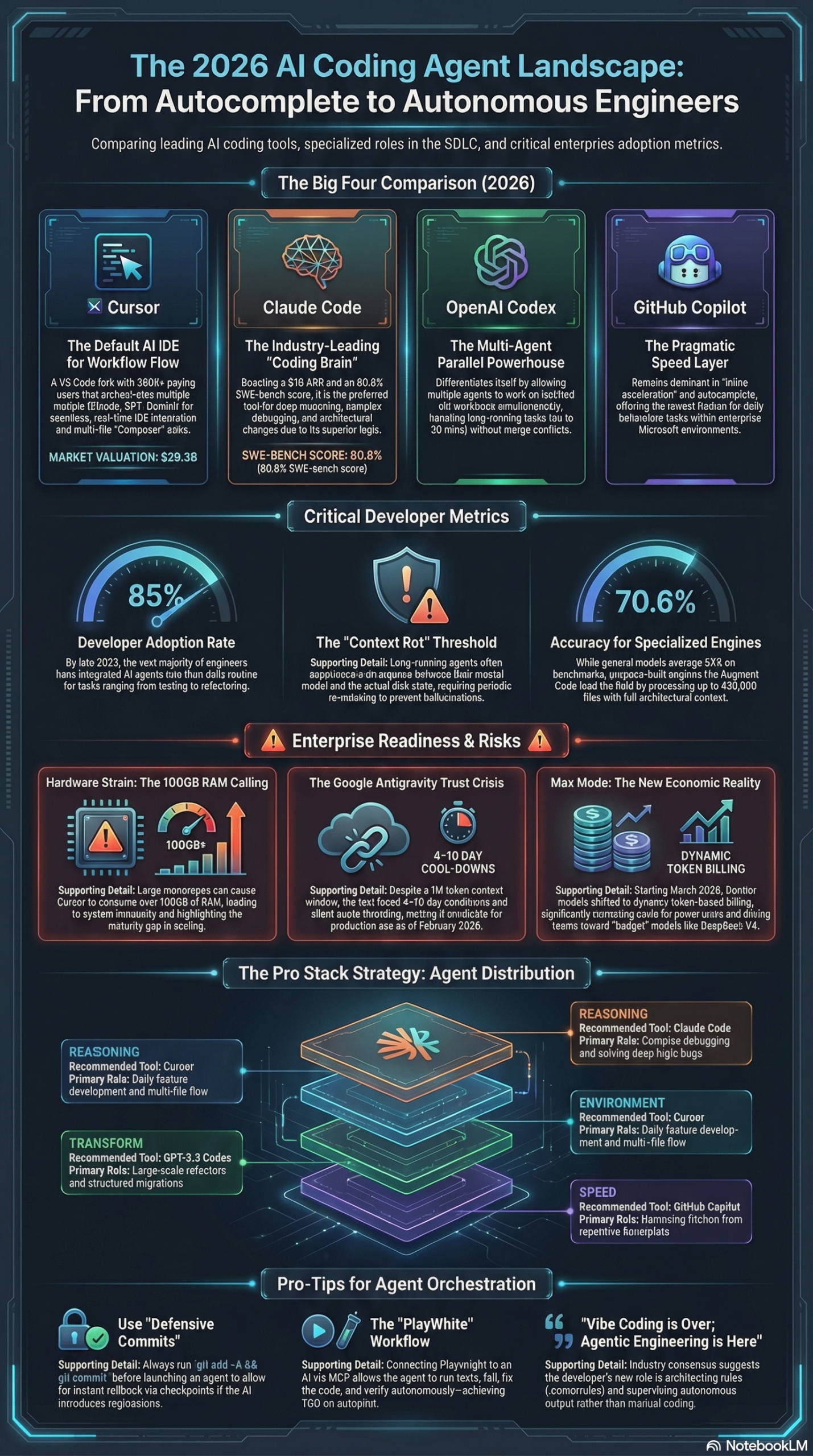
Cursor 3 launched on April 2, 2026 as an explicitly “agent-first” coding product, directly challenging Anthropic’s Claude Code and OpenAI’s Codex CLI for dominance in the rapidly maturing AI-native development space. The company — now valued at $29.3 billion with 360,000+ paying users — is betting that the future of software development isn’t AI-assisted autocomplete, it’s multi-agent orchestration baked directly into the IDE. This tutorial walks you through exactly what Cursor 3 delivers, how to configure it for production agentic workflows, and where it fits in the broader 2026 stack.
What Is Cursor 3?
Maxwell Zeff at Wired broke the launch story: Cursor 3 is a ground-up redesign of the Cursor IDE that positions the product as an agent orchestration platform rather than an enhanced code editor. Where earlier Cursor versions treated AI as a sophisticated autocomplete layer, version 3 makes agents the primary interface for all development work. That’s not spin — it’s a fundamental change in how the product expects you to work.
Cursor is a fork of VS Code, which gives it the entire VS Code extension ecosystem out of the box while adding deep AI integration directly into the rendering pipeline. That architectural choice gives Cursor a structural advantage over terminal-based tools like Claude Code: developers never need to leave their editor to initiate agent workflows. The VS Code foundation also means most teams can adopt Cursor 3 with minimal friction — your existing extensions, themes, and keybindings migrate automatically.
The headline feature in Cursor 3 is an expanded multi-agent orchestration system. The Composer agent — Cursor’s autonomous multi-file editing engine — is documented as running 4x faster than general LLMs for diff-edit loops, meaning it applies surgical, structured changes across dozens of files without the latency of a full-context generation pass. This matters for real engineering tasks: a feature implementation that touches 12 files is not a theoretical edge case.
Version 3 builds on the Automations system introduced in Cursor 2.6, which allowed agents to respond to external triggers: GitHub pull requests, PagerDuty alerts, Linear issues, Slack webhooks, and cron jobs. Version 3 extends this trigger surface and positions autonomous triggered work — not inline completions — as the default mode of operation. The semantic label “agent-first” is load-bearing here: the product is not incrementally improved, it is reoriented.
Context management is where Cursor 3 makes its most technically substantive architectural claims. The tool uses semantic vector-based search combined with Merkle trees to index entire repositories and maintain awareness of inter-module relationships. This directly addresses the problem of context rot — a phenomenon documented in the 2026 AI coding briefing where long-running agents lose synchronization between their internal model of a codebase and the actual state on disk, leading to recursive optimization loops and calls to non-existent functions. As the 2026 AI coding state briefing makes clear, context engineering — not raw model intelligence — is the defining competitive axis for AI coding tools this year. Cursor 3’s architecture is explicitly designed around this constraint.
The tool is model-agnostic within the frontier ecosystem. It routes to Claude Opus 4.6, GPT-5.3, Gemini 3 Pro, and lower-cost models like DeepSeek V4 Lite through OpenRouter depending on task complexity. That routing flexibility is not a nice-to-have feature — under the new Max Mode token-based billing that went into effect March 16, 2026, it is cost-critical infrastructure. Teams that run Opus 4.6 on every Composer task will see monthly bills that bear no resemblance to their old request-based subscriptions.
Why It Matters
According to the 2026 AI coding state briefing, approximately 85% of developers now regularly use AI coding tools. But the nature of that usage is changing rapidly. The industry has moved past what Andrej Karpathy and the broader developer community labeled “Vibe Coding” — describe your intent, wait for a generation — into what practitioners are calling “Agentic Engineering.” In this paradigm, engineers don’t write code. They orchestrate agents that write code, run tests, handle migrations, and submit PRs. The research report characterizes this directly: “Vibe Coding is officially over. Welcome to ‘Agentic Engineering’ — where engineers orchestrate agents rather than write code.”
Cursor 3’s agent-first positioning matters for three distinct groups:
For individual developers, the primary interface is no longer a chat sidebar but a command surface for deploying autonomous workers. You define constraints — in .cursorrules files, in .mdc context documents, in plain-language automation triggers — and agents execute while you focus on architecture and review.
For engineering teams, Cursor 3 introduces a new class of CI/CD-adjacent automation. Agents that respond to GitHub webhooks can triage incoming PRs, apply code-style fixes, and run self-healing test suites without any human initiation. The Playwright MCP server integration enables agents to verify UI changes against live browser sessions, closing the loop between code generation and validation without requiring the team to maintain a separate test harness.
For the competitive landscape, Cursor 3 directly forces a comparison with Anthropic’s Claude Code — which hit $1 billion ARR within six months of launch and is consistently rated the quality leader for reasoning depth — and with OpenAI’s Codex, which uses Git worktrees to run multiple agents in parallel on tasks spanning 30 minutes or more. Cursor’s bet is that IDE integration density and orchestration flexibility beat raw reasoning quality for the majority of day-to-day engineering work. With 360,000+ paying users already in the system, that bet appears to be paying off.
The differentiator isn’t any single model capability — it’s integration depth. You get trigger-based automations, context-indexed repository awareness, multi-model routing, and MCP server connectivity inside the same tool you already use to write code.
The Data: 2026 AI Coding Agent Comparison
The following tables are drawn directly from the 2026 AI coding state briefing.
Head-to-Head Tool Comparison
| Feature | Cursor 3 | Claude Code | OpenAI Codex | GitHub Copilot |
|---|---|---|---|---|
| Architecture | VS Code Fork (IDE) | Terminal-based CLI | Standalone App (macOS) | Plugin/Extension |
| Primary Strength | IDE integration + orchestration | Highest reasoning & code quality | Multi-agent parallel workflows | Frictionless enterprise integration |
| Context Window | 1M+ Tokens | 1M Tokens | ~1M Tokens | Limited (Agent Mode expanding) |
| Max Task Length | Real-time / Variable | ~10 Minutes | 30 Minutes | Real-time |
| Market Traction | 360K+ paying users / IDE leader | $1B ARR / quality leader | Free trial / disruptor | Dominant enterprise presence |
| Key Weakness | 100GB+ RAM on large monorepos | Single-agent only | macOS only (as of early 2026) | Lower reasoning depth |
| Agent Triggers | GitHub, Slack, PagerDuty, cron | Manual initiation | Git worktrees (parallel) | Limited |
2026 Model Benchmark Data
| Model | SWE-bench Accuracy | Best Deployment Context |
|---|---|---|
| Claude Opus 4.6 | 80.8% | Deep debugging, legacy migration, architecture review |
| Augment Code | 70.6% | Massive monorepos (400K+ files) |
| GPT-5.3 Codex | High (not publicly disclosed) | Speed and one-shot feature implementation |
| Gemini 3 Pro | Leader in HLE benchmark (37.5%) | Codebase reading (2M token context window) |
Claude Opus 4.6’s 80.8% SWE-bench accuracy makes it the quality leader for complex debugging tasks. That’s the context for why model routing matters: running Opus 4.6 on everything is expensive; running it only on tasks that require deep reasoning is the correct engineering decision.
Step-by-Step Tutorial: Setting Up Cursor 3 for Agent-First Development
This tutorial assumes you’re either migrating from VS Code or upgrading from an earlier Cursor version. It covers the complete setup for a production-ready agentic workflow, from installation through your first autonomous task.
Prerequisites
Before you start:
– Git installed and configured with remote access (agent workflows depend on branch creation and PR submission)
– A Cursor 3 license
– API credentials for at least one frontier model (Claude Opus 4.6 via Anthropic, GPT-5.3 via OpenAI, or both)
– A repository with basic branching hygiene — agents will create branches, commit changes, and open PRs; a repository without branch protection rules will cause problems downstream
– Ideally: 16GB+ RAM minimum, 32GB+ recommended; the research report documents Cursor consuming 100GB+ of RAM on large monorepos
Phase 1: Installation and Initial Model Configuration
Download Cursor 3 from cursor.com and run the installer. The VS Code foundation handles extension migration automatically — on first launch, Cursor will offer to import your existing VS Code profile. Accept it. You are not starting from scratch.
After installation, open Cursor Settings → Models. This is where you configure model routing — the practice the research report calls Model Arbitrage. Set up three tiers now:
- Deep reasoning / debugging: Claude Opus 4.6 — assign this to tasks requiring architectural analysis, complex bug investigation, or legacy code comprehension. Its 80.8% SWE-bench accuracy justifies the token cost for these use cases.
- Standard feature implementation: GPT-5.3 — faster, cheaper, entirely capable for greenfield feature work and standard refactors.
- Bulk / budget tasks: DeepSeek V4 Lite via OpenRouter — pattern-matching tasks, compliance checks, documentation generation, dependency audits.
The 2026 billing shift to Max Mode on March 16, 2026 made this configuration mandatory, not optional. Token-based pricing means there is no flat-rate ceiling on costs when running frontier models. Configure arbitrage from the start.
Phase 2: Creating Your Project “Constitution”
This is the highest-leverage step most teams skip. Before running any agent on a production codebase, define its operating constraints. The research report describes this as establishing a project “constitution” — a set of configuration files that govern agent behavior across every task.
Step 1: Create .cursorrules in your repository root.
This file tells Cursor agents what stack you’re on, what patterns are required, and what is off-limits. A production .cursorrules file:
# Stack
- Language: TypeScript (strict mode, no implicit any)
- Framework: Next.js 15, App Router only (no Pages Router)
- Database: PostgreSQL via Drizzle ORM
- Styling: Tailwind CSS v4
- Testing: Vitest (unit), Playwright (e2e)

# Conventions
- Always use named exports — no default exports
- Error handling: Result<T, E> pattern throughout — never throw
- No inline SQL — all queries through Drizzle schema definitions
- All API routes must include input validation via Zod
- Prefer server actions over API routes for form handling

# Off-limits
- Do not modify /lib/auth or /lib/payments — these require security review
- Do not add new npm packages without flagging in the PR description
- Do not modify database migrations that have already been applied

# Commit conventions
- feat: / fix: / chore: prefix required
- Always include a brief description of why the change was made
Step 2: Create .mdc context files for major subsystems.
For each major subdirectory in your application — a payments module, an authentication layer, an API gateway — create a brief .mdc file explaining its architecture, key invariants, and known gotchas. Agents consume these before working in a given directory. A minimal example:
# Payments Module Context
- Provider: Stripe (API v2025-11-01)
- Webhook signature verification is required on all inbound events
- Refunds must go through /lib/payments/refund.ts — never call Stripe directly
- All amounts are in cents (integer) — never use floats
- Test mode: STRIPE_SECRET_KEY starting with sk_test_
Step 3: If running Claude Code alongside Cursor, create CLAUDE.md.
The research report describes this as the Claude Code equivalent of .cursorrules. Place it in the repository root with the same style constraints and off-limits directories. Teams running a multi-tool workflow — Cursor for day-to-day development, Claude Code for deep debugging escalations — need both files in sync.
Phase 3: Configure Automations
Cursor 3’s Automations system is what separates it architecturally from a sophisticated editor. Here are the three highest-value automations to configure first:
Automation 1: GitHub PR Auto-Triage
In Cursor’s Automations panel, create a new automation:
– Trigger: github.pull_request.opened
– Model: GPT-5.3 (pattern matching doesn’t require Opus 4.6)
– Prompt: “Review this pull request against the project’s .cursorrules constraints. Check for: (1) adherence to naming conventions and error handling patterns, (2) missing test coverage for changed code paths, (3) any modifications to off-limits directories. Leave a structured review comment summarizing findings by category.”
Automation 2: PagerDuty Alert Response
- Trigger:
pagerduty.alert.triggered - Model: Claude Opus 4.6 (debugging requires deep reasoning)
- Prompt: “Analyze the stack trace in this alert. Identify the most likely root cause in the codebase based on the error message and call stack. Create a branch named
hotfix/[alert-id], propose a targeted fix, and open a draft PR with your analysis. Do not merge anything without human approval.”
Automation 3: Scheduled Dependency Audit
- Trigger: cron
0 9 * * 1(Monday at 9 AM) - Model: DeepSeek V4 Lite (structured, low-complexity task)
- Prompt: “Run
npm audit --json. For each high-severity vulnerability, identify the affected code paths in the repository. Open one GitHub issue per vulnerability with: the package name, the CVE identifier if available, the affected code paths, and recommended remediation steps.”
Phase 4: Configure MCP Servers
Model Context Protocol servers extend what agents can access and verify. The research report specifically highlights two integrations as high-value for production teams.
Create .cursor/mcp.json in your repository:
{
  "servers": {
    "playwright": {
      "command": "npx",
      "args": ["@playwright/mcp-server"],
      "description": "Browser automation for UI validation"
    },
    "postgres": {
      "command": "npx",
      "args": ["@modelcontextprotocol/server-postgres"],
      "env": {
        "DATABASE_URL": "${DATABASE_URL}"
      },
      "description": "Live schema access for migration generation"
    }
  }
}
With Playwright MCP active, agents can open a browser, navigate to your running application, and verify that UI changes render correctly against real browser state. With Postgres MCP, agents query your live schema before generating any database migration — eliminating the class of errors that comes from agents assuming the current schema state rather than reading it.
Phase 5: Implement the Defensive Commit Protocol
The research report documents a “Revert Bug” active in Cursor versions 2.4 through 2.6: file-locking conflicts between the Agent Review Tab and the editor can cause agent-applied code changes to silently revert. This has been documented in production environments. Until Cursor explicitly patches it in version 3, treat the defensive commit protocol as mandatory:
# Run this before EVERY autonomous agent task
git add -A && git commit -m "pre-agent-checkpoint: $(date +%Y%m%d-%H%M%S)"
Additionally: close the Agent Review Tab before using “Fix in Chat.” The review tab holds a file lock that conflicts with agent-applied changes. For long-running autonomous tasks, include a checkpoint instruction in your agent prompt:
After completing each major phase, run:
git add -A && git commit -m "agent-checkpoint: [describe what was just completed]"
This gives you a granular rollback surface if anything goes wrong mid-task.
Phase 6: Running Your First Complete Agentic Task
With your project constitution in place and MCP servers configured, here is a complete example of a real agentic task: converting a callback-based Node.js module to async/await across an entire service.
- Run
git add -A && git commit -m "pre-agent-checkpoint: async refactor"to create your safety baseline - Close the Agent Review Tab
- Open Cursor’s Composer panel (
Cmd+Ion macOS) - Enter: “Refactor
/src/lib/email-service.jsfrom callbacks to async/await. Preserve all existing function signatures for backward compatibility. Update all call sites in/src/routes/. Run the existing Vitest test suite before and after the change. Commit all changes to a new branch namedrefactor/email-async. Do not open a PR — leave it as a local branch.” - Select Claude Opus 4.6 (this task requires reasoning about call-site dependencies across multiple files)
- Execute and monitor the Agent panel — you will see the agent read
.cursorrules, scan relevant files, make changes, run tests, and commit - Review the diff in the Agent Review Tab before accepting — read every changed file
On a 500-line service module with 8-12 call sites, this task typically completes in 3-8 minutes. Expected output: a clean async/await refactor with all call sites updated, test results showing parity, and a draft branch ready for peer review.
Phase 7: Subagent Architecture for Complex Tasks
For tasks involving multiple, potentially conflicting concerns — a full feature that touches authentication, database schema, API layer, and UI — Alice Moore from Builder.io explains in the research report: “A subagent is a specialist agent… The clean context is how you keep your main thread readable while the work gets noisy.”
Create separate Composer sessions in sequence:
Session 1 — Repo Scout (read-only)
“Map the complete data flow for the user authentication system. Return a structured summary of: key files, exported functions, database tables involved, external service calls, and any known issues in the comments. Do not make any changes to any files.”
Session 2 — Architect (planning-only)
“Given the following system map [paste Scout output], design the database schema changes and API modifications required to add multi-factor authentication via TOTP. Output a migration plan in numbered steps. Do not generate any code — planning only.”
Session 3 — Implementer (execution)
“Execute the following migration plan [paste Architect output]. Start with the database migration file. Then the auth service layer. Then the API endpoints. Then the UI component. Run tests after each layer. Commit after each layer with a descriptive message.”
This three-pass subagent structure prevents context bloat — the implementer starts with a clean, focused context rather than the accumulated noise of the scouting and planning passes.
Real-World Use Cases
Use Case 1: Legacy Framework Migration at Scale
Scenario: A mid-size SaaS engineering team has 200,000 lines of legacy PHP that needs migrating to a Node.js/TypeScript stack. Manual rewriting would take 18 months.
Implementation: Configure Cursor 3 with a .cursorrules file defining the target TypeScript patterns. Set up a nightly cron automation that processes one bounded module per night, committing the output to a feature branch. Route all tasks to Claude Opus 4.6 — its 80.8% SWE-bench accuracy makes it the right model for reasoning about legacy code semantics and preserving behavioral equivalence.
Expected Outcome: The research report documents Cursor’s Composer agent running 4x faster than general LLMs for diff-edit loops. A disciplined nightly automation can process several hundred to over a thousand lines of migration per run with human review gating each batch. The migration that would have taken 18 months now runs in parallel with normal development work.
Use Case 2: Zero-Latency PR Review for Small Teams
Scenario: A developer at an early-stage startup is the sole reviewer for a five-person team’s pull requests. Review latency is averaging 18 hours and blocking deployment velocity.
Implementation: Configure the GitHub PR automation from Phase 3. The agent checks .cursorrules compliance, flags missing test coverage, and marks any changes to protected directories. Route to GPT-5.3 — pattern matching and compliance checking does not require Opus 4.6’s reasoning depth.
Expected Outcome: First-pass reviews complete within minutes of PR creation. Obvious issues surface before the human reviewer touches the PR. Human review time on routine PRs drops significantly, and the developer’s review queue clears to same-day turnaround.
Use Case 3: Self-Healing End-to-End Test Infrastructure
Scenario: A QA-light team struggles to keep Playwright tests synchronized with rapid UI iteration. Tests break after routine frontend updates and stay broken for days because no one has time to fix them.
Implementation: Configure the Playwright MCP server. Set up a weekly cron automation: “Run the full Playwright test suite. Categorize each failure as either a legitimate regression or a test out of sync with an accepted UI change. For out-of-sync tests, update the test selectors and assertions. For regressions, open a GitHub issue with the full failure trace, affected component, and a suggested code fix.”
Expected Outcome: Test maintenance that previously consumed 4-6 hours per sprint runs autonomously. Engineers engage only with genuine regressions. Test coverage stops being a lagging indicator.
Use Case 4: On-Call Hotfix Acceleration
Scenario: A senior engineer is paged at 2 AM for a production database timeout. They need to identify the slow query, trace it to the offending code, and ship a fix before the business day begins.
Implementation: The PagerDuty automation triggers automatically when the alert fires. By the time the engineer checks Slack, the agent has already analyzed the alert using the Postgres MCP server to query the live schema, traced the call path to the slow query, identified a missing index, and opened a draft PR with the migration file and a written analysis.
Expected Outcome: Time-to-remediation drops from the typical 45-90 minute cycle (alert → forensics → fix → review → deploy) to 10-15 minutes (engineer reviews the agent’s draft PR and merges). The engineer retains full approval authority; the agent handles the forensics.
Use Case 5: Non-Technical Team Tooling
Scenario: A marketing operations team needs an internal dashboard to track campaign attribution metrics. There’s no engineering time available for the next two sprints.
Implementation: The research report notes that for non-developers, no-code AI app builders like NxCode ($5/mo) or Lovable ($20/mo) are often more practical than Cursor directly. For teams with a single technical member, however, Cursor 3’s natural-language Composer interface — combined with a minimal .cursorrules file defining the stack — makes it feasible to build a functional internal dashboard from a plain-English specification in a single afternoon, with the technical member handling deployment.
Expected Outcome: A working internal dashboard in 2-4 hours of agent-supervised development rather than 2-4 days of traditional engineering time.
Common Pitfalls
Pitfall 1: The Silent Revert Bug
The research report documents a “Revert Bug” in Cursor versions 2.4 through 2.6 where file-locking conflicts between the Agent Review Tab and the editor cause agent-applied changes to silently revert. You see the changes in the diff, accept them, and later discover the file is unchanged. Fix: Mandatory git commit before agent tasks, close the Agent Review Tab before using “Fix in Chat,” and verify changes with git diff HEAD after agent completion.
Pitfall 2: Context Rot on Long-Running Tasks
As documented in the research, context rot occurs when agents lose synchronization between their internal codebase model and actual disk state. Symptoms: agents calling functions that don’t exist, duplicating code that was just written, entering loops that re-implement the same logic repeatedly. Fix: Use the subagent architecture described in Phase 7 to isolate phases. Keep the implementer’s context window narrow and focused. Use defensive commits to give agents a clean, verified reference state.
Pitfall 3: Max Mode Billing Without Routing Configuration
On March 16, 2026, token-based billing replaced flat-rate subscriptions for frontier models. The developer community’s reaction was direct: “Cursor: pay more, get less, and don’t ask how it works.” If you’re routing every Composer task to Claude Opus 4.6 or GPT-5.3 without model arbitrage configuration, your bill at end of month will surprise you. Fix: Configure three-tier model routing before running any agent tasks — this is not an optimization, it is cost hygiene.
Pitfall 4: RAM Exhaustion on Large Monorepos
The research report documents Cursor consuming 100GB+ of RAM on large monorepos, “occasionally leading to system instability.” Fix: Use .cursorignore to exclude build artifacts, node_modules, generated code directories, and large asset directories from repository indexing. Scope agent tasks to specific modules rather than full-repository context. For repositories over 400K files, the research report recommends considering Augment Code instead of Cursor.
Pitfall 5: Under-Specified Project Constitutions
The developer complaint documented in the research report captures this precisely: “The codebase becomes messy, filled with unnecessary code, duplicated files, excessive comments.” This outcome almost always traces to an absent or minimal .cursorrules file. An agent without constraints makes locally-reasonable decisions that violate your team’s conventions — wrong import styles, thrown errors instead of Result types, new packages added without review. Fix: Invest 2-3 hours in a thorough .cursorrules before running any autonomous task. Update it every time an agent makes a mistake you don’t want repeated.
Expert Tips
1. Treat Model Arbitrage as Non-Negotiable Infrastructure
Route Claude Opus 4.6 exclusively to tasks that require deep reasoning: complex debugging, architecture decisions, legacy code comprehension. Use GPT-5.3 for standard feature work. Use DeepSeek V4 Lite via OpenRouter for pattern matching and bulk tasks. As the research report notes, this three-tier approach — “model arbitrage” — can dramatically reduce token costs under Max Mode billing without sacrificing quality where it matters. Configure this at project start, not after your first surprising invoice.
2. Use Claude Code as a Deliberate Escalation Path
The 2026 research briefing positions Claude Code as the “escalation path when other tools fail to solve complex, multi-layered bugs.” When Cursor’s agent loops on a gnarly debugging problem or produces an incomplete fix after multiple attempts, export the relevant context (files, error, failed attempts) and feed it to Claude Code. This is not a failure of Cursor — it’s correct multi-tool workflow design. Claude Opus 4.6 at 80.8% SWE-bench accuracy is the right tool for last-resort debugging even if Cursor is your primary IDE.
3. Build a Reusable Subagent Library
Define reusable subagent personas as Markdown files in a /agents/ directory committed to your repository. A “Security Reviewer” agent, a “Performance Auditor” agent, a “Migration Planner” agent — each with its own system prompt and assigned model — can be consistently invoked across your entire team. The research report specifically cites this practice as a method for standardizing specialized AI personas across engineering organizations, ensuring every team member is working with the same agent definitions.
4. MCP Servers Eliminate Assumption-Based Errors
Don’t treat MCP configuration as optional setup. Playwright MCP enables agents to validate UI changes in a real browser without you writing test code. Postgres MCP enables agents to query your live schema before generating migrations rather than assuming schema state. Every assumption an agent makes is a potential hallucination. MCP servers replace assumption with direct observation — and that is where reliability improvements actually come from.
5. Treat Automations as Engineering Work, Not Set-and-Forget
The engineers extracting the most value from Cursor 3’s Automations review automation outputs systematically, tune prompts based on what the agent misses, and update .cursorrules constraints when agents make repeated mistakes. Agentic engineering is still engineering. The human is the architect; the agent is the executor. Your automation prompts are production code — version control them, review them, and iterate them with the same rigor you’d apply to any other system configuration.
FAQ
Q: How does Cursor 3 specifically differ from Cursor 2.6?
Cursor 2.6 introduced Automations as a power-user feature and added background agent execution. Cursor 3 makes agents the primary product interface — autonomous work is the default, not an optional mode. The specific technical improvements to Composer, context indexing, and the trigger system in version 3 are detailed in Maxwell Zeff’s launch article at Wired (note: the article was inaccessible at the time of writing; details are drawn from the 2026 AI coding research briefing).
Q: Is Cursor 3 better than Claude Code for complex debugging?
Not necessarily — and this is an important distinction. The research report consistently positions Claude Code as the quality leader for deep reasoning, with Claude Opus 4.6 achieving 80.8% on SWE-bench compared to all competing tools. Cursor 3’s advantage is workflow integration and orchestration depth. The correct approach: run Cursor 3 as your primary development environment and treat Claude Code as the escalation path for bugs that Cursor’s agent cannot resolve after multiple attempts.
Q: What is the actual cost impact of Max Mode billing?
As of March 16, 2026, token-based billing replaced request-based subscriptions for frontier models including GPT-5.3 and Claude Opus 4.6. The cost impact is entirely dependent on your model routing discipline. Teams running Opus 4.6 on every task will see significant cost increases over previous flat-rate subscriptions. Teams implementing model arbitrage — routing expensive models only to tasks that warrant them — can maintain or reduce previous costs while accessing superior models for high-value tasks.
Q: Can Cursor 3 handle monorepos with hundreds of thousands of files?
With caveats. The research report documents Cursor consuming 100GB+ of RAM on large monorepos with documented system instability. For repositories exceeding 400K files, the same report identifies Augment Code as the more appropriate tool (designed specifically for massive monorepos). For large but not extreme-scale codebases, aggressive .cursorignore configuration and scoped agent task contexts mitigate the RAM issue substantially.
Q: Who is Cursor 3 not right for?
Non-developers are not the target user. Cursor 3 requires Git, a running development environment, and the ability to review code changes. The research report recommends non-developers evaluate NxCode ($5/mo) for full-stack app building or Lovable ($20/mo) for rapid UI prototyping — both use comparable underlying models through interfaces that don’t require engineering context. For individual developers on very large monorepos, Augment Code may be a better primary tool. For teams prioritizing raw reasoning quality over IDE integration, Claude Code remains the benchmark.
Bottom Line
Cursor 3 is the most capable agent orchestration environment available in an IDE form factor, and the “agent-first” label reflects a genuine architectural shift rather than marketing positioning. The combination of Automations (trigger-based autonomous work), Composer (4x diff-edit speed advantage), MCP server integration, and multi-model routing makes it the right primary tool for engineering teams that have already committed to the Agentic Engineering paradigm. It competes differently than Claude Code — which wins on reasoning depth — and differently than Codex — which wins on parallel long-running task execution. Cursor wins on integration density and the fact that your entire workflow lives in one place. The $29.3 billion valuation and 360,000+ paying users reflect real deployment adoption. Configure your project constitution correctly before running anything, implement model arbitrage from day one to avoid Max Mode billing surprises, treat the defensive commit protocol as mandatory infrastructure, and you have the most productive AI development environment available in 2026.


0 Comments