

AI tools like ChatGPT, Gemini, and Perplexity are sending customers to product pages they never searched for—and skipping yours entirely because your Shopify store’s HTML is too cluttered for an LLM to parse in real time. The llms.txt standard, now natively supported by Yoast SEO for Shopify as of March 31, 2026, gives AI a clean, structured Markdown map directly to your best products, policies, and content. This tutorial walks you through what llms.txt is, why it matters for ecommerce, and exactly how to implement it on your Shopify store—whether you use Yoast, a third-party app, or a manual workaround.
What This Is
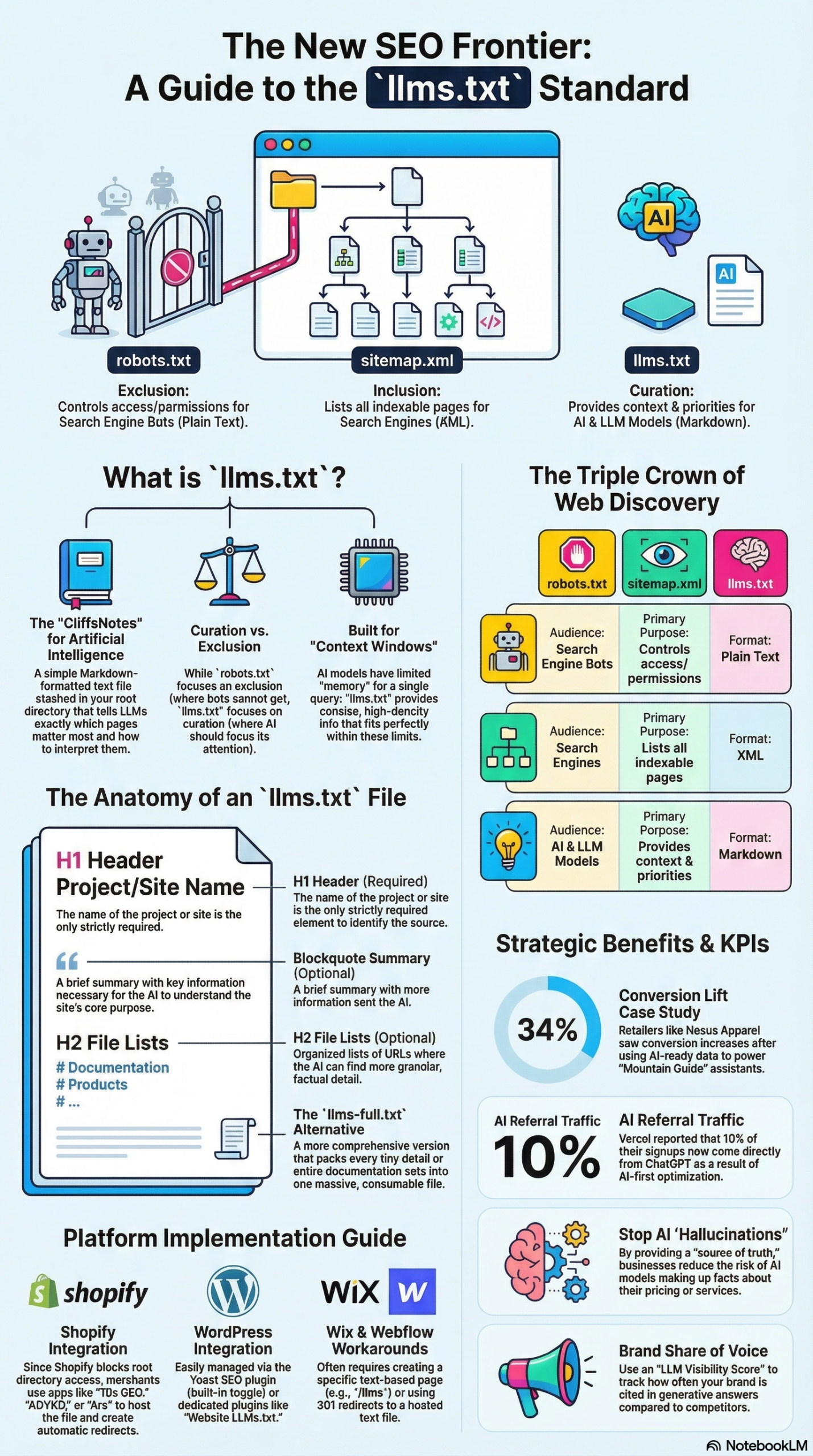
llms.txt is a plain-text Markdown file hosted at the root of your domain (yourdomain.com/llms.txt) that tells AI language models which pages and resources on your site are most important. Think of it as the robots.txt for AI—except instead of telling crawlers what not to access, it actively curates the content you want AI to surface when answering a user’s question about your brand, products, or niche.
The standard was proposed in late 2024 by Jeremy Howard of Answer.AI and has since been adopted by over 800,000 sites, primarily documentation platforms, SaaS tools, and now ecommerce stores. Platforms like Mintlify drove early adoption by enabling llms.txt automatically for thousands of developer documentation sites, which established the format before it reached the ecommerce world.
The file follows a specific technical structure:
- H1 Heading: Your site or store name
- Blockquote: A one-paragraph summary of what your store does and who it serves
- H2 Sections: Categorized lists of Markdown-linked resources (products, collections, policies, FAQs, guides)
- Optional
.mdextensions: Adding.mdto URLs (e.g.,product-page.html.md) signals AI that a pure-text version of that page exists
There’s also an extended variant—llms-full.txt—which includes the full text of your documents rather than just links. For a Shopify store, llms.txt (the curated map version) is almost always the right starting point. The full version is better suited for documentation-heavy brands with large knowledge bases.
The core problem this solves: AI tools don’t crawl your entire catalog the way Google does. As Global Reach Digital Marketing puts it: “Search engines index your whole site… AI tools scan in real time. They don’t index your content, and they only process what’s easy to read in the moment.” That means JavaScript-heavy product pages, nested navigation, and dynamic pricing widgets all create noise that causes AI to skip key product details or—worse—fill in the gaps with competitor data or hallucinated specifications.
With llms.txt, you hand AI a curated reading list. It knows exactly which 10 products are your best sellers, which collections matter, how your shipping policy works, and what your brand story is. That’s the difference between being cited and being ignored.
Why It Matters
This is not a distant-future concern. Some platforms are already reporting that 10% of new signups originate from AI referrals rather than traditional search. As conversational AI interfaces replace the “blue link” search result for millions of users, ecommerce brands are entering what researchers call the GEO era—Generative Engine Optimization.
GEO differs from SEO in one fundamental way: you’re not trying to rank. You’re trying to be included. Carolyn Shelby, SEO expert at Yoast, frames this precisely: “Ranking is no longer the prize — inclusion is.” When a user asks ChatGPT “what’s a good pair of waterproof trail runners under $150?”, there are no positions 1 through 10. There’s a cited answer—and everything else is silence.
For Shopify merchants specifically, the stakes are compounded by a structural problem: Shopify’s platform architecture has historically blocked merchants from placing files directly in the root directory. That meant llms.txt required technical workarounds—Cloudflare Workers, URL redirects, third-party apps—putting it out of reach for most store owners.
Yoast SEO for Shopify’s March 2026 update changes that. The plugin now generates and maintains your llms.txt file automatically, updates it weekly, and removes deleted products without any developer involvement. Merchants on the $19/30-day Yoast plan get access as a built-in feature.
Beyond Shopify convenience, llms.txt matters because AI models are observed actively fetching these files. Check your server logs for user agents like GPTBot, ClaudeBot, and PerplexityBot—multiple practitioners have confirmed these crawlers hit /llms.txt endpoints. While Ahrefs analysis correctly notes that “No major LLM provider currently supports llms.txt. Not OpenAI. Not Anthropic. Not Google” in an official, documented capacity, the crawl evidence suggests the file is being read during model training or real-time retrieval, even without formal specification adoption.
For marketers and ecommerce operators, the practical upshot: implement llms.txt now, when there’s minimal competition, and establish your brand’s structured data footprint before AI-driven product discovery becomes the dominant channel.
The Data: llms.txt vs. Traditional SEO vs. GEO
| Dimension | Traditional SEO | GEO with llms.txt |
|---|---|---|
| Primary Goal | Rank in search results | Be cited in AI-generated answers |
| Content Format | HTML pages, meta tags, structured data | Markdown, plain text, structured feeds |
| Crawl Model | Periodic full-site indexing | Real-time, context-window parsing |
| Discovery Mechanism | Keyword matching, backlinks | Semantic relevance, factual density |
| Update Frequency | Indexed over days/weeks | File read during inference (real-time) |
| Zero-Click Impact | Traffic loss risk | Inclusion = brand authority signal |
| Shopify Complexity | Native, well-supported | Requires app, edge routing, or Yoast |
| Cost to Implement | Time + SEO tooling | $0 (manual) to $499/mo (10x GEO Enterprise) |
| llms.txt Variant | Purpose | Best For |
|---|---|---|
llms.txt |
Curated link map (table of contents) | All ecommerce stores |
llms-full.txt |
Full document text included | Documentation-heavy brands, large catalogs |
Sources: NotebookLM Research Report, Yoast SEO for Shopify
Step-by-Step Tutorial: Implementing llms.txt on Your Shopify Store
Prerequisites
Before you start, confirm you have:
– A Shopify store with admin access
– Either: Yoast SEO for Shopify installed ($19/30 days), OR the 10x GEO app, OR access to Cloudflare for a manual implementation
– A list of your 10-15 most important products, collections, and policy pages
– Basic familiarity with Shopify’s admin panel (no coding required for the Yoast path)
Phase 1: Choose Your Implementation Method
There are three practical paths for adding llms.txt to Shopify. Choose based on your technical comfort and budget.
Option A — Yoast SEO for Shopify (Recommended for most merchants)
Best for: Non-technical merchants who want automatic updates and minimal maintenance. Yoast’s March 2026 update delivers llms.txt as a native feature with weekly refresh cycles and auto-removal of deleted products.
Option B — 10x GEO App
Best for: Merchants who want advanced GEO analytics, prompt tracking, and content optimization alongside llms.txt. The 10x GEO app tracks brand mentions across ChatGPT, Gemini, Perplexity, and Claude, and generates citation-worthy FAQ content. Plans range from $9/month (10 tracked prompts) to $499/month (300 prompts with impact scoring).
Option C — Cloudflare Workers (Manual, Technical)
Best for: Developers who need full control over the file’s content or whose store’s root directory is blocked from both Yoast and app-based solutions. This involves writing a Worker script that intercepts requests for /llms.txt and serves the file from Cloudflare’s edge before the request reaches Shopify.
Phase 2: Build Your Content Inventory
Regardless of which implementation path you choose, the quality of your llms.txt depends on what you put in it. AI models prioritize what the research report calls “factual density”—content that mirrors the precision of a technical whitepaper. Before generating the file, do this audit:
Step 1: Identify your 10-15 hero products.
These are your best-sellers, highest-margin items, or products you’re actively promoting. For each one, verify that:
– The product title is specific and descriptive (e.g., “Men’s TrailBlazer Gore-Tex Hiking Boot, Size 8-13” not “Amazing Hiking Boot”)
– The product page includes objective specs: materials, dimensions, weight, certifications, compatibility
– All subjective marketing language (“stunning,” “incredible,” “life-changing”) is replaced with measurable attributes
Step 2: List your top 3-5 collections.
These should be your highest-traffic or most semantically meaningful category pages. Include the full product range URL if your catalog is large—AI models can follow this to a structured product feed.
Step 3: Audit your policy pages.
Shipping policy, return policy, and privacy policy are high-value for AI. When a user asks “does this store ship to Canada?”—your shipping policy page, correctly linked in llms.txt, is what gets cited. Make sure these pages are in plain language with clear, scannable bullet points.
Step 4: Identify your “cornerstone” content.
If you have guides, comparison articles, FAQs, or how-to content that establishes authority in your niche, include these. These are the pages that position your brand as a subject-matter expert, not just a storefront.
Phase 3: Generate the llms.txt File (Yoast Method)
- Open Shopify Admin → Apps → Yoast SEO for Shopify
- Navigate to the SEO Settings panel. Look for the “AI Readiness” or “llms.txt” section (added in the March 31, 2026 update).
- Choose your mode:
- Automatic Mode: Yoast builds the file using Shopify’s sales data. It pulls your 10 best-selling products over time, up to 5 of your largest collections, your store policies, homepage, latest blog posts, and recently updated pages. The file refreshes weekly. No decisions required on your end.
- Manual Mode: You hand-pick which products and pages appear. This mode also includes a dedicated field for your “About Us” page—important for brand identity signals.
- Enable the feature. Yoast is opt-in and respects any existing
/llms.txtredirects you may have set up previously. - Verify the file is live by visiting
yourdomain.com/llms.txtin your browser. You should see a plain-text Markdown file, not an HTML page.
Phase 4: Generate the llms.txt File (Manual/Cloudflare Method)
If you’re building the file yourself, here’s the exact structure to follow:
# Your Store Name

> A one-paragraph description of what your store sells, who your customers are, and what makes you different. Keep it factual and specific—AI models use this to match your brand to user queries.

## Best-Selling Products

- [Product Name — Key Spec, Key Spec](https://yourdomain.com/products/product-handle): Brief factual description, 1-2 sentences max.
- [Product Name — Key Spec, Key Spec](https://yourdomain.com/products/product-handle): Brief factual description.

## Collections

- [Collection Name](https://yourdomain.com/collections/collection-handle): What's in this collection, who it's for.
- [Full Product Catalog](https://yourdomain.com/collections/all): Browse all products.

## Store Policies

- [Shipping Policy](https://yourdomain.com/policies/shipping-policy): Ships to US, Canada, UK. Free shipping over $75.
- [Return Policy](https://yourdomain.com/policies/refund-policy): 30-day returns on unworn items.
- [Privacy Policy](https://yourdomain.com/policies/privacy-policy)

## Resources & Guides

- [Guide Title](https://yourdomain.com/blogs/guides/guide-handle): One-line description.
- [FAQ](https://yourdomain.com/pages/faq): Answers to common customer questions.

## About

- [About Us](https://yourdomain.com/pages/about): Founded in [year], [city]. Mission statement.
For the Cloudflare Workers approach: create a new Worker in your Cloudflare dashboard, route it to yourdomain.com/llms.txt, and return the above Markdown content with Content-Type: text/plain. The Worker intercepts the request before it hits Shopify’s servers, which is why it bypasses Shopify’s root-directory restriction.
Phase 5: Validate and Monitor
Step 1: Validate your file syntax.
Use a free tool like the llms.txt Checker or AccuWeb Validator to confirm your file follows the correct Markdown structure and that all links return 200 status codes, not 404s.
Step 2: Check your server logs.
Within 1-4 weeks, look for these user agents accessing /llms.txt:
– GPTBot (OpenAI)
– ClaudeBot (Anthropic)
– PerplexityBot
– Google-Extended
Their presence confirms the file is being fetched. This is not a ranking guarantee, but it validates delivery.
Step 3: Set up prompt monitoring.
Use 10x GEO’s “Prompt Watch” feature or manually query ChatGPT, Gemini, and Perplexity with prompts your customers would use: “best [product category] under $X,” “[your niche] brands with free returns,” “where to buy [specific product type].” Screenshot the responses monthly. This is your GEO baseline.
Expected Outcome: Within 30-90 days of implementation, brands with well-structured llms.txt files and high factual-density product pages report improved citation frequency in AI-generated shopping recommendations—though results vary significantly based on brand authority, product specificity, and competitive landscape.
Real-World Use Cases
Use Case 1: Specialty Outdoor Gear Retailer
Scenario: A mid-size outdoor gear store with 400+ SKUs. Customers frequently ask ChatGPT for gear recommendations by activity, budget, and technical spec. The store’s product pages were loaded with marketing copy and minimal technical specs.
Implementation: Switched to Yoast’s automatic mode for llms.txt, then manually audited the 15 hero products flagged by Yoast and rewrote descriptions to include waterproof ratings (IPX scores), weight in grams, material composition percentages, and compatibility notes. Added a structured FAQ page covering “what’s the difference between waterproof and water-resistant” and “how to choose the right sleeping bag rating.”
Expected Outcome: When users query AI for “waterproof hiking jackets under $200 with Gore-Tex,” the store’s products are cited with accurate specifications rather than generic descriptions from a competitor’s marketing copy.
Use Case 2: DTC Skincare Brand
Scenario: A direct-to-consumer skincare brand competing against large retailers. Users increasingly ask AI for ingredient-based product recommendations (“retinol serum without fragrance,” “niacinamide moisturizer for oily skin”).
Implementation: Manual llms.txt mode, hand-selecting 10 hero products. Each product entry includes active ingredient percentages, skin type suitability, and dermatologist-testing status. Linked to a comprehensive ingredient glossary blog post as a cornerstone resource.
Expected Outcome: Brand products surface in AI ingredient-matching queries. The ingredient glossary gets cited as an authoritative reference, driving brand association with expertise.
Use Case 3: B2B Industrial Supplier on Shopify Plus
Scenario: A Shopify Plus merchant selling industrial components to procurement managers. These buyers increasingly use AI to compare specs and source vendors before making contact.
Implementation: Used the Cloudflare Workers method for full control. Built llms.txt with categorized sections by product type, each linking to specification sheets (PDFs converted to Markdown). Linked directly to the structured product feed (XML) so AI models with large context windows could access the full catalog programmatically.
Expected Outcome: When procurement AI agents or human buyers using ChatGPT query for specific component standards (e.g., “ISO 9001 certified stainless steel fittings, 1/2 inch NPT”), the brand’s products appear with accurate technical citations.
Use Case 4: Independent Bookstore
Scenario: An independent bookstore on Shopify competing against Amazon for AI-driven book recommendations. When users ask “what are good independent bookstores that carry [genre]?”, the store is invisible.
Implementation: Yoast automatic mode for base llms.txt, supplemented with a manually curated “Staff Picks” section and a link to the store’s curated reading lists blog. Added policy pages noting local delivery, in-store events, and author signing schedules.
Expected Outcome: The store surfaces when AI answers questions about independent bookstores, local literary culture, or genre-specific curation—queries that previously defaulted to Amazon or Goodreads.
Common Pitfalls
Pitfall 1: Linking to broken or redirected URLs.
A llms.txt file full of 301 redirects or 404 errors signals low-quality data to AI crawlers. Every URL in the file should return a 200 status. Run a link audit with a tool like Screaming Frog before publishing, and re-validate after every major store restructure.
Pitfall 2: Using marketing language instead of factual specs.
If your product descriptions say “our most popular jacket, loved by thousands”—that’s useless to an AI trying to match your product to a query for “lightweight packable jacket under 500 grams.” The research report is explicit: AI models prioritize “factual density.” Replace sentiment with specifications.
Pitfall 3: Setting it and forgetting it.
A llms.txt file that lists discontinued products or points to seasonal collection pages that no longer exist actively hurts your AI visibility. Yoast’s automatic mode handles weekly cleanup, but if you’re using manual mode or a DIY file, build a quarterly review into your calendar. The research report notes that AI systems prioritize fresh data—a stale file is worse than no file.
Pitfall 4: Skipping the llms-full.txt for content-heavy brands.
If your brand has extensive guides, tutorials, or documentation, the basic llms.txt link map isn’t enough for AI models with large context windows. Implement llms-full.txt as a companion file that includes full article text. This is especially relevant for brands where content marketing is a primary acquisition channel.
Pitfall 5: Ignoring sentiment and reputation signals.
llms.txt tells AI where to find your content, but it can’t override what the broader internet says about your brand. As the research report warns: “If an AI agent steers users away due to unresolved negative reviews in its training data, proactive reputation management is required.” Monitor AI-generated answers for brand sentiment, not just citation frequency.
Expert Tips
Tip 1: Link your product feed directly.
Don’t just link individual product pages—link your structured product feed (JSON or XML) in the llms.txt. LLMs with large context windows can parse a structured feed far more efficiently than crawling individual product HTML pages. Include the feed URL under a “Data Feeds” or “Full Catalog” H2 section.
Tip 2: Use the two-file approach for large catalogs.
Deploy llms.txt for your curated top 15 products and key pages, and llms-full.txt with complete Markdown versions of your top 5-10 FAQ pages and category guides. This covers both quick-parse queries and deep-research queries from AI models with expanded context windows.
Tip 3: Mirror your best content as .md URLs.
For your most important pages, create Markdown versions accessible at page-url.md. This is part of the official llms.txt specification: the standard explicitly supports adding .md to URLs to signal pure-text availability. Shopify’s Liquid templating can serve a stripped-down Markdown version of any page template with minimal dev work.
Tip 4: Run monthly prompt audits.
Query ChatGPT, Perplexity, and Gemini monthly using your exact target buyer queries. If your competitors are being cited and you’re not, the gap is almost always in factual density or missing structural data. Use these audits to refine both your llms.txt and your underlying product page copy.
Tip 5: Don’t wait for official LLM provider confirmation.
Ahrefs analysis documents that no major LLM provider has officially committed to the llms.txt specification—but server log evidence confirms crawlers are fetching the files. The opportunity cost of waiting for official confirmation is real: brands implementing now are building AI visibility while the space is uncrowded. As Profound notes: “If your content isn’t in the Docs section of an llms.txt file, your brand and your narrative will not be found.”
FAQ
Q1: Does llms.txt work with all AI tools, or just specific ones?
The llms.txt standard is platform-agnostic—it’s a plain Markdown file at a predictable URL. Server log evidence shows crawlers from OpenAI (GPTBot), Anthropic (ClaudeBot), Perplexity (PerplexityBot), and Google accessing these files. That said, no major provider has officially published documentation confirming they use llms.txt during inference, per Ahrefs’ analysis. Implement it regardless—the downside risk is zero, and the upside is meaningful.
Q2: Will llms.txt replace traditional SEO for my Shopify store?
No. These are complementary, not competing strategies. Traditional SEO still drives the majority of discoverable traffic for most ecommerce stores. llms.txt and GEO practices layer on top, ensuring you’re also visible in the growing segment of users who start product discovery in AI interfaces rather than search engines. Run both in parallel.
Q3: How often should I update my llms.txt file?
Yoast’s automatic mode refreshes weekly. For manual implementations, update whenever you: launch a new hero product, discontinue a product currently in the file, restructure your collections, or update a major policy page. The research report recommends refreshing whenever site structure changes or new flagship products launch, as AI systems prioritize fresh data.
Q4: Can I use llms.txt on Shopify without a paid plugin?
Yes—but it requires technical work. The cleanest free option is the Cloudflare Workers approach: intercept requests for /llms.txt at the edge and return your manually maintained Markdown file. This bypasses Shopify’s root-directory restriction without any app dependency. The trade-off is manual maintenance with no automatic product sync.
Q5: What’s the difference between llms.txt and structured data / schema markup?
Schema markup (JSON-LD) is embedded in your HTML and tells search engines about individual pages—product name, price, review score. llms.txt is a separate file that gives AI a sitewide map of your most important content, written in plain Markdown that LLMs parse more naturally than HTML with embedded JSON. Both are valuable; they work at different layers of the AI readability stack.
Bottom Line
llms.txt is the lowest-effort, highest-leverage GEO move available to Shopify merchants right now. The technical barrier has dropped to near-zero with Yoast SEO for Shopify’s March 2026 implementation—automatic mode requires zero developer involvement and keeps your file current weekly. The real work is content quality: AI models reward factual density, not marketing language, and a well-structured llms.txt pointing to poorly-written product pages won’t move the needle. Audit your hero product specs, implement the file, and run monthly prompt audits to close the gap between how AI describes your products and how you want them described. The brands building structured AI visibility now—while adoption is still early and competition is thin—are positioning themselves for the channel shift that’s already underway.


0 Comments