

Google launched a new user agent called Google-Agent on March 20, 2026, and if you run a website, it’s already showing up in your logs. This isn’t another crawler — it’s an AI agent acting on behalf of real users, browsing your site, evaluating your content, and potentially submitting forms autonomously. This tutorial walks you through exactly what Google-Agent is, how to find it in your server logs, and what operational changes you need to make right now to stay visible in the emerging agentic web.
What This Is
Google-Agent is a new user-triggered fetcher — not a crawler — that Google introduced as part of its agentic AI infrastructure. According to Search Engine Land, the user agent appears in HTTP request headers when an AI agent running on Google’s infrastructure visits a website to complete a task initiated by a real user. That task might be “find the cheapest available hotel in Berlin,” “check if this product is still in stock,” or “fill out this contact form.”
This is fundamentally different from Googlebot, which crawls the web automatically for search indexing on Google’s schedule. Google-Agent only visits your site when a human user, interacting with a Google AI product like Project Mariner, explicitly triggers an action that requires your site to be fetched.
The actual user agent strings, as documented by Search Engine Land, are:
Desktop:
Mozilla/5.0 AppleWebKit/537.36 (KHTML, like Gecko; compatible; Google-Agent; +https://developers.google.com/crawling/docs/crawlers-fetchers/google-agent) Chrome/W.X.Y.Z Safari/537.36
Mobile:
Mozilla/5.0 (Linux; Android 6.0.1; Nexus 5X Build/MMB29P) AppleWebKit/537.36 (KHTML, like Gecko) Chrome/W.X.Y.Z Mobile Safari/537.36 (compatible; Google-Agent; +https://developers.google.com/crawling/docs/crawlers-fetchers/google-agent)
Notice the embedded documentation URL: https://developers.google.com/crawling/docs/crawlers-fetchers/google-agent. That’s your canonical reference for verifying the legitimacy of any request claiming to be Google-Agent.
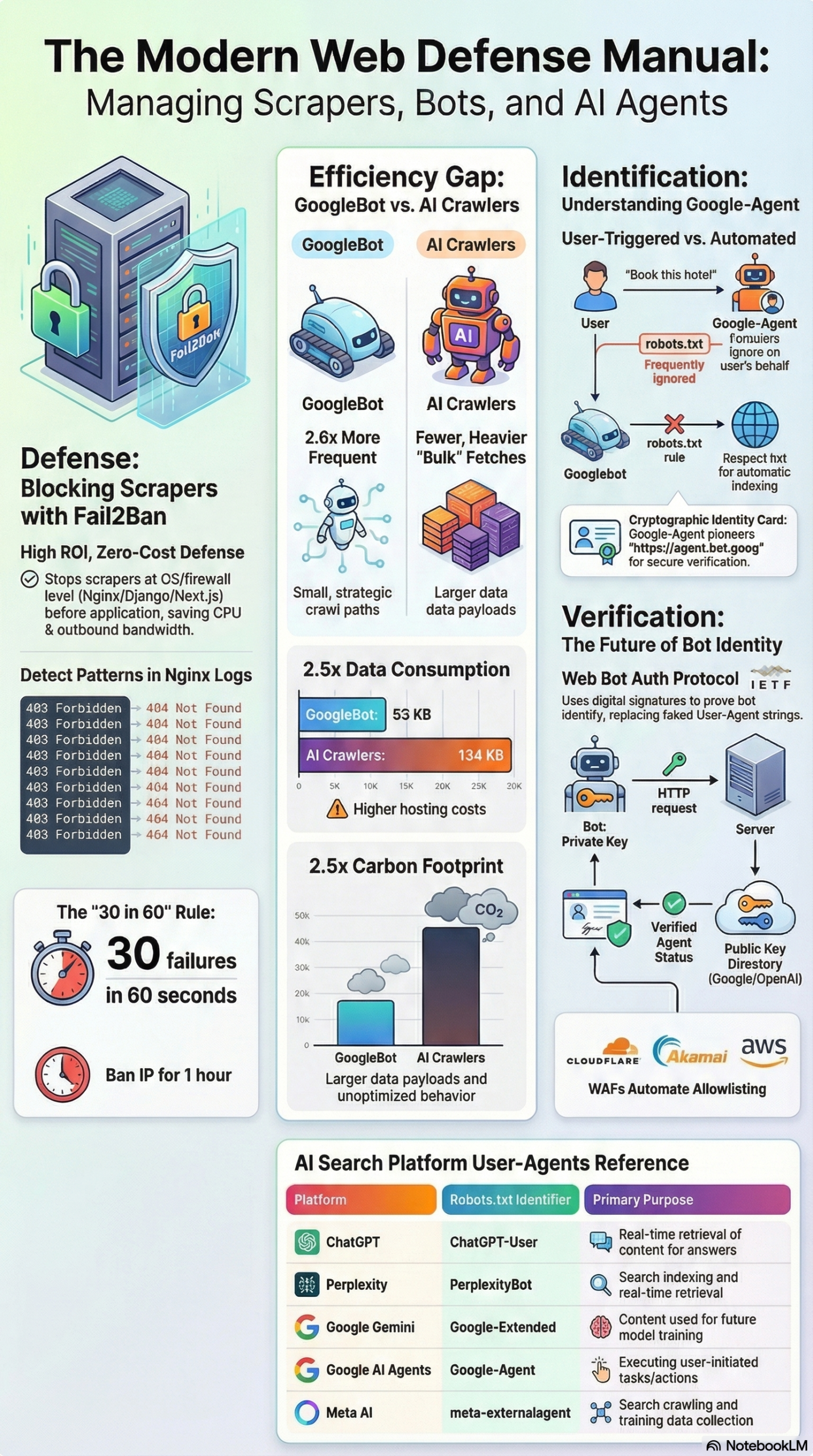
The critical technical detail — and the one most site operators are going to trip over — is that Google-Agent belongs to Google’s category of user-triggered fetchers, not common crawlers. According to Google’s official crawler documentation, user-triggered fetchers “are activated by end users through tools and product functions.” And as the NotebookLM research report documents directly: Google-Agent ignores robots.txt. The rules you’ve written to manage crawler access simply do not apply to this traffic type.
This puts Google-Agent in a completely different operational category from anything you’ve managed before. Googlebot obeys your robots.txt. Google-Extended obeys your robots.txt. Google-Agent does not. It operates under the assumption that a real user has the right to access publicly available content, and the AI agent is simply executing that user’s intent.
The practical implication: every Disallow rule you’ve configured has no bearing on whether Google-Agent fetches your pages. Your access control layer for this traffic type needs to move to the edge — your WAF, CDN, or a new cryptographic verification layer called Web Bot Auth, which we’ll cover in the tutorial section.
Why It Matters
For practitioners who manage web infrastructure, SEO, or digital marketing for any brand with a website, Google-Agent represents a category shift — not an incremental update.
It changes what “traffic” means. Traditional web analytics tracks human visits. Server logs track crawler activity. Google-Agent creates a third category: agent-mediated conversions. A user might ask Google’s AI to “compare prices on running shoes” and never visit a single merchant site themselves. The agent does the browsing, comparison, and potentially the purchase, entirely on their behalf. If your logs aren’t segmented to catch this, you’re building attribution models on incomplete data.
It invalidates standard access control assumptions. Every tool in the traditional SEO and server management toolkit — robots.txt, Disallow rules, crawl delay directives — was designed for crawler bots that respect the Robots Exclusion Protocol. Google-Agent doesn’t play by those rules, and according to the research report, “a pure robots.txt mindset can become misleading” when managing this traffic type. Your team needs to understand that different user agents now require fundamentally different control mechanisms.
It opens a new optimization surface. On the upside: Google-Agent traffic is a direct signal that AI-assisted users are engaging with your brand. If you’re being fetched by Google-Agent, it means real users are asking Google’s AI agents to interact with your site. That’s a measurable, actionable signal for understanding how AI-mediated discovery is working for your content. Search Engine Land recommends monitoring server logs specifically to establish a baseline for agent-driven traffic.
It’s the leading edge of “agentic commerce.” Google’s price tracking and automated purchasing features — where users can convert via AI agents without ever landing on a merchant’s front-end — depend on Google-Agent doing the work. If your structured data (Schema markup for products, prices, availability) is incomplete, the agent can’t execute the task correctly. As the research report notes, “AI agents use this data to execute ‘agentic commerce’ tasks like price comparisons.”
For developers and DevOps: this is a new traffic class you need to whitelist selectively, monitor continuously, and prepare your infrastructure to handle. For SEOs and content marketers: this is the first concrete, observable signal of how the agentic web is interacting with your brand.
The Data: Google’s Three Crawler Surfaces vs. AI Bot Efficiency
Understanding Google-Agent in isolation misses the bigger context. Google has effectively bifurcated its web-touching infrastructure into three surfaces, each with distinct behaviors. Treating them as one entity leads to what the research report calls “accidental overblocking.”
| Surface | User Agent Token | Primary Purpose | Respects robots.txt? |
Trigger |
|---|---|---|---|---|
| Googlebot | Googlebot |
Core search indexing and discovery | Yes | Automatic (Google’s schedule) |
| Google-Extended | Google-Extended |
Gemini AI training and grounding data | Yes | Automatic (Google’s schedule) |
| Google-Agent | Google-Agent |
User-triggered AI tasks (browsing, form fills, transactions) | No | User-initiated via AI products |
Beyond Google’s own ecosystem, there’s a broader efficiency gap between traditional search crawlers and the new class of AI retrieval bots. A 14-day server log study cited in the research report documented stark differences between Googlebot and combined AI bot traffic (ChatGPT, Perplexity, Claude):
| Metric | Googlebot | AI Bots (Combined) | Ratio |
|---|---|---|---|
| Crawl Frequency (14 days) | 49,905 events | 19,063 events | Google 2.6× more frequent |
| Data per Event | 53 KB | 134 KB | AI bots 2.5× heavier per request |
| JavaScript Rendering | Full rendering | None (static HTML only) | AI bots skip JS entirely |
| CO₂ per Crawl Event | ~20.78 units | ~52.4 units | AI bots 2.5× more carbon-intensive |
The operational takeaway: AI crawlers are making fewer but dramatically heavier requests. They’re pulling bulk static HTML — averaging 134 KB per request versus Googlebot’s 53 KB — without executing JavaScript. This means your server-rendered HTML needs to be lean and information-dense to avoid bloated AI crawler payloads, and your dynamic content (anything rendered client-side by JavaScript) is effectively invisible to most AI retrieval systems right now.
Step-by-Step Tutorial: Setting Up Google-Agent Monitoring and Access Control
This is the operational playbook. Follow these steps to get full visibility into Google-Agent traffic and implement proper access control across your infrastructure.
Phase 1: Find Google-Agent in Your Current Server Logs
Before you build anything new, check what’s already hitting your servers.
Step 1: Search your Nginx access logs
Run this command on your server to find all Google-Agent requests in your current log file:
grep "Google-Agent" /var/log/nginx/access.log | tail -100
For Apache:
grep "Google-Agent" /var/log/apache2/access.log | tail -100
A matching entry will look something like this:
203.0.113.42 - - [26/Mar/2026:14:32:11 +0000] "GET /products/running-shoes HTTP/1.1" 200 18432 "-" "Mozilla/5.0 AppleWebKit/537.36 (KHTML, like Gecko; compatible; Google-Agent; +https://developers.google.com/crawling/docs/crawlers-fetchers/google-agent) Chrome/120.0.6099.129 Safari/537.36"
Step 2: Build a dedicated log filter
Create a separate log file that captures only agent-type traffic. In your Nginx config, add a conditional log directive:
map $http_user_agent $is_ai_agent {
    default         0;
    "~*Google-Agent"    1;
    "~*ChatGPT-User"    1;
    "~*PerplexityBot"   1;
}

access_log /var/log/nginx/ai_agent_access.log combined if=$is_ai_agent;
Reload Nginx after making this change:
sudo nginx -t && sudo systemctl reload nginx
Now you have a dedicated log stream that captures every AI agent visit, separated from general traffic noise.
Step 3: Generate a baseline traffic report
Pull a 7-day summary to understand current volume:
grep "Google-Agent" /var/log/nginx/ai_agent_access.log | \
  awk '{print $7}' | \
  sort | uniq -c | sort -rn | \
  head -20
This gives you the top 20 URLs being fetched by Google-Agent, by frequency. This is your starting visibility into which pages AI agents are actively using on behalf of users.
Phase 2: Verify Google-Agent Requests Are Legitimate
User agent strings are trivially spoofable. Anyone can send a request with Google-Agent in the header. Before you build access policies around this traffic, verify it’s actually coming from Google’s infrastructure.
Step 4: Perform reverse DNS lookup on suspicious IPs
Extract the source IPs from your logs:
grep "Google-Agent" /var/log/nginx/ai_agent_access.log | \
  awk '{print $1}' | sort | uniq
For each IP, run a reverse DNS lookup:
host 203.0.113.42
Legitimate Google-Agent traffic will resolve to a hostname ending in .googlebot.com or .google.com. If the reverse lookup doesn’t resolve to a Google domain, treat the request as spoofed.
Step 5: Cross-reference against Google’s published IP ranges
Google publishes the IP ranges used by its user-triggered fetchers. Search Engine Land recommends verifying your CDN and WAF aren’t blocking the published user-triggered-agents.json IP ranges. Fetch the current list:
curl https://developers.google.com/static/search/apis/ipranges/user-triggered-agents.json
Use this list to build an allowlist in your WAF (Cloudflare, AWS WAF, Fastly, etc.) for verified Google-Agent traffic.
Phase 3: Configure Access Control at the Edge
Because Google-Agent ignores robots.txt, your control layer must move to the edge — your CDN or WAF — or to cryptographic verification via Web Bot Auth.
Step 6: Configure Cloudflare WAF rules for Google-Agent
In Cloudflare, navigate to Security > WAF > Custom Rules and create a rule that:
- Allows verified Google-Agent traffic (matching IP ranges from
user-triggered-agents.json) on your critical conversion paths - Challenges any request claiming to be
Google-Agentthat doesn’t originate from a verified Google IP
Example rule expression (Cloudflare syntax):
(http.user_agent contains "Google-Agent" and not ip.src in $google_agent_ips)
Set the action to Challenge or Block depending on your risk tolerance.
Step 7: Prepare for Web Bot Auth (the future standard)
The industry is converging on Web Bot Auth, an IETF standard for cryptographic bot verification, supported by Google, Cloudflare, Akamai, and Amazon AgentCore, per the research report. This protocol works like a digital passport system:
- The bot operator (e.g., Google) signs each HTTP request with a private key
- Your server verifies the signature using the operator’s public key, published at a known URL (e.g.,
https://agent.bot.goog) - Verification happens in real time, without cumbersome reverse DNS lookups
Implementation will vary by framework, but the verification logic in pseudocode looks like this:
import httpx
from cryptography.hazmat.primitives.asymmetric import ed25519

def verify_web_bot_auth(request_headers):
    signature = request_headers.get("X-Bot-Auth-Signature")
    key_url = request_headers.get("X-Bot-Auth-Key-URL")  # e.g. https://agent.bot.goog/pubkey

    # Fetch public key from operator's published endpoint
    pubkey_response = httpx.get(key_url)
    public_key = ed25519.Ed25519PublicKey.from_public_bytes(pubkey_response.content)

    # Verify the signature against the request body/headers
    message = build_signed_message(request_headers)
    public_key.verify(bytes.fromhex(signature), message)
    return True  # Raises exception if invalid
Monitor IETF Working Group progress and your CDN provider’s release notes — Web Bot Auth is moving from proposal to production deployment in 2026.
Phase 4: Block Malicious Scrapers While Protecting Legitimate Agent Traffic
While Google-Agent deserves a whitelist, the same log monitoring that surfaces it will also reveal abusive scrapers — AI data harvesters that don’t identify themselves honestly and generate 403/404 spike patterns. According to the research report, Fail2Ban combined with Nginx is the highest-ROI defensive measure for self-managed stacks.
Step 8: Install and configure Fail2Ban
sudo apt install fail2ban
Create a custom filter for Nginx scraper abuse at /etc/fail2ban/filter.d/nginx-scraper.conf:
[Definition]
failregex = ^<HOST> .* "(GET|POST|HEAD).*" (403|404) .*$
ignoreregex =
Add a jail at /etc/fail2ban/jail.local:
[nginx-scraper]
enabled  = true
port     = http,https
filter   = nginx-scraper
logpath  = /var/log/nginx/access.log
maxretry = 30
findtime = 60
bantime  = 3600
This configuration — from the research report — bans any IP that triggers 30 forbidden/not-found errors within 60 seconds, for 1 hour. Critically: once banned, the traffic never reaches Nginx. The block happens at the kernel-level firewall, so CPU and bandwidth usage drop immediately.
Step 9: Verify your allowlist doesn’t conflict with Fail2Ban
Before deploying, ensure Google’s verified agent IP ranges are added to Fail2Ban’s ignoreip list in /etc/fail2ban/jail.local:
[DEFAULT]
ignoreip = 127.0.0.1/8 ::1 66.249.64.0/19  # Add Google IP ranges here
Expected Outcomes After Full Implementation:
– Dedicated log stream segmenting AI agent traffic from human and crawler traffic
– Verified Google-Agent requests allowlisted at the CDN/WAF layer
– Spoofed Google-Agent attempts challenged or blocked
– Abusive scraper IPs blocked at kernel level via Fail2Ban
– Baseline established for week-over-week Google-Agent traffic volume
Real-World Use Cases
Use Case 1: E-Commerce Price Comparison Monitoring
Scenario: A mid-size online retailer running Shopify Plus with a custom storefront notices Google-Agent traffic hitting product pages and JSON-LD structured data endpoints.
Implementation: They configure Nginx log filtering (Phase 1 above) and set up a weekly cron job that aggregates Google-Agent request counts by product category:
grep "Google-Agent" /var/log/nginx/ai_agent_access.log | \
  grep "$(date -d '7 days ago' +%d/%b/%Y)" | \
  awk '{print $7}' | grep "/products/" | sort | uniq -c
They also ensure their Schema.org Product markup includes offers.price, offers.availability, and offers.priceCurrency — the exact fields an AI agent needs to execute a price comparison or purchase on behalf of a user.
Expected Outcome: Within 30 days, they establish a Google-Agent traffic baseline. They discover certain product categories are being fetched 3× more often than others — revealing which product lines users are actively asking Google’s AI to research. This informs inventory prioritization and promotional strategy.
Use Case 2: Lead Gen Site Protecting Form Endpoints
Scenario: A B2B SaaS company offers a free trial signup form. They’re concerned that Google-Agent (which can “complete form fills” per Search Engine Land) might pollute their CRM with AI-generated trial signups.
Implementation: They add a WAF rule that allows Google-Agent traffic to browse and read content pages, but challenges POST requests to /signup and /trial endpoints from any non-human-verified session. They also implement honeypot fields specifically to catch automated form submissions, flagging them in their CRM with a source: ai-agent tag for separate analysis rather than outright blocking.
Expected Outcome: They gain clean attribution data distinguishing agent-initiated signups from human-initiated ones. Some of those agent-initiated trials may convert — users who had Google’s AI scout the product and then followed up themselves — so wholesale blocking would have cost them pipeline.
Use Case 3: Media Publisher Auditing AI Citation Traffic
Scenario: A digital media publisher wants to know whether their content is being surfaced by Google’s AI agents in response to user queries. They want to correlate Google-Agent log activity with referral patterns.
Implementation: They export weekly Google-Agent log data to a Google BigQuery table, joining it with GA4 session data to identify days where Google-Agent activity on a specific article preceded spikes in direct or “dark” traffic. They also audit their robots.txt to ensure Google-Extended (the AI training bot) is blocked to protect editorial IP, while Googlebot and Google-Agent remain fully accessible.
Expected Outcome: They discover a correlation between Google-Agent fetching an investigative report and subsequent direct traffic spikes — evidence that Google’s AI is surfacing their content to users who then decide to visit directly. This validates their investment in deep, original reporting as an AEO (AI Engine Optimization) strategy.
Use Case 4: Travel Site Enabling Agentic Bookings
Scenario: A hotel booking platform wants to be accessible to Google-Agent so AI agents can complete hotel searches and potentially reservations on behalf of users — the “zero-click conversion” model described in the research report.
Implementation: They implement full Schema.org LodgingBusiness and Offer markup with real-time pricing. They add Google’s published user-triggered-agents.json IP ranges to a CDN allowlist with elevated rate limits (since a single user task might trigger multiple rapid page fetches). They also configure server-side rendering for their availability pages, since AI bots don’t execute JavaScript and would otherwise see empty content.
Expected Outcome: Their properties start appearing in Google AI agent responses to queries like “find me an available hotel in Chicago under $200 for next Friday.” Bookings initiated by AI agents show up in their attribution as a new channel.
Common Pitfalls
Pitfall 1: Blocking Google-Agent in robots.txt and Assuming It Works
The most dangerous mistake: adding User-agent: Google-Agent / Disallow: / to your robots.txt and considering the problem solved. As documented in the research report, Google-Agent ignores robots.txt entirely. The disallow rule will have zero effect. You need WAF or cryptographic controls, not text file declarations.
Pitfall 2: Conflating Google-Agent with Google-Extended
These are separate systems with different purposes and different robots.txt behaviors. Blocking Google-Extended (which you might legitimately want to do to protect content from AI training) does nothing to affect Google-Agent traffic. The research report explicitly warns that treating Google’s crawlers as a single entity leads to “accidental overblocking” — inadvertently blocking Googlebot while trying to manage a different surface.
Pitfall 3: Blocking All Unfamiliar User Agents at the WAF
A blanket “block anything not matching known browsers” WAF policy will catch Google-Agent. But it will also catch legitimate AI retrieval bots like ChatGPT-User and PerplexityBot that you actually want indexing your content for real-time AI search results. According to the research report, blocking these prevents AI systems from sourcing your data for real-time answers. Distinguish between retrieval bots (allowlist) and training bots (block if you want) and user-triggered agents (verify and allowlist).
Pitfall 4: Not Verifying IP Origin Before Building Access Rules
User agent strings are trivially spoofable. If you build an allowlist based purely on the Google-Agent string in the user agent header without cross-referencing against Google’s published IP ranges via reverse DNS or user-triggered-agents.json, you’ll be whitelisting any attacker who knows to put “Google-Agent” in their headers. Always verify IP origin before extending trust.
Pitfall 5: Ignoring JavaScript Rendering for AI Traffic
The 14-day crawl study in the research report documents that AI bots fetch static HTML only — no JavaScript rendering. If your product pages, pricing, or availability data is populated client-side via JavaScript, AI agents see empty containers. This is a silent failure: your pages appear to be accessible but the agent returns no useful data to the user, effectively making your inventory invisible to AI-mediated queries.
Expert Tips
1. Build a Separate Analytics View for Agent Traffic
Don’t mix Google-Agent requests into your standard analytics dashboards. Create a dedicated view — in BigQuery, Grafana, or even a simple cron-generated CSV — that tracks agent traffic volume, page depth, and request frequency week over week. This becomes your AI-visibility metric.
2. Monitor the user-triggered-agents.json IP List for Changes
Google updates its published IP ranges. Set up a weekly diff check against the current list and alert your team when it changes. Stale WAF allowlists will start blocking legitimate agent traffic after IP range updates.
3. Prioritize Schema Markup on High-Intent Pages
AI agents rely on structured data to complete tasks. Product pages, pricing pages, availability calendars, and contact forms are the highest-priority targets for complete Schema.org markup. Incomplete or outdated structured data means the agent can’t execute the user’s intent on your site.
4. Use canary Logging to Detect Spoofed Google-Agent
Set up a log alert that fires whenever a request claims to be Google-Agent but resolves to a non-Google IP on reverse DNS lookup. This gives you early warning of scraper campaigns that are trying to impersonate trusted agents to bypass your WAF rules.
5. Prepare Your Fail2Ban Allowlist Before Scaling Agent Traffic
As Google-Agent adoption grows, its traffic patterns could trigger your existing abuse detection rules — many rapid requests from a shared IP pool. Add Google’s agent IP ranges to Fail2Ban’s ignoreip before this becomes a production incident. The research report’s recommended Fail2Ban config (maxretry: 30, findtime: 60s) is aggressive by design for abuse prevention, which means verified agent IP bursts could get caught in it if you don’t pre-configure the exemption.
FAQ
Q: Does Google-Agent follow my robots.txt rules?
No. According to the research report and Google’s own crawler documentation, Google-Agent is a user-triggered fetcher, not a crawler. User-triggered fetchers operate on the assumption that they’re acting on behalf of a real user accessing public content and therefore ignore the Robots Exclusion Protocol. Your robots.txt Disallow rules have no effect on this traffic type.
Q: How do I tell the difference between a real Google-Agent request and a spoofed one?
Two methods: (1) Reverse DNS — the source IP of a legitimate Google-Agent request will resolve to a hostname ending in .google.com or .googlebot.com. (2) Cross-reference against Google’s published user-triggered-agents.json IP list. Any request claiming to be Google-Agent that doesn’t originate from a verified Google IP range should be treated as spoofed. Search Engine Land also recommends verifying that your CDN and WAF are not blocking the published IP ranges.
Q: Should I block Google-Agent entirely if I don’t want AI agents on my site?
You can restrict it at the WAF or CDN layer, but consider the business implications carefully. Google-Agent traffic represents real users asking Google’s AI to interact with your brand. Blocking it means your site becomes inaccessible to AI-mediated user journeys, which the research report identifies as an increasingly significant traffic and conversion channel — including the “zero-click conversion” model for e-commerce.
Q: What is Web Bot Auth and when will it be available?
Web Bot Auth is an IETF standard for cryptographically verifying bot identity. Bots sign HTTP requests with a private key; servers verify using the operator’s published public key. The research report documents that it’s already supported by Google, Cloudflare, Akamai, and Amazon AgentCore. Full server-side implementation tooling is in active development. Monitor your CDN provider’s changelog for native support.
Q: How is Google-Agent different from Googlebot and Google-Extended?
Googlebot indexes content for search; it runs on Google’s automatic schedule and obeys robots.txt. Google-Extended fetches content for Gemini AI training; it also obeys robots.txt. Google-Agent visits your site only when a human user triggers an AI task, ignores robots.txt, and may perform interactive actions like form submissions. The research report treats these as three distinct “control surfaces” that require separate management strategies.
Bottom Line
Google-Agent is the first production signal of the agentic web: real users using AI to browse, compare, and transact without directly visiting your site. Launched March 20, 2026, it renders the Robots Exclusion Protocol irrelevant for a growing class of traffic, requiring practitioners to shift access control to the WAF/CDN layer and prepare for cryptographic verification via Web Bot Auth. The immediate actions are concrete: grep your logs for “Google-Agent” today, build a dedicated monitoring stream, verify IP legitimacy before extending access, and ensure your high-intent pages have complete server-rendered HTML with structured data. Teams that build operational visibility into agent traffic now will have a measurable advantage as agentic commerce scales — those that don’t will be making attribution and inventory decisions on fundamentally incomplete data.


0 Comments