

Tencent’s ClawBot launch on March 22, 2026 put autonomous AI agents in front of over one billion WeChat users overnight — not as a standalone app, but baked directly into the chat interface they already use daily. Built on the OpenClaw framework, ClawBot lets any WeChat user send a command like “book my Tuesday 3pm meeting” or “summarize that document I just forwarded” and have an AI agent actually execute it, not just respond with text. This tutorial walks you through exactly how OpenClaw works under the hood, how Tencent architected ClawBot on top of it, and how you can deploy your own OpenClaw agent — whether you’re plugging into WeChat, WhatsApp, or Slack.
What This Is
OpenClaw is an open-source, TypeScript-based AI agent framework built on what its creators call an “agentic loop” — a cycle in which a large language model doesn’t just generate a response, but decides on an action, executes it via a tool, observes the result, and decides the next step. According to the OpenClaw architectural research report, the project was originally developed by Peter Steinberger (under earlier project names Clawdbot and Moltbot) and later integrated into OpenAI’s broader agentic ecosystem after OpenAI acquired Steinberger’s expertise in February 2026. By early 2026, the repository surpassed 100,000 GitHub stars, making it one of the most-starred AI frameworks in the TypeScript ecosystem.
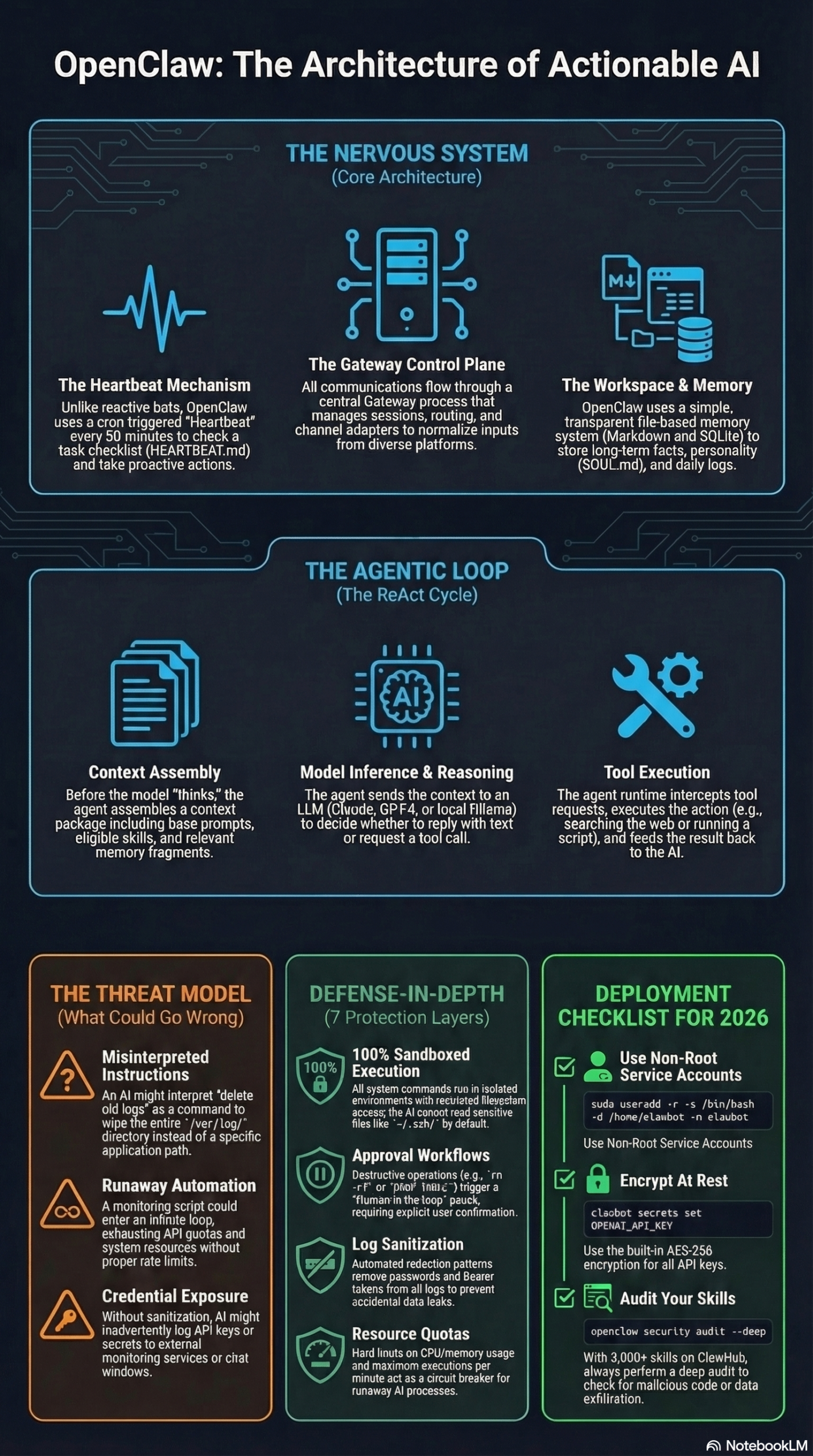
What makes OpenClaw different from a standard chatbot wrapper is its Gateway model. Rather than a stateless request-response loop, OpenClaw runs a persistent background process — the Gateway — that serves as the single source of truth for all agent activity. The Gateway handles three core responsibilities per the research report:
- Routing and Sessions: Multiple channel adapters run simultaneously. You can have one agent handling your personal WhatsApp and a separate agent on team Slack, with the Gateway routing correctly between them.
- Concurrency Control: Messages within a session are processed one at a time through a Command Queue. This prevents tool conflicts — for example, preventing two simultaneous “write to file” operations from corrupting data.
- Input Normalization: Voice notes, image attachments, plain text, and forwarded documents all get transformed into a consistent message object before hitting the model. This abstraction is what allows WeChat’s diverse input types to work seamlessly with ClawBot.
Tencent’s ClawBot, as reported by Reuters and analyzed in the research report, plugs OpenClaw’s Gateway directly into WeChat’s messaging backend. WeChat users interact with ClawBot exactly as they would with any other WeChat contact — no new app, no separate interface. The AI appears as a chat contact, accepts natural language commands, and executes real tasks: calendar management, document processing, web lookups, and more.
The underlying agentic loop works like this: when ClawBot receives your WeChat message, the Gateway normalizes it, packages it with relevant context (your past preferences, the skills available), and sends it to a large language model. The model doesn’t just write back — it generates a structured tool call. OpenClaw executes that tool (say, reading a calendar API), captures the output, and feeds it back to the model for the next decision. This ReAct (Reason + Act) loop continues until the task is complete. The final result is then posted back to your WeChat thread.
This isn’t a novelty product. Nvidia CEO Jensen Huang highlighted OpenClaw’s integration into Nvidia’s NemoClaw platform at GTC, saying China’s AI ecosystem is “formidable” — specifically noting how robotics and supply chain infrastructure in China gives agentic AI a meaningful deployment advantage in industrial applications. That context matters: ClawBot’s WeChat integration isn’t just a consumer feature, it’s a strategic bet on agents becoming the primary interface for work, coordination, and commerce across a billion-user network.
Why It Matters
For developers and marketers, Tencent’s ClawBot launch changes the deployment calculus for AI agents in two important ways.
First, it sets distribution precedent. Prior to this, deploying an AI agent meant convincing users to adopt a new app, visit a new URL, or install a browser extension. ClawBot’s WeChat integration demonstrates that the highest-leverage distribution channel for an AI agent is the messaging platform users already live inside. For the 1 billion+ monthly active users on WeChat — per the research report — there is zero friction to starting a conversation with ClawBot. This is the same dynamic that made WeChat Mini Programs a dominant app distribution channel in China: you reach users where they already are.
Second, OpenClaw’s open-source architecture means these same patterns are replicable right now. You don’t need Tencent’s infrastructure to connect an OpenClaw agent to WhatsApp, Slack, Telegram, or any other platform with a messaging API. The Channel Adapter abstraction in OpenClaw’s Gateway is explicitly designed for this multi-platform deployment model. Businesses that move now to deploy agents inside the messaging channels their customers already use will have a significant head start.
For marketers specifically, the implications are operational. An OpenClaw agent connected to your Slack workspace can autonomously draft campaign briefs, pull analytics data from connected dashboards, schedule content calendar entries, and summarize competitive research — all triggered by a plain-English message, without requiring the marketer to context-switch to five different tools. The Heartbeat mechanism (more on this in the tutorial) means the agent can also proactively push updates: a morning briefing on overnight campaign performance, a reminder that an A/B test has hit statistical significance, a flag that a competitor just published something relevant.
The competitive context intensifies the urgency. As noted in the research report, both Alibaba (with its Wukong multi-agent enterprise platform) and Baidu (with agents spanning desktop, mobile, and smart-home hardware) have launched OpenClaw-based products. The “AI agent race” in China is moving fast, and the global developer community is watching which architectural patterns win at scale. OpenClaw’s approach — decentralized skills, persistent memory, proactive heartbeat — is becoming the de facto blueprint.
The Data
The following table summarizes the key players in the OpenClaw-based AI agent ecosystem as of March 2026, based on the research report:
| Platform | Company | Agent Name | Target Audience | Integration Channel | Key Differentiator |
|---|---|---|---|---|---|
| Tencent | ClawBot | Consumer + Enterprise | Messaging (WeChat contact) | 1B+ MAU distribution, zero-friction onboarding | |
| Enterprise Suite | Alibaba | Wukong | Enterprise | Office apps | Multi-agent coordination for complex document workflows |
| Multi-surface | Baidu | (Various) | Consumer + Smart Home | Desktop, mobile, hardware | Cross-device agent continuity |
| Developer/Enterprise | Nvidia | NemoClaw | Industrial/Enterprise | API + SDK | Robotics and industrial applications, GTC keynote integration |
| OpenClaw Core | OpenAI (via acquisition) | OpenClaw | Developers | GitHub / self-hosted | Open source, 100K+ GitHub stars, full TypeScript |
OpenClaw Memory File Architecture (per research report):
| File | Location | Function | Update Frequency |
|---|---|---|---|
SOUL.md |
~/.openclaw/workspace/ |
Agent personality, name, communication tone | Manual / initial setup |
MEMORY.md |
~/.openclaw/workspace/ |
Long-term user preferences and facts | Automatically updated per session |
HEARTBEAT.md |
~/.openclaw/workspace/ |
Proactive task checklist, evaluated every 30 min | Updated by user or agent |
| Daily Logs | ~/.openclaw/workspace/YYYY-MM-DD.md |
Durable activity logs, retrieved on demand | Automatically written per session |
Step-by-Step Tutorial: Deploy Your Own OpenClaw Agent
This tutorial walks through setting up an OpenClaw agent from scratch and connecting it to a messaging channel — the same architectural pattern Tencent used for ClawBot. We’ll use a Slack integration as the example, since it’s accessible to most practitioners, but the Channel Adapter pattern applies equally to WhatsApp, Telegram, or WeChat.
Prerequisites
- Node.js 20+ and npm installed
- An Anthropic, OpenAI, or Google API key (OpenClaw supports all three, plus local Ollama models)
- A Slack workspace where you have admin rights to create apps
- Basic familiarity with environment variables and terminal commands
Phase 1: Install OpenClaw and Initialize a Workspace
Step 1: Install the OpenClaw CLI globally.
npm install -g openclaw
Once installed, verify with:
openclaw --version
Step 2: Initialize your agent workspace.
openclaw init my-agent
cd my-agent
This creates the directory structure at ~/.openclaw/workspace/ and generates the default configuration files. You’ll see SOUL.md, MEMORY.md, and HEARTBEAT.md scaffolded automatically, per the file-based memory architecture described earlier.
Step 3: Configure your LLM provider.
Open .env and set your provider credentials:
ANTHROPIC_API_KEY=your_key_here
# or
OPENAI_API_KEY=your_key_here
For cost management, the research report recommends using slash commands like /compact to summarize conversation history and prevent context bloat. For high-volume deployments, configure a context window budget in config.yaml:
model:
  provider: anthropic
  model: claude-3-7-sonnet
  max_context_tokens: 100000
  auto_compact: true
  compact_threshold: 0.8
Phase 2: Define Your Agent’s Identity and Memory
Step 4: Edit SOUL.md to define your agent’s personality.
This file is read by the model at the start of every session and governs tone, name, and behavioral constraints. For a marketing operations agent:
# Soul

You are Atlas, a marketing operations assistant for [Company Name].

## Personality
- Direct and concise. No fluff.
- You surface metrics, not just data.
- When unsure, you ask one clarifying question before acting.

## Hard Rules
- Never send a message or email without explicit user confirmation.
- Never delete files without showing a preview first.
- Always log actions taken to the daily log.
Step 5: Pre-populate MEMORY.md with user context.
Unlike a chatbot that starts fresh every session, OpenClaw’s memory system persists facts across all conversations. Per the research report, this is where you store durable user preferences:
# Memory

- User prefers campaign reports in bullet format, not paragraph form.
- Primary analytics dashboard: Google Analytics 4.
- Content calendar is maintained in Notion, workspace ID: [your-workspace-id].
- No meetings on Fridays. Do not schedule anything for Friday.
- Preferred timezone: US/Eastern.
Step 6: Configure HEARTBEAT.md for proactive behavior.
The Heartbeat mechanism evaluates this checklist every 30 minutes, per the research report. This is the feature that makes OpenClaw agents genuinely proactive rather than reactive:
# Heartbeat Checklist

- [ ] Check if any A/B tests in GA4 have reached 95% statistical significance. If yes, notify user.
- [ ] Check if the scheduled Notion content calendar entry for today has been published. If not, remind user.
- [ ] At 9:00 AM ET Monday, pull last week's campaign performance and send a summary.
- [ ] If a new item has been added to the [competitor blog RSS feed], summarize and send to user.
Phase 3: Create a Custom Skill
Skills are the mechanism by which OpenClaw agents acquire domain-specific capabilities without bloating the base context. Per the research report, skills are stored as SKILL.md files and loaded on demand — the model sees only the skill name and description until it decides to invoke one.
Step 7: Create a skill for pulling GA4 data.
Create skills/ga4-report/SKILL.md:
# GA4 Report Skill

## When to Use
Use this skill when the user asks for website traffic, conversion data, campaign performance,
or any metrics from Google Analytics 4.

## Instructions
1. Use the GA4 MCP connector to authenticate with the configured property ID.
2. Pull data for the requested date range (default: last 7 days).
3. Return metrics as a markdown table: Sessions, Conversions, Bounce Rate, Revenue.
4. Always include % change vs. prior period.

## Required MCP Connection
ga4-connector (configured in mcp.yaml)
Step 8: Configure the MCP layer for external service connections.
OpenClaw uses the Model Context Protocol (MCP) to connect to external services without hardcoding integrations, per the research report. In mcp.yaml:
connectors:
  - name: ga4-connector
    type: google-analytics
    property_id: ${GA4_PROPERTY_ID}
    credentials: ${GOOGLE_SERVICE_ACCOUNT_JSON}
  - name: notion-connector
    type: notion
    api_key: ${NOTION_API_KEY}
  - name: slack-connector
    type: slack
    bot_token: ${SLACK_BOT_TOKEN}
    default_channel: "#marketing-ops"
Phase 4: Connect to Slack and Launch the Gateway
Step 9: Create a Slack app and configure the Channel Adapter.
In your Slack workspace, create a new app at api.slack.com with the following OAuth scopes: chat:write, channels:history, im:history, files:read. Install the app and copy the Bot Token to your .env file.
OpenClaw’s Channel Adapter normalizes all Slack input types — direct messages, channel mentions, forwarded files — into the standard message object before it reaches the model. Configure the adapter in channels.yaml:
channels:
  - name: slack-marketing
    type: slack
    bot_token: ${SLACK_BOT_TOKEN}
    listen_mode: dm_and_mention
    allowed_users:
      - U0123456  # your Slack user ID
Step 10: Start the Gateway.
openclaw start --channel slack-marketing
The Gateway will initialize, confirm the Slack connection, and begin listening. You can monitor activity with:
openclaw logs --follow
Or open the Terminal UI for a real-time dashboard:
openclaw tui
Per the research report, the TUI is particularly useful for debugging “quiet” failures where the agent may be stuck in an execution loop without surfacing an error to the user.
Phase 5: Test and Validate
Step 11: Send your first agentic command.
In Slack, DM your bot:
“Atlas, pull last week’s GA4 performance and post it to #marketing-ops.”
You should see the agent’s tool calls in the TUI: invoking the GA4 skill, calling the MCP connector, formatting results, then posting to the channel. If it fails silently, check openclaw logs — the most common issue at this stage is an MCP authentication error due to misconfigured service account credentials.
Expected Outcome: Within 30-60 seconds, your Slack channel should receive a formatted performance table. The interaction will be logged to that day’s Daily Log file in ~/.openclaw/workspace/.
Real-World Use Cases
Use Case 1: Content Operations Agent (Marketing Agency)
Scenario: A 12-person content agency wants to reduce the time account managers spend on weekly client reporting. Currently, each AM spends 2-3 hours every Friday pulling metrics, formatting reports, and writing commentary.
Implementation: Deploy an OpenClaw agent with GA4, Google Search Console, and Notion MCP connectors. Configure HEARTBEAT.md to run every Friday at 8 AM: pull last week’s metrics for each client property, format them per the agency’s template stored in MEMORY.md, draft the report in Notion, and post a Slack notification to the account manager for review. The AM’s only job is to review and approve — they never pull a number manually.
Expected Outcome: Based on the Heartbeat’s 30-minute evaluation cycle per the research report, a Friday 8 AM trigger means reports are ready before the team logs on. Manual reporting time drops from 2-3 hours to a 15-minute review.
Use Case 2: WeChat Commerce Assistant (Tencent ClawBot Pattern)
Scenario: A Chinese e-commerce brand wants to replicate the ClawBot architecture for its own WeChat Official Account, enabling customers to check order status, request returns, or get product recommendations via chat.
Implementation: Following the same Channel Adapter pattern used by Tencent’s ClawBot per the research report, configure an OpenClaw Gateway with a WeChat adapter, connecting to the brand’s order management system and product catalog via MCP. Skills handle order lookup, return initiation, and recommendation logic. MEMORY.md stores customer preferences per WeChat Open ID.
Expected Outcome: Customers interact with the brand through the WeChat interface they already use. The agent handles tier-1 support autonomously, escalating to human agents only for edge cases.
Use Case 3: Developer Productivity Agent (Engineering Team)
Scenario: An engineering team wants an agent that monitors CI/CD pipeline status, summarizes failing test output, and creates Jira tickets for regressions — all triggered by a Slack mention.
Implementation: OpenClaw agent with MCP connectors for GitHub Actions, Jira, and Slack. A skill handles test log parsing. HEARTBEAT.md is configured to check pipeline status every 30 minutes and post alerts to the on-call channel if a build has been failing for over an hour.
Expected Outcome: Engineers stop context-switching to three different dashboards to diagnose failures. The agent surfaces the relevant log lines and files the Jira ticket with pre-populated details, per the multi-agent specialization best practice from the research report.
Use Case 4: Competitive Intelligence Monitor (B2B SaaS)
Scenario: A B2B SaaS product team wants daily briefings on competitor activity: new blog posts, product changelog updates, pricing page changes, and social activity.
Implementation: Configure HEARTBEAT.md with daily RSS feed checks across competitor blogs, G2 review feeds, and LinkedIn company pages. The agent summarizes new items, flags anything mentioning pricing or feature launches, and posts a digest to a dedicated Slack channel each morning.
Expected Outcome: The product team gets a curated briefing without anyone spending time on manual monitoring. The agent’s persistent MEMORY.md stores known competitors and what’s already been flagged, preventing duplicate alerts.
Common Pitfalls
1. Misconfigured Command Scope Leading to Data Loss
The most dangerous failure mode documented in the research report is a misinterpreted shell command. The report cites the example of “delete old logs” being interpreted as /var/log/* rather than an application-specific directory. How to avoid it: Always scope file and shell operations explicitly in your SOUL.md hard rules. Set a confirmation requirement for any destructive action. Use sandbox mode (available in OpenClaw’s configuration) for any agent that has shell or file system access.
2. Installing Unaudited ClawHub Skills
The research report notes that security audits by firms including Koi Security and Snyk found a meaningful fraction of community skills in the ClawHub directory contain prompt injections, malware, or credential theft mechanisms. How to avoid it: Never install a ClawHub skill without manually reviewing its SKILL.md and any associated code. Treat third-party skills with the same scrutiny you’d apply to an npm package from an unknown author.
3. Context Bloat Killing Token Budget
Long-running agents accumulate conversation history. The research report warns that unchecked context growth can lead to “one question killing hundreds of thousands of tokens.” How to avoid it: Configure auto_compact: true in your model settings. Use /compact manually for long sessions, and /new to start fresh when switching to a completely different task.
4. Exposed Gateway Instances
Analysis by Censys, cited in the research report, identified over 21,000 OpenClaw instances exposed to the public internet with little or no authentication. These instances leave API keys and full system access vulnerable. How to avoid it: Never expose the Gateway port publicly without authentication. Use VPN or private network access. Restrict allowed users in your channel configuration.
5. Hybrid Identity Drift
Per security researcher Roy Akerman of Silverfort, as quoted in the research report: when an agent continues operating using a human’s credentials after that human has logged off, it becomes a “hybrid identity that most security controls aren’t designed to recognize or govern.” How to avoid it: Use dedicated service accounts for agent credentials, not personal API keys. Implement session expiry and explicit re-authorization requirements for sensitive operations.
Expert Tips
1. Run agents on cloud, not local machines. The research report recommends cloud-based deployment (such as Tencent Cloud Lighthouse, or AWS/GCP equivalents) for 24/7 reliability. Local deployments are subject to system crashes and freezes that interrupt long-running agentic tasks at critical points.
2. Use multi-agent specialization for complex organizations. Rather than one agent that does everything, configure independent agents with unique SOUL.md and MEMORY.md files for different domains — one for marketing ops, one for engineering, one for customer support. Per the research report, this reduces cognitive load and token consumption significantly versus overloading a single agent.
3. Structure HEARTBEAT.md with time-specific triggers. The Heartbeat evaluates every 30 minutes, but you can include time-of-day conditions in each checklist item (e.g., “At 9:00 AM ET on Monday…”). This gives you cron-like scheduling behavior through a natural language interface, without any additional infrastructure.
4. Manage SecretRef coverage rigorously. Per the research report, sensitive keys must be managed via environment variables or KMS — never in plaintext in any .md file. This is especially important because MEMORY.md and SOUL.md are read by the model on every session; any credentials stored there are effectively in the prompt.
5. Use the TUI for debugging, not just logs. The openclaw tui terminal interface provides real-time visibility into the agentic loop — which tool the model is currently calling, what the tool returned, and where it’s stuck. For production deployments, keep the TUI open in a secondary terminal during initial rollout. Most silent failures are immediately obvious in the TUI that would take hours to diagnose from logs alone.
FAQ
Q: Is OpenClaw only for TypeScript developers?
The framework itself is TypeScript-based, but you don’t need to write TypeScript to use it. Skills are written in Markdown (plain text instruction files), and most configuration is done in YAML and .env files. The main requirement is Node.js 20+. That said, if you want to build custom MCP connectors or extend the Gateway, TypeScript proficiency is needed.
Q: How does Tencent’s ClawBot differ from regular WeChat bots?
Standard WeChat Official Account bots are keyword-triggered response machines — they pattern-match on input and return a fixed response. ClawBot, per the research report, uses OpenClaw’s full agentic loop: it reasons about the request, executes multi-step tool calls, maintains memory across conversations, and can proactively initiate messages via the Heartbeat mechanism. The gap in capability is substantial.
Q: What LLM providers does OpenClaw support?
Per the research report, OpenClaw supports Anthropic (Claude), OpenAI (GPT), Google (Gemini), and local models via Ollama. You can switch providers by changing the model configuration in config.yaml. This provider-agnostic architecture is one of OpenClaw’s key advantages — you’re not locked into a single vendor.
Q: How do I prevent the agent from running up a massive API bill?
Three levers help here, per the research report: (1) set max_context_tokens in your model config to cap per-session cost; (2) enable auto_compact to automatically summarize history before the context window fills; (3) use /new to start fresh sessions rather than carrying context from unrelated tasks. For high-volume deployments, consider routing routine tasks (simple lookups, status checks) to a smaller model and reserving the larger model for complex reasoning.
Q: Is it safe to connect OpenClaw to production systems?
It can be, with the right guardrails. The research report outlines a defense-in-depth approach: sandbox isolation, SecretRef management via environment variables or KMS, session export verification, and explicit confirmation requirements for destructive operations. The key principle is minimal permissions — grant the agent only the specific API scopes it needs for its defined skills, not broad admin access.
Bottom Line
OpenClaw has moved from a developer experiment to production infrastructure in under two years, and Tencent’s ClawBot integration into WeChat is the clearest signal yet that agentic AI is becoming a distribution channel, not just a feature. The framework’s architecture — persistent memory, proactive Heartbeat, decentralized skills, and multi-platform Channel Adapters — gives practitioners a replicable blueprint for deploying agents inside the messaging surfaces their users already inhabit. The security risks documented in the research report are real and require deliberate mitigation, but they don’t change the fundamental direction: autonomous agents executing real tasks inside chat are the next interface layer, and the teams building familiarity with OpenClaw’s architecture now will have a significant operational advantage as this pattern scales.


0 Comments