

WordPress.com launched write-access capabilities for AI agents on March 20, 2026, through an expanded Model Context Protocol (MCP) server — turning Claude, ChatGPT, and other AI clients into autonomous site administrators. This tutorial walks you through exactly how to configure an AI agent to draft, manage, and publish WordPress content, along with the security practices, anti-spam strategies, and SEO considerations every practitioner needs to deploy this safely in production.
What This Is
The Model Context Protocol (MCP) is Anthropic’s open standard for connecting AI assistants to external tools and services through a structured, reliable API layer. Before late 2025, WordPress.com’s MCP server was read-only: agents could retrieve posts, pages, and site metadata, but couldn’t touch anything. The March 20, 2026 update — announced by WordPress.com via TechCrunch — changed that fundamentally.
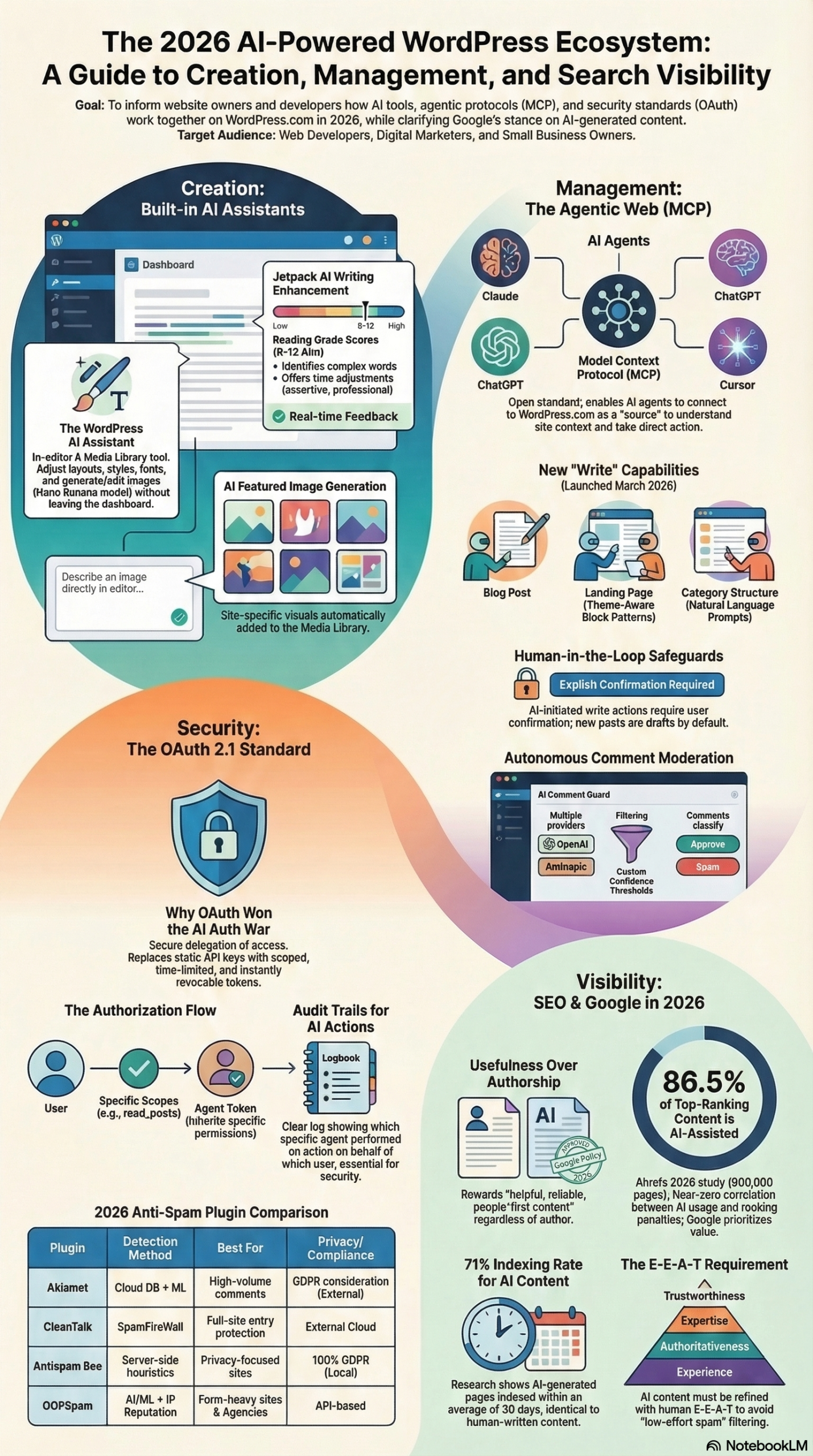
According to the NotebookLM research briefing on agentic AI and WordPress security, the expanded MCP server now supports 19 distinct operations across six content types:
- Posts: create, read, update, delete, schedule
- Pages: create, read, update, delete
- Comments: create, read, update, delete, moderate
- Categories: create, read, update, delete
- Tags: create, read, update, delete
- Media: upload, read, update
That’s a significant operational surface. In practical terms, you can ask Claude or ChatGPT to “write a 1,200-word tutorial on email segmentation and save it as a draft” and the agent will execute the full sequence: compose the content, apply the appropriate category and tags, set the featured image if you’ve uploaded one, and save it to your drafts queue — all without you touching the WordPress admin dashboard.
Theme awareness is an underappreciated part of this release. The MCP server exposes your site’s design system — colors, fonts, spacing — so agents can generate content that inherits your existing brand identity rather than producing structurally correct but visually mismatched output. For teams maintaining consistent brand standards across dozens of posts per month, this is a workflow accelerator on its own.
The system is designed around a human-in-the-loop security model. Every write or delete operation requires explicit human confirmation before execution. New content is always saved as “draft” status by default — it never auto-publishes. Ronnie Burt, AI Product Lead at WordPress.com, described the intent directly: “Now those tools can actually take action — draft a post, build a page, manage comments — directly on your site, through conversation. You stay in control the whole time.”
There are three distinct implementation paths, each suited to different operator profiles:
- WordPress.com Connector: The fastest setup path for hosted WordPress.com users, accessible directly through the Claude or ChatGPT settings interface with minimal configuration.
- Official MCP Adapter: A bridge between the WordPress Abilities API and the MCP protocol, designed for self-hosted WordPress installations that need full control over their environment.
- InstaWP Managed MCP: The preferred path for agencies, providing sandboxed staging environments where AI actions can be tested safely before hitting production sites.
As the research report notes, this infrastructure represents the transition “from human-computer interaction to autonomous ‘agentic’ workflows” — and WordPress is now one of the most widely deployed platforms where that transition is happening in real time.
Why It Matters
Before this update, AI-assisted WordPress publishing workflows fell into one of two failure modes: either a human was in the loop the entire time (copy-paste from ChatGPT into the editor), or teams built brittle custom integrations via the WordPress REST API with static API keys buried in .env files. The MCP approach eliminates both.
For solo creators and bloggers, this means a direct conversational interface for publishing — no more context-switching between tools. You describe what you want, confirm the action, and the draft is waiting in your queue for final review.
For marketing agencies, the operational leverage is substantial. According to the research briefing, MCP-compatible clients can handle bulk administrative tasks that are traditionally time-consuming: updating alt text across hundreds of images, reorganizing stale category structures, auditing post metadata consistency, and moderating comment backlogs. Tasks that would take a junior team member four to six hours become a 30-minute conversation with an agent.
For enterprise WordPress operators running multi-site configurations, the combination of scoped OAuth tokens and agent-specific audit trails — which distinguish human actions from agent actions in logs — finally provides the governance layer that static API keys never could. This matters for compliance-conscious industries where the question “who changed this, and when?” has to have a clean answer.
What makes this materially different from earlier AI publishing tools is standardization. Because MCP is an open protocol, any MCP-compatible client — not just Claude or ChatGPT today, but any future agent built to spec — can connect to the same WordPress MCP server without new custom integrations. The setup investment compounds.
The opt-in architecture also matters for community trust. WordPress.com Support clarified directly in community discussions: “No worries, AI features are completely opt-in. [They] only run if you enable [them].” This addresses legitimate operator concerns that hosting providers might silently activate AI generation on sites without explicit consent — a concern with real precedent in the broader CMS industry.
The Data
MCP Implementation Paths Compared
| Implementation Path | Best For | Setup Complexity | Staging Support | Cost Model |
|---|---|---|---|---|
| WordPress.com Connector | Hosted WordPress.com users | Low (UI-based) | No | Included with plan |
| Official MCP Adapter | Self-hosted WordPress | Medium (config required) | No | Free / open source |
| InstaWP Managed MCP | Agencies, multi-site teams | Medium | Yes (sandboxed) | Paid agency plans |
Anti-Spam Tool Comparison (2026)
The expanded AI write capabilities on WordPress.com sites also increase the need for robust spam protection — more agentic surface area creates more vectors for adversarial inputs. The research report documents the current state of anti-spam tooling:
| Plugin | Primary Method | Best Use Case |
|---|---|---|
| Akismet | Cloud DB + ML | High-traffic blogs and comment-heavy sites |
| CleanTalk | Cloud + SpamFireWall | Full-site protection (forms, login, comments) |
| Antispam Bee | Server-side Heuristics | Privacy-focused sites, GDPR compliance |
| OOPSpam | AI/ML + IP Reputation | Form-heavy sites and agency-managed installs |
The scale of the problem is worth stating plainly: Akismet currently blocks over 7 million spam comments per hour by learning from global datasets and user correction signals. For any site enabling AI write agents, layering a spam solution is not optional — it’s a baseline requirement.
Step-by-Step Tutorial: Connecting an AI Agent to Your WordPress.com Site
This walkthrough uses Claude as the AI client and the WordPress.com Connector (the lowest-friction path for hosted users). Allow 20–30 minutes for initial setup.
Prerequisites
- WordPress.com site on a Business plan or higher (required for full MCP feature access as of March 2026)
- Active Claude account at claude.ai — Pro or Team plan recommended
- Admin access to your WordPress.com dashboard
- Anti-spam plugin installed and configured (Akismet recommended)
- Basic familiarity with WordPress categories and tags
Phase 1: Enable MCP Write Access on WordPress.com
Step 1: Open the Connected Applications settings.
Log into your WordPress.com dashboard. Navigate to Settings → Connected Applications. You’re looking for the AI Agents or MCP section. If it’s not visible, confirm your plan — as of March 2026, MCP write access requires a Business plan or above. Free and Personal plans include read-only agent access only.
Step 2: Enable write operations and scope your permissions.
The MCP server defaults to either disabled or read-only. Toggle write access on, then review the permission checklist carefully. You’ll see a breakdown of the 19 operations across the six content types. Disable any operation categories you don’t need for your specific workflow.
If you’re using the agent only for post drafting, disable write access for pages, media uploads, and comment deletion. The principle of least privilege is not a theoretical security guideline here — it’s a direct risk-reduction measure against prompt injection attacks and misconfigured agent behavior.
Step 3: Complete the OAuth 2.1 authorization flow.
Click “Authorize AI Agent Access.” You’ll be redirected through the WordPress.com OAuth 2.1 flow. This issues a scoped token — not a master API key — that is cryptographically tied to the specific operations you enabled in Step 2. According to the research report on OAuth 2.1 in agentic systems, this architecture solves four critical requirements simultaneously: user consent via standardized permission screens, scoped tokens tied to specific tasks, instant revocation via Connected Apps settings, and audit trails that distinguish human actions from agent actions.
After authorization completes, copy the MCP server endpoint URL displayed on the confirmation screen. You will need this in Phase 2.
Step 4: Note the token expiry window.
Unlike static Application Passwords that persist indefinitely, OAuth 2.1 tokens issued by WordPress.com have a defined expiry window. Note the expiry date and set a calendar reminder to re-authorize before it lapses. For production workflows, configure your identity provider to handle token refresh automatically if your plan supports it.
Phase 2: Connect Claude to Your WordPress MCP Server
Step 5: Open Claude’s Integrations panel.
In Claude (claude.ai), navigate to your account settings and locate the Integrations or Tools panel. This is where MCP server connections are managed. If you’re on a Team plan, this may be in the workspace settings rather than individual account settings — check both.
Step 6: Add the WordPress MCP server.
Click “Add MCP Server” and populate the fields:
– Server URL: the endpoint URL from Step 3
– Authentication type: OAuth 2.1
– Scopes: these should auto-populate from your WordPress.com authorization flow
If you’re using ChatGPT instead of Claude, the process is structurally identical — find Connected Apps in ChatGPT settings, add the WordPress.com connector, and complete the OAuth flow. The MCP protocol is client-agnostic; the underlying authentication is the same.
Step 7: Verify the connection with a test read.
Claude will execute a test read operation — typically fetching your 5 most recent posts — and display them in the confirmation dialog. If this fails, the most common causes are: (a) a plan restriction on the WordPress.com side, (b) a token scope mismatch, or (c) a network issue with the MCP endpoint URL. Check the WordPress.com Connected Applications panel for any error state on the token before troubleshooting further.
Phase 3: Draft, Review, and Publish Your First Agent Post
Step 8: Construct a specific content brief for the agent.
Open a new Claude conversation. Specificity is the difference between a usable draft and a generic one. Use this prompt structure as a starting template:
Write a [WORD COUNT]-word tutorial post for my WordPress blog about [TOPIC].
Target audience: [AUDIENCE — e.g., "mid-level marketing managers who use HubSpot"].
Tone: [e.g., practitioner-first, direct, no filler phrases].
Structure: brief intro, [NUMBER] main sections with H2 headers, actionable conclusion.
Category: [YOUR EXACT CATEGORY NAME AS IT EXISTS ON SITE].
Tags: [TAG 1], [TAG 2], [TAG 3].
Do NOT include any placeholder text or [BRACKET] items in the draft.
Save as draft — do NOT publish.
Claude will generate the post and then present a confirmation dialog before executing the write operation. The confirmation summary will show: post title, approximate word count, assigned category, tags, and the target draft status. Review this before confirming.
Step 9: Confirm the write operation.
Click “Confirm.” Claude calls the WordPress MCP server, creates the post object with all metadata populated, and returns a direct dashboard link to the new draft. The entire operation typically completes in under 10 seconds.
Step 10: Review and enhance the draft in WordPress.
Open the draft link in your WordPress.com editor. This is where your editorial judgment is not optional — it’s the primary SEO protection mechanism. According to Google’s E-E-A-T guidelines as documented in the research report, the “Experience” factor is the ranking differentiator that AI cannot replicate: “AI lacks ‘lived experience,’ making human-added case studies, original workflows, and personal anecdotes critical for ranking.” At minimum, add the following before publishing:
- 1–2 first-hand observations, results, or workflow-specific details from your own experience
- At least one original screenshot, data visualization, or proprietary metric
- An explicit recommendation or opinion that reflects your actual stance
These are not cosmetic additions. They are the content attributes that Google’s automated ranking systems and human quality reviewers use to distinguish substantive posts from “low-effort automated spam,” as the research report describes it.
Step 11: Configure anti-spam before enabling comments.
Before you publish and open the post to comments, confirm your spam protection is active. Navigate to Plugins → Installed Plugins and verify Akismet is active and associated with a valid API key. For higher-traffic sites, the research report recommends layering a honeypot method (like WP Armour) for basic bots alongside an AI-powered service for contextual spam. This two-layer approach catches both pattern-based and semantically sophisticated spam.
Step 12: Publish using the standard WordPress workflow.
Once your review and enhancement are complete, publish through the standard WordPress editor — not through the agent. This is a deliberate best practice: agents handle the drafting, metadata, and administrative overhead; you retain final editorial control and the explicit publish action. This distinction also maintains clean audit trails in your Connected Apps panel.
Expected Outcomes After Setup
By the end of this workflow, you should have:
– A working AI agent with scoped, revocable write access tied to your specific operational needs
– A repeatable content drafting workflow that moves from brief to draft in under 10 minutes
– Multi-layered anti-spam protection active before AI-assisted content goes public
– A tamper-resistant audit trail in Connected Apps showing every agent action with timestamps
– A clear mental model of where the human review step is non-negotiable (Steps 10 and 12)
Real-World Use Cases
Use Case 1: Content Agency Batch Drafting Across Client Sites
Scenario: A content agency manages 12 WordPress.com client sites, each requiring 3 posts per week — 36 posts weekly at standard production scale.
Implementation: The agency uses InstaWP Managed MCP for sandboxed testing, connecting Claude to each client’s MCP endpoint with site-specific scoped tokens. A single project manager sends Claude a weekly content brief spreadsheet exported as a prompt block — topics, audience descriptions, categories, and tags for all 12 sites. Claude drafts all posts and saves them to respective client draft queues. Human editors then review each draft, injecting client-specific case studies, screenshots, and tone corrections before scheduling.
Expected Outcome: Initial drafting time drops from roughly 4 hours per week to under 45 minutes. Human editor capacity shifts from first-draft production to quality enhancement and E-E-A-T injection — the work that actually drives ranking performance. The agency can scale client count without adding headcount proportionally.
Use Case 2: Solo Blogger SEO Infrastructure Maintenance
Scenario: A solo blogger with 400 published posts has an inconsistent category structure accumulated over 5 years, plus 800 images with missing alt text — a technical SEO liability and accessibility problem.
Implementation: Using the WordPress.com Connector and a structured Claude conversation, the blogger asks the agent to: (1) audit current category assignments across all posts and propose a consolidation, (2) generate alt text for images missing descriptions based on file names and surrounding content context, and (3) draft updated category description text for the top 10 categories. Each batch action is presented as a confirmation dialog before execution.
Expected Outcome: An 800-image alt text update that would take 6–8 hours manually completes in under an hour. Category restructuring improvements flow immediately into navigation, internal linking, and site crawl efficiency. The blogger invests the recovered time in new content rather than infrastructure maintenance.
Use Case 3: E-Commerce Store Blog Comment Moderation
Scenario: A WooCommerce-powered WordPress site receives 200+ comments per day across its blog, with significant spam volume and occasional genuine customer questions mixed in.
Implementation: The site deploys AI Comment Guard (using Anthropic as the moderation backend per the research report) with confidence thresholds set to flag — not auto-delete — borderline comments. An AI agent connected via MCP reviews the daily flag queue and executes bulk approval or deletion through the MCP server’s comment management operations. Genuine customer questions routed to the support team.
Expected Outcome: Daily moderation time drops from a manual 45-minute review of 200+ comments to a 5-minute confirmation of the agent’s proposed actions. Legitimate customer engagement gets faster responses. Spam that evades Akismet’s pattern-matching (currently blocking over 7 million spam comments per hour globally) is caught by the contextual AI review layer.
Use Case 4: WordPress Developer Client Onboarding Automation
Scenario: A WordPress developer who builds and hands off sites to clients needs to populate each new site with placeholder content, category structures, and default pages before client handoff.
Implementation: Install the Official MCP Adapter on the staging environment. Use Cursor (an MCP-compatible development editor) to run a structured agent prompt that builds the initial content architecture: creates 8–10 category stubs with descriptions, generates 3 sample posts per category, sets up standard pages (About, Contact, Privacy Policy skeletons), and uploads placeholder media. When the client approves the structure, deploy to production.
Expected Outcome: New site scaffolding that previously took 3–4 hours of manual work takes under 30 minutes. The workflow is version-controlled and repeatable across every new client engagement. Developers can offer a more polished handoff experience without proportionally more setup time.
Common Pitfalls
1. Using Long-Lived API Keys Instead of OAuth 2.1
The legacy WordPress integration approach — grabbing an Application Password from the user profile and hardcoding it into an agent configuration — creates serious exposure. Static keys have no expiry, no scope restrictions, and no audit trail. If that key is exposed through prompt injection or a leaked configuration file, an attacker has persistent, unrestricted access. As Kundan Singh, VP of Engineering at LoginRadius, stated directly in the research report: “We are handing ‘God-mode’ access to non-deterministic software and hoping for the best.” OAuth 2.1 is the required standard — not a preference.
2. Auto-Publishing Without Human Review
Some operators configure agents to publish immediately to maximize throughput. This is the fastest path to publishing low-quality content that underperforms in search. The human-in-the-loop confirmation model in the WordPress MCP system exists because AI output lacks the “Experience” dimension of E-E-A-T. Keep new content defaulting to draft status and treat the review step as a non-negotiable quality gate.
3. Granting Admin-Level Scope When Editor-Level Is Sufficient
Giving an agent full admin permissions for a routine content drafting workflow is a common misconfiguration. The research report is explicit: “Use role-limited tokens (e.g., Editor scope instead of Admin) for routine content tasks to limit the ‘blast radius’ of a potential prompt injection attack.” Configure minimum required permissions at initial setup — retrofitting scope restrictions after a problem occurs is harder than getting them right upfront.
4. No Documented Revocation Process
If an agent begins a hallucination loop, queries excessive records, or behaves unexpectedly, you need a documented process to cut off access immediately. Know where your Connected Apps settings are before you need them in an emergency. The research report recommends that teams ensure their identity provider supports real-time “Universal Logout” for agent identities — not just token expiry on a schedule.
5. Publishing 100% AI Output Without E-E-A-T Enhancement
Google’s 2026 guidelines confirm no blanket penalty for AI-generated content. John Mueller of Google summarized the position: “I wouldn’t think about it as AI or not, but about the value that the site adds to the web.” The risk is not origin — it’s low-effort output. Posts with no proprietary data, no first-hand observations, and no original analysis are increasingly filtered by Google’s automated systems. Every agent draft requires human editorial enrichment before publication.
Expert Tips
1. Bind Tokens to Specific Resources Using RFC 8707
For operators managing multiple WordPress sites under a single account, implement Resource Indicators (RFC 8707) in your OAuth configuration. This extension cryptographically binds a token to a specific target service, preventing “Confused Deputy” attacks where a token issued for Site A is used to access Site B. As noted in the research report, this is a documented defense against a real attack vector in multi-site agent deployments.
2. Segment Agent Identities by Function
Don’t use one agent identity for all operations. Create separate MCP connections with distinct scoped tokens for (a) content drafting, (b) comment moderation, and (c) site administration tasks like category management. Compartmentalization means that if your drafting agent is compromised via a malicious prompt in user-submitted content, it cannot access your moderation pipeline or admin settings.
3. Always Stage Bulk Operations in InstaWP Before Production
Even for seemingly low-risk operations like bulk category reassignment or alt text updates across hundreds of posts, test the agent’s behavior against a sandboxed staging clone first. Agent-executed bulk operations on 400+ posts are not easily undone via standard WordPress undo functionality. InstaWP Managed MCP provides exactly this safety net — use it for any operation touching more than 20 content objects.
4. Pipe Agent Action Logs to an External System
WordPress.com’s Connected Apps panel records agent actions, but those logs live inside the same platform you’re automating. For genuine accountability and debugging, export agent action logs to an external system — a structured spreadsheet via Zapier, a Slack channel for team visibility, or a lightweight database. This gives you a timestamped, tamper-resistant record that exists independently of the WordPress environment.
5. Leverage Theme Awareness in Your Content Briefs
The MCP server’s exposure of your site’s design system is useful beyond visual consistency. Reference your brand’s heading hierarchy preferences and section length norms in your content brief prompts. Agents aware of how the theme renders content will structure posts — heading depth, callout box usage, section pacing — to fit your actual display environment, which reduces the reformatting work required during editorial review.
FAQ
Q: Does enabling AI agents on WordPress.com mean my site will automatically publish AI-generated content?
No. WordPress.com Support confirmed directly in community discussions: “AI features are completely opt-in. [They] only run if you enable [them].” Additionally, the human-in-the-loop confirmation model requires explicit approval for every write operation, and all new content defaults to draft status. Nothing goes live without a deliberate publish action from you.
Q: Will Google penalize posts drafted by an AI agent through this system?
Not automatically, and not based on origin. Google’s 2026 position, summarized by Search Advocate John Mueller in the research report: “I wouldn’t think about it as AI or not, but about the value that the site adds to the web.” The risk is publishing low-effort output without human enrichment. Drafts enhanced with original experience, proprietary data, and genuine first-hand insight are not at elevated ranking risk.
Q: Can I use MCP write access with self-hosted WordPress — not just WordPress.com?
Yes. The Official MCP Adapter bridges the WordPress Abilities API with the MCP protocol for self-hosted environments. Setup is more involved than the WordPress.com Connector but the adapter is free and open source. Agencies managing self-hosted client sites should evaluate InstaWP Managed MCP for the sandboxed staging environment it provides — the safety net is worth the additional cost for client-facing production sites.
Q: How is this different from just using the WordPress REST API with a custom integration?
The REST API requires custom integration code, manual authentication handling, and bespoke error management for every client you want to connect. The MCP server is agent-native: it provides a protocol-compliant interface that any MCP-compatible client consumes without custom code. It’s also designed for conversational workflows — agents can chain multiple operations naturally in sequence rather than requiring discrete API calls per action.
Q: What’s the fastest way to revoke an agent’s access if something goes wrong?
Navigate to WordPress.com Dashboard → Settings → Connected Applications, find the agent’s OAuth token, and click “Revoke.” This immediately invalidates the token — there is no delay or grace period. For teams needing faster response capability, configure your identity provider to support Universal Logout, which can revoke all active sessions for a specific agent identity across every connected service simultaneously, as recommended in the research report.
Bottom Line
WordPress.com’s March 2026 MCP write-access launch is the most significant structural change to WordPress publishing infrastructure in years — not because AI agents are new, but because this is the first time they’ve been integrated into the publishing workflow through a standardized, governed, and auditable protocol. The combination of OAuth 2.1 scoped tokens, human-in-the-loop confirmations, and theme-aware content generation makes this viable for production use, not just prototyping. The operational leverage for content teams, agencies, and solo creators is real and immediately measurable. Practitioners who configure this correctly now — with proper scope restrictions, layered anti-spam protection, staging environments for bulk operations, and a non-negotiable E-E-A-T enhancement step in their editorial workflow — will have a durable content operations advantage as the agentic web continues to mature.


0 Comments