

Over 80% of AI projects fail — and the root cause almost never comes back to the model. It comes back to the data. If you are deploying autonomous AI agents in 2026 and your data infrastructure is still built like a 2019 reporting stack, your agents will fail in production regardless of how sophisticated your prompts are. This tutorial walks you through the full architecture, implementation phases, and governance practices required to run AI agents reliably at enterprise scale, using the MIT Technology Review research brief (March 2026) and a deep-dive NotebookLM research report as the primary sources.
What This Is: The Agentic Data Plane
The term “data infrastructure” used to mean a data warehouse, a few ETL jobs, and a BI dashboard. In 2026, that definition is functionally obsolete for any organization running AI agents. According to the NotebookLM research report on enterprise AI deployment, the definition of a data platform has shifted from a reporting infrastructure to an intelligence infrastructure — one where autonomous agents consume data directly to enable automated action.
This new model is called the Agentic Data Plane: a context-aware layer that supports continuous, high-frequency decision-making by software agents rather than periodic consumption by human analysts. It is not a single product. It is an architectural pattern composed of event-driven pipelines, multi-modal data stores, memory systems, and embedded governance controls.
The research report describes this as a three-tier model that every enterprise must implement to support production-grade agents:
Tier 1: The Foundation (State, Memory, and Knowledge)
This tier determines how information is stored, retrieved, and understood by agents. It is built on two sub-systems:
- Memory Layer: Every agent needs both short-term working memory (what happened in this session?) and long-term episodic memory (what has the system done historically?). Without both, agents repeat mistakes, lose context across interactions, and produce inconsistent outputs.
- Knowledge Layer: This connects agents to enterprise truth — the current state of your CRM, your ERP, your product catalog, your contracts. The primary mechanisms are vector databases (for semantic, fuzzy retrieval from unstructured content) and Retrieval-Augmented Generation (RAG) pipelines (which inject relevant retrieved chunks into the agent’s context window before it generates a response). An emerging pattern called Graph RAG extends this with relationship-aware retrieval — more on that in the data section below.
Tier 2: The Workflow (Planning and Orchestration)
This tier converts understanding into action sequencing. It contains two roles:
- The Planner: Receives a high-level objective (e.g., “qualify these 200 inbound leads and book meetings for the top 20”) and breaks it into discrete, executable steps.
- The Orchestrator: Manages which specialized sub-agents handle which steps, preventing duplication, resolving conflicts, and ensuring that parallel workstreams do not overwrite each other’s outputs.
If you skip this tier and just chain agents together ad hoc, you will see what the Kore.ai strategic analysis describes as “integration spaghetti” — a tangled mesh of point-to-point connections that cannot be debugged, monitored, or scaled.
Tier 3: The Autonomous Layer (Action)
This is where agents stop reasoning and start doing: updating records in a CRM, generating a customer response email, triggering an API call to an ERP system, or escalating a case to a human. This tier is also the one most directly exposed to business risk, which is why governance (covered below) must be embedded here — not bolted on afterward.
In late 2025, nearly two-thirds of companies were experimenting with AI agents, while 88% were using AI in at least one business function — up from 78% in 2024. The infrastructure described above is what separates the companies running agents as production systems from those still running experiments.
Why It Matters: The Infrastructure Gap Is the Agent Gap
The failure rate of AI projects is not a model problem. The research report is explicit: over 80% of AI projects fail due to poor data foundations. The model is usually fine. The retrieval pipeline, the data freshness, the access controls, the observability — that is where production deployments break down.
This matters specifically for three audiences:
For developers and ML engineers: You are responsible for the pipelines that feed agents context. If those pipelines deliver stale, poorly formatted, or incomplete data, the agent’s outputs will be wrong — and the blast radius of a wrong autonomous action is far larger than a wrong chatbot response. The research report cites that 91% of ML models experience quality degradation over time due to stale data. Agents compound this problem because they act on the data rather than just presenting it.
For enterprise architects: The shift from a reporting stack to an intelligence infrastructure requires rethinking how data is governed, accessed, and versioned. Traditional batch ETL is insufficient for agents that need sub-5-minute data freshness for operational decisions. You need Change Data Capture (CDC) pipelines and event streaming — tools like Redpanda or Apache Kafka — feeding a unified access layer.
For marketing and revenue operations teams: AI agents deployed in customer-facing or revenue-impacting workflows (lead qualification, churn prediction, personalization) are only as trustworthy as the data they act on. Informatica frames it directly in its ROI metric: Agent ROI = (Business value delivered) × (Data reliability score). A perfectly functioning agent operating on 70% reliable data delivers 70% of potential ROI — at best. At worst, it takes confidently wrong action at scale.
The business case is not “AI is exciting.” The business case is that 72% of organizations expect to increase LLM spending, and the organizations that have invested in data infrastructure will see returns while those that haven’t will continue to experience the 80% failure rate.
The Data: Infrastructure Requirements vs. Agent Outcomes
The following table, drawn from the NotebookLM research report, maps each infrastructure requirement to its direct impact on agent behavior and business outcomes.
| Infrastructure Component | Without It | With It | Recommended Tool/Pattern |
|---|---|---|---|
| Unified Data Access Layer | Agents query 6-10 systems individually, causing integration spaghetti | Single abstraction layer; agents get clean, consistent data | IDMC, n8n, custom API gateway |
| Real-Time CDC Pipelines | Agents operate on hours-old snapshots; wrong decisions at speed | Agents act on current business state (sub-5-min latency) | Redpanda, Apache Kafka |
| Vector Database (RAG) | Agents hallucinate facts not in their context window | Semantic retrieval surfaces relevant enterprise knowledge | Pinecone, Weaviate, pgvector |
| Graph RAG | Agents fail on multi-hop relational queries | Precise entity-relationship reasoning across structured data | Neo4j + LangChain, Amazon Neptune |
| Agent Identity & RBAC | Agents access data they shouldn’t; audit trail is unclear | Least-privilege access per agent; full audit trail | Microsoft Entra Agent Identity |
| Human-in-the-Loop Nodes | Agents take high-risk actions without human review | Pause-and-review gates at critical decision points | n8n Wait nodes, LangGraph interrupt |
| Circuit Breakers | API failure causes cascading agent failures | Graceful fallback to cached data or queued retry | Redis queue, custom retry logic |
| Observability Dashboards | No visibility into failure rates, costs, or latency | Real-time tracking of run times, error rates, API costs | Langfuse, custom dashboards |
Memory Architecture Comparison: Vector DB vs. Graph RAG vs. Hybrid
| Criteria | Vector Database | Graph RAG | Hybrid (Recommended) |
|---|---|---|---|
| Best For | Unstructured text, chat logs, semantic similarity | Multi-hop relational queries, structured knowledge | Both workloads simultaneously |
| Query Style | “Find documents similar to this query” | “How is entity X related to entity Y?” | Broad retrieval → precise refinement |
| Speed | Very fast (approximate nearest neighbor) | Slower (graph traversal) | Fast initial retrieval, precise follow-up |
| Setup Complexity | Low-medium | High | High |
| Industry Trend | Widely adopted | Emerging | Emerging industry standard (2026) |
The hybrid approach — using vector search for initial retrieval and graph traversal for precise relational context — is what the research report identifies as the emerging industry standard.
Step-by-Step Tutorial: Building Enterprise AI Agent Infrastructure
This walkthrough follows the three-phase deployment framework from the research report. Each phase has concrete deliverables.
Prerequisites
Before starting Phase 1, confirm you have:
– Access to your organization’s primary data systems (CRM, ERP, data warehouse)
– A decision on deployment environment: Cloud-managed (faster setup, less control) vs. Self-hosted (compliance-friendly, more engineering lift)
– At least one engineer familiar with event streaming concepts
– An identity management system that supports service account creation (e.g., Microsoft Entra ID, Okta)
– A vector database or the ability to deploy one (cloud-hosted Pinecone/Weaviate, or self-hosted pgvector on Postgres)
Phase 1: Build the Foundation (Days 1–90)
Step 1: Choose and configure your deployment environment
For most enterprises starting in 2026, the default recommendation is cloud-managed for the first 90 days. You get managed infrastructure, automatic scaling, and faster time to first production workflow. If your organization has strict data residency or compliance requirements (HIPAA, FedRAMP, GDPR), plan for self-hosted from day one — retrofitting compliance controls later is significantly more expensive.
Step 2: Deploy your unified data access layer
This is the single most impactful infrastructure decision you will make. Rather than letting agents query each data system directly, deploy an integration layer with pre-built connectors. The research report specifically references Informatica IDMC and n8n as platforms that provide this unified access pattern at enterprise scale.
The practical implementation: stand up an API gateway or integration platform that exposes your CRM, ERP, data warehouse, and key external APIs through a standardized interface. Agents query this layer, not the underlying systems directly. This gives you a single point of access control, logging, and rate limiting.
Step 3: Set up real-time Change Data Capture (CDC)
Batch ETL is incompatible with operational AI agents. If your agents are making customer-facing decisions, they need data that is less than 5 minutes old. Implement CDC on your primary transactional systems (your CRM database, your ERP) to stream changes in real time to a Kafka or Redpanda topic.
As Kannan Dorairaj, Chief Architect at LiveRamp, put it: “The hardest part of AI isn’t building applications — it’s trusting them with sensitive data. Redpanda gives enterprises the guardrails and speed we need to actually put agents into production.”
A minimal CDC configuration using Debezium (open source) against a Postgres CRM database looks like this:
# debezium-connector-config.json
{
  "name": "crm-connector",
  "config": {
    "connector.class": "io.debezium.connector.postgresql.PostgresConnector",
    "database.hostname": "your-crm-db-host",
    "database.port": "5432",
    "database.user": "debezium_user",
    "database.password": "${DB_PASSWORD}",
    "database.dbname": "crm",
    "table.include.list": "public.contacts,public.deals,public.activities",
    "topic.prefix": "crm",
    "plugin.name": "pgoutput"
  }
}
This streams every INSERT, UPDATE, and DELETE from your contacts, deals, and activities tables into Kafka topics in real time. Your agents subscribe to those topics rather than polling the database.
Step 4: Configure agent identity and RBAC
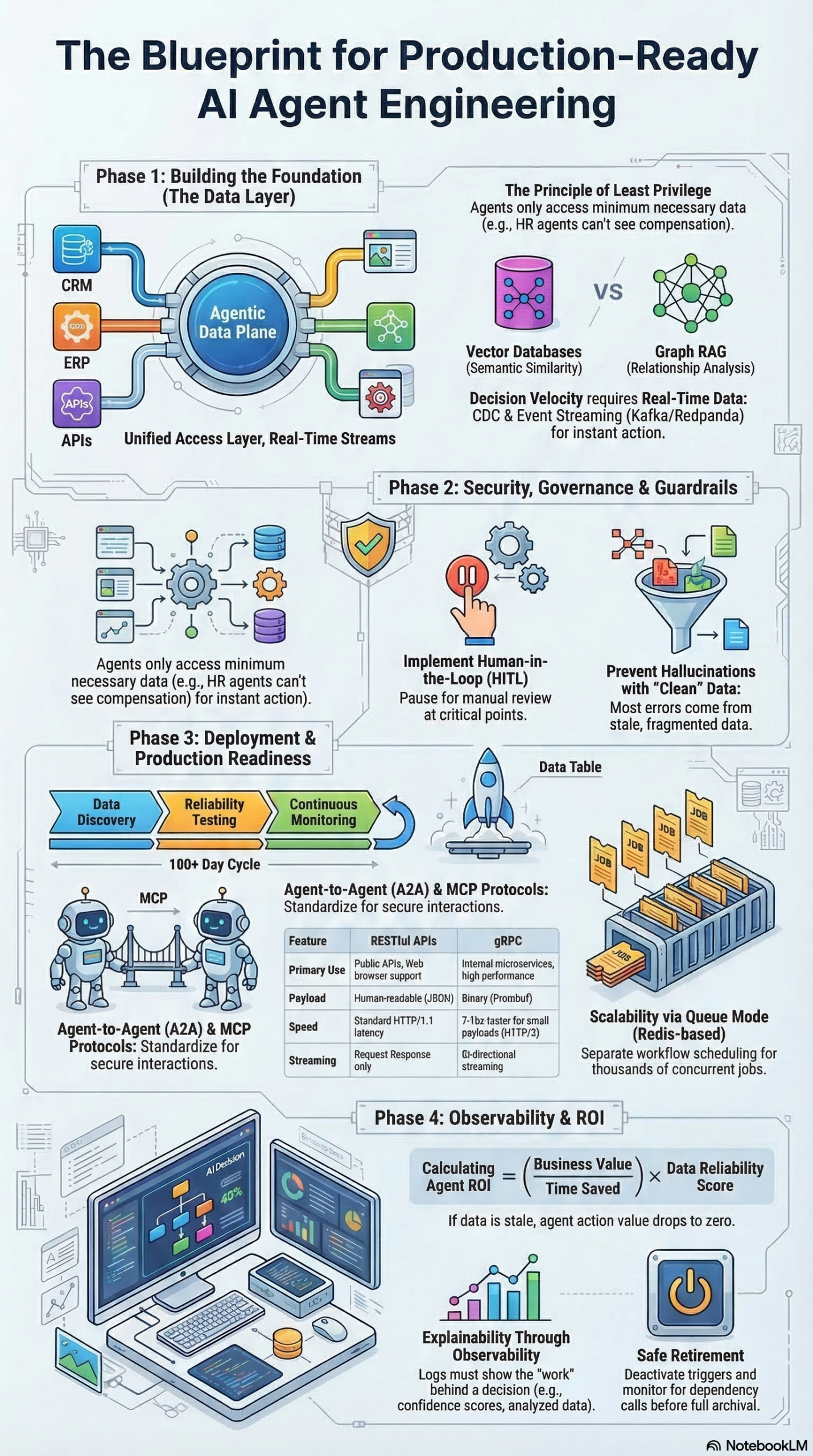
Every agent must have a unique, non-human identity. The research report cites Microsoft Entra Agent Identity as the reference pattern. Create distinct service principals for:
– Production agents
– Development agents
– Test/staging agents
Apply the principle of least privilege to each. A lead-qualification agent has no business reading financial records. A contract-summarization agent has no business writing to the CRM. Define scopes explicitly and audit them quarterly.
# Example: Create an agent service principal in Azure
az ad sp create-for-rbac \
  --name "agent-lead-qualification-prod" \
  --role "CRM.ReadOnly" \
  --scopes "/subscriptions/{sub-id}/resourceGroups/{rg}/providers/Microsoft.CRM/instances/{instance}"
Step 5: Implement “Queue Mode” for scalability
Scale agent workloads by separating scheduling from execution. Using Redis as a job queue, you decouple the trigger (a webhook fires, a schedule hits) from the execution (an agent does the work). This lets you run concurrent agent jobs without them competing for resources on a single process.
The configuration in n8n, for example, involves setting the execution mode to queue and pointing it at a Redis instance. Similar patterns apply in LangGraph and custom agent frameworks.
Phase 2: Build and Test Your Agent Workflows (Days 30–90)
Step 6: Define your trigger types
Every agent workflow starts with a trigger. The three primary types are:
1. Webhooks — an external system pushes an event (new lead created in CRM → qualification agent fires)
2. Scheduled Triggers — time-based execution (daily at 06:00 UTC → reporting agent generates digest)
3. Application Events — internal system events (deal stage changes to “Proposal Sent” → follow-up sequence agent fires)
Document every trigger, its source system, the expected payload schema, and the maximum acceptable latency for the downstream action.
Step 7: Build multi-agent coordination patterns
For complex workflows, use one of three coordination patterns documented in the research report:
- Sequential: Agent A completes, passes output to Agent B. Use this for dependent tasks where order matters.
- Parallel: Multiple agents run simultaneously on different subtasks. Use this for independent workstreams (e.g., research agent + draft agent running in parallel before a synthesis agent combines their outputs).
- Hierarchical: An orchestrator agent dynamically delegates to sub-agents based on the nature of each task. The most powerful pattern, also the most complex to debug.
Step 8: Implement Human-in-the-Loop (HITL) checkpoints
Not every agent action should be fully autonomous. The research report is explicit: “Trustworthy AI systems combine deterministic workflows, probabilistic models, and human oversight. Automation ensures control, AI handles complexity, and humans own risk, edge cases, and final responsibility.” — Jan Oberhauser, Founder and CEO of n8n.
Implement “Wait” nodes at any decision point that is high-stakes, irreversible, or customer-facing. In practice, this means:
– Sending a draft agent output to a Slack channel for human approval before the action fires
– Holding a bulk data update in a staging state until a human confirms
– Flagging anomalous agent behavior for review before processing continues
Step 9: Run structured evaluations before production
Before any agent touches production data, run an evaluation suite measuring:
– Helpfulness: Did the agent complete the intended task?
– Correctness: Was the output factually accurate relative to the source data?
– Semantic Similarity: For generative tasks, does the output match the expected format and intent?
Test with realistic data volumes and edge cases — not just the happy path. A qualification agent trained on clean demo data will behave differently when it encounters a contact record with five conflicting email addresses and no company affiliation.
Phase 3: Production Deployment and Ongoing Maintenance
Step 10: Mirror staging to production exactly
Your staging environment must replicate production as closely as possible — same data volumes, same latency profiles, same external API dependencies. Agents that pass testing on sanitized sample data but fail on live data are a common failure mode, and the cause is almost always a staging environment that does not reflect production reality.
Step 11: Set up continuous monitoring
Configure dashboards to track, at minimum:
– Agent failure rate by workflow and trigger type
– Average run time per agent (flag p95 latency spikes)
– API call costs per agent per day
– Data freshness lag (how old is the data an agent is acting on?)
Establish health check endpoints (/healthz) on all critical agent services. Route alerts to Slack or email when a workflow fails or when an underlying data dependency becomes unresponsive.
Step 12: Plan for graceful retirement
When decommissioning an agent workflow, check all upstream and downstream dependencies before shutting it down. Move workflows to a “Deprecated” folder with a documented sunset date before archiving. This prevents silent failures when another workflow was unknowingly depending on the agent you just turned off.
Expected Outcomes
After completing all three phases, you should have:
– A unified data access layer with real-time CDC pipelines feeding agent context
– Separate agent identities with least-privilege RBAC enforced
– Multi-agent workflows with documented trigger types and coordination patterns
– HITL checkpoints at all high-risk decision points
– A staging environment that mirrors production
– Monitoring dashboards with alert thresholds configured
Real-World Use Cases
Use Case 1: B2B Lead Qualification at Scale
Scenario: A SaaS company receives 500–1,000 inbound leads per week via web forms, content downloads, and event registrations. The SDR team can only meaningfully engage 50–100 of them, and manual scoring is inconsistent.
Implementation: Deploy a qualification agent that subscribes to a Kafka topic fed by a Debezium CDC connector on the CRM. When a new contact record is created, the agent retrieves the company’s firmographic data (from an enrichment API), the contact’s activity history (from the vector store), and the current ICP definition (retrieved via RAG from the product team’s latest ideal customer profile document). It scores the lead, writes the score back to the CRM, and — for leads above the threshold — creates a task for an SDR with a personalized outreach brief.
Expected Outcome: Consistent scoring applied to 100% of inbound leads in under 3 minutes of form submission. SDR capacity focused on the highest-value opportunities. The HITL checkpoint: leads flagged as high-value but with unusual firmographic signals route to a human reviewer before task creation.
Use Case 2: Real-Time Customer Churn Prevention
Scenario: A subscription business wants to intervene with at-risk customers before they cancel, but the existing system only generates weekly churn risk reports that customer success managers rarely act on in time.
Implementation: Build a churn-detection agent that consumes real-time product usage events from a Kafka stream. When a customer’s usage drops below a threshold for 48 consecutive hours, the agent retrieves their full account history (contract terms, past support tickets, recent feature adoption) using Graph RAG to navigate the relationship between the contact, the account, the subscription, and the product usage records. It then generates a personalized intervention recommendation and routes it to the assigned CSM via Slack — with a HITL checkpoint requiring the CSM to approve or modify before any outreach fires.
Expected Outcome: Intervention alerts within 2 hours of a usage drop crossing the threshold, replacing a weekly batch report. CSM response rates improve because the alert contains actionable context, not just a risk score.
Use Case 3: Contract Intelligence for Procurement
Scenario: An enterprise procurement team manages thousands of vendor contracts with varying payment terms, renewal dates, SLA obligations, and price escalation clauses. Tracking these manually in spreadsheets creates significant financial and legal exposure.
Implementation: Deploy a document-intelligence agent that ingests PDFs via an unstructured data pipeline — parsing them into structured JSON and embeddings, then indexing them in a hybrid vector + graph store. The graph layer captures relationships between vendors, contracts, renewal clauses, and associated business units. A monitoring agent runs daily, querying the graph for contracts within 90 days of renewal or with unfavorable auto-escalation terms, and generates a briefing for the procurement lead.
Expected Outcome: Zero missed renewals. Proactive identification of contracts with unfavorable terms before they auto-renew. The research report notes that 80% of enterprise data is unstructured — contract intelligence is one of the highest-ROI applications of multi-modal data pipelines.
Use Case 4: Marketing Campaign Performance Optimization
Scenario: A digital marketing team runs campaigns across paid search, social, email, and content channels. Campaign performance data lives in separate platform dashboards, and the team only reviews cross-channel performance weekly.
Implementation: Build a campaign monitoring agent that pulls performance data from each channel’s API on a scheduled trigger (hourly for paid channels, daily for organic). The orchestrator agent compares current performance to target KPIs, identifies budget misallocation patterns, and generates reallocation recommendations. High-confidence recommendations (e.g., “pause this ad set — CPA is 3x target after 1,000 impressions”) fire automatically. Low-confidence recommendations (“this organic post is trending — consider paid amplification?”) route to the marketing manager via a HITL Slack workflow.
Expected Outcome: Faster reaction to underperforming spend, with human oversight retained for strategic decisions. Reduction in manual reporting time by automating the cross-channel data aggregation layer.
Common Pitfalls
Pitfall 1: Treating Data Infrastructure as an Afterthought
The single most common failure pattern: teams build the agent first, then try to plumb in the data layer. The research report is unambiguous — over 80% of AI failures come from data problems, not model problems. If your data access layer, freshness guarantees, and governance model are not defined before you build the first workflow, you will rebuild it after the first production incident.
How to avoid it: Infrastructure design is a prerequisite for agent design. Complete Phase 1 (unified access, CDC, identity, queue mode) before writing a single agent prompt.
Pitfall 2: No Separation Between Agent Environments
Running development and production agents under the same identity or against the same data systems is a governance and reliability catastrophe waiting to happen. A test agent that accidentally writes to a production CRM contact at scale is not a hypothetical; it is a documented failure pattern.
How to avoid it: Enforce separate Microsoft Entra Agent Identities (or equivalent) for every environment. Production agents cannot be spun up with dev credentials. Period.
Pitfall 3: Skipping Evals Before Production
Deploying an agent into production without a structured evaluation suite is the equivalent of deploying code without tests. The research report recommends measuring helpfulness, correctness, and semantic similarity against real data volumes before any production deployment.
How to avoid it: Build your eval suite as part of Phase 2, not as an afterthought once users are complaining.
Pitfall 4: Ignoring “Shadow” AI Deployments
Teams across the business are already deploying AI agents without central visibility. The research report explicitly flags this risk: ungoverned deployments introduce security exposure, untracked data access, and unpredictable API costs.
How to avoid it: Audit all cloud workloads for AI agent activity. Implement tagging and discovery policies that classify every AI workload in your environment, even those deployed by other teams.
Pitfall 5: Hardcoding Agent Logic Against Specific API Schemas
External APIs change. CRM schemas get updated. An agent workflow that directly parses a raw Salesforce API response will break the next time Salesforce adds or renames a field. This is not rare — it is inevitable.
How to avoid it: Route all external API access through the unified data access layer. When a schema changes, you fix it in one place, not in every agent that was querying that endpoint directly.
Expert Tips
Tip 1: Set data freshness SLAs per agent type. Operational agents (customer service, lead qualification) need data no older than 5 minutes. Analytical agents (weekly campaign reports, monthly forecasts) can tolerate up to 1 hour. Do not apply the same freshness standard across all agents — it creates unnecessary infrastructure cost for low-stakes workloads.
Tip 2: Implement circuit breakers on every external dependency. When an ERP or external API goes down, agents should fail gracefully — either falling back to a recent cached state or queuing the job for retry — rather than propagating the error downstream. Design this into your architecture in Phase 1, not after your first 2 AM incident. Redis-backed queues with exponential backoff retry logic are the standard implementation pattern.
Tip 3: Mandate Model Context Protocol (MCP) for tool access. MCP provides a standardized, secure protocol for agents to access tools and external systems. Using MCP means your tool integrations are portable across agent frameworks (LangGraph, CrewAI, n8n) without rebuilding the integration layer for each one. The research report recommends standardizing on MCP as a mandatory protocol for any multi-agent deployment.
Tip 4: Red-team your agents before they touch production data. Adversarial testing — also called red-teaming — involves deliberately attempting to trigger prompt injection, data leakage, privilege escalation, and jailbreak behaviors in a controlled environment. The research report treats this as a mandatory step before production release, not an optional security exercise.
Tip 5: Prefer managed platforms over frameworks for enterprise-scale deployment. Frameworks like LangGraph and CrewAI are excellent for experimentation and rapid prototyping. For production at enterprise scale, the research report recommends managed platforms (e.g., n8n, Kore.ai) that provide built-in security audit trails, deployment pipelines, and team-based access controls — capabilities that take months to build from scratch on a raw framework.
FAQ
Q1: How do I know if my current data infrastructure is ready for AI agents?
Run through this checklist: (1) Can you get a consistent, current view of customer state in under 5 minutes? (2) Do you have a unified access layer, or are your systems queried individually? (3) Do you have service accounts with documented, scoped permissions for non-human processes? (4) Can you audit every data access event for any given system? If you answered “no” to more than one of these, your infrastructure needs work before you deploy autonomous agents. The research report shows that inadequate foundations are responsible for over 80% of AI project failures.
Q2: Vector database vs. Graph RAG — which should I start with?
Start with a vector database if your primary use case involves semantic search over unstructured content (documents, chat logs, emails). Move to Graph RAG when you need precise, multi-hop relational reasoning — “show me all contracts with vendors who also have open support tickets and whose pricing escalation terms exceed 5%.” The research report identifies the hybrid approach as the emerging standard, but many enterprises reasonably start with vector search and layer in graph capabilities as use cases demand it.
Q3: How much does real-time CDC add to infrastructure complexity and cost?
CDC is more operationally complex than batch ETL, but the cost has come down significantly with managed offerings from Confluent, Redpanda Cloud, and AWS MSK. For most organizations, the operational overhead of CDC is justified for any agent that touches customer-facing or revenue-impacting workflows. For purely analytical agents, nightly batch loads may be sufficient. Calibrate the freshness requirement to the business impact of the agent, not the engineering preference.
Q4: What is Agent-to-Agent (A2A) protocol, and do I need it?
A2A is an emerging protocol for structured communication and coordination between autonomous agents, developed to complement MCP (which handles agent-to-tool communication). You need A2A when you are running multi-agent systems where agents from different vendors or frameworks need to coordinate on shared tasks. The research report recommends standardizing on both MCP and A2A for enterprise multi-agent deployments.
Q5: How do I handle agents that encounter data they should not have access to?
The first line of defense is RBAC enforced at the unified access layer — agents are scoped to only the data objects their function requires. The second line is automated anomaly detection in your data platform: flag and block any agent that attempts to query outside its defined scope. The research report recommends data masking as an additional control for agents that legitimately access records containing sensitive fields (PII, financial data) where the agent only needs non-sensitive attributes from those records.
Bottom Line
The enterprises winning with AI agents in 2026 are not the ones with the best models. They are the ones that treated data infrastructure as a first-class engineering priority before they deployed a single autonomous workflow. The three-tier Agentic Data Plane — Foundation, Workflow, and Autonomous — gives you a concrete architectural target, and the three-phase deployment framework gives you a 90-day path to production-grade infrastructure. The research report puts the formula plainly: Agent ROI = (Business value delivered) × (Data reliability score). Invest in the denominator, and the numerator takes care of itself. The 80% failure rate is not inevitable — it is the cost of skipping the infrastructure work.


0 Comments