

Anthropic just made it meaningfully easier to walk away from ChatGPT or Gemini without losing months of personalized context. On March 2, 2026, The Verge reported that Anthropic is rolling out a free Memory feature along with a dedicated import tool at claude.com/import-memory, specifically designed to eliminate the friction that has kept users locked into competing AI platforms. This tutorial walks you through the exact process of exporting your data from ChatGPT or Gemini, importing it into Claude, and configuring Claude’s multi-layer memory system so you hit the ground running — no re-teaching your preferences from scratch.
What This Is
Memory in AI assistants functions like institutional knowledge. The more persistent context a model has about who you are — your job title, writing style, preferred output format, recurring projects, technical stack, communication cadence — the less time you spend repeating yourself, correcting outputs, and manually re-establishing context at the start of every session.
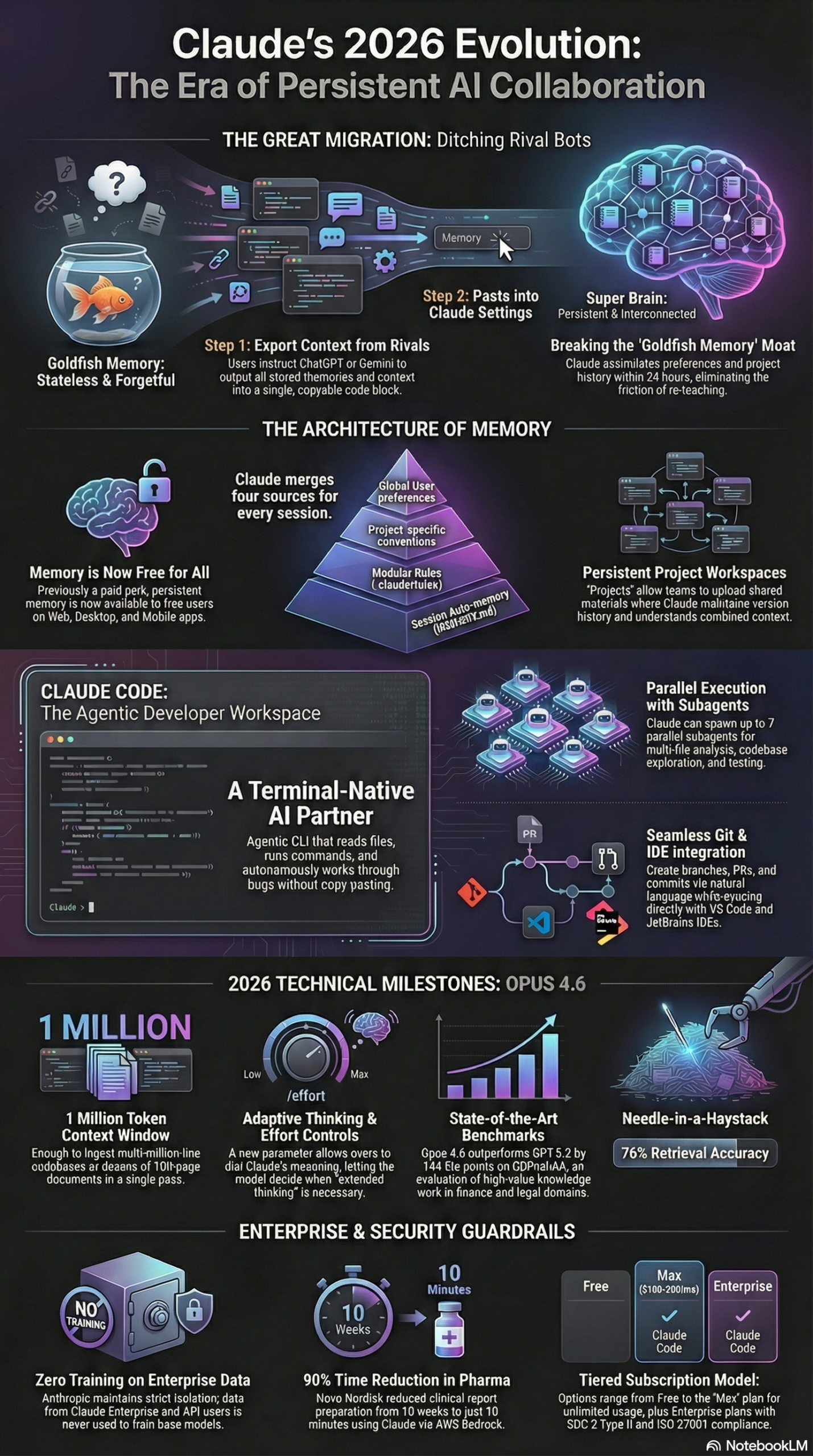
Until this update, Claude’s Memory feature was locked behind a paid subscription tier. That changed on March 2, 2026, when Anthropic expanded Memory access to free-plan users. According to the NotebookLM research brief on Anthropic’s 2026 strategic moves, this is a deliberate effort to eliminate switching costs and position Claude as the default AI assistant for users who have grown frustrated with competitors. Anthropic is treating personalized context — which has historically been a competitive moat for large platforms — as a portable asset that belongs to the user, not the platform.
Here is how the memory system actually works under the hood, based on the research report:
Three-Layer Memory Architecture
Claude’s memory operates across three distinct layers, each serving a different scope and lifecycle:
Layer 1 — Global Preferences (~/.claude/CLAUDE.md): A persistent markdown file stored at the system level that holds your universal preferences — tone, output format, role description, communication style, recurring constraints. Every Claude session reads this file by default, regardless of what project or task you are working on. It is the closest thing to a permanent AI persona for your work style.
Layer 2 — Project-Specific Conventions: When you work inside a named “Project” in Claude, you can define project-level context — the tech stack, client name, style guide, regulatory requirements, or any recurring rules that apply only within that scope. This layer activates contextually and does not bleed into unrelated sessions, keeping your AI behavior clean and task-appropriate.
Layer 3 — Auto-Generated Summaries (MEMORY.md): As sessions accumulate, Claude generates compressed summaries of your interaction history, storing them in a MEMORY.md file. This is the layer that gets populated when you use the import tool — it accepts structured data about your history and synthesizes it into a running profile that persists between sessions.
The import mechanism is built around a structured prompt approach. Rather than forcing you to export files, navigate complex API pipelines, or convert proprietary data formats, Anthropic has created a plain-English prompt you paste into ChatGPT or Gemini to extract a structured summary of everything those systems know about you. That export gets pasted into Claude’s import tool at claude.com/import-memory, which processes and assimilates it within approximately 24 hours, according to the research report.
This design choice matters. Most AI data portability efforts have historically required technical knowledge — OAuth flows, JSON exports, API keys. Anthropic’s prompt-based approach is accessible to non-technical users on day one. A marketer, product manager, or executive with no engineering background can complete the full migration in under 30 minutes, with no tools beyond a web browser. That accessibility is precisely the point: Anthropic is targeting the mass market of ChatGPT users who are open to switching but unwilling to invest significant technical effort to do so.
The import tool is part of a broader strategic pivot at Anthropic. The research report documents that this Memory expansion, combined with the technical advances in Claude Opus 4.6 — including a 1-million-token context window, new agentic capabilities, and top performance on the Humanity’s Last Exam reasoning benchmark — represents Anthropic’s most aggressive product push to date. Memory is not just a feature; it is the onboarding mechanism for an entire new wave of AI adopters.
Why It Matters
The competitive signal embedded in this update is unmistakable. According to the research brief, Anthropic has seen a quadrupling of daily signups since January 2026, driven in part by a “Cancel ChatGPT” movement on social media that followed Anthropic’s public refusal to remove AI safety guardrails for U.S. Department of Defense applications. Claude reached the #1 position on the App Store during this period — a metric that reflects consumer-level momentum that no enterprise contract announcement can replicate.
For individual practitioners, the free Memory upgrade resolves a long-standing frustration. You no longer have to choose between paying for personalization or starting from zero every session. Free users now get the same persistent context capabilities that Pro users had previously. For someone who uses Claude daily for writing, research, or analysis, this means every session builds on the last — and after the migration, it builds on the context accumulated in ChatGPT or Gemini as well.
For developers, the stakes are different but equally high. The research report documents that 53% of coding professionals have adopted Claude as of 2026. The CLAUDE.md memory system — which developers use to document project context, coding standards, and architecture decisions — has been shown to reduce AI hallucinations by 40% and cut manual corrections by 35%. Those are not marginal gains. A 40% reduction in hallucinations on a codebase project is the difference between Claude being a productivity multiplier and Claude being a liability. The memory system is what converts Claude from a smart autocomplete into a reliable engineering collaborator.
For enterprises, the memory and import capabilities tie directly into Claude’s Projects feature, which can trigger Retrieval-Augmented Generation (RAG) when data exceeds the context window. This effectively expands usable context by 10x without quality loss, according to Anthropic’s strategic documentation. Organizations like Deloitte — which has deployed Claude to over 470,000 employees — are already operating at this scale, using Claude’s persistent context and long-context capabilities to handle complex, multi-document analysis workflows that would have required entire analyst teams just two years ago.
For marketers and content teams specifically, persistent memory eliminates the prompt engineering overhead that currently consumes hours per week. Once Claude knows your brand voice, your preferred output formats, your audience personas, and your campaign history, the quality of its first-pass output rises substantially. You stop editing AI drafts and start treating them as usable starting points — which is where the ROI on AI tooling actually lives.
The competitive context also includes an ethical dimension worth naming directly. While OpenAI signed contracts to deploy systems on the Department of Defense’s classified networks, Anthropic rejected government requests to lift safety safeguards against mass surveillance and autonomous weapons. The research report notes that this refusal led to Secretary of Defense Pete Hegseth designating Anthropic a “supply chain risk.” Rather than collapsing demand, the stance generated the “Cancel ChatGPT” movement and quadrupled daily signups. For practitioners evaluating AI platforms in 2026, this is relevant data: Anthropic’s principled positioning is not just marketing — it has survived a confrontation with the federal government at real commercial cost.
The Data
Here is how Claude’s memory and core capabilities compare to the leading competitors, and what the migration actually delivers for practitioners — based on the research report and The Verge’s reporting:
| Feature | ChatGPT (OpenAI) | Gemini (Google) | Claude (Anthropic) |
|---|---|---|---|
| Memory on Free Plan | Limited (Custom Instructions only) | Limited workspace context | ✅ Full Memory (as of March 2026) |
| AI Data Import Tool | None | None | ✅ claude.com/import-memory |
| Memory Architecture | Flat memory store | Workspace context | Multi-layer: Global + Project + Session |
| Context Window (Max) | 128k tokens | 1M tokens | 1M tokens (Claude Opus 4.6, Beta) |
| Developer Config File | None | None | ✅ CLAUDE.md system |
| Hallucination Reduction | Not publicly benchmarked | Not publicly benchmarked | 40% with CLAUDE.md implementation |
| Agentic Coding Rank | Competitive | Competitive | #1 on Terminal-Bench 2.0 |
| Reasoning Benchmark | Competitive | Competitive | #1 on Humanity’s Last Exam |
| Enterprise Data Policy | Opt-out required for training | Opt-out required | Enterprise inputs not used to train |
| MCP Integration | Limited | Limited | ✅ Native Model Context Protocol |
Sources: The Verge, NotebookLM Research Report
The table above illustrates why the Memory expansion is strategically significant. Claude is not just matching competitors on memory — it is introducing a structural advantage with the multi-layer architecture and import tooling that has no direct equivalent in either ChatGPT or Gemini as of March 2026.
Step-by-Step Tutorial: Migrating to Claude and Configuring Memory
This walkthrough covers the complete migration — from exporting your existing AI profile to verifying memory is active and configuring it for your specific workflow. You do not need a paid Claude subscription to complete this process. The entire migration is available to free-tier users following the March 2026 update.
Prerequisites
- An active Claude.ai account (free tier works)
- An active ChatGPT or Gemini account with at least several weeks of history
- Approximately 30 minutes to complete the full process end-to-end
- A text editor for reviewing and editing your exported data before import
Phase 1: Export Your Memory Data from ChatGPT
Step 1: Open a new ChatGPT conversation
Log into your ChatGPT account and start a fresh conversation. You will use a structured prompt to extract everything ChatGPT has learned about you in a portable, structured format. Starting fresh ensures ChatGPT is not interpreting this as a continuation of a previous task.
Step 2: Paste the Anthropic import prompt
According to the research report, Anthropic has published a specific prompt for this migration. Paste exactly the following into ChatGPT:
List every memory you have stored about me, including my preferences,
working style, role, recurring projects, and any other context you've
accumulated. Output everything in a single code block so I can easily
copy it.
Step 3: Review the output carefully
ChatGPT will return a structured list of everything it has retained about you — your professional role, communication preferences, typical use cases, project history, and any recurring patterns it has identified. Do not copy this blindly. Read through it with a critical eye. You are looking for:
- Outdated information: old job titles, concluded projects, tools you no longer use
- Errors: preferences ChatGPT misread or inverted
- Gaps: important context you want Claude to have that ChatGPT never captured
This is your opportunity to clean and enrich the data before it becomes the foundation of your Claude profile.
Step 4: Edit the export before copying
Paste the ChatGPT output into a text editor. Remove anything inaccurate or outdated. Add any context that was missing — particularly technical stack details, communication style preferences, or role-specific constraints that ChatGPT never fully learned. This upfront editing investment pays dividends for every Claude session that follows.
Step 5: Copy the cleaned, edited export
Copy the full edited text. This is your migration payload.
Phase 2: Export from Gemini (Optional — for Users Who Used Both)
If you have been using Gemini alongside ChatGPT, run the same Anthropic import prompt in a fresh Gemini conversation. Repeat Steps 1-5 for Gemini, then manually merge the two exports in your text editor. When merging:
- Remove duplicate entries (keep the most accurate version)
- Resolve conflicts by keeping the most current information
- Combine complementary context (Gemini may have captured things ChatGPT missed, and vice versa)
The result is a consolidated AI profile that reflects the sum of all context you have built across platforms.
Phase 3: Import Your Data into Claude
Step 6: Navigate to claude.com/import-memory
Open Claude in your browser and go directly to the import tool URL. This dedicated migration tool was built specifically to support users transitioning from competing platforms, as reported by The Verge on March 2, 2026.
Step 7: Paste your exported and edited data
Paste your full migration payload into the import interface. The system will parse the structured data and queue it for assimilation into your Claude profile.
Step 8: Allow 24 hours for processing
Per the research report, Claude’s import system requires approximately 24 hours to process and assimilate your data. During this window, Claude is building your user profile and integrating your imported preferences into the MEMORY.md layer of its memory hierarchy. Do not evaluate the results before this window closes — premature testing leads to the incorrect conclusion that the import tool did not work.
Phase 4: Activate and Verify Memory
Step 9: Enable Memory in Settings
Navigate to Settings > Capabilities in Claude.ai and confirm that the Memory toggle is enabled. Even though Memory is now available to free users, it may not be activated by default on your account. Per the research report, you must explicitly toggle Memory on to allow Claude to build, store, and use your profile. Without this step, the import data has nowhere to surface.
Step 10: Verify your memory is populated
After the 24-hour processing window closes, open a new Claude conversation and ask:
What do you know about me? Can you summarize my preferences, role,
and working style from your memory?
Claude should return a coherent and accurate profile reflecting your imported data. If the output is empty, vague, or incorrect, return to claude.com/import-memory to check the import status, and verify the Memory toggle is enabled in Settings > Capabilities.
Phase 5: Configure CLAUDE.md for Deep Personalization
The built-in Memory feature handles dynamic, session-accumulated preferences. But for power users — developers, writers, content strategists, product managers — the CLAUDE.md file is where precise, intentional personalization lives. According to the research report, implementing CLAUDE.md is “the single most effective way to reduce AI hallucinations,” with documented reductions of 40% in hallucinations and 35% in manual corrections.
Step 11: Create your global CLAUDE.md file
On your local machine, create a file at ~/.claude/CLAUDE.md. This is the global configuration file Claude reads at the start of every Claude Code session and project-scoped session. Start with this template and customize it to reflect your actual role and preferences:
# My Claude Configuration

## Role & Context
I am a [your role] at [your company or team].
I specialize in [your primary domain or expertise].
My outputs are typically used for [primary use of outputs].

## Communication Preferences
- Use direct, concise language — skip preamble and throat-clearing
- Do not use phrases like "Certainly!" or "Great question!"
- Use markdown formatting for all multi-section outputs
- When I ask for code, provide complete, immediately runnable examples
- Flag uncertainties explicitly rather than guessing confidently

## Default Output Format
- Headers and subheadings for organization
- Bullet points for lists, numbered steps for sequences
- Code blocks with language tags for all code snippets
- Tables for comparisons, specs, and structured data

## Current Projects
- [Project 1 name]: [one-line description]
- [Project 2 name]: [one-line description]

## Technical Stack
- Languages: [e.g., Python 3.12, TypeScript 5.3]
- Frameworks: [e.g., Next.js 15, FastAPI]
- Infrastructure: [e.g., AWS, Docker, GitHub Actions]
- Databases: [e.g., PostgreSQL 16, Redis]

## Constraints
- [Any firm constraints: compliance requirements, style rules, etc.]
Keep this file concise. Per Anthropic’s own documentation cited in the research report, context window space is a critical resource — CLAUDE.md should hold behavioral rules, not entire reference documents.
Step 12: Create project-specific CLAUDE.md files
For each major project, repository, or client engagement, create a CLAUDE.md in the project root directory. This scoped file allows Claude to load project-specific context without contaminating other sessions. Example:
# Project: Client Campaign — Acme Corp

## Project Context
Client: Acme Corp (B2B SaaS, manufacturing vertical)
Deliverable type: Content marketing (blog posts, case studies, email)
Brand voice: Direct, technical, no jargon, practitioner-focused
Target audience: VP-level operations and engineering leaders

## Style Rules
- Always use active voice
- No acronyms without spelling out on first use
- Avoid superlatives ("best," "leading," "top") without data to back them
- Preferred headline format: [Action verb] + [Specific outcome] + [Time/scale]

## Current Sprint
- Deliverable 1: Case study on inventory optimization (draft due March 10)
- Deliverable 2: Email sequence for Q2 nurture campaign (outline due March 12)
Step 13: Test your full memory setup
Open a new Claude session within a project directory (or reference the project context in Claude.ai). Ask Claude to summarize the project context it can see. Verify that it reflects both your imported memory and the CLAUDE.md contents accurately, without you having to re-explain anything.
Step 14: Establish a memory maintenance routine
Run this check every 4-6 weeks:
Please output everything stored in your memory about me, including
my role, preferences, and any project-specific context you have.
Review the output, correct anything outdated, and update your CLAUDE.md files to reflect changes in your role, tech stack, or active projects. Stale memory produces confidently wrong outputs — routine maintenance is what keeps the system accurate over time.
Expected Outcome: After completing all 14 steps, you have a fully migrated AI profile in Claude — including your imported history from ChatGPT or Gemini, a global CLAUDE.md encoding your precise behavioral preferences, and project-specific configuration files that give Claude the right context for every workspace. Claude will produce on-target outputs from session one and require significantly fewer corrections over time.
Real-World Use Cases
Use Case 1: Marketing Agency Migrating a Full Team
Scenario: A 15-person digital marketing agency has been using ChatGPT for 18 months. Several team members have built up significant memory around client names, brand voices, content formats, and campaign types. The agency wants to migrate to Claude without losing accumulated context and without each team member spending days re-establishing their AI profile.
Implementation: Each team member runs the Anthropic export prompt in their individual ChatGPT accounts, generating a structured data export. They edit the exports to remove errors and add missing context, then use claude.com/import-memory for individual imports. Simultaneously, an agency-wide shared CLAUDE.md is created in a team project folder — documenting all active clients, brand guidelines for each, preferred deliverable formats, and recurring campaign types. New projects get their own scoped CLAUDE.md files.
Expected Outcome: Within 48 hours, the entire team is operating in Claude with context that matches or exceeds what they had in ChatGPT. New hires can be onboarded by reading the shared project CLAUDE.md files rather than spending weeks building up AI context through trial and error — a significant reduction in ramp time.
Use Case 2: Software Engineer Running a Large-Scale Codebase Migration
Scenario: A senior engineer needs to migrate a multi-million-line legacy codebase to a modern stack. They want to use Claude for the full analysis-and-refactoring workflow, similar to the scenario documented in the research report where Gregor Stewart, Chief AI Officer at SentinelOne, noted that “Claude Opus 4.6 handled a multi-million-line codebase migration like a senior engineer. It planned up front, adapted its strategy as it learned, and finished in half the time.”
Implementation: The engineer creates a project-level CLAUDE.md documenting the source and target tech stacks, migration rules, naming conventions, and architectural decisions made to date. They use Claude Code’s terminal-native CLI to read and write files and manage Git workflows autonomously. With Claude Opus 4.6’s 1-million-token context window, they load entire subsystems for analysis without chunking — eliminating the coherence failures that occur when splitting large codebases across multiple sessions.
Expected Outcome: Dramatically faster migration with fewer architectural inconsistencies, because Claude maintains full project context throughout the effort. The documented 40% hallucination reduction from CLAUDE.md means fewer code suggestions that violate the established conventions of the new architecture.
Use Case 3: Clinical Writing Team Accelerating Regulatory Documents
Scenario: A pharmaceutical company’s clinical writing team needs to produce regulatory submission documents faster while maintaining strict compliance with style guides and formatting requirements. Their current process involves weeks of manual drafting and review.
Implementation: The team creates a Claude Enterprise environment with a project-level CLAUDE.md encoding the regulatory style guide, required document structure templates, citation formats, and compliance flags. Claude’s memory retains the structure and language patterns of previously approved documents, allowing it to generate consistent outputs without manual re-specification for each new report. This mirrors how Novo Nordisk, as documented in the research report, reduced clinical report writing time from 10 weeks to 10 minutes using Claude.
Expected Outcome: Consistently compliant regulatory documents generated in a fraction of the previous time, with a shared memory infrastructure that new team members inherit immediately upon joining the project — dramatically reducing onboarding time for specialized document formats.
Use Case 4: Individual Power User Consolidating Multiple AI Platforms
Scenario: A product manager has been using ChatGPT for strategy documents, Gemini for competitive research, and Claude for writing tasks — maintaining separate profiles in each and manually re-entering their context at the start of every session in each tool. They want a single, persistent AI assistant that knows their full professional context.
Implementation: They export memory from both ChatGPT and Gemini using the Anthropic import prompt, consolidate the outputs in a text editor, resolve any conflicts, and submit a single merged import via claude.com/import-memory. They then create a global ~/.claude/CLAUDE.md that captures everything both tools knew, plus additional context neither had learned. Going forward, Claude becomes the single AI environment — connecting to other data sources via MCP rather than requiring separate tool contexts.
Expected Outcome: One AI assistant carrying the accumulated context of all previous tools, with a portable, version-controlled CLAUDE.md file that travels across devices and sessions. The overhead of maintaining separate AI profiles across tools is eliminated entirely.
Common Pitfalls
Pitfall 1: Not enabling Memory after import
The most common failure mode is completing the import flow but forgetting to activate Memory in Settings > Capabilities. Without this toggle enabled, Claude does not build or access memory regardless of what you have imported. The import sits dormant. Always verify the toggle immediately after import — it takes 10 seconds and prevents hours of confusion.
Pitfall 2: Importing outdated or incorrect context
ChatGPT’s memory may contain stale information — an old job title, a project that concluded eight months ago, or preferences you changed. Importing this verbatim transfers the inaccuracies to Claude and locks them into your profile. Always edit the export in a text editor before submitting. Twenty minutes of cleanup at import time prevents weeks of correcting AI outputs downstream.
Pitfall 3: Relying solely on the import tool for technical workflows
The import tool populates the session-level MEMORY.md layer but does not create CLAUDE.md files for your development projects. If you are using Claude Code for engineering work, you must separately author project-level CLAUDE.md files. Skipping this step means Claude lacks the technical context it needs for code work — and you will not see the 40% hallucination reduction documented in the research report.
Pitfall 4: Overloading CLAUDE.md with excessive content
Anthropic’s own documentation, cited in the research report, warns: “The context window is the most important resource to manage… LLM performance degrades as context fills.” If your CLAUDE.md file runs to thousands of words, you are consuming context window capacity that Claude needs for actual task execution. Keep CLAUDE.md focused: role context, key behavioral preferences, and project-specific rules only. Link to external documentation rather than pasting it inline.
Pitfall 5: Testing too early after import
The research report documents a processing window of approximately 24 hours. Users who test Claude immediately after submitting an import will find no change in behavior and may incorrectly conclude the import failed. Build in the full 24-hour wait before evaluating results. Set a calendar reminder rather than checking manually every few hours.
Expert Tips
Tip 1: Version control your CLAUDE.md files
Treat CLAUDE.md files like production configuration code. Commit them to Git. This gives you a documented history of how your AI configuration has evolved, lets you roll back changes that degraded output quality, and allows team members to fork and adapt shared configurations for their specific roles. A version-controlled CLAUDE.md is an organizational knowledge asset — not just a personal productivity tool.
Tip 2: Route tasks to the right model tier
Not every task warrants Claude Opus. Per the research report, the recommended approach is to implement MAX_THINKING_TOKENS limits and route routine tasks to Claude Sonnet while reserving Opus for high-reasoning architectural decisions and complex analysis. This optimization preserves budget for the tasks where Opus’s reasoning capabilities deliver the most value, without paying Opus rates for tasks that Sonnet handles equally well.
Tip 3: Use MCP to give Claude live data access
The Model Context Protocol (MCP) is an open standard that lets Claude connect directly to external tools — GitHub, Slack, Notion, PostgreSQL — without requiring you to paste data into prompts manually. Per the research report, MCP enables Claude to troubleshoot with live system data, such as pulling live error logs from Sentry or fetching open tickets from Jira. For practitioners who currently spend time copying data between systems to give Claude context, MCP eliminates that overhead entirely.
Tip 4: Use Agent Teams for parallel analysis
Claude Opus 4.6 supports spinning up multiple autonomous agents working simultaneously on complex tasks, as documented in the research report. For codebase reviews, you can deploy Agent Teams to analyze different modules in parallel rather than reviewing sequentially — dramatically reducing the time required for comprehensive audits of large systems. For content teams, parallel agents can research, draft, and fact-check simultaneously rather than sequentially.
Tip 5: Audit memory on a quarterly schedule
AI memory is only as valuable as its accuracy. Schedule a quarterly audit: prompt Claude to output everything it knows about you, verify accuracy against your current role and projects, update CLAUDE.md files to reflect changes, and submit corrections for any outdated memory. Stale memory is not neutral — it actively degrades output quality by giving Claude a false premise for every response. Regular audits are what maintain the 40% hallucination reduction over time, not just at initial configuration.
FAQ
Q: Does the free Memory feature have the same capabilities as the paid version?
Based on The Verge’s reporting from March 2, 2026, and the research report, Anthropic expanded the Memory feature to free-plan users as part of this update. The reports describe this as a democratization of the feature rather than a limited preview. For current specifics on any capacity differences between free and paid tiers, verify the current feature matrix at Claude.ai’s pricing page, as these details can change after publication.
Q: Will my imported ChatGPT or Gemini data be used to train Claude’s models?
The research report documents that Anthropic maintains strict data isolation for enterprise deployments: “enterprise inputs are not used to train models.” For consumer-tier users, Anthropic’s data practices are governed by its privacy policy. Review the current terms at Claude.ai for specifics. Anthropic’s overall positioning on data privacy is more conservative than most competitors — their refusal to use enterprise data for training is a documented differentiator.
Q: How long does the import process take, and what if nothing changes after 24 hours?
The research report documents a processing window of approximately 24 hours. If your memory is still not populated after 24 hours, confirm that the Memory toggle is enabled in Settings > Capabilities — this is the most common cause of apparent import failures. If Memory is enabled and you are still seeing no stored context, return to claude.com/import-memory and check the import status, or re-submit the import with a cleanly formatted export.
Q: Can I import from both ChatGPT and Gemini at the same time?
The import tool accepts structured text exports, which means you can consolidate exports from multiple platforms before submitting. Run the Anthropic import prompt in each tool, combine the outputs in a text editor, remove duplicates, resolve any conflicting information by keeping the most accurate and current version, and submit the merged file through claude.com/import-memory. This gives Claude a richer starting profile than any single-platform import provides — particularly useful for users who have been using different tools for different purposes.
Q: What is the practical difference between Memory and CLAUDE.md?
Memory (enabled via Settings > Capabilities) manages dynamic, session-accumulated context — the conversational preferences and interaction history Claude builds automatically over time. CLAUDE.md is a manually authored configuration file that stores explicit, structured behavioral rules about how you want Claude to operate. Memory is dynamic and auto-updated by Claude; CLAUDE.md is static, human-authored, and version-controlled. Memory handles the “who you are” layer; CLAUDE.md handles the “how you want me to work” layer. For best results, use both in tandem: Memory for accumulated context, CLAUDE.md for precise behavioral specifications that you want to enforce consistently regardless of what Claude learns over time.
Bottom Line
Anthropic’s Memory expansion and the claude.com/import-memory tool remove the single most significant friction point keeping practitioners locked into competing AI platforms. For users who have invested months in building up personalized AI context, the ability to export that history and import it into Claude is a genuine workflow unlock — not a marginal feature update. The multi-layer memory architecture (global CLAUDE.md, project-specific configuration, and auto-generated session summaries) is architecturally more sophisticated than anything currently offered by ChatGPT or Gemini, and the documented 40% reduction in AI hallucinations from CLAUDE.md implementation alone justifies the 30-minute migration effort. Combined with Claude Opus 4.6’s 1-million-token context window, top benchmark performance, and a growing enterprise track record that includes deployments at Deloitte and Novo Nordisk, Anthropic has built a platform that rewards practitioners who invest in configuration. If you are using ChatGPT out of inertia rather than genuine preference, March 2026 is the right time to run the 14-step process above and find out what you have been missing.


0 Comments