

Claude’s paid subscriptions more than doubled in 2026, according to TechCrunch, and with total consumer users now estimated between 18 million and 30 million, Anthropic has completed one of the most dramatic commercial turnarounds in AI history. This guide breaks down exactly which Claude plan makes sense for your workflow, how to unlock the platform’s most powerful features, and how to apply the documented AI Fluency framework so you extract real professional value — not just novelty.
What This Is
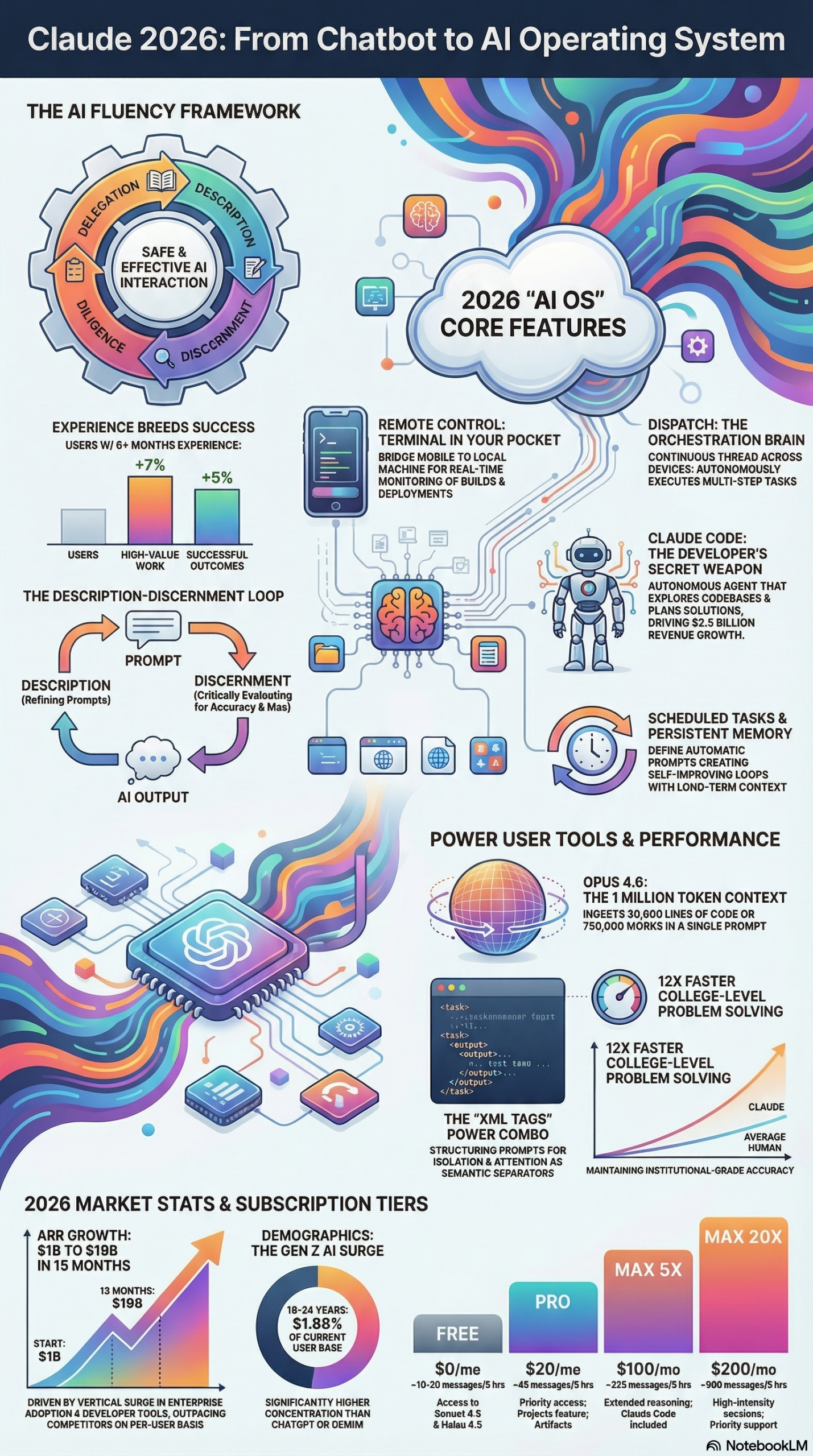
Claude is Anthropic’s flagship AI assistant, but calling it a “chatbot” in 2026 undersells it badly. According to the NotebookLM research report synthesizing Anthropic’s product timeline through early 2026, the company has successfully transitioned Claude from a standard conversational interface into what they describe as a persistent “AI operating system.”
That shift is concrete, not marketing language. Here’s what it means in practice:
Claude Code is a terminal-based autonomous developer agent that can explore entire codebases, implement features independently, and run background tasks while you work on something else. It’s not a code autocomplete tool — it’s closer to an AI junior developer you can assign a GitHub issue to and walk away from.
Computer Use extends Claude’s reach beyond the chat window. It can navigate macOS directly — pointing, clicking, scrolling — and can operate any application on your machine. According to the research report, Claude prioritizes API-based connectors (MCP, or Model Context Protocol) for precision tasks, but falls back to direct computer control when no connector is available.
Task Orchestration via Dispatch is the glue layer. Anthropic calls it a “task orchestration brain” — a continuous thread between your devices that lets you assign a complex task from your phone and have Claude execute it locally on your desktop using your actual file system and applications.
Opus 4.6 is the current top-tier model, supporting a 1-million-token context window. The research report notes this translates to approximately 750,000 words in a single prompt — enough to ingest an entire codebase, a stack of legal contracts, or a year of customer support tickets without hitting truncation.
Financially, the numbers behind this product evolution are staggering. Anthropic grew its Annualized Revenue Run-rate (ARR) from $1 billion in December 2024 to an estimated $19 billion by March 2026 — a 19x increase in just 15 months, as documented in the research report. Enterprise contracts account for roughly 80% of that revenue, but the consumer surge is what’s making headlines: daily signups passed 1 million for a week straight in March 2026, pushing the Claude app to the #1 position on major app stores.
The proximate cause of that spike was what the research report calls the “Pentagon Effect” — CEO Dario Amodei’s public refusal to deploy Claude for autonomous weapons systems, quoting directly: “Threats do not change our position: We cannot in good conscience accede to their request.” That principled stance triggered a wave of users who switched from competitors, voting with their wallets for a safety-first AI company.
Why It Matters
The growth story matters because it signals market validation at scale. When paid subscriptions double in a single year and a developer tool (Claude Code alone) drives roughly $2.5 billion in ARR — making it one of the fastest-monetizing developer tool launches in history according to the research report — you’re looking at a platform that’s crossed from early adopter territory into mainstream professional infrastructure.
For practitioners specifically, here’s what the momentum means:
Developers now have a genuine autonomous coding agent with documented benchmark improvements. Boris Cherny, Creator of Claude Code, framed this evolution directly in the research report: “We’ve evolved from punch cards → assembly → high-level languages → IDEs with autocomplete → and now we’re entering the era of prompt-driven development.” Developers are becoming reviewers and orchestrators of AI-generated work rather than manual implementers — a real shift in how senior engineering time gets allocated.
Content teams and marketers gain access to Computer Use capabilities that can operate software they already use. An AI that can open Figma, navigate a CMS, draft copy, and submit a form — without requiring an API integration — changes what “automation” means for non-engineering teams.
Enterprise buyers are already buying in at scale (80% of ARR is enterprise). The introduction of the Claude Teams plan and tiered Max subscriptions means the pricing model now maps cleanly to different organizational use cases.
Power users who’ve been frustrated by hitting message limits on the standard Pro plan now have a clear upgrade path. The introduction of the Max plan directly addresses the ceiling problem — and the research on usage patterns shows that heavy users who push into professional workflows genuinely need it.
The Anthropic Economic Index Report from February 2026 documented something important here: users who had been on Claude for 6+ months were 7% more likely to use it for work and had a 3-4% higher success rate on complex tasks than newer users. Experience compounds. Getting your team on Claude now and building the fluency muscle is a durable competitive advantage.
The Data
Claude Subscription Tiers (2026)
| Plan | Monthly Cost | Usage Capacity | Key Features |
|---|---|---|---|
| Free | $0 | Limited | Basic Claude access, limited messages |
| Pro | $20 | 5x Free (~45 msgs/5h) | Claude Code, Cowork, web research, all models |
| Max 5x | $100 | 5x Pro (~225 msgs/5h) | Priority access to newest models, higher output limits |
| Max 20x | $200 | 20x Pro (~900 msgs/5h) | Effectively unlimited for all-day intensive professional use |
| Teams | Per seat | Pro-level per user | Centralized billing, Shared Projects, team context |
Source: NotebookLM research report. Limits operate on a rolling 5-hour window, not a fixed daily budget.
Anthropic ARR Growth Timeline
| Period | ARR | Key Driver |
|---|---|---|
| December 2024 | $1 billion | Enterprise contract ramp |
| Mid-2025 | ~$4 billion | Claude Code launch, Max plan intro |
| Early 2026 | ~$12 billion | Consumer surge, Claude Computer Use |
| March 2026 | $19 billion | Pentagon Effect, app store #1, daily signups >1M |
Source: NotebookLM research report
Anthropic AI Fluency Framework
| Pillar | What It Means in Practice |
|---|---|
| Delegation | Identifying which tasks are genuinely suitable for AI handoff vs. requiring human judgment |
| Description | Writing prompts with sufficient clarity, scope definition, and constraints |
| Discernment | Evaluating AI outputs for accuracy, bias, hallucinations, and quality |
| Diligence | Maintaining the human-in-the-loop through the Description–Discernment cycle |
Source: NotebookLM research report, based on Anthropic Academy curriculum by Prof. Joseph Feller and Prof. Rick Dakan
Step-by-Step Tutorial
This tutorial walks through four distinct workflows: selecting the right plan for your workload, setting up Claude Code for autonomous development, applying the AI Fluency framework to your prompts, and using advanced features like Computer Use and Task Orchestration. Each phase builds on the previous one.
Phase 1: Choosing Your Plan Based on Actual Usage Patterns
Step 1: Audit your intended daily interaction volume.
The key variable in the Claude pricing model is the rolling 5-hour usage window, not a daily message cap. Before choosing a plan, estimate how many hours per day you’ll be in an active back-and-forth with Claude on complex tasks.
- Under 2 hours/day of focused use: Pro at $20/month is sufficient. You’re unlikely to hit the ~45 messages per 5-hour window limit during casual professional use.
- 4-6 hours/day of continuous professional use: The Pro ceiling becomes a real friction point. Max 5x at $100/month expands that to ~225 messages per 5-hour window, covering a standard workday.
- Full-day intensive use (developer, researcher, power user): Max 20x at $200/month delivers ~900 messages per 5-hour window. According to the research report, this tier was explicitly designed for users running Claude Code for extended autonomous coding sessions — the kind of work where Claude is actively generating, testing, and iterating code for hours without human interruption.
Step 2: Decide between individual and team billing.
If you’re buying for a team, the Teams plan centralizes billing and — critically — enables Shared Projects. This feature lets every team member access the same context files, instructions, and project history. For agencies or development teams, this eliminates the overhead of each person manually importing the same documents into their individual sessions.
Step 3: Run a one-week Pro trial before upgrading.
Even if you think you need Max, spend a week on Pro first and note exactly when and how often you hit the usage ceiling. The upgrade decision should be data-driven, not speculative.
Phase 2: Setting Up Claude Code for Autonomous Development
Claude Code is the most financially significant feature Anthropic has shipped — attributed with $2.5 billion in ARR on its own, per the research report. Setting it up correctly from the start determines whether you use it as a glorified autocomplete or as an actual autonomous agent.
Step 4: Install Claude Code.
Claude Code runs as a terminal-based agent. It’s included with Pro and all Max plans. Install it via your terminal using the documented CLI setup process on Anthropic’s developer documentation site. Once installed, launch it from your project root directory.
Step 5: Create a Claude.md file in your project root.
This is the single highest-leverage setup action you can take. The Claude.md file acts as persistent memory for the agent — Claude automatically reads it every time it launches in that directory. According to the research report, you should use this file to store:
- Team coding style guides and naming conventions
- Project architecture overview (what each major directory contains)
- Tech stack versions and any quirks or gotchas
- Instructions for how you want tasks scoped and reported back
- Any recurring context Claude would otherwise need re-explained every session
A well-written Claude.md file eliminates the “warm-up tax” — the back-and-forth you’d otherwise need at the start of every session to get Claude oriented in your codebase.
Step 6: Enable Plan Mode before tackling complex features.
Before asking Claude Code to implement anything non-trivial, use Shift + Tab to enable Plan Mode. This forces the agent to ask clarifying questions and architect a full solution before writing a single line of code. The research report notes this significantly improves benchmark scores — because the cost of a wrong architectural decision at the start is much higher than the cost of a few extra planning questions.
In Plan Mode, Claude will typically:
– Ask about constraints you haven’t specified
– Propose multiple implementation approaches with trade-offs
– Flag potential conflicts with existing code patterns
– Outline the files it expects to create or modify
Review that plan before approving. Treat this like you’d treat a PR review from a junior developer — catching issues here is 10x cheaper than catching them after the code is written.
Step 7: Use the /rc command for remote monitoring.
Once Claude Code is running a long autonomous task, you don’t need to stay at your desk. The /rc command generates a QR code that allows you to monitor and control the terminal session from your mobile device via an encrypted bridge, as documented in the research report. This is particularly useful for overnight runs or tasks that take hours — you can check progress, redirect if needed, or approve a step without returning to your workstation.
Phase 3: Applying the AI Fluency Framework to Your Prompts
The Anthropic Economic Index finding that 6-month users outperform newer users by 3-4% on complex tasks isn’t magic — it’s the accumulated practice of running the four-pillar AI Fluency cycle that Anthropic’s Academy (built with Prof. Joseph Feller and Prof. Rick Dakan) documented in the research report.
Step 8: Apply Delegation discipline before you prompt.
Before opening a chat, ask: is this task actually appropriate for AI delegation? The research report frames this as identifying whether the task has clear success criteria, whether the output is verifiable, and whether the risk of a wrong answer is acceptable. Tasks with ambiguous success criteria (e.g., “make this better”) are delegation traps — Claude will produce something, but you won’t have a framework for evaluating whether it’s actually better.
Step 9: Structure prompts using XML semantic separators.
Anthropic specifically trained Claude to treat XML tags as semantic separators. According to the research report, this prevents “context bleed” and improves injection resistance. A structured prompt looks like:
<role>You are a senior product manager reviewing feature specifications.</role>

<context>
We are building a B2B SaaS product for mid-market logistics companies.
Our users are operations managers, not engineers.
</context>

<task>
Review the following feature spec and identify:
1. Any requirements that are ambiguous or untestable
2. Missing edge cases
3. Potential UX problems for non-technical users
</task>

<output>
Format your response as a numbered list, grouped by category.
Flag critical issues separately from minor ones.
</output>

<spec>
[paste your spec here]
</spec>
This structure consistently outperforms a plain-text version of the same request because it eliminates ambiguity about what role Claude should take, what context is relevant, and what the output format should be.
Step 10: Run the Discernment check on every output.
Discernment is the most skipped step and the source of most AI-related professional errors. Before using any AI-generated output — especially factual claims, code, or customer-facing copy — run it through a four-point check:
- Accuracy: Is every factual claim verifiable against a source you trust?
- Bias check: Does the output reflect assumptions that don’t apply to your specific context?
- Quality: Is this the best version of this output, or did Claude take the easy path?
- Risk: What happens if this output contains an error that isn’t caught?
Step 11: Use a Meta-Prompt Coach for failed prompts.
When a prompt produces a poor result, don’t just rephrase it by feel. Per the research report, use a Meta-Prompt Coach — a prompt that evaluates other prompts, scoring them on Clarity, Completeness, Specificity, and Risk of Misinterpretation. Paste your failed prompt into Claude and ask it to evaluate and improve it. This “meta-cognition” step builds your prompting skill faster than trial-and-error alone.
Phase 4: Using Computer Use and Task Orchestration
Step 12: Set up Computer Use for application automation.
Computer Use is available on Max plans and gives Claude the ability to operate your macOS environment directly. The research report notes Claude will default to MCP API connectors when available (more reliable, faster), and only falls back to direct screen interaction when no connector exists. To use Computer Use effectively:
- For applications with MCP connectors: install the connector first and configure it in Claude’s settings. This gives Claude structured access to the app’s data layer rather than scraping the UI.
- For applications without connectors: screen-based Computer Use works, but build in more verification checkpoints since UI-based automation is inherently more fragile than API-based automation.
Step 13: Use Task Orchestration (Dispatch) for cross-device workflows.
Dispatch creates a continuous task thread between your devices. A practical implementation: assign Claude a research task from your phone while commuting, specifying the output file path on your desktop. Claude executes the task locally using your desktop’s file system and applications. When you return to your desk, the output file is waiting. This is not a cloud task — it runs locally using your machine’s resources, which matters for privacy-sensitive work.
Expected Outcomes After This Tutorial:
– You’ve selected the right plan based on your actual usage pattern
– Claude Code is set up with a Claude.md file that eliminates session warm-up overhead
– You’re using Plan Mode for complex tasks and /rc for remote monitoring
– Your prompts use XML structure to eliminate context bleed
– You have a repeatable Discernment checklist for validating outputs
Real-World Use Cases
Use Case 1: Solo Developer Building a SaaS Product
Scenario: A solo developer building a B2B SaaS product needs to ship features fast but can’t afford a full engineering team.
Implementation: Subscribe to Max 5x at $100/month. Create a comprehensive Claude.md that documents the tech stack, database schema, API patterns, and coding conventions. Use Plan Mode before every major feature to get architectural sign-off. Assign Claude Code to implement entire features — authentication flows, API endpoints, database migrations — while personally reviewing the PRs Claude generates.
Expected Outcome: According to the research report framing of Claude Code as one of the fastest-monetizing developer tools in history, this workflow can reduce implementation time on well-scoped tasks by 60-80%. The key constraint is the quality of the Claude.md file and the developer’s ability to write tight feature specifications.
Use Case 2: Content Agency Running Client Campaigns
Scenario: A five-person content agency producing weekly blog content, email campaigns, and social copy for 12 clients.
Implementation: Use the Teams plan with Shared Projects. Create one project per client with that client’s brand voice guide, audience persona, past campaign performance data, and content calendar loaded as context files. Each team member accesses the shared project and gets Claude oriented in seconds rather than uploading context documents every session.
Expected Outcome: Shared context eliminates the 15-20 minutes per session that individual contributors otherwise spend re-orienting Claude to a specific client. Across 5 team members handling 3 clients each per week, this compounds into several hours of recovered productive time weekly.
Use Case 3: Legal Research Team Using Opus 4.6’s Context Window
Scenario: A legal team reviewing merger documentation needs to cross-reference 200+ page contracts against regulatory filings.
Implementation: Use Opus 4.6 with its 1-million-token (roughly 750,000-word) context window, as documented in the research report. Load multiple complete contracts and the relevant regulatory frameworks into a single session. Ask Claude to identify conflicting clauses, flag compliance risks, and generate a structured summary without document switching or context truncation.
Expected Outcome: Eliminates the chunking and manual cross-referencing that currently constrains large-document legal analysis. A task that previously took 2-3 days of associate time becomes a same-day review with Claude generating the first-pass analysis that attorneys then validate.
Use Case 4: Marketing Automation via Computer Use
Scenario: A digital marketer needs to update campaign parameters across multiple ad platforms, pull performance reports, and update a shared spreadsheet — a task that currently takes 2 hours of manual clicking every Monday morning.
Implementation: On a Max plan, configure Claude with MCP connectors for platforms that have them. For platforms without connectors, use Computer Use in supervised mode — Claude executes the navigation sequence while you monitor. Build a repeatable workflow that Claude can execute from a single instruction each week.
Expected Outcome: Routine platform administration that doesn’t require creative judgment gets offloaded to Claude. The research report frames Computer Use as giving Claude reach into “any application on your machine” — the constraint is your willingness to invest the upfront time in building and testing the workflow.
Use Case 5: Enterprise Team Scaling AI Fluency
Scenario: An enterprise is trying to increase effective Claude utilization across a 50-person marketing department. Most users have access but aren’t getting measurable value from it.
Implementation: Deploy the Anthropic Academy AI Fluency framework — Delegation, Description, Discernment, Diligence — as a structured onboarding curriculum. Run workshops that focus specifically on the Delegation and Discernment pillars, which are the most commonly skipped. Establish a Shared Projects library of pre-validated prompt templates for the team’s most common use cases.
Expected Outcome: The Anthropic Economic Index from February 2026 found users with 6+ months of experience outperform newer users by 7% on work use cases and 3-4% on task success rates. Structured fluency training compresses that learning curve.
Common Pitfalls
1. Upgrading to Max Before Auditing Pro Usage
Jumping straight to the $200/month Max 20x plan without first understanding your actual usage pattern is a common and expensive mistake. Pro at $20 is genuinely sufficient for casual professional use. The rolling 5-hour window means you only hit the ceiling if you’re running intensive sessions continuously — not if you’re doing a few hours of focused work per day. Audit your Pro usage for one week before upgrading.
2. Skipping the Claude.md File
Using Claude Code without a Claude.md file means you’re starting every session from zero context. According to the research report, this file is how the agent learns and retains your project’s conventions. Without it, Claude makes architectural decisions based on generic best practices rather than your specific codebase — leading to inconsistent code that requires more rework.
3. Using Plain-Text Prompts for Complex Tasks
Generic prompts produce generic outputs. The XML structure documented in the research report isn’t optional polish — it’s how Claude’s training was designed to receive structured input. Using role, context, task, and output tags isn’t just organizational; it activates different processing behavior in the model.
4. Skipping Plan Mode on Complex Code Tasks
Jumping directly into implementation mode on complex features is the equivalent of having a contractor start construction without reviewing blueprints. Plan Mode (Shift + Tab in Claude Code) surfaces architectural conflicts and ambiguities before any code is written. Skipping it to save time usually costs more time in the form of rework.
5. Treating AI Output as Final Without Discernment Review
The biggest enterprise risk with AI adoption isn’t that the tools don’t work — it’s that outputs get used without validation. The research report explicitly includes Discernment as a required pillar of AI Fluency for exactly this reason. Customer-facing copy, legal language, financial projections, and code that touches production systems all require human review before deployment.
Expert Tips
1. Use Opus 4.6’s Million-Token Context for Competitive Research Synthesis
Load a competitor’s entire public documentation library, their last 12 months of blog posts, and their pricing page into a single Opus 4.6 session. Ask Claude to map their product positioning, identify gaps they’re not addressing, and flag claims they make that you can counter. At 750,000 words of context, you can do this for multiple competitors simultaneously.
2. Chain /rc with Long Overnight Claude Code Runs
For large-scale refactors or test suite generation, launch Claude Code before you leave work, enable /rc remote monitoring, and let it run overnight. Check progress from your phone. The research report highlights this mobile-to-local bridge as a differentiating feature for power users running extended autonomous sessions.
3. Build a Prompt Library in Shared Projects
Don’t rebuild high-performing prompts from scratch. When you get exceptional output from a well-structured prompt, save it to a Shared Project as a template. Over time, your team accumulates a tested prompt library that functions as institutional knowledge — onboarding new team members becomes faster because you’re handing them proven starting points.
4. Use the Meta-Prompt Coach Proactively, Not Just Reactively
Most practitioners only use Meta-Prompt coaching after a prompt fails. The higher-leverage move is to run your draft prompt through the evaluator before submitting it for the actual task. A 30-second evaluation that catches a clarity problem saves the time of a full failed run and the cognitive overhead of diagnosing what went wrong.
5. Align Your Team on Delegation Boundaries Before Deploying
The Delegation pillar of the AI Fluency framework is where most enterprise rollouts stumble. Before giving your team Claude access, define explicitly which task categories are approved for AI delegation, which require human review before use, and which are off-limits (e.g., final customer-facing legal language). Per the research report, Diligence — maintaining the human-in-the-loop — is the pillar that prevents the professional and reputational risks of unsupervised AI deployment.
FAQ
Q: Is Claude Max worth $200/month for an individual user?
It depends entirely on how many hours per day you’re running intensive Claude sessions. The Max 20x plan was designed for users running Claude Code for extended autonomous coding sessions or doing all-day research workflows, according to the research report. If you’re hitting Pro limits daily, the upgrade math is straightforward — $180/month more for ~20x the capacity. If you’re not hitting limits, Pro is the right tier.
Q: How does Claude Code compare to GitHub Copilot or Cursor?
Claude Code is an autonomous terminal agent that executes multi-step tasks independently — it’s architecturally different from inline autocomplete tools. Per the research report, Claude Code is attributed with driving $2.5 billion in ARR because it unlocks a different category of use: assigning an entire feature implementation rather than line-by-line assistance. The tools aren’t mutually exclusive — many developers use Cursor for in-editor autocomplete and Claude Code for larger autonomous tasks.
Q: What is the “Pentagon Effect” and how did it impact Claude’s user base?
Following CEO Dario Amodei’s public refusal to comply with autonomous weapons deployment terms from the Pentagon — stating “We cannot in good conscience accede to their request” — Claude experienced a surge in daily signups that exceeded 1 million per day for a week straight in March 2026, according to the research report. The app reached #1 on major app stores. The effect was driven by users who switched from competitors specifically because of the principled ethical stance.
Q: What’s the difference between Claude’s Computer Use and a standard browser automation tool?
Standard browser automation tools (Selenium, Playwright, etc.) require developers to write explicit scripts targeting specific DOM elements. Claude’s Computer Use, as documented in the research report, operates visually — it can navigate applications it has never been specifically programmed for, using the same visual understanding a human would. The trade-off is reliability: API-based MCP connectors are more precise and less fragile. Computer Use is the fallback for applications without connectors.
Q: How do I measure whether AI Fluency training is actually improving outcomes on my team?
The Anthropic Economic Index from February 2026 provides the benchmark: users with 6+ months of experience show a 7% lift in using Claude for work tasks and a 3-4% lift in task success rates. Track those two metrics: what percentage of your team uses Claude in actual work workflows (vs. exploration), and what percentage of tasks that get started result in usable output. Baseline both before training and measure 60 and 90 days after.
Bottom Line
Claude’s paid subscription growth isn’t a vanity metric — it reflects real deployment of real AI workflows by practitioners who are getting measurable value. The platform’s evolution from chatbot to autonomous agent (via Claude Code, Computer Use, and Task Orchestration) creates genuine leverage for developers, content teams, legal researchers, and enterprise operations teams who invest in learning it properly. The AI Fluency framework — Delegation, Description, Discernment, Diligence — isn’t abstract theory; it’s the documented difference between users who extract compound professional value and users who dabble. With ARR growing from $1 billion to $19 billion in 15 months and Claude Code alone generating $2.5 billion in ARR, the platform’s durability is no longer in question. The practitioners who build fluency now will be the ones who are hardest to catch in 18 months.


0 Comments