

AI has moved well past scheduling your campaign for Tuesday at 10 a.m. Modern email deliverability systems now use machine learning to analyze sender reputation, content scoring, engagement signals, authentication alignment, and list quality—simultaneously, in real time, before your message ever reaches a filter. This tutorial walks through every layer of AI-driven deliverability optimization and shows you exactly how to implement each one.
What This Is
HubSpot’s April 2026 deliverability analysis frames email deliverability as cumulative—every campaign either deposits or withdraws from your sender reputation account. AI-powered deliverability tools are the auditing and optimization systems that keep that account in the black.
The old model was reactive: you’d notice a spam rate spike, investigate, and patch the problem after the damage was already done. The new model is predictive. AI systems monitor authentication alignment, complaint rate trends by segment, bounce rate patterns, sending consistency, and engagement scoring simultaneously—and surface warnings before you breach any threshold.
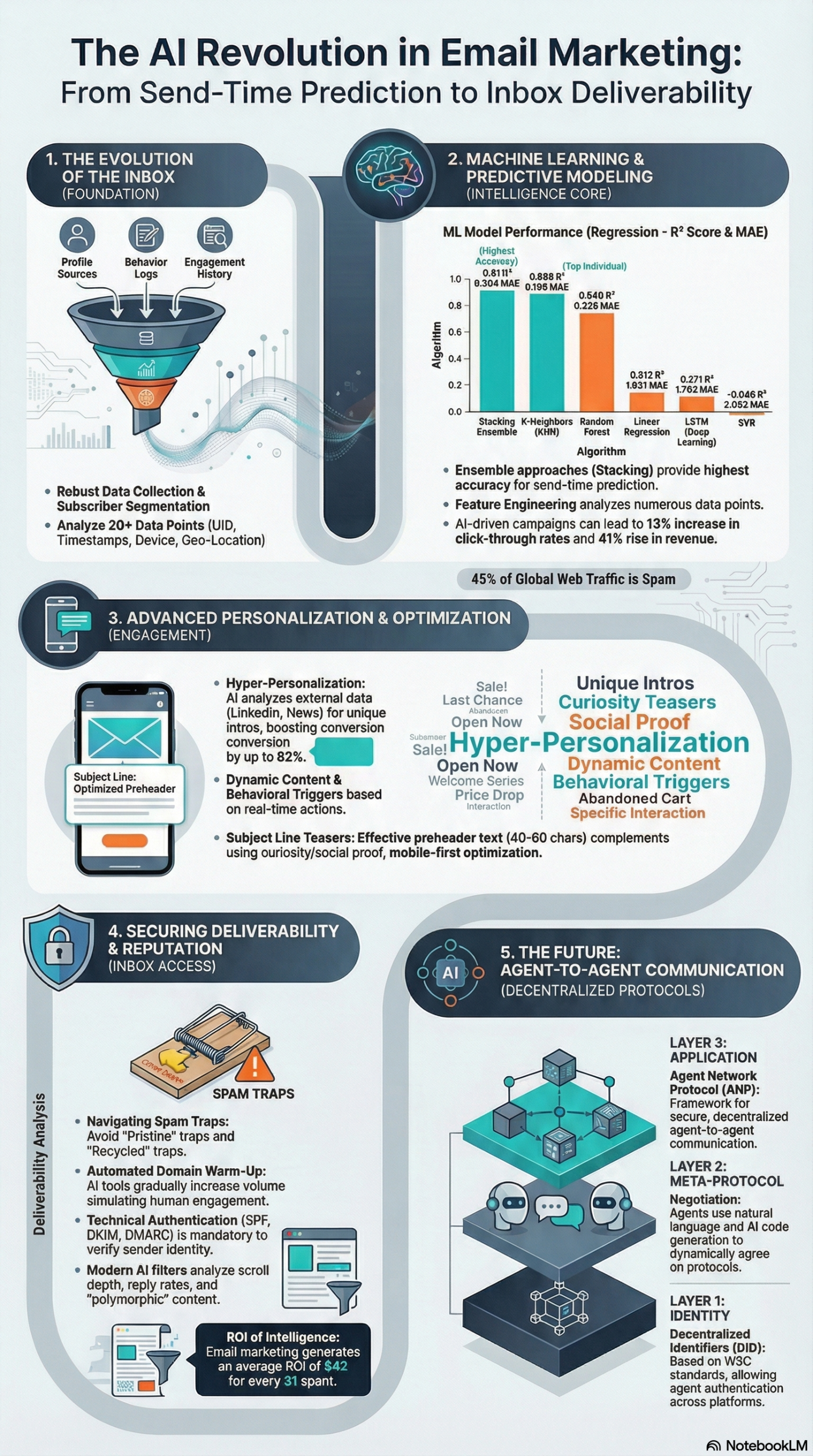
At the technical core, this shift means replacing rule-based spam filters (blacklists and keyword matching) with ensemble machine learning classifiers that evaluate behavioral signals. According to the AI and Machine Learning in Email Marketing research briefing compiled from academic research and industry white papers, modern filters deployed by Google and Microsoft now evaluate signals including “scroll depth” on mobile apps, link trustworthiness, and real-time interaction patterns. The practical consequence: two subscribers on the same list can have entirely different inbox experiences based purely on their individual engagement histories.
The scope of what AI now handles in deliverability covers four distinct domains:
Content Analysis — Subject line pattern evaluation, link density assessment, promotional tone scoring, and HTML rendering stability checks. AI flags content that shares structural patterns with high-complaint campaigns before you hit send, giving you an opportunity to revise rather than recover.
Reputation Monitoring — Authentication alignment tracking (SPF, DKIM, DMARC), complaint rate trending by segment, bounce rate spike detection, and sending consistency analysis. These systems watch for deviation from your established sending patterns, which is the signal that triggers escalated filtering scrutiny.
Engagement Modeling — Click and reply pattern analysis, sustained interaction tracking, and contact-level responsiveness assessment. This layer determines whether your sends are trending positive or negative in the eyes of inbox providers who use real engagement data to calibrate their filters continuously.
List Quality Management — Inactive cluster identification, acquisition source risk evaluation, declining CTR segment detection, and behavior-based suppression automation. AI has turned list hygiene from a manual quarterly task into a continuous, automated process.
Gmail and Yahoo hardened their authentication requirements for bulk senders in 2024, mandating valid SPF and DKIM authentication, a published DMARC policy with alignment, spam complaint rates below 0.3%, one-click unsubscribe for marketing messages, and encrypted TLS delivery—per HubSpot’s deliverability requirements guide. These requirements define the floor. AI optimization operates above that floor, building the layered reputation that keeps you in the inbox consistently rather than sporadically.
Why It Matters
22% of marketers cite email as a top revenue driver, according to HubSpot’s 2026 State of Marketing report. The channel still generates $38 to $42 for every $1 spent, making it the highest-ROI channel in digital marketing by a significant margin. But that ROI assumes your emails actually reach the inbox. Deliverability degradation quietly destroys campaign performance while dashboards still show sends going out—the damage is invisible until it’s severe.
The stakes have escalated because AI is now on both sides of the equation. According to the research briefing, AI-generated phishing emails accounted for an estimated 73.8% to 82.6% of all phishing campaigns in 2024–2025. These AI-crafted messages bypass traditional filters at a rate 24% higher than human-written counterparts and achieve a 54% click-through rate. There was a 1,265% increase in AI-powered phishing attacks from 2023 to 2025. Inbox providers responded by building far more aggressive ML-based classifiers—which means legitimate senders now face substantially tighter filtering than they did even two years ago.
The implications for practitioners are direct and measurable:
- Over 91% of outreach emails are ignored because they fail the relevance and personalization test, per the research briefing. Deliverability problems compound this failure—you cannot personalize your way to results if you are landing in spam folders.
- 72% of consumers report they only engage with personalized messaging. Most senders still treat deliverability and personalization as separate workstreams. AI connects them—engagement signals from personalized content directly improve sender reputation.
- AI-driven personalization has demonstrated a 41% revenue increase and a 13% increase in click-through rates across documented deployments, per the research briefing. One experiment by HubSpot’s VP of Marketing showed that Personalization at Scale (PAS) increased conversion rates by 82%.
For developers building email infrastructure, AI deliverability also introduces new architectural considerations. The Agent Network Protocol (ANP), a proposed three-layer framework using W3C Decentralized Identifiers (DID) for cross-platform authentication, matters if you are building multi-agent outreach systems where traditional SPF/DKIM/DMARC authentication methods do not map cleanly to agent-to-agent communication patterns.
For marketers at the campaign operations level, the most important shift is that AI deliverability tools have moved from single-metric watches (open rate, bounce rate) to multi-signal, contact-level monitoring that catches problems at the segment level before they surface as domain-level reputation damage. HubSpot’s Deliverability Protection System, for instance, triggers automated review at a 5% hard bounce rate—well before you would face ISP-level blocking or blacklisting.
The Data: ML Model Performance in Email Optimization
The research briefing includes a comparative analysis of machine learning models used in send-time optimization and engagement prediction, drawn from academic research on optimal email delivery systems. Understanding which models perform at what tasks is essential if you are evaluating or building these systems yourself.
| Model | R² Score | MAE | Best Use Case |
|---|---|---|---|
| KNN (K-Nearest Neighbors) | 0.898 | 0.166 | High-precision behavioral prediction |
| Random Forest | 0.840 | 0.328 | Complex, non-linear feature sets |
| ML Ensemble (Stacking) | 0.910 | 0.204 | Best overall for send-time optimization |
| Logistic Regression | N/A (classifier) | Low | Binary spam/ham detection |
| LSTM (Deep Learning) | 0.271 | 1.702 | Sequential data — poor for sparse email logs |
The stacking model—which uses a linear regression meta-learner to aggregate predictions from KNN and Random Forest—achieves an R² of 0.91 and an MAE of 0.204, meaning it predicts optimal send windows within a half-day margin of error for most subscribers. This is the architecture underlying most modern commercial send-time optimization features. The LSTM result is instructive: despite strong performance in sequential NLP tasks, it performs poorly on email engagement logs because most subscribers do not generate the dense time-series data LSTM requires. Deep learning is not automatically the right tool for email optimization.
Platform AI Feature Comparison
| Platform | Best For | Key AI Deliverability Features |
|---|---|---|
| HubSpot Marketing Hub | Mid-market / Enterprise | CRM-integrated STO, automated suppression, Deliverability Protection System |
| Klaviyo | E-commerce | Predictive churn forecasting, Smart Send Time |
| Mailchimp | SMB | Send Day/Time Optimization, predictive segmentation |
| ActiveCampaign | Automation-focused SMB | Predictive Sending (contact-level timing) |
Source: HubSpot Deliverability Guide
Step-by-Step Tutorial: Implementing AI-Driven Email Deliverability
This walkthrough covers a complete AI deliverability implementation across authentication, content scoring, list hygiene, send-time optimization, and real-time monitoring. Follow these phases in order—each builds on the previous, and skipping ahead produces unreliable results.
Prerequisites
Before beginning, confirm you have:
– An ESP with AI features: HubSpot, Klaviyo, or ActiveCampaign are the practical options
– Domain DNS access for SPF, DKIM, and DMARC record management
– At minimum 90 days of send history for meaningful ML predictions
– Access to Google Postmaster Tools and MXToolbox for reputation monitoring
– A baseline metrics export from your ESP (90-day lookback: bounce rate, complaint rate, open rate, CTR)
Phase 1: Lock Down Authentication — The Non-Negotiable Foundation
AI cannot fix a broken authentication stack. Every ML-driven optimization layer upstream depends on passing authentication checks. Before any AI feature is worth enabling, your domain must clear all four of these.
Step 1: Publish a valid SPF record
In your DNS manager, add a TXT record at your root domain:
v=spf1 include:_spf.youresp.com ~all
Replace _spf.youresp.com with your ESP’s SPF include string (find it in your ESP’s authentication settings). The ~all softfail is acceptable for most senders; -all hardfail is stricter but can cause issues with legitimate email forwarding. Critical: the domain in your From: header must align with the SPF domain for DMARC compliance.
Step 2: Generate and publish DKIM keys
Navigate to your ESP’s authentication settings (typically Settings → Email → DKIM or similar). The ESP generates a public/private key pair and gives you a CNAME or TXT record to add to DNS. This cryptographically signs every outgoing message, proving it originated from your server. Most ESPs walk you through this with a verification step—complete it and confirm the DKIM status shows as “Verified” or “Active.”
Step 3: Publish a DMARC policy and ramp it gradually
Start permissive to collect data:
v=DMARC1; p=none; rua=mailto:dmarc-reports@yourdomain.com
Review the aggregate reports at dmarc-reports@yourdomain.com for 30 days. Confirm no legitimate mail streams are failing alignment. Then tighten:
– Week 5: Move to p=quarantine; pct=25 (quarantine 25% of failing mail)
– Week 9: Move to p=quarantine; pct=100
– Week 13: Move to p=reject
Per HubSpot’s 2024 sender requirements documentation, a published DMARC policy with alignment is now mandatory for bulk senders sending 5,000+ messages per day to Gmail personal accounts.
Step 4: Verify TLS delivery
Confirm your ESP sends over TLS by default—all major platforms do, but verify in your account settings. Unencrypted delivery fails Gmail’s 2024 requirements and sends a negative signal to filters that check for encrypted transmission.
Phase 2: Document Your Baseline Metrics
AI deliverability tools detect deviation from your established pattern. If you have no documented baseline, you cannot interpret the signals they surface or evaluate whether optimizations are actually working.
Step 5: Connect Google Postmaster Tools
- Go to postmaster.google.com and sign in with a Google account
- Add your sending domain and verify ownership via a DNS TXT record
- Record your current Domain Reputation score (High, Medium, Low, or Bad) and IP Reputation score
- Export a 30-day trend of spam rate, delivery error rate, and encryption percentage
If your Domain Reputation shows as “Low” or “Bad,” focus exclusively on authentication fixes and list hygiene before enabling any AI optimization features.
Step 6: Configure MXToolbox blacklist monitoring
Create an MXToolbox account and add your sending IP addresses to blacklist monitoring. Enable email alerts for any new listings. Per the research briefing, AI spam filters now respond to behavioral shifts almost instantly—real-time monitoring is required, not weekly manual checks.
Step 7: Export and document your 90-day ESP baseline
Pull a 90-day performance export from your ESP and record exactly:
– Hard bounce rate (healthy target: under 2%; HubSpot’s Deliverability Protection triggers at 5%)
– Spam complaint rate (required: under 0.3% per Gmail; best-in-class senders maintain under 0.05%)
– Overall open rate and CTR by segment
– Unsubscribe rate by campaign type
Date-stamp this document. You will compare against it at 60-day and 90-day intervals post-implementation.
Phase 3: Enable AI Content Scoring Pre-Send
Step 8: Run every campaign through your ESP’s content analysis tools
HubSpot’s email health tools and Klaviyo’s pre-send analysis evaluate subject line patterns, link density, promotional tone scoring, and HTML rendering before your campaign goes out. Make pre-send analysis a mandatory step in your campaign workflow. Review each of these signals:
- Subject line spam score: Excessive capitalization, multiple exclamation marks, and known trigger phrases increase filter scrutiny
- Link-to-text ratio: High link density relative to text content is a classic filter signal—if your email is primarily links, add supporting content
- Image-to-text balance: Image-heavy emails with minimal readable text are filter targets; aim for a balance of text and images
- Preheader length: Per the research briefing, limit preheader text to 40–60 characters to ensure the core value proposition is visible on mobile devices before truncation
Step 9: Enforce double opt-in on all new subscriber acquisition
Double opt-in is the most reliable method for avoiding pristine spam traps—email addresses that were never valid, deliberately seeded by ISPs to catch scrapers and purchased-list users, per the research briefing. A two-step verification process ensures every address on your list belongs to a real person who actively confirmed their subscription. Configure this as the default for all list entry points: website forms, landing pages, content downloads, webinar registrations. The short-term friction of confirmation emails is vastly outweighed by the long-term list quality gains.
Phase 4: Deploy AI-Driven List Hygiene
Step 10: Build engagement-based segments
In your ESP, create four engagement tiers based on recency:
| Segment | Definition | Default Treatment |
|---|---|---|
| Active | Opened or clicked in last 90 days | Full campaign cadence |
| At-Risk | No engagement in 90–180 days | Reduced frequency: 1×/week max |
| Lapsed | No engagement in 180–365 days | Re-engagement sequence only |
| Dormant | No engagement in 12+ months | Suppress; purge after win-back failure |
Run your core marketing campaigns to Active only. Per the research briefing, contacts who have not engaged in 6–12 months should be removed to avoid recycled spam traps—abandoned addresses repurposed by ISPs to identify senders who don’t purge inactive contacts.
Step 11: Run a structured re-engagement sequence before purging
Before removing lapsed contacts, deploy a 3-email win-back sequence:
1. Email 1: Direct, low-pressure message acknowledging the gap. Simple text format works better than designed HTML for this purpose. Include a clear, single CTA.
2. Email 2 (7 days later): Highlight the most compelling content or offer available. Reinforce the value proposition for staying subscribed.
3. Email 3 (7 days later): Explicit “should we part ways?” framing with a one-click resubscribe confirmation option. This final message converts some contacts and cleanly removes the rest.
Anyone who doesn’t engage with the entire sequence gets suppressed immediately after Email 3. Set this as an automated workflow triggered by the Lapsed segment entry condition.
Step 12: Configure automated suppression rules
Set the following suppression automations in your ESP:
– Hard bounce: Suppress after first hard bounce (most ESPs do this automatically—verify it’s active)
– Spam complaint: Suppress immediately upon complaint receipt (confirm your ESP processes Feedback Loop data from ISPs)
– Sustained non-engagement: Suppress contacts who enter Dormant status after failing win-back sequence
Phase 5: Implement Contact-Level Send-Time Optimization
Step 13: Enable AI send-time prediction
In HubSpot: navigate to your email send settings and enable Send-Time Optimization—the system uses CRM engagement history to predict when each individual contact is most likely to open. In Klaviyo: activate Smart Send Time in campaign settings. In ActiveCampaign: enable Predictive Sending.
Per the research briefing, the best-performing STO models use ensemble stacking—combining KNN and Random Forest predictions—to achieve an R² of 0.91, meaning predictions are accurate within a half-day window for most subscribers. You need a minimum of 90 days of individual-level engagement history for these models to generate reliable predictions. For new contacts, the system defaults to statistically optimal time windows until individual data accumulates.
Step 14: Configure per-contact frequency caps
AI engagement modeling identifies contacts showing fatigue signals: declining open rates, increasing scroll-away behavior, shorter engagement durations, growing gaps between sends and opens. Configure frequency caps that respond to these signals:
– Standard cadence: No more than 2 marketing emails per week per contact
– At-risk cadence: Contacts flagged by engagement scoring receive no more than 1 per week
– Promotional surge protection: Even during high-volume periods (Black Friday, product launches), cap individual contact exposure to 3 promotional sends per week maximum
Step 15: Monitor trends, not single-campaign anomalies
The key operational principle, per HubSpot’s deliverability guide: monitor sustained trends rather than individual campaign data points. An open rate dip on one campaign is noise. A three-week downward trend in inbox placement rate is a signal that your reputation is degrading. Set weekly review cadences on trend metrics, not daily reviews of individual send performance.
Expected Outcomes After 60–90 Days
With full implementation across all five phases, you should observe:
– Hard bounce rate stabilizes below 2%
– Spam complaint rate holds below 0.3% and ideally below 0.1%
– Domain Reputation in Google Postmaster Tools moves to or maintains at “High”
– Inbox placement rate improves measurably against your pre-implementation baseline
– CTR increases as contact-level timing aligns sends with individual behavioral patterns
– Per the research briefing, AI-driven personalization and timing improvements demonstrate a 13% increase in CTR on average across documented deployments
Real-World Use Cases
Use Case 1: E-Commerce Brand Recovering from Reputation Damage
Scenario: A mid-size e-commerce retailer running three campaigns per week to a 200,000-person list sees their Gmail Domain Reputation drop to “Low” after a high-volume Black Friday promotional push. Open rates fall 40% over six weeks. Revenue from email drops proportionally.
Implementation: Immediately suspend sends to the full list. Pull the Active tier (opened or clicked in the last 90 days)—typically 20–30% of the list. Verify SPF, DKIM, and DMARC alignment for all sending domains. Enable Klaviyo’s Smart Send Time and predictive churn forecasting to identify which remaining segments carry the highest complaint risk. Send to Active tier only at reduced frequency (one campaign per week) for 30 days while reputation recovers. Run the three-email win-back sequence to the At-Risk tier simultaneously.
Expected Outcome: Domain Reputation recovers to “Medium” within 30 days, “High” within 60–90 days as engagement signals normalize. The smaller active list outperforms the degraded full-list sends from before—you’re mailing people who want your mail, which is what inbox providers reward.
Use Case 2: B2B SaaS Company Scaling Cold Outbound
Scenario: A B2B SaaS sales team wants to scale outbound prospecting from 500 to 5,000 sends per day across new sending domains without triggering spam filters or damaging primary domain reputation.
Implementation: Use an AI warm-up tool to build positive sending history for new dedicated outbound domains before ramping volume. Per the research briefing, AI warm-up tools simulate human-like engagement—opening messages, replying, marking as not spam—to establish a baseline sending reputation. Start at 100 sends per day and increase by 100 per day over a 40-day ramp period. Use a personalization platform like SalesForge.ai to generate unique, prospect-specific intros from LinkedIn activity and company news signals; per the research briefing, this approach has achieved open rates as high as 90% by passing the relevance test that kills standard outreach.
Expected Outcome: Outbound domains reach the 5,000-message-per-day threshold with clean sender reputation. Personalized messaging outperforms spray-and-pray significantly—91% of non-personalized outreach emails are ignored, per the research briefing, making personalization a deliverability factor as much as a conversion factor.
Use Case 3: Marketing Agency Managing 50+ Client Domains
Scenario: A digital marketing agency managing email programs for 50+ clients needs to monitor deliverability across all of them without unsustainable manual workload. One client’s deliverability problem should not go undetected for weeks.
Implementation: Build a centralized monitoring dashboard pulling Postmaster Tools Domain Reputation data via API for each client domain. Configure MXToolbox blacklist monitoring for all sending IPs with immediate email alerts on new listings. Set automated internal alerts when any client’s complaint rate trends above 0.15%—giving a 0.15% buffer before the 0.3% Gmail limit triggers a compliance concern. Use HubSpot’s AI-powered segment-level complaint tracking to surface which specific list segments are driving complaints rather than diagnosing at the domain level.
Expected Outcome: Proactive issue detection replaces reactive firefighting. Clients maintain consistent Domain Reputation scores. The agency can demonstrate measurable inbox placement improvements tied to AI optimization as a concrete deliverable.
Use Case 4: Independent Newsletter Publisher Scaling from 5K to 50K Subscribers
Scenario: An independent newsletter publisher growing rapidly through paid and organic acquisition needs to protect deliverability as their list scales 10x over 12 months.
Implementation: Enforce double opt-in across all acquisition channels from day one. Segment all new subscribers into a 30-day high-value onboarding sequence that establishes positive engagement signals before they enter the main broadcast list. Use Mailchimp’s predictive segmentation to flag new subscribers showing low early engagement—open less than 20% of onboarding emails—and immediately move them to a reduced-frequency track. Monitor Postmaster Tools Domain Reputation weekly during the growth phase and pause aggressive acquisition if Domain Reputation shows any decline.
Expected Outcome: New subscriber engagement rate stays elevated because list quality is enforced at the acquisition layer. As the list scales from 5,000 to 50,000, spam complaint rate remains well below 0.3% because disengaged contacts are identified and managed before they can accumulate and damage sender reputation.
Use Case 5: Developer Building In-House Send-Time Optimization
Scenario: A growth engineering team at a mid-stage startup wants to build proprietary STO rather than depend entirely on ESP-provided features, using their own engagement data warehouse.
Implementation: Pull 90-day individual-level engagement logs (send timestamp, open timestamp, click timestamp, device type) from the data warehouse. Engineer features including preferred hour of day, preferred day of week, recency of last engagement, and open-to-send lag time per contact. Train both a KNN regressor and a Random Forest regressor on historical data. Build a stacking meta-learner (Linear Regression) that takes both base model predictions as inputs and outputs a final predicted optimal send window. Per the research briefing, this architecture achieves an R² of 0.91 with an MAE of 0.204—half-day accuracy on optimal timing. Deploy predictions via a daily batch job that assigns each contact an optimal delivery window and feeds it to the ESP’s scheduling API.
Expected Outcome: Proprietary STO that outperforms generic ESP-provided timing, customized to the startup’s specific subscriber behavioral patterns and integrated directly with internal engagement data that the ESP cannot access.
Common Pitfalls
1. Treating Send-Time Optimization as the Only AI Lever
STO is the most visible and marketable AI feature in most ESPs, so it receives disproportionate attention. But timing is irrelevant if your content is being flagged, your authentication is misaligned, or your list contains recycled spam traps. Every practitioner I’ve seen over-invest in STO while neglecting authentication and list hygiene ends up chasing their tail—send timing improves marginally while underlying reputation continues to erode.
2. Introducing Multiple AI Changes Simultaneously
AI deliverability optimization requires isolated changes for clear attribution. If you enable STO, content scoring, and automated suppression in the same week, you cannot determine which change drove a given metric shift. Per HubSpot’s implementation guide, implement one optimization at a time and measure against your documented baseline before introducing the next variable.
3. Using AI Tooling as a Volume Amplifier
AI optimization improves the quality of engagement per send—it does not enable higher volume to low-quality lists. Attempting to use AI warm-up tools to ramp volume on purchased or scraped lists will fail. Modern filters detect anomalous engagement patterns generated by bots versus real users, and pristine spam traps embedded in those lists will immediately flag your domain. Per the research briefing, pristine traps are specifically designed to catch senders who use scraped or purchased lists.
4. Monitoring Only Aggregate Complaint Rates
An overall complaint rate below 0.3% can mask serious segment-level problems. A single high-risk acquisition source—a sweepstakes partner, a co-registration list, a purchased segment—can have a 2%+ complaint rate that is diluted to acceptable-looking aggregate numbers by your clean organic list. AI reputation monitoring tools track complaint rate trending by segment specifically because this is where the signal lives. Always review segment-level data, not just domain-level aggregates.
5. Purging Without a Re-engagement Sequence
Deleting inactive contacts without attempting re-engagement destroys recoverable revenue. The research briefing recommends removing contacts after 6–12 months of non-engagement—but running a proper win-back sequence first. Even a 5% reactivation rate on a 100,000-person inactive segment represents 5,000 re-engaged subscribers who expressed intent. Run the win-back sequence, then suppress those who still don’t respond. Do not skip the sequence.
Expert Tips
1. Build Stacking Ensembles If You’re Developing Custom STO
If you’re building send-time prediction in-house rather than relying on ESP-provided features, implement a stacking meta-learner that aggregates KNN and Random Forest predictions. Per the research briefing, this architecture achieves an R² of 0.91. Do not default to LSTM—it drops to an R² of 0.271 on sparse email engagement logs because most subscribers simply do not generate the dense sequential data LSTM requires to perform well.
2. React Within Hours, Not Days
AI spam filters deployed by inbox providers now respond to behavioral shifts within hours. Per the research briefing, use Postmaster Tools and MXToolbox to monitor complaint spikes in near real-time during active campaign sends. If you see a complaint rate spike mid-send, pause the campaign immediately and diagnose before resuming. The cost of investigating a false alarm is vastly lower than allowing a real problem to complete a million-message send.
3. Segment by Scroll Depth, Not Just Opens
Modern filter signals include how far users scroll through an email on mobile apps. An open that ends with the user immediately scrolling away sends a negative engagement signal to inbox providers, even though it registers as an “open” in your ESP dashboard. If your ESP exposes scroll behavior data, incorporate it into your engagement scoring model. Contacts who open but never engage with content should be treated as at-risk, not as active.
4. Implement DIDs for Multi-Agent Outreach Architectures
If you’re building systems where AI agents send on behalf of multiple identities, explore the Agent Network Protocol’s did:wba (Web-Based Agent) method for cross-platform identity authentication. Traditional SPF/DKIM/DMARC were designed for human-operated mail servers. As AI agent-to-agent communication scales and autonomous outreach systems proliferate, decentralized identity standards will become a necessary authentication layer that current protocols don’t address.
5. Always Establish a Documented Baseline Before Any AI Change
This cannot be overstated: without a documented baseline, AI optimization results are unattributable. Pull 90 days of data before enabling any new feature. Record inbox placement rate, complaint rate, hard bounce rate, open rate, CTR, and CTOR by segment. Date-stamp the document. Compare against these exact metrics at 60 and 90 days post-implementation. Undocumented baselines turn a provably successful optimization project into a contested one when leadership asks for ROI.
FAQ
Q: Does AI send-time optimization work for small lists under 5,000 subscribers?
A: Most contact-level STO models require at least 90 days of individual engagement history to generate reliable predictions. For small lists, the models have insufficient per-contact data and will default to statistically optimal population-level time windows rather than individualized predictions. Per the research briefing, the ensemble stacking models that achieve R² of 0.91 require meaningful engagement density to perform at that accuracy level. For small lists, focus on authentication, double opt-in, and content quality first—STO delivers its value as you scale and accumulate behavioral data.
Q: Can AI deliverability tools fix a domain that is already on spam blacklists?
A: No. Blacklist removal requires identifying and remediating the root cause—complaint rate violations, spam trap hits, or authentication failures—then submitting a manual delisting request to the specific blacklist organization. AI monitoring tools are valuable for preventing blacklist listings by catching early warning signals; they cannot remove a listing that already exists. If you are currently blacklisted, address authentication and list hygiene first, then request delisting once the underlying problem is resolved.
Q: How has AI changed the spam detection environment for legitimate senders?
A: Substantially. According to the research briefing, AI-generated phishing emails accounted for 73.8%–82.6% of all phishing campaigns in 2024–2025, with a 1,265% increase in AI-powered phishing attacks from 2023 to 2025. Inbox providers responded by deploying far more aggressive ML-based classifiers. For legitimate senders, the practical consequence is that borderline content, imperfect authentication, and low-engagement sending patterns now trigger filtering at lower thresholds than they would have two to three years ago. The bar for inbox placement has risen significantly.
Q: Should I use a subdomain for marketing email sends?
A: Yes—this is standard production practice for protecting your transactional email reputation. Use mail.yourdomain.com or news.yourdomain.com for marketing sends and reserve your root domain (yourdomain.com) for transactional mail: receipts, password resets, account notifications. If your marketing sender reputation degrades due to a campaign issue, it does not impact the transactional domain that customers depend on for critical communications. Keep the authentication records for each subdomain separately configured and monitored.
Q: What is the right spam complaint rate target?
A: Gmail’s published requirement is below 0.3% per HubSpot’s sender requirements documentation, but that is a compliance floor, not a performance target. In practice, a complaint rate above 0.1% is a warning signal worth investigating immediately. Best-in-class senders consistently maintain rates below 0.05%. If you are operating at 0.2%, you have a very narrow margin of safety—a single problematic campaign segment can push you above the Gmail threshold, triggering deliverability penalties that take 30–60 days to recover from.
Bottom Line
AI email deliverability is a layered system that compounds over time, not a single feature you toggle on. The research briefing and HubSpot’s April 2026 analysis reach the same conclusion: deliverability is cumulative, and every send either builds or erodes your sender reputation. The channel still generates $38–$42 ROI per dollar spent, but only for senders who treat authentication, list hygiene, and engagement modeling as infrastructure rather than afterthoughts. The implementation sequence matters: start with authentication, document your baseline, then layer in AI content scoring, list automation, and send-time optimization one phase at a time. The compounding gains from a properly implemented AI deliverability stack are real and measurable—but they require a clean foundation and disciplined measurement to realize.


0 Comments