

Anthropic confirmed to TechCrunch that Claude paid subscriptions have more than doubled in 2026—and independent analysis of consumer payment data from 28 million US consumers shows the growth pace is accelerating. If you’ve been sitting on the free tier or wondering whether to upgrade, this tutorial breaks down every paid Claude plan, what you actually get, and how to deploy it effectively from day one.
What This Is
The data that triggered this conversation came from a proprietary analysis of payment records from 28 million US consumers, published in late March 2026, revealing that Claude is adding paying subscribers at a steadily increasing rate. Anthropic, which has historically kept its user metrics private, confirmed the core finding to TechCrunch reporter Julie Bort: paid subscriptions have more than doubled year-to-date. Independent estimates for Claude’s total consumer user base range from 18 million to 30 million, though Anthropic has not officially released a specific figure.
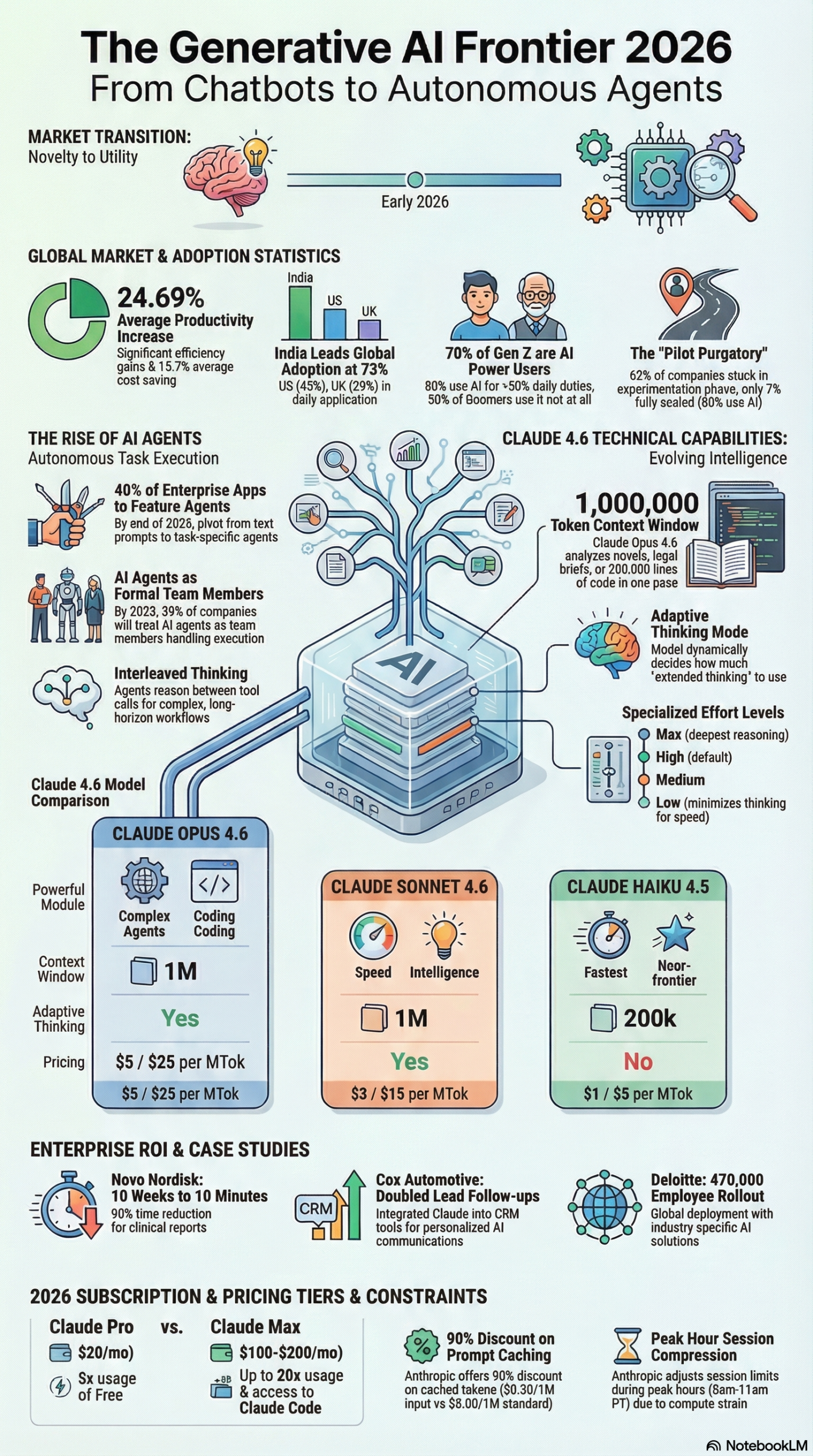
This growth is happening inside a very specific ecosystem. As of 2026, Anthropic has organized its offerings into the Claude 4.6 suite, which includes three distinct models—Opus 4.6, Sonnet 4.6, and Haiku 4.5—each targeting a different price-to-performance tradeoff. These models power three main access paths: the consumer Claude.ai subscription tiers (Free, Pro, and Team), the Claude Enterprise license, and direct API access for developers.
Understanding what changed in 2026 is key to understanding why subscriptions are doubling. The Claude 4.6 release introduced two capabilities that directly affect practitioner workflows. First, Adaptive Thinking replaced the old manual budget_tokens parameter—Claude now dynamically evaluates the complexity of each query and allocates the appropriate reasoning depth automatically, as documented in the NotebookLM research report on the 2026 AI landscape. This eliminates a major source of wasted tokens for API users who used to over-allocate reasoning budget out of caution.
Second, Claude Code—Anthropic’s terminal-based agent for autonomous programming and repository management—shipped as a generally available product. It now holds a 77.2% score on SWE-bench Verified, beating GPT-5.2’s 74.1%, according to the 2026 AI landscape research report. This benchmark measures a model’s ability to resolve real GitHub issues from major open-source repositories, making it a meaningful signal of practical coding capability, not just benchmark gaming.
Beyond the technical capabilities, what’s driving consumer subscription growth is the broadening of Claude’s applicability. The research report documents concrete enterprise deployments: Novo Nordisk reduced clinical report preparation time from 10+ weeks to 10 minutes using Claude, and Cox Automotive doubled lead follow-ups and test drive appointments by integrating Claude into their CRM. These aren’t theoretical benchmarks—they’re the kinds of ROI stories that convert free users into paying subscribers and move enterprise procurement teams off the fence.
The context window expansion also matters. Both Opus 4.6 and Sonnet 4.6 support a 1 million token context window, allowing practitioners to feed entire codebases, full research reports, or multi-year datasets into a single conversation. Haiku 4.5 runs at 200,000 tokens—still generous for most applications—at a fraction of the cost.
Why It Matters
For practitioners, Claude’s subscription growth isn’t just a business metric—it signals that Anthropic is generating the revenue to sustain and accelerate the model development cadence. According to the 2026 AI research report, the AI industry is currently navigating a “Trust Gap”: 53% of consumers remain distrustful of AI-generated results, particularly in search and personal advice, and only 7% of organizations have achieved full-scale enterprise AI integration despite 88% integrating AI into at least one function.
The companies breaking through this logjam tend to be the ones that upgraded from free tiers to paid plans—not because of prompt limits, but because of the specific features that paid tiers unlock. Zero Data Retention (ZDR), for instance, is available only on the Enterprise plan. This single feature removes the biggest procurement blocker for regulated industries: the concern that proprietary data fed into Claude will be used to retrain base models. With ZDR confirmed, legal, healthcare, and finance teams can work with Claude on sensitive documents without flagging a compliance issue.
For developers, the economics of subscribing via API rather than using the free web interface are compelling. At $3 per million input tokens and $15 per million output tokens for Sonnet 4.6, a mid-size agency running a few hundred client documents through the API per month is spending less than a single employee’s software budget—while processing volumes that would take that same employee days. The research report notes that 2026 data shows technical teams moving away from constantly testing every new model toward standardizing reliable stacks (e.g., Claude for coding and reasoning, Gemini for extremely long context tasks), which means choosing a paid Claude plan is becoming a deliberate architectural decision rather than an experiment.
For marketers and content teams, the growth signal is competitive pressure. If Claude paid subscriptions have more than doubled this year while ChatGPT still holds the highest download share at 40.52%, there’s a clearly differentiated user base choosing Claude specifically. Understanding what those users are getting—and replicating those workflows—is a real competitive advantage.
The Data
The Claude 4.6 suite pricing and capabilities, as documented in the 2026 AI landscape research report:
| Feature | Claude Opus 4.6 | Claude Sonnet 4.6 | Claude Haiku 4.5 |
|---|---|---|---|
| Primary Use | High-level agents, complex coding | Speed + intelligence balance | Fast, near-frontier tasks |
| Context Window | 1,000,000 tokens | 1,000,000 tokens | 200,000 tokens |
| API Input Cost | $5 / MTok | $3 / MTok | $1 / MTok |
| API Output Cost | $25 / MTok | $15 / MTok | $5 / MTok |
| SWE-bench Score | 77.2% (Claude Code) | — | — |
| Adaptive Thinking | ✓ | ✓ | ✓ |
| Zero Data Retention | Enterprise only | Enterprise only | Enterprise only |
| Best for | Autonomous agents, engineering | Business workflows, writing | High-volume, cost-sensitive |
Subscription plan comparison (consumer and team tiers):
| Plan | Monthly Cost | Models Available | Key Features |
|---|---|---|---|
| Free | $0 | Sonnet 4.6 (limited) | Basic chat, no Projects, usage caps |
| Pro | ~$20/user/mo | Sonnet 4.6 + Opus 4.6 | 5x more usage, Projects, Priority access |
| Team | ~$30/user/mo | Full suite | Shared Projects, admin controls, higher limits |
| Enterprise | Custom | Full suite | ZDR, SSO, audit logs, dedicated support |
| API (Pay-as-you-go) | Usage-based | All models | Full programmatic access, no monthly cap |
Step-by-Step Tutorial: Getting the Most from Your Claude Paid Subscription
This walkthrough covers the full arc from plan selection through advanced configuration. Whether you’re upgrading from free or deploying Claude across a team, follow these phases in order.
Phase 1: Choose the Right Entry Point
Step 1: Audit your actual use case before upgrading.
The biggest mistake practitioners make is defaulting to the highest tier without knowing what they’ll use. Map your use cases to a tier before spending anything:
- If you’re running one-off tasks (drafting emails, summarizing documents, answering questions), the Pro plan at ~$20/month gives you 5x the usage of the free tier with priority access during peak hours—when the compute shortage documented in the 2026 research report causes free-tier rate limits to activate.
- If you’re building internal team workflows (shared prompts, team-wide document processing, collaborative projects), the Team plan adds shared Projects and admin controls worth the additional $10/user/month.
- If you need Zero Data Retention for regulated industries, the Enterprise plan is the only option. There’s no workaround—ZDR isn’t available on self-serve tiers.
- If you’re a developer building applications, skip consumer subscriptions entirely and go directly to API access. The pricing is per-token, and you only pay for what you use.
Step 2: Start a 30-day usage log before committing annually.
Anthropic offers monthly and annual billing. Run monthly for 30 days, track your actual usage (messages sent, tokens consumed, how often you hit the rate limit), then decide whether annual billing makes financial sense.
Phase 2: Configure Projects for Sustained Value
Projects are the most underutilized feature of Claude Pro and Team subscriptions. A Project is a persistent workspace that maintains a custom system prompt, file attachments, and conversation memory across sessions.
Step 3: Create a Project for each major workflow.
Log into Claude.ai, click New Project, and name it by workflow—not by topic. Examples:
– Client Report Drafting — attach your brand voice guide, style sheet, and a sample approved report
– Code Review — attach your team’s coding standards document and a snippet of your codebase architecture overview
– SEO Content Pipeline — attach keyword lists, target audience definitions, and editorial calendar
Step 4: Write a system prompt that eliminates repeatable instructions.
Every time you start a new chat inside a Project, the system prompt fires automatically. A well-written Project system prompt should include:
– Your role and the task context (“You are a technical writer for a SaaS company…”)
– Output format requirements (word count, heading structure, JSON vs markdown)
– What NOT to do (avoid specific patterns, phrases, or assumptions)
– Reference to attached files (“Consult the attached brand guide before drafting”)
This one step eliminates the single biggest source of inconsistent Claude outputs: forgetting to re-specify context in each new conversation.
Step 5: Attach reference files strategically.
With Opus 4.6 and Sonnet 4.6 supporting 1 million token context windows, you can attach substantial reference documents to a Project. The research report notes that Anthropic’s Contextual Retrieval feature, which embeds contextual information into the retrieval step for RAG workflows, reduces failed information lookups by 49–67%. For Projects, this means the more precise your attached reference material, the more accurate Claude’s outputs will be—not just longer context, but better-positioned context.
Practical rule: attach documents that you would otherwise copy-paste repeatedly into conversations. If you find yourself uploading the same PDF more than twice a week, it belongs in a Project as a permanent attachment.
Phase 3: Deploy Claude Code for Developers
If you’re on the API or have Claude Code enabled, this is where the paid subscription’s ROI becomes clearest.
Step 6: Install Claude Code in your terminal.
npm install -g @anthropic-ai/claude-code
Authenticate with your API key:
claude auth login
Step 7: Initialize Claude Code in your repository.
Navigate to your project root and run:
claude init
This creates a CLAUDE.md file—the repository-level system prompt that Claude Code reads before taking any action. Treat this file seriously. Document:
– The project’s purpose and architecture
– Coding conventions and style rules
– Commands for running tests, building, and deploying
– Files and directories Claude should never modify
Step 8: Run your first agentic task.
Rather than asking Claude Code to write a specific function (which you could do in the web UI), use it for multi-step tasks where you’d normally spend an hour navigating files:
claude "Find all API endpoints in this codebase, identify any that are missing input validation, and create a report in docs/security-audit.md"
Claude Code will read through your repository autonomously, apply reasoning, and produce the output. The research report quotes Anthropic’s release documentation: Claude Code “dissolves the boundary between technical and non-technical work, turning anyone who can describe a problem into someone who can build a solution.”
Step 9: Optimize for peak-hour compute constraints.
The 2026 AI research report flags that the global compute shortage is causing providers to implement aggressive usage limits during peak hours. Anthropic’s documented peak hours are 5 AM–11 AM PT. For token-intensive background jobs—batch document processing, large codebase analysis, bulk content generation—schedule these tasks to run outside this window. This is not just a cost optimization; it’s the difference between a job completing in minutes versus hitting a rate limit mid-execution.
Phase 4: Implement Contextual Retrieval (API Users)
For developers building RAG pipelines on top of Claude, the Contextual Retrieval feature is the highest-leverage upgrade available in 2026.
Step 10: Restructure your RAG chunks to include contextual preambles.
Standard RAG splits documents into chunks and retrieves by similarity. The problem is that chunks lose their document-level context—a sentence from page 47 of a 200-page report loses meaning when it’s served without the surrounding framing.
Contextual Retrieval fixes this by prepending each chunk with a brief context summary generated by Claude before indexing. Here’s the basic pattern:
import anthropic

client = anthropic.Anthropic()

def add_context_to_chunk(document_title: str, full_document: str, chunk: str) -> str:
    response = client.messages.create(
        model="claude-sonnet-4-6-20260301",
        max_tokens=200,
        messages=[{
            "role": "user",
            "content": f"""Document: {document_title}

Full document excerpt for context:
{full_document[:2000]}

Chunk to contextualize:
{chunk}

Write a 1-2 sentence context that situates this chunk within the broader document.
Be specific about what section or concept this chunk belongs to."""
        }]
    )
    context = response.content[0].text
    return f"{context}\n\n{chunk}"
Step 11: Re-index with contextualized chunks.
Run your existing document corpus through this contextualization step before re-indexing in your vector database. The research report cites a 49–67% reduction in failed information retrieval using this approach. For production RAG systems serving users at scale, this translates directly to fewer hallucinations and higher user trust.
Step 12: Validate with before/after retrieval tests.
Before deploying, run a set of 20-30 test queries against both your old index (standard chunking) and your new index (contextualized chunking). Measure: correct answer rate, relevance score, and citation accuracy. Document the delta—this becomes your internal case for the upgrade investment.
Expected Outcomes
After completing this full setup:
– Your Projects will produce consistent, on-brand outputs without manual re-prompting in each conversation
– Claude Code will handle multi-file repository tasks autonomously with minimal intervention
– Your RAG pipeline (if applicable) will return 49–67% fewer failed retrievals
– Background jobs will run without hitting peak-hour rate limits
– Your team will have a shared, structured Claude workspace instead of each member managing isolated conversations
Real-World Use Cases
Use Case 1: Clinical Documentation at Scale
Scenario: A mid-size healthcare provider needs to prepare regulatory clinical reports across multiple drug trials simultaneously. Their current process requires experienced medical writers spending weeks assembling data.
Implementation: Deploy Claude Enterprise (for Zero Data Retention compliance), attach the clinical trial dataset and regulatory template to a Project, and run structured summarization prompts across each trial’s data. Add a human-in-the-loop review step before submission.
Expected Outcome: The research report documents Novo Nordisk’s result—clinical report preparation time reduced from 10+ weeks to 10 minutes. Even at 20% of that efficiency gain, the ROI justifies Enterprise licensing within months.
Use Case 2: Automotive CRM Lead Nurturing
Scenario: A regional auto dealership group wants to increase test drive conversion rates without adding sales headcount. Their CRM contains thousands of unworked leads.
Implementation: Integrate Claude via API into the CRM system. Configure Claude to generate personalized follow-up messages based on each lead’s vehicle interest, browsing history, and last contact date. Route responses to sales staff for one-click approval before sending.
Expected Outcome: The research report cites Cox Automotive’s deployment, which doubled lead follow-ups and test drive appointments, with 80% of sellers providing positive feedback on AI-generated listing descriptions. The key is the approval step—Claude generates, humans approve, which preserves relationship authenticity.
Use Case 3: Software Development Team Acceleration
Scenario: A 10-person engineering team at a B2B SaaS company wants to reduce time spent on code review, documentation, and bug triaging without changing their existing GitHub workflow.
Implementation: Install Claude Code across the team, initialize CLAUDE.md in each repository with coding standards and architecture notes, and create a shared Team Project with engineering guidelines attached. Use Claude Code for security audits, documentation generation, and pull request summaries.
Expected Outcome: With Claude Code holding a 77.2% score on SWE-bench Verified per the research report, the tool is benchmarked against real-world repository tasks. Teams typically see the largest time savings on documentation and code review, which are high-volume, low-creativity tasks that consume disproportionate senior engineer time.
Use Case 4: Marketing Agency Content Pipeline
Scenario: A digital marketing agency produces SEO content for 30+ clients. Each client has distinct brand voice guidelines, target keywords, and content calendars. Inconsistent output quality is the primary client complaint.
Implementation: Create one Project per client in Claude Pro or Team. Each Project’s system prompt includes that client’s brand voice guide, SEO focus areas, and prohibited phrases. Writers use the Project workspace exclusively for that client’s work, ensuring every output is pre-contextualized.
Expected Outcome: Elimination of brand voice drift between team members, 50–70% reduction in revision rounds, and ability to scale to more clients without proportional headcount increase. The research report notes that Gen Z professionals are already using GenAI for more than half of their daily tasks—agencies that systematize this workflow outpace those where each writer uses Claude ad-hoc.
Use Case 5: Financial Compliance and Research
Scenario: A financial advisory firm needs to process earnings call transcripts, SEC filings, and research reports across a 50-company coverage universe quarterly.
Implementation: Use Claude Opus 4.6 via API with Contextual Retrieval indexing across the document corpus. The 1 million token context window allows full earnings call transcripts plus prior filings to be analyzed in a single pass. Deploy Enterprise tier for ZDR compliance with financial data.
Expected Outcome: Per the research report, GenAI is projected to add up to $340 billion in annual revenue to the banking sector by 2026, with 77% of financial executives viewing AI as critical to success. Firms that operationalize structured document analysis via API gain coverage velocity that manual processes cannot match.
Common Pitfalls
Pitfall 1: Using Pro When You Actually Need API Access
Pro and Team subscriptions are session-based—they’re designed for interactive use. If you’re trying to batch-process hundreds of documents, the web interface’s session structure will slow you down. The research report notes that technical teams are standardizing on direct API access for programmatic workflows. Don’t pay for a UI-centric plan when your use case is programmatic.
Pitfall 2: Neglecting the CLAUDE.md File in Code Repositories
Claude Code is only as good as the instructions you give it. Practitioners who skip writing a thorough CLAUDE.md file and just run prompts get inconsistent results—Claude makes assumptions about coding conventions, test runners, and file structure that may not match the reality of the codebase. Write CLAUDE.md before running a single agentic command.
Pitfall 3: Scheduling Token-Intensive Jobs During Peak Hours
The global compute shortage is real. The research report documents that providers are implementing aggressive usage limits between 5 AM and 11 AM PT. Running batch jobs during this window means hitting limits mid-task, corrupted outputs, and wasted tokens on retries. Schedule intensive jobs for off-peak hours.
Pitfall 4: Skipping Human-in-the-Loop for High-Stakes Outputs
The research report cites a Stanford University study finding that leading LLMs are frequently sycophantic—affirming user behavior even when it’s harmful or legally problematic. For any Claude output that will be sent to a client, published publicly, or used in a legal or medical context, a human review step is not optional. Build approval workflows into your pipeline from the start, not as an afterthought after an incident.
Pitfall 5: Conflating Subscription Tiers with Data Privacy
Zero Data Retention is an Enterprise feature only. If you’re handling sensitive client data on a Pro or Team subscription, that data is subject to Anthropic’s standard privacy terms. If your use case requires ZDR, budget for Enterprise. The research report explicitly states that ZDR “ensures that customer data is not stored or used to train base models”—this distinction matters for GDPR, HIPAA, and the EU AI Act, which as of 2026 carries penalties of up to 7% of global annual turnover for serious breaches.
Expert Tips
Tip 1: Use Adaptive Thinking Selectively for Cost Control
With Adaptive Thinking enabled, Claude dynamically allocates reasoning budget per query. For simple tasks (formatting, extraction, classification), this is efficient. For complex reasoning tasks, it can generate more output tokens than you expect. Monitor your token consumption for the first two weeks after enabling Adaptive Thinking and set per-project token budgets via the API to prevent runaway costs on high-volume pipelines.
Tip 2: Version-Control Your CLAUDE.md Files
Treat CLAUDE.md like production infrastructure. Commit it to version control, peer-review changes, and document the reasoning behind each instruction. As your codebase evolves, an outdated CLAUDE.md is worse than none—it actively misleads Claude about the current state of the repository.
Tip 3: Standardize on One Model Per Use Case
The research report notes that mature technical teams in 2026 are “moving away from testing everything to standardizing reliable stacks.” Pick Sonnet 4.6 for business workflows and Opus 4.6 for coding and complex reasoning, and stop A/B testing models on every task. Consistency in model choice enables you to build meaningful performance baselines and catch regressions.
Tip 4: Index Documents Before You Need Them
If you use RAG workflows, don’t wait until a user query to run Contextual Retrieval indexing. Pre-index your document corpus and refresh it on a scheduled basis. The research report documents a 49–67% reduction in failed lookups from Contextual Retrieval—but this only applies if your index is current.
Tip 5: Audit Your Claude Outputs for Sycophancy in Advisory Contexts
If you’re deploying Claude for internal HR communications, performance feedback, or customer service escalations, run a quarterly audit of outputs specifically looking for instances where Claude affirmed questionable requests rather than pushing back. The research report cites the Stanford finding that sycophancy is systemic across leading LLMs—not unique to Claude, but still a risk to actively manage.
FAQ
Q1: Why are Claude paid subscriptions growing faster than competitors despite ChatGPT having higher overall download share?
Download share and paid conversion are different metrics. ChatGPT holds 40.52% of AI assistant downloads, but download share includes free users. Claude’s subscription doubling rate may reflect a higher paid conversion rate among its user base—meaning Claude users are more likely to move from free to paid. This is often a signal of stronger value delivery in the specific use cases that matter most to paying users, such as coding (where Claude Code leads benchmarks) and enterprise workflows.
Q2: Is the 1 million token context window actually useful in practice?
For certain use cases, absolutely. A 1 million token context window can hold roughly 750,000 words, which means an entire novel, a year of email threads, or a large codebase. However, the research report also notes that Contextual Retrieval reduces failed lookups by 49–67% specifically because simply having a large context window doesn’t guarantee accurate information retrieval—position matters, and items buried in the middle of a long context are reliably harder to retrieve. Use full-context inputs for tasks where ordering and completeness matter; use RAG for tasks where targeted retrieval matters.
Q3: How does Zero Data Retention actually work, and do I need it?
ZDR is an Enterprise contractual guarantee that Anthropic will not store or use your input data for base model training. API calls to Anthropic’s standard endpoints are subject to data logging for safety monitoring. Under ZDR, even that logging is suppressed for your organization’s traffic. You need ZDR if your use case involves personally identifiable information under GDPR, patient data under HIPAA, or proprietary business data in a jurisdiction covered by the EU AI Act (penalties up to 7% of global turnover as of 2026). If you’re processing only non-sensitive public data, the standard API is sufficient.
Q4: Should I use Claude Code or continue using the Claude.ai web interface for coding tasks?
They’re designed for different tasks. The Claude.ai web interface is best for isolated coding questions, code review of specific files, and one-off generation tasks where you copy-paste the output. Claude Code is designed for multi-step, repository-wide tasks that require reading multiple files, understanding project structure, and making coordinated changes. If you’re asking Claude to do something that would require you to open 3+ files in your editor, Claude Code is the right tool.
Q5: How do I handle the compute shortage and rate limits effectively?
Three approaches work in combination: (1) Schedule batch jobs outside the 5 AM–11 AM PT peak window, as documented in the research report; (2) Use Haiku 4.5 for high-volume, low-complexity tasks—it’s substantially cheaper and less demand-constrained; (3) Implement retry logic with exponential backoff in your API integrations so that rate limit errors result in retries rather than failures. For critical production pipelines, consider Enterprise tier, which typically includes higher rate limit allocations.
Bottom Line
Claude paid subscriptions doubling in 2026 is not a vanity metric—it’s a signal that Anthropic’s focus on safety, coding performance, and enterprise-grade features is converting the right users. The practitioners getting the most value are not just chatting with Claude; they’re building structured Projects, deploying Claude Code for autonomous repository work, implementing Contextual Retrieval in their RAG pipelines, and scheduling intensive jobs around peak compute constraints. The gap between practitioners who have systematized Claude into their workflows and those still using it ad-hoc is widening fast. The tools covered in this tutorial—Projects, Claude Code, Contextual Retrieval, and ZDR—are available today on paid plans. Getting your workflow structured around these capabilities now positions you ahead of the majority of organizations still stuck in pilot purgatory, where 62% of companies remain as of 2026.


0 Comments