

Building an 11-Skill AI Content Team Inside Claude Code
A single Claude Code session now handles what used to require a stack of disconnected tools: audience research, content ideation, platform-specific drafting, and performance-driven self-improvement. This 11-skill architecture runs across five layers — from audience profiling to a monthly feedback loop that rewrites its own skill files. After completing this tutorial, you’ll understand how each layer connects, what APIs the system depends on, and how to configure the same pipeline for your own content operation.

- Open Claude Code and type
let's start creating content. This phrase triggers the Orchestrator skill, which acts as a router for every other skill in the system.
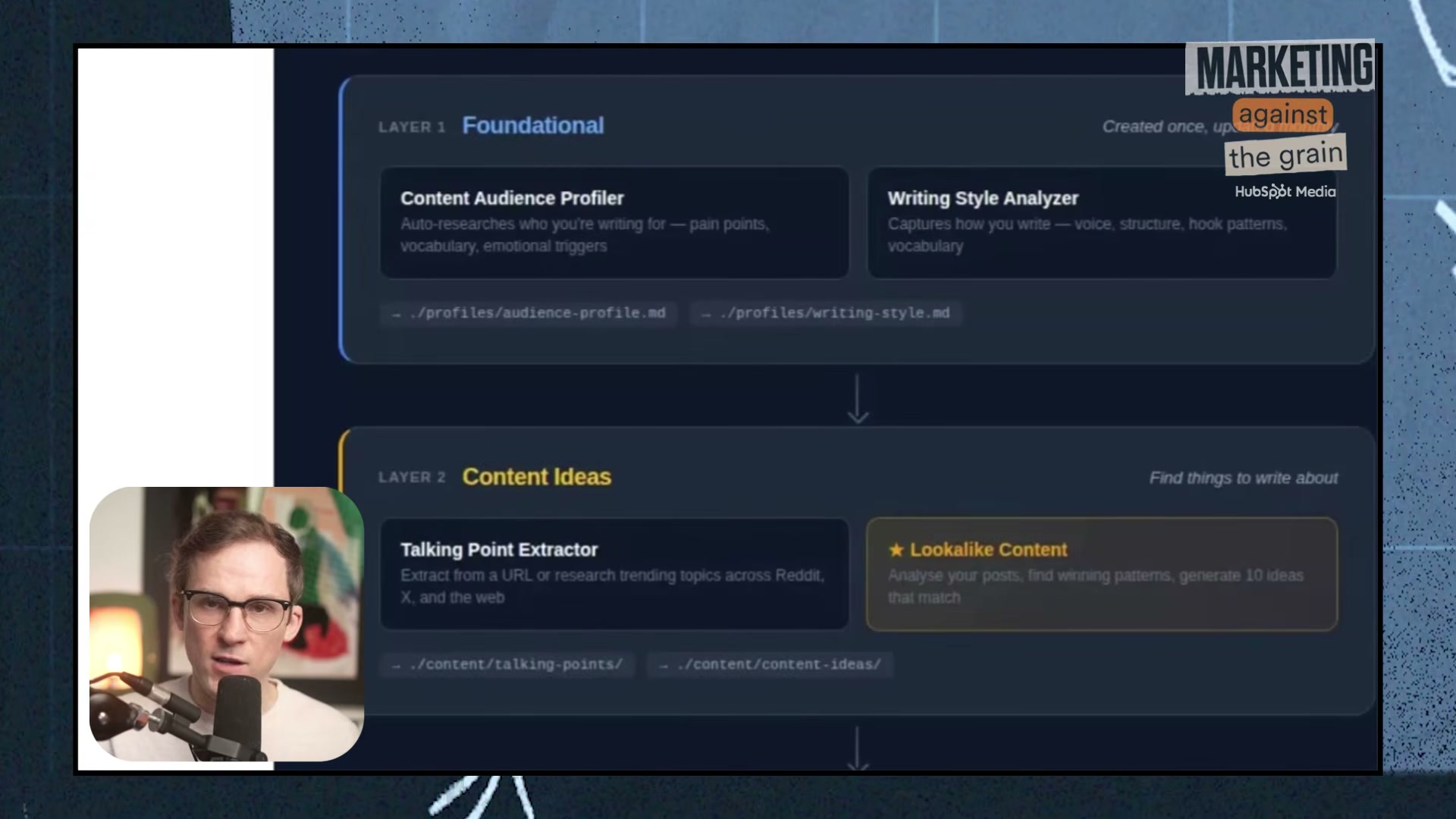
2. Review the Orchestrator’s status inventory. It surfaces your existing audience profile, writing style, prior research, previously created posts, and confirms all four API keys — X, Perplexity, Firecrawl, and OpenAI — are present before proceeding.
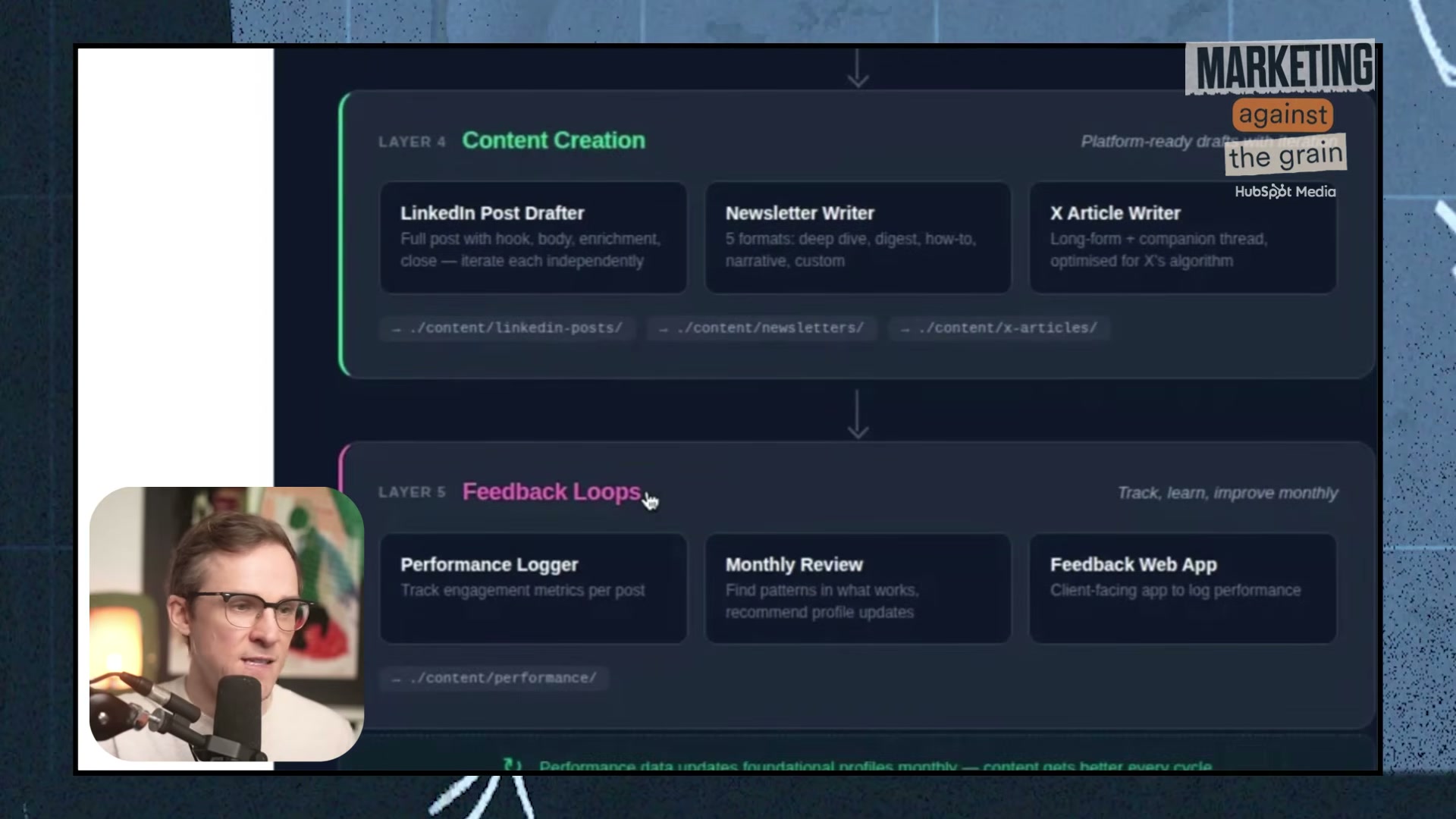
3. Choose your operating mode. Automatic runs the full pipeline overnight without intervention; Interactive steps you through each layer one at a time.

4. Launch the Audience Profiler. Provide a plain-language description of your target audience and your primary content platform. The skill fires parallel Perplexity queries, ranks pain points by frequency × severity with verbatim language, and asks you to validate the research before writing anything to disk.

5. Open the HTML-rendered audience profile. It covers audience identity, jobs-to-be-done, pain points, a vocabulary library (what they say vs. avoid), emotional register, and platform-specific persona detail — all derived from live research, not assumptions.
6. Run the Writing Style Analyzer. The skill scrapes web-accessible creator content via Firecrawl and Perplexity, then generates a structured Style Card .md file. Build one style card per platform — voice and structure should differ across LinkedIn, Substack, and X.
Warning: this step may differ from current official documentation — see the verified version below.
Firecrawl has documented difficulty accessing LinkedIn posts through Perplexity; the workaround is to export your own LinkedIn archive and upload it directly to the skill.

7. Run the Talking Point Extractor. Provide a topic description or source content (YouTube video, PDF). The skill queries Reddit, X, and Perplexity and returns dated, categorized talking points: educational angles, data nuggets, spicy takes, and story sparks.
8. Run the Lookalike Content skill. Upload a data dump of past posts — performance data is optional but sharpens output. The skill extracts structural DNA from your top performers (post length, section count, paragraph cadence, hook types) and generates new ideas mapped to those patterns.
9. Use the Post Enricher on any existing draft. Feed it a post and specify the target platform; it researches and layers in a relevant data point, case study, or story before passing the enriched copy to the appropriate platform drafter.
10. Generate final drafts using the platform-specific Content Creation skills — LinkedIn Post Drafter, Newsletter Writer, X Article Writer, or YouTube Transcript Generator. Each skill reads the active audience profile and style card before producing a word of output.
11. Log every generated post to the feedback-loop web app. After publishing, input performance data. On a monthly cadence, run the Review skill — it reads aggregate metrics and rewrites the foundational skill files to sharpen future output.
How does this compare to the official docs?
The system leans on Claude Code’s native skill architecture, but several critical integration points — the Perplexity API calls, Firecrawl scraping pipelines, and the custom feedback app — sit outside Anthropic’s documented tooling, and the next act verifies which pieces map to supported Claude Code primitives and which require you to build your own infrastructure.
Here’s What the Official Docs Show
The video builds a coherent, replicable system — this act layers in the prerequisite details, API distinctions, and platform constraints the official documentation surfaces that will keep your build from breaking before you finish step one.
Step 1 — Install Claude Code and trigger the Orchestrator
The video’s approach here matches the current docs exactly. The install command and natural-language trigger are both confirmed. One critical addition: Claude Code requires a paid Anthropic plan — there is no free tier. Pro starts at $17/month; the Max 5x plan at $100/month handles heavier agentic workloads. The video omits this entirely. Also worth noting: Claude Code runs across five interfaces (Terminal, IDE, Desktop, Web/iOS, and Slack) — the terminal session in the video is one of five supported access methods, and the Desktop app is currently labeled BETA.


Step 2 — Review the Orchestrator’s status inventory
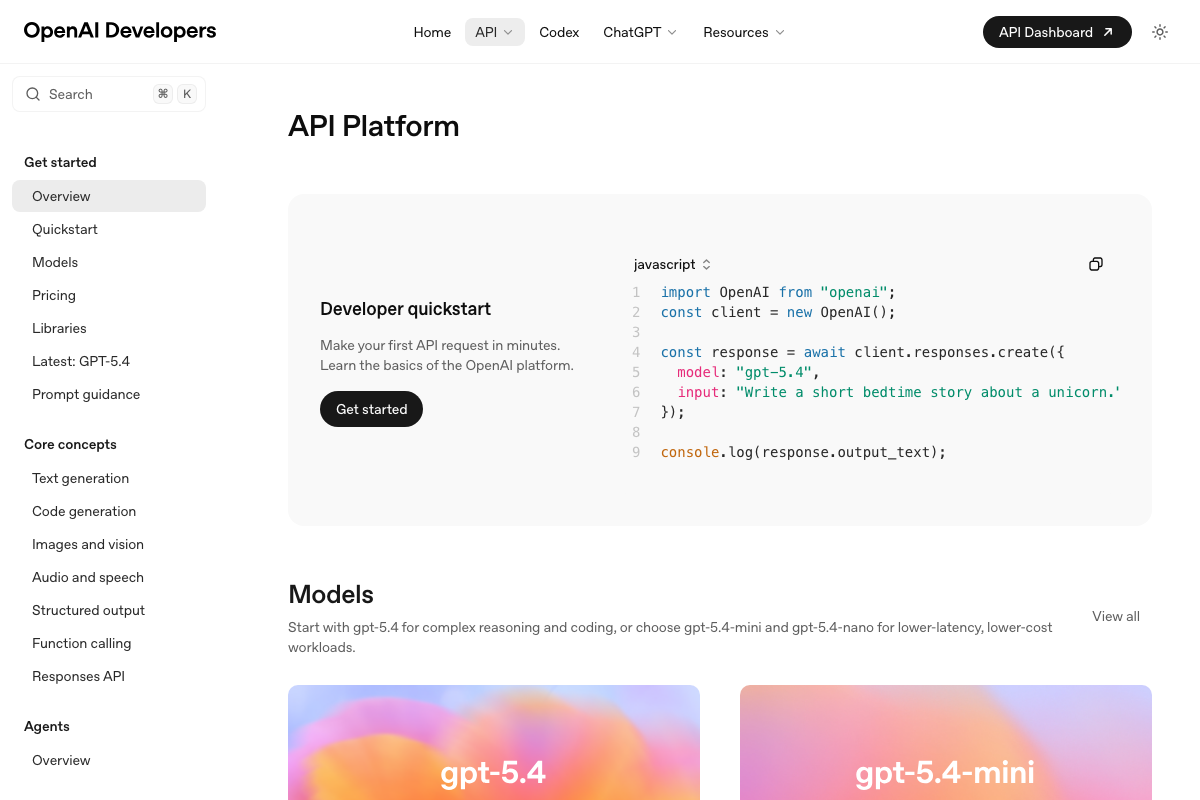
The video’s approach here matches the current docs exactly — the Projects and Sessions panels in the desktop UI align directly with the persistent context behavior described. Two API clarifications before you configure your keys: Perplexity is not a single tool. The platform offers a standard SDK, a separate Agent API, and an OpenAI compatibility layer — your skill files need to target one explicitly. And as of March 17, 2026, the current OpenAI flagship model is gpt-5.4. The official quickstart now uses the Responses API pattern (client.responses.create()), not Chat Completions. Any skill file referencing gpt-4 or gpt-4o by name, or using the Chat Completions endpoint, reflects an earlier integration pattern.


Step 3 — Choose operating mode
No official documentation was found for this step — proceed using the video’s approach and verify independently.
Step 4 — Launch the Audience Profiler
No official documentation was found for this step — proceed using the video’s approach and verify independently.
Step 5 — Review the HTML audience profile
No official documentation was found for this step — proceed using the video’s approach and verify independently.
Step 6 — Run the Writing Style Analyzer
The video’s approach here matches the current docs exactly. Firecrawl is confirmed as an open-source web data service, and the markdown field it returns is what your writing style skill consumes. Two additions: Firecrawl’s open-source status means you can self-host if needed. More usefully, a Browser sandbox mode — currently labeled NEW in the docs — enables agent-driven dynamic page interaction, which resolves the JavaScript-heavy site problem the video flags as a known Firecrawl limitation.


Step 7 — Run the Talking Point Extractor
The video’s approach here matches the current docs exactly for Perplexity and Reddit as research sources. One hard prerequisite the video skips: Reddit API access now requires paid credentials following the 2023 pricing change. You’ll need to budget for Reddit API keys before this skill functions. Also: target specific subreddits aligned to your audience profile rather than the r/popular feed — the structured data return and relevance improve significantly.

Steps 8, 9, 10 — Lookalike Content skill, Post Enricher, Platform Content Drafters
No official documentation was found for these steps — proceed using the video’s approach and verify independently.
Step 11 — Log to the feedback loop and run the monthly Review skill
The video’s approach here matches the current docs exactly for Claude Code as the runtime. Two publishing constraints the video does not address: Substack has no public API for programmatic post creation — all newsletter drafts require manual copy-paste into the Substack web editor. LinkedIn’s public API does not support automated posting for individual accounts — programmatic access is limited to Company Pages via OAuth-approved apps. Every draft this system produces for both platforms requires a human hand to publish.
Useful Links
- Claude Code by Anthropic | AI Coding Agent, Terminal, IDE — Official product page covering installation, supported interfaces, pricing tiers, and enterprise integrations.
- Overview – Perplexity — API platform documentation distinguishing the standard SDK, Agent API, and OpenAI compatibility layer with Python/TypeScript quickstart examples.
- Quickstart | Firecrawl — Developer quickstart covering Scrape, Search, Agent, Map, Crawl operations and the new Browser sandbox mode for agent-driven web interaction.
- OpenAI API Platform Documentation — Current API reference featuring gpt-5.4 as the recommended model and the Responses API as the standard integration pattern.
- Substack — Independent newsletter publishing platform; no public API for programmatic post creation.
- LinkedIn: Log In or Sign Up — Professional content platform; automated posting for individual accounts is not supported via the public API.
- Reddit – The heart of the internet — Community discussion platform used as a talking point research source; API access requires paid credentials following the 2023 pricing change.


0 Comments