

Google’s search result pages are no longer the finish line — AI agents are now the gatekeepers deciding which brands get cited, recommended, and surfaced to users. The March 2026 SEO Update by Yoast makes one thing unmistakably clear: the ranking game has shifted to a readability-for-machines game, and the window to get ahead of it is narrowing fast. This tutorial walks you through exactly what changed, what it means for your site, and how to implement the new Yoast SEO 27.1 features — Schema Aggregation, NLWeb integration, and the AI content suite — step by step.
What This Is: Yoast 27.1, Schema Aggregation, and the Agentic Web
The headline feature in Yoast SEO version 27.1 (released March 2026) is Schema Aggregation — an opt-in endpoint that consolidates your site’s entire structured data graph into a single, deduplicated, AI-readable output. But to understand why this matters, you need to understand the problem it solves.
Traditional search engines crawl page by page, stitching together a picture of your site over time. That model breaks down when the audience is an AI language model trying to answer a user’s question directly, in real time, without visiting your site at all.
When an LLM encounters your domain, it needs to understand your site’s entity graph — who you are, what you publish, who your authors are, what topics you cover — in a single efficient interaction. Without that, the AI either ignores you or hallucinates something plausible but wrong about your brand.
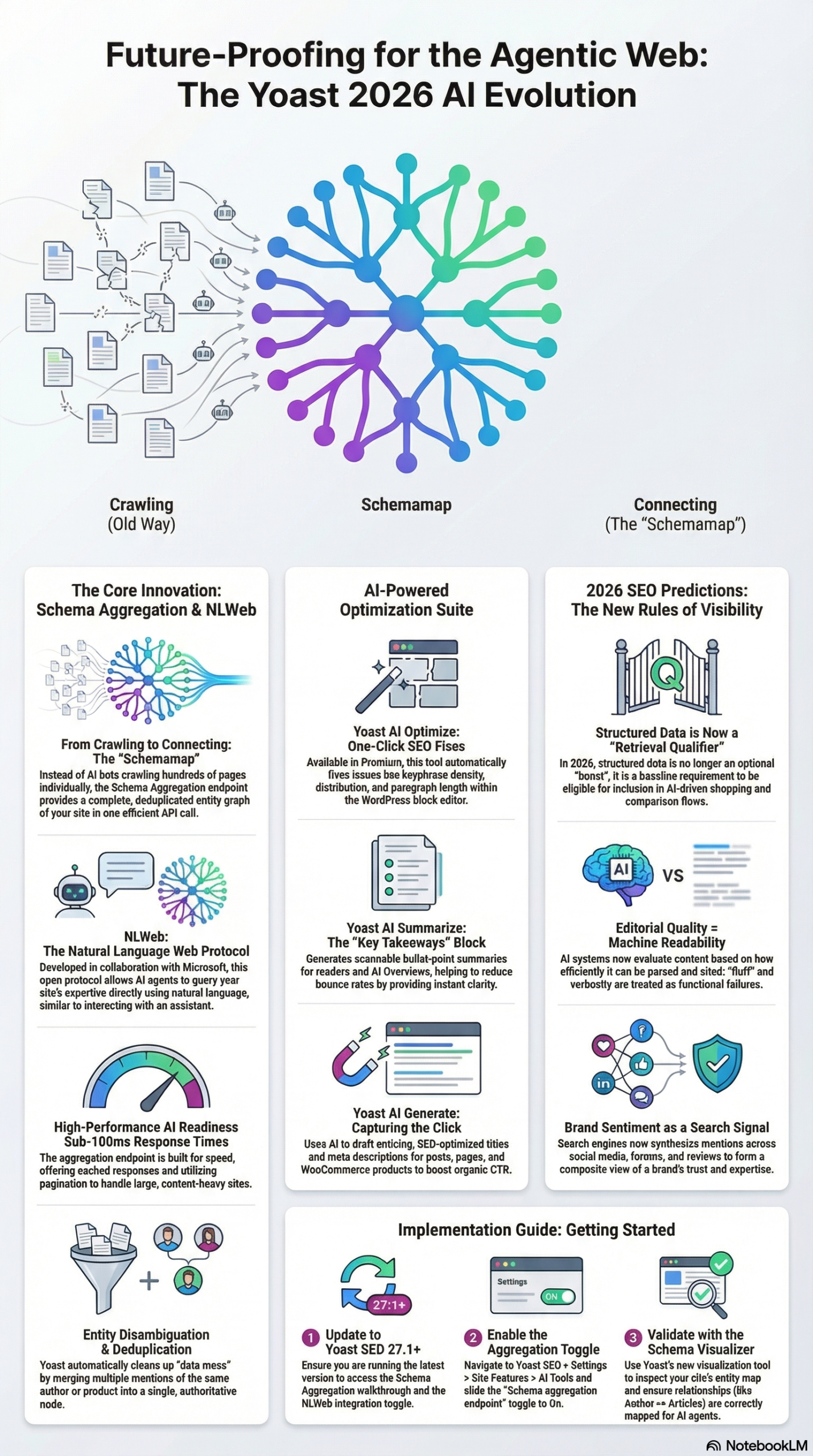
Schema Aggregation solves this at the protocol level. According to the Yoast research report, the feature creates a dedicated endpoint that exposes a connected graph of all published, public, and indexable content — posts, pages, and custom post types — in one deduplicated schemamap. Instead of forcing AI systems to reconstruct your entity relationships by crawling, they can retrieve the full picture of authors, products, and articles in a single API call.
The technical performance benchmarks are worth noting: the endpoint delivers cached responses in under 100ms, supports pagination for large sites, and respects your existing privacy and indexing settings. Nothing private gets exposed; the schema aggregation only surfaces what was already publicly indexed.
Underpinning all of this is Yoast’s collaboration with Microsoft’s NLWeb project — a protocol co-led by R.V. Guha, co-founder of Schema.org, the very standard that powers structured data across the web today. NLWeb natively supports MCP (Model Context Protocol), which means it can serve both human users and AI agents through the same natural language API layer. This isn’t a proprietary vendor solution bolted onto a plugin — it’s a standards-based implementation designed to interoperate across the open web.
Alain Schlesser, Principal Architect at Yoast, described the strategic intent clearly: “You can’t stop the AI wave, but you can direct it. Our integration with NLWeb puts you back in charge. It allows you to manage server load efficiently and ensures that when AIs do access your content, they get the rich, semantic understanding necessary to represent you correctly.”
The broader picture from the March 2026 Yoast recap includes several parallel developments: Google filed a patent for AI-generated landing pages that could replace traditional SERPs; WordPress.org now offers Markdown versions of pages to facilitate AI parsing; Google Maps is testing conversational AI queries for local search; and Google Search Console added a branded vs. non-branded filter. All of these signals point the same direction: optimize for machine readability or risk being invisible to both AI agents and the users they serve.
Why It Matters: The Shift from Rankings to AI Visibility
The shift to AI-first discovery is the largest structural change SEO has seen yet, and the Yoast March 2026 analysis makes the stakes explicit.
Structured data is no longer a ranking booster — it’s a retrieval qualifier. As the research report states, brands without clean entity data will simply not appear in AI-driven shopping and comparison flows. That’s not a penalty; it’s an absence. You’re invisible before the conversation even starts.
Agentic commerce is already here. Users are increasingly delegating product discovery to AI agents that research, compare, and shortlist options before the user sees any result. The Yoast report draws a direct parallel: “agent readiness” in 2026 is as critical as “mobile-first readiness” was in 2015. Sites that weren’t mobile-optimized lost organic traffic for years. The same fate awaits sites not optimized for agent retrieval.
Editorial quality is now a functional requirement. AI systems evaluate content based on how efficiently it can be chunked, extracted, and reused as a factual citation. Verbose, circular, or keyword-stuffed content is actively penalized by the machines evaluating it. Fluff is a functional failure.
Brand sentiment has moved beyond your website. According to the research report, AI systems synthesize signals from forums, Reddit, LinkedIn, and YouTube to build a composite picture of brand legitimacy. Inconsistent messaging across these channels directly weakens your trust signals in AI-generated summaries.
For developers, structured data is now an ongoing architectural concern. For content marketers, every piece of content must be written for extraction, not just engagement. For agencies, “SEO audit” now includes a schema audit, an entity graph review, and a brand sentiment sweep across secondary indexes.
The Data: Yoast AI Feature Comparison
The following table is drawn from the Yoast research report and summarizes the three AI-powered content features released alongside Schema Aggregation.
| Feature | Primary Function | Key Benefit | Current Limitation |
|---|---|---|---|
| Yoast AI Optimize | Automatically suggests fixes for keyphrase density, distribution, sentence length | Saves time on manual tweaks to achieve green-light SEO scores | Beta; limited to texts under ~1,000 words in the WordPress Block Editor |
| Yoast AI Generate | Generates multiple SEO title, meta description, and social preview options | Eliminates ideation blocks for writers and marketers | Requires Yoast SEO Premium |
| Yoast AI Summarize | Creates an editable “Key Takeaways” bullet-point block at the top of posts | Reduces bounce risk; improves clarity for both readers and AI systems | Best for long-form content; marginal value on short posts |
| Schema Aggregation | Consolidates all structured data into a single deduplicated schemamap endpoint | Enables AI agents to ingest full site entity graph in one API call | Opt-in only; requires Yoast SEO 27.1 or higher |
| NLWeb Integration | Exposes natural language API supporting MCP for AI agent access | Turns your site into a “smart oracle” grounding LLM responses | Full feature availability dependent on NLWeb protocol adoption |
Before/After: Traditional Crawl vs. Schema Aggregation
| Dimension | Traditional Crawl | Schema Aggregation Endpoint |
|---|---|---|
| Data Retrieval Method | Page-by-page crawl over days/weeks | Single API call to schemamap |
| Entity Deduplication | Manual or none | Automatic — one entity record per author/product |
| Response Time | Variable (crawler-dependent) | Cached response under 100ms |
| AI Agent Compatibility | Low — requires inference from fragmented data | High — MCP-compatible via NLWeb |
| Privacy Controls | Follows robots.txt/noindex | Respects existing indexing and privacy settings |
| Pagination Support | N/A | Yes — built-in for large sites |
Step-by-Step Tutorial: Activating AI-First SEO on Your WordPress Site
This walkthrough covers enabling Schema Aggregation, setting up the AI content tools, auditing your entity graph, and building out the off-site brand signals that AI systems use to validate your authority. Complete these steps in order — each builds on the previous.
Phase 1: Verify Your Yoast Version and Prerequisites
Step 1: Update to Yoast SEO 27.1 or higher.
Log into your WordPress admin dashboard. Navigate to Plugins → Installed Plugins and check your current Yoast SEO version. If you’re below 27.1, click Update Now. Schema Aggregation is not backported to earlier versions — this update is a hard requirement.
If you’re running Yoast SEO Free, you can still activate Schema Aggregation (it’s available in both Free and Premium). However, the AI content features (AI Optimize, AI Generate, AI Summarize) require Yoast SEO Premium.
Step 2: Confirm your structured data foundation is clean.
Before enabling Schema Aggregation, run a structured data audit. Navigate to Yoast SEO → Tools → Schema Visualizer (available in 27.1). Review your author entities, organization entity, and content types. If you see duplicate author records — for example, the same person appearing under two different schema IDs — resolve those before enabling the aggregation endpoint. Garbage in, garbage out: the schemamap will faithfully replicate any errors in your existing schema.
Use the Schema.org validator to check individual pages for errors before you proceed.
Phase 2: Enable Schema Aggregation
Step 3: Navigate to the Schema Aggregation setting.
In your WordPress dashboard, go to Yoast SEO → Settings → AI Tools. You’ll see a toggle labeled Schema aggregation endpoint. Toggle it to “On.” Save your settings.
Once enabled, Yoast creates a new public endpoint on your domain. The URL pattern follows this structure:
https://yourdomain.com/?yoast_schema_aggregation=1
Larger sites using custom permalink structures may find the endpoint under a different path. Check the AI Tools settings page — Yoast displays the exact endpoint URL after activation.
Step 4: Validate the endpoint response.
Open the endpoint URL in your browser or use a tool like curl to inspect the response:
curl -s "https://yourdomain.com/?yoast_schema_aggregation=1" | python3 -m json.tool | head -100
You should see a JSON-LD response containing @graph nodes for your organization, authors, posts, and pages. Confirm:
- Your organization entity includes
name,url,logo, andsameAsproperties - Author entities have
name,url, and ideally aknowsAboutarray - Post nodes include
headline,datePublished,author, andabout
If any of these are missing, go back to Yoast SEO → Settings → Site Representation and fill in the missing details. The Schema Aggregation endpoint surfaces whatever is in your site’s schema graph — it doesn’t generate data that doesn’t exist.
Step 5: Test response time.
The Yoast research report cites sub-100ms cached response times. Verify this with a simple timing test:
curl -o /dev/null -s -w "Time: %{time_total}s\n" "https://yourdomain.com/?yoast_schema_aggregation=1"
If your response time exceeds 500ms, check whether your caching layer is active. Yoast caches the schemamap automatically, but object caching (Redis, Memcached) will dramatically improve performance for high-traffic sites.
Phase 3: Implement NLWeb Integration
Step 6: Understand what NLWeb adds.
NLWeb is the protocol layer that makes your Schema Aggregation endpoint usable by AI agents that speak MCP (Model Context Protocol). Once your schemamap endpoint is live, NLWeb-compatible agents — including Microsoft Copilot — can query your site in natural language and receive structured, grounded responses.
As the research report notes, this turns your site into a “smart oracle” for LLMs. When a user asks Copilot about a topic your site covers, the model can pull from your verified entity data rather than reconstructing an answer from memory — which reduces hallucinations and ensures your brand is represented accurately.
Step 7: Verify NLWeb protocol headers.
Yoast 27.1 automatically adds protocol headers when Schema Aggregation is enabled. Confirm with:
curl -I "https://yourdomain.com/?yoast_schema_aggregation=1"
Look for X-Robots-Tag, content type (application/ld+json), and cache directives. Full NLWeb header specifications are in the NLWeb project repository.
Step 8: Add sameAs links to your organization entity.
NLWeb relies on verified identity signals. Your organization schema should include sameAs links pointing to your authoritative profiles:
{
  "@type": "Organization",
  "name": "Your Brand",
  "url": "https://yourdomain.com",
  "sameAs": [
    "https://www.linkedin.com/company/yourbrand",
    "https://twitter.com/yourbrand",
    "https://www.youtube.com/@yourbrand",
    "https://en.wikipedia.org/wiki/YourBrand"
  ]
}
Configure these in Yoast SEO → Settings → Site Representation → Social Profiles. These links are the primary mechanism by which AI systems cross-reference your identity across platforms.
Phase 4: Deploy the AI Content Features
Step 9: Enable Key Takeaways with Yoast AI Summarize.
Open any long-form post in the WordPress Block Editor. In the Yoast SEO sidebar, locate AI Summarize and click Generate Key Takeaways. Review and edit the generated bullets before publishing — they appear at the top of the post and serve two audiences: human readers who want to scan before committing, and AI systems extracting content for citations. According to the research report, this directly reduces bounce risk while improving machine readability.
Step 10: Use AI Optimize to fix on-page signals.
With Yoast SEO Premium, the AI Optimize button appears in the SEO analysis panel when fixable issues are detected (keyphrase density, paragraph length, sentence distribution). Click it for specific automated suggestions. Important constraint: AI Optimize is currently in beta and limited to posts under approximately 1,000 words within the Block Editor, per the research report. For longer posts, apply the recommendations manually.
Step 11: Use AI Generate for meta assets.
Once your draft is complete, open the SEO Title and Meta Description fields in the Yoast sidebar and click AI Generate for multiple options. Select the one that balances your target keyphrase with natural readability. Use the same feature for social previews under the Social tab — AI Generate produces platform-appropriate variants for Facebook and Twitter/X, which is best practice for multi-channel visibility.
Phase 5: Audit Off-Site Brand Signals
Step 12: Monitor brand mentions on secondary indexes.
The March 2026 Yoast recap identifies Reddit, LinkedIn, and YouTube as secondary indexes AI systems use to validate brand legitimacy. Set up monitoring with Google Alerts, Mention, or Brand24. Where you find incorrect product descriptions or conflicting narratives, correct them — a clean on-site schema can be undermined by off-site misinformation.
Step 13: Use Search Console’s new branded filter.
Google Search Console added a branded vs. non-branded query filter in early 2026, per the Yoast March recap. Use it to find queries where users searching for your brand land on competitors — a brand confusion signal that AI systems can amplify. Address those gaps with dedicated content reinforcing your brand’s position on those specific topics.
Expected Outcomes After Completing All Steps:
– Your site’s full entity graph is accessible to AI agents in a single, sub-100ms API call
– Your content is discoverable by Microsoft Copilot and other NLWeb-compatible agents
– Key Takeaways blocks improve both reader experience and AI extractability
– Off-site brand signals are consistent and monitored, reinforcing AI trust signals
Real-World Use Cases
Use Case 1: E-Commerce Brand Enabling Agentic Shopping Visibility
Scenario: A mid-size DTC apparel brand running WooCommerce on WordPress. They have 2,000+ product pages, strong organic traffic, but no structured data beyond basic product schema.
Implementation: Upgrade to Yoast SEO 27.1, enable Schema Aggregation, and use the Schema Visualizer to confirm product entities include pricing, availability, SKUs, and shipping details. Add sameAs links to the brand’s Google Business Profile, Amazon storefront, and LinkedIn page. Use AI Summarize on category pages to create extractable product group descriptions.
Expected Outcome: AI shopping agents (Copilot, Perplexity, Google Shopping AI) can retrieve the brand’s full product catalog via the schemamap endpoint. When users ask an AI assistant for product recommendations in this brand’s category, the brand’s products appear with accurate, real-time data rather than being absent or misrepresented.
Use Case 2: Content Publisher Building AI Citation Authority
Scenario: A B2B SaaS blog with 500+ posts and strong domain authority but inconsistent author schema and no Key Takeaways blocks.
Implementation: Run the Schema Visualizer to identify and consolidate duplicate author entities. Add knowsAbout arrays to each author. Deploy AI Summarize across the top 50 highest-traffic posts. Enable Schema Aggregation and validate the endpoint includes all author-article relationships.
Expected Outcome: AI systems summarizing topics this publisher covers begin citing the site consistently, because the author-article entity graph is clean and complete. The publisher moves from occasional mention to reliable primary source in AI-generated answers.
Use Case 3: Local Business Optimizing for Conversational AI Search
Scenario: A multi-location restaurant chain. Google Maps is testing AI chat features for local queries, per the Yoast March 2026 recap.
Implementation: Complete Google Business Profiles with natural language descriptions, accurate hours, menu schema, and aggregateRating schema on the website. Enable Schema Aggregation to expose location entities. Use AI Generate for conversational meta descriptions that mirror how users phrase natural language queries.
Expected Outcome: When users ask Google Maps’ AI “find me a good Italian restaurant open Sunday with outdoor seating near downtown,” this chain’s locations surface because the entity data is complete and AI-retrievable.
Use Case 4: Agency Running Schema Audits at Scale
Scenario: A digital marketing agency with 40 clients on WordPress needs a systematic AI-readiness evaluation process.
Implementation: Incorporate the Yoast Schema Visualizer as a standard quarterly audit step. Build a repeatable checklist: organization entity complete, author entities deduplicated, product/service schema present, sameAs links verified, Schema Aggregation enabled and endpoint response validated. Use AI Optimize to triage on-page issues for eligible posts.
Expected Outcome: The agency delivers a consistent “AI Readiness Score” per client with a prioritized implementation roadmap. Clients with completed audits see measurable improvement in AI-generated brand citations within 60–90 days.
Use Case 5: SaaS Company Protecting Brand Narrative in AI Responses
Scenario: A SaaS company whose product is frequently mischaracterized in AI-generated comparisons because competitor review sites dominate the secondary indexes.
Implementation: Enable Schema Aggregation and NLWeb integration. Audit Reddit, G2, and Capterra for inaccurate product descriptions. Publish an authoritative clarification post with Key Takeaways, FAQ schema, and sameAs links to verified review profiles. Monitor AI-generated summaries weekly.
Expected Outcome: The brand’s verified entity data begins to assert accurate claims in AI responses, gradually correcting the competitor-driven misinformation that previously dominated AI-generated comparisons.
Common Pitfalls
Pitfall 1: Enabling Schema Aggregation Before Fixing Duplicate Entities
The schemamap faithfully replicates whatever exists in your schema graph. If you have three different author records for the same person — a common result of importing content or switching themes — the endpoint will expose all three. AI agents treating these as three different people will build an inaccurate model of your site. Always run the Schema Visualizer audit before enabling the endpoint. Deduplicate first, aggregate second.
Pitfall 2: Treating AI Optimize as a Complete Solution
AI Optimize addresses on-page signals: keyphrase density, sentence length, paragraph structure. It does not address entity relationships, structured data completeness, or off-site signals. Practitioners who run AI Optimize and call their SEO “done” are optimizing the surface while ignoring the foundation. The on-page and structured data layers must be addressed together.
Pitfall 3: Ignoring the 1,000-Word Beta Limitation
AI Optimize is currently in beta and only works on posts under approximately 1,000 words in the Block Editor, per the research report. Attempting to run it on longer posts will either produce no result or incomplete recommendations. For longer content, apply the underlying SEO analysis recommendations manually. Don’t skip the audit just because the automation doesn’t trigger.
Pitfall 4: Neglecting Off-Site Brand Signals
The Yoast research report is explicit: AI systems pull from Reddit, LinkedIn, and YouTube to validate your brand. A clean schemamap won’t override a chorus of negative or conflicting off-site signals. Brand sentiment management is now an SEO function, not just a PR function.
Pitfall 5: Assuming NLWeb Integration Boosts Google Rankings
A community contributor in the r/SEO discussion captured this precisely: “Not snake oil, but not SEO either… It is an AI readiness play, not an SEO play.” NLWeb integration has no confirmed direct effect on traditional Google rankings as of March 2026. Its value is visibility in AI agents like Microsoft Copilot and future agentic interfaces — not in the ten blue links. Set correct expectations with stakeholders before implementation.
Expert Tips
Tip 1: Add knowsAbout to Every Author Entity
Most implementations stop at name and url for authors. Adding a knowsAbout array — listing the specific topics, industries, or technologies the author covers — gives AI systems a richer signal for attribution. When an AI is synthesizing an answer on a niche topic, it matches content to domain experts. Authors with explicit topical authority declarations in their entity data are more likely to be cited.
Tip 2: Use Pagination for Large-Site Schema Aggregation
For sites with 1,000+ posts, the schemamap endpoint supports pagination. Verify that all content is reachable across paginated responses — a common oversight is enabling the endpoint without confirming that the full content inventory is traversable, which leaves thousands of posts absent from the schemamap entirely.
Tip 3: Match Key Takeaways Language to Conversational Query Patterns
When editing the AI Summarize output, rewrite bullets to answer the questions users would actually ask an AI assistant. Instead of “This post covers the history of Schema.org,” write “Schema.org was co-founded by Google, Microsoft, Yahoo, and Yandex in 2011 to standardize structured data.” Declarative statements grounded in specific facts are far more extractable by AI systems than summary statements.
Tip 4: Validate Schema Aggregation After Every Major Site Update
Theme changes, plugin conflicts, or CPT configuration changes can silently break your schema graph. Add a monthly validation step: hit the schemamap endpoint, run the output through the Schema.org validator, and confirm entity counts match your expected content volume. Treat it the same way you’d monitor your sitemap.
Tip 5: Cross-Reference sameAs Links with Active Profile Content
Your sameAs links are only as strong as the profiles they point to. An AI system following a sameAs link to a LinkedIn page with no description and 12 followers will discount that signal immediately. Every platform listed in sameAs must have a complete, active, and consistent presence — the schema link and the profile content must corroborate each other.
FAQ
Q1: Does enabling Schema Aggregation affect my Google rankings?
Not directly. Schema Aggregation is designed for AI agent retrieval, not for Google’s traditional ranking algorithm. It can reinforce structured data signals that benefit rich results and Knowledge Panel accuracy, but its primary purpose is readiness for AI-driven discovery channels like Microsoft Copilot. As the r/SEO community noted, it is an AI readiness play, not a classic SEO ranking play, per the research report.
Q2: Is Schema Aggregation available in Yoast SEO Free or only Premium?
Schema Aggregation is available in both Yoast SEO Free and Yoast SEO Premium. The AI content features — AI Optimize, AI Generate, and AI Summarize — require Yoast SEO Premium. If you’re on the free version, you can still enable the endpoint and gain the core agentic readiness benefit.
Q3: How do I know if my schemamap endpoint is working correctly?
Navigate to your endpoint URL (displayed in Yoast SEO → Settings → AI Tools after activation) and confirm you receive a valid JSON-LD response with an @graph array containing your organization, author, and content nodes. Validate the output at validator.schema.org. Check response time with curl — target under 100ms for the cached response.
Q4: Will this work with custom post types and WooCommerce products?
Yes. The Yoast research report confirms that the schemamap endpoint includes posts, pages, and custom post types. WooCommerce product schema is supported provided it is correctly configured. Verify using the Schema Visualizer that product entities appear in the schemamap with the expected properties (price, availability, SKU).
Q5: How does Yoast AI Summarize interact with Google’s AI Overviews?
The Key Takeaways block improves extractability for any AI system including Google’s AI Overviews, which evaluates content based on how cleanly factual statements can be isolated. Bullet-point takeaways at the top of a post match the structured, scannable format AI Overviews preferentially pulls from. No guaranteed citation, but the structural alignment is deliberate and well-documented.
Bottom Line
Yoast SEO 27.1’s Schema Aggregation and NLWeb integration move your site from a collection of indexed pages to a structured, machine-queryable knowledge source — and the underlying shift from search engine crawling to AI agent retrieval is not a trend to watch but a transition to execute now. The AI content tools (AI Optimize, AI Generate, AI Summarize) address the editorial layer, ensuring your content is clean enough for machines to extract and clear enough for humans to trust. The sites implementing these features now hold the same early-mover advantage that mobile-optimized sites held in 2015. The technical barrier is low; the window before this becomes table stakes is not.


0 Comments