

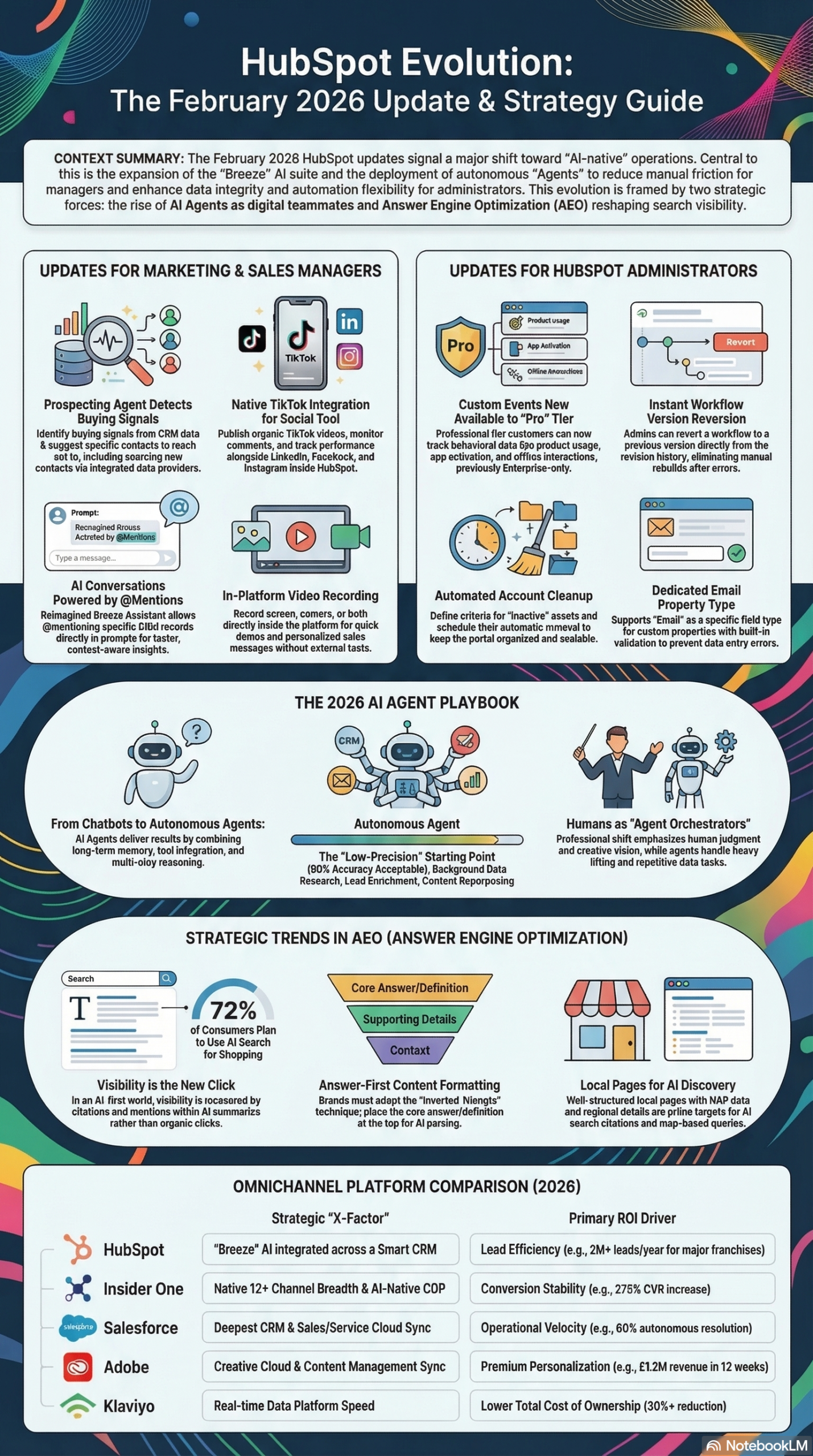
HubSpot’s February 2026 release cycle is one of the most operationally significant update batches the platform has shipped in years — 15 updates touching AI configuration, campaign attribution, social publishing, admin tooling, and developer infrastructure. According to Martech.org, these updates collectively “expand AI capabilities, improve campaign attribution and remove several long-standing friction points inside HubSpot.” This guide walks you through every feature, what it actually does, which tier gets access, and step-by-step instructions for activating each one.
What This Is
HubSpot releases product updates on a rolling basis, but February 2026 landed a particularly dense batch. The Martech.org coverage identifies 15 distinct updates split across two tracks: updates for managers (revenue team leads, marketing ops, sales directors) and updates for admins and developers.
The 15 updates span four core Hubs — Marketing Hub, Sales Hub, Service Hub, and Content Hub — and introduce capabilities at different availability stages: Private Beta, Public Beta, and General Availability (Live). Understanding which stage each update is in matters because Private Beta features require HubSpot rep access to enable, Public Beta features can typically be activated through your account settings, and Live features are already available in your portal.
At a high level, the February 2026 updates fall into five strategic categories:
1. AI Agent Expansion — Three updates directly extend HubSpot’s Breeze AI ecosystem. The Prospecting Agent now detects buying signals and surfaces contacts. Breeze Assistant received a redesigned prompt interface with @mentions and saved prompts. Customer Agent configurations got deeper tone and behavior controls. Together, these reflect HubSpot’s broader platform strategy outlined in the 2026 Marketing Technology Briefing: transitioning from a feature-heavy CRM to what they call a “Smart CRM” with embedded autonomous agents.
2. Campaign Attribution Overhaul — Two updates (Campaign Record Association and Campaign-Based Workflows) directly address a long-standing pain point: campaigns in HubSpot historically lived in isolation from the CRM object model. In February 2026, campaigns became first-class workflow objects, meaning you can now build automation that responds to campaign-level events — like when a campaign exceeds its budget or when a contact is influenced by a campaign touch.
3. Social Media Expansion — TikTok joins HubSpot’s native social publishing stack for the first time. Both organic publishing and paid ad reporting are now available (both in beta), which is significant because it brings TikTok into the same unified social analytics dashboard that marketers already use for LinkedIn, Facebook, Instagram, and X.
4. Admin and Data Governance Tools — The Account Cleanup Tool, Dedicated Email Property Type, Workflow Version Reversion, and Never Log Meeting options address the accumulation of technical debt that happens in any mature HubSpot portal. These features matter because, as the 2026 Marketing Technology Briefing notes, “platform stability, data unification, and measurable ROI” have become the primary concerns for enterprise teams — not feature volume.
5. Developer Infrastructure — The Local MCP Server reaching General Availability is the single most consequential update for developers in this batch. It allows HubSpot apps and CMS assets to be built through agentic coding tools like VS Code, Cursor, and Claude Code. This is HubSpot’s implementation of the Model Context Protocol (MCP), which is rapidly becoming the standard for tool-integrated AI agents.
Each of these five categories represents a deliberate architectural choice by HubSpot — one that signals where the platform is heading over the next 12-18 months.
Why It Matters
The February 2026 updates matter beyond their individual feature value because they represent HubSpot closing gaps that have historically pushed enterprises toward point solutions.
For Marketing Managers: The TikTok integration ends a fragmented workflow that forced teams to manage TikTok performance in a separate analytics tool while everything else lived in HubSpot. The new Social Analytics Dashboard with pre-built goal-focused dashboards (brand visibility, engagement, lead generation, content performance) means you can now run a weekly social review inside HubSpot rather than exporting data from multiple platforms.
For Sales Teams: The Prospecting Agent and Buying Groups features work in tandem. Buying Groups — the native version of OrgChartHub, which HubSpot acquired — lets reps visualize all decision-makers in a complex deal. The Prospecting Agent then monitors those target companies for buying signals and suggests contacts through connected data providers. According to the 2026 Marketing Technology Briefing, the emerging model for AI in sales is “Humans for Judgment, Agents for Execution” — and this combination operationalizes that model directly inside HubSpot.
For HubSpot Admins: The Workflow Version Reversion feature alone is worth highlighting. Before this update, if a workflow change caused problems, you had to manually reconstruct the previous version. Now you can roll back from revision history. Similarly, the Dedicated Email Property Type prevents the common problem of invalid email addresses being stored in text fields — a data hygiene issue that compounds over time and degrades deliverability.
For Developers: The Local MCP Server going GA changes the build experience fundamentally. As noted in the 2026 Marketing Technology Briefing, frameworks like the Model Context Protocol are “facilitating agents that can now interact directly with CRMs, email systems, and analytics platforms.” For HubSpot developers, this means using AI coding assistants to scaffold CMS templates and app components — a workflow that previously required manual API documentation lookups.
For Operators on a Budget: The Custom Events expansion to Professional tier (previously Enterprise-only) is the most democratizing change in this batch. Professional tier customers can now track product usage, feature activation, and deep website engagement — capabilities that were gated behind a significantly higher spend threshold.
The Data
Here is the complete feature matrix for all 15 February 2026 HubSpot updates, including availability status and applicable Hub tiers, as documented by Martech.org and the 2026 Marketing Technology Briefing:
| # | Feature | Category | Status | Available In |
|---|---|---|---|---|
| 1 | Prospecting Agent (Buying Signals) | AI / Sales | Private Beta | Sales Hub Pro, Enterprise |
| 2 | TikTok Organic Publishing | Social | Private Beta | Marketing Hub Pro, Enterprise |
| 3 | Customer Agent Instructions | AI / Service | Public Beta | All Hubs Pro, Enterprise |
| 4 | Breeze Assistant Prompts | AI / Productivity | Live (GA) | All Hubs Pro, Enterprise |
| 5 | Customer Agent Free Trial | AI / Service | Live (GA) | All Hubs Pro, Enterprise |
| 6 | Social Analytics Dashboard | Reporting | Public Beta | Marketing Hub Pro, Enterprise |
| 7 | Chrome Extension Calling | Sales Productivity | Live (GA) | Sales Hub, Service Hub Pro, Enterprise |
| 8 | In-Platform Video Recording | Content | Public Beta | Content Hub Pro, Enterprise |
| 9 | Custom Events for Pro Tier | Analytics | Public Beta | All Hubs Pro, Enterprise |
| 10 | Workflow Version Reversion | Admin / Ops | Live (GA) | Marketing, Sales, Service, Operations Hub Pro, Enterprise |
| 11 | Campaign Record Association | Attribution | Public Beta | Marketing Hub Pro, Enterprise |
| 12 | Account Cleanup Tool | Admin | Live (GA) | All Hubs Enterprise |
| 13 | Dedicated Email Property Type | Data Governance | Public Beta | All Hubs Pro, Enterprise |
| 14 | Campaign-Based Workflows | Automation | Public Beta | Marketing Hub Pro, Enterprise |
| 15 | Never Log Meeting Option | Privacy / CRM | Live (GA) | Sales Hub, Service Hub Pro, Enterprise |
Key takeaway from the data: Of the 15 updates, 6 are already live in all qualifying portals with no opt-in required. 7 are in Public Beta and can be activated through your account settings. Only 2 (Prospecting Agent and TikTok Organic) are in Private Beta and require a HubSpot rep to enable them.
Step-by-Step Tutorial: Activating and Configuring the High-Impact Updates
This tutorial covers the seven highest-impact updates from the February 2026 batch, grouped by role. Follow the steps in order — some configurations build on each other.
Prerequisites
Before starting, confirm:
– You have Super Admin access in your HubSpot portal
– Your Hub and tier are confirmed (check Settings → Account → Account Details)
– You’re on Marketing Hub, Sales Hub, or Service Hub at Professional or Enterprise tier for most features
– For the Local MCP Server section, you need Node.js 18+ installed locally and VS Code or Cursor
Phase 1: Configure Breeze Assistant Prompts (All Portals — Live Now)
This is the fastest win in the batch because it’s already live and requires zero technical setup.
Step 1: Navigate to any CRM record (contact, company, deal, or ticket).
Step 2: Open the Breeze Assistant panel on the right sidebar. You’ll see the redesigned prompt interface with a text field at the top.
Step 3: Type @ to trigger the mention selector. You can now reference any CRM property, associated record, or object from within the prompt — for example, @contact.company_name or @deal.amount. This eliminates the need to copy-paste record data into your AI prompts manually.
Step 4: Use the built-in category buttons — Summarize, Create, How do I, and Prepare — to access pre-built prompt templates. These are particularly useful for standardizing how your team uses AI across the organization.
Step 5: After building a prompt that works well, click Save Prompt and give it a name. Saved prompts appear in your personal prompt library and can be retrieved with one click on future records.
Recommended use: Create a saved “Deal Summary for Handoff” prompt that references @deal.amount, @deal.close_date, and @contact.name. Any rep handing off a deal can generate a consistent summary in under 10 seconds.
Phase 2: Set Up Campaign Record Association and Campaign-Based Workflows (Marketing Hub Pro/Enterprise — Public Beta)
This is the most structurally important change for marketing attribution in this update batch. Before this feature, campaigns were reporting constructs — they couldn’t trigger or be triggered by workflows. That limitation is now removed.
Step 1: Opt into the Beta
Go to Settings → Product Updates → Beta Features. Find “Campaign Record Association” and “Campaign-Based Workflows” and toggle both on.
Step 2: Associate Records to a Campaign Manually
Open any Campaign record. In the new Associations tab, click Add Records. You can now associate contacts, deals, and tickets directly to the campaign. This populates the campaign’s influence reporting with CRM-level data, not just page view data.
Step 3: Build a Campaign-Triggered Workflow
Go to Automation → Workflows → Create Workflow. Select Campaign-based as the enrollment trigger type (this is new in February 2026).
Step 4: Set your enrollment trigger to “Contact is influenced by campaign” and select your target campaign. Then add your follow-up actions — for example, enroll the contact in a nurture sequence, notify the account owner, or update a lifecycle stage property.
Step 5: Build a Budget Alert Workflow
Create a second workflow with the campaign object as the enrolled record (not a contact). Set the trigger to “Campaign property changes” and select “Budget Spent” as the monitored property. Add a threshold condition (e.g., Budget Spent > 90% of Budget Total) and notify the campaign owner via internal email or Slack.
Expected outcome: You’ll have a closed-loop attribution system where campaigns both influence contact workflows and self-report when they’re hitting budget ceilings — without anyone manually checking campaign dashboards.
Phase 3: Activate Custom Events for Pro Tier (All Hubs Pro — Public Beta)
Custom Events were previously Enterprise-only. If you’re on Professional tier, this is new territory.
Step 1: Go to Settings → Data Management → Custom Events. If you’re in the beta, you’ll see this menu item. If not, opt in through Beta Features first.
Step 2: Click Create Custom Event. Name it using a consistent convention — for example, product_feature_activated or pricing_page_scrolled_75.
Step 3: Add properties to your event. For a product usage event, you might add: feature_name (string), user_tier (string), session_duration_seconds (number).
Step 4: Implement the event using HubSpot’s tracking code. Add this to your app’s event handler:
var _hsq = window._hsq = window._hsq || [];
_hsq.push(['trackCustomBehavioralEvent', {
  name: 'product_feature_activated',
  properties: {
    feature_name: 'bulk_export',
    user_tier: 'professional',
    session_duration_seconds: 142
  }
}]);
Step 5: Once events are firing, build a workflow that enrolls contacts when a specific custom event occurs. Go to Automation → Workflows, create a contact-based workflow, and set the enrollment trigger to “Contact has completed event” → select your custom event.
Expected outcome: You can now segment contacts by in-product behavior and trigger nurture flows or sales alerts based on actual product usage — a capability previously requiring a $48,000+ Enterprise HubSpot contract.
Phase 4: Connect the Local MCP Server (Developers — Live/GA)
The Local MCP Server is now in General Availability. This lets you use AI coding assistants (VS Code with Copilot, Cursor, or Claude Code) to build HubSpot CMS templates and app components with full awareness of your HubSpot schema.
Step 1: Install the HubSpot CLI if you haven’t:
npm install -g @hubspot/cli
hs init
Step 2: Authenticate with your portal:
hs auth
Step 3: Start the Local MCP Server:
hs mcp start
This launches a local server (typically at localhost:3000) that exposes your HubSpot schema — content types, properties, modules — to any MCP-compatible tool.
Step 4: In Cursor or VS Code, add the MCP server to your AI assistant’s context. In Cursor, go to Settings → AI → MCP Servers and add:
{
  "name": "hubspot-local",
  "url": "http://localhost:3000/mcp"
}
Step 5: You can now prompt your AI coding assistant with HubSpot-aware requests like: “Create a HubSpot CMS module for a testimonial card that uses the existing brand_color global theme variable.” The assistant has access to your actual schema and can generate contextually accurate code.
As the 2026 Marketing Technology Briefing notes, developers should “transition to the local MCP server for CMS and app development to utilize AI coding assistants like Cursor and Claude for faster scaffolding.”
Phase 5: Configure the Never Log Meeting Option (Sales/Service Pro — Live)
This is a small feature with outsized impact on CRM data hygiene.
Step 1: Go to Settings → General → Meetings.
Step 2: Find the “Meeting Logging Exclusions” section. Click Add Exclusion.
Step 3: You can exclude meetings by: domain (e.g., @yourcompany.com), specific email address, or meeting title pattern. Add your internal domains first — any internal standup or team meeting booked through HubSpot Meetings will no longer auto-log on contact timelines.
Step 4: For external meetings that shouldn’t be logged (e.g., vendor calls, legal discussions), you can set per-meeting exceptions directly in the calendar integration rather than portal-wide rules.
Expected outcome: Contact timelines become dramatically cleaner, which matters because cluttered timelines reduce adoption. Reps who see 40 irrelevant internal meeting logs on a contact record stop trusting the CRM timeline as a source of truth.
Real-World Use Cases
Use Case 1: B2B SaaS Company Using Prospecting Agent + Buying Groups
Scenario: A 20-person sales team at a B2B SaaS company targeting mid-market accounts. They have 300 target accounts in HubSpot but limited signal on when those accounts are actually in-market.
Implementation: Enable the Prospecting Agent (Private Beta, requires rep activation). Configure it to monitor target accounts for buying signals — job postings for roles that indicate platform investment, technology changes detected by connected data providers, and news events. Simultaneously, use Buying Groups to map the decision-making unit at each account: economic buyer, technical evaluator, champion, and legal reviewer.
Expected Outcome: Reps receive a weekly digest of accounts showing purchase intent, with suggested contacts to add. Instead of cold-calling 300 accounts on a rotation, they focus outreach on the 15-20 accounts showing active signals. The 2026 Marketing Technology Briefing describes this as the “Humans for Judgment, Agents for Execution” model — the agent identifies signal, the human decides how to respond.
Use Case 2: E-commerce Brand Using TikTok Integration + Social Analytics Dashboard
Scenario: A DTC e-commerce brand running organic content across TikTok, Instagram, and LinkedIn. Their social team previously had to pull TikTok analytics from TikTok’s native dashboard and manually reconcile with HubSpot reporting.
Implementation: Opt into the TikTok Organic Publishing Private Beta. Connect the brand’s TikTok Business account. Enable the Social Analytics Dashboard beta, and configure the “Content Performance” pre-built dashboard to include TikTok alongside existing channels.
Expected Outcome: The social team publishes and schedules TikTok content from the same HubSpot social calendar used for other channels. Weekly reporting pulls all channel performance into a single dashboard. Comment monitoring alerts the community manager to replies requiring a response, across all platforms in one interface.
Use Case 3: Marketing Ops Team Using Campaign Record Association for True Attribution
Scenario: A marketing ops manager at a 500-person B2B company who needs to prove campaign ROI to the CFO but currently has no reliable way to connect campaign touches to closed revenue.
Implementation: Enable Campaign Record Association beta. For every active campaign, manually associate the deals that were influenced by campaign touches. Then build a Campaign-Based Workflow that automatically associates a deal to a campaign when the deal’s associated contact was influenced by that campaign within the past 90 days.
Expected Outcome: Campaign records now show associated pipeline and closed revenue. The CFO can see, for each campaign: total spend, contacts influenced, deals influenced, and revenue closed from influenced deals. This is multi-touch attribution built natively in HubSpot without a third-party tool like Bizible or Rockerbox.
Use Case 4: Developer Team Using Local MCP Server for CMS Acceleration
Scenario: A HubSpot agency with 5 developers building custom CMS themes for clients. Each new client engagement requires scaffolding dozens of modules from scratch, which takes 20-30 hours per project.
Implementation: Every developer runs hs mcp start at the beginning of a client project and connects it to Cursor. Using the MCP-aware AI assistant, they prompt the generation of module boilerplate with the client’s actual content schema, field names, and global theme variables already populated.
Expected Outcome: Initial module scaffolding time drops from 20-30 hours to 6-10 hours per project. The AI assistant generates syntactically correct HubSpot-specific code because it has access to the client’s actual schema, not just generic web templates. As the 2026 Marketing Technology Briefing describes, MCP is “facilitating agents that can now interact directly with CRMs” — and for HubSpot developers, that means the AI coding assistant understands your portal, not just your language.
Use Case 5: Customer Success Team Using In-Platform Video + Customer Agent Instructions
Scenario: A customer success team that sends personalized video updates to enterprise accounts during onboarding, currently recorded in Loom and attached to HubSpot emails manually.
Implementation: Enable In-Platform Video Recording beta (Content Hub Pro/Enterprise). Configure Customer Agent Instructions to ensure the AI agent that handles incoming support chat maintains a formal, consultative tone and always references the account’s current onboarding stage before responding.
Expected Outcome: CSMs record screen-and-camera walkthrough videos directly inside HubSpot and attach them to contact records or email sequences without leaving the platform. The Customer Agent handles tier-one inquiries with tone consistency, escalating complex issues to the CSM with full conversation context.
Common Pitfalls
Pitfall 1: Enabling Campaign-Based Workflows Without Cleaning Up Campaign Records First
If your HubSpot portal has years of abandoned campaign records (campaigns that were started and never completed), activating Campaign Record Association will surface all of them as options in your workflow triggers. Before enabling the beta, archive or delete campaigns that are no longer active. A cluttered campaign list makes workflow configuration error-prone. The 2026 Marketing Technology Briefing explicitly recommends using the Account Cleanup Tool “to automatically remove unused or inactive assets on a recurring schedule” before expanding automation.
Pitfall 2: Setting Portal-Wide Never Log Exclusions Too Broadly
It’s tempting to exclude all internal domains from meeting logging, but this will also suppress logging for internal meetings that should be on the timeline — like executive business reviews that happen to include internal stakeholders. Be specific: exclude specific meeting title patterns or specific email addresses rather than entire domains.
Pitfall 3: Using Custom Events Without a Naming Convention
Custom Events are now available to Pro tier, and teams that gain access for the first time tend to create events ad hoc. Within a few months, you’ll have feature_activated, Feature_Activated, featureActivated, and feature_used all referring to the same action. Establish a naming convention on day one (snake_case, verb-first: feature_activated, page_scrolled, export_completed) and document it in your HubSpot Admin wiki before creating any events.
Pitfall 4: Treating the Prospecting Agent as a Replacement for Human Research
The Prospecting Agent detects buying signals and suggests contacts — it does not qualify them. Kevin Hutson, AI Educator at Futurepedia, is quoted in the 2026 Marketing Technology Briefing: “The winners will be people who learn to work with imperfect agents, not people waiting for perfect ones.” Treat agent suggestions as a prioritization input, not a definitive list. Have reps review and confirm before adding suggested contacts to active sequences.
Pitfall 5: Running the Local MCP Server in Production Environments
The Local MCP Server is a development tool. It exposes your HubSpot schema to local AI tools, which is powerful in a dev or sandbox environment. Do not run it against your production portal in a shared network environment. Use a sandbox portal for AI-assisted development and promote validated assets to production through the standard CLI deployment flow.
Expert Tips
Tip 1: Stack Breeze Assistant Saved Prompts Across Your Team
Saved prompts are currently personal — they don’t sync across a team. Work around this by creating a shared HubSpot knowledge base article that lists your team’s highest-value prompt templates. Team members paste them once, save to personal library, and you’ve effectively standardized AI usage without waiting for HubSpot to build team-shared prompts.
Tip 2: Use Workflow Version Reversion as a Safety Net to Accelerate Iteration
Now that you can revert workflows to previous versions, you can afford to iterate faster on workflow logic without the risk of losing a working configuration. Build a habit of saving a named revision checkpoint before any significant change — HubSpot’s revision history tracks changes automatically, but naming key versions makes rollback faster.
Tip 3: Build Custom Event Tracking for AEO as Well as Product Analytics
Beyond product usage tracking, use Custom Events to track engagement with your “answer-first” content. When a visitor scrolls past 75% of a key FAQ page or clicks an anchor link to a specific answer, fire a custom event. This lets you build segments of high-intent research prospects and attribute pipeline to content investments. The 2026 Marketing Technology Briefing notes that “72% of consumers plan to use AI-powered search for shopping more frequently” — tracking who engages with answer-optimized content is how you measure AEO performance inside HubSpot.
Tip 4: Validate TikTok Audiences Before Scaling Paid Integration
When TikTok Ads integration is available in your portal, start by syncing a small contact segment as a TikTok audience and validating match rates before building automation around audience sync. TikTok’s identity matching relies on email and phone, so list hygiene directly impacts the accuracy of your synced audiences.
Tip 5: Use the Account Cleanup Tool Before Audit Season
If your organization does a quarterly or annual HubSpot audit, run the Account Cleanup Tool two weeks before the audit window. This removes unused workflows, templates, and lists that would otherwise inflate your asset counts and make the audit harder to interpret. Set it on a recurring monthly schedule once you’ve done the initial cleanup pass.
FAQ
Q1: Which of the 15 updates are available right now without any opt-in?
Six updates are live in all qualifying portals with no beta opt-in required: Breeze Assistant Prompts, Customer Agent Free Trial, Chrome Extension Calling, Workflow Version Reversion, Account Cleanup Tool, and Never Log Meeting Option. If you have the required Hub and tier, these are already active. Check Martech.org’s coverage for the full status breakdown.
Q2: How do I get access to the Private Beta features like Prospecting Agent and TikTok Organic?
Private Beta features require activation by a HubSpot product team member or your Customer Success Manager. Contact your HubSpot CSM and specifically request access to the Prospecting Agent (Sales Hub) and TikTok Organic Publishing (Marketing Hub) betas. Include your portal ID and a brief description of your use case — beta access is typically granted to accounts with a clear use case and sufficient data for the feature to be useful.
Q3: Does Campaign Record Association replace the need for UTM tracking?
No. Campaign Record Association gives you CRM-level attribution — connecting contacts, deals, and tickets to campaigns. UTM tracking gives you traffic-source attribution — connecting website sessions to specific links and channels. You need both. In fact, they work better together: UTMs identify the source channel, and Campaign Record Association connects the resulting CRM activity back to the campaign investment. The 2026 Marketing Technology Briefing emphasizes “data unification” as the primary mandate for 2026 — and unified attribution requires both layers.
Q4: Is the Local MCP Server the same as the Model Context Protocol used by other AI tools?
Yes. HubSpot’s Local MCP Server implements the same Model Context Protocol that is becoming the standard for tool-integrated AI agents. This means any MCP-compatible AI coding assistant — not just tools HubSpot specifically mentions — can connect to it. As the 2026 Marketing Technology Briefing notes, MCP is a key framework “facilitating agents that can now interact directly with CRMs, email systems, and analytics platforms.”
Q5: Can Professional tier customers now do everything Enterprise tier can in terms of events?
Not entirely. Custom Events coming to Professional tier is a meaningful expansion, but Enterprise still has exclusive access to several features in this update batch — most notably the Account Cleanup Tool (Enterprise-only) and Buying Groups (beta). The Custom Events expansion at Pro tier does close one of the most impactful gaps, particularly for SaaS companies that want product-led growth signals in their CRM without an Enterprise contract.
Bottom Line
HubSpot’s February 2026 update batch is not a cosmetic release — it’s structural. Campaign attribution is moving to a proper object model. AI agents are becoming configurable at the behavior level. TikTok is entering the native social stack. And the Local MCP Server going GA opens a new development paradigm for the entire HubSpot developer ecosystem. Six of the 15 features are live in your portal today. Start with Breeze Assistant Prompts and Workflow Version Reversion — both are zero-risk, immediate-value changes. Then build toward Campaign-Based Workflows and Custom Events as your foundational attribution and analytics stack. The 2026 Marketing Technology Briefing puts it plainly: the mandate for 2026 is to “transition from manual execution to strategic orchestration.” These 15 updates are HubSpot’s contribution to that transition.


0 Comments