

Flat-rate creative subscriptions are rewriting the economics of marketing production — and Flocksy has been one of the more mature platforms in this space since its founding in 2016. This tutorial walks you through exactly how to set up and run Flocksy as a production engine for your marketing team, from initial brand profile configuration to managing multi-format campaigns across their 140+ service categories. By the end, you’ll have a clear operational playbook for getting predictable creative output at a fraction of traditional agency cost.
What This Is
Flocksy is a subscription-based creative services platform that gives businesses access to a dedicated multidisciplinary creative team under a single flat monthly rate. According to the MarketingAgent research briefing on Flocksy, the platform is not a freelance marketplace — you don’t post jobs, browse profiles, or negotiate rates per project. Instead, you submit work requests into a managed production queue, and a dedicated team works through them based on your daily hours allocation and the priority order you set.
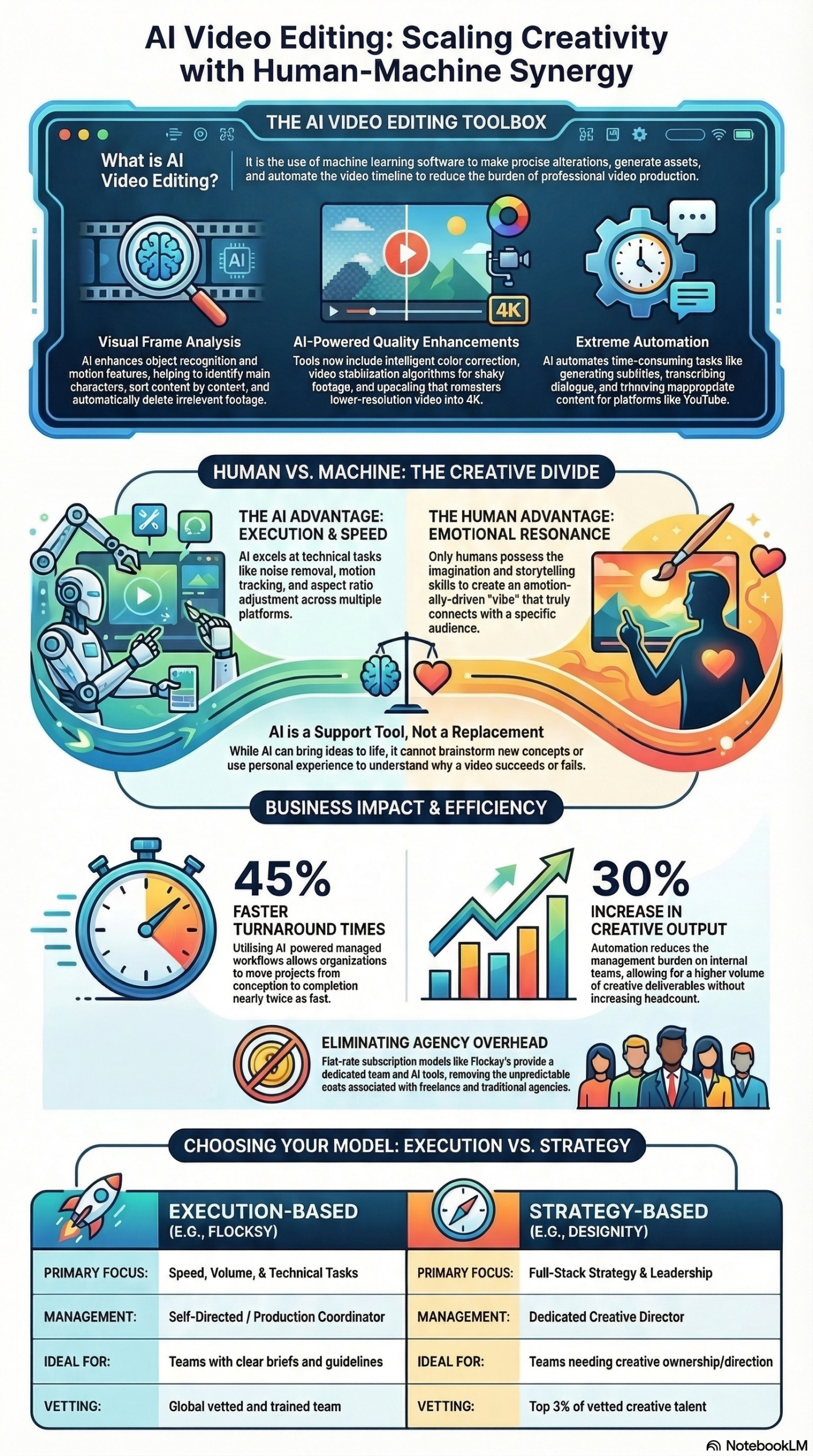
As of 2026, the platform covers over 140 categories of creative work, including graphic design, video editing, copywriting, motion graphics, custom illustration, web design, and virtual assistance. The research briefing reports that Flocksy delivers up to 45% faster turnaround times and a 30% increase in total creative output compared to traditional freelance or agency models — in scenarios where the client arrives with clear briefs and established brand guidelines.
The platform is currently transitioning from its legacy system at app.flocksy.com to a new hours-based AI-integrated platform at ai.flocksy.com. This migration is mandatory by August 7, 2026, per the research briefing, and the new platform introduces AI tooling throughout the workflow — from brief generation to video post-production enhancement.
What distinguishes Flocksy from a staffing agency or traditional creative agency is its production-first philosophy. The platform is explicitly designed for teams that have already determined what they need to produce. You provide the brief, the brand direction, and the strategic goal — Flocksy handles execution. This is not where you go to figure out what your next campaign should look like; it’s where you go to produce a lot of it, consistently, and without invoice surprises.
Service access is structured around daily production hours rather than project counts or unlimited revision promises. Plans range from 2 to 8 daily hours, giving you a throughput model that maps directly to your monthly creative volume. On a 4-hour/day plan, you’re working with roughly 80 hours of creative production per month — across any combination of services in the 140+ catalog. A video editor can be cutting a product demo, a copywriter drafting email sequences, and a graphic designer producing social assets, all running simultaneously from the same subscription.
Flocksy has integrated AI directly into its workflow under what it describes as a “human-at-the-helm” philosophy. The platform’s teams use tools including ChatGPT, Midjourney, and Adobe Firefly to accelerate production, but every AI-generated element is reviewed and refined by a human professional before delivery. Per the research briefing, “AI will likely change the entire video editing industry but should only be thought of as a supporting tool. It’s unlikely that a human presence will ever be eliminated because of the unique skills and understanding that people possess which computers don’t.” The new ai.flocksy.com platform formalizes this with an “AI Assist” feature that generates structured project briefs and initial image concepts from plain-language descriptions — particularly useful when your team is staring at a blank brief form under deadline pressure.
Why It Matters
The core problem Flocksy solves is one most marketing managers know exactly: the cost and operational chaos of managing creative production at scale.
Traditional agencies charge a premium for overhead that doesn’t directly produce your assets — account management layers, strategic planning sessions, creative direction meetings, and revision-cycle administration. That overhead is worth paying for when you need strategy. When your strategy is already set and you need execution, you’re paying for infrastructure you aren’t using.
Freelancers solve the cost problem but introduce a different category of risk: inconsistent quality across projects, brand drift when working across multiple vendors, no single point of accountability, and the administrative tax of sourcing and managing contractors for different skill types. A freelance graphic designer can’t also edit your video or write your email copy — which means three separate vendor relationships, three separate billing cycles, and three separate communication threads.
Flocksy’s flat-rate model collapses both problems simultaneously. You pay a predictable monthly fee and get a dedicated team that learns your brand’s visual identity and voice over time. As the MarketingAgent research briefing documents, “the managed workflow ensures that you are paired with a consistent team that learns your brand’s voice and visual identity over time, leading to higher-quality results with significantly less oversight required from your end.”
For agencies, the white-label functionality creates a different use model entirely: Flocksy as a silent production partner. Client briefs flow in, get routed through Flocksy, reviewed internally, and delivered under the agency’s own brand. You run a full-service creative team without the payroll, benefits, or management overhead of building one in-house.
The AI integration is functionally meaningful, not cosmetic. Video upscaling to 4K, intelligent color correction, noise removal, and stabilization are technical tasks that historically required skilled specialists and significant post-production time. Automating them under human oversight accelerates delivery without sacrificing output quality, which is what keeps the cost-per-deliverable low enough for the flat-rate model to actually work at scale.
The Data: Flocksy vs. Designity — CaaS Platform Comparison
The Flocksy model becomes concrete when compared against its closest Creative-as-a-Service (CaaS) competitor. According to the MarketingAgent research briefing, the clearest apples-to-apples comparison is with Designity:
| Factor | Flocksy | Designity |
|---|---|---|
| Monthly Cost (120 hrs/month) | $3,595 | $5,995 |
| Effective Cost Per Hour | ~$30 | ~$50 |
| Creative Director Included | No (Production Coordinator at 4+ hrs/day) | Yes |
| Art Director Included | Yes (at 6+ hrs/day plans) | Included in plan |
| Onboarding Time | 24–48 hours | Longer discovery process |
| Strategy Services | Client-directed | CD-led strategy |
| AI Integration | Yes (ai.flocksy.com) | Varies |
| White Label Support | Yes | Not prominently documented |
| Daily Hours Range | 2–8 hrs/day | Varies by plan |
| Service Categories | 140+ | Design-focused |
| Brand Profiles | Yes (unlimited) | Yes |
| Frame.io Video Feedback | Yes | Not documented |
| Turnaround Improvement | Up to 45% faster vs. traditional | Not published |
| Output Volume Increase | Up to 30% vs. traditional | Not published |
Source: MarketingAgent Flocksy Research Briefing
The pricing delta is significant: at 120 hours per month, Flocksy runs approximately 40% cheaper than Designity. But this cost difference reflects a genuine trade-off — Designity includes a Creative Director who manages strategy and reduces the internal coordination burden on the client. Teams that have the internal bandwidth to manage their own briefs and revisions will find Flocksy’s lower price point a real advantage. Teams that don’t have that bandwidth may find the “saved” cost showing up as time expenditure instead.
The 45% faster turnaround and 30% output increase statistics cited in the research briefing apply specifically to scenarios where clients have pre-defined briefs and brand guidelines ready — the conditions under which Flocksy is designed to operate optimally.
Step-by-Step Tutorial: Setting Up and Running Flocksy as a Production Engine
This walkthrough covers getting Flocksy configured to run at full capacity from day one. If you’re already onboarded, skip to Phase 3 — queue management and revision batching are where most teams leave efficiency behind.
Prerequisites
Before you submit your first project, have the following ready:
– Finalized brand guidelines: logo files (all variants), hex color codes, typography specifications
– At least one fully-written project brief to submit immediately after onboarding
– A clear estimate of your monthly creative volume to select the right plan tier
– If using for agency white-label work: client brand assets organized and ready to import
Phase 1: Platform Selection and Plan Configuration (Day 1)
Step 1: Choose the New Platform
If you’re starting fresh in 2026, go directly to ai.flocksy.com. The legacy platform at app.flocksy.com will be shut down by August 7, 2026, per the Flocksy research briefing. There’s no strategic reason to onboard a system you’ll be forced to migrate off within months. The new platform’s AI-integrated workflow — including AI Assist for brief generation and enhanced video tools — is also where Flocksy’s active development is concentrated.
Step 2: Select Your Daily Hours Plan
Plans are structured around daily production hours. Choose based on your expected monthly volume:
- 2 hours/day (~40 hrs/month): Entry-level tier, best for small businesses with consistent but moderate creative needs — think 8–12 deliverables per month
- 4 hours/day (~80 hrs/month): Mid-tier; unlocks the Production Coordinator, which is your dedicated traffic manager for concurrent projects — the minimum recommended for teams running multiple project types simultaneously
- 6 hours/day (~120 hrs/month): Adds an Art Director to your team; best for high-volume campaigns and multi-brand operations requiring brand governance oversight
- 8 hours/day (~160 hrs/month): Maximum throughput; full team with all management layers in place
The Production Coordinator available at 4+ hours/day is a meaningful operational upgrade. Per the research briefing, this role serves as a single point of contact to organize requests and keep the client team and creative team synchronized. Without it, you’re handling that coordination manually.
Step 3: Complete Onboarding
Flocksy’s onboarding is lightweight by design — 24 to 48 hours, focused on getting your first projects into the queue immediately rather than weeks of discovery calls. You’ll be assigned your dedicated team, your account will be configured, and you’ll be prompted to create Brand Profiles.
Phase 2: Brand Profile Configuration (Days 1–2)
This is the highest-leverage setup task, and the one most teams rush. Brand Profiles automatically attach to every new project brief, ensuring the creative team has your assets on hand without requiring you to re-upload them for each request.
Step 4: Build Your Brand Profiles Completely
Navigate to Brand Profiles in the dashboard and populate every field before submitting work:
- Logo files: Upload all variants — full color, black, white, horizontal, and stacked versions in both SVG and PNG formats
- Color palette: Enter hex codes for primary, secondary, and accent colors; include any “never use” colors if relevant
- Typography: Upload font files or specify exact font names including weights (Light, Regular, Bold, Italic); don’t assume the creative team has access to licensed fonts
- Brand voice guidelines: Even a bullet-point list describing tone (formal vs. conversational, technical vs. accessible, active vs. passive) is substantially better than nothing
- Sample approved assets: Upload 3–5 examples of past work that reflects exactly the quality and style you want — this is the fastest calibration mechanism available
Do not submit projects before completing Brand Profiles. Incomplete profiles force the creative team to make brand decisions based on inference, which almost always produces a first draft that needs significant revision. That revision consumes your daily hours on a problem that was preventable at setup.
Step 5: Create Separate Brand Profiles for Each Client or Brand
If you’re managing multiple brands or running the platform as an agency white-label operation, create a distinct Brand Profile for each. The platform supports unlimited brand profiles, which is the infrastructure that makes agency use at scale actually viable.
Phase 3: Brief Writing and Project Submission (Ongoing)
The brief is where projects succeed or fail. Flocksy is an execution engine — it produces exactly what it’s asked to produce. The precision of the brief determines the quality of the output.
Step 6: Structure Every Brief Using the Inverted Pyramid
Per the Flocksy research briefing, the recommended structure for all copywriting briefs follows the Inverted Pyramid:
- Hook: The primary message or attention-grabbing opening — state it first, not buried at the end
- Details: Supporting information, key messages, specs, and deliverable requirements
- Background: Campaign context, audience segment, and relevant brand history
- Call to Action: What the intended audience should do after engaging with the content
For design and video briefs, the equivalent principle applies: lead with the intended use case and format (e.g., “1080×1080 Instagram post for paid social”), then dimensions and specs, then brand context, then visual references.
Step 7: Use AI Assist to Generate Briefs from Plain Language
If you’re struggling to articulate a technical visual direction or don’t know how to describe a specific style in writing, use the AI Assist feature in the ai.flocksy.com dashboard. Describe your project in plain language, and AI Assist generates a structured brief and initial image concept references. This is particularly useful for video projects where describing visual tone, pacing, and editing style in text is notoriously imprecise.
Step 8: Submit and Prioritize the Queue Daily
After submission, your project enters the production queue. Use the Drag-and-Drop Queue every day — the creative team works through projects in priority order, not submission order. If a time-sensitive deliverable gets buried under older, lower-priority requests, it waits.
Make queue review part of your daily morning workflow: open the dashboard, check active and pending projects, and reorder the queue to reflect current campaign deadlines. This takes five minutes and is the difference between projects landing on time and missing launch dates.
Phase 4: Revision Management and Feedback (Ongoing)
Step 9: Batch All Revision Requests Before Submitting
Revisions count against your daily hours — this is the operational detail that catches most new Flocksy users off guard. If you have four stakeholders reviewing a design, don’t submit feedback as each person responds. Collect all input, consolidate it into a single clear revision request, and submit once.
The compounding benefit: one consolidated revision request typically resolves in a single round. Four separate requests use four separate allocations of daily hours and stretch a project across multiple days unnecessarily. Teams that implement this discipline consistently see measurably faster project completion and fewer hours consumed by rework.
Step 10: Use Frame.io for All Video Feedback
For video projects, Flocksy integrates with Frame.io. Use it for every video revision cycle. Frame.io allows you to:
- Tag specific timecodes with change requests directly on the video timeline
- Record screen-share walkthroughs describing changes in context
- Thread feedback discussions that the editor can reference without ambiguity
Avoid sending video feedback via email or Slack messages. Timecode-tagged comments in Frame.io cut revision cycles significantly because there’s no ambiguity about which frame, edit, or audio moment you’re referencing.
Phase 5: Scaling to Multi-Format Campaign Production
Step 11: Run Multiple Service Types Concurrently
Don’t restrict your subscription to one output type. A single Flocksy plan supports full campaign production running in parallel:
- Graphic designer producing print and digital ad assets
- Copywriter drafting landing page copy and email nurture sequences
- Video editor cutting a product demo and platform-specific social clips
- Motion graphics artist creating animated banner ads and social content
Submit each as a separately briefed project, manage the queue to reflect campaign launch deadlines, and let the Production Coordinator coordinate across the team. This is the model that produces the 30% output increase documented in the research briefing — running diverse work in parallel rather than sequentially.
Step 12: Build a Systematic Short-Form Video Repurposing Pipeline
YouTube Shorts receives 50 billion daily views, per the Flocksy research briefing. One of the highest-ROI applications of Flocksy’s video team is systematic content repurposing: submit long-form recordings (webinars, product demos, interviews) for conversion into vertical short-form cuts for YouTube Shorts, Instagram Reels, and TikTok.
Note the February 2026 YouTube update that made links in Shorts descriptions and comments non-clickable. Brief Flocksy’s design team to create on-screen graphics directing viewers to your channel’s About tab — a workaround that keeps CTAs functional under the new policy restrictions.
Expected Outcomes After 30 Days
Running Flocksy at full capacity with properly configured Brand Profiles and daily queue management should produce:
- Consistent first-draft quality requiring 1–2 revision rounds (down from the 4–5 rounds typical during onboarding with a new freelancer)
- A compressing creative feedback loop as the dedicated team internalizes your brand voice and visual preferences
- Predictable monthly creative spend with zero invoice surprises
- Measurable increase in deliverable volume relative to your previous production model
Real-World Use Cases
Use Case 1: The Lean In-House Marketing Team
Scenario: A 3-person marketing team at a mid-market SaaS company needs to produce assets for 5 channels — email, LinkedIn, paid social, the company blog, and video — but can’t justify headcount for a full-time designer, videographer, and copywriter.
Implementation: Sign up for a 4-hour/day plan. Build a comprehensive Brand Profile with the company’s design system. Establish a weekly submission rhythm: briefs submitted Monday morning, queue priority-ordered by campaign deadline, all revision feedback consolidated and submitted by end of day Wednesday.
Expected Outcome: 30–40 creative deliverables per month across formats — a volume that would require 2–3 dedicated hires to sustain in-house — at a fraction of the equivalent fully-loaded salary cost. The Production Coordinator handles cross-team coordination; the internal marketer handles strategy and final approvals only.
Use Case 2: The Agency Scaling White-Label Production
Scenario: A digital marketing agency lands three new clients simultaneously and lacks internal capacity to handle the creative load without hiring or missing deadlines.
Implementation: Create a separate Brand Profile for each client in Flocksy. Use the white-label project sharing feature to send review links to clients without exposing the Flocksy platform. Route briefs through Flocksy, review internally, and deliver under the agency’s own brand identity.
Expected Outcome: The agency absorbs the client volume without headcount increases. Profit margins improve because Flocksy’s per-hour cost is substantially below the rate the agency bills clients for creative production. The consistent team assignment maintains quality as volume scales — unlike adding ad-hoc freelancers for overflow work.
Use Case 3: The DTC Brand Running Continuous Ad Creative
Scenario: A direct-to-consumer e-commerce brand runs paid social ads on a continuous testing cadence, burning through creative variations quickly. Testing different hooks, visual formats, and CTAs at the speed required by modern paid social demands a constant pipeline of new assets.
Implementation: Configure a 6-hour/day plan. Brief the creative team thoroughly on the brand’s top-performing ad structures — hook formats, visual color treatments, CTA styles, proven copy frameworks. Submit 10–15 new ad concept briefs weekly with performance notes on what has and hasn’t worked in recent testing cycles.
Expected Outcome: 50+ ad creative variations per month without agency retainer costs. Over time, the dedicated team learns which approaches perform best for the brand’s specific audience, producing better first drafts as the working relationship matures and creative intelligence compounds.
Use Case 4: The B2B Content Team Repurposing at Scale
Scenario: A B2B SaaS company produces weekly 60-minute webinars and wants to extract maximum distribution value from each session without building a post-production team.
Implementation: Upload each raw webinar recording to Flocksy. Brief the video team to produce from each session: a 2-minute highlight reel for YouTube, five 60-second vertical cuts for Shorts/Reels/TikTok, a designed quote card series for LinkedIn, and a written summary post for the blog. Apply AI-powered video enhancement (4K upscaling, noise removal, color correction) as a standard step on all recordings.
Expected Outcome: Each 60-minute webinar generates 10–12 distinct content assets across formats. The AI-enhanced video quality means even recordings shot on basic equipment come out polished enough for organic distribution. Turnaround compresses from weeks of manual editing to a 3–4 day production cycle.
Common Pitfalls
Pitfall 1: Submitting Underspecified Briefs
The most expensive mistake you can make on Flocksy is submitting a brief that says something like “make a social media graphic for our new product launch.” Without platform, dimensions, messaging, visual references, and a clear CTA, the first draft will require multiple revision cycles — each consuming your daily hours. Write complete, specific briefs every time. If you’re stuck, use AI Assist to generate a structured starting point from a plain-language description.
Pitfall 2: Not Managing the Queue Daily
The drag-and-drop queue is an active management tool, not a passive sorting mechanism. If you submit ten projects and don’t set priority order, the creative team works in submission sequence — meaning your most time-sensitive deliverable may be the last one started. Build a 5-minute daily queue review into your morning workflow. It’s the smallest habit with the biggest impact on deadline adherence.
Pitfall 3: Sending Fragmented Revision Feedback
Sending revision feedback as it occurs to you — one comment from you, one from your manager, one from your client, spread across a day or two — fragments the revision cycle and consumes daily hours on each fragmented round. Collect all stakeholder input into a single consolidated request before submitting. This practice alone can cut revision time per project by half on complex deliverables.
Pitfall 4: Launching Projects Before Brand Profiles Are Complete
Submitting projects before your Brand Profiles are fully populated forces the creative team to make brand decisions from inference. The inevitable result is a first draft that misses on color, typography, or tone — requiring revision rounds that a complete Brand Profile would have prevented entirely. Complete your profiles before your first submission, not after.
Pitfall 5: Using Flocksy to Determine Strategy
Flocksy is an execution engine. If your brief asks “what should our Q3 campaign look like?” or “what’s the best angle for this product launch?”, you’re using the wrong service for that question. Every brief should arrive at Flocksy with those strategic decisions already made. The platform’s efficiency compounds only when the internal “what and why” is handled before the brief is submitted.
Expert Tips
Tip 1: Invest Heavily in the First Two Weeks
The dedicated team learns your brand fastest when you give detailed, specific feedback on the first 5–10 deliverables. Spend extra time on feedback quality during the onboarding period — not just “approved” or “revise,” but explaining why something works or doesn’t. That investment pays off in measurably better first-draft quality for months afterward, reducing your total revision time across the subscription.
Tip 2: Use the Art Director for Brand Governance, Not Just Projects
If you’re on a 6+ hour/day plan with an Art Director included, deploy them beyond individual project review. Submit your existing asset library for a consistency audit. The Art Director can identify brand drift across your historical materials and establish a reference set that anchors future output to a consistent standard — particularly valuable if you’ve been running with multiple freelancers or vendors prior to switching to Flocksy.
Tip 3: Share Campaign Arc Context, Not Just Project Briefs
The teams that extract the most value from Flocksy share strategic context proactively. When the creative team understands the campaign arc, the target audience segment, the performance goal, and how each deliverable fits into the larger sequence, they make better micro-decisions within each piece. Consider sharing a quarterly campaign overview in addition to weekly request briefs.
Tip 4: Build Repeatable Templates for Short-Form Video Requests
Systematize your vertical video brief template: specify aspect ratio (9:16), maximum duration, opening hook format, preferred pacing style, caption format, and CTA placement as defaults. A well-templated brief for short-form repurposing cuts briefing time from 60+ minutes of back-and-forth to 15 minutes of form-filling and file uploading — and dramatically reduces revision rounds because the parameters are explicit from the start.
Tip 5: Apply AI-Enhanced Video Processing to Field-Condition Footage
The AI video enhancement capabilities in Flocksy — 4K upscaling, noise removal, stabilization, and color correction — are most impactful on footage shot in imperfect conditions: customer testimonials filmed on a webcam, product demos recorded at a trade show, event footage captured without professional lighting. Brief the video team to apply AI enhancement as a standard post-processing step on all such content. It closes a significant quality gap without adding cost.
FAQ
Q: Can Flocksy handle copywriting, or is it primarily a design platform?
A: Copywriting is a full service category on Flocksy — not a secondary add-on. Your subscription includes access to human copywriters who use tools like Jasper and Grammarly to accelerate production. According to the research briefing, “any written materials you receive from your copy team will always be written by a human” — meaning AI tools assist production speed but a human writer is always responsible for the content. Blog posts, email sequences, ad copy, landing pages, and social captions are all available from the same subscription.
Q: How do revisions work, and do they count against my daily hours?
A: Yes — revisions consume daily hours, and this is by design. The model incentivizes clear upfront briefs and consolidated feedback rather than open-ended revision cycles. In practice: collect all stakeholder input before submitting any revision request, and write detailed briefs to minimize the need for multiple revision rounds. Teams that implement this discipline consistently see 1–2 revision rounds per project; teams that don’t often exhaust their daily hours on rework instead of new production.
Q: What’s the practical difference between the 4-hour and 6-hour plans?
A: Two additional daily hours of production capacity, plus an Art Director added to your dedicated team. The Art Director operates above the Production Coordinator (available at 4+ hours) to manage overall creative quality and brand alignment across your output — not just logistics. For high-volume campaigns, multi-brand operations, or teams where brand governance is a priority, the Art Director is a substantive capability upgrade worth the additional plan cost.
Q: Is Flocksy cost-effective for a solo founder or very early-stage startup?
A: It depends entirely on your creative volume. The entry-level 2-hour/day plan provides roughly 40 hours of creative production per month. If you’re consistently generating enough work to utilize that capacity, the flat-rate model is cost-competitive. If you’re submitting one or two projects every few weeks, an on-demand freelance platform will be more economical — you’d be paying for capacity you’re not using. Flocksy’s value per dollar increases with utilization rate.
Q: How should I prepare for the mandatory migration to ai.flocksy.com?
A: The migration from app.flocksy.com to ai.flocksy.com is required by August 7, 2026, per the research briefing. Don’t wait until the deadline. The new platform introduces an hours-based system with deeper AI integration — AI Assist for brief generation, enhanced video production tools, and updated queue management. Use the transition as an opportunity to rebuild your Brand Profiles with the new interface and update your brief templates to take advantage of AI Assist. Plan the migration during a lower-volume week to avoid disruption to active campaign timelines.
Bottom Line
Flocksy is an infrastructure decision, not a creative one. If your team’s bottleneck is execution — volume, consistency, and cost predictability — the flat-rate model solves a real problem that traditional agencies and freelancers each create in different ways. The 40% cost advantage over comparable CaaS competitors, combined with the 45% faster turnaround and 30% output increase documented in the research briefing, makes a measurable operational case for the model. The AI integration at ai.flocksy.com is practical rather than cosmetic: it accelerates video post-production and brief generation in ways that directly reduce the cost-per-deliverable and compress the revision cycle. The mandatory platform migration by August 2026 is the near-term operational priority for current users — and a good forcing function to rebuild Brand Profiles and brief templates with the new AI-assisted workflow in mind.


0 Comments