

TikTok Shop’s U.S. monthly Gross Merchandise Value climbed from $15.1 million in 2023 to over $1.1 billion by mid-2025—and TikTok for Business has introduced a new campaign framework built specifically to accelerate that trajectory. According to the TikTok Creative and Commerce Strategy 2026 research report, the platform is deploying a coordinated stack of AI-powered creative tools, automated ad delivery, and a 15.3-million-creator affiliate network to transform TikTok into a complete purchase journey: discovery, consideration, validation, and checkout—all inside a single app. This tutorial walks you through every layer of that system, from first asset generation to post-launch compliance.
What This Is
TikTok for Business has rolled out a coordinated in-app shopping campaign system that combines three interconnected layers: AI-powered creative production under the TikTok Symphony brand, automated ad delivery through Smart+ Campaigns, and a native commerce infrastructure via TikTok Shop. Together, these form what practitioners should think of as a full-funnel, end-to-end social commerce stack.
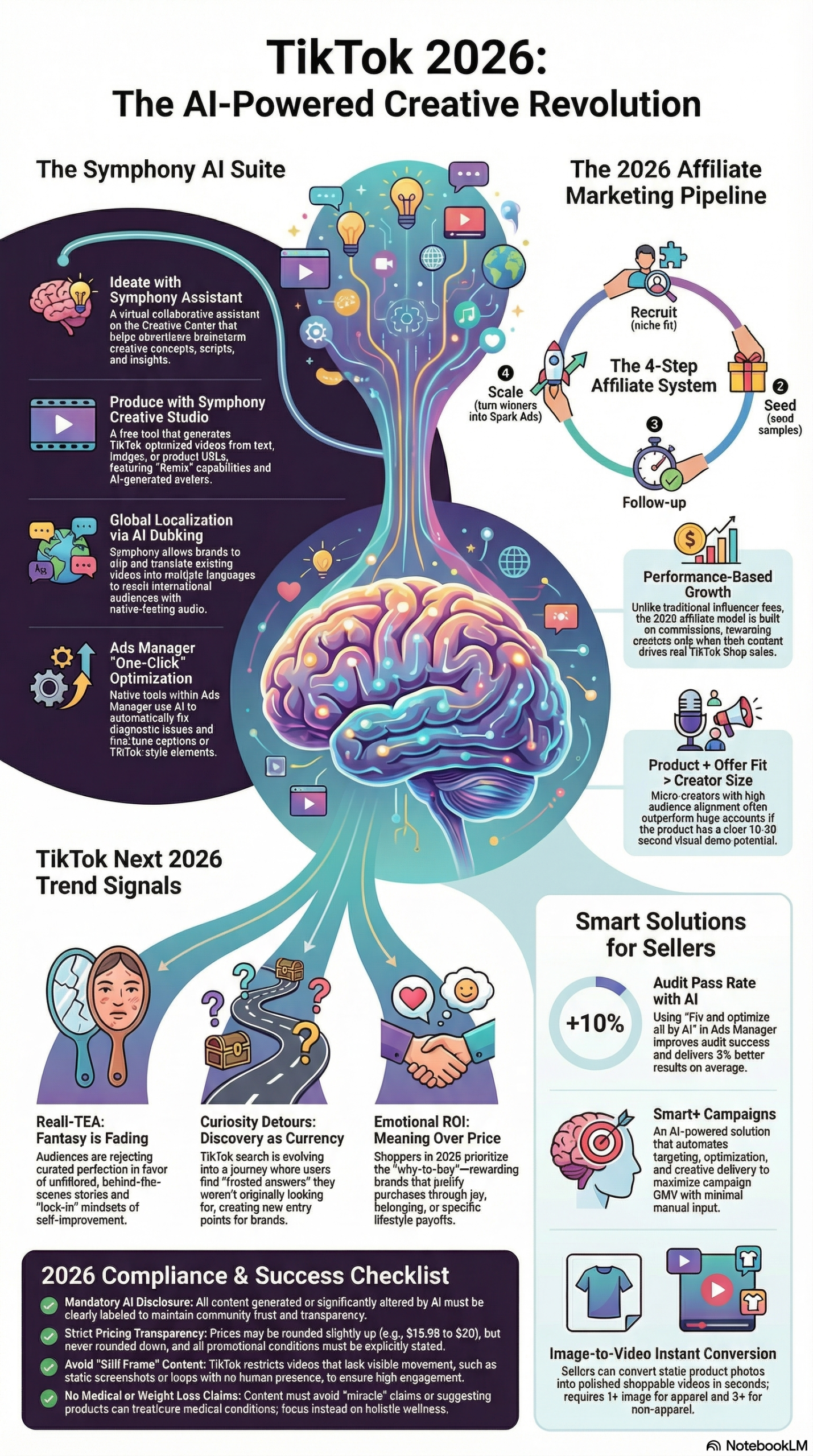
At the production layer, TikTok Symphony is TikTok’s umbrella brand for its suite of generative AI (GenAI) tools. The research report documents four core components:
- Symphony Creative Studio: Generates video content from existing product images, text descriptions, or uploaded video assets. It supports Image-to-Video conversion, Text-to-Video creation, asset remixing, and AI-generated avatars that can narrate your content with a human-like on-screen presence.
- Symphony Assistant: A conversational AI layer for brainstorming campaign concepts, writing ad scripts, and surfacing category-specific audience insights—essentially a creative strategist available inside Ads Manager.
- Generate with AI (Ads Manager): Analyzes a product URL or product ID and automatically produces up to 10 creative variations formatted for Smart+ and sales campaign objectives. This is the fastest path from product catalog to live creatives.
- Localization Tools: AI Dubbing and Translation that adapts existing video content across languages while preserving the native TikTok visual and audio style—critical for brands operating in multilingual markets.
At the delivery layer, Smart+ Campaigns automate both audience targeting and creative optimization. Rather than manually A/B testing audiences, bid strategies, and creative combinations, Smart+ dynamically adjusts these variables based on the campaign’s objective signals—clicks, add-to-carts, and completed purchases. The system requires variation to function; it converges on the highest-performing combinations from the assets you supply.
At the commerce layer, TikTok Shop provides the native one-tap checkout infrastructure. Shoppable videos embed a product link directly inside the video frame; the viewer taps once and completes the purchase without leaving TikTok. According to the research report, shoppable videos account for approximately 50% of TikTok Shop’s total GMV—making the in-app checkout the single most important conversion lever on the platform.
Completing the ecosystem is TikTok Shop’s affiliate network, which connects brands directly with over 15.3 million active influencers through Creator Marketplace. Brands send product samples, set commission rates, and pay only on confirmed sales—making it a performance-based creator channel rather than a flat-fee influencer spend. The research report notes that the platform’s projected global Gross Merchandise Value for 2025 is $66 billion, a figure that underscores why TikTok has invested this heavily in making commerce a native function rather than an add-on.
It is worth understanding what this is not: it is not an update to TikTok’s standard paid social advertising system. This is a restructured commerce operating system, and treating it as simply another ad placement will produce results that significantly underperform what the platform is now capable of delivering.
Why It Matters
For marketers and e-commerce operators, the new campaign framework changes the unit economics of social commerce in concrete, measurable ways.
The algorithmic demand on TikTok has always been high. The research report documents that brands winning on the platform have built systematic, AI-powered production pipelines specifically because TikTok’s algorithm requires 10–20 creative variations per campaign to optimize effectively. Before Symphony, that volume required either a large in-house creative team, an expensive production retainer, or both. Symphony closes that gap by enabling one person with a product catalog to generate an entire campaign’s worth of creative variations in a single session.
The affiliate network efficiency compounds this. The research report cites affiliate links on TikTok achieving engagement rates 160% higher than comparable affiliate content on Instagram—a platform that has had a shopping layer for years longer. The behavioral difference is the key variable: TikTok users arrive in a discovery mindset, not a browsing mindset. They are not looking for a specific product; they are open to being convinced.
The consumer behavior data confirms this dynamic. The research report documents that 81% of TikTok users use the platform to see real-life product usage before making a purchase decision. TikTok has named this behavioral pattern the “Evidence Economy”: the comment section functions as a live peer-review system where purchases are validated or rejected in real time by the community. This means ad spend alone is insufficient—brands that fail to build content that invites community engagement are leaving the most powerful conversion mechanism on the platform unused.
For enterprise and mid-market brands, the Smart+ performance data is the most operationally compelling number in the research. A case study involving Ashley Canada documented a 533% higher “Add to Cart” rate when using Smart+ Campaigns versus standard campaign configurations. The research report presents this as representative of the broader performance gap between automated and manual campaign management on TikTok’s current platform generation.
The 2026 consumer behavior context—branded by TikTok as “Irreplaceable Instinct”—signals that these trends are deepening. The research report quotes Sofia Hernandez, Global Head of Business Marketing at TikTok: “2026 will usher in a shift in user behaviour toward new realities, newfound curiosity and a search for emotional ROI… marketers must look past the days of passive consumption and actively seek opportunities to tap into culturally relevant conversations.” The practical implication is that purchase decisions are increasingly premeditated and emotionally justified—consumers are constructing a “Why to Buy” argument for themselves, and brands that provide that evidence through tutorials, comparisons, and community engagement win the conversion.
The Data
TikTok Symphony Tool Comparison
| Tool | Primary Use | Inputs Required | Output |
|---|---|---|---|
| Symphony Creative Studio | Video generation & asset remixing | Product images, existing video, text description | Short-form video ads with optional AI avatar narration |
| Symphony Assistant | Creative strategy & scripting | Text prompt, campaign objective | Ad scripts, concept briefs, category-specific insights |
| Generate with AI (Ads Manager) | Bulk automated creative production | Product URL or product catalog ID | Up to 10 creative variations per product |
| Localization Tools | Global market adaptation | Existing video + target language | Dubbed/translated video preserving native TikTok style |
Source: TikTok Creative and Commerce Strategy 2026 Research Report
TikTok Shop Commerce Performance Benchmarks
| Metric | Value | Source |
|---|---|---|
| U.S. Monthly GMV (2023 baseline) | $15.1 million | Research Report |
| U.S. Monthly GMV (mid-2025) | $1.1 billion | Research Report |
| Projected Global GMV (2025) | $66 billion | Research Report |
| Shoppable Video Share of Total GMV | ~50% | Research Report |
| Users Watching Real-Life Product Usage Content | 81% | Research Report |
| Affiliate Engagement Rate vs. Instagram | +160% | Research Report |
| Ashley Canada Smart+ Add-to-Cart Lift | +533% | Research Report |
| Active Influencers in Affiliate Network | 15.3 million | Research Report |
| Top-Performing Ads with Immediate Hook Delivery | 63% | Research Report |
2026 Consumer Behavior Signals (“Irreplaceable Instinct”)
| Trend Signal | Description | Content Implication |
|---|---|---|
| Reali-TEA | Rejection of polished “romanticized” content; demand for unfiltered BTS and accountability content | Produce raw, behind-the-scenes, and process-driven videos |
| Curiosity Detours | Non-linear search behavior; users discover adjacent interests from a single starting point | Show up in niche communities adjacent to your core category |
| Emotional ROI | Purchases premeditated and justified by joy, meaning, and everyday value—not just price | Build “Why to Buy” content: tutorials, comparisons, real-use documentation |
| Evidence Economy | Comment sections function as community validation hubs before purchase | Seed comments with factual answers; invite engagement through open questions |
Source: TikTok Creative and Commerce Strategy 2026 Research Report
Step-by-Step Tutorial: Running a TikTok In-App Shopping Campaign
This walkthrough covers the full campaign setup from creative production through compliance review.
Prerequisites: A TikTok for Business account with Ads Manager access, a TikTok Shop seller account, and a product catalog with at least one active SKU uploaded. If you are running affiliate creator content, you also need access to TikTok Shop’s Creator Center.
Phase 1: Build Your Creative Pipeline with Symphony
Step 1: Access Symphony Creative Studio
Log into TikTok Ads Manager. Navigate to Creative → Creative Tools → Symphony Creative Studio. If you do not see this in your Creative Tools menu, verify that your Business Center account is properly linked to your Ads Manager account and that Symphony has rolled out to your region—availability is expanding but may not yet be universal.
Step 2: Generate Video Creatives from Product Assets
Select Image-to-Video if you have product photography, or Text-to-Video if you are starting from a written product description. For most e-commerce brands, Image-to-Video is the faster path:
- Upload 3–5 high-resolution product images (minimum 1080×1080px for best output quality).
- In the text field, write a specific product description—include materials, primary use case, target user, and the single most compelling product benefit. Vague descriptions produce generic video output.
- Select an AI Avatar if your brand would benefit from on-screen narration without requiring a human spokesperson. The avatar provides a face and voice for the content.
- Before generating, confirm the AI-generated content (AIGC) disclosure checkbox is enabled. TikTok requires this disclosure on all AI-produced content. The research report identifies non-disclosure as a compliance violation that risks ad disapproval and account flags.
- Click Generate and review all variations produced. Select 3–4 strongest outputs to carry forward.
Step 3: Produce Bulk Variations with Generate with AI in Ads Manager
This tool is accessed during the creative setup phase of campaign creation, not from the Creative Tools menu:
- In Ads Manager, create a new campaign with a Product Sales objective.
- At the ad creative step, click Generate with AI.
- Enter your TikTok Shop product URL or product catalog ID.
- The system analyzes your product page—title, description, images—and generates up to 10 creative variations.
- Review every variation manually. AI-generated copy can drift toward prohibited claim territory if your product URL contains marketing language that approaches health or outcome-guarantee claims. Catch this here, not post-approval.
- Select 3–5 variations for your ad group. Running a single creative defeats Smart+’s optimization capability.
Step 4: Validate and Strengthen Hooks with Symphony Assistant
Before finalizing any creative, use Symphony Assistant to pressure-test your opening hooks:
- Open Symphony Assistant from the Creative Tools section.
- Use this prompt structure: “Write 5 opening hooks for a [product category] ad targeting [audience description]. Each hook must deliver the core product benefit within the first 3 seconds. No greeting intros. No brand name introductions. Lead with the value.”
- Use the strongest hooks as opening voiceover lines or on-screen text overlays in your Symphony Creative Studio videos.
- Validation benchmark: The research report confirms that 63% of top-performing TikTok ad creatives deliver their message immediately—no “Hey guys,” no “Welcome back,” no brand-name introduction. Discard any creative that wastes the first two seconds.
Phase 2: Configure Your Smart+ Campaign
Step 5: Create the Smart+ Campaign Structure
In Ads Manager:
- Click Create Campaign and select Smart+ as your campaign type.
- Choose Product Sales as the objective and select TikTok Shop as the destination. This activates the one-tap in-app checkout path.
- Set your budget at the campaign level, not the ad group level. Smart+ optimizes budget allocation across ad groups dynamically—ad-group-level budget caps limit this optimization.
- Set a realistic daily minimum. Smart+ requires a learning period of approximately 7 days and 50 optimization events to exit the learning phase. Under-funded campaigns extend this window and produce unreliable early data.
Step 6: Configure Ad Groups
Smart+ significantly reduces manual targeting decisions, but you still control several critical variables:
- Location and Language Targeting: Be precise. If you are running localized content produced with Symphony’s AI Dubbing tool, create separate ad groups per language market rather than stacking them. Mixed-language ad groups produce diluted signals.
- Product Catalog Connection: Link your TikTok Shop catalog to the ad group. Smart+ uses product data for dynamic creative assembly and audience matching.
- Attribution Window: Start with the default 7-day click + 1-day view attribution window. Adjust based on your product’s typical consideration cycle—high-consideration products (appliances, premium apparel) may warrant a 14-day click window.
- Placement: Start with automatic placements and only restrict to specific placements (TikTok feed only, for example) after you have sufficient data showing where your conversions are concentrated.
Step 7: Upload Creative Variations and Enable Automated Optimization
- Upload the 3–7 videos selected from your Symphony production work in Phase 1.
- Label each creative with a descriptive naming convention (e.g.,
symphony-avatar-hook-benefit1,gen-ai-product-demo-hook2) so you can track performance by creative type in your reporting dashboard without guessing what each asset contains. - Toggle Automated Creative Optimization on. This allows Smart+ to test combinations of your uploaded assets—hooks, body content, calls-to-action—and concentrate spend on the highest-performing assemblies.
- Add at least 3 distinct calls-to-action (e.g., “Shop Now,” “See It In Action,” “Get Yours Today”) as variation inputs. Smart+ will test which CTA language converts best with your audience.
Phase 3: Activate the Creator Affiliate Network
Step 8: Access Creator Marketplace and Set Filters
From your TikTok Shop seller dashboard, navigate to Creator Center → Find Creators. Apply these filters before browsing:
- Follower Range: Micro-creators (10K–100K followers) typically outperform large-account creators on a cost-per-conversion basis in most product categories due to higher niche audience trust. Start here unless your category requires reach-first brand awareness.
- Category Affinity: Filter for creators whose content history aligns with your product vertical. TikTok’s matching here is reasonably accurate, but review a creator’s recent 10–15 videos manually before outreach.
- GMV History: This is the most important filter. Sort by GMV generated within TikTok Shop. A creator with 25K followers and $120K in historical GMV is a higher-value partner than one with 200K followers and no sales record.
Step 9: Configure a Multi-SKU Sampling Campaign
The research report identifies the multi-SKU sampling strategy as the highest-performing affiliate content activation model:
- In Creator Center, create a Sample Request campaign.
- Select 2–4 complementary products—a hero SKU paired with a complementary accessory or supporting product that enables a more comprehensive review.
- Set your commission rate. Competitive rates in most categories fall in the 10–20% range; research what comparable brands in your category offer via Creator Marketplace’s public collaboration listings.
- Write a product brief for creators. Keep it factual: product specs, key benefits, primary use case. Avoid scripts. Creators who sound scripted convert significantly worse than those who present products in their authentic voice.
- Set the sample campaign to accept applications for 7–10 days, then review applicants by GMV history and recent content quality before approving.
Step 10: Run the Video Pre-Check Before Every Piece of Creator Content Goes Live
This step is non-optional for compliance-sensitive categories (beauty, wellness, food, supplements):
- Ask all creators to submit their draft video to the Video Pre-Check Tool inside TikTok Shop’s Creator Center before posting.
- The tool identifies: missing disclaimers on before-and-after visual content, potential medical or outcome claims, pricing inconsistencies, and other policy flags.
- Review flagged items with the creator before the video publishes. A compliance violation that triggers post-publication removal eliminates the affiliate link retroactively—the purchase path breaks, and any conversion momentum the video had built is lost.
Phase 4: Optimize for the Evidence Economy
Step 11: Seed and Monitor the Comment Section
Once your shoppable videos and creator content are live, the comment section becomes an active campaign surface:
- Monitor comments in real time during the first 48 hours after launch—this is when TikTok’s algorithm is evaluating distribution.
- Reply to product questions with direct, factual answers. Active comment threads signal to the algorithm that content is generating engagement, which drives additional distribution.
- Pin a top comment that directly addresses the single most common purchase objection in your category (price, sizing, ingredients, compatibility, or return policy).
- Do not delete critical or skeptical comments unless they violate community guidelines. A well-handled critical comment—answered with facts and transparency—converts skeptical viewers more effectively than an unmoderated, uniformly positive thread.
Step 12: Build Your Reporting Dashboard
In Ads Manager, configure a custom report with these columns from day one:
- ROAS by Creative Asset: Compare Symphony AI-generated creatives against any manually produced content. This quantifies the production ROI.
- Add-to-Cart Rate by Ad Group: Benchmark against the Ashley Canada reference point (533% Smart+ lift) to evaluate your optimization configuration. (Research Report)
- Affiliate GMV by Creator Tier: Break down revenue by follower range to validate your creator mix and identify where to concentrate future sampling budget.
- Cost per Shoppable Video View: A leading indicator for conversion efficiency before purchase event data is statistically significant.
- Creative Variation Performance: Track which Symphony-generated hook types (avatar narration vs. product demo vs. text overlay) produce the strongest Click-to-Cart rates.
Expected Outcomes: A properly configured campaign running all four phases should exit Smart+’s learning phase within 7–10 days with sufficient budget. Expect creative optimization to stabilize by day 14, with affiliate content contributing additional organic reach and GMV in the 2–3 week window after creator sampling shipments arrive.
Real-World Use Cases
Use Case 1: DTC Skincare Brand — New Product Launch with No TikTok History
Scenario: A direct-to-consumer skincare brand is launching a new serum. The team has product photography from their website shoot but no video content and no dedicated TikTok production staff.
Implementation: Use Symphony Creative Studio’s Image-to-Video tool to generate 8–10 video variations from existing product photography. Enable AI Avatar narration to provide an on-screen presence without requiring a human spokesperson on camera. Configure a Smart+ Product Sales campaign at a minimum viable daily budget. Simultaneously, deploy 5–7 micro-creators via the affiliate network with a 15% commission rate and a multi-SKU sample kit pairing the hero serum with a complementary cleanser. Run all content through the Video Pre-Check tool to flag any ingredient-related claims before posting.
Expected Outcome: Campaign is live with creative variation within 5–7 days of asset generation. Creator content arrives in weeks 2–3, fueling the Evidence Economy layer with organic peer validation. With clean compliance across all content, the campaign can scale without interruption.
Use Case 2: Mid-Market Apparel Brand — Peak Season Creative Scaling
Scenario: An apparel brand needs to dramatically increase creative volume during a peak sales window without expanding their creative team or extending production timelines.
Implementation: Use Generate with AI in Ads Manager to produce 10 creative variations per hero SKU across the brand’s 5 top-selling items—50 creatives produced in hours rather than weeks. Configure separate Smart+ campaign ad groups per product line so optimization signals do not cross-contaminate. Use Symphony’s AI Dubbing tool to produce Spanish-language versions of the top 5 performing creatives from the first week, opening a secondary market segment without incremental production spend.
Expected Outcome: Creative velocity achieves scale that was previously impossible without agency support. Smart+ tests all 50 variants and concentrates budget on the top performers. Localized creatives generate incremental reach from a previously untapped audience segment without proportional cost increase.
Use Case 3: Wellness Brand — Building Trust in a Skeptical Category
Scenario: A supplement brand in a category where consumers are highly skeptical of advertising claims needs to drive credible product education without triggering compliance violations.
Implementation: Focus entirely on the Evidence Economy strategy rather than direct-response paid amplification. Commission 15–20 micro-creators with demonstrated engagement in wellness and fitness communities to produce 60–90 second tutorial and FAQ-format videos—not testimonials. Brief creators explicitly on prohibited claim categories: no disease treatment language, no guaranteed outcome claims, no GLP-related language. The research report is explicit that these categories are banned outright. Amplify tutorial and comparison content with paid Smart+ spend; do not amplify testimonial content. Seed comment sections with factual product answers from the brand account.
Expected Outcome: Comment sections develop into peer-review validation hubs. Creator content generates both affiliate commission revenue and organic algorithmic distribution. The “Emotional ROI” framing—the research report identifies this as the primary 2026 purchase justification signal—converts skeptical researchers into validated buyers who feel they have done their due diligence.
Use Case 4: Digital Agency — Multi-Brand Portfolio Management
Scenario: A social media agency manages TikTok campaigns for eight brands simultaneously. Creative production and compliance review are the primary bottlenecks limiting the number of accounts the team can manage.
Implementation: Standardize creative production across all accounts on Symphony Creative Studio, establishing templated Symphony Assistant prompts per brand with tone guidelines, prohibited terminology, and category-specific hook structures baked in. This maintains brand voice consistency while eliminating the per-brief startup time. Deploy Smart+ across all accounts to shift optimization workload from manual management to automated systems. Build a universal compliance checklist derived from TikTok Shop’s Video Pre-Check criteria so all content—client-produced or agency-produced—passes a consistent review gate before posting.
Expected Outcome: Material reduction in per-brand production hours, enabling the team to handle more accounts at the same headcount. Compliance error rates drop because the review process is standardized rather than ad hoc. Creative quality becomes more consistent across the portfolio.
Common Pitfalls
Pitfall 1: Publishing AI-Generated Content Without AIGC Disclosure
TikTok’s policy requires explicit disclosure of AI-generated content on all AI-produced creatives. The research report identifies this as a non-negotiable compliance requirement covering AI Avatars, Symphony Creative Studio outputs, and any content produced using TikTok’s generative tools. The AIGC disclosure checkbox must be confirmed in Symphony Creative Studio before export, and AI-generated assets must be labeled in Ads Manager before submission. Skipping this step risks ad disapproval on the immediate campaign and account-level flags that affect future campaign delivery.
How to avoid it: Build the AIGC disclosure check into your creative QA checklist as a mandatory pre-submission step—not an afterthought.
Pitfall 2: Allowing AI-Generated Copy to Drift Into Prohibited Claim Territory
The Generate with AI tool reads your product URL and produces copy based on its content. If your product page contains marketing language that approaches medical claims, outcome guarantees, or weight loss promises, the AI output will often replicate or amplify that language. The research report is explicit: TikTok bans claims that a product treats or cures diseases, guarantees weight loss results, or references GLP-related outcomes.
How to avoid it: Review every AI-generated creative manually before uploading—do not treat AI output as automatically compliant. If your product URL contains borderline language, clean it up on your TikTok Shop product listing before running Generate with AI.
Pitfall 3: Greeting Hook Intros on Every Creative
The data from the research report is unambiguous: 63% of top-performing TikTok ads deliver their message immediately. Opening with “Hey everyone,” “Welcome back,” or a brand name introduction burns the 1–2 seconds when the scroll-or-watch decision is made by the viewer. This applies equally to Symphony-generated content (where the AI Avatar can be instructed to start with a greeting) and human-produced creator content.
How to avoid it: Make hook-first scripts a non-negotiable brief requirement. Use Symphony Assistant to generate hook options and explicitly specify “no greeting intros” in your prompts. Audit all creatives for the first 3 seconds before uploading.
Pitfall 4: Pricing Transparency Violations in Creative Content
The research report identifies a specific operational trap: displaying a rounded-down price in a creative (showing “$19” for a product that costs $19.99) or advertising a promotional price without explicitly stating the location-based or time-limited conditions constitutes a “Misleading Content” violation under TikTok Shop’s policies.
How to avoid it: Round prices slightly up rather than down in creative copy. When running promotions, state the conditions explicitly in the caption or on-screen text. Have every promotional creative reviewed against the current offer terms before publishing.
Pitfall 5: Single-Creative Ad Groups That Neutralize Smart+ Optimization
Running one creative asset per Smart+ ad group removes the system’s ability to test and converge on the best-performing combinations. Smart+ is designed to mix creative components—hooks, bodies, CTAs—across multiple uploaded assets. A single-creative ad group forces Smart+ into a pure bidding optimization mode while bypassing its primary function.
How to avoid it: Upload a minimum of 3 creative variations per ad group, with 5–7 being the practical target for meaningful optimization. If you used Generate with AI, you have up to 10 variations per product—select the strongest ones after manual review and load them all.
Expert Tips
1. Mine the Comment Section as a Creative Brief
Before your next content production cycle, export or manually review the top 50 comments on your highest-performing shoppable videos. Recurring questions become your next FAQ video. Repeated purchase objections become your next comparison or “myth vs. fact” video. Frequently cited use cases become your next creator brief. The comment section provides real-time audience intelligence you do not need to pay a research firm to generate.
2. Use TikTok Search Intent to Optimize Product Listings
The research report documents that 2 in 3 TikTok searchers discover things beyond what they originally searched for. This “Curiosity Detour” behavior means TikTok search is a discovery channel, not just a navigation one. Optimize your TikTok Shop product titles, descriptions, and your creator content briefing with the actual search phrases your category users type—not just hashtags—and Symphony Assistant can help you generate search-intent variations.
3. Filter Affiliate Partners by GMV History, Not Follower Count
TikTok Shop’s Creator Marketplace surfaces each creator’s historical GMV directly. A creator with 30K followers and $90K in historical GMV is structurally a more valuable affiliate partner than one with 300K followers and no commerce track record. Make GMV history the first filter applied, then cross-reference with recent content quality. Follower count is a reach metric; GMV history is a conversion metric.
4. Test New Geographic Markets with Symphony Dubbing Before Committing Budget
Before allocating meaningful spend to a new language market, use Symphony’s AI Dubbing tool to localize your best-performing existing creative into the target language. Run it as a separate Smart+ ad group at minimal budget ($20–30/day) for 5 days. If the ROAS signal is positive, scale. This is a lower-risk market validation approach than commissioning original localized creative for a market whose TikTok commerce potential you have not yet verified.
5. Build for the “Curiosity Detour” by Appearing in Adjacent Niche Communities
The research report cites Duracell’s engagement in the K-pop lightstick community as an example of a brand discovering significant affinity in a niche audience they would not traditionally target. Map your product’s adjacent use cases—who else uses this, in contexts outside your primary category?—and brief 2–3 creators from those niche communities. The conversion rates in highly engaged niche communities frequently outperform broad-audience campaigns because trust and relevance are both higher.
FAQ
Q: Do I need a TikTok Shop account to use Smart+ for product sales campaigns?
A: For campaigns using TikTok’s one-tap in-app checkout—which accounts for approximately 50% of platform GMV per the research report—yes, a linked TikTok Shop seller account and an uploaded product catalog are required. Smart+ can also drive traffic to external landing pages as a separate campaign objective, but in-app checkout is where TikTok’s conversion infrastructure operates most efficiently. If you do not have a TikTok Shop account, set one up before building the Smart+ campaign; retroactively connecting a catalog after campaign launch resets the learning phase.
Q: How many creative variations should I upload per Smart+ ad group to get reliable optimization data?
A: A minimum of 3 variations, with 5–7 as the practical target. Smart+ needs multiple assets to test creative component combinations—hooks, body content, CTAs—and converge on high-performing assemblies. If you have used Generate with AI, you will have up to 10 variations per product to choose from. Select the ones with the strongest hooks and the cleanest compliance profile, discard any with potential policy violations, and upload the rest. Running a single creative per ad group eliminates the optimization value of Smart+ entirely.
Q: What is the fastest path from zero assets to a live in-app shopping campaign?
A: Image-to-Video in Symphony Creative Studio is the fastest entry point. With 3–5 product images and a written product description, you can generate multiple video variations in a single session without a production team, a filming schedule, or a video editor. Use Generate with AI in Ads Manager to produce additional variations from your product URL simultaneously. A brand with existing product photography can realistically have 8–10 approved creative variations ready for Smart+ upload within one working day.
Q: How do I handle compliance for wellness or supplement products given TikTok’s strict claim prohibitions?
A: The safest framework is to structure all content around education and documentation rather than outcomes. Produce tutorials showing how the product is used, comparison videos explaining ingredient differences, and FAQ-format content answering common purchase questions. The research report identifies three prohibited categories to avoid entirely: disease treatment claims, guaranteed weight loss outcome claims, and GLP-related promotional language. Run all content through the Video Pre-Check tool in Creator Center before posting. Brief every creator in writing on the specific claim categories they must not make—verbal briefings alone are insufficient documentation if a compliance issue arises.
Q: How should I structure the relationship between paid Smart+ campaigns and organic affiliate creator content?
A: Think of them as parallel flywheels that reinforce each other rather than as separate channels competing for budget. Paid Smart+ campaigns drive initial product visibility and purchase conversion among cold audiences. Affiliate creator content generates organic reach, fuels the Evidence Economy comment validation layer, and builds the social proof that makes paid ads more efficient—viewers arriving at a product page that already has active, positive community commentary convert at higher rates than those arriving at an empty page. The allocation question is not paid vs. organic but rather how quickly you can get both flywheels spinning simultaneously.
Bottom Line
TikTok for Business’s in-app shopping campaign framework—Symphony AI production tools, Smart+ automated delivery, and a 15.3-million-creator affiliate network—represents a structural shift in social commerce that practitioners cannot treat as a standard paid media channel overlay. The U.S. monthly GMV trajectory from $15.1 million in 2023 to over $1.1 billion by mid-2025 is not marketing positioning; it is infrastructure proof. The research report documents that the brands generating disproportionate results have built systematic AI-driven creative pipelines, leaned into the Evidence Economy dynamic rather than fighting it, and treated compliance as a competitive advantage rather than a constraint. The platform’s 2026 trajectory under the “Irreplaceable Instinct” framework—deeper authenticity, discovery-driven search, emotionally justified purchasing—favors brands that produce credible, community-facing content at scale. Build the pipeline, activate the affiliate network, configure Smart+ with sufficient creative variation, and let the system do what it was designed to do.


0 Comments