

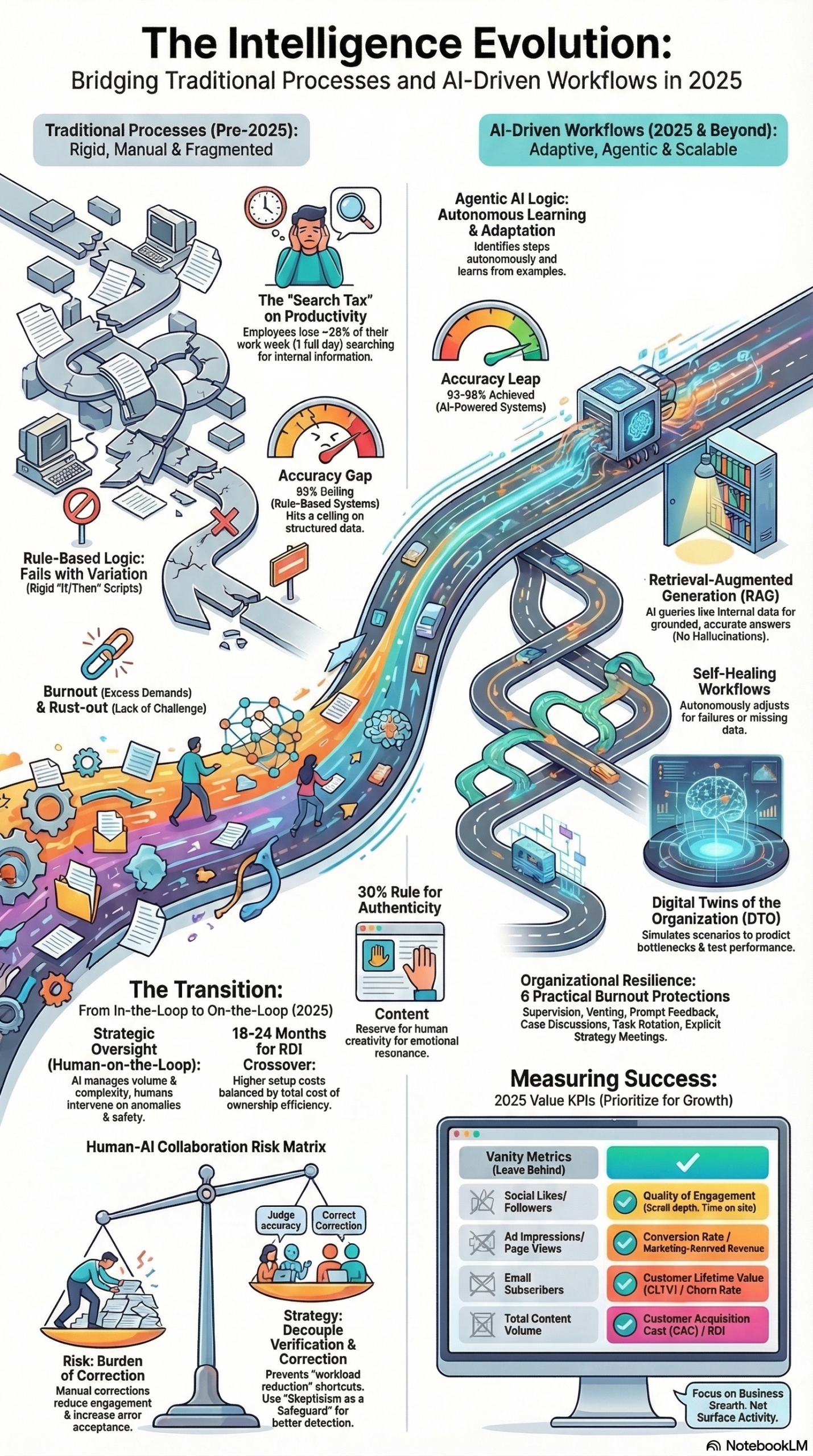
Chaotic content workflows aren’t just annoying — they are quietly bleeding your marketing budget through rework cycles, misaligned briefs, brand voice inconsistency, and last-minute fire drills. According to research synthesized in the MarketingAgent NotebookLM research report, employees lose nearly one full workday per week searching for information across disconnected platforms, and martech utilization has collapsed to just 49% of available capabilities despite organizations paying for over 15,000 tools. This tutorial will show you exactly how to diagnose your workflow gaps and implement the systems — briefs, calendars, approval chains, and AI orchestration — that eliminate chaos for good.
What This Is
“Chaotic content workflow” is not a personality flaw in your team. It is a structural failure — the absence of systems that govern how content gets requested, produced, reviewed, and shipped. Martech.org’s analysis of content operations identifies four specific cost drivers that emerge when those systems don’t exist:
- Rework — Undefined goals and approval chains generate multiple revision cycles. A single piece of content circles back for a fourth round of edits because no one agreed on direction upfront.
- Voice Drift — Without a documented brand voice standard, ten pieces of content from ten different contributors sound like ten different brands, eroding audience trust over time.
- Misaligned Briefs — Teams treat briefs as administrative formalities rather than the actual strategic work, which causes scope creep and directional pivots mid-production.
- Fire Drills — Last-minute, unplanned requests derail scheduled work and reduce output quality by forcing teams into reactive execution mode.
Each of these failure modes is amplified by the scale of modern martech environments. According to the research report, the marketing technology landscape has grown by over 9,000% since 2011, now exceeding 15,000 available solutions. Yet organizations are only using roughly half of the capabilities they are paying for. That utilization gap is partly a symptom of tool sprawl — too many disconnected platforms generating too many switching costs, too much context fragmentation, and too much time spent hunting for files rather than creating them.
The shift from traditional, rigid workflows to intelligent, adaptive systems is underway. The research report describes this evolution as the move toward Agentic AI and Intelligent Orchestration — goal-oriented AI systems capable of coordinating between specialized agents (e.g., a “Copywriter” agent and a “Compliance” agent) autonomously, without manual handoffs. Organizations that pair strong foundational workflow systems with AI orchestration can reduce content production costs by up to 85%, per the research report. But AI won’t save a broken process — it will only automate the chaos faster. That’s why fixing the structural foundations comes first.
The research report also introduces the concept of Digital Twins of the Organization (DTO) — AI-generated replicas of your operational processes that can simulate outcomes, predict bottlenecks, and estimate costs before you commit to changes in the live workflow. For content operations teams managing complex, multi-channel production pipelines, this is one of the highest-leverage tools available for workflow redesign.
Why It Matters
The financial case for fixing chaotic content workflows is measurable, not theoretical. Here’s what the research report quantifies:
- One lost workday per week per employee spent searching for information across disconnected platforms — that’s a 20% drag on individual productivity, compounding across every person on your team.
- AI-generated blog content costs approximately $131 versus $611 for a human-written equivalent — a 4.7x cost reduction available to teams with the workflow infrastructure to deploy and govern AI production responsibly.
- Automated repetitive tasks like content scheduling, approval reminders, and distribution workflows can reduce operational costs by up to 35%.
The beneficiaries of fixing this are not just content managers. Practitioners across the org feel the impact:
- Content strategists stop spending half their week in triage mode and start doing actual strategy work.
- Brand and editorial leaders get consistent output that reinforces rather than undermines brand equity.
- Marketing ops professionals gain the documentation and data trails needed for budget justification, campaign attribution, and capacity planning.
- Agencies managing multi-client content programs find that structured workflows are the difference between profitable accounts and unprofitable chaos.
What makes this different from the standard “build a content calendar” advice is the integration layer. Fixing workflow chaos in 2026 means connecting your brief templates, approval chains, and editorial calendars to AI systems that can operate autonomously within those guardrails — not bolting a calendar onto an otherwise dysfunctional process.
The Data
The numbers below draw from the research report and the Martech.org source article to show the before/after impact of structured content operations.
| Metric | Chaotic Workflow | Structured Workflow |
|---|---|---|
| Employee time lost searching for content/info | ~1 full day/week | Minimal — centralized repository |
| Martech capability utilization | 49% of paid features | 70–80%+ with consolidated stack |
| AI blog content cost | Uncontrolled / ad-hoc | ~$131/post with AI pipeline |
| Human blog content cost | $611/post average | Redirected to strategy/oversight |
| Rework cycles per piece | 3–5+ revision rounds | 1–2 with pre-approved briefs |
| Content cost reduction potential | Baseline | Up to 85% with AI orchestration |
| Operational task automation savings | 0% | Up to 35% on repetitive tasks |
| Brand voice consistency | Inconsistent across contributors | Enforced via style guide + brief |
| Fire drill frequency | Weekly/constant | Managed via 72-hour lead time rule |
This table illustrates why workflow chaos is a budget problem, not just a process annoyance. The cumulative drag — lost time, underused tools, rework, and missed AI savings — represents a significant portion of content operations budgets that organizations are hemorrhaging invisibly.
Step-by-Step Tutorial: Building a Chaos-Proof Content Workflow
This walkthrough covers the four foundational documents and the weekly operating rhythm that turn reactive content teams into predictable production systems. It also integrates the AI orchestration layer for teams ready to scale.
Phase 1: Audit Your Current State
Before building anything new, you need an honest picture of where your workflow breaks down.
Step 1: Run the brand voice test.
Pull your last ten published pieces of content across channels. Read them back-to-back without looking at author names. If they sound like different brands, you have a voice drift problem. If you can’t find ten recent pieces easily, you have a documentation and discoverability problem. Both are solvable — but you need to know which one you’re solving.
Step 2: Map your current content request flow.
Trace a single piece of content from request to publish. Write down every step, every person involved, every tool touched, and every place where work sits idle waiting for a response. The research report describes this as process mapping — visually documenting critical workflows to identify redundancies and bottlenecks before automating anything. Look specifically for: handoff delays (waiting for someone to pass the baton), approval ambiguity (unclear who has final sign-off), and brief gaps (requests that arrive without enough information to act on).
Step 3: Count your tools.
List every platform your content team touches from ideation to distribution. Per the research report, most organizations are paying for roughly double the software functionality they actually use. Identify which tools overlap in function, which ones are consistently bypassed, and which integrations are missing that force manual copy-paste transfers between systems.
Phase 2: Build the Four Foundation Documents
The Martech.org analysis is specific about this: you need four core documents before any other workflow intervention will stick.
Step 4: Create your Content Brief Template.
A brief is not an email with a vague ask. A functioning brief template includes:
– Target audience: Specific segment, not “everyone”
– Goal: One primary outcome (leads, SEO ranking, enablement, brand awareness)
– Angle / key message: The one idea this piece must land
– Scope exclusions: What this piece explicitly does NOT cover
– Deadline with buffer: Final publish date minus at least 72 hours for review
– Approval chain: Named individuals, not departments
Make this a form — Google Forms, Airtable, or your project management tool — so that requesters cannot submit without completing every required field. Incomplete brief submissions get returned immediately, not worked around.
Step 5: Build your Editorial Calendar.
An editorial calendar is not a Google Sheet with post titles and dates. A functional editorial calendar tracks:
– Content type and format
– Target keyword or topic cluster
– Production owner
– Current stage (Brief → Draft → Review → Approved → Scheduled → Published)
– Associated campaign or initiative
The calendar’s primary value is making work-in-progress visible. When a fire drill request lands, the calendar shows the team exactly what has to move to accommodate it — making the trade-off explicit and forcing a real prioritization decision rather than a heroics response.
Step 6: Document your Approval Workflow.
Write down every approval required to publish a single piece of content. Name the specific people responsible for each review stage, define what each reviewer is actually checking (copy accuracy, brand voice, legal compliance, strategic alignment), and set response time SLAs for each step. The Martech.org article emphasizes that sign-off owners must be named individuals — not teams, not roles, not “management.” When approval accountability is diffused across a team, no one acts urgently.
Step 7: Write the One-Page Brand Voice Cheat Sheet.
This document does not replace a full style guide. It is the fast-reference version that a freelancer or new team member can read in five minutes and internalize before touching a keyboard. Include: three adjectives that describe your brand voice, three that explicitly describe what you’re NOT, two example sentences in brand voice, two anti-examples showing off-brand tone, and guidance on formality level for different content formats (social vs. long-form vs. email).
Phase 3: Implement the Weekly Operating Rhythm
Step 8: Run the Monday 30-Minute Sync.
Every Monday, the content team meets for exactly 30 minutes. The agenda is fixed: review all in-flight work and its current stage, identify any pieces at risk of missing their deadline this week, and surface any incoming requests that haven’t been briefed yet. This meeting is not a brainstorm — it is a production status check. Keep it under 30 minutes by enforcing that the calendar is updated before the meeting starts, not during it.
Step 9: Run the Friday 10-Minute Check.
Every Friday, one person (can rotate) spends ten minutes comparing what was planned to ship this week versus what actually shipped. This is your operations data. Over four to six weeks, this comparison reveals your team’s true throughput capacity, your most common reasons for delay, and which content types consistently slip. That data is what you use to set realistic capacity limits and push back on overcommitment.
Step 10: Enforce the 72-Hour Lead Time Rule.
All new content requests require a minimum 72-hour lead time before production begins. This rule does two things: it forces requesters to think ahead rather than treating content as an instant-order service, and it gives your team a buffer to complete briefing properly. The only exception is a genuine business emergency — and if those happen more than once a quarter, the definition of “emergency” has been stretched to cover poor planning. Document every exception with the reason so you can show the pattern to leadership.
Phase 4: Integrate the AI Orchestration Layer
Once your foundational workflow is operating consistently for four to six weeks, you have the governance structure needed to introduce AI production systems safely.
Step 11: Deploy AI on high-volume, clearly-specified content types first.
Per the research report, the shift to Human-on-the-Loop oversight — where AI handles high-volume drafting while humans provide strategic review — requires that the brief template is precise enough to consistently produce usable AI output. Social media captions, meta descriptions, email subject line variants, and brief-driven blog first drafts are good starting points. Complex thought leadership, sensitive brand communications, and original research are not.
Step 12: Integrate RAG (Retrieval-Augmented Generation) with internal brand assets.
The research report identifies RAG as the critical layer that separates useful AI content output from generic hallucinated text. Before scaling AI drafting, connect your AI system to your internal brand repository: past approved content, your brand voice guide, product documentation, and customer research. This ensures that AI-generated outputs are contextually accurate and on-brand rather than drawing from generic internet training data.
Step 13: Apply the 30% Human Ingenuity Rule.
The research report recommends reserving at least 30% of content output for human-led creation — content that requires genuine original thinking, brand relationship management, or creative risk-taking that AI cannot replicate. This isn’t sentiment; it’s strategic. The AI-produced 70% frees your best writers to do the work that actually differentiates your brand.
Expected Outcome: Teams that implement all four phases typically see rework cycles drop from four-plus rounds to one-to-two within the first six weeks, fire drill frequency reduce substantially within the first quarter, and a measurable reduction in time spent on information search as content assets become findable and consistently documented.
Real-World Use Cases
Use Case 1: The Agency Scaling to 20+ Clients
– Scenario: A digital marketing agency has grown from five to twenty clients and their content production is breaking down — briefs arrive via Slack DMs, approvals happen over email, and two clients have complained about inconsistent brand voice.
– Implementation: They build a standardized intake form using Airtable that maps directly to their brief template. Each client has a dedicated row in a shared editorial calendar. Approval workflows are configured in their project management tool with automated reminders after 24 hours of no response.
– Expected Outcome: Production time per piece drops, client escalations about voice inconsistency decrease, and the agency can onboard new clients without proportionally growing their ops team.
Use Case 2: The In-House Team Introducing AI Content Production
– Scenario: A B2B SaaS company’s marketing team wants to use AI to scale blog output from four posts per month to sixteen, but leadership is concerned about quality control and brand voice consistency.
– Implementation: They spend six weeks locking down their brief template and brand voice cheat sheet, then configure an AI drafting system connected via RAG to their approved content library. Every AI draft goes through a single human editor who checks for brand voice, factual accuracy, and strategic alignment before approval.
– Expected Outcome: Per the research report, AI-generated blog content costs approximately $131 versus $611 for fully human-written equivalents. At sixteen posts per month, this represents significant cost avoidance while maintaining quality standards through the human review layer.
Use Case 3: The Enterprise Team Reducing Tool Sprawl
– Scenario: A large consumer brand’s content team is using eleven different platforms across the content lifecycle, causing information to be siloed and version control to be a constant problem.
– Implementation: They conduct the tool audit from Phase 1, identify four platforms that can be retired, and consolidate content assets into a single OCR-searchable repository. The editorial calendar becomes the single source of truth for all content status.
– Expected Outcome: Per the research report, eliminating information search time across disconnected platforms recovers approximately one workday per week per employee — a direct productivity return that compounds as headcount grows.
Use Case 4: The Content Operations Manager Building the Business Case
– Scenario: A content ops manager needs to convince leadership to invest in workflow infrastructure — tools, documentation time, and process redesign — and needs concrete ROI data to support the request.
– Implementation: They run the Friday 10-minute check for eight weeks to build a throughput baseline, quantify rework cycles per piece, and calculate the hours-per-week lost to information searching. They frame the investment against the 35% operational cost reduction potential from automated repetitive tasks documented in the research report.
– Expected Outcome: A data-supported business case that ties workflow investment to specific, measurable returns — making the conversation about ROI rather than process preferences.
Common Pitfalls
Pitfall 1: Building documentation before auditing the real workflow.
Jumping straight to creating brief templates and brand guidelines without first mapping how work actually flows in your organization produces documentation that doesn’t match reality and gets ignored within two weeks. Always run the audit in Phase 1 before building anything.
Pitfall 2: Treating the brief template as optional.
Teams often build a brief template, then allow “quick asks” to bypass it for time-sensitive requests. Within weeks, the exception becomes the norm and the template is irrelevant. The 72-hour lead time rule is what enforces brief compliance — without it, the template has no teeth.
Pitfall 3: Deploying AI before the brief infrastructure is solid.
Per the research report, the behavioral psychology risk of AI in content workflows is real: automation bias causes teams to accept AI output uncritically, while algorithmic aversion causes others to reject it reflexively after even minor errors. Neither extreme produces good content. You need a well-defined brief structure and a human review layer before AI can operate safely within the workflow.
Pitfall 4: Naming teams instead of individuals in the approval workflow.
“Marketing needs to approve” is not an approval workflow. When no specific person owns a decision, the decision doesn’t get made on time and the production schedule slips. Name individuals, define their review scope, and set response SLAs.
Pitfall 5: Underestimating the cultural resistance to lead time rules.
The 72-hour lead time rule will be tested immediately by stakeholders who have been conditioned to treat content as an on-demand service. The only effective response is to track every exception, show the data on how fire drills affect overall team throughput, and present that data to leadership so the enforcement becomes a policy, not a personal preference.
Expert Tips
Tip 1: Use your Friday 10-minute check as a capacity planning tool.
After six weeks of Friday checks, you have reliable data on how many pieces of each content type your team can actually produce per week. Use this to set intake limits in your brief intake form — once weekly capacity is reached, new requests queue to the following week. This is the single most effective way to prevent fire drills.
Tip 2: Decouple AI error correction from AI error judgment.
The research report cites research showing that when a human is required to both judge and correct an AI error in the same step, the correction burden causes them to accept incorrect AI outputs rather than do the extra work. Consider having one team member flag AI output issues and a separate person implement the corrections so that the effort of fixing doesn’t influence the judgment of whether to fix.
Tip 3: Build your brand voice cheat sheet from your best-performing content, not from internal opinions.
Pull your top-ten performing pieces by the metric you care about most. Identify what they have in common tonally. That is your empirical brand voice — more useful than a committee-designed document.
Tip 4: Use Digital Twins before redesigning complex workflows.
For significant workflow redesigns — restructuring your entire approval chain, integrating a new AI production system, consolidating platforms — the research report recommends using Digital Twin simulation tools to model the new workflow and identify bottlenecks before committing to a live rollout. This prevents expensive mid-implementation reversals.
Tip 5: Audit your content workflow the same way you audit contracts.
The research report notes that the same audit principles that recover the average 9% of annual revenue lost to poor contract management apply to content operations. Run a structured quarterly workflow audit: what processes are redundant, what tools are underused, what approval steps have become ceremonial rather than functional? Systematic auditing is what keeps a workflow from drifting back into chaos.
FAQ
Q: How long does it take to build and implement these four foundation documents?
A: For a team of five to ten people, expect two to three weeks of actual work — one week for the audit and process mapping, one week to draft all four documents collaboratively, and one week to run a test production cycle before going live. The Monday sync and Friday check can start in week one. The 72-hour lead time rule should be enforced from day one of the new workflow.
Q: Our team is very small — do we need all four documents?
A: Yes, but scale them appropriately. A two-person team doesn’t need a formal Monday sync, but they absolutely need a brief template and an explicit approval process. The brief template and brand voice cheat sheet are the minimum viable infrastructure for any content operation that involves more than one person or more than one content type.
Q: How do we introduce AI into the workflow without losing brand voice control?
A: Two controls matter most. First, connect your AI system to your internal brand repository using RAG so it draws from your approved content, not generic training data. Second, every AI draft should pass through a human editor who is specifically checking for brand voice adherence against the cheat sheet — not editing for personal preference. Per the research report, the Human-on-the-Loop model keeps humans in a strategic oversight role without re-creating the human-as-bottleneck problem.
Q: What is the right ratio of AI-produced to human-produced content?
A: The research report recommends the 30% Rule — reserve at least 30% of content output for human-led creation. This 30% should be your highest-stakes content: thought leadership, original research, brand-defining storytelling, and any content that requires relationship nuance or genuine creative risk. The AI-handled 70% should be high-volume, clearly specified, brief-driven content where consistency and efficiency matter more than originality.
Q: How do we measure whether the workflow fix is working?
A: Track four metrics from week one: (1) average revision cycles per piece of content, (2) percentage of briefs submitted with complete information vs. incomplete, (3) percentage of content shipped on the originally scheduled date, and (4) team-reported time lost per week to information searching. Run the Friday check consistently and compare these metrics monthly. Within six to eight weeks, you will see measurable movement on all four if the foundations are implemented correctly.
Bottom Line
Chaotic content workflows are a revenue problem disguised as a process problem. Employees lose nearly a full workday per week to information searching, martech utilization sits at 49% despite organizations paying for tools they don’t use, and AI content cost savings of up to 85% remain inaccessible to teams without the workflow infrastructure to govern them. The fix is not a new tool — it is four documents (brief template, editorial calendar, approval workflow, brand voice cheat sheet) and two weekly rituals that make work visible and decisions explicit. Once those foundations are solid, AI orchestration becomes a force multiplier rather than an accelerant for existing chaos. The organizations that build workflow discipline now will hold a compounding operational advantage over those still operating in reactive mode.


0 Comments