

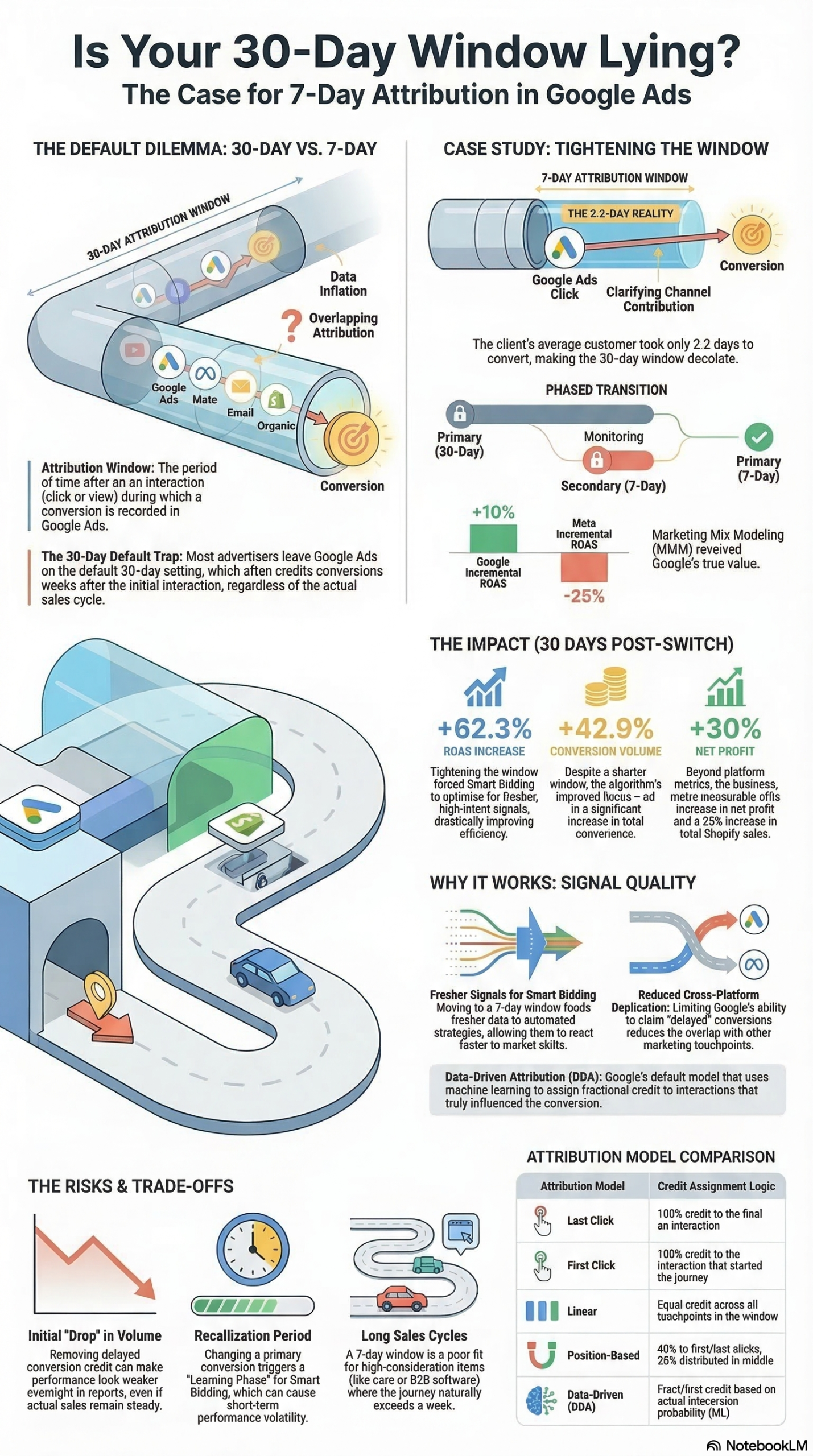
Your Google Ads account is probably over-crediting conversions right now — and feeding corrupted signals into Smart Bidding as a result. A documented transition from a 30-day to a 7-day attribution window produced a 62.3% ROAS lift and a 42.9% jump in recorded conversions for a direct-to-consumer retailer, not by generating more traffic, but by cleaning up measurement and eliminating cross-platform overlap. This tutorial walks you through how to audit your current attribution setup, run a phased window test, and interpret what the data means for your bidding strategy.
What This Is
Attribution windows in Google Ads define the timeframe during which the platform can record and credit a conversion to a prior ad interaction. When a user clicks your ad on March 1 and completes a purchase on March 25, a 30-day window captures that sale and assigns credit to the original click. A 7-day window does not — that conversion goes unattributed to any Google click.
The distinction that most practitioners miss: there are three separate but frequently confused settings inside Google Ads measurement.
- Conversion Window: The maximum time after an ad interaction during which a conversion is recorded. Ranges from 1 to 90 days for clicks, and 1 to 30 days for view-through interactions.
- Lookback Window: A reporting-layer tool that determines how far back from a conversion event Google searches for eligible ad interactions when generating attribution reports. This is not a tracking rule — it’s a reporting filter.
- Attribution Model: The rule set determining how credit is distributed across multiple touchpoints within the window. As of 2023, Google deprecated several rules-based models — first-click, linear, time-decay, and position-based — leaving two primary options: Data-Driven Attribution (DDA) and Last-Click.
The lever that moves the needle in this analysis is the conversion window — specifically what happens when you tighten it from 30 days to 7 days for accounts where actual customer buying cycles are far shorter than the default window assumes.
According to the NotebookLM research report synthesizing the Search Engine Land analysis, Google’s default 30-day click attribution window “muddies the waters” for high-velocity DTC accounts where the average conversion cycle runs just 2.2 days. A customer who sees your Shopping ad and buys within hours or a couple of days doesn’t need a 30-day tracking tail — that extended window is capturing noise, not signal.
The two remaining attribution models each serve a distinct purpose:
| Model | How Credit Is Assigned | Ideal Account Type |
|---|---|---|
| Data-Driven Attribution (DDA) | Machine learning assigns fractional credit based on observed influence and historical conversion paths across all ad interactions | Most accounts; complex multi-touch, multi-session journeys |
| Last-Click Attribution | 100% of credit assigned to the final ad interaction before the conversion event | Very short sales cycles; single-session, impulse purchases |
DDA is the default for most Google Ads accounts and generally the right choice for multi-channel advertisers. Critically, the attribution model and the attribution window are independent levers — you can run DDA with a 7-day window, or Last-Click with a 30-day window. Confusing these two settings is one of the most common misconfigurations practitioners encounter when troubleshooting ROAS discrepancies.
What makes this especially relevant in 2026 is the tight coupling of window settings with AI-powered Smart Bidding. Google’s machine learning evaluates over 70 million signals per auction within 100 milliseconds — device type, location, time of day, browser, audience membership, and dozens more contextual factors. That optimization is only as accurate as the conversion data feeding it. A 30-day window inflated by cross-platform overlap delivers stale, distorted feedback to the algorithm. A 7-day window matched to actual buying behavior gives the algorithm what it needs: recent, clean conversion events that genuinely reflect current purchase intent.
Why It Matters
Attribution window misconfiguration produces three compounding problems: inflated performance reporting, corrupted bidding signals, and systematically wrong budget allocation decisions.
Inflated Reporting Across Channels
Every ad platform — Google, Meta, TikTok, Pinterest — is architected to capture every conversion it can plausibly claim credit for. When you run campaigns across multiple platforms simultaneously, each one counts the same purchase against its own clicks and view-throughs. The cumulative result: your cross-channel conversion totals regularly exceed actual CRM or backend sales data by 30% to 50%. This is not a tracking bug — it is the designed behavior of platform-level attribution. A 30-day window dramatically increases the surface area for this overlap by permitting Google to claim credit for purchases occurring weeks after the original ad interaction, long after other channels have influenced or closed the sale.
Corrupted Smart Bidding Signals
Smart Bidding strategies — Target CPA, Target ROAS, Maximize Conversions — optimize against the conversion events your account marks as “Primary.” If your primary conversion action uses a 30-day window and your customers actually convert within 3 days on average, the algorithm receives delayed, noisy feedback. It’s equivalent to training a machine learning model on data that’s weeks out of date. The system doesn’t know when a conversion occurred relative to the click — it only processes what was reported to it. Cleaner windows produce cleaner signals, which directly improves Smart Bidding’s ability to target the right users at the right bid.
Budget Misallocation Between Channels
When Google reports inflated ROAS because its 30-day window is overlapping with Meta’s attribution window, you make budget decisions on false performance data. Google appears to outperform Meta when the reality is that both platforms are claiming credit for the same conversions. Tightening both platforms to the same 7-day click, 1-day view settings — even temporarily — creates an apples-to-apples comparison baseline that Marketing Mix Modeling (MMM) can validate against actual backend revenue.
The practitioners who benefit most from this adjustment:
- DTC e-commerce brands running Google Shopping and Performance Max alongside Meta Advantage+ campaigns, where cross-platform overlap is guaranteed
- Performance marketing agencies managing multi-channel budgets where platform-reported ROAS diverges significantly from client backend data
- In-house paid search teams whose Smart Bidding strategies underperform versus manual bidding benchmarks — a common symptom of bad input data
- Marketers implementing server-side tracking who want to maximize the fidelity of first-party data flowing into Google’s conversion measurement infrastructure
The Data
The documented results from a 30-day to 7-day attribution window transition — as synthesized in the research report from a real DTC account — show significant in-platform and backend improvements over a 30-day post-transition measurement period:
| Metric | Pre-Transition (30-Day Window) | Post-Transition (7-Day Window) | Change |
|---|---|---|---|
| Recorded In-Platform Conversions | Baseline | +42.9% | ↑ 42.9% |
| Conversion Value (In-Platform) | Baseline | +52.1% | ↑ 52.1% |
| In-Platform ROAS | Baseline | +62.3% | ↑ 62.3% |
| Net Profit (Shopify Backend Data) | Baseline | +30% | ↑ 30% |
| Average Customer Conversion Cycle | 2.2 days | 2.2 days | Unchanged |
The critical validation in this data is the backend net profit figure: +30% confirmed in Shopify. This rules out a pure measurement artifact — actual business outcomes improved. The account generated more revenue on comparable spend, driven by Smart Bidding receiving higher-quality signals and allocating budget more efficiently toward genuine purchase intent.
The conversion count increase (+42.9%) is counterintuitive on first read. Shouldn’t a shorter window reduce conversions recorded? What the data demonstrates is that by eliminating the noise from delayed, overlapping attributed conversions, Smart Bidding began identifying and targeting higher-intent users — those who convert quickly. The algorithm spent more efficiently, reached more genuine buyers within the 7-day window, and actual conversion volume rose as a result.
Additional Smart Bidding benchmarks from the research report:
| Smart Bidding Strategy | Minimum Conversions Required | Primary Optimization Focus | Recommended Window for DTC |
|---|---|---|---|
| Target CPA | 30+ conversions per 30 days | Cost per acquisition efficiency | 7–14 days |
| Target ROAS | More = better; flexible minimum | Revenue optimization | Match buying cycle |
| Maximize Conversions | Flexible | Conversion volume | 7–14 days |
| Maximize Conversion Value | Flexible | Total revenue generated | Match buying cycle |
Step-by-Step Tutorial
Prerequisites
Before changing any attribution settings, confirm you have:
- A Google Ads account with at least 90 days of conversion history
- Account Editor or Admin access to Google Ads conversion settings
- Access to backend sales data — Shopify, GA4, or your CRM — for validation
- At least 30 conversions per month to maintain Smart Bidding learning eligibility
- Google Analytics 4 linked to your Google Ads account
- Google Tag Manager access (required for Enhanced Conversions manual setup)
Phase 1: Diagnose Your Actual Conversion Lag
Never change a setting you haven’t measured first. The Time Lag report is the one number that determines whether a 7-day window is right for your account.
Step 1: Pull the Time Lag Report
Navigate to: Google Ads → Tools & Settings → Measurement → Attribution → Time Lag
This report shows the distribution of days between an ad click and a recorded conversion across your account. For a DTC account selling impulse-oriented products — apparel, supplements, accessories, home goods — you’ll typically see 60–80% of conversions occurring within 3 days of the click. For considered purchases — appliances, luxury items, B2B software — you may see a long tail extending to 20–30 days.
Read the distribution carefully. If 75% of your conversions happen within 7 days, a 7-day window captures three-quarters of your real conversions while cutting the extended tail that drives cross-platform overlap. If only 40% of conversions happen within 7 days, tightening the window will cause genuine attribution loss — and the fix is not a shorter window.
Step 2: Calculate Your Weighted Average Conversion Cycle
Export the Time Lag report as CSV. In a spreadsheet, calculate the weighted average:
Weighted Avg = SUM(Days × % of Conversions on That Day)
If your weighted average comes in under 7 days — as it did at 2.2 days in the documented case study — you are a strong candidate for the 7-day window. If your weighted average is 10–15 days, consider a 14-day window instead of jumping straight to 7.
Step 3: Quantify Your Cross-Platform Overlap
Pull backend CRM or Shopify order data for the last 60 days. Compare total actual orders to the conversions recorded in your Google Ads account for the same period.
Overlap Ratio = Google Reported Conversions ÷ Actual Backend Orders
If this ratio is greater than 1.0, you have attribution overlap. A ratio between 1.3 and 1.5 means 30–50% of your “Google conversions” are being simultaneously claimed by other platforms. Research shows this range is common across multi-channel accounts — it is not a sign of broken tracking, but of how platform-level attribution is designed.
Phase 2: Set Up the Parallel Test
The cardinal rule of attribution window testing: never change your primary conversion action directly. Switching the primary action mid-flight triggers a Smart Bidding learning phase that introduces 2–3 weeks of performance volatility. Run a parallel secondary conversion action instead.
Step 4: Create a New 7-Day Conversion Action
Navigate to: Google Ads → Tools & Settings → Measurement → Conversions → + New Conversion Action
If you’re tracking website purchases via the Google Tag:
- Select Website as your conversion source
- Select or configure your purchase event (using Google Tag Manager if applicable)
- Under Conversion window, set Click-through conversion window to 7 days
- Set View-through conversion window to 1 day (industry standard)
- Set Counting method to One (count one conversion per click, not every purchase from one session)
- Critically: set the action status to Secondary — do NOT set it as Primary yet
- Name it clearly:
"Purchase - 7-Day Window [TEST]" - Save, then verify firing with Google Tag Assistant or the real-time view in GA4
Step 5: Run Both Conversion Actions in Parallel
For a minimum of 14 days — 21 days is preferable for lower-volume accounts — let both actions accumulate data simultaneously:
- Primary: Your existing purchase action (30-day window) — Smart Bidding continues optimizing on this; no disruption
- Secondary: New 7-day window purchase action — data-only, not used for bidding yet
During this parallel window, the algorithm is completely unaffected. You are building a comparison dataset without touching live bidding.
Step 6: Analyze the Parallel Data Side by Side
After 14–21 days, compare three numbers:
| Data Source | Conversions Recorded |
|---|---|
| Google Ads — 30-Day Window (Primary) | X |
| Google Ads — 7-Day Window (Secondary Test) | Y |
| Shopify / CRM Backend Actual Orders | Z |
If Y closely matches Z (within 10–15%), your customers genuinely convert within 7 days and the shorter window accurately captures your real purchase volume. If Y is significantly lower than Z, your conversion cycle is longer than the Time Lag report suggested — possibly due to iOS/cookie tracking gaps that browser-side data misses.
Phase 3: Execute the Transition
Step 7: Swap Primary and Secondary Designations
Once the parallel data confirms the 7-day action is capturing your real conversion volume:
- Navigate to your conversion action list
- Set the 7-day window action to Primary
- Set the 30-day window action to Secondary (retain it for reference data)
Make both changes in a single editing session. The moment Smart Bidding detects a primary conversion action change, the learning phase begins. Expect 2–3 weeks of performance volatility — this is unavoidable. Avoid this transition during your highest-revenue periods: product launches, promotional events, holiday season lead-up.
Step 8: Loosen Bidding Targets During the Learning Phase
During the learning phase, Smart Bidding recalibrates to the new conversion signal pattern. If you’re running Target ROAS, temporarily loosen your target by 15–20% to give the algorithm room to explore the auction landscape without hitting budget constraints prematurely.
The research report explicitly warns against aggressive target-tightening during this period: “If you set your goal too low (e.g., halving the CPA), the algorithm won’t get enough auctions to learn from. The result: Less traffic and poorer performance.” Hold your loosened targets for 3–4 weeks, then tighten incrementally once performance stabilizes.
Step 9: Enable Enhanced Conversions
While in conversion settings, enable Enhanced Conversions if not already active. This feature hashes first-party user data — email addresses collected at checkout — and sends it to Google, which uses it to match conversions that would otherwise be lost due to iOS 14.5 tracking restrictions and third-party cookie deprecation.
Navigate to: Tools & Settings → Measurement → Conversions → Enhanced Conversions → Turn On
Configuration options:
– Automatic collection: Easiest implementation; works with standard Shopify checkout fields out of the box
– Manual tagging via Google Tag Manager: More precise control; requires tag configuration of your email field selectors
Enhanced Conversions consistently improves data capture rates in privacy-restricted environments and is one of the highest-ROI, lowest-effort optimizations available in 2026. It does not affect your attribution window — it fills in tracking gaps caused by privacy changes.
Step 10: Validate Against Backend Data at the 30-Day Mark
After 30 days on the new 7-day primary window, run your validation:
- Export Google Ads conversion report, segmented by conversion action, for the 30-day period
- Export Shopify or CRM order data for the exact same 30 days
- Calculate true ROAS:
Backend Revenue ÷ Actual Google Spend - Compare to in-platform ROAS
The gap between in-platform ROAS and backend ROAS is your real measure of remaining attribution overlap. For the documented account, backend net profit increased 30% — confirming that the in-platform improvement was anchored in real business results, not just cleaner reporting.
Expected Outcomes
For accounts where Time Lag analysis confirms sub-7-day average conversion cycles:
- In-platform ROAS increases as delayed, overlapping attributions are removed
- Recorded conversions align more closely to backend sales data
- Smart Bidding performance improves within 4–6 weeks post-stabilization
- Cross-channel budget allocation decisions become defensible with normalized data
- Marketing Mix Modeling validates Google’s true incremental contribution more accurately
Real-World Use Cases
Use Case 1: DTC Apparel Brand Eliminating Cross-Platform Double-Counting
Scenario: A mid-market DTC clothing brand runs Google Shopping and Meta Advantage+ concurrently. Google Ads reports 450 monthly purchases at a 4.2x ROAS; Shopify records 310 actual orders. Meta simultaneously claims 280 conversions for the same period. Platforms are collectively claiming 730 conversions against 310 real sales — a 2.35x inflation ratio.
Implementation: The brand pulls the Time Lag report and finds 78% of conversions occur within 3 days. They create a 7-day secondary conversion action, run it for 21 days alongside the existing 30-day primary, and confirm the 7-day action captures 298 conversions — closely matching Shopify’s 310. They apply the same 7-day window in Meta Ads Manager to create a normalized cross-platform baseline.
Expected Outcome: For the first time, true cross-platform ROAS is measurable and defensible. Budget allocation between Google and Meta is made on attribution-normalized data. Smart Bidding receives clean signals and begins identifying higher-intent audiences more precisely, driving actual purchase volume without increased spend.
Use Case 2: B2B SaaS Company Running Demand Generation Campaigns
Scenario: A SaaS company runs Google Ads targeting demo request submissions, with a 45-day average sales cycle from demo to closed-won. They’re currently using a 7-day conversion window — incorrectly applied to a long-cycle product — and their Smart Bidding is optimizing for low-quality leads that never close.
Implementation: The research report explicitly addresses this scenario: B2B and high-consideration products with multi-month sales cycles require longer lookbacks — 60 to 90 days — not shorter ones. The SaaS company switches to a 30-day click window, implements Offline Conversion Imports (OCI) from Salesforce, and passes closed-won deal data back to Google Ads. They configure Value-Based Bidding: if 20% of demo requests close at $10k, each demo is assigned a $2,000 conversion value.
Expected Outcome: Smart Bidding optimizes for lead quality rather than raw volume. Cost per demo request stabilizes while average deal size increases as the algorithm learns to favor users with high-value intent signals.
Use Case 3: Performance Agency Standardizing Multi-Client Attribution
Scenario: A performance marketing agency manages 15 e-commerce clients, each with attribution windows set arbitrarily by previous agencies. Cross-client benchmarking is impossible; ROAS figures are incomparable across accounts; client reporting lacks credibility.
Implementation: The agency audits all 15 accounts using the Time Lag protocol. For 12 accounts with sub-7-day average conversion cycles, they execute the phased 7-day transition. For the 3 accounts selling luxury goods and custom furniture (longer cycles), they maintain 30-day windows. All client reporting dashboards are standardized to display both in-platform ROAS and backend ROAS calculated from actual Shopify data.
Expected Outcome: Consistent cross-client benchmarking. Clients receive accurate performance data. The agency makes credible cross-channel budget recommendations backed by attribution-normalized metrics rather than platform-inflated numbers.
Use Case 4: Seasonal Retailer Managing Flash Sale Traffic Spikes
Scenario: An outdoor gear retailer runs a 48-hour July 4th flash sale. They want Smart Bidding to push aggressively during the sale event without permanently disrupting the algorithm’s baseline learning or triggering a post-sale learning phase.
Implementation: Using Seasonality Adjustments — a separate feature from attribution windows — the retailer signals to Google Ads that conversion rates are expected to increase 150% for 48 hours, applied 2 hours before the sale launches. After the sale, the adjustment expires automatically. Smart Bidding reverts to baseline optimization without manual intervention.
Expected Outcome: Smart Bidding bids more aggressively during the sale window, capturing high-intent traffic at peak conversion rates. Post-sale performance returns to normal without the algorithm overcorrecting or requiring a new learning phase.
Use Case 5: Server-Side Migration for Privacy-Compliant Tracking
Scenario: A health and wellness DTC brand discovers their Google Tag–based conversion tracking has significant gaps: Safari users, iOS opt-outs, and ad blocker users are systematically underrepresented. Their Time Lag report may be showing a falsely short conversion cycle because long-lag, cross-device conversions aren’t being captured at all.
Implementation: Before concluding that a 7-day window is appropriate, the brand implements server-side tracking through Google Cloud or a third-party solution like Elevar or Stape. Server-side tracking captures conversions at the infrastructure level, bypassing browser-based blockers and cookie restrictions. The research report confirms that transitioning to server-side tracking typically improves data capture rates significantly in privacy-restricted environments. They then re-run the Time Lag analysis with the more complete server-side data set.
Expected Outcome: The re-run Time Lag report may reveal a longer actual conversion cycle than browser-only data suggested, leading to a 14-day window decision instead of 7 days — a more accurate fit for the true customer journey.
Common Pitfalls
Pitfall 1: Switching Primary Conversion Actions During Peak Revenue Periods
Changing your primary conversion action always triggers a Smart Bidding learning phase. If you make this change during a product launch, Black Friday prep, or any high-revenue window, you will experience 2–3 weeks of degraded performance exactly when it costs you most. The mitigation is simple: plan your transition during the slowest revenue weeks of your calendar. Use the parallel secondary action to prepare well in advance.
Pitfall 2: Applying a Short Window to Long-Cycle Products
The research report is unambiguous on this point: “A shorter attribution window is only better if it reflects how your customers are actually buying.” If you sell high-consideration products — luxury goods, B2B software, custom services, real estate — with 30–60 day consideration periods, a 7-day window will cause you to miss genuine conversions and starve Smart Bidding of legitimate signal. Always run the Time Lag report first. The window must match your actual buying cycle, not an arbitrary “best practice.”
Pitfall 3: Tightening Smart Bidding Targets Immediately After Transition
After switching to a 7-day primary window, in-platform ROAS will initially appear lower as the algorithm recalibrates and historical performance data is re-weighted. If you see this dip and immediately tighten your Target ROAS target, you choke the algorithm — it restricts bidding, impression share drops, and you enter a negative feedback loop. Hold targets steady or loosen by 15–20% for the first 3–4 weeks. Let the system stabilize before tightening.
Pitfall 4: Neglecting iOS 14.5 and Cookie-Related Tracking Gaps
Privacy restrictions have created systematic measurement blind spots that affect all browser-based tracking. Safari’s Intelligent Tracking Prevention, iOS opt-outs, and cross-device user journeys cause fragmented data that makes your Time Lag report show artificially short cycles. If you don’t address these gaps with Enhanced Conversions and server-side tracking, your attribution window decision is based on incomplete data — regardless of which window you choose.
Pitfall 5: Marking Micro-Conversions as Primary Bidding Actions
If your Primary conversion action includes events like PDF downloads, newsletter signups, or add-to-cart interactions, Smart Bidding is optimizing toward micro-conversions instead of revenue events. The research is explicit: only revenue-driving events should be marked Primary. Micro-conversions should be Secondary. The symptom: high conversion volume, poor actual revenue, and a ROAS that looks great in the dashboard but doesn’t match Shopify.
Expert Tips
Tip 1: Segment the Time Lag Report by Campaign Type Before Deciding
Account-level time lag data obscures important variation. Brand campaigns typically convert in hours; non-brand prospecting campaigns may need 10–14 days. Run the Time Lag report filtered to each campaign type separately. You may discover that brand campaigns justify a 3-day window while prospecting campaigns need a 14-day window — which means creating separate conversion actions with appropriate windows per campaign type, rather than applying one window account-wide.
Tip 2: Normalize Attribution Settings Across Platforms for Honest Comparisons
When you need to produce a defensible cross-channel comparison for a client or stakeholder, temporarily force identical attribution windows across platforms: 7-day click, 1-day view in both Google Ads and Meta Ads Manager. This is the closest approximation to an honest apples-to-apples baseline available without a full incrementality test. Document the normalization methodology in your reporting and revert each platform to its optimized window afterward.
Tip 3: Use Value-Based Bidding for Variable-Quality Lead Gen Accounts
For B2B accounts where leads vary dramatically in quality and eventual revenue, assign explicit conversion values based on expected downstream revenue: if 20% of demo requests close at $10k average deal size, each demo submission is worth $2,000. As the research documents, configuring Target ROAS with value-based conversion actions lets Smart Bidding optimize for high-value leads rather than raw volume. This consistently outperforms Target CPA for accounts with heterogeneous lead quality.
Tip 4: Implement Server-Side Tracking Before Running Time Lag Analysis
Browser-based tracking systematically underrepresents long-lag conversions: cross-device users, Safari users, and iOS opt-outs all produce fragmented or missing data. If you run your Time Lag analysis on browser-only data and conclude that “90% of conversions happen within 3 days,” that may simply reflect which conversions your browser tag can capture — not your actual customer behavior. Implement server-side tracking first, then re-run the analysis for accurate results.
Tip 5: Use Seasonality Adjustments Sparingly and with Data Backing
Seasonality Adjustments are designed for 1–7 day events with quantifiable, expected conversion rate changes — documented flash sales, historical email-blast traffic spikes, major promotional events with prior year data. Using them too frequently or for ambiguous events destabilizes Smart Bidding. Reserve them for situations where you have specific, historical data supporting the expected conversion rate lift. Overuse trains the algorithm to distrust its own historical learning.
FAQ
Q: If I switch to a 7-day window, will I immediately lose reported conversions?
No — not immediately. The change applies to future ad interactions, not historical data already recorded. Conversions previously attributed under the 30-day window remain in your historical data. Going forward, any click occurring more than 7 days before the conversion event will no longer be credited. Your parallel test period (Step 5 above) will show you exactly what the difference looks like for your specific account before you commit to the change.
Q: How many conversions do I need before Smart Bidding performs reliably?
According to the research report, Target CPA requires at least 30 conversions in 30 days for optimal machine learning performance. Accounts below this threshold should use Maximize Conversions without a CPA constraint, allowing the algorithm to accumulate learning data before applying targets. Switching attribution windows on a low-volume account can temporarily push you below the 30-conversion floor — factor this into your timing and consider the transition when account volume is trending upward.
Q: Does the attribution window affect my Quality Score or Ad Rank?
Not directly. Quality Score is calculated from expected click-through rate, ad relevance, and landing page experience. Attribution window settings do not influence these factors or the ad auction mechanism. The indirect effect is that cleaner attribution signals improve Smart Bidding performance, which can lead to more efficient bidding and higher effective Ad Rank over time — but this is a downstream optimization effect, not a direct Quality Score input.
Q: Should I use the same attribution window across all campaigns in my account?
Not necessarily. The research recommends matching the window to the actual buying cycle of each product category or campaign type. If your account runs both fast-moving consumer goods (7-day window appropriate) and high-consideration premium products (30-day appropriate), create separate conversion actions with appropriate windows for each, and ensure the correct Primary conversion action is assigned to each campaign. A one-size-fits-all approach to window settings is the second most common attribution configuration mistake, after ignoring the Time Lag report entirely.
Q: What’s the difference between the attribution window and the attribution model — and which should I change first?
The attribution model determines how credit is split across multiple touchpoints along the conversion path (DDA vs. Last-Click). The attribution window determines the timeframe during which touchpoints are eligible to receive any credit at all. For most accounts, DDA is the correct model and should not be changed. Focus optimization effort on the window, which has a more directly testable, measurable impact on Smart Bidding signal quality and cross-platform overlap. If you’re still running Last-Click attribution on a multi-touch journey account, switching to DDA is also worth prioritizing — but run it as a separate test, not simultaneously with a window change.
Bottom Line
Google Ads attribution windows are an active bidding signal input, not a set-it-and-forget-it measurement preference. For DTC and high-velocity e-commerce accounts with actual buying cycles under 7 days, the documented evidence shows that tightening from 30 days to 7 days can produce a 62.3% in-platform ROAS improvement and 42.9% conversion lift, validated by a 30% backend net profit increase — driven by cleaner signals reaching Smart Bidding and reduced cross-platform overlap inflating reported metrics. The transition requires discipline: run the Time Lag report first, validate a 7-day secondary action for 21 days before switching primary, loosen bidding targets through the learning phase, and enable Enhanced Conversions to fill privacy-driven tracking gaps. For B2B and long-cycle accounts, the inverse applies — shorter windows cause genuine attribution loss and should never be applied without Time Lag analysis. The window that reflects your customers’ actual buying behavior is always the right window.


0 Comments