

The Model Context Protocol (MCP) — an open-source standard launched by Anthropic in November 2024 — is the infrastructure layer that finally makes AI agents useful inside real marketing stacks. While the industry conversation has fixated on which large language model is smarter, the practitioners shipping results have shifted attention to the architecture surrounding those models. This tutorial walks you through what MCP is, which servers matter for marketing operations, and a hands-on walkthrough for connecting your AI agent to live campaign data, CRM records, and email performance — without writing a custom integration for each one.
What This Is
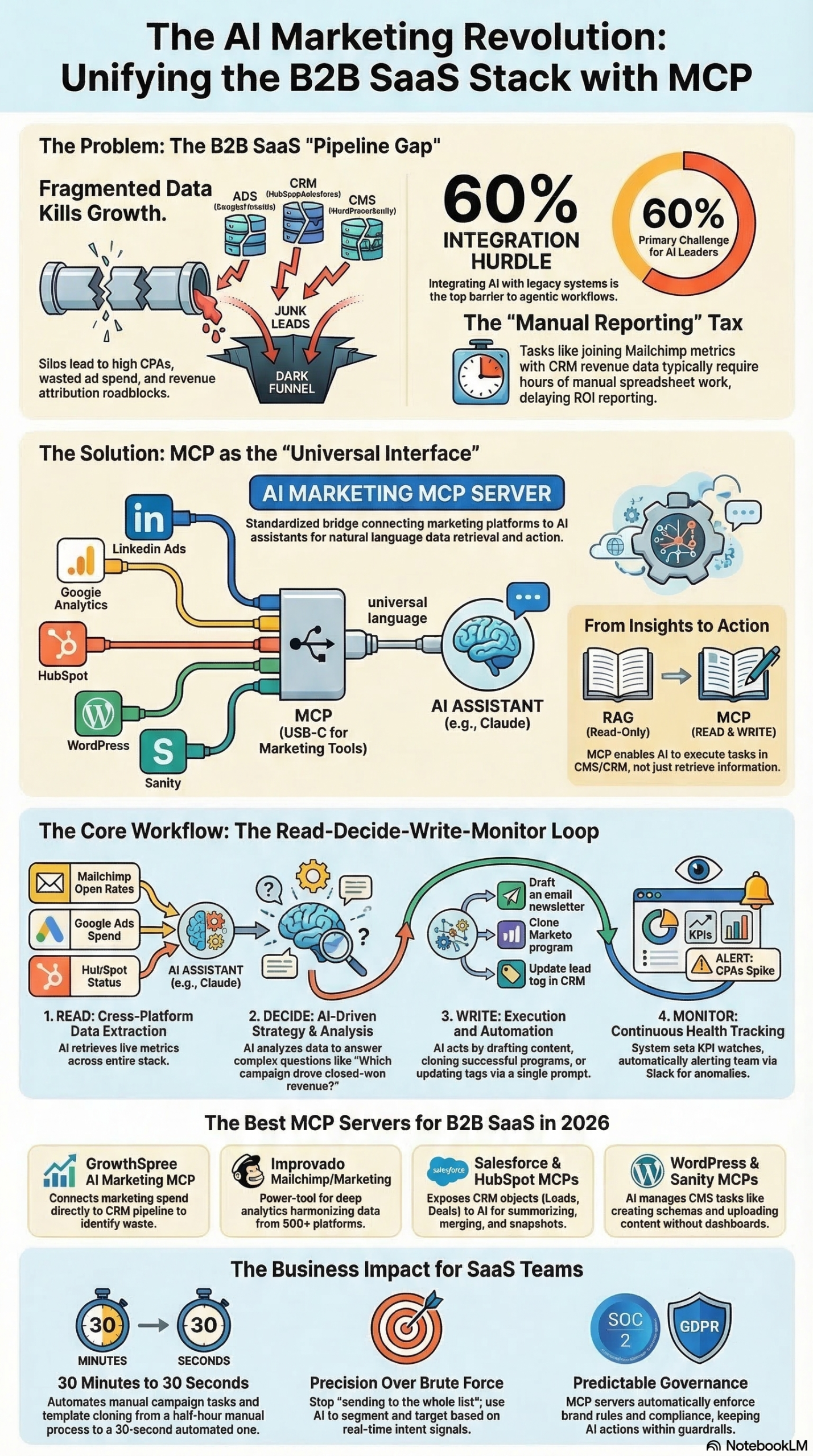
MCP stands for Model Context Protocol. It is an open-source standard that defines a universal communication layer between AI models and the external tools, data sources, and business applications they need to act on. Before MCP existed, connecting an AI assistant to your CRM meant building a bespoke integration — a fragile connector that would break every time either the AI provider or the CRM released an API update. Multiply that problem across a typical marketing stack (Google Ads, LinkedIn, HubSpot, GA4, MailerLite, your CMS) and you end up with a maintenance nightmare that consumes developer time faster than it creates value.
As documented in the MarketingAgent MCP Research Report, the protocol follows a client-server architecture with three core components:
- MCP Server: Exposes specific capabilities, data, and tools to AI agents. This is the component that a CRM, ad platform, or analytics tool runs. It defines what the AI is allowed to see and do.
- MCP Client: The AI-powered application the marketer actually interacts with — Claude Desktop, a custom agent, or any other MCP-compliant interface.
- Standardization: Once an MCP server exists for a tool, any compliant AI model can connect to it without custom integration code.
The analogy that captures this most clearly, cited in the research report: “You only have to build the integration once, then any AI model can use it. Think of MCP kind of like a USB port: it’s one standard with broad compatibility.” The same way USB-C standardized how hardware connects to peripherals, MCP standardizes how AI agents discover and use tools — across any vendor, any model, any stack configuration.
Amazon Ads illustrated this in practice when it launched its MCP server in open beta. According to Alex Brockhoff, Senior Technical Product Manager at Amazon Ads, as quoted in the Digiday source article: “The Amazon Ads MCP Server provides the foundation enabling partners and developers to connect their AI agents to Amazon Ads capabilities.” The server powers an “Ads Agent” that allows advertisers to plan, launch, and optimize Amazon campaigns using natural language commands — replacing a multi-step sequence of API calls with a single conversational prompt. The Amazon Ads MCP has since expanded to include Amazon Marketing Cloud (AMC) query capabilities, allowing advertisers to run saved audience and attribution queries through their AI workflows directly, as reported in the Digiday article.
The broader significance is a shift in the Martech landscape from a “model-centric” era to a “system-centric” era, as framed in the research report. The specific LLM you deploy matters less than the quality of the system you build around it. MCP is the connective tissue of that system.
As of March 2026, production-ready MCP servers exist for Google Ads, LinkedIn Ads, HubSpot, Salesforce, GA4, Ahrefs, MailerLite, Mailchimp (via Improvado), WordPress and WooCommerce (via Hostinger), Sanity CMS, and data infrastructure tools including Skyvia and n8n — all catalogued in the research report.
Why It Matters
Marketing operations teams have been drowning in dashboards for years. Every platform runs its own reporting silo, every integration requires ongoing maintenance, and any cross-channel analysis requires someone to manually export data from four tabs, paste it into a spreadsheet, and pray the date ranges align. MCP collapses this architecture.
According to Deloitte data cited in the Digiday source article, nearly 60% of AI leaders cite integrating agentic AI with legacy systems as their primary challenge in deployment. MCP is the direct answer to that infrastructure gap — it makes legacy marketing systems agent-accessible without rebuilding them from scratch.
The impact, as documented in the research report, falls into three meaningful categories:
Conversational Analytics Instead of Dashboard Hopping: Marketers can now ask natural language questions — “Which campaign generated the most pipeline revenue last quarter?” — and the AI agent retrieves, correlates, and synthesizes data across all connected platforms automatically. The manual process of logging into Google Analytics, then LinkedIn Campaign Manager, then HubSpot, then Excel is replaced by a single query.
Cross-Channel Intelligence: B2B customer journeys are multi-touch and inherently messy. MCP enables AI agents to understand the semantic difference between “leads” in an ad platform versus “contacts” in a CRM, know where “revenue” lives versus where “spend” is tracked, and surface insights like budget waste — detecting underperforming campaigns and high-cost audience segments across channels that were previously siloed. The research report notes that MCP servers like GrowthSpree specifically target this use case for B2B SaaS teams.
From Analysis to Autonomous Action: This is where MCP becomes genuinely consequential. Closed-loop systems enabled by MCP allow the AI to read data, make a decision, execute an action (pause a campaign, update a CRM record, draft and schedule an email), and monitor the result — entirely within one automated workflow. As the research report documents, real examples include automatically merging duplicate leads in Marketo, drafting newsletter content from published blog posts, and updating WooCommerce inventory via natural language commands.
The scale trajectory supports urgency. According to Gartner analysis cited in the research report and the Digiday article, 33% of enterprise software will include agentic AI by 2028 — up from less than 1% in 2024. The teams building MCP-connected stacks now are setting up a compounding structural advantage.
The Data: MCP Server Landscape for Marketing
The following tables, compiled from the MarketingAgent Research Report, map the primary MCP servers available for marketing teams and contrast the workflow impact.
MCP Server Directory: Marketing Stack Coverage
| Server | Category | Primary Focus | Key Capabilities |
|---|---|---|---|
| GrowthSpree | B2B Analytics | Cross-Channel ROI | Connects LinkedIn Ads, Google Ads, HubSpot, GA4 to track pipeline attribution |
| Amazon Ads | Performance | Campaign Management | Natural language campaign planning, launch, and optimization via “Ads Agent” |
| Ahrefs | SEO | Organic Intelligence | Live keyword research and competitor organic traffic analysis |
| MailerLite | Automation | Drafts emails from blog content, analyzes automation drop-offs, A/B subject lines | |
| Improvado (Mailchimp) | Attribution | Email Analytics | Joins Mailchimp data with CRM revenue for true attribution; deliverability monitoring |
| HubSpot | CRM | Pipeline Visibility | Queries live deal and contact data via AI |
| Salesforce | CRM | CRM Operations | Full Create/Update/Delete CRM actions with role-based access governance |
| Sanity | CMS | Content Ops | Bulk content audits, schema creation, editorial workflow management |
| Hostinger (WordPress) | CMS | Site Admin | Manages posts, users, WooCommerce inventory via Kodee AI assistant |
| Skyvia | Infrastructure | Data Integration | No-code connectivity to 200+ sources including PostgreSQL and SQL Server |
| n8n | Infrastructure | Agent Orchestration | Visual builder for custom MCP agents — the Marketing Ops “sweet spot” |
Source: MarketingAgent Research Report
Before and After: Marketing Ops Workflow Comparison
| Task | Pre-MCP Workflow | MCP-Enabled Workflow | Time Impact |
|---|---|---|---|
| Cross-channel campaign reporting | Export CSVs from 4+ platforms, merge manually | Single natural language query across all sources | Hours → Minutes |
| Budget waste detection | Manual CPL comparison across ad platforms | AI flags underperforming audiences automatically | Days → Real-time |
| Email subject line optimization | Brainstorm + manual performance review | AI analyzes history and generates variants in one prompt | Hours → Minutes |
| CRM duplicate cleanup | Manual review or paid deduplication tools | AI detects and merges duplicates on command | Days → Hours |
| SEO + paid keyword overlap analysis | Separate tool exports, manual VLOOKUP | AI cross-references organic rankings with ad spend | Hours → Minutes |
| Content audit | Spreadsheet-based page-by-page review | Bulk audit with AI recommendations via CMS MCP | Weeks → Hours |
Source: MarketingAgent Research Report
Step-by-Step Tutorial: Connecting MCP to Your Marketing Stack
This tutorial covers building a working MCP setup from scratch — specifically connecting Claude Desktop to HubSpot and Google Ads data, running cross-channel campaign analysis, and setting up an autonomous weekly reporting workflow using n8n.
Prerequisites
Before you start:
– Claude Desktop (free, available at claude.ai/download) — this is your MCP client
– HubSpot account with at minimum the free CRM tier (marketing attribution requires Marketing Hub Starter or above)
– Google Ads account with active campaign data
– Node.js 18 or later installed on your machine
– Comfort running basic terminal commands
Phase 1: Configure Claude Desktop for MCP
Claude Desktop ships with MCP support built in. To verify it’s active and check your current server list:
- Open Claude Desktop
- Click the settings icon in the top-right corner
- Navigate to Developer → MCP Servers
- You will see an empty list if no servers are connected
MCP server configurations live in a JSON file on your local machine:
– macOS: ~/Library/Application Support/Claude/claude_desktop_config.json
– Windows: %APPDATA%\Claude\claude_desktop_config.json
Open this file in any text editor. The default state is an empty config:
{
  "mcpServers": {}
}
Every MCP server you add gets a named entry inside this object. You can add as many as your stack requires; Claude Desktop loads all active servers when it launches.
Phase 2: Add the GrowthSpree MCP Server
GrowthSpree is one of the free, production-ready MCP servers documented in the research report. It provides unified access to LinkedIn Ads, Google Ads, HubSpot, and GA4 from a single AI interface — exactly the cross-channel analytics layer that previously required a BI tool or custom data warehouse.
Step 1: Install the server package via npm
npm install -g @growthspree/mcp-server
Step 2: Generate your API credentials
For Google Ads:
– Go to Google Cloud Console
– Create a new project and enable the Google Ads API
– Create OAuth2 credentials (client ID and client secret)
– Complete the OAuth2 flow to get a refresh token
– Retrieve your Developer Token from your Google Ads manager account under Tools → API Center
For HubSpot:
– Go to Settings → Integrations → Private Apps in your HubSpot account
– Create a new private app with the following scopes: crm.objects.contacts.read, crm.objects.deals.read, marketing-email.read
– Copy the generated access token
Step 3: Add GrowthSpree to your MCP config
{
  "mcpServers": {
    "growthspree": {
      "command": "growthspree-mcp",
      "env": {
        "GOOGLE_ADS_CLIENT_ID": "your_client_id_here",
        "GOOGLE_ADS_CLIENT_SECRET": "your_client_secret_here",
        "GOOGLE_ADS_DEVELOPER_TOKEN": "your_dev_token_here",
        "GOOGLE_ADS_REFRESH_TOKEN": "your_refresh_token_here",
        "GOOGLE_ADS_CUSTOMER_ID": "your_10_digit_customer_id",
        "HUBSPOT_ACCESS_TOKEN": "your_hubspot_private_app_token"
      }
    }
  }
}
Step 4: Restart Claude Desktop
Fully quit and relaunch Claude Desktop. In Developer → MCP Servers, you should see “growthspree” listed with a connected status indicator.
Phase 3: Add the Native HubSpot MCP Server
HubSpot offers its own official MCP server with deeper CRM action capabilities (contact updates, deal stage changes) beyond what GrowthSpree exposes. Add it alongside GrowthSpree:
{
  "mcpServers": {
    "growthspree": {
      "command": "growthspree-mcp",
      "env": {
        "GOOGLE_ADS_CLIENT_ID": "your_client_id_here",
        "GOOGLE_ADS_CLIENT_SECRET": "your_client_secret_here",
        "GOOGLE_ADS_DEVELOPER_TOKEN": "your_dev_token_here",
        "GOOGLE_ADS_REFRESH_TOKEN": "your_refresh_token_here",
        "GOOGLE_ADS_CUSTOMER_ID": "your_10_digit_customer_id",
        "HUBSPOT_ACCESS_TOKEN": "your_hubspot_private_app_token"
      }
    },
    "hubspot": {
      "command": "npx",
      "args": ["-y", "@hubspot/mcp-server"],
      "env": {
        "HUBSPOT_ACCESS_TOKEN": "your_hubspot_private_app_token"
      }
    }
  }
}
Restart Claude Desktop again. You now have two active MCP servers: GrowthSpree for cross-channel analytics and HubSpot native for CRM read/write operations.
Phase 4: Run Your First Cross-Channel Queries
With both servers active, open a new Claude Desktop conversation. You can now ask questions that span Google Ads data and your HubSpot CRM — something previously impossible without custom ETL pipelines or a paid BI platform.
Cross-channel campaign ROI:
Which of my Google Ads campaigns generated the most HubSpot deals in Q1 2026?
Show me cost per deal for each campaign, sorted by efficiency.
The agent queries Google Ads for campaign spend, cross-references HubSpot deal attribution, and returns a formatted table — work that previously took an analyst 30+ minutes of manual data joining.
Budget waste detection (the GrowthSpree capability highlighted in the research report):
Identify any Google Ads audiences or ad groups where I'm spending more than $75
per lead but those leads are not converting to closed-won HubSpot deals within 90 days.
Flag the top 5 by total wasted spend.
The AI correlates ad spend with downstream pipeline outcomes, surfacing exactly where your budget is burning without producing revenue.
Contact enrichment gap analysis:
Pull my HubSpot contacts created from Google Ads conversions in the last 30 days.
Show me which required fields (company, job title, phone) are missing, grouped by
the campaign that generated each contact.
Phase 5: Build a Closed-Loop Autonomous Workflow
The transition from analysis to action is where MCP compounds in value. This workflow uses n8n — described in the research report as the “sweet spot” for Marketing Ops teams building custom MCP agents — to automate weekly reporting without manual prompting.
Install n8n locally:
npm install -g n8n
n8n start
Access the visual workflow builder at http://localhost:5678.
Build the Monday reporting workflow:
- Add a Schedule Trigger node: every Monday at 8:00 AM
- Add an HTTP Request node pointing to the Claude API endpoint:
https://api.anthropic.com/v1/messages - Set the Authorization header:
x-api-key: your_anthropic_api_key - Pass this instruction as the message content:
Using the connected GrowthSpree and HubSpot MCP servers, generate the weekly marketing
performance report for the previous 7 days:
1. Top 3 campaigns by pipeline generated
2. Bottom 3 campaigns by cost-per-lead efficiency
3. Any ad groups with zero HubSpot deal attribution this week
4. Three recommended budget reallocations based on the data
Output the report in markdown table format suitable for Slack.
- Add a Slack node to post the output to your
#marketing-opschannel - Add error handling: if the HTTP request fails, send an alert to your email
Set HubSpot write actions: For campaigns that surface consistently in the “zero attribution” list three weeks in a row, prompt the HubSpot MCP server to add a tag to all contacts from those campaigns flagging them for manual sales review.
Phase 6: Validate Before Scaling
Before enabling write operations on production CRM data, run a two-week validation cycle:
- Spot-check 10 records manually: Verify AI-generated data points against raw platform dashboards
- Compare aggregate metrics: AI-reported campaign spend should match Google Ads totals within the attribution window you’ve defined
- Review the AI’s reasoning: Ask “Explain how you calculated cost-per-deal for Campaign X” — this surfaces field misinterpretations before they contaminate your CRM
Expected Outcomes After Completing This Tutorial:
– Claude Desktop connected to Google Ads and HubSpot via multiple MCP servers
– The ability to run cross-channel queries in natural language without data exports
– A live automated weekly reporting workflow posting to Slack
– A validated foundation for expanding to additional servers (LinkedIn via GrowthSpree, MailerLite, Ahrefs)
Real-World Use Cases
Use Case 1: B2B SaaS Performance Marketing Team
Scenario: A B2B SaaS company runs paid campaigns across Google, LinkedIn, and Meta. Their marketing ops manager spends 8-10 hours per week manually pulling and reconciling cross-channel campaign reports against HubSpot pipeline data.
Implementation: Deploy GrowthSpree MCP server connecting all three ad platforms and HubSpot. Build an n8n workflow with weekly reporting automation and a real-time prompt interface for ad-hoc queries during campaign reviews.
Expected Outcome: Per the research report‘s cross-platform intelligence framework, the AI identifies which specific keywords and creative variations generate pipeline — not just clicks or form fills — enabling faster budget reallocation. Manual reporting time collapses. The ops manager shifts from report builder to insight interpreter.
Use Case 2: Email Marketing Manager Automating Newsletter Production
Scenario: A content team publishes three blog posts per week and manually drafts a weekly email newsletter summarizing the content. The process consumes 2-3 hours per send.
Implementation: Connect the MailerLite MCP server and a CMS MCP (Sanity or Hostinger/WordPress) to Claude Desktop. After publishing, prompt: “Draft this week’s newsletter from our published posts. Analyze our last 12 campaigns and recommend a subject line format based on what’s historically driven the highest open rates with our audience segment.”
Expected Outcome: As documented in the research report, the MailerLite MCP server supports exactly this — creating email drafts from source content while analyzing automation performance and generating subject line recommendations from historical send data. The 2-3 hour manual process compresses to a review-and-approve workflow.
Use Case 3: Commerce Brand Using Amazon Ads MCP
Scenario: An e-commerce brand advertising on Amazon wants to optimize campaigns without switching between Seller Central, the Amazon Ads console, and a separate analytics dashboard.
Implementation: Deploy the Amazon Ads MCP server (currently in open beta, as reported in the Digiday source article) and connect it to Claude Desktop. Use the “Ads Agent” to run a campaign optimization prompt: “Review all Sponsored Product campaigns with an ACoS above 35% and suggest bid adjustments for each underperforming keyword.”
Expected Outcome: The agent reviews live campaign data, generates specific bid change recommendations with reasoning, and — after approval — executes the changes. Commerce media platform Hector Ai demonstrated this model by layering its optimization intelligence atop the Amazon MCP server, as documented in the Digiday article, enabling advertisers to access its capabilities through Claude without interface switching.
Use Case 4: Agency Building Scalable Client Reporting
Scenario: A performance marketing agency manages 15 client accounts. Monthly reporting is the single largest operational overhead — roughly 40 hours per month across the team.
Implementation: Use Skyvia’s MCP server, which per the research report provides no-code connectivity to 200+ data sources, to aggregate all client data into a queryable layer. Build a prompt template that generates each client’s monthly report in a consistent format, with Claude writing narrative analysis from the structured data.
Expected Outcome: Each client report takes 10-15 minutes of AI generation time and 20-30 minutes of analyst review and personalization, down from 2-3 hours of building reports from scratch. The agency’s analysts shift from data wranglers to strategists.
Use Case 5: Revenue Ops CRM Data Hygiene at Scale
Scenario: A Salesforce-heavy revenue ops team has 50,000+ contact records accumulated over five years. Duplicates, missing required fields, and outdated job titles are degrading marketing segmentation quality.
Implementation: Using the Salesforce MCP server — which per the research report supports full Create/Update/Delete operations with role-based access governance — build a data hygiene workflow. Prompt the agent to identify contacts missing required fields, surface potential duplicates based on email domain and company name match, and generate a structured cleanup queue.
Expected Outcome: The AI generates a tiered cleanup plan: high-confidence duplicates it can merge automatically, medium-confidence cases flagged for human review, and missing field reports by segment and record owner. The Salesforce MCP’s built-in governance ensures the AI only touches records within its permitted scope.
Common Pitfalls
1. Overly Broad API Credentials
The fastest way to create a security liability is generating API tokens with full read/write access “just to keep setup simple.” If your MCP config file is ever exposed, overpermissioned tokens hand over the keys to your entire marketing stack. Scope every token to the minimum permissions needed: read-only for analytics servers, write access only for specific objects and actions that the workflow explicitly requires.
2. Attribution Window Misalignment
When your AI agent correlates Google Ads spend with HubSpot deals, the data it surfaces depends entirely on the attribution windows each platform uses. If Google Ads is set to 30-day click attribution and your HubSpot revenue attribution window differs, the numbers will not reconcile and the agent will produce misleading cross-channel comparisons. Standardize attribution windows across all connected platforms before running any ROI queries, and always specify exact date ranges in your prompts.
3. Enabling Write Actions Without a Validation Period
Closed-loop workflows that automatically update CRM records are high-value and high-risk. Before enabling write operations on any production system, run the workflow in read-only mode for two full reporting cycles. Review every suggested action manually. Only after you’ve verified accuracy at the record level should you authorize the agent to execute changes autonomously.
4. Chaining Too Many Servers Without Explicit Field Mapping
Each MCP server has its own data model and field naming conventions. A server built for Google Ads may use “Cost” where your CRM uses “Spend.” Building workflows that chain multiple servers without explicitly defining the mapping in your prompts creates silent errors — the AI retrieves valid data but misattributes it. Define your terminology and field mappings at the top of any complex cross-platform prompt.
5. Neglecting Prompt Version Control
Your MCP setup is only as reliable as the prompts driving it. When a workflow breaks — and eventually one will — the problem is often a prompt that was edited informally. Maintain a shared prompt library in a Git repository alongside your MCP configurations. Treat prompts like code: version-controlled, tested, and peer-reviewed before deploying to production workflows.
Expert Tips
1. Use n8n as Your Orchestration Layer, Not Manual Prompts
Relying on Claude Desktop conversations for recurring workflows creates operational fragility. The research report identifies n8n specifically as the “sweet spot” for Marketing Ops teams building MCP agents. Use n8n to schedule prompts, handle failures gracefully, route outputs to Slack or email, chain multiple AI calls sequentially, and maintain an audit log of every automated action — capabilities that ad-hoc conversations simply cannot provide.
2. Add MCP Server Availability to Vendor Evaluations
When assessing new marketing software — email platforms, ad tech, analytics tools — add “MCP server available or on roadmap” to your evaluation criteria. As the research report recommends, this prevents the creation of new data silos that require custom integrations later. Vendors who cannot provide an MCP server today should at minimum have a documented API that a tool like Skyvia or n8n can bridge.
3. Implement Governance at the Infrastructure Level
Do not rely on prompt instructions to enforce compliance and access rules. Use MCP servers that have role-based access controls built into the server itself. The research report specifically calls out Salesforce MCP and Skyvia as examples that enforce data governance at the infrastructure layer — meaning the AI agent is architecturally incapable of accessing records or performing actions beyond its permitted scope, regardless of how the prompt is written.
4. Start with Free Servers and Measure Before Scaling
Both GrowthSpree and Sanity offer free MCP servers, as noted in the research report. Use a 30-day pilot with a single high-friction use case — cross-channel reporting, CRM hygiene, or email drafting automation. Measure time saved, accuracy rate, and error frequency. Use that data to justify expanding to additional servers and enterprise-grade deployments. Skip the pilot and you skip the evidence base needed to get organizational buy-in.
5. Test Workflows When You Switch AI Models
One of MCP’s core promises is composability — swap out the AI model without rebuilding your integrations. In practice, different models interpret the same prompt differently, especially for complex multi-step tasks. If you migrate from one model to another, re-run your full suite of workflow prompts against a read-only data snapshot before enabling write operations in production. The integration layer will survive; the instruction interpretation may not.
FAQ
Q: Does setting up MCP require a developer, or can a technical marketer do it?
For basic setups using existing MCP servers, you need enough command-line comfort to run npm install commands, edit a JSON config file, and manage API credentials. Tools like Skyvia — which the research report notes connects to 200+ data sources without coding — and n8n’s visual workflow builder significantly reduce the technical barrier for Marketing Ops professionals. Custom MCP server development (building a new server for a tool that doesn’t have one) requires a developer. Connecting to existing servers does not.
Q: Is MCP proprietary to Anthropic, or does it work with other AI models?
MCP is fully open-source. Anthropic created the standard and released it in November 2024, but any AI provider can implement it. As documented in the research report, the protocol is designed so that any compliant AI model can use any compliant MCP server. An MCP server built for your HubSpot instance today will work with Claude, GPT, Gemini, or whatever model you’re running in two years — provided that model implements the client spec.
Q: How do I handle GDPR and data privacy compliance when AI agents access CRM data?
This requires controls at two levels. First, scope your API credentials to minimum permissions and use read-only tokens wherever write access is not required. Second, use MCP servers with built-in governance controls. The research report highlights Salesforce MCP and Skyvia as examples that enforce role-based access and maintain audit logs at the infrastructure level. For GDPR-sensitive processing, review your AI provider’s data retention and processing policies — specifically whether conversation content is used for model training — before connecting customer data.
Q: What is the practical difference between MCP and using Zapier or Make for marketing automation?
Zapier and Make are trigger-based: they execute a predefined action when a specific condition is met. They cannot reason about data or make decisions — they can only route it. An MCP-connected AI agent can receive a novel question it has never encountered, reason across multiple data sources simultaneously, and return a synthesized answer or take a context-aware action. The tools are complementary: use Zapier for simple conditional routing and notification automation, use MCP for analytical queries, cross-platform intelligence, and decision-driven workflows where the action depends on what the data shows.
Q: How quickly should I expect to see measurable ROI from an MCP implementation?
The fastest wins are in reporting automation. A marketing ops professional spending 8-10 hours per week on manual cross-channel reconciliation can typically recapture the majority of that time within the first week of a working GrowthSpree-plus-HubSpot setup. More complex closed-loop workflows — automated CRM updates, campaign bid adjustments, content publishing pipelines — require a 2-4 week validation period before you can trust them to run autonomously. The research report recommends using free MCP servers to run a 30-day pilot specifically to establish the baseline time savings and accuracy rates you need to justify broader deployment.
Bottom Line
The Model Context Protocol has shifted the core question in marketing technology from “which AI model should we use?” to “how well can we connect our AI to the systems where our data actually lives?” As the research report frames it directly: “success will not depend on who has the best algorithm, but on who builds the best marketing system around it.” With production-ready MCP servers covering every major marketing platform — free to start, enterprise-grade at scale — the infrastructure is available now. The teams connecting their AI agents to live ad data, CRM records, and content operations today are building a compounding advantage that becomes harder to replicate as the ecosystem matures. With Gartner projecting that 33% of enterprise software will include agentic AI by 2028 — up from less than 1% in 2024 — the window for first-mover advantage is measured in months, not years.


0 Comments