

Google DeepMind’s Gemma 4 family has flipped the calculus on local agentic AI: the smallest model in the lineup, the E2B, outperforms the previous generation’s Gemma 3 27B on nearly every benchmark — while running comfortably on a consumer RTX GPU. Pair that with NVIDIA’s newly released DGX Spark personal supercomputer and the emerging OpenClaw agentic framework, and you now have a credible full-stack for deploying autonomous AI agents entirely on-premises. This tutorial walks you through deploying Gemma 4 locally, wiring it into an agentic workflow, and hardening it for production — without touching a cloud instance.
What This Is
Google DeepMind released the Gemma 4 model family in April 2026, building on the open-weight Gemma lineage to deliver a new class of multimodal, agentic-ready models that can be deployed locally on NVIDIA RTX workstations, the DGX Spark personal supercomputer, and even Jetson Orin Nano edge modules.
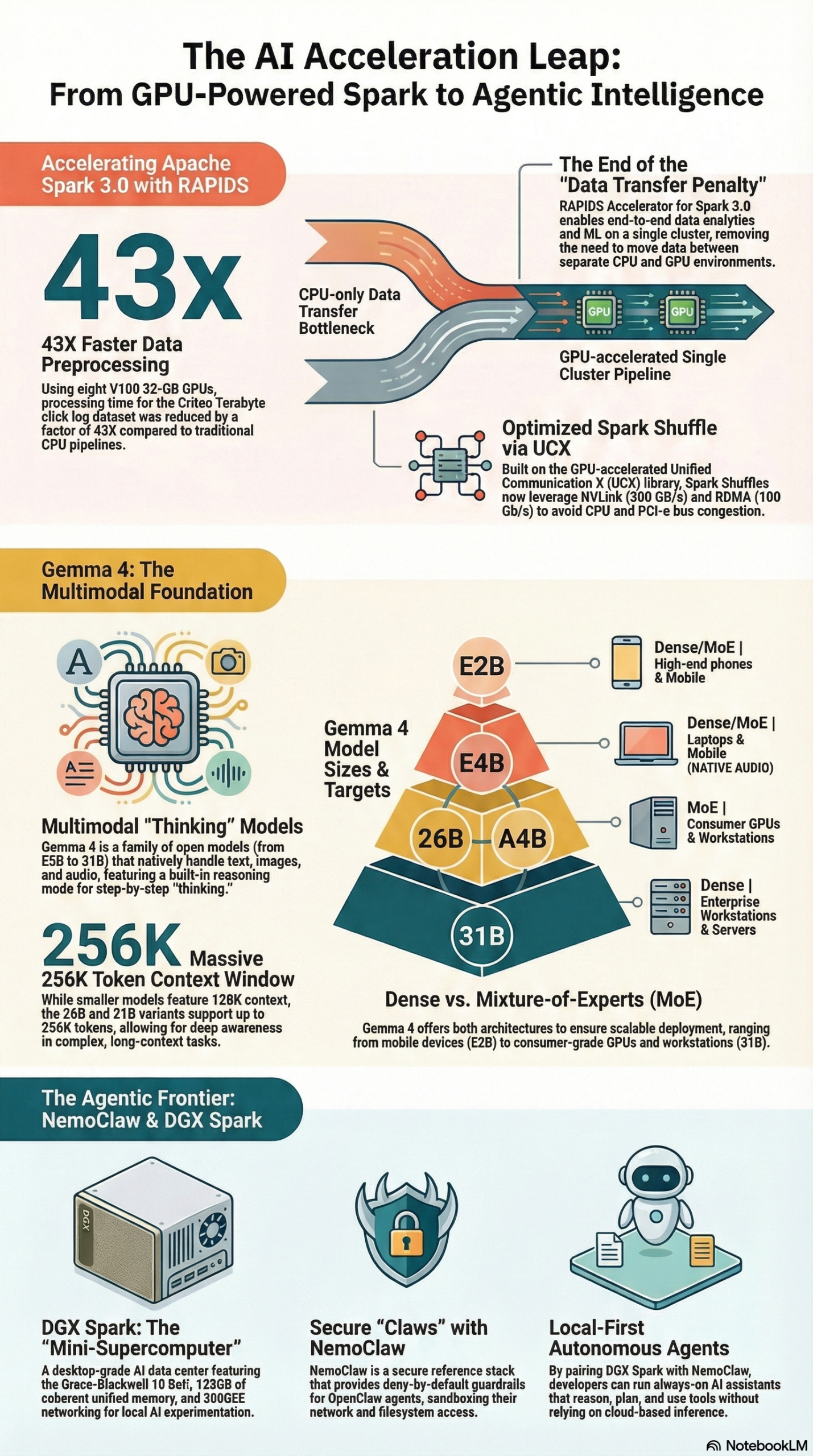
The Gemma 4 lineup ships in four configurations according to NVIDIA’s RTX AI Garage blog:
- E2B — An ultra-efficient edge model built for low-latency, offline inference on constrained hardware.
- E4B — A slightly larger edge variant offering higher accuracy while still targeting mobile and RTX laptops.
- 26B A4B — A mixture-of-experts style model with 26 billion total parameters but only 4 billion active per forward pass; suited for reasoning-heavy tasks.
- 31B — The flagship open-weight model optimized for developer workflows, complex reasoning, and deep coding tasks.
What makes Gemma 4 distinct isn’t just raw parameter count. According to the NotebookLM research report synthesizing GTC 2026 sessions and official documentation, the models feature a hybrid attention mechanism that interleaves local sliding window attention with global attention layers. The result is a model that maintains deep contextual awareness across a context window of up to 256K tokens while keeping memory footprint and inference latency competitive with much smaller architectures.
Gemma 4 handles text, images, video, and audio natively. Every variant supports interleaved multimodal input — meaning you can pass a text prompt and one or more images in the same request without preprocessing gymnastics. Out of the box, the models support 35+ languages and were pretrained on data spanning 140+ languages, making them immediately deployable for multilingual agentic applications.
The architectural efficiency story is the headline. Per the research report, the E2B reportedly outperforms Gemma 3 27B on nearly all benchmarks. That’s a roughly 13.5x reduction in parameter count for equivalent or better performance — a direct result of the hybrid attention design and Google DeepMind’s improvements in training data curation and distillation methodology.
For practitioners deploying AI agents, the key feature is native function calling. Gemma 4 was designed from the ground up to support agentic tool use — the model can receive a structured tool schema, decide when to invoke a tool, format the call correctly, and process the returned result in a single inference loop. This is the foundation that makes Gemma 4 genuinely useful as the reasoning core of an autonomous agent rather than just a chat assistant.
On the hardware side, NVIDIA’s acceleration story covers the full deployment stack. The NVIDIA RTX AI Garage post confirms that Tensor Cores on RTX GPUs accelerate AI inference workloads to deliver higher throughput and lower latency for local execution. The DGX Spark — which packages the Grace-Blackwell 10 SoC combining a Mediatek CPU with an NVIDIA Blackwell GPU into a desktop form factor — pushes this further, providing what the research report describes as a “mini-supercomputer” capable of validating Blackwell-scale deployments locally before committing to expensive cloud infrastructure.
Why It Matters
The practical impact of Gemma 4 plus NVIDIA local hardware can be summarized in one shift: the feedback loop for agentic AI development just got dramatically faster and cheaper.
As Max Weinbach of Creative Strategies put it directly: deploying AI on any system means not everything just works. Identifying inconsistent tool-calling behavior, reasoning parsing errors in quantized models, and out-of-memory configurations requires a tight debug cycle. Spinning up a minimum $30/hour cloud instance to test each configuration is prohibitive for most development teams. Running the same validation on a local RTX workstation or DGX Spark means iterating at the speed of a save-and-run, not a deploy-and-wait.
For marketing and product teams, this opens specific workflows that were previously too latency-sensitive or cost-prohibitive to run locally:
Multimodal content pipelines: Gemma 4’s native vision processing means you can run image understanding, caption generation, and content classification in a single model call without routing to a separate vision API. For agencies processing large volumes of creative assets, this eliminates a billing-per-image cost structure entirely.
Private agentic assistants: The OpenClaw framework — described by NVIDIA CEO Jensen Huang as “the most popular open-source project in the history of humanity” — enables always-on AI assistants that can access local files, manage calendars, conduct market research, and generate sub-agents for specialized tasks. Running the reasoning model locally means your proprietary data never leaves your network.
Edge and offline deployments: The E2B and E4B variants target Jetson Orin Nano and laptop-class RTX hardware. For field teams, retail kiosks, or any environment without reliable internet connectivity, these models provide enterprise-grade reasoning capabilities without cloud dependency.
Enterprise security posture: Per the research report, the NemoClaw governance stack implements deny-by-default network egress and routes all inference calls through a local gateway (inference.local) so agents never see provider API keys. For organizations with strict data governance requirements, local deployment with NemoClaw guardrails represents a materially different risk profile than cloud API calls.
What differentiates Gemma 4 from earlier open-weight alternatives is the combination of multimodality, long context, and native tool-calling in models small enough to run on accessible hardware. Previous models with comparable capability required either massive GPU clusters or accepting significant performance degradation from aggressive quantization.
The Data
Benchmark data in the NVIDIA RTX AI Garage post was collected using Q4_K_M quantization with batch size 1, input sequence length of 4096 tokens, and output sequence length of 128 tokens. The reference testing platform was an NVIDIA GeForce RTX 5090, with the benchmark tool llama-bench running on llama.cpp b7789.
Gemma 4 Model Comparison
| Model | Parameters | Active Params | Context Window | Primary Use Case | Hardware Target |
|---|---|---|---|---|---|
| E2B | ~2B | ~2B | 256K tokens | Edge / Offline | Jetson Orin Nano, RTX Laptop |
| E4B | ~4B | ~4B | 256K tokens | Mobile / On-Device | RTX 4060+, Laptop |
| 26B A4B | 26B | ~4B active | 256K tokens | Reasoning / Agentic | RTX 4090, DGX Spark |
| 31B | 31B | 31B | 256K tokens | Developer / Coding | DGX Spark, Data Center |
Gemma 4 vs. Prior Generation: Performance Benchmark Context
| Comparison | Gemma 4 E2B | Gemma 3 27B | Delta |
|---|---|---|---|
| Parameter count | ~2B | 27B | ~13.5x fewer parameters |
| Benchmark performance | Outperforms on nearly all tasks | Baseline | E2B exceeds on most benchmarks |
| Hardware requirement | RTX 3060 / Jetson Nano | RTX 4090 / A100 | Dramatically lower compute |
| Inference latency (local) | Low | High | E2B faster per token |
| Quantization format | Q4_K_M (GGUF) | Q4/Q5 | Both supported via llama.cpp |
Source: NVIDIA RTX AI Garage and NotebookLM Research Report
Local Deployment Tool Ecosystem
| Tool | Function | Gemma 4 Support | Best For |
|---|---|---|---|
| Ollama | Local model runtime and API server | Yes (day-one) | Quick setup, REST API access |
| llama.cpp | Low-level inference, GGUF models | Yes (b7789+) | Benchmarking, custom builds |
| Unsloth | Fine-tuning and optimized inference | Yes (Unsloth Studio) | Custom fine-tuning workflows |
| OpenClaw | Agentic framework / orchestration | Yes (native tool calling) | Full agent deployment |
| NemoClaw | Security and governance sandbox | Yes (any model) | Enterprise / compliance |
Source: NVIDIA RTX AI Garage and NotebookLM Research Report
Step-by-Step Tutorial: Deploy Gemma 4 as a Local Agentic System
This walkthrough covers deploying Gemma 4 on an NVIDIA RTX workstation or DGX Spark, exposing it via Ollama’s local API, and wiring it into a basic OpenClaw-compatible agentic loop with tool-calling enabled. By the end you will have a running local agent that can answer questions, process images, and invoke defined tools — entirely offline.
Prerequisites
- Hardware: NVIDIA RTX GPU (RTX 4060 minimum for E4B; RTX 4090 or DGX Spark recommended for 26B A4B)
- OS: Ubuntu 22.04+ or Windows 11 with WSL2 enabled
- Software: NVIDIA drivers 560+, Docker (optional), Python 3.11+
- Disk: 10GB free minimum for E4B GGUF; 25GB+ for 26B A4B
- RAM: 16GB system RAM minimum; 32GB recommended
Phase 1: Install Ollama and Pull the Gemma 4 Model
Ollama provides a one-command local model runtime that handles GPU memory management, quantization, and a REST API endpoint. It has day-one support for Gemma 4 per the NVIDIA RTX AI Garage post.
Step 1: Install Ollama
curl -fsSL https://ollama.com/install.sh | sh
Verify GPU detection after install:
ollama serve &
ollama info
# Should show your RTX GPU listed under "GPU" with VRAM capacity
Step 2: Pull Gemma 4
Choose your variant based on available VRAM:
# For RTX 4060/4070 (8–12GB VRAM) — use E4B
ollama pull gemma4:e4b

# For RTX 4090 / DGX Spark — use 26B A4B
ollama pull gemma4:26b-a4b

# For edge hardware / testing
ollama pull gemma4:e2b
Ollama automatically uses Q4_K_M quantization by default, which matches the benchmark configuration tested by NVIDIA on the RTX 5090.
Step 3: Run a basic inference test
ollama run gemma4:e4b "Explain hybrid attention mechanisms in 100 words."
If the response is coherent and arrives within a few seconds, your inference pipeline is working correctly.
Phase 2: Enable Native Tool Calling via Ollama’s API
Gemma 4 supports native function calling. To use it, you need to hit the Ollama REST API directly (not the CLI) and pass a tools schema in your request.
Step 4: Define a tool schema and send a structured request
import requests
import json

OLLAMA_URL = "http://localhost:11434/api/chat"

tools = [
    {
        "type": "function",
        "function": {
            "name": "search_web",
            "description": "Search the web for recent information on a topic",
            "parameters": {
                "type": "object",
                "properties": {
                    "query": {
                        "type": "string",
                        "description": "The search query"
                    }
                },
                "required": ["query"]
            }
        }
    }
]

messages = [
    {
        "role": "user",
        "content": "What are the latest benchmarks for Gemma 4 E2B on RTX hardware?"
    }
]

payload = {
    "model": "gemma4:e4b",
    "messages": messages,
    "tools": tools,
    "stream": False
}

response = requests.post(OLLAMA_URL, json=payload)
result = response.json()

# Check if model chose to call a tool
if result["message"].get("tool_calls"):
    tool_call = result["message"]["tool_calls"][0]
    print(f"Tool invoked: {tool_call['function']['name']}")
    print(f"Arguments: {tool_call['function']['arguments']}")
else:
    print(result["message"]["content"])
When Gemma 4 decides to invoke a tool, it returns a structured tool_calls object. Your agent loop then executes the actual function, appends the result to the message history, and sends it back to the model for the next reasoning step.
Phase 3: Build a Simple Agentic Loop
An agent loop is just a while-loop that keeps feeding results back to the model until it returns a final response with no pending tool calls. This is the core of any OpenClaw-compatible agent.
Step 5: Implement the agent loop
def run_agent(user_input: str, tools: list, tool_handlers: dict) -> str:
    """
    A minimal agentic loop using Gemma 4's native tool calling.
    tool_handlers: dict mapping tool name -> callable function
    """
    messages = [{"role": "user", "content": user_input}]

    MAX_ITERATIONS = 10  # Safety cap to prevent runaway loops

    for iteration in range(MAX_ITERATIONS):
        payload = {
            "model": "gemma4:e4b",
            "messages": messages,
            "tools": tools,
            "stream": False
        }

        response = requests.post(OLLAMA_URL, json=payload).json()
        assistant_msg = response["message"]
        messages.append(assistant_msg)

        # No tool calls → final answer reached
        if not assistant_msg.get("tool_calls"):
            return assistant_msg["content"]

        # Execute each tool call and append results
        for tool_call in assistant_msg["tool_calls"]:
            name = tool_call["function"]["name"]
            args = tool_call["function"]["arguments"]

            if name in tool_handlers:
                result = tool_handlers[name](**args)
            else:
                result = f"Error: tool '{name}' not found"

            messages.append({
                "role": "tool",
                "content": str(result),
                "name": name
            })

    return "Max iterations reached — agent did not converge."
Phase 4: Add Multimodal Input
Gemma 4 handles interleaved text and images natively. Per the NVIDIA source, you can mix text and images in a single prompt without a separate preprocessing step.
Step 6: Pass an image to the model
import base64

def encode_image(image_path: str) -> str:
    with open(image_path, "rb") as f:
        return base64.b64encode(f.read()).decode("utf-8")

image_b64 = encode_image("product_screenshot.png")

messages = [
    {
        "role": "user",
        "content": [
            {"type": "text", "text": "Describe this product screenshot and suggest 3 ad copy headlines."},
            {"type": "image_url", "image_url": {"url": f"data:image/png;base64,{image_b64}"}}
        ]
    }
]

payload = {
    "model": "gemma4:e4b",  # All variants support vision
    "messages": messages,
    "stream": False
}

response = requests.post(OLLAMA_URL, json=payload).json()
print(response["message"]["content"])
Phase 5: Apply NemoClaw Governance (Production Hardening)
For any deployment touching sensitive data or performing autonomous file system operations, the NemoClaw stack provides sandboxing via Linux Landlock LSM, seccomp filters, and network namespace isolation.
Step 7: Apply deny-by-default network policy
NemoClaw’s core principle is that agents cannot access the internet or local files unless explicitly allowlisted by an operator. Inference calls are routed through inference.local so the agent never sees raw API credentials.
# Install NemoClaw reference stack (open-source)
git clone https://github.com/nvidia/nemoclaw
cd nemoclaw

# Configure operator policy — allowlist only required egress endpoints
cp config/policy.example.yaml config/policy.yaml
# Edit policy.yaml: set egress.default = "deny"
# Add only your approved endpoints under egress.allow

# Launch OpenClaw agent under NemoClaw sandbox
./nemoclaw run --policy config/policy.yaml --agent your_agent.py
The agent process runs sandboxed. Any attempt to write files outside the approved directory tree or call unapproved network endpoints is blocked at the OS level — not just caught and logged.
Expected Outcomes
After completing this tutorial you will have:
– Gemma 4 running locally via Ollama with GPU acceleration on your RTX card
– A working agentic loop that can call external tools and process their results
– Multimodal inference capability (text + images) in a single model call
– An optional NemoClaw governance layer for production-safe autonomous operation
The full stack runs without any cloud API keys. Cold-start time from ollama serve to first token is typically under 10 seconds on an RTX 4090.
Real-World Use Cases
Use Case 1: Marketing Asset Classification at Scale
Scenario: A digital agency manages creative assets for 30+ brands, processing thousands of images and video thumbnails per week to tag, categorize, and route to appropriate campaigns.
Implementation: Deploy Gemma 4 E4B on an RTX workstation. Write a tool-calling agent that accepts an image path, invokes a classify_asset tool backed by the model’s vision capabilities, and writes structured metadata (category, brand safety score, suggested alt text) to a local database. Run the agent as a batch job against the asset library every night.
Expected Outcome: Full asset classification pipeline running locally with zero per-image API costs. The 256K token context window allows processing entire campaign briefs alongside individual assets for context-aware tagging — a capability that would require expensive extended-context cloud API calls otherwise.
Use Case 2: Private Competitive Intelligence Agent
Scenario: A SaaS company’s growth team wants an agent that monitors competitor pricing pages, summarizes changes, and drafts internal slack reports — without sending competitive intelligence data to third-party AI cloud providers.
Implementation: Use the OpenClaw framework (per the research report, it enables agents to conduct market research and perform multi-step workflows autonomously) with Gemma 4 26B A4B as the reasoning core on a DGX Spark. Configure the agent with tools for web scraping, diff comparison, and Slack webhook posting. Run under NemoClaw with egress rules that allow only approved domains (competitor URLs + internal Slack webhook).
Expected Outcome: A fully autonomous intelligence agent that runs entirely on-premises. Proprietary competitive research stays in your network. The 26B A4B’s mixture-of-experts architecture delivers high reasoning quality without requiring the full 31B model’s memory footprint.
Use Case 3: On-Device Customer Support for Retail Kiosks
Scenario: A retail chain deploys interactive kiosks in 200 stores. Each kiosk needs a product Q&A assistant that works without reliable network connectivity and handles customer photos of products for identification.
Implementation: Flash Gemma 4 E2B onto Jetson Orin Nano modules (confirmed deployment target per NVIDIA’s post). Load a product catalog as a local vector database. The agent accepts text questions and product photos, uses the vision capability to identify products, queries the local catalog, and returns answers with no cloud dependency.
Expected Outcome: Sub-second first-token latency on Jetson hardware for E2B. Kiosks remain fully operational during internet outages. The multilingual capability (35+ languages out of the box) handles diverse customer demographics without per-language model management.
Use Case 4: Local Code Review and Documentation Agent
Scenario: A fintech engineering team wants an AI code reviewer that can access their private codebase, understand context across multiple files simultaneously, and flag compliance issues — without sending proprietary financial logic to external APIs.
Implementation: Deploy Gemma 4 31B on a DGX Spark. Clayton Littlejohn of Nationwide noted that DGX Spark “enables showcasing the art of the possible, while keeping it all local” — exactly the posture required for regulated industries. Configure the agent with filesystem access tools (allow-listed to the repo directory) and a compliance rules tool that checks code patterns against internal standards. The 256K context window handles reviewing entire feature branches in a single pass.
Expected Outcome: The agent can ingest a multi-file pull request, understand its full context, flag specific lines with compliance concerns, and generate documentation — all within the local network boundary that financial regulators increasingly require for AI tooling.
Use Case 5: Multimodal Ad Creative Analysis
Scenario: A performance marketing team wants to analyze ad creative performance at scale, correlating visual elements with conversion data to identify high-performing patterns.
Implementation: Build an Ollama-backed pipeline using Gemma 4 E4B. For each ad creative, pass the image alongside its performance metrics to the model. Ask it to identify visual attributes (color dominance, text-to-image ratio, CTA placement, emotional tone) and correlate with provided CTR/ROAS data. Store structured output in a local analytics database. Run weekly.
Expected Outcome: A compound dataset of visual attributes mapped to performance data, built entirely from proprietary creative assets and internal metrics — no third-party AI provider ever touches the raw creative. The output feeds directly into creative briefs for the next campaign cycle.
Common Pitfalls
1. Skipping the VRAM Budget Calculation Before Model Selection
The single most common mistake when deploying open-weight models locally is choosing a model variant before calculating actual VRAM requirements. A Q4_K_M quantized E4B fits in 4–5GB VRAM; the 26B A4B requires 14–16GB; the 31B needs 20GB+. Running OOM (out-of-memory) errors on a production agent is a hard failure, not a graceful degradation. Max Weinbach’s post-deployment note specifically flags OOM debugging as a primary use case for local prototyping before cloud deployment. Calculate your model size (params × bytes per weight at your quantization level) before spinning up anything.
2. Treating the Agentic Loop as Infallible
Gemma 4’s tool-calling is reliable but not perfect. Models can misformat tool arguments, call tools in the wrong order, or fail to recognize when a task is complete and enter a spin loop. Always implement a hard iteration cap (as shown in the tutorial above), validate tool argument schemas before execution, and log every tool call and result to a structured trace file. Debugging a runaway agent without traces is effectively impossible.
3. Deploying Autonomous Agents Without Egress Controls
The NemoClaw research exists for a reason: agents with internet access and no egress policy will eventually make calls you didn’t anticipate. A market research agent that can reach any URL can also exfiltrate data to any URL. Implement deny-by-default network policy from day one, even in development. Retroactively adding governance to a production agent is significantly harder than building it in.
4. Using llama.cpp’s Default Quantization Without Benchmarking
Not all quantization levels perform equally for tool-calling specifically. NVIDIA’s benchmark methodology used Q4_K_M as the baseline configuration. Lower quantization levels (Q3 or Q2) can produce models that pass general text benchmarks but fail intermittently on structured JSON output — which is exactly what tool-calling requires. Benchmark your chosen quantization level against your specific tool schemas before committing to it in production.
5. Ignoring Context Window Management
256K tokens is a large context window, but it’s not infinite, and long-context inference is meaningfully slower and more memory-intensive than short-context. Agents that naively append every message and tool result to the conversation history will eventually hit limits or degrade in performance. Implement explicit context pruning: summarize older turns, archive completed sub-task threads, and keep only the active working context in the model’s input.
Expert Tips
1. Use Agent Teams Instead of Single Overloaded Agents
Per the research report’s analysis of OpenClaw deployments, effective agentic systems use teams of specialized agents: one orchestrator delegates to focused sub-agents (e.g., separate agents for file operations, web lookup, and report writing). Small models perform significantly better when they have fewer tools and a narrower scope. Wire Gemma 4 E4B agents together via an orchestrator running the 26B A4B model for best cost/quality tradeoff.
2. Prototype on DGX Spark Before Scaling to Cloud
Clayton Littlejohn’s quote is a practical workflow recommendation: use local hardware to identify Docker configuration issues, OOM conditions, and reasoning inconsistencies before scaling to cloud clusters. A bug caught on a local DGX Spark saves you from a $30+/hour debugging session on a GB200 rack instance.
3. Route All Model Calls Through a Local Gateway
Even if you’re not using NemoClaw’s full stack, implement a local proxy (e.g., LiteLLM running at inference.local) between your agent code and the model. This lets you swap models, add logging, rate-limit tool calls, and implement retry logic without touching agent code. It also mirrors the NemoClaw architecture of preventing credential exposure at the agent layer.
4. Benchmark With Your Actual Tool Schemas
Generic benchmarks like llama-bench (the tool used in NVIDIA’s RTX 5090 tests) measure raw token throughput, not tool-calling reliability. Build a small evaluation harness that tests your specific tools with your specific inputs and measures JSON parse success rate, argument accuracy, and task completion rate. That’s the number that matters for production agents.
5. Leverage Unsloth Studio for Domain-Specific Fine-Tuning
Unsloth has day-one optimized models for Gemma 4 via Unsloth Studio. If your use case involves a specialized domain (legal, medical, proprietary product catalog), fine-tuning even the E4B on a small curated dataset materially improves tool-calling accuracy for domain-specific schemas. Unsloth’s optimizations reduce fine-tuning memory requirements so the process fits on consumer RTX hardware.
FAQ
Q: What is the minimum GPU required to run Gemma 4 locally?
The E2B model (the smallest variant) can run on Jetson Orin Nano-class hardware per the NVIDIA deployment targets. On the desktop side, an RTX 4060 with 8GB VRAM is sufficient for the E4B at Q4_K_M quantization. The 26B A4B model — which activates only ~4 billion parameters per forward pass — fits on an RTX 4090 with 24GB VRAM. The 31B requires a DGX Spark or data center GPU.
Q: How does Gemma 4 E2B outperform Gemma 3 27B if it has fewer parameters?
The performance gain comes from architectural improvements and training methodology, not raw size, per the research report. The hybrid attention mechanism — interleaving local sliding window attention with global attention layers — preserves long-context understanding while reducing per-token compute. Combined with improvements in training data quality and distillation techniques from larger models, the E2B achieves higher benchmark scores at a fraction of the compute cost.
Q: Is Gemma 4 production-ready for agentic applications, or is it still experimental?
Gemma 4 was explicitly designed for agentic use: native function calling support, 256K token context for long multi-step task histories, and multimodal input for real-world sensing tasks are all first-class features per NVIDIA’s post. The OpenClaw integration and the NemoClaw governance stack are production-oriented components. That said, tool-calling reliability varies by quantization level and task complexity — run benchmarks with your actual tool schemas before calling any model “production-ready.”
Q: What is DGX Spark and why does it matter for local AI development?
DGX Spark packages the Grace-Blackwell 10 SoC — a Mediatek CPU combined with an NVIDIA Blackwell GPU — into a desktop form factor per the research report. It serves as the lowest-friction path to running Blackwell-scale workloads locally. As Max Weinbach noted, the feedback loop of “run it locally, debug, iterate” is dramatically faster and cheaper than cloud-based development. DGX Spark lets developers catch OOM errors, Docker configuration bugs, and reasoning failures locally before those failures cost real money in production cloud environments.
Q: How does NemoClaw protect against agent credential theft?
NemoClaw routes all inference calls through a local gateway (inference.local) using the OpenShell runtime, per the research report. The agent process never receives provider API keys directly — it makes calls to the local gateway, which handles credential injection and forwards requests to the actual inference endpoint. Simultaneously, Landlock LSM and seccomp filters restrict what syscalls the agent process can execute. Network namespace isolation prevents the agent from reaching any endpoint not explicitly allowlisted in the operator policy. The result is an agent that cannot exfiltrate credentials even if its reasoning is compromised.
Bottom Line
Gemma 4 and NVIDIA’s local hardware stack have collectively removed the two biggest blockers to on-premises agentic AI: model performance and deployment complexity. The E2B’s ability to exceed Gemma 3 27B benchmarks at a fraction of the compute cost means capable agents now fit on hardware most engineering teams already own. The DGX Spark and RTX workstation ecosystem, combined with day-one support from Ollama, llama.cpp, and Unsloth, makes the deployment path straightforward. The NemoClaw governance layer solves the enterprise security question that previously made local agentic deployment a compliance risk rather than a compliance advantage. For practitioners who have been waiting for the local AI stack to catch up with cloud capabilities — that moment has arrived, and this tutorial gives you the tools to take advantage of it right now.


0 Comments