

Your company rebranded months — or even years — ago, but Google still displays the old name in search results. This is not a myth, and it is not always your fault. A real-world case confirmed by Google’s John Mueller illustrates exactly how legacy brand signals can survive in Google’s index for over a decade, and more importantly, what you can do right now to fix it using structured data, sitemap hygiene, and a systematic crawl audit.
What This Is
In March 2026, a question surfaced in a Google Search community forum that many SEOs have quietly wrestled with: a UK-based company that rebranded from Wahanda to Treatwell back in 2015 was still seeing the old name “Wahanda” appear in Google Search results — more than ten years after the rebrand. The company had done the right things on the surface: they had updated their on-page content, implemented 301 redirects from the old domain, and moved forward under the new brand. Yet Google’s index continued surfacing the ghost of Wahanda in their SERP listings.
Google Search Advocate John Mueller acknowledged the anomaly directly: “That’s a bit odd – I’ll pass it on to the team. FWIW what generally works in cases like this is to use the domain name as an alternate site name.”
Mueller’s response points to a specific technical mechanism: Google’s site name feature, introduced as part of structured data schema for the WebSite object. This feature allows webmasters to specify a preferred display name for their site in Google Search results — but when it is misconfigured, missing, or overridden by persistent legacy signals embedded elsewhere in the index, Google may fall back to data it collected years ago.
What makes this particular case instructive is that it is not simply about an incomplete redirect chain or forgotten legacy pages. The Search Engine Journal investigation identified two specific technical culprits that were invisible at first glance:
- Footer links containing referral codes with the old brand name baked into query strings, which Google’s crawlers were reading as signals for the old brand.
- Sitemap entries linking to 404 pages that still referenced the outdated branding in their URL paths or metadata.
These are the kinds of “legacy signals” that Google’s algorithms pick up and weight heavily — and they are exactly the issues that our NotebookLM research report categorizes under “Brand Persistence” failures in the post-rebrand technical environment.
Brand Persistence is a term used to describe the scenario where search engines retain outdated or incorrect brand names after an organization rebrands. As the research report notes, this happens because legacy signals — old crawl data, stale inbound links, residual referral codes, and unclean sitemaps — can override fresh structured data signals for an extended period. The Treatwell/Wahanda case is an extreme example, lasting over a decade, but shorter durations of three to six months are common even for well-executed rebrands.
Understanding this issue is no longer just a technical SEO concern. With AI search platforms like ChatGPT Search, Google AI Overviews, Perplexity AI, and Microsoft Copilot now synthesizing brand information directly from indexed content, a stale brand name in Google’s index can propagate into AI-generated answers — damaging brand trust at scale.
Why It Matters
If you are a marketer, SEO specialist, or growth engineer at a company that has ever rebranded — or is planning to — the Treatwell/Wahanda case is a direct warning about what can go wrong when the technical cleanup is incomplete.
For marketing teams, a brand name discrepancy in SERPs creates immediate trust erosion. Users searching for your current brand name who see an old name in the results will question whether they are looking at the right company. This confusion increases bounce rates, suppresses click-through rates, and can undermine the entire investment in a rebrand.
For SEO practitioners, the issue exposes a gap between on-site optimization and what Google actually stores in its index. A clean canonical URL structure, accurate meta titles, and updated on-page copy are necessary but not sufficient. The structured data layer — specifically the WebSite schema — must also be correctly deployed, and the index must be free of legacy signals that Google’s crawlers might continue reading as authoritative.
For agencies managing enterprise or multi-market clients, the risk scales significantly. A client with thousands of indexed pages, legacy subdomain structures, affiliate or partner links containing old brand references, and an aging sitemap is extremely vulnerable to Brand Persistence failures after a rebrand.
In the broader AI search context, this problem is compounding. The research report notes that AI platforms generate an estimated 10 billion responses monthly, and these systems synthesize brand data from the same signals that Google indexes. If your old brand name is persisting in Google’s crawl data, it is almost certainly being pulled into AI-generated brand summaries as well. The measurement gap between traditional SEO tools and AI visibility tracking means many brands do not even know this is happening until a customer flags it.
What makes the structured data fix valuable is its precision: you are giving Google an explicit, machine-readable instruction about what your site’s name is, and providing a fallback signal (the domain name) that Google recognizes as authoritative. Mueller’s recommendation is not a workaround — it is a documented, supported mechanism in Google’s developer documentation for exactly these cases.
The Data: Brand Persistence Risk Factors After a Rebrand
The following table maps the most common legacy signal types, their risk level for causing Brand Persistence, and the recommended remediation action — based on the Treatwell/Wahanda case study and the NotebookLM research report.
| Legacy Signal Type | Persistence Risk | Typical Duration | Remediation Action |
|---|---|---|---|
| Footer links with old brand in referral codes | High | 12–24+ months | Strip old brand from all referral/UTM parameters |
| Sitemap entries linking to 404 pages with old brand URLs | High | Until sitemap is resubmitted | Audit and regenerate sitemap; remove all 404 entries |
Missing or misconfigured WebSite schema |
High | Indefinite | Deploy correct JSON-LD WebSite schema on homepage only |
| Inbound links from third-party sites using old name | Medium | 6–18 months | Outreach to update links; submit disavow only as last resort |
| Old brand name in image alt tags or file names | Medium | 3–12 months | Rename image assets and update alt text sitewide |
| Old brand name in internal anchor text | Low–Medium | 1–6 months | Update internal linking text in CMS |
| Expired 301 redirect chains | High | Until corrected | Audit redirect chains; maintain 301s for minimum 12 months |
This table should serve as your rebrand technical audit checklist. Each high-risk item you leave unaddressed extends the window during which Google (and AI search platforms) will surface your old brand.
Step-by-Step Tutorial: Fixing Old Branding Stuck in Google SERPs
This tutorial walks through the complete process for diagnosing and resolving a Brand Persistence issue, from crawl audit to structured data deployment and ongoing monitoring. This is the same framework applicable to the Treatwell/Wahanda scenario.
Prerequisites
Before you begin, make sure you have access to:
– Google Search Console (verified property for your domain)
– A crawl tool (Screaming Frog SEO Spider, Sitebulb, or Ahrefs Site Audit)
– Access to your CMS or codebase to edit the homepage <head> section
– Google’s Rich Results Test (search.google.com/test/rich-results)
– Your current sitemap URL
Phase 1: Diagnose the Legacy Signal Sources
Step 1: Run a full site crawl filtering for old brand mentions.
Open Screaming Frog (or your crawl tool of choice) and crawl your entire domain. Once complete, use the Search tab to filter for all instances of the old brand name across:
– Page titles
– Meta descriptions
– H1/H2 headings
– Body copy
– Image alt text
– Internal anchor text
– URL strings (including query parameters)
Export the results to a spreadsheet. This becomes your remediation backlog.
Step 2: Audit your sitemap for dead URLs.
Download your XML sitemap and run it through a URL checker (Screaming Frog can crawl a sitemap list directly). Flag every URL that returns a 404 or 301 status. As the Search Engine Journal report confirmed in the Treatwell case, sitemap entries pointing to dead pages with old branding are a direct signal to Google to maintain old associations. Remove all dead URLs from your sitemap immediately.
Step 3: Inspect footer and global template code for referral codes.
Search your codebase or CMS templates for any link parameters that contain the old brand name. Referral codes in the format ?ref=oldname or ?source=OldBrand embedded in footer links are read by Googlebot as anchor text signals associated with the linked page. Replace or remove these.
Step 4: Check your Google Search Console Coverage report.
In Google Search Console, navigate to Coverage → Excluded and look for URLs containing the old brand name that Google has crawled but excluded. This tells you exactly what legacy URLs are still in Google’s radar.
Phase 2: Deploy the WebSite Structured Data Fix
This is the technical fix that John Mueller specifically recommended, and it is documented in Google’s developer documentation.
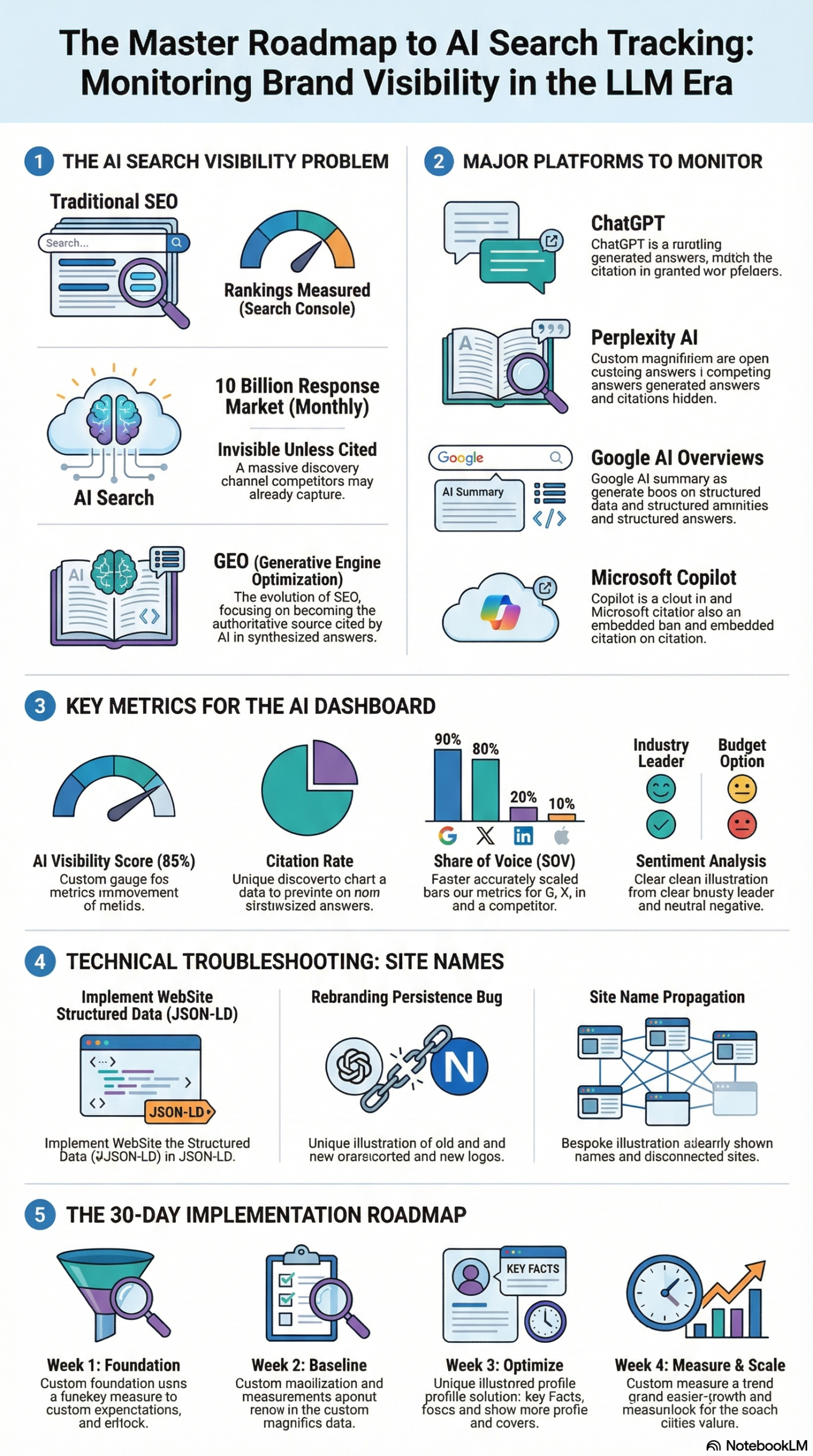
Step 5: Create the correct JSON-LD WebSite schema.
The WebSite structured data must be placed on the homepage only (root URI: https://yourdomain.com/). Placing it on other pages can confuse Google’s parser. Here is the correct implementation:
<script type="application/ld+json">
{
  "@context": "https://schema.org",
  "@type": "WebSite",
  "name": "Treatwell",
  "alternateName": ["treatwell.co.uk", "TW"],
  "url": "https://www.treatwell.co.uk/"
}
</script>
Key fields explained:
– name: Your preferred, current brand name exactly as you want it to appear in Google Search.
– alternateName: An array of fallback names. As Mueller specifically stated, use the domain name in all-lowercase as one of the alternate names. This gives Google a “last-resort” signal that is authoritative and matches crawl data. You can also include commonly used abbreviations.
– url: The canonical URL of your homepage.
Step 6: Validate the schema implementation.
After deploying the JSON-LD to your homepage, validate it using Google’s Rich Results Test. Enter your homepage URL and confirm:
– The WebSite type is detected.
– The name property shows your current brand name.
– The alternateName array is correctly parsed.
If validation passes, you are ready to request reindexing.
Step 7: Submit your homepage for reindexing via Google Search Console.
In Google Search Console, use the URL Inspection tool on your homepage URL. Once inspected, click Request Indexing. This signals to Google that the homepage has been updated and should be recrawled with priority. Google does not guarantee a reindex timeline, but for high-authority sites this typically happens within 24–72 hours.
Phase 3: Clean Up the Sitemap and Resubmit
Step 8: Regenerate your sitemap.
Using your CMS sitemap plugin (Yoast SEO, Rank Math, or custom generator), regenerate the sitemap with only live, indexable URLs. Confirm the following before submitting:
– No 404 URLs included.
– No URLs with old brand name in path strings.
– No noindex URLs included.
– lastmod dates are accurate.
Step 9: Resubmit the sitemap in Google Search Console.
Navigate to Sitemaps in Google Search Console, delete the old sitemap entry if it exists, and resubmit the fresh sitemap URL. Monitor the coverage report over the following week to confirm that previously-flagged dead URLs are removed from Google’s index.
Phase 4: Extended Signal Cleanup
Step 10: Update third-party citations and partner links.
Compile a list of external sites — directories, partners, affiliates, PR mentions — that still reference your old brand name in anchor text or brand mentions. Prioritize high-authority domains. Reach out with updated brand guidelines and request link updates. This is slow work but important: third-party anchor text is one of the most persistent legacy signals Google reads.
Step 11: Implement Organization schema alongside WebSite schema.
For maximum brand signal clarity, also deploy Organization structured data on the homepage:
<script type="application/ld+json">
{
  "@context": "https://schema.org",
  "@type": "Organization",
  "name": "Treatwell",
  "url": "https://www.treatwell.co.uk/",
  "logo": "https://www.treatwell.co.uk/logo.png",
  "sameAs": [
    "https://www.facebook.com/treatwell",
    "https://twitter.com/treatwell",
    "https://www.linkedin.com/company/treatwell"
  ]
}
</script>
The sameAs property links your brand entity to your verified social profiles, reinforcing to Google (and AI search engines) that Treatwell is the canonical brand name across all platforms. As the research report notes, entity modeling — defining a canonical set of names, products, and associations — is critical for AI search visibility as well as traditional SERP accuracy.
Step 12: Set up monitoring for brand name consistency.
Use Google Search Console’s Search Appearance filter to monitor how your site name appears in search results over the following 30 days. If the old brand name persists past 30 days after completing all the above steps, document the specific search queries triggering it, escalate via the Google Search Central Help Community (as the Treatwell case demonstrates, Mueller’s team will investigate genuine anomalies), and check for any remaining legacy signals you may have missed.
Expected Outcomes:
– Old brand name stops appearing in Google SERPs within 2–6 weeks of completing all steps.
– WebSite schema validates cleanly in Rich Results Test.
– Sitemap coverage report shows no 404 URLs.
– Google Search Console Search Appearance begins reflecting the correct brand name.
Real-World Use Cases
Use Case 1: SaaS Company Post-Acquisition Rebrand
Scenario: A B2B SaaS company acquired a competitor and consolidated both products under a new unified brand name. The acquired product had strong legacy SEO authority — hundreds of indexed pages, thousands of inbound links, and ten years of brand signals.
Implementation: The technical team deployed WebSite schema with the new brand name on the root domain homepage, added the old product name as an alternateName, and ran a full crawl audit to identify all footer links and internal references to the old product name. They also set up a dedicated redirect map maintaining 301s from all legacy URL patterns.
Expected Outcome: Google continues to benefit from the link equity of the acquired domain while the new brand name progressively takes over in SERP display names. The alternateName field provides a bridge that prevents Google from falling back to the old product name as a primary label.
Use Case 2: E-Commerce Retailer Switching Domain TLDs
Scenario: A UK retailer operating on .co.uk launched a .com domain for international expansion while maintaining the same brand name. Users searching the brand in the US were seeing the UK domain surfaced with the country-specific branding.
Implementation: Separate WebSite schemas were deployed on each TLD homepage with region-appropriate name and alternateName properties. hreflang tags were added across all pages for geographic targeting. Sitemaps were maintained separately per domain and submitted individually to Search Console.
Expected Outcome: Google correctly identifies each domain as serving a distinct regional audience, and SERP site names are consistent with the brand’s intended presentation per region.
Use Case 3: Agency Cleaning Up a Client’s Legacy Brand Ghost
Scenario: An SEO agency inherits a new client whose website still shows an old agency’s white-label branding in Google Knowledge Panel and SERP snippets — a result of the previous agency embedding their brand in the client’s structured data.
Implementation: The agency audits all JSON-LD on the site, removes all references to the previous agency’s brand from Organization, WebSite, and LocalBusiness schemas, and replaces with the client’s accurate information. A Google Business Profile audit is run in parallel to ensure Knowledge Panel data is up to date.
Expected Outcome: Within 4–8 weeks, the SERP site name and Knowledge Panel reflect only the client’s brand. The agency documents the cleanup steps into a standard onboarding checklist for all new clients.
Use Case 4: Non-Profit Rebranding After Merger
Scenario: Two non-profit organizations merge and operate under a new combined brand. Both legacy organizations had significant digital footprints — donor pages, press mentions, and directory listings under their old names.
Implementation: The merged organization creates a new consolidated website with correct WebSite and Organization schema, maintains 301 redirects from both legacy domains, conducts a stakeholder outreach campaign to update major directory listings, and adds both legacy names to the alternateName array as a transitional measure.
Expected Outcome: Google associates the new brand with both legacy authority pools. Donor searches for either old organization name are redirected appropriately and the new brand name surfaces in SERP titles.
Use Case 5: Brand Visibility in AI Search After Rebrand
Scenario: A financial services firm rebranded and found that AI search platforms — specifically Perplexity AI and Google AI Overviews — were still describing them under the old brand name in synthesized answers. The research report identifies this as the “Black Box Problem” of AI visibility: brands often do not know what AI engines are saying about them until a user reports it.
Implementation: The team set up a manual monitoring workflow — querying ChatGPT, Perplexity, and Google AI Overviews weekly with brand-specific queries — to document how each platform described the company. They used these findings to identify which content pieces AI engines were citing, then updated those pages with accurate Organization schema and current brand language. They also added “verdict” summary blocks at the top of key brand pages to provide AI models with unambiguous, LLM-parseable brand descriptions.
Expected Outcome: Within 60 days, AI-generated summaries begin reflecting the new brand name. This aligns with the research report’s 30-day implementation framework for AI brand tracking and GEO optimization.
Common Pitfalls
Pitfall 1: Placing WebSite Schema on Every Page
The WebSite structured data must only appear on your homepage. Deploying it sitewide causes conflicting signals and can confuse Google’s parser about which URL is authoritative. As the research report specifies: ensure WebSite structured data is only on the homepage (root URI). Audit your schema deployment carefully — especially if you are using a CMS plugin that might apply schema globally.
Pitfall 2: Ignoring Sitemap Hygiene After a Rebrand
The Treatwell case confirmed it: sitemap entries linking to 404 pages with outdated branding are active signals that reinforce old brand associations in Google’s index. Many teams regenerate their sitemap once and then forget about it. Schedule quarterly sitemap audits — or better, set up automated sitemap validation as part of your CI/CD pipeline if you manage a large-scale site.
Pitfall 3: Assuming 301 Redirects Are Sufficient
A 301 redirect passes link equity and tells Google the page has permanently moved — but it does not erase the crawl history associated with the old URL. Legacy anchor text, inbound links, and referral code strings can continue feeding old brand signals into Google’s index even when redirects are in place. The research report notes that some experts suggest legacy signals can persist well beyond the standard 12-month redirect window.
Pitfall 4: Not Monitoring AI Search Platforms Post-Rebrand
Traditional SEO tools like Google Search Console do not show you what AI engines are saying about your brand. As the research report identifies, this “Measurement Gap” means brands can be successfully corrected in traditional SERPs but still appear under the old name in ChatGPT or Perplexity AI responses. Build manual AI query monitoring into your post-rebrand workflow from day one.
Pitfall 5: Using Multiple name Values Instead of alternateName
Some developers mistakenly add multiple name properties to the WebSite schema, or deploy two separate WebSite schemas. JSON-LD does not support multiple primary name values — Google will either ignore duplicates or pick one arbitrarily. Use a single name with the current brand, and place all fallback options in the alternateName array.
Expert Tips
Tip 1: Use the domain name as your alternateName anchor. Mueller’s advice is direct: use the domain name in lowercase as an alternateName. This works because the domain is one of the most stable, unambiguous signals Google has for associating a site with its identity — it predates and outlasts any structured data. For treatwell.co.uk, the alternateName would include "treatwell.co.uk".
Tip 2: Combine WebSite and Organization schema strategically. Both schemas serve different purposes. WebSite controls the SERP site name feature. Organization feeds the Knowledge Panel and AI entity models. Deploying both on your homepage, correctly linked via the same url property, gives Google two reinforcing signals for your brand identity. Pair Organization with sameAs links to verified social profiles for maximum entity clarity.
Tip 3: Add a brand “verdict block” to key pages for AI parsability. As the research report recommends, LLMs favor content that is explicit and unambiguous. Add a short, structured paragraph near the top of your brand’s key landing pages in the format: “[Brand Name] is [one-sentence description]. Previously known as [Old Brand Name], [Brand Name] rebranded in [Year].” This gives AI models the context they need to report your brand accurately.
Tip 4: Audit partner and affiliate link texts proactively. Affiliate networks often auto-generate links with brand names baked into URL parameters. After a rebrand, reach out directly to your affiliate management platform to update brand references in their link templates. This is a frequently overlooked source of persistent legacy signals.
Tip 5: Document your rebrand technical checklist as a living playbook. The research report recommends building a pattern-based internal playbook from your monitoring data. Every time you identify a legacy signal source and fix it, document the source type, the fix, and the time to resolution. This playbook becomes invaluable if you run a portfolio of brands or manage clients through future rebrands.
FAQ
Q1: How long does it take Google to update a SERP site name after I deploy correct structured data?
There is no guaranteed timeline. For high-traffic, frequently crawled sites, changes can appear within days of a Search Console reindex request. For lower-authority or infrequently crawled sites, it can take several weeks. The Treatwell case is extreme — over a decade — largely because the underlying legacy signals were not fully cleaned up. If you have addressed all the technical steps in this tutorial, expect 2–6 weeks for most sites.
Q2: Does this issue only affect the SERP site name, or can it affect other SERP features?
It can affect multiple SERP features. The old brand name can appear in Knowledge Panel descriptions, breadcrumb structures, and even in AI-generated summaries via Google AI Overviews — because all of these features draw from Google’s indexed understanding of your brand entity. Deploying both WebSite and Organization schema addresses all of these surfaces simultaneously.
Q3: John Mueller said he’d escalate the Treatwell issue — can I contact Google directly about a brand persistence problem?
Yes, via the Google Search Central Help Community. Googlers including Mueller actively monitor and respond to threads. Document the issue thoroughly — include the specific search query triggering the old name, a screenshot, your current structured data implementation, and the steps you have already taken. Clear documentation gets faster, more useful responses.
Q4: Should I use the siteLinks or searchAction properties in my WebSite schema?
The searchAction property (for Sitelinks Searchbox) is optional and separate from the site name feature. For the purpose of fixing a brand name persistence issue, focus exclusively on the name, alternateName, and url properties. Adding searchAction is a separate enhancement that does not affect how Google displays your site name.
Q5: Will this fix also help my brand appear correctly in AI search engines like Perplexity or ChatGPT?
Structured data directly impacts Google’s systems. For third-party AI search engines, the path is indirect: accurate structured data improves how Google indexes your content, and AI engines frequently draw from Google’s indexed web. However, the research report recommends a separate AI visibility strategy: manual query monitoring across ChatGPT, Perplexity, and Copilot, combined with E-E-A-T content improvements and entity-modeling in your page copy, to address AI brand accuracy comprehensively.
Bottom Line
Old branding persisting in Google SERPs after a rebrand is not just an aesthetic problem — it is a technical failure with measurable business consequences, and the Treatwell/Wahanda case proves it can last for over a decade when legacy signals go unaddressed. The fix is a three-layer approach: deploy correct WebSite structured data with the domain name as an alternateName, surgically remove all legacy signal sources from sitemaps, footer links, and referral codes, and establish ongoing monitoring for both traditional SERP display and AI search platform accuracy. As AI search continues to scale — with an estimated 10 billion AI-generated responses per month synthesizing brand data from the same signals Google indexes — the cost of ignoring Brand Persistence is only increasing. Treat the structured data audit as a first-principles requirement after any rebrand, not an afterthought.


0 Comments