

Salesforce has fundamentally repositioned Slack — not as a chat tool, but as the primary interface where AI-driven enterprise work actually gets done. As of April 2026, Salesforce has unveiled a wave of Slackbot capabilities that connect conversations, CRM data, and agentic actions in a single workspace, making the case that you should never need to log into Salesforce directly again. This tutorial walks through exactly how the new architecture works, how to configure it for your team, and how to extract measurable productivity gains from day one.
What This Is: Slack Becomes the Face of Enterprise AI
For years, Slack occupied a specific box on the enterprise org chart: communications layer. You chatted in Slack, but you worked in Salesforce, Confluence, Zendesk, or whatever CRM your team was running. That boundary is dissolving.
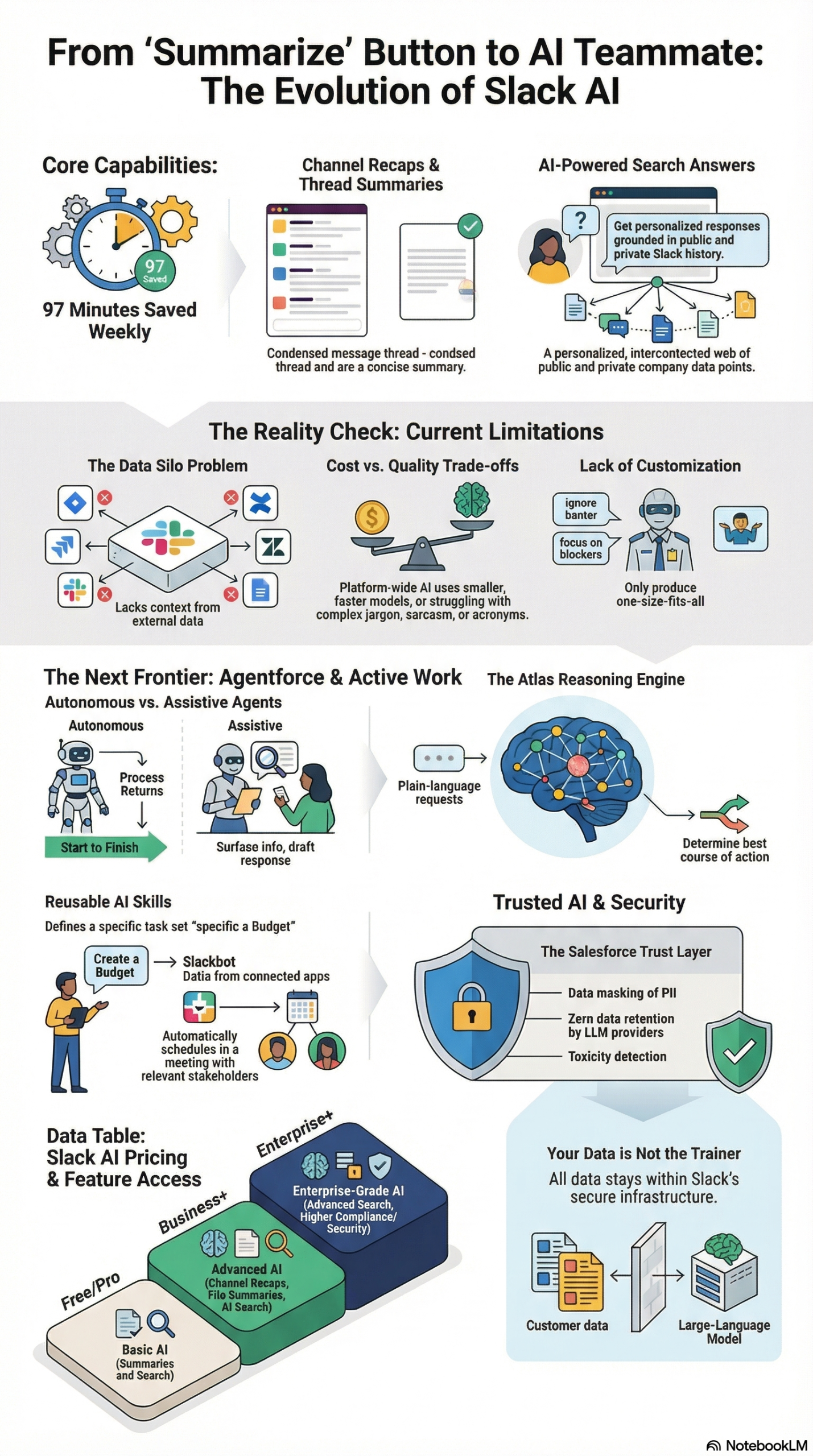
According to the NotebookLM research report compiled from Salesforce’s own documentation and product announcements, Salesforce has repositioned Slack as the conversational interface for Agentforce — its “always-on digital labor” platform. The centerpiece of this transformation is a newly elevated Slackbot, which now functions as a Model Context Protocol (MCP) client capable of executing multi-step tasks, updating CRM records, summarizing meetings, and orchestrating workflows across an enterprise’s entire tool stack.
The technical backbone driving this is the Atlas Reasoning Engine, described in the research report as the “brain” of Agentforce. Atlas interprets plain-language requests from users, retrieves live data via Salesforce’s Data Cloud, and determines the required sequence of actions — all in real time, all from within the Slack interface.
Here’s what that actually means in practice: A sales rep receives a notification that a high-value lead just requested a demo. From Slack, they can ask Slackbot to pull up the lead’s full history from Salesforce, generate a tailored pitch brief, update the CRM record, and schedule a prep huddle with the account team — without ever opening a browser tab outside of Slack.
The Martech article by Constantine von Hoffman published April 1, 2026 highlighted three specific new capability pillars:
- Meeting Intelligence: Slackbot listens to meetings, summarizes discussions, captures action items, and immediately updates CRM records — no manual follow-up needed.
- Context Continuity: Slackbot follows users between applications, carrying awareness of conversations, deals, calendar state, and past activity to eliminate the friction of constant context switching.
- AI Skills (Reusable Workflows): Teams can define repeatable instructions — codified “skills” — that Slackbot recognizes and triggers automatically when a matching request pattern is detected.
Beyond Slackbot, native Slack AI still includes three foundational generative features per the research report: Search Answers (personalized responses drawing from public and private channel history with citations), Channel Recaps (key themes and decisions from a channel over any date range), and Thread Summaries (one-click digests of long conversations). These are the “out of the box” layer — useful, but limited to data inside Slack itself unless you build on top with Agentforce.
Salesforce co-founder and Slack CTO Parker Harris captured the strategic intent cleanly: “Why log into Salesforce at all?” That quote, documented in the research report, signals that the goal is to make Slack the permanent residence of the enterprise worker — with AI doing the heavy lifting across all connected systems in the background.
Why It Matters: The Productivity Gap Is Real
The business case behind this shift isn’t theoretical. Internal pilot data cited in the research report shows that Slack AI features save users an average of 97 minutes per week. At scale across a 500-person sales and marketing organization, that’s the equivalent of recovering multiple full-time headcount worth of productive hours without any new hires.
But the deeper problem being solved is structural. Enterprise AI tools have historically operated in silos — AI in your CRM, AI in your helpdesk, AI in your project management tool — with no unified interface to orchestrate them. Workers end up spending more time switching contexts and searching for information than acting on it. The Martech source article frames this as the core problem Salesforce is solving: positioning Slack as “a unified interface where intelligence connects to actual workflow execution.”
For marketers and demand generation teams, the implications are immediate. The research report notes that only 37% of businesses engage online leads within the first hour — a figure that directly correlates to conversion rates. By routing real-time lead alerts into Slack and enabling Slackbot to qualify, score, and distribute those leads automatically, teams can compress the response cycle from hours to minutes.
For sales teams, the CRM integration changes the data-quality game. Today, CRM records go stale because reps hate manual data entry. With Slackbot automatically updating contacts, deals, and notes from meeting conversations and Slack threads, Salesforce customers now have a conversational interface directly on Customer 360 — and the data stays current without anyone having to remember to log it.
For developers and RevOps engineers, this matters because it opens a programmable, extensible layer. Slack exposes Apex Custom Actions — Invocable Methods developers can create in Salesforce to let agents perform specific tasks like looking up Slack channel IDs or posting messages to targeted workspaces. Combined with the Model Context Protocol for multi-vendor environments, this means you can connect Agentforce agents to virtually any external tool without high-complexity custom integrations.
Morgan Finegan, VP of Business Systems at SpotOn, summarized the practitioner experience this way: “Slack AI is not only a huge productivity boost — it’s easy to use, right where we already work in Slack.” (research report) The friction reduction isn’t just about features — it’s about meeting workers where they already are.
The Data: Slack AI Capability Tiers and Feature Matrix
Not all Slack AI is equal. Before building on this platform, understand what you’re getting at each level:
| Capability | Native Slack AI | Agentforce + Slackbot | Custom Apex Agents |
|---|---|---|---|
| Thread & Channel Summaries | ✅ Built-in | ✅ Enhanced with CRM context | ✅ Fully customizable |
| Search Answers (with citations) | ✅ Built-in | ✅ Cross-system search | ✅ Custom knowledge bases |
| CRM Data Access | ❌ None | ✅ Live Salesforce Customer 360 | ✅ Any connected system |
| Meeting Transcription & Action Items | ❌ None | ✅ Slackbot + AI Skills | ✅ Custom workflows |
| Automated Lead Routing | ❌ None | ✅ Workflow Builder + Agentforce | ✅ Full custom logic |
| MCP Multi-Tool Integration | ❌ None | ✅ MCP client via Slackbot | ✅ Full MCP support |
| Custom AI Skills (Reusable Workflows) | ❌ None | ✅ Codifiable and shareable | ✅ Full programmatic control |
| Text Streaming (Live Typing UX) | ❌ None | ✅ Via chat.startStream API | ✅ Full API access |
| Einstein Trust Layer (Zero Retention) | ✅ Basic | ✅ Full trust layer | ✅ Full trust layer |
| Batch Testing / Simulation Mode | ❌ None | ⚠️ Limited | ✅ Full simulation capability |
AI Lead Management Pipeline — Speed-to-Contact Enhancement:
| Stage | Without Slack AI | With Agentforce + Slack |
|---|---|---|
| Lead Capture | Email notification → rep checks inbox | Real-time Slack alert with full lead context |
| Qualification | Manual BANT/MEDDIC review (30-60 min) | Automated Agentforce scoring in < 2 min |
| Scoring | Weekly batch scoring in CRM | Continuous behavioral scoring (email opens, downloads) |
| Distribution | Sales ops manually routes leads | Workflow Builder auto-routes by territory/expertise |
| Conversion | Rep reviews CRM pre-call | Instant Slack huddle with AI-generated pitch brief |
Sources: research report, Martech / Salesforce announcement
Step-by-Step Tutorial: Configuring Slack as Your Enterprise AI Command Center
This tutorial covers the end-to-end process of activating Agentforce within Slack, building your first AI Skill, and setting up an automated lead management workflow. You’ll need Salesforce admin access and a Slack workspace on a paid plan.
Phase 1: Prerequisites and Environment Setup
What you need before starting:
– Salesforce org with Agentforce licenses enabled (Enterprise or Unlimited edition)
– Slack workspace on Business+ or Enterprise Grid
– Slack/Salesforce integration installed (available via Slack App Directory)
– Admin access to both Salesforce Setup and Slack workspace settings
– Data Cloud enabled in your Salesforce org (required for live data retrieval by Atlas)
Start by verifying your Agentforce entitlement in Salesforce Setup. Navigate to Setup → Agentforce → Agent Management and confirm that your org has available agent capacity. If you see a “Get Started” prompt instead of an active console, contact your Salesforce AE to activate the feature flag.
In Slack, confirm the Salesforce app is installed under Settings → Manage Apps. If it’s not, install it from the Slack App Directory and authorize it with your Salesforce org credentials using OAuth.
Phase 2: Activating Slackbot as an Agentforce MCP Client
Per the research report, Slackbot now functions as a Model Context Protocol (MCP) client. To activate agentic behavior, you need to configure its connection to Agentforce.
- In Salesforce Setup, navigate to Agentforce → Agent Studio → New Agent.
- Select Slack as the deployment channel.
- Name your agent (e.g., “RevOps Assistant”) and assign it a persona description that shapes how the Atlas Reasoning Engine interprets ambiguous requests. Be specific — “You are a B2B sales operations assistant. Respond concisely. Always confirm before updating CRM records.” works better than a generic description.
- Under Data Sources, connect your Data Cloud instance. This is what allows Atlas to retrieve live Salesforce records in response to natural language queries.
- Enable Context Continuity so Slackbot can carry conversation state across channels and direct messages. This setting is under Agent Settings → Memory & Context.
- Save and deploy. Slackbot will now appear in your Slack workspace with agentic capabilities active.
Phase 3: Building Your First AI Skill
AI Skills are reusable, codified instructions that Slackbot recognizes and triggers automatically. Salesforce describes these as the mechanism for standardizing repeatable processes like campaign planning and reporting.
- In Agent Studio, navigate to Skills → Create New Skill.
- Name your skill with a clear, action-oriented label: “Qualify Inbound Lead,” “Generate Campaign Brief,” or “Prep Call Summary.”
- Write the skill instructions in plain language. Example for a lead qualification skill:
When triggered with a lead name or company, do the following:
1. Look up the lead in Salesforce Data Cloud.
2. Retrieve: company size, industry, recent web activity, and assigned territory.
3. Score the lead against BANT criteria (Budget, Authority, Need, Timeline).
4. Post a qualification summary to the #inbound-leads Slack channel, tagging the assigned rep.
5. Update the Lead Status field in Salesforce to "AI Qualified" if BANT score ≥ 3/4.
- Under Triggers, define the natural language patterns that activate this skill: “qualify lead [name]”, “is [company] a good fit?”, “lead score for [contact].”
- Test the skill in Simulation Mode by entering sample inputs and reviewing the agent’s planned action sequence before going live.
- Publish the skill and share it with your Slack workspace. All members can now trigger it by @mentioning Slackbot with a recognized pattern.
Phase 4: Configuring Meeting Intelligence
One of the most impactful new features is Slackbot’s ability to listen to meetings, summarize them, and update CRM records automatically — eliminating the manual follow-up that kills CRM data quality. Per the Martech article, this directly addresses the gap between discussion and execution.
- In your Slack workspace, open a Huddle or connect Slackbot to a Zoom/Teams meeting via the Meetings integration.
- At the start of the meeting, type
/slackbot recordin the meeting thread. Slackbot will confirm it’s capturing the session. - At the end of the meeting, Slackbot will automatically post a structured summary with: key discussion points, decisions made, and action items with assigned owners.
- For Salesforce-connected workspaces, the action item summary will include a prompt: “Update Salesforce opportunity?” — click Confirm and the relevant opportunity record is updated without any manual data entry.
- To configure which Salesforce objects get updated automatically (without the confirm prompt), go to Agent Settings → Auto-Update Rules and define your field-mapping logic.
Phase 5: Building a Real-Time Lead Routing Workflow
This is where the 37% “golden hour” problem gets solved. Using Slack’s Workflow Builder combined with Agentforce, you can route qualified leads to the right rep in under two minutes from form submission.
- In Slack, navigate to Tools → Workflow Builder → New Workflow.
- Set the trigger: Form submission received (connect your Marketo, HubSpot, or Salesforce web-to-lead form via webhook).
- Add step: Agentforce: Score Lead — this calls the Atlas Reasoning Engine to evaluate the incoming lead data against your defined scoring model.
- Add conditional branch: If score ≥ threshold → route to #high-priority-leads channel and tag the territory owner. If score < threshold → route to #nurture-queue and enroll in sequence.
- Add a final step: Update Salesforce Lead Record — automatically log the routing action, score, and timestamp to the CRM.
- Activate the workflow. Test it by submitting a dummy form entry and confirming the Slack notification appears in the correct channel with the correct rep tagged.
Phase 6: Implementing Text Streaming for a Live Agent Experience
Per the research report, Slack exposes three API methods for streaming agent responses in real time — creating the familiar “typing” experience users expect from ChatGPT or Claude. Implement this when building custom agents via code:
// Start a streaming response
const stream = await slack.chat.startStream({
  channel: channelId,
  thread_ts: threadTimestamp,
  initial_text: "Searching workspace for relevant context..."
});

// Append content as the agent reasons
await slack.chat.appendStream({
  stream_ts: stream.stream_ts,
  channel: channelId,
  text: "Found 3 matching opportunities. Building summary..."
});

// Finalize the stream
await slack.chat.stopStream({
  stream_ts: stream.stream_ts,
  channel: channelId,
  text: finalResponse
});
Use Block Kit’s Task Cards and Plan Blocks to visually surface what the agent is doing at each step (e.g., “Consulting knowledge base,” “Drafting proposal”). Per the research report, showing intermediate steps builds user trust and increases adoption — don’t skip this UX layer.
Expected outcome after completing all six phases: Your Slack workspace now functions as a live enterprise AI command center. Slackbot qualifies leads, updates CRM records from meetings, routes high-priority contacts to the right reps in real time, and executes reusable AI Skills triggered by natural language — with full auditability via the Einstein Trust Layer.
Real-World Use Cases
Use Case 1: Revenue Operations — Automated Lead Triage
Scenario: A B2B SaaS company runs paid campaigns that generate 400+ inbound leads per week. The RevOps team is the bottleneck — manually reviewing leads and routing them takes 3-4 hours per day.
Implementation: Configure a Workflow Builder automation that triggers on every new Marketo form submission. Agentforce scores each lead using behavioral data (content downloaded, pages visited, email engagement) and routes it via Slack to the correct territory rep within 60 seconds. High-score leads get a Slack ping with the AI-generated qualification summary pre-attached.
Expected Outcome: Response time to high-intent leads drops from 4+ hours to under 2 minutes. Win rates on demo-request leads increase materially. RevOps team reclaims 15+ hours per week for strategic work.
Use Case 2: Sales Enablement — Pre-Call Prep on Demand
Scenario: Account executives spend 20-30 minutes before every client call manually pulling data from Salesforce, reviewing email history, and checking LinkedIn for context updates.
Implementation: Create a “Prep Call Summary” AI Skill that, when triggered with an account name, pulls the last 30 days of Salesforce activity, recent Slack thread mentions of the account, and open tasks — then generates a 1-page brief posted directly in the AE’s DM with Slackbot.
Expected Outcome: Pre-call prep time drops to under 3 minutes. Reps enter calls with consistent, current context. CRM adoption increases because reps see value in keeping records updated.
Use Case 3: Marketing Operations — Campaign Briefing at Scale
Scenario: A demand gen manager needs to spin up campaign briefs for 8 product launches per quarter. Each brief requires pulling from multiple systems: messaging docs in Confluence, audience data in Salesforce, past performance data in Marketo.
Implementation: Build a “Create Campaign Brief” AI Skill using MCP to connect Agentforce to Confluence, Salesforce Data Cloud, and the Marketo API. When triggered, Slackbot assembles a structured brief — target audience, key messages, comparable past campaigns, recommended channels — posted in the campaign’s dedicated Slack channel.
Expected Outcome: Brief creation time drops from 3-4 hours to 15 minutes. Consistency improves across campaigns. The brief becomes a living document that Slackbot updates as new performance data comes in.
Use Case 4: Customer Success — Meeting-to-CRM Automation
Scenario: Customer success managers hold 8-12 QBRs per week. Post-call CRM updates consistently get delayed or skipped, leaving account health data stale.
Implementation: Enable Slackbot’s Meeting Intelligence feature for all CS team huddles. Configure Auto-Update Rules to map action items to Salesforce Task objects and discussion sentiment to the Account Health Score field. No manual follow-up required.
Expected Outcome: CRM data quality improves dramatically. CS leadership gets accurate, real-time account health visibility. CSMs recover 30-45 minutes per day previously spent on administrative data entry.
Use Case 5: IT / Developer Teams — Cross-System Incident Response
Scenario: When a production incident fires, the on-call engineer has to manually correlate alerts from PagerDuty, check Jira for related tickets, and post status updates to three different Slack channels — while also trying to fix the problem.
Implementation: Create an Incident Response AI Skill that triggers on PagerDuty webhooks. Agentforce (via MCP connections to Jira and GitHub) automatically pulls related tickets, recent deploys, and error log patterns — posting a consolidated incident brief to #incidents with the on-call engineer tagged.
Expected Outcome: Mean time to diagnosis drops as the engineer starts with context already assembled. Status communication to stakeholder channels is automated, reducing interruptions during the critical response window.
Common Pitfalls
1. Relying Solely on Native Slack AI for Technical Knowledge
The research report is direct about this limitation: native Slack AI models often struggle with technical jargon, company-specific acronyms, and internal project codenames. If you deploy Search Answers on a workspace full of engineering channels without configuring custom vocabulary or connecting a curated knowledge base, you’ll get hallucinated answers that erode user trust quickly. Fix: Use Agentforce agents with defined knowledge sources rather than relying on the generic summarization layer for anything requiring domain accuracy.
2. Skipping Simulation Mode Before Launch
Rolling out an AI Skill to your full Slack workspace without testing it on historical data is a common mistake. The research report recommends using simulation modes and batch testing to identify “topic gaps” — areas where the agent needs better instructions or richer data context. Fix: Run every new skill against at least 20 real-world input scenarios before activating it in production.
3. Building Without the Plan Display Mode
When developing custom agents, skipping the Block Kit Plan Blocks step means users see a black box — they get an answer but have no visibility into how the agent got there. Per the research report, showing intermediate reasoning steps (e.g., “Consulting knowledge base,” “Drafting proposal”) builds user trust and adoption. Fix: Always implement Plan display mode in your agent responses.
4. Ignoring Data Silo Boundaries
Native Slack AI cannot see data outside of Slack — not Confluence, not Zendesk, not Google Drive — without explicit Agentforce configuration or MCP connections. Teams often assume that “Slack AI” means enterprise-wide intelligence out of the box. It doesn’t. Fix: Map your data dependencies upfront, and configure MCP connections to each system before launching agents that claim cross-system knowledge.
5. Misconfiguring Auto-Update Rules for CRM
Giving Agentforce unlimited write access to Salesforce without carefully scoped Auto-Update Rules can lead to overwritten records and corrupted pipeline data. The Atlas Reasoning Engine is powerful but not infallible. Fix: Start with confirmation prompts on all CRM updates (“Update Salesforce opportunity?” → user confirms), then selectively automate only the fields and objects where you’ve validated accuracy over two or more weeks of usage.
Expert Tips
1. Use MCP as Your Integration Backbone
For organizations running multi-vendor tech stacks, the research report explicitly recommends leveraging Model Context Protocol rather than building one-off custom integrations. MCP provides a standardized connection layer that lets Agentforce agents talk to external tools securely — cutting integration development time significantly.
2. Audit Skill Performance Monthly
AI Skills degrade in accuracy as business context evolves — new product names, updated territories, changed scoring criteria. Build a monthly audit cadence where you run each skill against a test set of inputs and compare outputs to expected results. This catches drift before it affects real workflows.
3. Layer Einstein Trust Layer Settings Intentionally
The research report documents three key Einstein Trust Layer guardrails: zero data retention by third-party LLM providers, data masking of PII before it reaches the LLM, and real-time toxicity detection. These are on by default — but you need to configure the data masking field list manually in Setup to ensure your specific sensitive fields (contract values, personal contact info) are covered.
4. Standardize Skill Naming Conventions Across Teams
When multiple teams build AI Skills independently, you end up with duplicates, conflicts, and inconsistent behavior. Establish a naming convention before you scale (e.g., [Team]-[Verb]-[Object]: RevOps-Qualify-Lead, Marketing-Create-Brief) and maintain a Skills registry in your Slack wiki channel.
5. Champion the “Why Log In?” Mentality from Leadership
Parker Harris’s quote — “Why log into Salesforce at all?” — is a useful internal change management message, not just a product tagline. If your VP of Sales still requires reps to work natively in Salesforce for certain tasks, your Slack-first AI workflows will have a compliance gap. Get leadership buy-in on the interface shift before rolling out agent capabilities broadly.
FAQ
Q: Does Slack AI use my company’s data to train its LLMs?
No. Per the research report and official Salesforce guidance: “Slack does not share customer data with LLM providers and does not use customer data to train large language models.” The Einstein Trust Layer enforces zero data retention at the LLM provider level — prompts and responses are processed but not stored externally.
Q: What’s the difference between Slack AI and Agentforce in Slack?
Slack AI refers to the native, out-of-the-box features: thread summaries, channel recaps, and search answers. These work only on data inside Slack. Agentforce in Slack is the agentic layer — powered by the Atlas Reasoning Engine and Data Cloud — that can cross system boundaries, execute multi-step workflows, and update external systems like Salesforce CRM. Think of Slack AI as read-only summarization; Agentforce is read-write orchestration. (research report)
Q: Do we need Salesforce to use Agentforce in Slack?
The full Agentforce capability set — especially CRM integration, Data Cloud access, and Customer 360 context — requires a Salesforce org. That said, some Agentforce features are available to Slack Enterprise Grid customers without a full Salesforce CRM subscription. Contact your Salesforce account team for the current entitlement matrix, as this is evolving rapidly.
Q: How do AI Skills get triggered — do reps have to use specific commands?
AI Skills can be triggered in multiple ways: natural language patterns (Slackbot recognizes intent), explicit slash commands you define, automated webhook triggers from external systems, or scheduled recurrence. Per the research report, Skills can also be triggered automatically when Slackbot detects a matching request pattern in conversation — meaning reps don’t need to learn new commands if the Skill instructions are tuned well enough.
Q: How do we handle the “generic intelligence” problem for company-specific context?
Native Slack AI models lack training on internal project codenames, custom acronyms, and proprietary frameworks. The research report recommends evaluating third-party tools or building custom Agentforce agents connected to your internal knowledge base (Wikis, documentation, past Slack threads) as a “source of truth.” For Salesforce orgs, Data Cloud can ingest internal documents and make them queryable by Atlas — this is the proper fix for generic intelligence limitations.
Bottom Line
Salesforce’s transformation of Slack into an enterprise AI command center is one of the most practically significant platform shifts in B2B software this year. The combination of Agentforce’s Atlas Reasoning Engine, Slackbot’s new agentic capabilities, and the Model Context Protocol integration layer means that for the first time, a single chat interface can legitimately orchestrate work across an entire enterprise tech stack. Internal pilot data showing 97 minutes saved per week per user is compelling, but the real ROI comes from compressing lead response times and eliminating the CRM data-quality tax that plagues every revenue team. The architecture is ready to build on now — start with one high-value AI Skill, validate it in simulation mode, and expand from there. Organizations that build institutional expertise on this platform in 2026 will have a durable operational advantage over those still toggling between browser tabs.


0 Comments