

Zendesk’s acquisition of Forethought marks the most significant structural shift in customer support technology since the help desk itself — moving the industry from static “systems of record” toward intelligent “systems of action” that resolve issues end-to-end without human intervention. Forethought, founded in 2017 and backed by $115 million in venture funding, has already delivered over $1 billion in ROI for its customers by training generative AI directly on proprietary historical ticket data. This post breaks down exactly how Forethought’s agentic AI architecture works, how to implement it inside your own support stack, and what the Zendesk integration means for CX teams in 2026.
What This Is
Forethought is a generative AI platform built specifically for customer support automation. Unlike generic chatbots or basic LLM wrappers, Forethought’s core differentiator is the way it trains its models: on your company’s own historical ticket data, macros, CRM notes, and past resolutions — not just public help documentation or off-the-shelf language models.
The platform operates across four primary products, each targeting a distinct layer of the support workflow according to the NotebookLM research report:
- Solve: Handles autonomous resolution across chat, email, voice, and SMS channels. When a ticket comes in, Solve attempts to resolve it end-to-end without routing to a human agent.
- Triage: Classifies, prioritizes, and routes incoming tickets based on intent, sentiment, and urgency — using the same historical-data-trained models.
- Assist: Surfaces relevant macros, knowledge articles, and past similar tickets directly inside the agent’s helpdesk interface, reducing handle time and cognitive load.
- Discover: Analytics and insight layer that surfaces trends, gaps in automation coverage, and opportunities for improvement.
The architecture sits on top of what Forethought calls SupportGPT — a system that, as Deon Nicholas, CEO and Co-Founder of Forethought describes it, “leverages the power of OpenAI’s LLMs — the same technology behind ChatGPT — and fine-tunes them on customers’ existing conversation history. This enables the models to understand intents and workflows automatically.”
This fine-tuning on internal data is the core technical innovation. A generic GPT-4 model has no idea how your company handles subscription downgrades, warranty claims, or shipping exceptions. Forethought trains that away — the result is an AI that behaves less like a general chatbot and more like a senior support specialist who has read every ticket your team has ever handled.
The Browser Agent: Automation Without APIs
In late 2025, Forethought launched a capability that fundamentally changes what’s possible with support automation: the Browser Agent. This tool allows the AI to interact with any browser-based application exactly as a human would — navigating screens, clicking buttons, filling forms — without requiring APIs or any engineering changes to the target system.
According to the research report, this is described as the “No API” breakthrough. For enterprise support teams that rely on legacy ERP systems, third-party logistics platforms, or homegrown CRMs that predate REST APIs, the Browser Agent eliminates the integration blocker that historically made automation impractical. The AI agent can look up an order in a legacy OMS, process a refund in a system with no public API, and update a CRM record — all in a single session, triggered by a customer message.
The Zendesk Acquisition
On March 11, 2026, Zendesk announced a definitive agreement to acquire Forethought for an undisclosed sum, with the deal expected to close by late March 2026. As Tom Eggemeier, CEO of Zendesk, stated: “The era of simply managing conversations is over. The future of customer experience requires agentic capabilities built for definitive resolution. … Resolution is our identity, and loyalty is the outcome.”
The strategic intent is to fold Forethought’s self-learning technology into Zendesk’s Resolution Learning Loop — a continuous feedback architecture where every resolved (and unresolved) interaction feeds back into the model, improving accuracy over time without manual prompt engineering. Critically, while the integration is optimized for Zendesk customers, Forethought’s capabilities will remain available to teams on other platforms.
Why It Matters
The reason this acquisition matters beyond the usual M&A headlines is the trajectory it signals for the entire CX industry. According to Shashi Upadhyay, President of Product, Engineering, and AI at Zendesk: “Zendesk AI customers are routinely achieving 80%+ automation rates, and we expect that AI agents will handle more service interactions than humans by the end of the year [2026].”
That’s not a forecast from an analyst report — it’s a deployment benchmark from an operator with tens of thousands of enterprise customers.
For practitioners, this changes the calculus on support staffing, tooling investment, and product decisions:
CX and Support Leaders get a credible path to 80%+ automation without building proprietary ML infrastructure. The Forethought model proves that training on internal ticket data — not buying an off-the-shelf bot — is the lever that moves deflection rates from 30% to 80%+.
Developers and Platform Engineers need to understand the Browser Agent paradigm. For years, the answer to “how do we automate this system?” was “build an API integration.” The Browser Agent breaks that assumption. Any system your agents can access visually can now be automated without a single API call.
Marketers and Product Teams need to revisit how support automation affects brand experience. Forethought’s research shows that resolution rates as high as 98% are achievable — but only when the AI is grounded in real customer data. Generic AI responses erode trust. Personalized, historically-trained responses build it.
Compliance and Security Teams now have documented standards to demand from AI vendors. Forethought’s SOC 2 Type II, ISO 27001, and HIPAA-aligned architecture — including automatic PII/PHI redaction at ingestion and source data deletion within 24 hours — defines what enterprise-grade AI support compliance looks like in 2026.
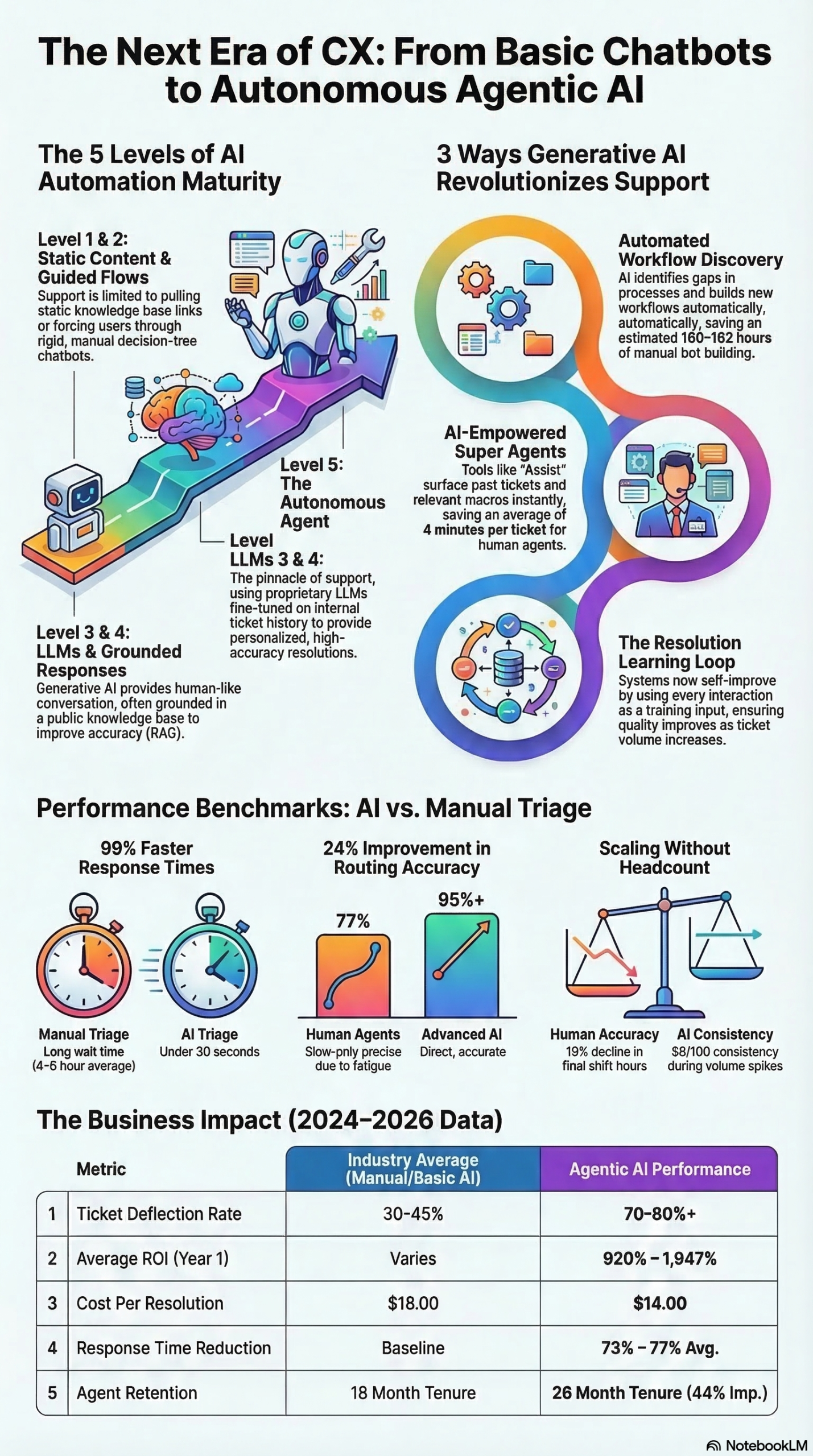
What separates Forethought from the field of chatbot and AI support vendors is the Level 5 maturity model they’ve defined and built toward. Most enterprise deployments today sit at Level 3 or 4. Forethought’s evidence is that Level 5 — the autonomous agent trained on proprietary data — delivers materially better results on every KPI that support organizations track.
The Data
The performance gap between AI trained on historical proprietary data versus generic sources is the empirical backbone of Forethought’s value proposition. The following tables summarize the key metrics from the research report:
Support Automation Maturity Framework
| Level | Type | Description | Typical Deflection Rate | Accuracy |
|---|---|---|---|---|
| 1 | Knowledge Base | Pulls static articles or links | < 10% | Low |
| 2 | Automated Chatbot | Decision-tree workflows; rigid | 15–25% | Low–Medium |
| 3 | LLM (Generic) | Human-like conversation; no grounding | 25–40% | Medium |
| 4 | LLM + Knowledge Base | Conversational + public docs | 35–50% | Medium |
| 5 | Autonomous Agent | Fine-tuned on proprietary ticket data, macros, CRM | 60–98% | High |
Source: Forethought / NotebookLM Research Report
Training Data Source: Performance Comparison
| Metric | Historical Ticket Data | Generic / Public Sources |
|---|---|---|
| Average Deflection Rate Uplift | 38% higher | Baseline |
| Average CSAT Score | 84% | 75% |
| Cost Per Resolution | ~$14 | ~$18 |
| Hallucination Risk | Low (grounded in past resolutions) | Higher |
| Time to Accurate Responses | Faster (context-specific) | Slower (requires more prompting) |
Source: NotebookLM Research Report
Forethought Platform: Reported Outcomes
| KPI | Forethought Reported Benchmark |
|---|---|
| Max Resolution Rate | 98% |
| Average First Response Time Reduction | 55% |
| Agent Efficiency Increase (Assist) | 20% |
| Total Customer ROI Delivered | $1 billion+ |
| Automation Rate (Zendesk AI customers) | 80%+ routinely |
Source: TechCrunch / Julie Bort, NotebookLM Research Report
Step-by-Step Tutorial: Implementing Agentic Support AI Using the Forethought Model
This tutorial walks through how to implement a Forethought-model agentic support workflow — whether you are a Zendesk customer onboarding through the acquisition, or a practitioner on another platform applying the same architectural principles. The goal is a Level 5 autonomous agent that handles deflection, triage, assist, and discovery in a unified loop.
Prerequisites
Before you start, ensure you have:
– At minimum 6 months of historical ticket data in exportable format (CSV, JSON, or API access)
– A defined set of your top 20 issue types by volume (run a frequency analysis on ticket tags/subjects)
– Access to your CRM or customer data platform for context enrichment
– A designated integration owner — this is not a set-and-forget deployment
– Clear escalation rules: know exactly which ticket types must reach a human agent every time
Phase 1: Data Audit and Preparation
The most important work in agentic AI implementation happens before you write a single configuration. According to the research report, the quality of the training data directly determines whether you land at Level 4 or Level 5 performance.
Step 1: Export your historical ticket data.
Pull 12–24 months of closed tickets including: subject line, full conversation thread, resolution category, resolution macro (if used), agent who resolved it, CSAT score, and time to resolution. The more resolution context you can include, the better.
Step 2: Classify and clean.
Identify your top issue categories. Strip out tickets that were resolved via transfer with no actual resolution content — they add noise. Mark tickets with high CSAT (4-5 stars) as your positive training signal. Flag outlier tickets (unusually long, multipart, or involving regulatory matters) for human-in-the-loop routing rules.
Step 3: Map your macros.
Export your existing response macros. These are gold. A macro represents a human-curated, proven resolution pattern. Feeding macros into the training pipeline alongside tickets gives the model tested language templates rather than forcing it to generate responses from scratch.
Step 4: Identify PII and sensitive data.
Before ingestion, run your data through a PII detection pass. Forethought’s platform automatically redacts PII, PHI, and financial records during ingestion — and deletes source data within 24 hours per the research report. If you’re implementing a similar architecture with another provider, verify their data handling practices explicitly against SOC 2 and HIPAA requirements before uploading anything.
Phase 2: Model Configuration and Channel Setup
Step 5: Define your automation tiers.
Not every ticket category should be routed to full autonomous resolution. Tier your issue types into three buckets:
– Auto-resolve: High-volume, low-complexity issues (password resets, order status, return initiation, billing FAQ). These are your Solve candidates.
– Assisted: Medium complexity where the AI drafts a response but a human approves before sending. These are your Assist candidates.
– Human-only: Legal, compliance, high-value account issues, anything involving refunds above a threshold. These go directly to human queues.
Step 6: Configure the Triage layer.
Set up intent classification rules against your top issue categories. Use a confidence threshold — Forethought’s architecture, per the research report, allows you to route any ticket below a confidence threshold automatically to a human queue. Start conservatively (e.g., 85% confidence required before autonomous resolution) and tune upward as you validate accuracy.
Step 7: Connect your channels.
Forethought’s Solve product operates across chat, email, voice, and SMS. Connect each channel separately and test in staging with real historical tickets before going live. Email automation in particular requires careful subject-line classification — ambiguous subjects get misclassified more often than structured chat intents.
Step 8: Set up the Browser Agent for legacy system workflows.
If you have systems without APIs (legacy OMS, custom CRMs, third-party portals), this is where the Browser Agent becomes critical. Per the research report, this allows the AI to interact with browser-based systems exactly as a human would. Configure specific Browser Agent workflows for each legacy system action: looking up an order, processing a refund, updating an account record. Test each workflow with a range of real scenarios — edge cases in legacy UI (loading delays, field validation errors) will surface here.
Phase 3: Assist Module Deployment for Agent Productivity
Step 9: Install Assist inside your helpdesk interface.
The Assist module operates inside your agents’ existing workspace. When an agent opens a ticket, Assist automatically surfaces: the most relevant knowledge base articles, the closest matching past tickets with their resolutions, recommended macros, and customer context from the CRM. No copy-paste research — it surfaces inline.
Step 10: Set up the Discover layer.
Discover provides the analytics view: which ticket categories have the highest volume, which are being deflected successfully, which are falling through to agents unnecessarily, and which macros are being used or ignored. Run Discover weekly to identify optimization opportunities. The research report notes that this continuous loop of analysis and refinement is what drives the system from initial deployment performance toward the reported 80%+ automation rates Zendesk customers achieve.
Phase 4: The Resolution Learning Loop
Step 11: Configure feedback signals.
Every ticket resolution — successful or escalated — should feed back into the model. Set up your pipeline so that:
– Auto-resolved tickets with positive CSAT become positive training examples
– Escalated tickets (where the AI failed) are flagged for review and model refinement
– Tickets where agents edited the AI draft (in Assist mode) log the edit as a correction signal
Step 12: Establish a monthly model review cadence.
Per the research report, Forethought’s architecture (and Zendesk’s planned Resolution Learning Loop) improves through volume and complexity of real interactions — not manual prompt tuning. But you still need a human to review the feedback logs monthly. Look for patterns: is the AI misclassifying a specific intent category? Are there new issue types emerging (product releases, policy changes) that the model hasn’t seen? Update training data and retrigger fine-tuning cycles.
Expected Outcomes
Based on the benchmarks documented in the research report and TechCrunch coverage:
- Weeks 1–4 (Baseline): Automation rates of 30–40% on configured auto-resolve tiers, with confidence-threshold routing protecting quality
- Months 2–3 (Tuning): Deflection rates climbing toward 55–65% as the model refines on real-world feedback
- Months 4–6 (Maturity): Sustained 70–80%+ automation on covered ticket categories, with agent handle times reduced by ~20% via Assist
- 12 months+: Teams operating Forethought at full maturity report first response time reductions averaging 55% and per-resolution cost drop to approximately $14 versus $18 for generic-model deployments
Real-World Use Cases
Use Case 1: E-Commerce Returns and Order Tracking Automation
Scenario: A mid-market e-commerce retailer handles 12,000 tickets/month with 60% of volume in order status, return initiation, and refund status — all repetitive, data-lookup-dependent tasks.
Implementation: Deploy Forethought Solve connected to the order management system via the Browser Agent (since the OMS has no public API). Train on 18 months of closed tickets filtered to these three categories. Configure auto-resolve with a 90% confidence threshold. Solve retrieves order data, initiates returns, and communicates tracking updates autonomously — end to end.
Expected Outcome: Based on the research report’s documented benchmarks, teams in this configuration see resolution rates above 80% on these high-frequency, low-complexity categories and first response times reduced from hours to seconds.
Use Case 2: SaaS Technical Support with Tiered Escalation
Scenario: A B2B SaaS company with a complex product has support tickets spanning password resets (trivial) all the way to API integration debugging (highly technical). They need the AI to handle Tier 1 autonomously while enriching Tier 2 tickets for faster human resolution.
Implementation: Use Solve for Tier 1 auto-resolve. For Tier 2 and 3 tickets, deploy Assist to surface relevant documentation, past resolved tickets from similar configurations, and recommended escalation macros. Triage routes by intent confidence and account tier (enterprise accounts skip autonomous resolution entirely and go to dedicated agents with full Assist context).
Expected Outcome: Tier 1 deflection reduces support load by 40–50%. Tier 2 handle times drop via Assist’s context surfacing. Agents report the 20% efficiency improvement described in Forethought’s benchmarks primarily because they’re not manually searching for historical context.
Use Case 3: Healthcare Patient Support with HIPAA Compliance
Scenario: A digital health platform handles patient billing questions, appointment scheduling inquiries, and insurance verification requests — all touching PHI.
Implementation: This use case requires strict compliance configuration first. Verify the platform’s SOC 2 Type II and ISO 27001 certifications (Forethought holds both, per the research report). Enable automatic PII/PHI redaction at ingestion. Configure the resolution pipeline so PHI-touching transactions (specific insurance details, billing disputes) route to human agents with full audit trails. Use Solve only for non-PHI intents (appointment reminders, general FAQ).
Expected Outcome: 40–60% deflection on non-PHI intents, full compliance posture maintained, and audit-ready Trust Reports for regulatory review.
Use Case 4: Retail Banking Customer Service
Scenario: A regional bank wants to automate routine inquiries (balance checks, transaction disputes initiated, card activation) while ensuring high-value and sensitive inquiries (fraud reports, loan applications) always reach a human.
Implementation: Train Forethought Triage on historical ticket data segmented by inquiry type and regulatory category. Set human-only routing rules for fraud, loan, and dispute escalation thresholds. Deploy Browser Agent to interface with the core banking system for balance and transaction lookups without requiring a new API build. Configure Assist to surface relevant compliance scripts for human agents handling escalated issues.
Expected Outcome: Autonomous resolution of 50–65% of routine inquiries. Compliance-mandated issues handled by humans with AI assist, reducing average handle time by 15–20%.
Use Case 5: Internal IT Help Desk at Enterprise Scale
Scenario: A large enterprise IT support team handles 5,000 internal tickets/month across password resets, VPN issues, software provisioning requests, and hardware trouble. Tier 1 is mostly noise for skilled technicians.
Implementation: Deploy Forethought Solve against the internal ITSM platform. Train on historical IT ticket data — internal tickets are often rich with structured resolution data (close codes, resolution steps, affected systems). Use the Browser Agent to automate direct actions in systems like Active Directory for password resets, provisioning systems for software access, and MDM platforms for device management.
Expected Outcome: 70%+ deflection on Tier 1, freeing skilled technicians for infrastructure and security work. Internal CSAT scores improve because Tier 1 requests are resolved in seconds instead of hours.
Common Pitfalls
Pitfall 1: Training on Unresolved or Low-Quality Tickets
If you feed the model tickets that were closed without real resolutions — escalations with no outcome, spam, or auto-closed tickets — you’re injecting noise that degrades performance. Per the research report, training quality directly determines accuracy. Audit your training set before ingestion: include only tickets with documented resolutions and positive customer outcomes.
Pitfall 2: Setting Confidence Thresholds Too Low at Launch
Teams eager to show automation numbers sometimes set confidence thresholds at 60–70%, allowing the AI to auto-resolve tickets it isn’t confident about. This generates bad resolutions, drives CSAT down, and creates an organizational backlash against AI automation. Start at 85–90% confidence required for autonomous resolution. Widen the threshold only after you’ve validated accuracy on the initial cohort.
Pitfall 3: Ignoring the Feedback Loop
The Resolution Learning Loop described in the research report is not automatic without proper pipeline configuration. Teams that deploy and walk away — without routing feedback signals back into model training — see performance plateau at initial accuracy levels. Set up the feedback pipeline before launch, not after you notice stagnation.
Pitfall 4: Treating Voice as Identical to Chat
Forethought’s expansion into Voice AI (part of the Zendesk integration strategy per the research report) requires treating unstructured speech differently than text. Speech-to-text transcription introduces errors; conversational speech lacks the structured intent signals of typed chat. Build voice-specific training data and test extensively before deploying autonomous resolution on voice channels.
Pitfall 5: Skipping the Compliance Layer
For any regulated industry — healthcare, finance, legal — deploying agentic AI without confirming PII/PHI redaction, audit trail configuration, and certification alignment is a liability. Per the research report, Forethought automatically redacts PII, PHI, and financial records during ingestion and deletes source data within 24 hours. Verify this is active in your configuration and documented for your compliance team before go-live.
Expert Tips
Tip 1: Start with your highest-volume, lowest-complexity ticket category.
Don’t try to automate everything at once. Find the single ticket type that makes up 20–30% of your volume and has a clear, repeatable resolution pattern. Deploy Solve against that category first, validate the resolution quality, then expand. This builds organizational confidence and gives you clean benchmark data.
Tip 2: Use macro data as your first training signal, not raw tickets.
Your existing macros are pre-validated resolution content. Training the model on macros first gives it tested, accurate templates before you introduce the more varied signal of raw ticket threads. Per the research report, macros are a core input to the Forethought training pipeline.
Tip 3: Build a monthly “correction corpus.”
Keep a log of every ticket where the AI draft was edited by an agent before sending, and every ticket that was escalated after AI attempted resolution. These corrections are more valuable training signal than successful auto-resolves because they identify specific failure modes. Feed this corpus into your fine-tuning cycle every month.
Tip 4: Configure the Browser Agent with explicit fallback rules.
When the Browser Agent is operating in a legacy system, UI changes (page redesigns, updated field labels) can break workflows silently. Build explicit fallback rules: if the Browser Agent fails to complete a workflow within X seconds or encounters an unexpected screen state, immediately escalate to a human agent with a pre-populated context note. Silent failures in customer-facing workflows destroy trust.
Tip 5: Align AI deployment KPIs with business outcomes, not just deflection rate.
Deflection rate is a proxy metric. What actually matters is cost per resolution (target ~$14 per the research report), CSAT at AI-resolved tickets, and total support cost as a percentage of revenue. Track these from day one so you can demonstrate business impact — not just automation volume — when reporting to leadership.
FAQ
Q1: How much historical ticket data do I need before the model is useful?
Per the research report, training on historical data produces a 38% higher deflection rate than generic sources, but the threshold for “enough” data depends on your issue complexity. Practically: 6 months of closed tickets covering your top 10 issue categories is a functional starting point. 12–24 months with 50,000+ tickets across categories gives the model enough signal to handle edge cases confidently. If you have less than 6 months of data, start with macro-first training and use historical tickets to supplement.
Q2: Will this replace my human support agents?
The research report explicitly documents Forethought’s position on this: “Generative AI should empower and supercharge agents — not replace them.” In practice, Level 5 autonomous agents handle Tier 1 volume autonomously, which frees human agents to handle complex, high-value interactions. The Assist module specifically makes existing agents faster and more accurate. Teams typically redeploy headcount toward higher-complexity work rather than eliminating roles outright.
Q3: What happens to Forethought’s platform for non-Zendesk customers after the acquisition?
According to the research report, Forethought’s capabilities will remain available to support teams on other platforms — not exclusively to Zendesk customers. The acquisition accelerates the Zendesk Resolution Platform integration, but the standalone Forethought products continue to operate for multi-platform teams.
Q4: How does the Browser Agent handle security for sensitive systems?
The Browser Agent operates within your existing access control and session management infrastructure — it authenticates as an authorized user with defined permissions, not as a superuser with blanket access. Per the research report, Forethought maintains SOC 2 Type II and ISO 27001 certifications and aligns with NIST frameworks. For sensitive systems, configure the Browser Agent with the minimum-privilege account required for the specific workflow and audit session logs routinely.
Q5: How long does a full Forethought deployment take from kickoff to production?
From data audit to live autonomous resolution on a single ticket category typically takes 6–10 weeks: 2 weeks for data preparation and cleaning, 2–3 weeks for model configuration and training, 2 weeks for staging testing and confidence threshold calibration, 1–2 weeks for phased production rollout. Full multi-channel, multi-category deployment at enterprise scale runs 3–6 months. The research report notes that performance improvement continues beyond launch as the Resolution Learning Loop accumulates real interaction data.
Bottom Line
The Zendesk acquisition of Forethought isn’t just a consolidation play — it’s the market validating a specific architectural thesis: that agentic AI trained on proprietary historical ticket data outperforms generic LLM deployments on every measurable support KPI. The evidence is concrete: 38% higher deflection rates, 84% CSAT versus 75%, $14 versus $18 cost per resolution. The 5-level maturity model gives any support team a clear diagnostic framework for where they are and what moving to Level 5 actually requires. The Browser Agent eliminates the API blocker that historically kept legacy systems out of automation scope. As Shashi Upadhyay of Zendesk put it, AI agents are projected to handle more service interactions than humans by the end of 2026 — the question for CX practitioners isn’t whether to deploy agentic support AI, but how quickly they can get their training data pipeline ready to build one that actually works.


0 Comments