

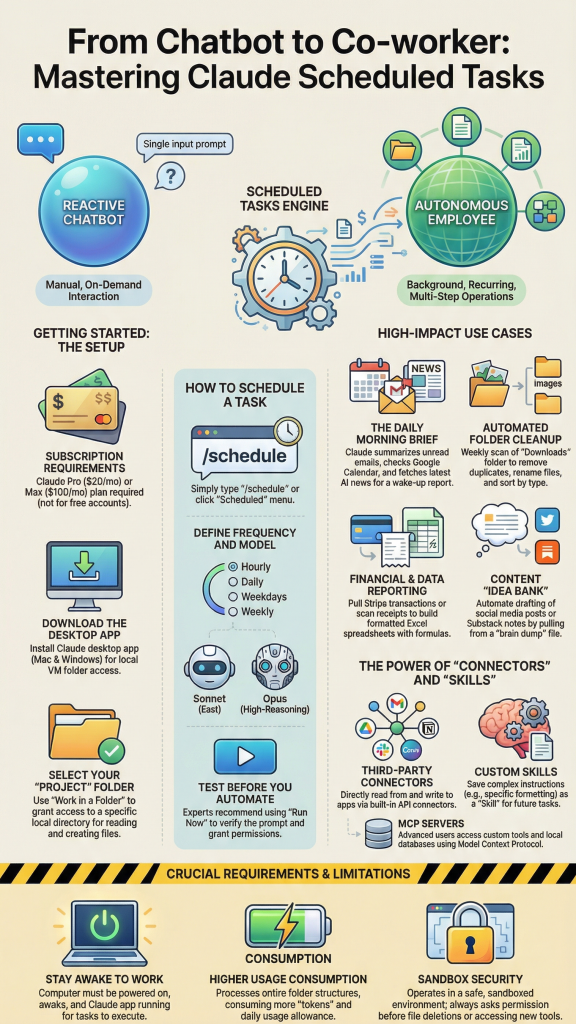
The Claude Cowork Scheduler represents a transformative advancement in artificial intelligence-driven workflow automation, specifically designed to streamline recurring tasks and optimize marketing operations. This comprehensive scheduling functionality extends beyond traditional chatbot interactions, enabling marketers to establish persistent, automated workflows that execute at predetermined intervals without manual intervention. Understanding the core capabilities of this system is essential for marketing professionals seeking to maximize efficiency while maintaining high-quality output across multiple channels and platforms.
At its fundamental level, the Claude Cowork Scheduler operates through a sophisticated command structure that distinguishes it from regular chat prompts. When utilizing the /schedule command in Claude Cowork, users initiate a process that creates persistent task definitions stored within the system’s memory architecture. Unlike standard conversational interactions that terminate upon completion, scheduled tasks maintain their parameters, execution logic, and contextual awareness across multiple iterations, ensuring consistency in output quality and format over extended periods.
Core Scheduling Mechanisms and Command Architecture
The scheduling functionality operates through several distinct mechanisms that marketers must understand to leverage the platform effectively. The primary distinction between claude cowork scheduled tasks vs regular chat prompts lies in their execution persistence and memory retention capabilities. Regular chat prompts function as isolated interactions, requiring complete context re-establishment with each invocation. Conversely, scheduled tasks benefit from creating a persistent memory file for recurring claude cowork tasks, which maintains critical information such as brand guidelines, formatting preferences, analytical frameworks, and historical context.
| Feature | Regular Chat Prompts | Scheduled Tasks |
|---|---|---|
| Execution Method | Manual initiation required | Automatic at specified intervals |
| Context Retention | Session-based only | Persistent across executions |
| Memory Utilization | Temporary conversation history | Dedicated memory file structure |
| Integration Capabilities | Limited to current session | Full connector ecosystem access |
| Ideal Use Cases | Ad-hoc queries and exploration | Recurring reports and systematic workflows |
Strategic Marketing Applications and Use Cases
Marketing professionals can leverage the Claude Cowork Scheduler across numerous high-value applications that directly impact campaign performance and operational efficiency. One particularly powerful application involves automating weekly status reports with claude cowork google drive connector, where the system automatically compiles data from multiple sources, analyzes performance metrics, and generates comprehensive executive summaries delivered to specified stakeholders on a predetermined schedule.
The scheduler excels at using /schedule command in claude cowork for daily slack summaries, enabling marketing teams to receive automated digests of channel activity, prioritized action items, and sentiment analysis without manual compilation. This functionality proves invaluable for distributed teams managing multiple concurrent campaigns across diverse geographic regions, ensuring that critical information flows consistently to decision-makers regardless of time zone constraints.
Another strategic application involves setting up automated email follow up reminders with claude cowork, where the system monitors communication patterns, identifies pending responses, and generates contextually appropriate reminder sequences. This capability significantly enhances lead nurturing processes while reducing the administrative burden on marketing personnel, allowing them to focus on higher-value strategic activities rather than routine follow-up management.
File Organization and Data Management Automation
Understanding how to schedule recurring file organization tasks in claude cowork provides marketers with powerful capabilities for maintaining structured digital asset libraries. The scheduler can automatically categorize campaign materials, archive completed projects, organize creative assets by campaign or client, and maintain consistent naming conventions across distributed file systems. This systematic approach to digital asset management reduces retrieval time, prevents version control issues, and ensures compliance with organizational governance standards.
| File Organization Task | Frequency Recommendation | Primary Benefits |
|---|---|---|
| Campaign asset categorization | Daily | Immediate accessibility, reduced search time |
| Performance report archival | Weekly | Historical data preservation, trend analysis capability |
| Creative version consolidation | Bi-weekly | Storage optimization, clarity in asset versioning |
| Duplicate file identification | Monthly | Resource efficiency, storage cost reduction |
Advanced Multi-Step Automation Workflows
The platform’s capability for claude cowork multi-step excel to powerpoint automation schedule demonstrates its sophisticated workflow orchestration potential. Marketers can establish automated sequences that extract data from Excel spreadsheets, perform analytical transformations, generate visualization elements, and populate PowerPoint templates with formatted insights—all executing on a predetermined schedule without manual intervention. This multi-step automation capability eliminates hundreds of hours annually in routine reporting activities while ensuring consistency and accuracy in stakeholder communications.
Best prompts for recurring market research tasks in claude cowork should incorporate several critical elements to maximize effectiveness. First, establish clear data source specifications, identifying which files, databases, or web resources the scheduler should access. Second, define explicit analytical frameworks including the specific metrics, comparative benchmarks, and temporal periods for analysis. Third, specify output formatting requirements including visualization preferences, narrative structure, and distribution parameters. Fourth, incorporate conditional logic that adjusts analysis based on detected patterns or threshold violations, enabling the system to provide contextually relevant insights rather than static reporting.
Understanding Claude Cowork Scheduler: Core Functionality and Strategic Marketing Applications
The Claude Cowork Scheduler represents a transformative advancement in artificial intelligence-powered workflow automation, specifically designed to address the repetitive, time-consuming tasks that marketing professionals encounter daily. Unlike traditional chat interactions with AI assistants that require manual initiation for each task, Claude Cowork’s scheduling functionality enables users to establish persistent, recurring automations that execute independently according to predetermined schedules.
At its fundamental level, the Claude Cowork Scheduler operates as an intelligent task management system integrated directly within the Claude desktop application. This functionality distinguishes itself from regular chat prompts by maintaining task continuity across sessions, eliminating the need for constant re-prompting and ensuring consistent execution regardless of whether the user is actively engaged with the interface. For marketing teams managing multiple campaigns, client communications, and analytical reports, this capability translates into substantial time savings and enhanced operational efficiency.
Core Architectural Components
The scheduler architecture consists of three primary components that work synergistically to deliver automated task execution. First, the command interface utilizes the /schedule command syntax, allowing users to define task parameters, execution frequency, and output specifications. Second, the integration layer connects Claude Cowork with external platforms including Google Drive, Slack, email systems, and various productivity applications. Third, the persistence engine maintains task definitions and execution histories, creating a reliable foundation for ongoing automation.
| Component | Function | Marketing Application |
|---|---|---|
| Command Interface | Task definition and scheduling | Setting up weekly competitor analysis reports |
| Integration Layer | External platform connectivity | Automating social media performance data collection |
| Persistence Engine | Task storage and execution tracking | Maintaining consistent brand monitoring schedules |
| Notification System | Status updates and alerts | Receiving campaign milestone notifications |
Scheduled Tasks Versus Regular Chat Prompts
Understanding the distinction between Claude Cowork scheduled tasks and regular chat prompts is essential for maximizing the platform’s strategic value. Regular chat prompts function as single-execution interactions where users pose questions or request task completion in real-time. These interactions conclude when the response is delivered, with no inherent memory or continuation mechanism beyond the immediate conversation context.
Conversely, scheduled tasks in Claude Cowork operate as autonomous agents that persist beyond individual sessions. When configuring a scheduled task, users establish a template that Claude references repeatedly according to the specified frequency. This approach proves particularly valuable for recurring market research tasks, where consistent methodology and formatting ensure comparable data across reporting periods. For instance, a marketing analyst might configure a weekly task to monitor specific industry keywords, compile trending topics, and generate a formatted summary document—all without manual intervention.
Strategic Marketing Applications
The practical applications of Claude Cowork Scheduler within marketing operations extend across multiple functional areas. Content marketers benefit significantly from automating weekly status reports that aggregate performance metrics from various channels. By connecting Claude Cowork with Google Drive and analytics platforms, teams can schedule comprehensive reports that compile blog traffic statistics, social engagement metrics, and conversion data into standardized formats delivered consistently every Monday morning.
Social media management represents another domain where scheduler functionality delivers substantial value. Marketing teams can configure Claude Cowork to generate daily Slack summaries using the /schedule command, consolidating mentions, engagement patterns, and trending conversations across platforms into digestible briefings distributed automatically to team channels. This automation ensures that social media managers begin each day with comprehensive situational awareness without dedicating valuable morning hours to manual data gathering.
File Organization and Document Management Automation
For marketing departments managing extensive content libraries, product collateral, and campaign assets, scheduling recurring file organization tasks in Claude Cowork provides essential structure. The scheduler can execute predetermined organizational logic at regular intervals, categorizing documents by campaign, date, content type, or custom taxonomy schemes. This functionality proves particularly valuable when integrated with cloud storage solutions, ensuring that shared drives maintain consistent structure despite multiple contributors with varying organizational habits.
| Automation Type | Frequency | Business Impact | Setup Complexity |
|---|---|---|---|
| Weekly Status Reports | Every Monday, 8:00 AM | Saves 3-4 hours per week | Moderate |
| Daily Slack Summaries | Daily, 7:00 AM | Improved team coordination | Low |
| File Organization Tasks | Nightly, 11:00 PM | Enhanced asset accessibility | Moderate |
| Email Follow-up Reminders | Business days, 9:00 AM | Increased conversion rates | Low |
| Market Research Compilation | Weekly, Friday 3:00 PM | Better strategic insights | High |
Email Automation and Client Relationship Management
Setting up automated email follow-up reminders with Claude Cowork represents a sophisticated application of scheduler functionality that directly impacts revenue generation. Marketing professionals managing lead nurturing sequences can configure Claude to monitor response patterns and trigger timely follow-up prompts.
Automating Marketing Workflows: Advanced Scheduling Techniques for Claude Cowork
Marketing professionals continually seek efficient methods to streamline repetitive tasks while maintaining high-quality output. Claude Cowork Scheduler represents a transformative solution that bridges the gap between artificial intelligence capabilities and practical marketing automation requirements. This section explores sophisticated scheduling techniques that enable marketers to establish robust, automated workflows that execute consistently without manual intervention.
Leveraging the /schedule Command for Marketing Operations
The foundation of Claude Cowork’s scheduling functionality resides in its powerful /schedule command syntax. Unlike regular chat prompts that require manual initiation, scheduled tasks execute automatically at predetermined intervals, enabling marketers to maintain consistent workflows across various platforms and applications. Understanding the distinction between scheduled tasks and regular chat prompts is essential for maximizing productivity.
Regular chat prompts provide immediate, one-time responses to specific queries, whereas scheduled tasks establish ongoing, recurring operations that continue executing until manually disabled. This fundamental difference transforms Claude Cowork from a reactive assistant into a proactive automation engine capable of handling complex marketing operations.
| Feature | Regular Chat Prompts | Scheduled Tasks |
|---|---|---|
| Execution Frequency | Single, manual activation | Recurring, automated intervals |
| User Intervention Required | High – every instance | Low – setup only |
| Memory Persistence | Session-based | Cross-session continuity |
| Computer Sleep Mode Behavior | N/A – immediate execution | Queues for next wake cycle |
| Ideal Marketing Use Cases | Ad-hoc analysis, quick queries | Reports, monitoring, content distribution |
Implementing Daily Slack Summaries Using the Schedule Command
One particularly valuable application involves using the /schedule command in Claude Cowork for daily Slack summaries. Marketing teams frequently struggle with information overload across multiple Slack channels, missing critical updates buried within extensive message threads. Automated daily summaries consolidate essential information into digestible reports delivered at optimal times.
To implement this automation, marketers should configure Claude Cowork to access designated Slack channels, extract messages containing specific keywords or tags, categorize content by priority or topic, and generate formatted summaries. The scheduling parameters should align with team workflows—for instance, generating summaries at 8:00 AM to prepare team members for daily standups, or at 5:00 PM to provide end-of-day recaps.
Example prompt structure for daily Slack summaries:
“Every weekday at 8:00 AM, review all messages from #marketing-campaigns, #content-team, and #analytics-updates from the previous 24 hours. Categorize messages by: urgent action items, campaign performance updates, content approvals needed, and general announcements. Create a formatted summary with bullet points and deliver via direct message to @marketing-lead.”
Automating Weekly Status Reports with Claude Cowork Google Drive Connector
Weekly status reporting represents one of the most time-consuming yet essential marketing activities. Automating weekly status reports with Claude Cowork Google Drive connector eliminates manual compilation while ensuring consistency and comprehensiveness. This integration enables Claude Cowork to access spreadsheets, analytics dashboards, and project management documents stored in Google Drive, extract relevant data, and compile professional reports automatically.
The Google Drive connector functions bidirectionally—reading source data and writing completed reports back to designated folders. This capability proves particularly valuable for marketing teams managing multiple campaigns simultaneously, as it maintains centralized documentation without requiring individual team members to manually update status reports.
| Report Component | Source Location | Automated Action | Frequency |
|---|---|---|---|
| Campaign Performance Metrics | Google Sheets Analytics Dashboard | Extract KPIs, calculate week-over-week changes | Weekly Monday 9:00 AM |
| Content Calendar Status | Google Drive Shared Folder | Identify completed vs. pending content pieces | Weekly Friday 3:00 PM |
| Budget Utilization | Google Sheets Budget Tracker | Calculate spend rates and project forecasts | Weekly Monday 9:00 AM |
| Team Task Completion | Project Management Integration | Summarize completed tasks and blockers | Weekly Friday 3:00 PM |
Scheduling Recurring File Organization Tasks in Claude Cowork
Digital asset management poses persistent challenges for marketing departments handling numerous creative files, campaign materials, and documentation. Understanding how to schedule recurring file organization tasks in Claude Cowork enables systematic maintenance of digital workspaces without dedicating staff hours to manual filing.
Understanding Claude Cowork Scheduler: Core Functionality and Strategic Marketing Applications
The Claude Cowork Scheduler represents a transformative advancement in artificial intelligence-powered workflow automation, specifically designed to address the recurring operational demands faced by modern marketing professionals. This sophisticated scheduling system enables users to establish persistent, automated tasks that execute at predetermined intervals without requiring manual intervention for each instance. Unlike regular chat prompts that necessitate individual activation, the scheduler functionality embedded within Claude Cowork creates a framework for sustainable automation that fundamentally alters how marketing teams approach routine responsibilities.
At its core, the Claude Cowork Scheduler operates through a specialized command structure that allows users to define task parameters, execution frequency, and associated file connections. When implementing the /schedule command in Claude Cowork, professionals establish a persistent instruction set that remains active within the system until explicitly modified or discontinued. This distinction between scheduled tasks and regular chat prompts represents a critical conceptual shift: whereas conventional interactions with Claude require deliberate user engagement each time assistance is needed, scheduled tasks function autonomously according to their configured parameters.
Fundamental Architecture of Claude Cowork Scheduled Tasks
The scheduling mechanism functions through integration with multiple data sources and output destinations, creating a comprehensive automation ecosystem particularly valuable for marketing operations. The Claude Cowork Google Drive connector serves as a primary interface for both input data retrieval and output file generation, enabling seamless coordination between the AI system and cloud-based document repositories where marketing teams typically maintain their collaborative assets.
| Component | Function | Marketing Application |
|---|---|---|
| Schedule Command | Initiates and defines recurring task parameters | Establishing weekly campaign performance analysis |
| Google Drive Connector | Accesses and writes files to cloud storage | Updating quarterly marketing metrics dashboards |
| Persistent Memory File | Maintains context and instructions across executions | Tracking brand voice guidelines for consistent content |
| Multi-Platform Integration | Connects with Slack, email, and productivity tools | Distributing daily social media performance summaries |
Strategic Marketing Applications: Transforming Routine Operations
Marketing departments encounter numerous cyclical responsibilities that consume substantial professional time despite their repetitive nature. The Claude Cowork Scheduler addresses this inefficiency by automating recurring file organization tasks, weekly status report generation, market research compilation, and stakeholder communication protocols. These applications extend beyond simple task completion to encompass strategic advantages including consistency maintenance, time reallocation toward creative initiatives, and elimination of human oversight gaps that frequently compromise routine processes.
Consider the process of automating weekly status reports with Claude Cowork Google Drive connector: marketing managers traditionally dedicate multiple hours each week to aggregating data from disparate sources, synthesizing performance metrics, and formatting deliverables for executive review. By establishing a scheduled task that accesses designated Google Drive folders containing campaign data, the system can autonomously generate comprehensive status reports following a predefined template, incorporating relevant metrics, trend analysis, and formatted visualizations without requiring any manual data manipulation.
Creating Persistent Memory Files for Recurring Claude Cowork Tasks
A particularly sophisticated capability within the scheduling framework involves establishing persistent memory files that maintain contextual information across multiple task executions. For marketing applications requiring brand consistency, strategic alignment, or cumulative knowledge retention, these memory structures prove indispensable. When setting up recurring market research tasks, for example, a persistent memory file can track previously identified competitive movements, ensuring that subsequent research iterations build upon earlier findings rather than approaching each analysis in isolation.
The creation of these memory files involves designating a specific Google Drive document that Claude Cowork references at the beginning of each scheduled execution and updates at the conclusion. This document serves as an institutional knowledge repository, capturing insights, decisions, and evolving parameters that inform future task performance. For marketers managing long-term campaigns or customer relationship initiatives, this functionality ensures continuity that would otherwise require extensive manual documentation and reference protocols.
Command Structure and Implementation Framework
Implementing scheduled tasks requires understanding the specific command syntax and configuration parameters that govern task behavior. The /schedule command in Claude Cowork accepts several critical arguments that define execution timing, data sources, and output specifications. Marketing professionals must articulate these parameters with precision to ensure scheduled tasks align with operational requirements and organizational workflows.
Understanding Claude Cowork Scheduler: Core Functionality and Strategic Marketing Applications
The Claude Cowork Scheduler represents a transformative approach to marketing automation, enabling professionals to harness artificial intelligence for recurring tasks without constant manual intervention. This sophisticated functionality extends Claude’s capabilities beyond traditional chat-based interactions, allowing marketers to establish persistent, time-based workflows that execute automatically according to predefined schedules.
At its fundamental level, the Claude Cowork Scheduler operates through the /schedule command within the Claude desktop application, creating a bridge between AI-powered task execution and calendar-based automation. Unlike regular chat prompts that require manual initiation each time, scheduled tasks in Claude Cowork maintain persistence, executing automatically at specified intervals while your computer remains active and connected.
Core Scheduling Capabilities for Marketing Professionals
The scheduler’s architecture enables marketers to automate repetitive analytical and administrative tasks that traditionally consume significant time resources. By establishing scheduled workflows, marketing teams can maintain consistent oversight of campaigns, data analysis, and stakeholder communications without dedicating personnel to manual execution of routine processes.
The system supports various temporal configurations, including daily, weekly, monthly, and custom interval scheduling. This flexibility accommodates diverse marketing workflows, from daily social media performance monitoring to weekly competitive analysis reports and monthly stakeholder presentations.
| Schedule Type | Marketing Application | Execution Frequency | Strategic Value |
|---|---|---|---|
| Daily | Slack channel summaries and team notifications | Every 24 hours at specified time | Maintains team alignment and communication continuity |
| Weekly | Campaign performance reports and status updates | Specified day each week | Consistent stakeholder communication and performance tracking |
| Bi-weekly | Competitive intelligence gathering and analysis | Every 14 days | Regular market positioning awareness without overwhelming frequency |
| Monthly | Comprehensive marketing analytics and strategic reviews | Specified date each month | Strategic planning support and performance evaluation |
Strategic Differentiation: Scheduled Tasks versus Regular Chat Prompts
Understanding the distinction between Claude Cowork scheduled tasks and regular chat prompts is essential for maximizing marketing efficiency. Regular chat interactions provide immediate, ad-hoc responses to specific queries, requiring manual initiation and offering no persistence beyond the conversation window. These interactions excel for exploratory analysis, creative brainstorming, and one-time research requirements.
Conversely, scheduled tasks establish automated workflows that persist across sessions, executing predetermined operations at specified intervals without human intervention. This functionality proves invaluable for recurring marketing responsibilities such as data compilation, report generation, and systematic monitoring activities.
| Feature | Regular Chat Prompts | Scheduled Tasks |
|---|---|---|
| Initiation Method | Manual user input required each time | Automatic execution based on schedule |
| Persistence | Session-based only | Maintains across sessions and system restarts |
| Ideal Use Cases | Creative development, exploratory research, ad-hoc analysis | Report generation, data monitoring, routine communications |
| Time Investment | Requires attention at each execution | One-time setup with ongoing automated execution |
| Consistency | Variable based on user availability | Guaranteed execution at scheduled intervals |
Integration with Marketing Technology Ecosystem
The Claude Cowork Scheduler’s true power emerges through its integration capabilities with essential marketing tools and platforms. The Google Drive connector exemplifies this integration potential, enabling automated workflows that access, analyze, and generate documents within your organization’s existing file structure.
For instance, automating weekly status reports with the Claude Cowork Google Drive connector allows marketers to establish workflows that retrieve campaign data from spreadsheets, analyze performance trends, generate narrative insights, and compile formatted reports—all deposited automatically into designated Drive folders for stakeholder access. This eliminates the repetitive manual effort of data compilation and preliminary analysis, allowing marketing professionals to focus on strategic interpretation and decision-making.
The scheduler also facilitates sophisticated multi-step automation sequences, such as Excel to PowerPoint automation workflows. Marketing analysts can configure schedules that extract data from performance tracking spreadsheets, generate visualizations, prepare executive summaries, and populate PowerPoint templates with current metrics—transforming raw data into presentation-ready materials without manual intervention.
Strategic Applications for Marketing Departments
The scheduler unlocks numerous strategic applications across marketing functions. Daily Slack summaries exemplify operational efficiency enhancement, where scheduled tasks monitor designated channels, identify priority discussions, synthesize key decisions, and distribute digestible summaries to team members or leadership. This ensures critical information reaches relevant stakeholders without requiring constant channel monitoring.
Market research automation represents another high-value application. By configuring recurring market research tasks, marketing teams can systematically monitor competitor activities, track industry developments, compile trend analyses, and generate insights reports. Best prompts for these recurring research tasks typically include specific parameters for data sources, analysis frameworks, and output formats, ensuring consistency and relevance across execution cycles.
Email follow-up reminder automation addresses a common marketing challenge: maintaining consistent communication cadence with prospects, partners, and stakeholders.


0 Comments