

Google has embedded Gemini — its most advanced large language model — directly into Google Ads and the Google Marketing Platform, turning the ad creation workflow into a conversational, agentic experience. This isn’t a cosmetic AI layer. It changes how campaigns are built, how creatives are scaled, and how performance is diagnosed. This tutorial walks you through every major Gemini-powered feature, how to configure it, and where the real performance gains are hiding.
What This Is
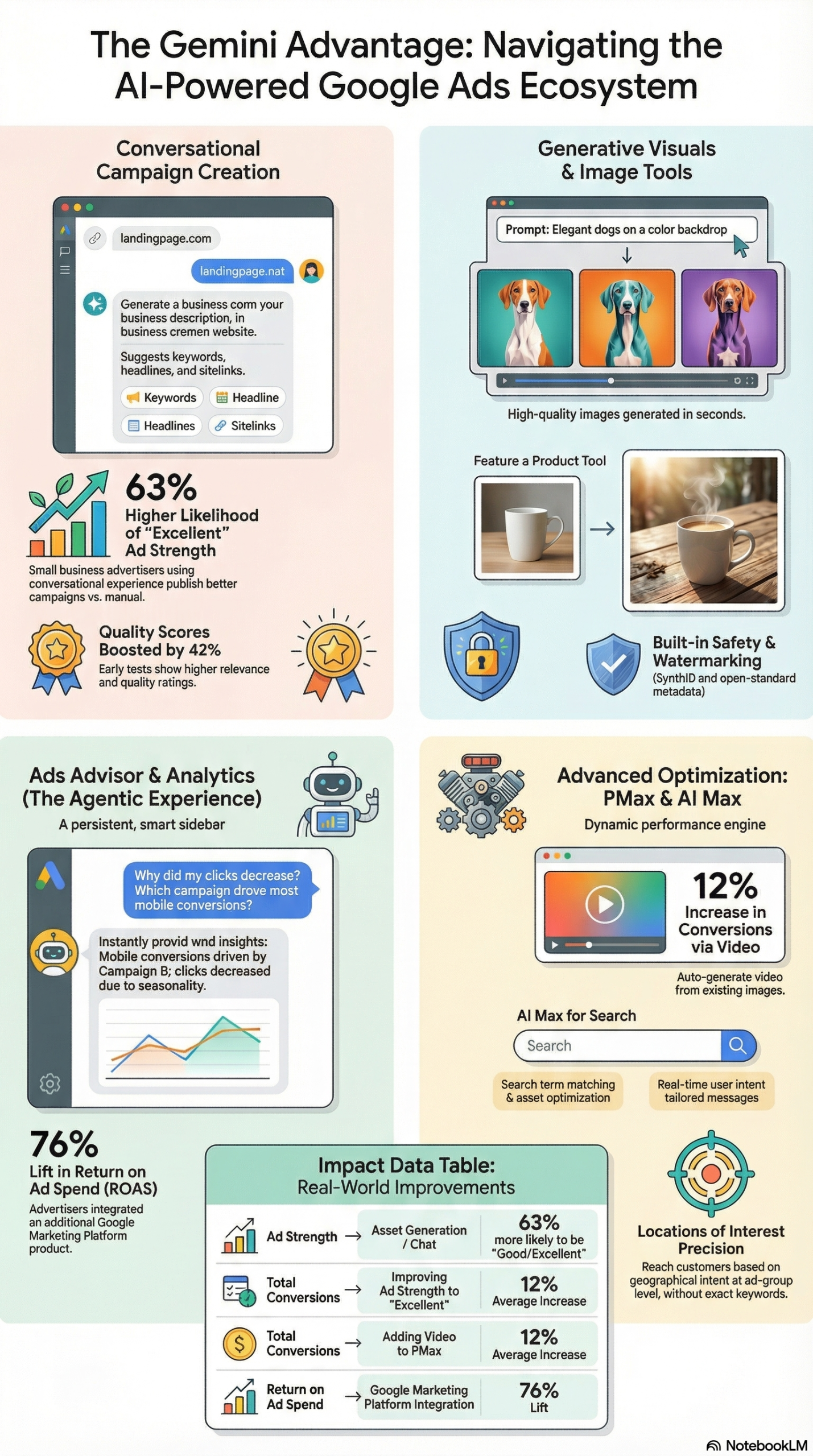
According to the NotebookLM research briefing on Gemini-powered Google Ads and Social Media Today’s coverage, Google is fundamentally restructuring its advertising ecosystem by embedding Gemini across the Google Ads and Google Marketing Platform (GMP) suites. This is not a third-party integration or a bolt-on feature. Gemini is the underlying intelligence powering the campaign setup assistant, the image generation pipeline, the performance troubleshooting agent, and the programmatic targeting layer.
The rollout covers four distinct capability areas:
1. Conversational Campaign Creation
The Conversational Experience in Google Ads is a chat-based feature that uses large language models to help advertisers build Search campaigns. You provide a landing page URL, and the AI analyzes it to generate a business description, keyword suggestions, headlines, ad descriptions, and image assets — all in a single workflow. This compresses what used to be a two-to-four-hour campaign setup into a guided, interactive session.
2. Ads Advisor (Beta)
Ads Advisor is an agentic assistant built specifically on Gemini. Unlike a static help center or rule-based bot, Ads Advisor maintains context across a conversation, letting you ask diagnostic questions like “Why did my clicks decrease this week?” or “Why is my ad disapproved?” and get actionable, account-specific answers. It can generate performance reports, surface billing issues, flag policy violations, and walk you through identity verification steps — all within the same chat interface.
3. Generative Creative Tools
Google has upgraded its image generation infrastructure to use Imagen 2, a model developed by Google DeepMind. Advertisers can create lifestyle imagery from text prompts, generate product-in-context images using the “Feature a Product” tool, and maintain brand consistency by uploading reference images in the Media Picker. All AI-generated images are watermarked with SynthID, an imperceptible digital watermark developed by Google DeepMind to identify AI-generated content and comply with content authenticity standards.
4. AI Max for Search
AI Max is a suite of AI-driven features for Search campaigns that introduces two primary enhancements: Search Term Matching and Asset Optimization. Search Term Matching combines traditional broad match with a new keywordless matching layer that identifies relevant queries your existing keyword list would miss entirely. Asset Optimization uses Gemini to generate and test long headlines and sitelinks dynamically.
As reported in the research briefing, this transition marks a deliberate shift from static toolsets to agentic, conversational experiences — and the internal performance data from Google backs up the case for adoption.
Why It Matters
For practitioners who have been running Google Ads campaigns manually — or even through semi-automated Smart Campaigns — this integration changes the operational math on three fronts.
Speed of Campaign Deployment
The Conversational Experience eliminates the cold-start problem. Most small business advertisers don’t fail at Google Ads because of strategy — they fail because the setup process is opaque. Keyword research, asset creation, and ad strength optimization all require expertise that most SMB owners don’t have in-house. The conversational workflow brings them to a publishable campaign state in a single session, with AI-generated assets that align to Google’s quality guidelines from the start.
Creative Volume at Scale
For agencies and in-house teams, the creative bottleneck has always been asset production. Performance Max campaigns require landscape images, square images, logos, headlines, long headlines, descriptions, and ideally video — across multiple ad groups, products, or services. Generating all of that manually is expensive and slow. With Imagen 2 integrated into the asset creation workflow, teams can generate a full creative suite from a product photo and a text prompt. This is not hypothetical — the research report notes that advertisers who include at least one video in their Performance Max campaigns see an average 12% increase in total additional conversions, and the new automated video creation tools can produce that video from Merchant Center feed images.
Programmatic and CTV Expansion
For enterprise advertisers using Display & Video 360, the Gemini advantage extends into Connected TV. At NewFront 2026, Google detailed how DV360 is positioning itself to capture live sports and real-time programming inventory — not just on-demand streaming. This opens up reach channels that were previously difficult to target programmatically, with Gemini handling the creative matching and audience alignment automatically.
What separates Google’s implementation from competitors like Meta AI or Amazon’s ad AI is the vertical integration. Google doesn’t license Gemini — it built it, and it runs on the same infrastructure as Google Search, YouTube, and Merchant Center. That tight coupling means the AI can pull product data directly from your feed, match it to search intent signals from Google’s index, and generate creative that aligns with the landing page — without any manual hand-off between systems.
The Data
The performance benchmarks documented in the NotebookLM research briefing show consistent gains across the AI-assisted workflows. Here’s a summary of the key data points alongside the feature matrix for AI Max:
Gemini-Powered Feature Performance Summary
| Feature | Performance Metric | Reported Lift | Source |
|---|---|---|---|
| Conversational Experience | Ad Strength (Good/Excellent) | 63% more likely to achieve Good/Excellent Ad Strength | Google Internal Data via Research Briefing |
| Ad Strength Improvement | Conversion Rate | 12% average increase (Poor → Excellent) | Google Internal Data via Research Briefing |
| Performance Max + Video | Total Conversions | 12% average additional conversions | Google Internal Data via Research Briefing |
| AI Max Search Term Matching | Query Coverage | Finds queries missed by traditional keywords | Google Product Documentation |
| Final URL Expansion | Landing Page Relevance | Matches user intent beyond static destination URLs | Google Product Documentation |
AI Max for Search: Feature Breakdown
| Feature | What It Does | Primary Benefit |
|---|---|---|
| Search Term Matching | Combines broad match + keywordless technology | Captures high-intent queries outside your keyword list |
| Final URL Expansion | Redirects to most relevant page on your domain | Increases landing page relevance to query intent |
| Locations of Interest | Targeting by geographic intent | Reaches users interested in a location, not just located there |
| Brand Controls | Brand inclusions and exclusions | Maintains brand safety and competitive positioning |
| Asset Optimization | Gemini-generated headlines and sitelinks | Improves Ad Strength without manual copy writing |
These numbers — particularly the 63% Ad Strength improvement for conversational users — are significant because Ad Strength is a direct proxy for auction eligibility and reach. Campaigns with Good or Excellent Ad Strength are eligible for more ad formats and more inventory. The 12% conversion lift from improving Ad Strength confirms the mechanism: better assets lead to better Quality Score, which leads to better auction outcomes.
Step-by-Step Tutorial
This tutorial covers four workflows: setting up a campaign with the Conversational Experience, using Ads Advisor for diagnostics, generating creative assets with Imagen 2, and configuring AI Max for Search.
Prerequisites
Before you start:
– Active Google Ads account (any tier)
– At least one live or draft campaign
– For image generation: access to the Media Picker in Performance Max or Display campaigns
– For AI Max: Search campaign with at least 30 days of conversion history (recommended)
– For Ads Advisor: Google Ads account with billing and policy history
Phase 1: Build a Search Campaign with the Conversational Experience
Step 1: Start a New Search Campaign
Log into your Google Ads account. Click the blue “+” button to create a new campaign. Select “Search” as the campaign type and choose your campaign objective (Leads, Website Traffic, or Sales).
Step 2: Enter Your Landing Page URL
On the campaign setup screen, you’ll see the Conversational Experience prompt box. Paste in the URL of the landing page you want to drive traffic to. This is the foundation the AI uses — it crawls the page, reads the content, and builds the campaign scaffold around what’s actually on that page.
Step 3: Review the AI-Generated Business Description
The system generates a one-to-two sentence business description based on the landing page content. Read it carefully. If your landing page is thin or poorly written, the AI description will reflect that — garbage in, garbage out. Edit it to match your actual positioning before moving forward.
Step 4: Review and Refine Keywords
The conversational experience generates an initial keyword list. This list is good at capturing head terms but may miss specific long-tail variations. Use the “Refine” prompt to add intent modifiers (e.g., “add location-based variants” or “focus on bottom-of-funnel terms”). You can also delete irrelevant suggestions directly in the chat interface.
Step 5: Review Headlines and Descriptions
The AI generates 15 headlines and 4 descriptions — the maximum allowed for Responsive Search Ads. Each one is drawn from your landing page content and keyword intent. Pin any non-negotiable brand messages (your brand name, a core differentiator) using the pin icon so they always appear in the ad.
Step 6: Review Image Assets
For Search campaigns with asset extensions, the conversational experience can pull existing images from your landing page or generate new ones. If your landing page has no usable imagery, use the “Generate images” prompt to create assets from scratch. We’ll cover this in more detail in Phase 3.
Step 7: Check Ad Strength Before Publishing
Before saving, check the Ad Strength indicator. Target “Good” or “Excellent.” If you’re at “Poor” or “Average,” follow the AI’s suggestions to add more headline variety, improve description diversity, or add image assets. According to the research briefing, advertisers who improve from Poor to Excellent see a 12% average increase in conversions — this is worth the extra five minutes.
Phase 2: Diagnose Performance with Ads Advisor
Step 1: Access Ads Advisor
Ads Advisor (Beta) is accessible from the Google Ads dashboard via the assistant icon or the “Get help” prompt in the top navigation. If you don’t see it, check whether your account has been enrolled in the beta.
Step 2: Ask a Diagnostic Question
Type a natural language question directly. Examples that work well:
– “Why did my conversions drop 20% last week?”
– “Which campaigns have disapproved ads right now?”
– “Why is my CPC increasing on Brand campaigns?”
– “What’s wrong with my billing?”
Ads Advisor uses account-specific data, not generic knowledge base content, to answer. It will surface the relevant metrics, identify the likely cause, and recommend a specific action.
Step 3: Implement Suggested Changes
For many diagnostic recommendations, Ads Advisor can implement changes directly from the chat. If it suggests adding a negative keyword to stop bleeding spend on an irrelevant query, you can approve that change in the chat without navigating to the keyword management interface. This is the “agentic” component — the AI doesn’t just tell you what to do, it can execute it with your approval.
Step 4: Request a Performance Report
Ask Ads Advisor to generate a summary report for a specific campaign or time period. It can output this as a structured summary within the chat. For recurring reporting, note that Ads Advisor works best as an on-demand diagnostic tool rather than a replacement for scheduled reports from Google Looker Studio.
Phase 3: Generate Creative Assets with Imagen 2
Step 1: Open the Media Picker
In your Performance Max or Display campaign, navigate to the Assets section and click “Add assets.” The Media Picker is the interface where you’ll access image generation.
Step 2: Write an Image Generation Prompt
Click “Generate images.” Write a specific prompt that describes your desired visual. The more specific, the better:
– Weak prompt: “A woman using a laptop”
– Strong prompt: “A 35-year-old professional woman reviewing financial charts on a laptop in a modern office, warm natural light, shallow depth of field”
Imagen 2 now supports lifestyle imagery featuring people, which was a previous limitation. The upgrade allows you to generate contextually appropriate human-centered imagery without needing a stock photo license.
Step 3: Use the “Feature a Product” Tool for Physical Goods
If you sell physical products, upload a product photo to the “Feature a Product” input. The AI places your product into a lifestyle scene, generating imagery that shows the product in context. This is especially useful for e-commerce advertisers who have product images from their catalog but no lifestyle photography budget. According to the research briefing, AI-generated lifestyle images are more faithful to the product when a reference image is provided, even if the original image is not professionally shot.
Step 4: Upload Style Reference Images
To maintain brand consistency, upload up to five style reference images in the Media Picker. These guide the AI to match your brand’s existing visual language — color palette, mood, lighting style, and compositional approach. This is the most important step for brand-conscious advertisers who can’t afford visual inconsistency across campaigns.
Step 5: Verify SynthID Watermarking
All images generated through Google Ads are automatically watermarked with SynthID and include open-standard content markup. You don’t need to take any action on this — it happens automatically. But you should be aware of it for any AI content disclosure policies you maintain internally or with clients.
Phase 4: Configure AI Max for Search
Step 1: Enable AI Max on an Existing Search Campaign
In your Search campaign settings, look for the “AI Max” toggle. This is a campaign-level setting that enables the full suite of AI Max features including Search Term Matching and Asset Optimization.
Step 2: Configure Search Term Matching
Within AI Max settings, you’ll see separate controls for Broad Match Expansion and Keywordless Matching. Enable both to maximize query coverage. Monitor the Search Terms report after the first 7-14 days to audit what the keywordless layer is capturing.
Step 3: Set Up Final URL Expansion
Enable Final URL Expansion and verify your tracking template uses the {lpurl} ValueTrack parameter. This is critical. If your existing tracking template uses a hardcoded URL rather than {lpurl}, Final URL Expansion will break your UTM tracking and you’ll lose attribution data on a significant portion of your traffic.
Step 4: Apply Brand Controls
Use Brand Inclusions to restrict AI-driven matching to queries related to your brand when brand protection is a priority. Use Brand Exclusions to prevent your ads from appearing alongside competitor brand queries that would be low-conversion and expensive. This is particularly important for AI Max campaigns because the keywordless layer can match to competitor-adjacent queries your keyword list would never have captured.
Step 5: Monitor the Search Terms Source Report
AI Max adds a new column to the Search Terms report that identifies whether a query came from “Broad Match Expansion” or “Keywordless Matching.” Segment this data weekly during the first month. If keywordless is driving high spend with low conversion rate, tighten your negative keyword list or reduce the keywordless matching aggressiveness in settings.
Expected Outcomes: After 30 days running AI Max on a mature Search campaign with adequate conversion history, most advertisers see an increase in query coverage (more unique search terms triggering ads), with the most significant gains coming from high-intent long-tail queries that traditional keyword structures miss.
Real-World Use Cases
Use Case 1: E-Commerce Brand Scaling Performance Max
Scenario: A direct-to-consumer apparel brand running Performance Max campaigns with manually produced creative assets. Their creative team produces roughly 20 new assets per month, which is insufficient for Google’s recommendation of asset variety across formats.
Implementation: The brand uses the “Feature a Product” tool with product catalog images pulled directly from their Merchant Center feed. They upload five style reference images reflecting their brand aesthetic (clean backgrounds, natural light, young professional models). Gemini generates 15-20 lifestyle images per product category per week, with each image automatically placed into the Performance Max campaign’s asset group.
Expected Outcome: Significantly increased asset variety, which directly improves Ad Strength scores and eligibility for more ad formats across the Google Display Network, YouTube, and Gmail. Based on Google’s internal data, adding video assets (which the automated video creation tool can generate from these product images) produces an average 12% increase in total conversions.
Use Case 2: Local Service Business Setting Up First Google Ads Campaign
Scenario: A residential HVAC company with no prior Google Ads experience. The business owner has a service page on their website but no marketing team and no history with paid search.
Implementation: The owner uses the Conversational Experience, entering the URL of their services page. The AI generates a draft campaign including local service keywords (e.g., “AC repair near me,” “HVAC installation [city]”), phone call extensions, and location targeting. The owner reviews and refines the keyword list through the chat, asking the AI to “focus on emergency repair intent.”
Expected Outcome: A publishable Search campaign with Good or Excellent Ad Strength, achieved in a single session. According to Google’s reported data, small business advertisers using the conversational experience are 63% more likely to publish campaigns at this quality threshold compared to those building campaigns through the traditional interface.
Use Case 3: Agency Diagnosing Client Account Performance
Scenario: A digital marketing agency managing 40+ Google Ads accounts. Their account managers spend significant time each week identifying why individual campaigns dropped in performance — a process that involves pulling multiple reports, cross-referencing dates, and manually diagnosing causes.
Implementation: The agency trains its account managers to use Ads Advisor as the first diagnostic step before manual investigation. For each account review, they open Ads Advisor and ask specific diagnostic questions: “What changed in Campaign X between March 1 and March 15?” and “Are there any disapproved ads or policy violations active right now?”
Expected Outcome: Reduction in time-per-account for performance diagnosis. Ads Advisor’s ability to generate account-specific answers from natural language queries — and implement approved changes within the chat — eliminates several steps from the standard account audit workflow, particularly for routine issues like disapproved ads or billing flags.
Use Case 4: Enterprise Brand Using DV360 for CTV and Live Sports
Scenario: A national retail brand running programmatic display campaigns through Display & Video 360. They want to expand into Connected TV to capture audiences watching live sports — a channel traditionally dominated by direct TV buys.
Implementation: Using DV360’s Gemini-powered features announced at NewFront 2026, the brand activates Confidential Publisher Match to connect their first-party customer data with streaming signals from publishers like Roku. This allows them to track the customer journey from a CTV impression during a live sports broadcast to an eventual in-store or online purchase.
Expected Outcome: Closed-loop attribution across CTV inventory that was previously impossible to track beyond impression delivery, enabling the brand to justify and optimize their CTV spend with conversion data rather than reach-and-frequency proxies.
Use Case 5: YouTube Creator Campaign Matching
Scenario: A consumer tech brand wants to run creator partnership campaigns on YouTube but lacks the internal resources to research, vet, and negotiate with individual creators at scale.
Implementation: Using DV360’s agentic YouTube Creator Partnership matching system, the brand submits a creative brief describing their target audience, brand values, and campaign objectives. Gemini’s matching system analyzes the brief against creator profiles, audience demographics, and content alignment scores to recommend a shortlist of creators for collaboration.
Expected Outcome: A faster, more data-driven influencer selection process that reduces the manual research phase from weeks to days, with creator recommendations grounded in audience data rather than follower counts alone.
Common Pitfalls
1. Broken Tracking from Final URL Expansion
What goes wrong: Advertisers enable Final URL Expansion in AI Max without updating their tracking templates. The AI redirects traffic to a more relevant landing page on their domain, but the hardcoded UTM parameters in the original tracking template no longer fire correctly, causing a sharp drop in tracked conversions.
Why it happens: Final URL Expansion changes the destination URL dynamically. Tracking templates that include a hardcoded URL (e.g., https://site.com/page?utm_source=google) break because the destination page changes but the tracking template doesn’t.
How to avoid it: Before enabling Final URL Expansion, audit all campaign tracking templates and ensure they use the {lpurl} ValueTrack parameter. Replace any hardcoded URLs in tracking templates with {lpurl} followed by your UTM parameters.
2. Publishing AI-Generated Campaigns Without Reviewing Keywords
What goes wrong: The Conversational Experience generates an initial keyword list that looks reasonable at first glance but includes broad terms that will match irrelevant queries and burn budget.
Why it happens: The AI generates keywords based on landing page content and search intent signals, but it doesn’t know your campaign’s specific exclusion requirements or competitive landscape.
How to avoid it: Always review the generated keyword list before publishing. Add a negative keyword list as the first step after campaign creation. Use the search terms report during the first 7 days to identify and exclude irrelevant matches.
3. Over-Relying on Ads Advisor for Complex Strategy
What goes wrong: Account managers use Ads Advisor as a strategy tool rather than a diagnostic tool, asking it to make bidding strategy decisions or restructure campaign architecture.
Why it happens: The conversational interface creates an impression of a strategic advisor. In practice, Ads Advisor is strongest at diagnosing specific performance issues and troubleshooting technical problems.
How to avoid it: Use Ads Advisor for diagnostics and troubleshooting. Use it to answer “what happened” and “what’s broken” — not “what should my bidding strategy be.”
4. Ignoring SynthID and AI Content Disclosure
What goes wrong: Advertisers using AI-generated images in regulated industries (financial services, healthcare, legal) don’t realize their assets are tagged as AI-generated, which can create compliance issues if their industry has AI content disclosure requirements.
Why it happens: SynthID watermarking is automatic and invisible, so advertisers don’t see a visible indicator that assets are AI-generated.
How to avoid it: If you operate in a regulated industry, audit your AI content disclosure policy before enabling image generation. Note that SynthID is an imperceptible watermark — compliant with open content standards, but may require additional disclosures depending on your regulatory environment.
Expert Tips
1. Use Style Reference Images as Your Brand Lock
The most underused feature in the image generation workflow is the style reference upload in the Media Picker. Upload your five most brand-representative images — not product images, but images that capture your brand’s visual language. This single step has more impact on output quality and brand consistency than any prompt engineering you’ll do.
2. Segment Keywordless vs. Broad Match Traffic Immediately
When you enable AI Max, add the Search Term Source segment to your Search Terms report from day one. Don’t wait until you’re troubleshooting. Keywordless matching can generate significant spend quickly, and you want to be able to isolate its performance from your established keyword traffic to make accurate optimization decisions.
3. Pin Headlines Strategically in Conversational Campaigns
The conversational experience generates 15 headlines, but Google’s RSA algorithm will test combinations you may not want. Pin your brand name to position 1, and pin your strongest differentiator to position 2. Leave all other positions unpinned so the AI can optimize. Over-pinning reduces the optimization surface — the AI needs flexibility to learn what combinations drive clicks.
4. Use Ads Advisor for Policy Violations First, Not Last
Most advertisers go to Ads Advisor only after manually discovering a problem. Invert this. Make a weekly habit of asking Ads Advisor “Are there any active policy violations or disapproved ads in this account?” before you dive into performance metrics. Catching policy issues early prevents silent traffic drops caused by disapproved ads running without alerts.
5. Feed Merchant Center Data into Performance Max Before Enabling Gemini Creative
Gemini’s automated video creation pulls from Merchant Center feed images. If your Merchant Center feed has low-quality images (white backgrounds only, no lifestyle shots), the auto-generated videos will look generic. Before activating automated video creation, enrich your Merchant Center feed with high-resolution product images from multiple angles. The AI will produce significantly better outputs with a richer source library.
FAQ
Q: Does the Conversational Experience replace keyword research entirely?
No. The Conversational Experience accelerates keyword discovery by generating an initial list from your landing page, but it doesn’t replace deliberate keyword strategy. You still need to review match types, add negative keywords, and refine intent categories. Think of it as a first draft that you’re responsible for editing — not a finished product. For accounts with complex keyword architectures or competitive landscapes, the AI-generated starting point is useful but not sufficient on its own.
Q: Can Ads Advisor access all accounts in a manager (MCC) account?
Ads Advisor is currently account-specific in its Beta implementation. It accesses data from the account you’re actively viewing, not across all accounts in an MCC. For agencies managing large account portfolios, this means you’ll need to use Ads Advisor individually within each client account rather than from the MCC level. This may change as the feature matures out of beta.
Q: Are AI-generated images from Imagen 2 safe to use in any industry?
Generally yes, but with caveats. All images generated in Google Ads are tagged with SynthID watermarking and open-standard AI content markup. For most advertisers, this meets transparency requirements. However, if you operate in financial services, healthcare, insurance, or any industry with specific AI content disclosure regulations, consult your compliance team before deploying AI-generated creative at scale. The watermarking is there — but it may not satisfy every regulatory requirement your industry imposes.
Q: What’s the difference between Performance Max and AI Max for Search?
These are separate campaign types with different optimization logic. Performance Max is a fully automated, multi-channel campaign type that runs across Search, Display, YouTube, Gmail, and Maps. AI Max for Search is an enhancement layer applied to standard Search campaigns, adding advanced matching and asset optimization while keeping the campaign within the Search network. If you need channel-specific control, use Search + AI Max. If you want maximum automated reach across all Google channels, use Performance Max.
Q: How does Confidential Publisher Match work without violating privacy regulations?
Confidential Publisher Match uses a privacy-preserving computation model to match your first-party customer data with streaming signals from publishers like Roku without either party exposing raw user data to the other. The matching occurs in a secure, encrypted environment — neither Google nor the publisher sees the other’s unencrypted data. The output is aggregated attribution data, not individual user tracking. This architecture is designed to be compliant with current privacy regulations including GDPR and CCPA, but you should verify compliance with your legal team before activating it with sensitive customer data segments.
Bottom Line
Google’s Gemini integration across Google Ads and the Google Marketing Platform is the most significant infrastructure change to the platform in years — not because the individual features are revolutionary in isolation, but because of how tightly they connect. The same model that generates your ad copy also optimizes your keywords, diagnoses your performance drops, generates your creative assets, and matches your brand to CTV audiences. Practitioners who learn to work within this system — using the Conversational Experience for launch speed, Ads Advisor for diagnostics, Imagen 2 for creative scale, and AI Max for query coverage — will run materially better campaigns than those who don’t. The 63% Ad Strength improvement and 12% conversion lift documented in Google’s internal data are not marketing claims — they are the practical outcome of using AI assistance to meet Google’s own quality standards. Learn the tools, configure them correctly, and monitor the outputs. That’s the job now.


0 Comments